Project 1_Comparative study of different storey buildings for Seismic forces
Aim: To Compare fundamental natural periods of buildings H, J and K. using ETABS Procedure: Building H: Step 1:
1) Click the Define tab and click section properties
2) Select Add new property and choose Rectangular
3) Add the new column dimension of 800 x 800
4) click ok
Step 2:
1) Click the Select tab and select the columns
2) Click assign tab and choose frame assignment as 800 x 800 dimension column
3) Click ok
Step 3:
1) After assigning loads of each frame run the analysis
2) Click Display and choose the show table option
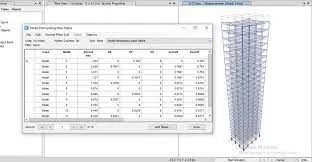
3) Select Modal participating ratio from Structural output
4) click ok
Building J:
Step 1:
1) Click the Edit tab and choose edit story
2) Add 25 story and make 1st story as Master and all other as similar to 1st story
3) Click ok
Step 2:
1) Click the Select tab and select the columns
2) Click assign tab and choose frame assignment as 800 x 800 dimension column
3) Click ok
Step 3: p
1) Click the select tab and assign the column dimensions as 800 x 800
2) Click the Select tab and choose floors
3) Click assign tab and choose shell loads then uniform load
4) Make live load and load pattern name and input 30kn/sq.m for load value
5) Click Ok
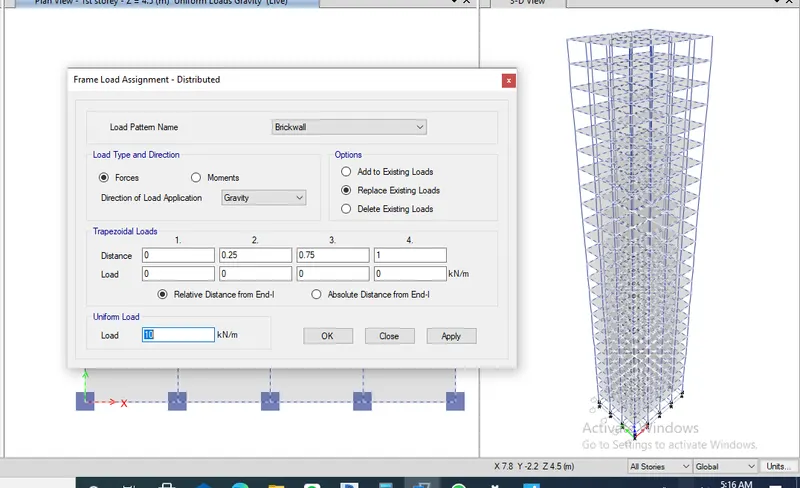
Step 4: 1) Click the Select tab and choose beams 2) Click assign tab and choose frame loads then distribute 3) Make brick wall load as input 10kn/sq.m for load value 4) Click Ok
Step 5: 1) After assigning loads of each frame run the analysis 2) Click Display and choose the show table option 3) Select Modal participating ratio from Structural output 4) click ok
Building K:
Step 1: p 1) Click the select tab and assign the column dimensions as 800 x 800 2) Click the Select tab and choose floors 3) Click assign tab and choose shell loads then uniform load 4) Make live load and load pattern name and input 60kn/sq.m for load value 5) Click Ok
Step 2: 1) After assigning loads of each frame run the analysis 2) Click Display and choose the show table option 3) Select Modal participating ratio from Structural output 4) click ok
Conclusion: 1) For building H,J, K are the same 25 story but the load increases gradually like 10% and 20%, because of this the building becomes more Flexi due to an increase in weight. 2) time period of H is 3.0, j is 3.411 and k is 4.036.
Comparison 2:
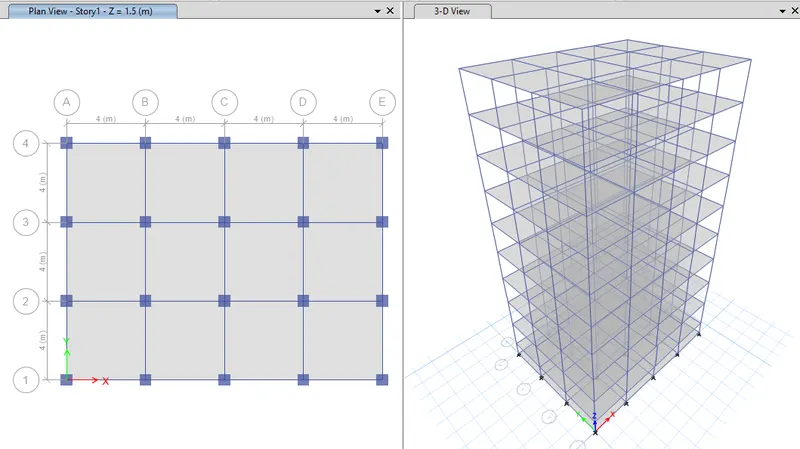
Building A: Step 1: 1) Click the Edit tab and choose edit story 2) Add 2 story and make 1st story as Master and all other as similar to 1st story 3) Click ok
Step 2: 1) Click the Select tab and select the columns 2) Click assign tab and choose frame assignment as 400 x 400 dimension column 3) Click ok
Step 3: 1) After assigning loads of each frame run the analysis 2) Click Display and choose the show table option 3) Select Modal participating ratio from Structural output 4) click ok
Building B: Step 1: 1) Click the Edit tab and choose edit story 1) Click the Edit tab and choose edit story 2) Add 5 story and make 1st story as Master and all other as similar to 1st story 3) Click ok
Step 2: 1) Click the Select tab and select the columns 2) Click assign tab and choose frame assignment as 400 x 400 dimension column 3) Click ok
Step 3: 1) Click the select tab and assign the column dimensions as 400 x 400 2) Click the Select tab and choose floors 3) Click assign tab and choose shell loads then uniform load 4) Make live load and load pattern name and input 3 kn/sq.m for load value and brickwall load as 10 kn/sq.m 5) Click Ok Step 4: 1) After assigning loads of each frame run the analysis 2) Click Display and choose the show table option 3) Select Modal participating ratio from Structural output 4) click ok
Building F: 1) Click the Select tab and select the columns 2) Click assign tab and choose frame assignment as 600 x 600 dimension column 3) Click ok
Step 2: 1) After assigning the loads of each frame run the analysis 2) Click Display and choose show table option 3) Select Modal participating ratio from Structural output 4) click ok Conclusion: 1) Due to the changing of building height the fundamental natural period varies gradually i.e.. for A is 89% at 0.39, for B is 83% at 0.911, for F is 75% at 0.48 and finally for H is 78% is 3.811.
Comparison 3:
Building C:
Step 1: 1) Click the Select tab and select the columns 2) Click assign tab and choose frame assignment as 550 x 300 dimension column 3) Click ok
Step 2: 1) Select the column object 2) Click the Assign tab and choose frame sections then local axes 3) Select rotation angle and enter the degree of 180 4) Click Ok Step 3: 1) After assigning loads of each frame run the analysis 2) Click Display and choose show table option 3) Select Modal participating ratio from Structural output 4) click ok Buiding D: Step 1: 1) Click the Select tab and select the columns 2) Click assign tab and choose frame assignment as 300 x 550 dimension column 3) Click ok
Step 2: 1) Select the column object 2) Click the Assign tab and choose frame sections then local axes 3) Select rotation angle and enter the degree of 90 4) Click Ok Step 3: 1) After assigning loads of each frame run the analysis 2) Click Display and choose the show table option 3) Select Modal participating ratio from Structural output 4) click ok Conclusion: 1) Due to changing of orientation the fundamental of the natural period varies each building i.e.. for C is 0.91 and for D is 1.04 then for B is 0.941 Comparison 4: For Building E: Step 1: 1) Click the Edit tab and choose edit story 2) Add 10 story and make 1st story as Master and all other as similar to 1st story 3) Click ok Step 2: 1) After assigning loads of each frame run the analysis 2) Click Display and choose the show table option 3) Select Modal participating ratio from Structural output 4) click ok Building G: Step 1: 1) Click the Edit tab and choose edit story 2) Add 25 story and make 1st story, 11th story and 21st story as Master and all other as similar to 1st, 11th, 21st story 3) Click ok Step 2: 1) Click the Select tab and select the columns of the 11th story ( make sure story selection must be in similar story mode) 2) Click assign tab and choose frame assignment as 600 x 600 dimension column ) 3) Click ok Step 3: 1) Click the Select tab and select the columns of 21st story ( make sure story selection must be in similar story mode) 2) Click assign tab and choose frame assignment as 400 x 400 dimension column 3) Click ok
Step 4: 1) Click Select tab and select the columns 2) Click assign tab and choose frame assignment as 400 x 400 dimension column 2) Click assign tab and choose frame assignment as 400 x 400 dimension column 3) Click ok
Step 5:
1) After assigning loads of each frame run the analysis
2) Click Display and choose the show table option
3) Select Modal participating ratio from Structural output
4) click ok
Conclusion: 1) When comparing these building there is significant difference due to different column sizes. The fundamental period of building E is More projects by Varun 0.36 and for F is 0.48. similarly for building G is 3.85 and for building H is 3.01