Project 1 : CFD Meshing for Tesla Cyber Truck
REPORT:
Aim: To Perform surface mesh and Volumetric mesh on tesla cybertruck.
Objective:
To perform:
- geometry cleanup
- assigning PIDs
- surface mesh
- create wind tunnel
- volumetric mesh
Procedure:
1. Geometry topo cleanup and PID Creation:
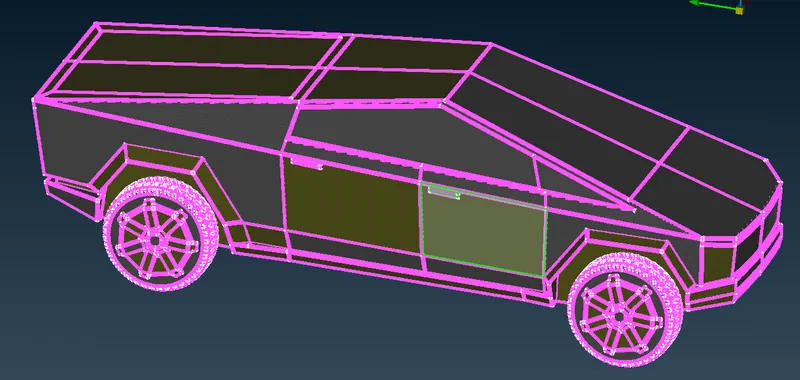
- The geometry is imported to ANSA software.
- understood the geometry.
- model looks symmetric as then it divided longitudinally into two parts and deleted one side.
- check the errors and over lapping faces.
- isolated each parts and cleared the errors and deleted over lapped faces.
- created model as one volume.
- closed the geometry by deleting and creating new faces.
- isolated each parts using 'not' command to assign PID's using PID manager as follow
- body
- lights
- tyres and rims
- windows
2. Surface Meshing:
- to create surface mesh on each PID.
- lets consider the PID windows to create surface mesh.
- windows are isolated using Not(PID) option or also can be isolated from PID manager as well.
- opened mesh quality criteria and entered the value of min length (i.e. 3 mm) and max length (i.e. 7 mm).
- opened mesh parameters and enter targhet length (i.e. 5 mm) and also min and max target length value.
- selected element type as tria.
- from perimeters menu selected length and assign perimeters and macros to windows PID.
- then created spot mesh on isolated PID.
- followed the same procedure from every PIDs.
- Target lengths, min target length and max target length for each PID is shown below.
-
Sl.No. PID's Target length min length max length 1 body 5 3 7 2 lights 5 3 7 3 windows 5 3 7 4 tyres and rims 5 3 7 - then use transform - copy tool using 3 point mirror option to create same half on other side.
- selected as same part at zero offset.
- selected 3 points and clicked middle mouse button.
- perform topo to check cracks and single cons.
3. Creating wind tunnel:
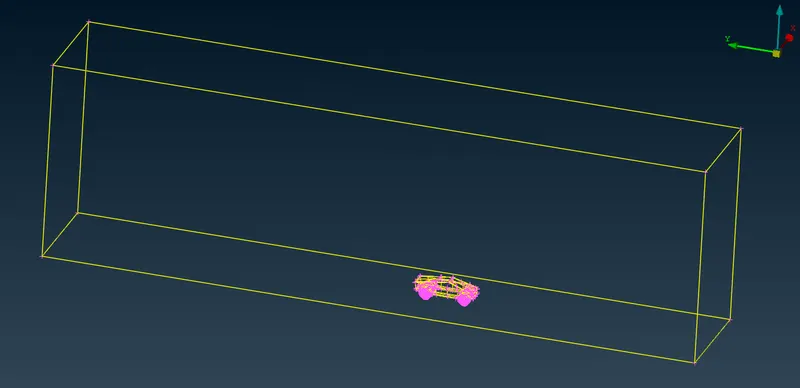
- for creating wind tunnel, one point is reffered at the middle of bottom surface and plotted one point exactly downwards at a distance of 530 mm using relative point option from the reffered point.
- suppose length of cybertruck is x mm which is =~6000 mm for the provided cybertruck model.
- we need to plot one point from front side of model at distance of 4x from most front point of cybertruck model.
- the most front point of model is at distance of 2500 mm and the most rear point of model is at distance of 3500 mm from newly plotted reffered point.
- so the front point will be at (24000+2500)= 26500 mm distance from reffered point.
- we need to plot one point from rear side of model at distance of 6x from most rear point of model.
- so the rear point will be at (36000+3500)=39500 mm distance from reffered point.
- then plotted points on both the sides of both rear and front point at a distamnc of (1x) 6000 mm.
- created curve to join all the four corner points(straight lines) to create surface.
- then surface is created below the model.
- then extra points and curves are deleted from that surface by hiding model and below surface.
- the same surface is copied straight above the model at a distance of 20500 mm ( 3x + height of model).
- then surface is created using fitted from new faces from all the sides of model reffering those two surfaces.
- then created PIDs as
- basesurface_tunnel
- topsurface_tunnel
- frontsurface_tunnel
- rearsurface_tunnel
- sidesurface_tunnel
- and then assigned PIDs to each side.
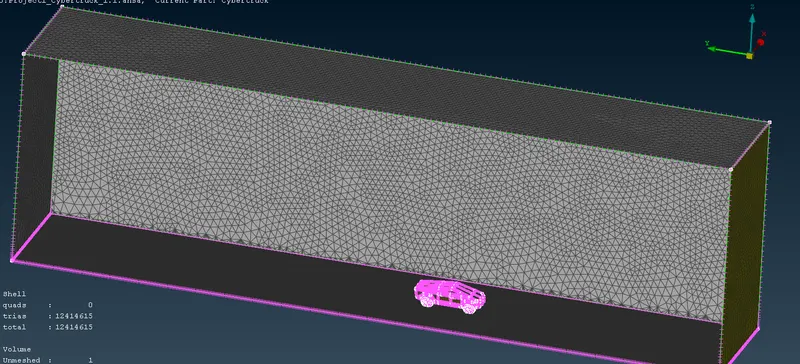
- then mesh base surface with target length = 100 mm, min length= 80 mm, max length= 120 mm and top surface with target length = 500 mm, min length= 450 mm, max length= 550 mm by the same procedure used for windows PID.
- Then used spacing command for side, front, rear side PIds and assigned spacing from bottom to top from 100 mm to 500 mm with factor of 1.1.
- then generated spot mesh on every PID one by one.
4. Volumetric Meshing:
- selected volume mesh deck.
- In that selected 'define' command from volume deck and selected detect on as on whole data base.
- got automatically generated volumes.
- from that volumes, deleted unwanted volumes which are not supposed to be meshed and keep only one volume which is between cybertruck model and tunnel.
- then we should use 'Tetra CFD' type mesh on required volume.
Results and conclusion: model is well studied and understood, PID's are assigned. surface mesh is done with required target lengths. volumetric mesh is carried on required volumes.
Google drive link for file: https://drive.google.com/file/d/1hihh09Sq9JDVMFCThmo6rgfzRzqDh_qp/view?usp=sharing