Project 1- Building a Master TCL/TK Macro
AIM: Building a master tcl/tk macro
OBJECTIVE: The objective of this project is to build master tcl/tk macro which contains all the buttons that will call all utilities created as assignments.
PROBLEM STATEMENT: It is time consuming to run each file with utilities individually, so to overcome this difficulty, we build a master macro that contains all the buttons assign to different utilities.
PROCEDURE:
1. To perform the given task, open any code editor ( here we use Notepad++) and type a code as follows:
# Code to create a window
set a .window
catch {destroy $a}
toplevel $a -class TopLevel
wm title $a "Master"
wm geometry $a 660x620+300+40; update
wm resizable $a 0 0
wm deiconify $a
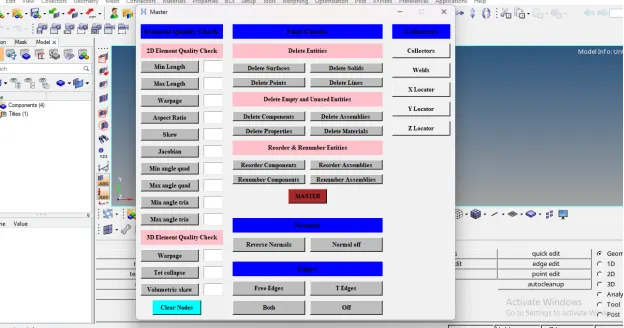
This code creates a new window in hypermesh having name as “Master” and having geometry of 660x620
# Code for Element Quality Check
label $a.001 -text "Element Quality Check" -bg blue -font {times 11 bold};
place $a.001 -x 10 -y 10 -width 170 -height 30
label $a.002 -text "2D Element Quality Check" -bg pink -font {times 10 bold};
place $a.002 -x 10 -y 50 -width 170 -height 30
button $a.01 -text "Min Length" -command {min_length $min_l} -bg grey -font {times 10 bold};
place $a.01 -x 10 -y 85 -width 120 -height 25
entry $a.02 -textvariable "min_l";
place $a.02 -x 140 -y 85 -width 40 -height 25
button $a.03 -text "Max Length" -command {max_length $max_l} -bg grey -font {times 10 bold};
place $a.03 -x 10 -y 120 -width 120 -height 25
entry $a.04 -textvariable "max_l";
place $a.04 -x 140 -y 120 -width 40 -height 25
button $a.05 -text "Warpage" -command {warpage $w} -bg grey -font {times 10 bold};
place $a.05 -x 10 -y 155 -width 120 -height 25
entry $a.06 -textvariable "w";
place $a.06 -x 140 -y 155 -width 40 -height 25
button $a.07 -text "Aspect Ratio" -command {aspect_ratio $ar} -bg grey -font {times 10 bold};
place $a.07 -x 10 -y 190 -width 120 -height 25
entry $a.08 -textvariable "ar";
place $a.08 -x 140 -y 190 -width 40 -height 25
button $a.09 -text "Skew" -command {skew $s} -bg grey -font {times 10 bold};
place $a.09 -x 10 -y 225 -width 120 -height 25
entry $a.010 -textvariable "s";
place $a.010 -x 140 -y 225 -width 40 -height 25
button $a.011 -text "Jacobian" -command {jacobian $j} -bg grey -font {times 10 bold};
place $a.011 -x 10 -y 260 -width 120 -height 25
entry $a.012 -textvariable "j";
place $a.012 -x 140 -y 260 -width 40 -height 25
button $a.013 -text "Min angle quad" -command {min_angle_quad $min_q} -bg grey -font {times 10 bold};
place $a.013 -x 10 -y 295 -width 120 -height 25
entry $a.014 -textvariable "min_q";
place $a.014 -x 140 -y 295 -width 40 -height 25
button $a.015 -text "Max angle quad" -command {max_angle_quad $max_q} -bg grey -font {times 10 bold};
place $a.015 -x 10 -y 330 -width 120 -height 25
entry $a.016 -textvariable "max_q";
place $a.016 -x 140 -y 330 -width 40 -height 25
button $a.017 -text "Min angle tria" -command {min_angle_tria $min_t} -bg grey -font {times 10 bold};
place $a.017 -x 10 -y 365 -width 120 -height 25
entry $a.018 -textvariable "min_t";
place $a.018 -x 140 -y 365 -width 40 -height 25
button $a.019 -text "Max angle tria" -command {max_angle_tria $max_t} -bg grey -font {times 10 bold};
place $a.019 -x 10 -y 400 -width 120 -height 25
entry $a.020 -textvariable "max_t";
place $a.020 -x 140 -y 400 -width 40 -height 25
label $a.003 -text "3D Element Quality Check" -bg pink -font {times 10 bold};
place $a.003 -x 10 -y 435 -width 170 -height 30
button $a.021 -text "Warpage" -command {warpage_3d $w3d} -bg grey -font {times 10 bold};
place $a.021 -x 10 -y 475 -width 120 -height 25
entry $a.022 -textvariable "w3d";
place $a.022 -x 140 -y 475 -width 40 -height 25
button $a.023 -text "Tet collapse" -command {tet_collapse $tet} -bg grey -font {times 10 bold};
place $a.023 -x 10 -y 510 -width 120 -height 25
entry $a.024 -textvariable "tet";
place $a.024 -x 140 -y 510 -width 40 -height 25
button $a.025 -text "Volumetric skew" -command {volumetric_skew $vs} -bg grey -font {times 10 bold};
place $a.025 -x 10 -y 545 -width 120 -height 25
entry $a.026 -textvariable "vs";
place $a.026 -x 140 -y 545 -width 40 -height 25
button $a.027 -text "Clear Nodes" -command {clear} -bg cyan -font {times 10 bold};
place $a.027 -x 35 -y 580 -width 100 -height 30
proc min_length {min_l} {
*nodecleartempmark;
*createmark elements 1 "displayed"
*elementtestlength elements 1 $min_l 2 1 2 0 "2D Min Length"
*maskentitymark elements 2 0
*maskreverse elements
*createmark nodes 1 "displayed"
*nodemarkaddtempmark 1
*unmaskall2
}
proc max_length {max_l} {
*nodecleartempmark;
*createmark elements 1 "displayed"
*elementtestlength elements 1 $max_l 2 1 2 0 "2D Max Length"
*maskentitymark elements 2 0
*maskreverse elements
*createmark nodes 1 "displayed"
*nodemarkaddtempmark 1
*unmaskall2
}
proc warpage {w} {
*nodecleartempmark;
*createmark elements 1 "displayed"
*elementtestwarpage elements 1 $w 2 2 0 "2D Warpage"
*maskentitymark elements 2 0
*maskreverse elements
*createmark nodes 1 "displayed"
*nodemarkaddtempmark 1
*unmaskall2
}
proc aspect_ratio {ar} {
*nodecleartempmark;
*createmark elements 1 "displayed"
*elementtestaspect elements 1 $ar 2 2 0 "2D Aspect Ratio"
*maskentitymark elements 2 0
*maskreverse elements
*createmark nodes 1 "displayed"
*nodemarkaddtempmark 1
*unmaskall2
}
proc skew {s} {
*nodecleartempmark;
*createmark elements 1 "displayed"
*elementtestskew elements 1 $s 2 2 0 "2D Skew"
*maskentitymark elements 2 0
*maskreverse elements
*createmark nodes 1 "displayed"
*nodemarkaddtempmark 1
*unmaskall2
}
proc jacobian {j} {
*nodecleartempmark;
*createmark elements 1 "displayed"
*elementtestjacobian elements 1 $j 2 2 0 "2D Jacobian"
*maskentitymark elements 2 0
*maskreverse elements
*createmark nodes 1 "displayed"
*nodemarkaddtempmark 1
*unmaskall2
}
proc min_angle_quad {min_q} {
*nodecleartempmark;
*createmark elements 1 "displayed"
*elementtestinterangle elements 1 $min_q 0 2 1 2 0 "2D Quad Min Angle"
*maskentitymark elements 2 0
*maskreverse elements
*createmark nodes 1 "displayed"
*nodemarkaddtempmark 1
*unmaskall2
}
proc max_angle_quad {max_q} {
*nodecleartempmark;
*createmark elements 1 "displayed"
*elementtestinterangle elements 1 $max_q 0 2 0 2 0 "2D Quad Max Angle"
*maskentitymark elements 2 0
*maskreverse elements
*createmark nodes 1 "displayed"
*nodemarkaddtempmark 1
*unmaskall2
}
proc min_angle_tria {min_t} {
*nodecleartempmark;
*createmark elements 1 "displayed"
*elementtestinterangle elements 1 $min_t 1 2 1 2 0 "2D Tria Min Angle"
*maskentitymark elements 2 0
*maskreverse elements
*createmark nodes 1 "displayed"
*nodemarkaddtempmark 1
*unmaskall2
}
proc max_angle_tria {max_t} {
*nodecleartempmark;
*createmark elements 1 "displayed"
*elementtestinterangle elements 1 $max_t 1 2 0 2 0 "2D Tria Max Angle"
*maskentitymark elements 2 0
*maskreverse elements
*createmark nodes 1 "displayed"
*nodemarkaddtempmark 1
*unmaskall2
}
proc warpage_3d {w3d} {
*nodecleartempmark;
*createmark elements 1 "displayed"
*elementtestwarpage elements 1 $w3d 2 4 0 "3D Warpage"
*maskentitymark elements 2 0
*maskreverse elements
*createmark nodes 1 "displayed"
*nodemarkaddtempmark 1
*unmaskall2
}
proc tet_collapse {tet} {
*nodecleartempmark;
*createmark elements 1 "displayed"
*elementtesttetracollapse elements 1 $tet 2 0 "3D Tetra collapse"
*maskentitymark elements 2 0
*maskreverse elements
*createmark nodes 1 "displayed"
*nodemarkaddtempmark 1
*unmaskall2
}
proc volumetric_skew {vs} {
*nodecleartempmark;
*createmark elements 1 "displayed"
*elementtestvolumetricskew elements 1 $vs 2 0 "3D Volumetric Skew"
*maskentitymark elements 2 0
*maskreverse elements
*createmark nodes 1 "displayed"
*nodemarkaddtempmark 1
*unmaskall2
}
proc clear {} {
*nodecleartempmark
}
# Code for Final Checks
label $a.004 -text "Final Checks" -bg blue -font {times 11 bold}
place $a.004 -x 200 -y 10 -width 310 -height 30
label $a.005 -text "Delete Entities" -bg pink -font {times 10 bold}
place $a.005 -x 200 -y 50 -width 310 -height 30
button $a.028 -text "Delete Surfaces" -command "delete surfaces" -bg grey -font {times 10 bold}
place $a.028 -x 200 -y 90 -width 150 -height 20
button $a.029 -text "Delete Solids" -command "delete solids" -bg grey -font {times 10 bold}
place $a.029 -x 360 -y 90 -width 150 -height 20
button $a.030 -text "Delete Points" -command "delete points" -bg grey -font {times 10 bold}
place $a.030 -x 200 -y 120 -width 150 -height 20
button $a.031 -text "Delete Lines" -command "delete lines" -bg grey -font {times 10 bold}
place $a.031 -x 360 -y 120 -width 150 -height 20
proc delete {a} {
*createmark $a 1 "displayed"
if {[hm_marklength $a 1]!=0} {*deletemark $a 1}
}
label $a.006 -text "Delete Empty and Unused Entities" -bg pink -font {times 10 bold}
place $a.006 -x 200 -y 150 -width 310 -height 30
button $a.032 -text "Delete Components" -command "empty components" -bg grey -font {times 10 bold}
place $a.032 -x 200 -y 190 -width 150 -height 20
button $a.033 -text "Delete Assemblies " -command "empty assemblies" -bg grey -font {times 10 bold}
place $a.033 -x 360 -y 190 -width 150 -height 20
button $a.034 -text "Delete Properties" -command "unused properties" -bg grey -font {times 10 bold}
place $a.034 -x 200 -y 220 -width 150 -height 20
button $a.035 -text "Delete Materials" -command "unused materials" -bg grey -font {times 10 bold}
place $a.035 -x 360 -y 220 -width 150 -height 20
proc empty {b} {
*EntityPreviewEmpty $b 1
if {[hm_marklength $b 1]!=0} {*deletemark $b 1}
}
proc unused {c} {
*EntityPreviewUnused $c 1
if {[hm_marklength $c 1]!=0} {*deletemark $c 1}
}
label $a.007 -text "Reorder & Renumber Entities" -bg pink -font {times 10 bold}
place $a.007 -x 200 -y 250 -width 310 -height 30
button $a.036 -text "Reorder Components" -command "reorder components" -bg grey -font {times 10 bold}
place $a.036 -x 200 -y 290 -width 150 -height 20
button $a.037 -text "Reorder Assemblies " -command "reorder assemblies" -bg grey -font {times 10 bold}
place $a.037 -x 360 -y 290 -width 150 -height 20
button $a.038 -text "Renumber Components" -command "renumber components" -bg grey -font {times 10 bold}
place $a.038 -x 200 -y 320 -width 150 -height 20
button $a.039 -text "Renumber Assemblies" -command "renumber assemblies" -bg grey -font {times 10 bold}
place $a.039 -x 360 -y 320 -width 150 -height 20
proc reorder {d} {
*createmark $d 1 "all"
if {[hm_marklength $d 1]!=0} {*collectormarkmove $d 1 1 1}
}
proc renumber {e} {
*createmark $e 1 "all"
if {[hm_marklength $e 1]!=0} {*renumbersolverid components 1 1 1 0 0 0 0}
}
button $a.040 -text "MASTER" -command "master" -bg brown -font {times 10 bold}
place $a.040 -x 315 -y 350 -width 80 -height 30
proc master {} {
delete surfaces
delete solids
delete points
delete lines
empty components
empty assemblies
unused properties
unused materials
reorder components
reorder assemblies
renumber components
renumber assemblies
}
# Code for Normals
label $a.008 -text "Normals" -bg blue -font {times 11 bold}
place $a.008 -x 200 -y 410 -width 310 -height 30
button $a.041 -text "Reverse Normals" -command {*createmark elements 1 "displayed" ; *normalsreverse elements 1} -bg grey -font {times 10 bold}
place $a.041 -x 200 -y 450 -width 150 -height 30
button $a.042 -text "Normal off" -command {*createmark elements 1 "displayed" ; *normalsoff} -bg grey -font {times 10 bold}
place $a.042 -x 360 -y 450 -width 150 -height 30
# Code for Edges
label $a.009 -text "Edges" -bg blue -font {times 11 bold}
place $a.009 -x 200 -y 500 -width 310 -height 30
button $a.043 -text "Free Edges" -command {free_edges} -bg grey -font {times 10 bold}
place $a.043 -x 200 -y 540 -width 150 -height 30
button $a.044 -text "T Edges" -command {T_edges} -bg grey -font {times 10 bold}
place $a.044 -x 360 -y 540 -width 150 -height 30
button $a.045 -text "Both" -command {both} -bg grey -font {times 10 bold}
place $a.045 -x 200 -y 580 -width 150 -height 30
button $a.046 -text "Off" -command {off} -bg grey -font {times 10 bold}
place $a.046 -x 360 -y 580 -width 150 -height 30
proc free_edges {} {
*setdisplayattributes 4 1
*createmark components 1 "free_edges"
set a [hm_getmark components 1]
if {$a !=0} {
*createmark elems 1 "displayed"
*equivalence elems 1 0.01 0 0 0
*createmark elems 1 "displayed"
*equivalence elems 1 0.01 3 0 0
*createmark nodes 1 "retrieve"
*nodemarkaddtempmark 1
*createmark elems 1 "displayed"
*findedges1 elems 1 0 0 0 30
*setvalue components name={^edges} name={free_edges}
*createmark components 1 "free_edges"
*setvalue components mark=1 color=3
*setcomponentdisplayattributes "free_edges" 2 1
}
}
proc T_edges {} {
*setdisplayattributes 4 1
*createmark components 1 "T_edges"
set b [hm_getmark components 1]
if {$b !=0} {
*createmark elems 1 "displayed"
*equivalence elems 1 0.01 0 0 0
*createmark elems 1 "displayed"
*equivalence elems 1 0.01 3 0 0
*createmark nodes 1 "retrieve"
*nodemarkaddtempmark 1
*createmark elems 1 "displayed"
*findedges1 elems 1 1 0 0 30
*setvalue components name={^edges} name={T_edges}
*createmark components 1 "T_edges"
*setvalue components mark=1 color=30
*setcomponentdisplayattributes "T_edges" 2 1
}
}
proc both {} {
free_edges
T_edges
*setcomponentdisplayattributes "free_edges" 2 1
*setcomponentdisplayattributes "T_edges" 2 1
}
proc delete_comp {c} {
*clearmarkall 1; *clearmarkall 2
*createmark components 1 $c
if {[hm_marklength comps 1]!=0} {*deletemark comps 1}
}
proc off {} {
delete_comp "free_edges"
delete_comp "T_edges"
*setdisplayattributes 2 1
}
# Code for Collectors
label $a.0010 -text "Collectors" -bg blue -font {times 11 bold}
place $a.0010 -x 530 -y 10 -width 120 -height 30
button $a.047 -text "Collectors" -command {create} -font {times 10 bold}
place $a.047 -x 530 -y 50 -width 120 -height 30
button $a.048 -text "Welds" -command {weld} -font {times 10 bold}
place $a.048 -x 530 -y 90 -width 120 -height 30
button $a.049 -text "X Locator" -command {X_Loc} -font {times 10 bold}
place $a.049 -x 530 -y 130 -width 120 -height 30
button $a.050 -text "Y Locator" -command {Y_Loc} -font {times 10 bold}
place $a.050 -x 530 -y 170 -width 120 -height 30
button $a.051 -text "Z Locator" -command {Z_Loc} -font {times 10 bold}
place $a.051 -x 530 -y 210 -width 120 -height 30
proc create {} {
*clearmarkall 1; *clearmarkall 2;
*createmark component 1 Welds;
if {[hm_marklength components 1] == 0} {*createentity component name = Welds Color=3}
*createmark component 1 X_Loc;
if {[hm_marklength components 1] == 0} {*createentity component name = X_Loc Color=56}
*createmark component 1 Y_Loc;
if {[hm_marklength components 1] == 0} {*createentity component name = Y_Loc Color=5}
*createmark component 1 Z_Loc;
if {[hm_marklength components 1] == 0} {*createentity component name = Z_Loc Color=6}
proc weld {} {
*clearmarkall 1; *clearmarkall 2;
*currentcollector components "Welds"
*createmarkpanel nodes 2 "Select all nodes for creating spider weld"
*rigidlinkinodecalandcreate 2 0 0 123456
}
proc X_Loc {} {
*clearmarkall 1; *clearmarkall 2;
*currentcollector components "X_Loc"
*createmarkpanel nodes 1 "Select source node for spot weld"
set source_node [hm_getmark nodes 1]
*createmarkpanel nodes 2 "Select target node for spot weld"
set target_node [hm_getmark nodes 2]
*rigid $source_node $target_node 156
}
proc Y_Loc {} {
*clearmarkall 1; *clearmarkall 2;
*currentcollector components "Y_Loc"
*createmarkpanel nodes 1 "Select source node for spot weld"
set source_node [hm_getmark nodes 1]
*createmarkpanel nodes 2 "Select target node for spot weld"
set target_node [hm_getmark nodes 2]
*rigid $source_node $target_node 246
}
proc Z_Loc {} {
*clearmarkall 1; *clearmarkall 2;
*currentcollector components "Z_Loc"
*createmarkpanel nodes 1 "Select source node for spot weld"
set source_node [hm_getmark nodes 1]
*createmarkpanel nodes 2 "Select target node for spot weld"
set target_node [hm_getmark nodes 2]
*rigid $source_node $target_node 345
}
}
create;
2. After writing the code save the file.
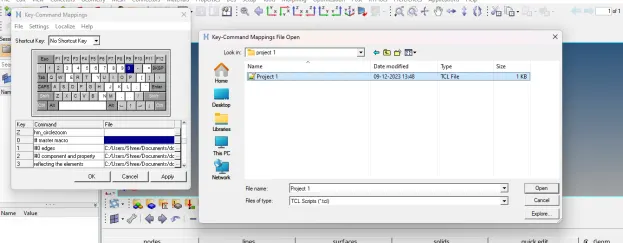
3. Then open any model in hypermesh and run this file in hypermesh using shortcut key assign to it.
4. After running these codes in hypermesh, following results will appear:
TCL COMMAND EXPLANATION:
1. *nodecleartempmark: Clears all of the nodes from the temporary node mark. If a node is selected at the time this command is run, it will not be removed, but its graphic will be cleared
2. *maskentitymark: This command masks the entities of entity_type that are on mark_id. Valid mark_ids are 1 and 2. Only entities in displayed collectors may be masked. To mask connectors and the realized FE, a flag of 1 must be passed. To mask only connectors (excluding realized FE) and all other entity types, a flag of zero must be passed.
3. *maskreverse: Reverses the masking state of a specific entity type. For collected entities, only entities in displayed collectors are affected.
4. *nodemarkaddtempmark: Places a node on the temporary node mark
5. *unmaskall: Unmasks all supported entities. For collected entities, only entities in displayed collectors are affected
6. *elementtestlength: Tests elements for whether or not they pass the edge length element quality check, and puts those that fail on the specified outputmark
7. *elementtestwarpage: Tests 2D and 3D elements for whether or not they pass the warpage element quality check, and puts those that fail on the specified outputmark
8. *elementtestaspect: Tests 2D and 3D elements using the aspect element quality check
9. *elementtestskew : Tests 2D and 3D elements for whether or not they pass the skew element quality check, and puts those that fail on the specified outputmark
10. *elementtestjacobian: Tests 2D and 3D elements for whether or not they pass the Jacobian ratio element quality check, and puts those that fail on the specified outputmark
11. *elementtestinterangle: Tests 2 and 3 dimensional elements for whether or not they pass the interior angle element quality check, and puts those that fail on the specified outputmark.
12. *elementtesttetracollapse: Tests tetra elements for whether or not they pass the tetra collapse element quality check, and puts those that fail on the specified outputmark
13. *elementtestvolumetricskew: Tests tetra elements for whether or not they pass the volumetric skew element quality check, and puts those that fail on the specified output mark.
The tetra element volumetric skew corresponds directly to the Abaqus and Fluent CFD tetra element quality checks. It is calculated by fitting a sphere through the four vertex nodes of the element.
In the CFD community, this quantity is traditionally referred to as "skew." To differentiate it from the finite element quantity of the same name, HyperMesh notes this as "volumetric skew."
14. *EntityPreviewEmpty: Searches the entities specified and stores any empty entities in the outputmark
15. *EntityPreviewUnused: Searches the specified entities for any unused entities, and stores them in the outputmark
16. *deletemark: Deletes entities from the database
17. *collectormarkmove: This command moves and/or sorts the entities on a mark. This affects their order within the browser and the advanced entity selection menus
18. *renumbersolverid: This command renumbers the solver IDs for entities of entity_type contained on mark_id. This command works in two ways depending on the entities selected. If the selected entities have solver IDs, the command will renumber the solver IDs and not the HyperMesh internal IDs. However, if the selected entities do not have solver IDs, the command will renumber the HyperMesh internal IDs
19. *setnormalsdisplaytype: Sets the display type for element normals. This is utilized by the commands that turn on element normals display
20. *normalsdisplay: Turns on the display of 2D and 3D element normals
21. *normalsreverse: Reverses the normals of 2D and 3D elements.
22. *normalsoff: Turns off the display of element/surface normals
23. *setdisplayattributes: Sets all components in the model to the specified style and coloring method
style: Set to:
· 0 wire frame
· 1 hidden line
· 2 hidden line with mesh
· 3 hidden line with features
· 4 hidden line transparent
colortype: Determines how the components are colored. The options are:
· 0 none
· 1 component color
· 2 assigned plots
· 3 contours
24. *equivalence: Equivalences or finds duplicate nodes of selected components, elements or nodes within a tolerance
25. *nodemarkaddtempmark: Places a node on the temporary node mark
26. *findedges1: Finds element free or T-connected edges
27. *setvalue: Updates an existing entity/entities with new/modified data. Data names, attributes, and metadata are allowed to be modified, assuming the proper card image is also assigned. If the specified data name is “name” and the entity type is enabled for the name pool, the provided name is used to update the solver name
28. *setcomponentdisplayattributes: Sets a component to the specified style and color
29. hm_marklength: Returns the number of entities on the specified mark
30. *createentity: Create a new entity with specified data. Data names only are allowed to be set. If the data name “name” is specified when creating an entity enabled for the name pool, the command uses the provided name to define the solver name.
31. *currentcollector: Sets the current collector
32. *createmarkpanel: Provides a panel to add entities to a mark
33. *rigidlinkinodecalandcreate: Creates a rigidlink elem by calculating the independent node based on selection of dependent nodes. Location of independent nodes will be at the geometric center of dependent nodes.
34 hm_marklength: Returns the number of entities on the specified mark
35. *currentcollector: Sets the current collector
36. *createmarkpanel: Provides a panel to add entities to a mark
37. *rigidlinkinodecalandcreate: Creates a rigidlink elem by calculating the independent node based on selection of dependent nodes. Location of independent nodes will be at the geometric center of dependent nodes.
CONCLUSION: After executing proper tcl/tk code, we are able to build a master tcl/tk macro which contains all the buttons that will call all utilities created as assignments.