Parsing Nasa Thermodynamic Data in MATLAB
Aim:
Parsing the Nasa thermodynamic data and calculate the thermodynamic properties of species.
Objectives:
The main objective of this project is calculate enthalpy, entropy and specific heats for all the species in the data file and calculate the molecular weight of each species and display it in the command window. In addition plot the Cp, Enthalpy and Entropy for the local temperature range.
Understanding Parsing and its uses:
Parsing, syntax analysis, or syntactic analysis is the process of analyzing a string of symbols, either in natural language, computer languages or data structures, conforming to the rules of a formal grammer.
Parser is a compiler or interpreter component that breaks data into smaller elements for easy translation into another language. A parser takes input in the form of a sequence of tokens or program instructions and usually builds a data structure in the form of a parse tree or an abstract syntax tree.
A parser is commonly used as a component of an interpreter or a compiler. The overall process of parsing involves three stages:
1. Lexical Analysis: A lexical analyser is used to produce tokens from a stream of input string characters, which are broken into small components to form meaningful expressions.
2. Syntactic Analysis: Checks whether the generated tokens form a meaningful expression. This makes use of a context-free grammar that defines algorithmic procedures for components. These work to form an expression and define the order in which tokens must be placed.
3. Semantic Parsing: The final parsing stage in which the meaning and implications of the validated expression are determined, and necessary actions are taken.
Formula used to calculate Specific Heat, Enthalpy and Entropy:
`(Cp)/R = a1+a2 T+a3 T^2+a4 T^3+a5 T^4`
`H/(RT)=a1+a2T/2+a3T^2/3+a4T^3/4+a5T^4/5+(a6)/T`
`S/R=a1 1nT+a2 T+a3T^2/2+a4T^3/3+a5T^4/4+a7`
Thermodynamics Properties:
H - Enthalpy is a property of a thermodynamics sustem, that is a convenient state function preferred in many measurements in chemical, biological, and physical systems at a constant pressure. It is defined as the sum of the system's internal energy and the product of its pressure and volume.
S - is an extensive property, of a thermodynamics. It quantifies the number Ω of microscopic configurations (known as microstates) that are consistent with the macroscopic quantities that characterize the system (such as its volume, pressure and temperature)
Cp - Specific Heat -
Molecular weight - is defined relative to the mass of the isotope 12C (carbon 12), which by definition is equal to 12 Da.
PROGRAM:
Function program for Enthalpy (H):
function H = enthalpy(a1,a2,a3,a4,a5,a6,a7,a8,a9,a10,a11,a12,a13,a14,lt_mid,T,R)
if(T>lt_mid)
    H = (a1+a2*T./2+a3*T.^2/3+a4*T.^3/4+a5*T.^4/5+a6./T)*R.*T;
else
    H = (a8+a9*T./2+a10*T.^2/3+a11*T.^3/4+a12*T.^4./5+a13./T)*R.*T;
end
By the use of above said formula, function program has been written to extracts the co-efficients for calculating Enthalpy for all the species given the data file (Termo.dat), where R is the universal gas constant and T is the temperature.
Here we used if else functions to calculate the Enthalpy.
Syntax
ifexpressionstatementselsestatementsend
Description:
if evaluates an expression, and executes a group of statements when the expression is true. An expression is true when its result is nonempty and contains only nonzero elements (logical or real numeric). Otherwise, the expression is false.expression, statements, end
The elseif and else blocks are optional. The statements execute only if previous expressions in the if...end block are false. An if block can include multiple elseif blocks.
Function program for Entropy (S):
function S = entropy(a1,a2,a3,a4,a5,a6,a7,a8,a9,a10,a11,a12,a13,a14,lt_mid,T,R)
if(T>lt_mid)
    S = (a1*log(T)+a2.*T+a3*T.^2/2+a4*T.^3/3+a5*T^.4/4+a7)*R;
else
    S = (a8*log(T)+a9.*T+a10*T.^2./2+a11*T.^3./3+a12*T.^4./4+a14)*R;
end
By the use of above said formula, function program has been written to extracts the co-efficients for calculating Entropy for all the species given the data file (Termo.dat), where R is the universal gas constant and T is the temperature.
Here we used if else functions to calculate the Entropy.
Function program for Specific_Heat (Cp):
function [cp] = specific_heat(a1,a2,a3,a4,a5,a6,~,a8,a9,a10,a11,a12,~,~,lt_mid,T,R)
if(T>lt_mid)
    cp = (a1+a2*T+a3*(T.^2)+a4*(T.^3)+a5*(T.^4)+a6.T).*R;
else
    cp = (a8+a9*T+a10*(T.^2)+a11*(T.^3)+a12*(T.^4)).*R;
end
end
By the use of above said formula, function program has been written to extracts the co-efficients for calculating Specific heat for all the species given the data file (Termo.dat), where R is the universal gas constant and T is the temperature.
Here we used if else functions to calculate the Specific heat.
Function program for molecular weight:
function [M] = molecular_weight(species)

M = 0;
z = 0;
atomic_mass = [15.999,1.008,32.065,12.001,14.007,39.948];
elements = ['O','H','S','C','N','A'];

for i = 1:length(species)
    for j = 1:length(atomic_mass)
    if strcmpi(species(i),elements(j))
        M = M + atomic_mass(j);
        z = j;
    end
end

varl = str2double(species(i));
if(varl>1)

    M = M + (atomic_mass(z)*(varl-1));
end

% M = Mol_wt;
end
end
Function program has been written as above to calculate molecular weight for species, where as,
for i = 1:length(species)
j = 1:length(atomic_mass)
if scrcmpi - compare strings(case sensitive)
varl - variables
str2double - convert strings to double precision values
Main program for file parsing:
clear all
close all
clc

f1 = fopen('THERMO.dat','r');
line_1 = fgetl(f1);
line_2 = fgetl(f1);

A = strsplit(line_2,' ');

global_low_temp = str2double(A{2});
global_mid_temp = str2double(A{3});
global_high_temp = str2double(A{4});

for i = 1 : 3
    comments = fgetl(f1);
end


for i = 1 : 53
    %line3_specs
    line_3 = fgetl(f1);
    line3_split = strsplit(line_3,' ');
    species = line3_split(1);
    species = species{1};

    splits = strsplit(line_3,'G ');
    lt = str2num(splits{2});
    lt_low = lt(1);
    lt_mid = lt(3);
    lt_high = lt(2);

    %line4_specs
    line_4 = fgetl(f1);
    c = strfind(line_4,'E');
    a1 = str2double(line_4(1:c(1)+3));
    a2 = str2double(line_4(c(1) + 4:c(2)+3));
    a3 = str2double(line_4(c(2) + 4:c(3)+3));
    a4 = str2double(line_4(c(3) + 4:c(4)+3));
    a5 = str2double(line_4(c(4) + 4:c(5)+3));

    %line5_specs
    line_5 = fgetl(f1);
    c = strfind(line_5,'E');
    a6 = str2double(line_5(1:c(1)+3));
    a7 = str2double(line_5(c(1) + 5:c(2)+3));
    a8 = str2double(line_5(c(2) + 5:c(3)+3));
    a9 = str2double(line_5(c(3) + 5:c(4)+3));
    a10 = str2double(line_5(c(4) + 5:c(5)+3));


    %line6_specs
    line_6 = fgetl(f1);
    c = strfind(line_6,'E');
    a11 = str2double(line_6(1:c(1)+3));
    a12 = str2double(line_6(c(1) + 5:c(2)+3));
    a13 = str2double(line_6(c(2) + 5:c(3)+3));
    a14 = str2double(line_6(c(3) + 5:c(4)+3));


    T = linspace(lt_low,lt_high, 100);
    R = 8.314;
    cp = specific_heat(a1,a2,a3,a4,a5,a6,a7,a8,a9,a10,a11,a12,a13,a14,lt_mid,T,R);
    H = enthalpy(a1,a2,a3,a4,a5,a6,a7,a8,a9,a10,a11,a12,a13,a14,lt_mid,T,R);
    S = entropy(a1,a2,a3,a4,a5,a6,a7,a8,a9,a10,a11,a12,a13,a14,lt_mid,T,R);

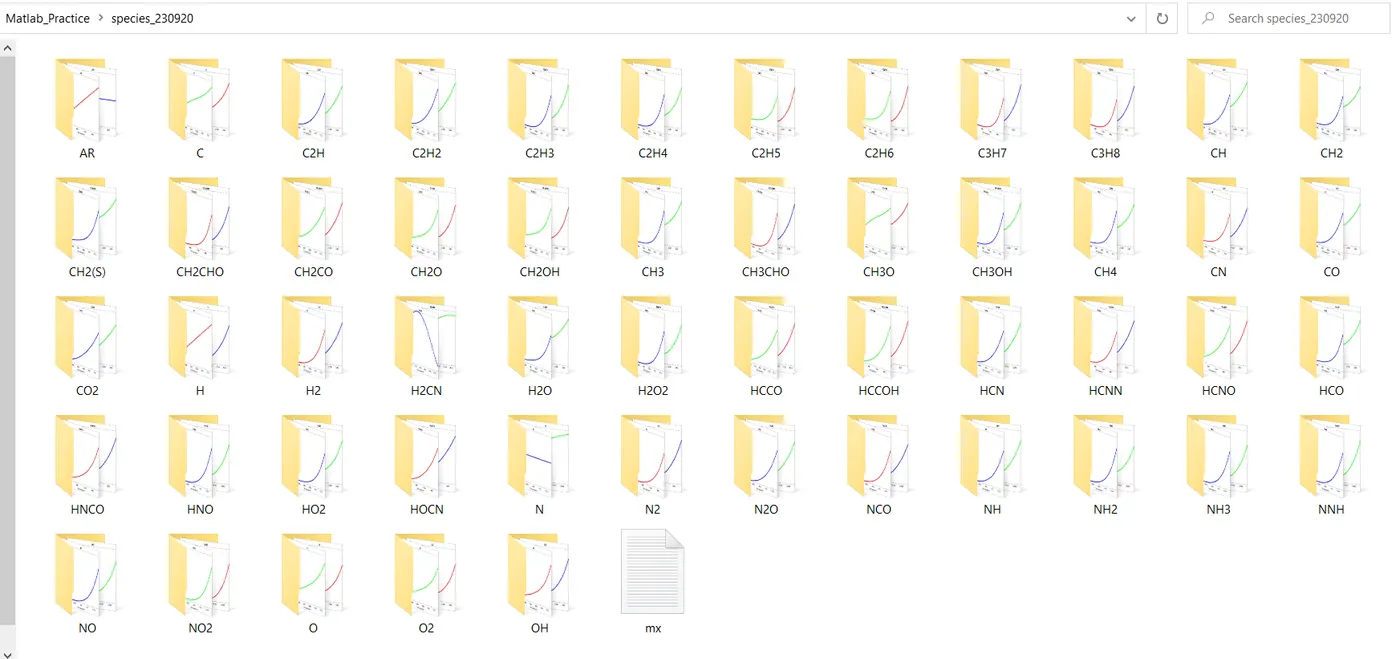
  mkdir(species)
%
% plotting
%
   figure(1)
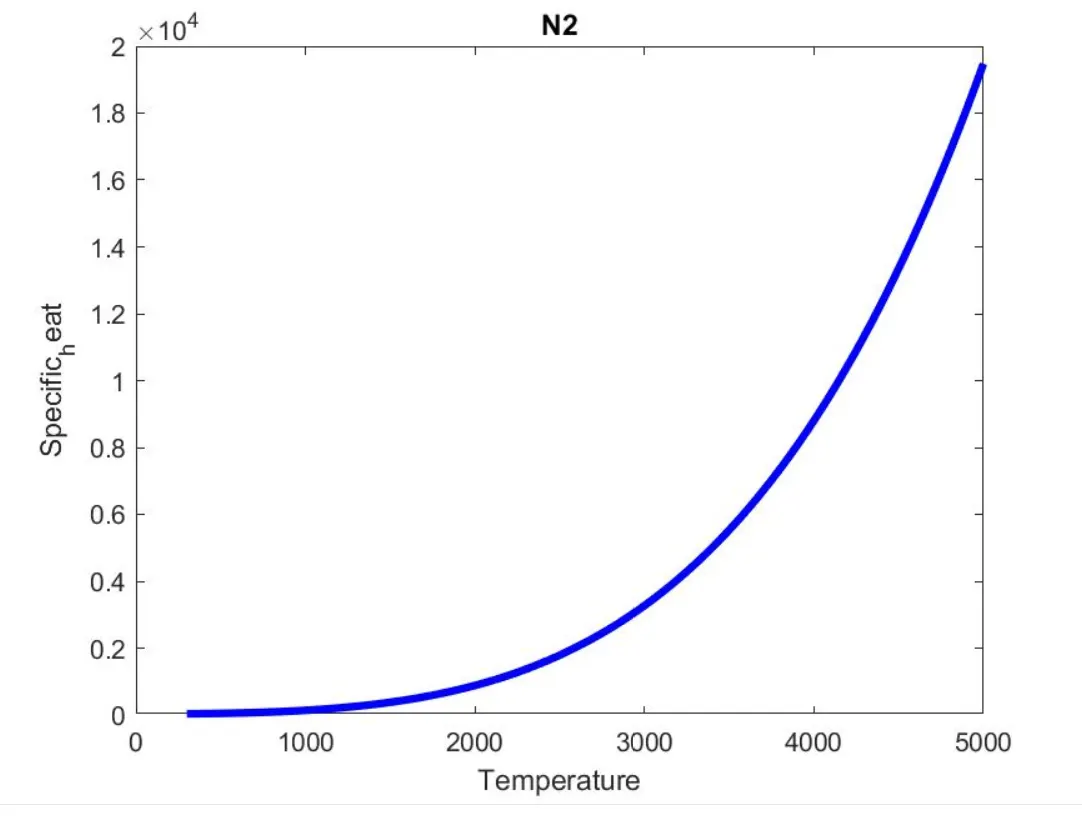
   plot(T,cp,'linewidth',3,'color','blue')
   xlabel('Temperature')
   ylabel('Specific_heat')
   title(species)
%
   figure(2)
   plot(T,H,'linewidth',3,'color','r')
   xlabel('Temperature')
   ylabel('Enthalpy')
   title(species)
%

   figure(3)
   plot(T,S,'linewidth',3,'color','g')
   xlabel('Temperature')
   ylabel('Entropy')
   title(species)
%
   cd(species)
   saveas(figure(1),'T vs Cp.jpg')
   saveas(figure(2),'T vs H.jpg')
   saveas(figure(3),'T vs S.jpg')
   cd('........................................................')


 [M(i)] = molecular_weight(species);

 ff = fopen('mx.txt','a');
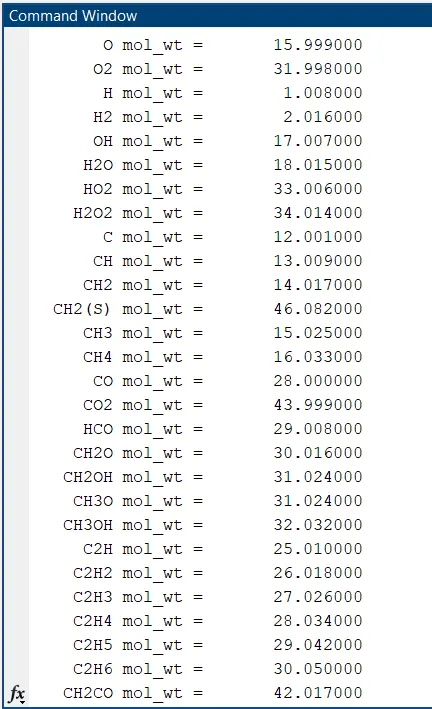
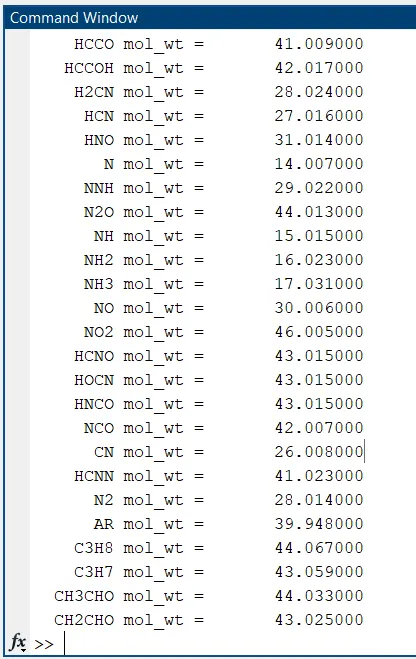
 K = sprintf('%8s mol_wt = %15f', species, M(i));
 fprintf(ff,'%10s mol_wt = %15.6f', species,M(i));
 fprintf(ff,'\n');
 fclose(ff);
 disp(K)

end

fclose(f1);
Explanation of Main program codes:
f1 = fopen('THERMO.dat','r') - the syntax to call the data file.
line_1 = fgetl(f1) - to call the first line of the data file.
A = strsplit(line_2,' ')
split - split string at delimiters
strsplit - split string or character vector at specified delimiter
num2str - convert numbers to character array
strfind - find strings within other strings
T = linspace(lt_low,lt_high,100)
linspace is similar to the colon operator, “:”, but gives direct control over the number of points and always includes the endpoints. “lin” in the name “linspace” refers to generating linearly spaced values as opposed to the sibling function logspace, which generates logarithmically spaced values.
% mkdir - mkdir(species) creates the folder folderName. If folderName exists, MATLAB issues a warning. If the operation is not successful, mkdir throws an error to the Command Window.
Syntax:
cd(......)
Description:
cd - displays the current folder
cd new folder changes the current folder to new folder, Folder changes are global. Therefore, if we use cd within a function, the folder change persists after MATLAB finishes excuting the function.
% cd(species)
saveas(figure(1),'T vs Cp.jpg')
saveas(figure(2),'T vs H.jpg')
saveas(figure(3),'T vs S.jpg')
cd('.........')
% plotting - plot the Enthalpy, Entropy, Specific heat for each species respectively.
[M(i)] = molecular_weight(species)
ff = fopen('mx.txt','a');
K = sprintf('%8s mol_wt = %15f', species, M(i));
fprintf(ff,'%10s mol_wt = %15.6f', species,M(i));
fprintf(ff,'\n');
fclose(ff);
disp(K)
Calculated molecular weight for each species and print.
Output:
Plots for O2:
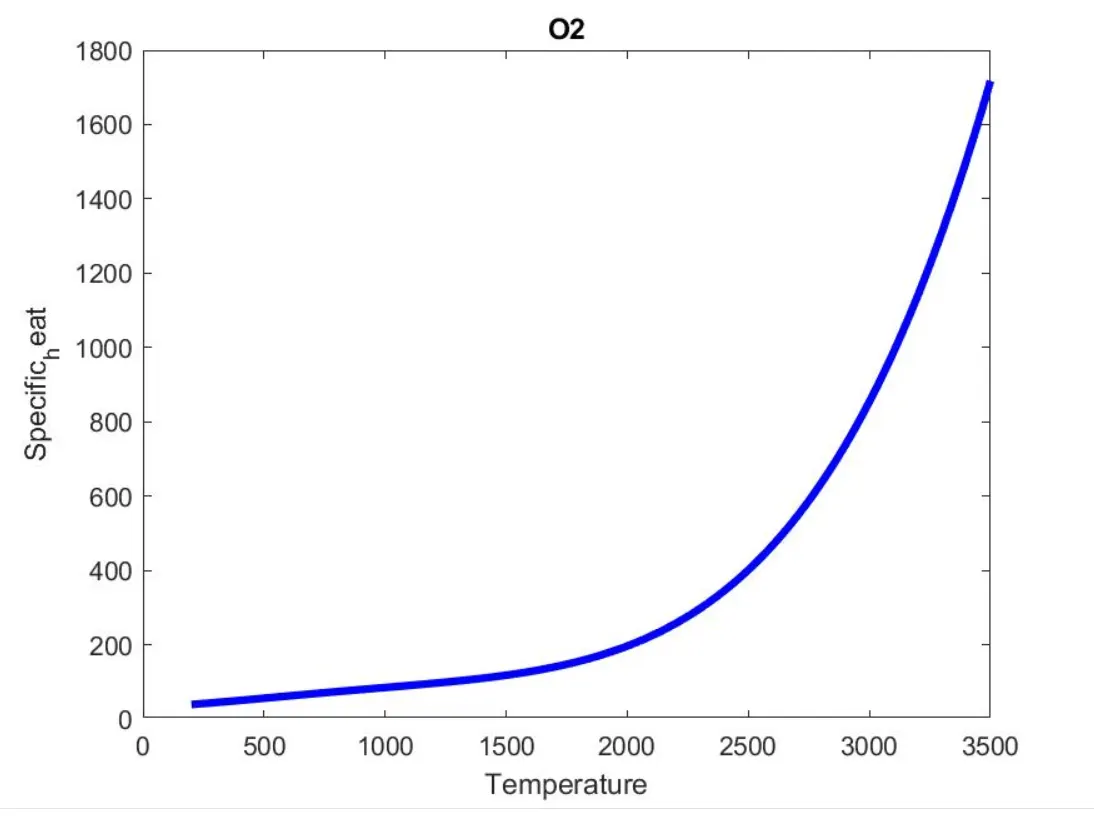
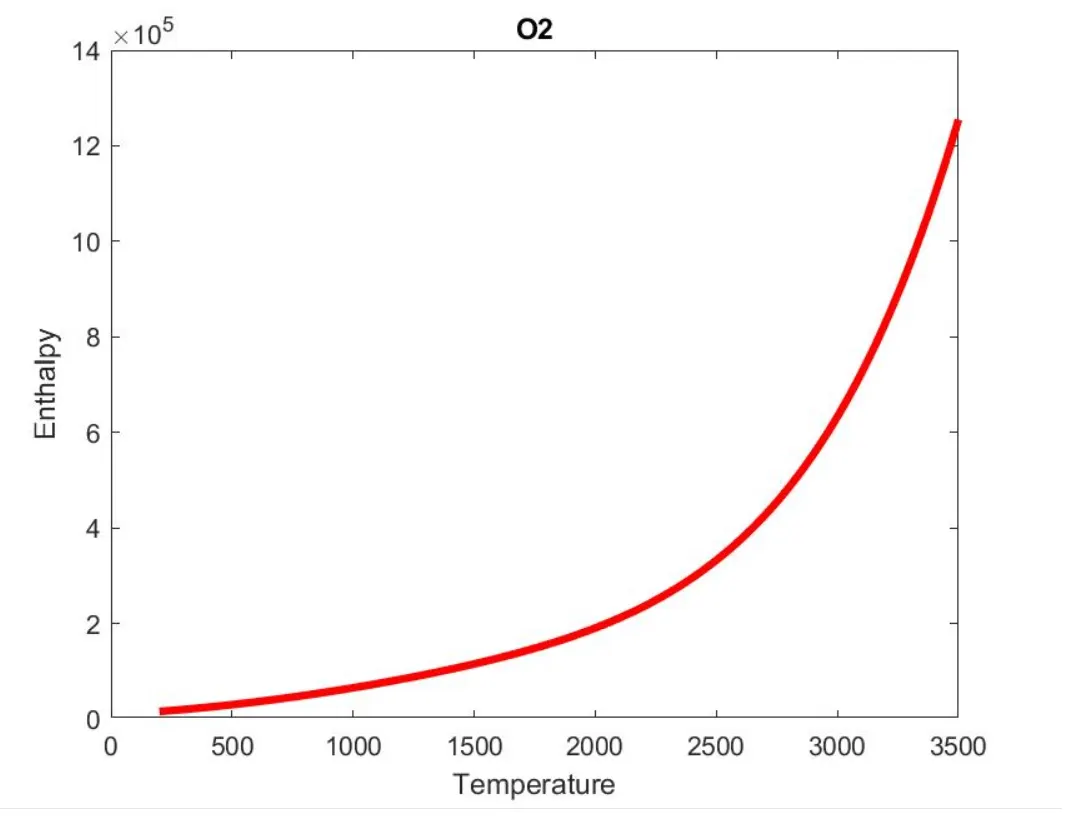
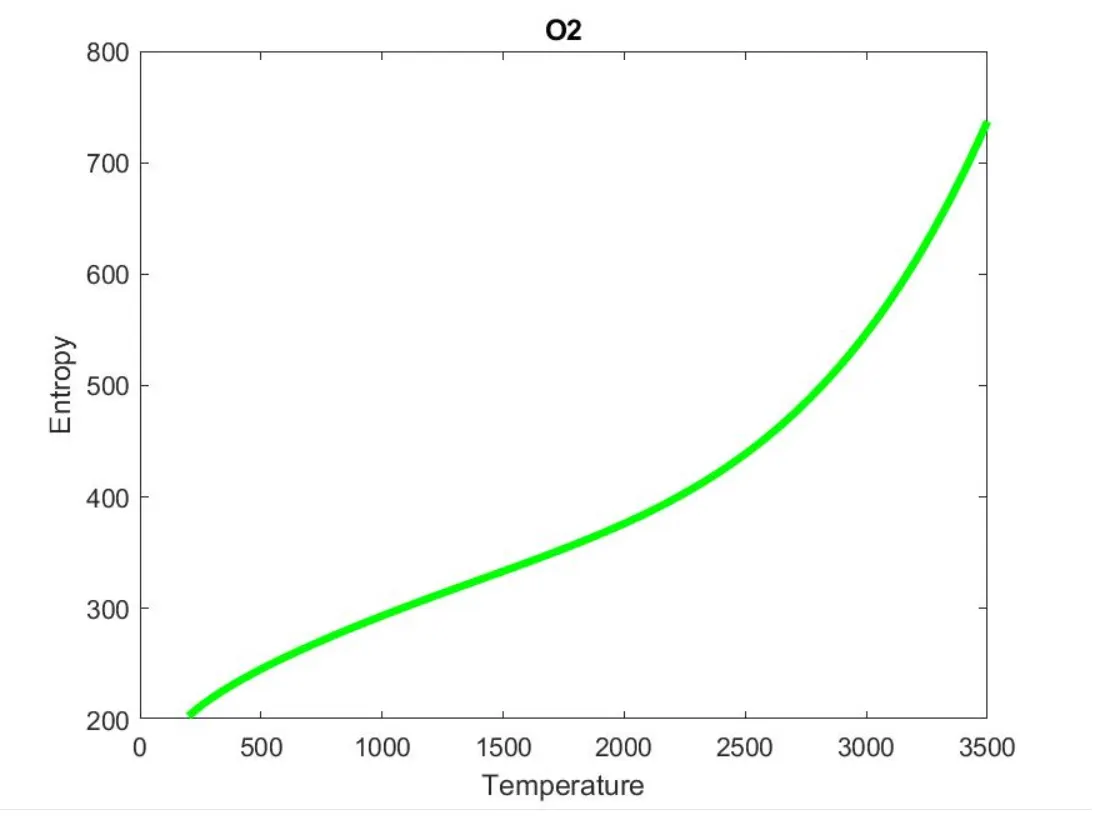
Plots for N2:
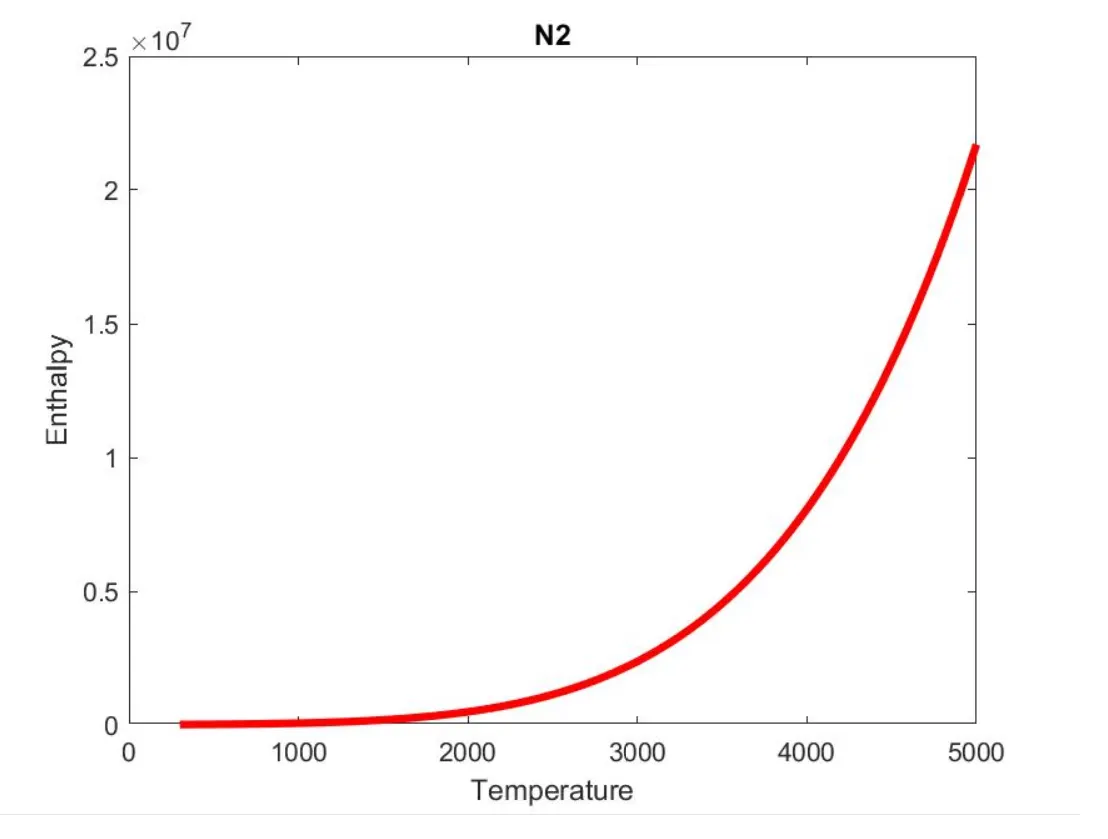
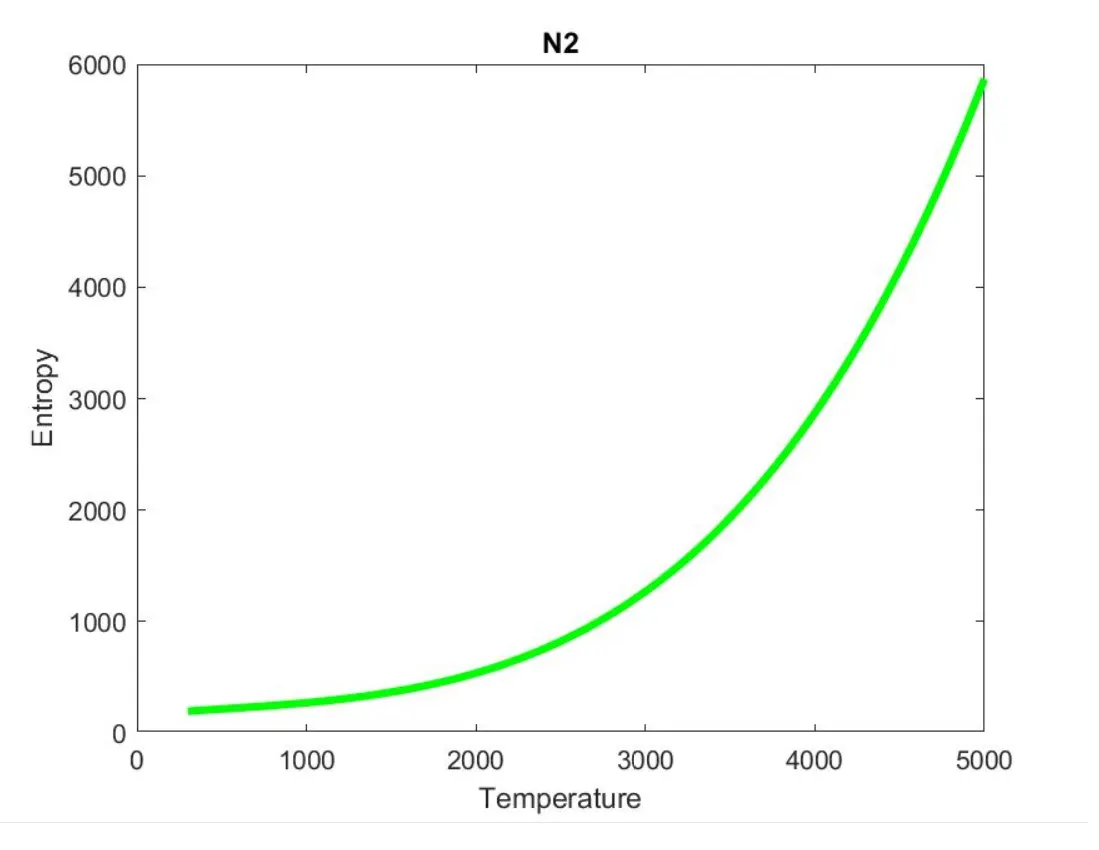
Plots for C02:
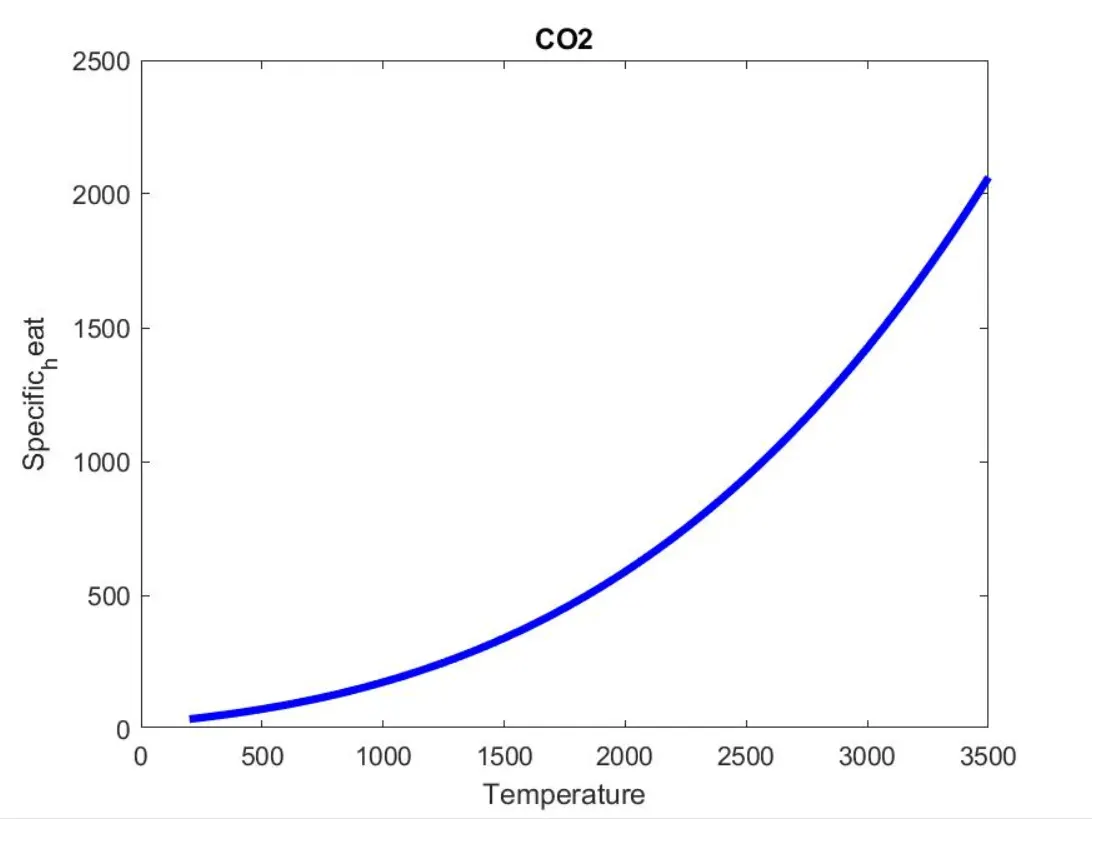
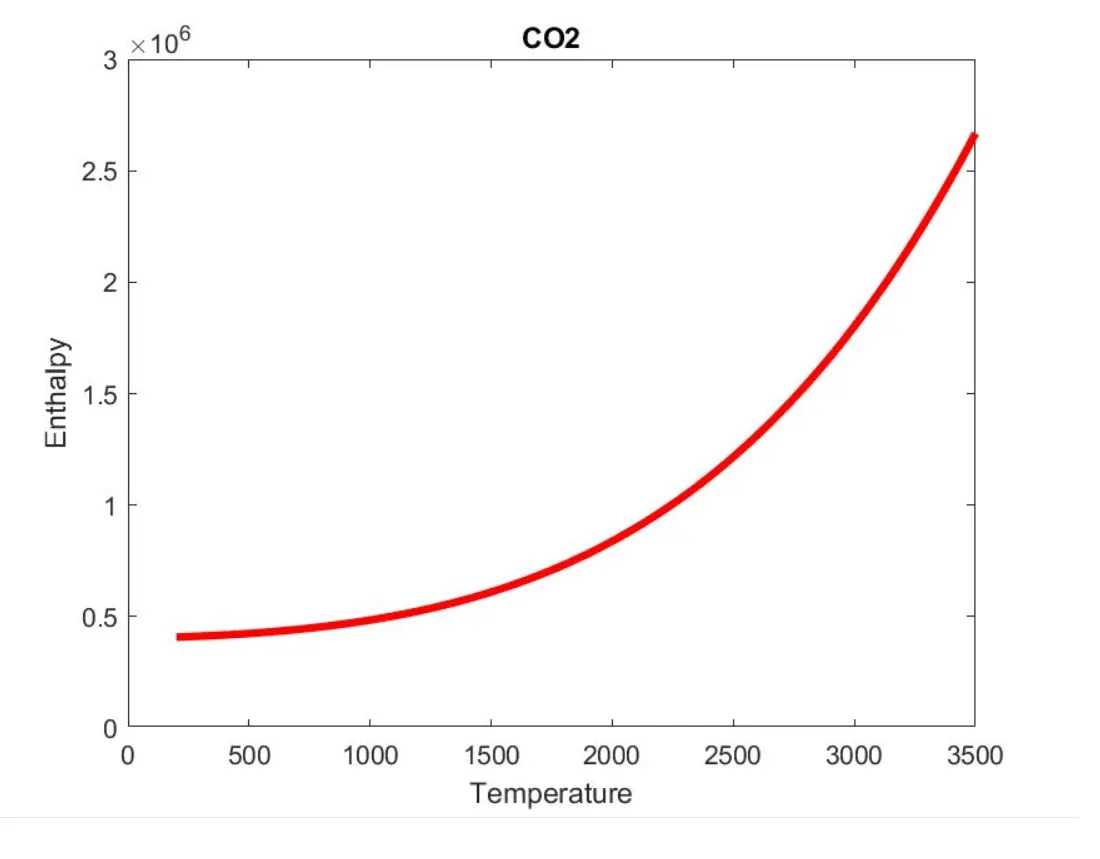
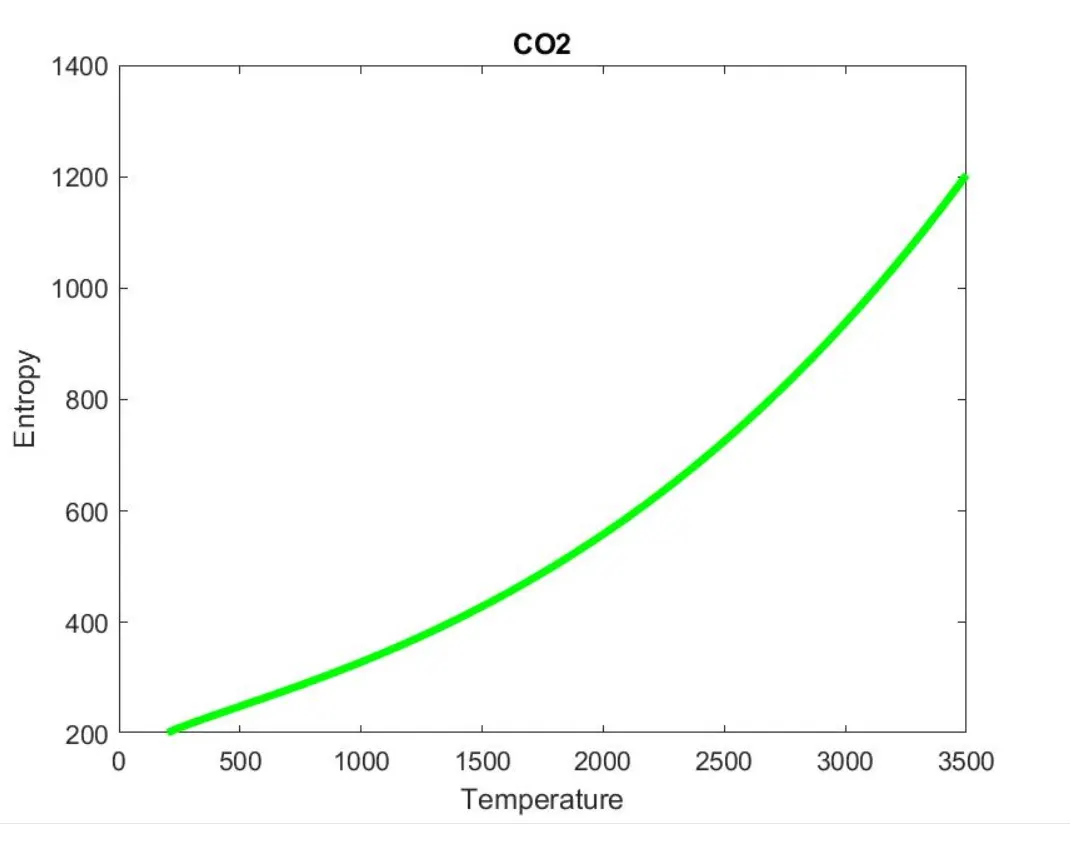
Plots are saved as images with appropriate names and dump them in seperate folders for each species with suitable name.
Screen shot of the window where all the folders are saved:
Molecular weight in the command window:
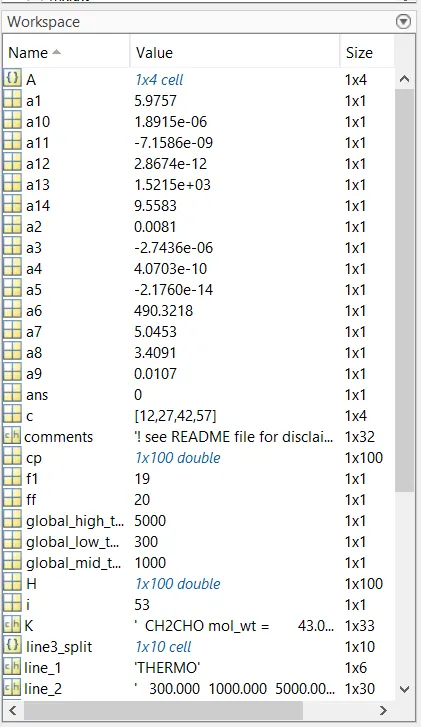
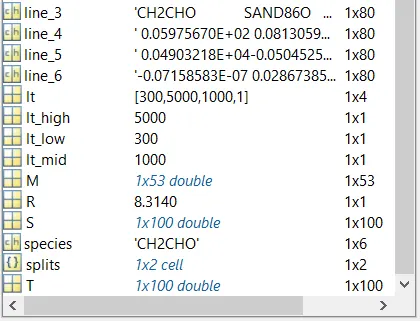
Workspace:
Error found while execute the program:
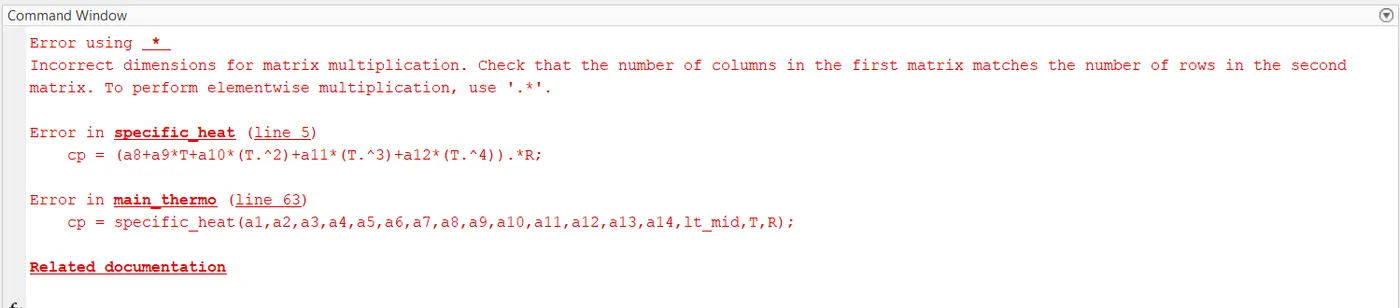
With the help of mathworks.com, the syntax error was fixed and after the program was executed smoothly.
Result:
Thus the file parsing of Nasa thermodynamic data has been obtained, and with MATLAB, Enthalpy, Entropy, Specific heat and molecular weights are calculated and plotted.
Addition to that, the overall process of parsing was understood.