NASA Thermodynamic data file parsing for calculating the Specific heat, Enthalpy and Entropy.
Aim: - To do the file parsing for the NASA thermodynamic data file, and to plot the Specific heat, Enthalpy, and Entropy of the given species.
Objective: -
- To write a MATLAB code to extract the 14 coefficient from the given file and calculate the Enthalpy, Entropy, and specific Heat of the 53 species.
- To plot the Cp, H, and S against the temperature for all the 53 species.
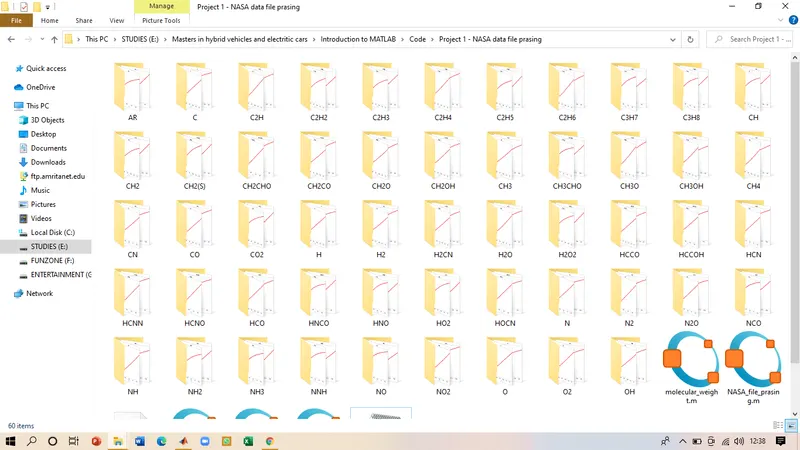
- To save the plots of Cp, H, and S in their respective folders in the set directory.
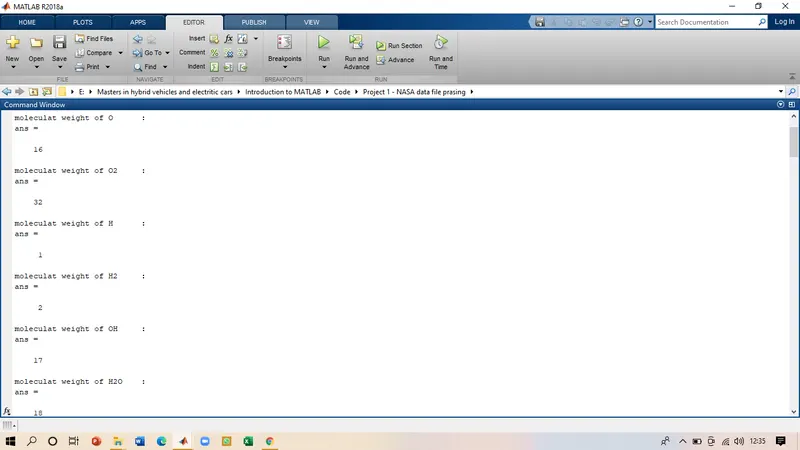
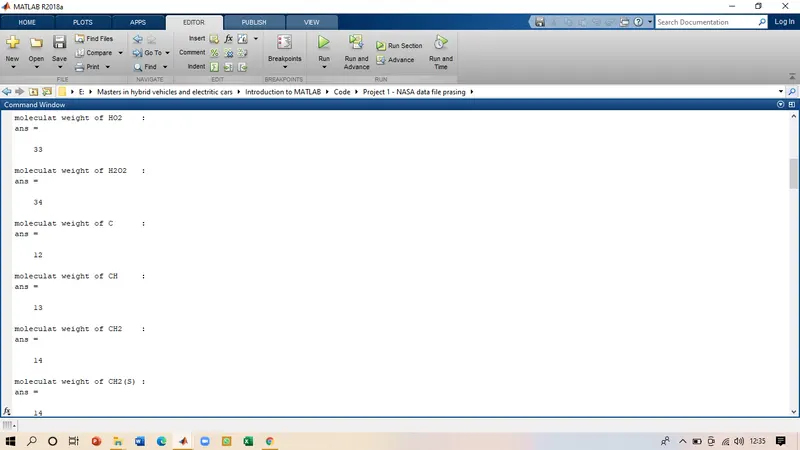
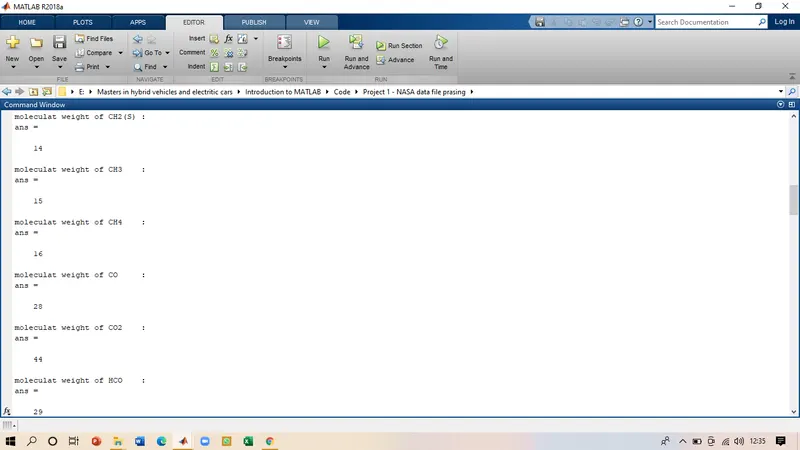
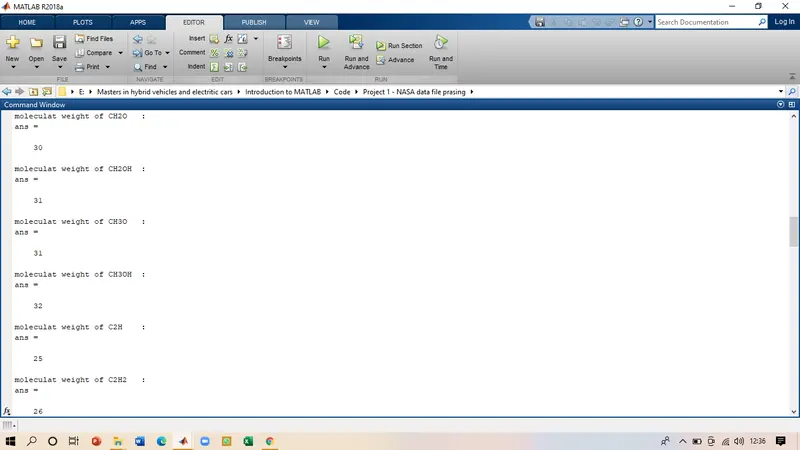
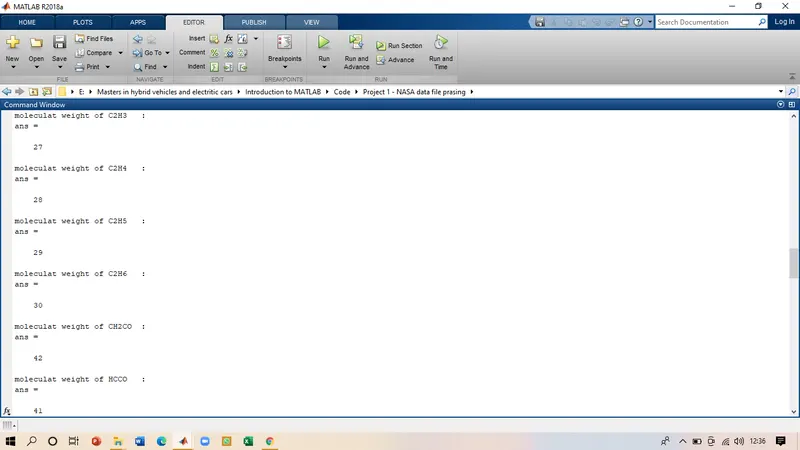
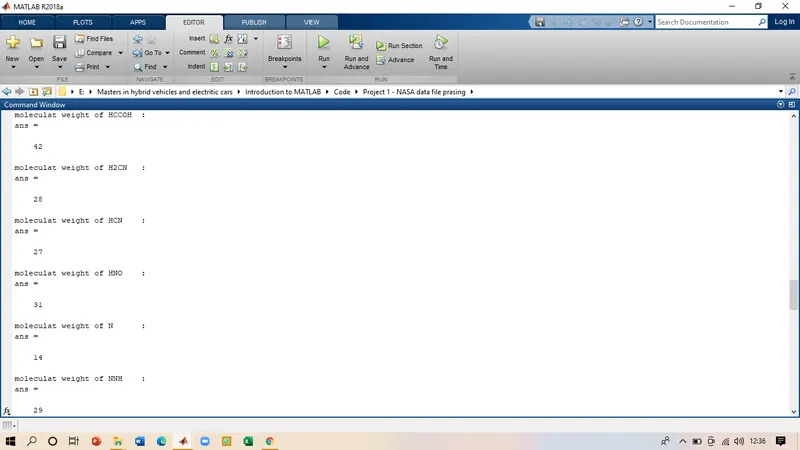
- To calculate the molecular weight for all the species and display it in the command window.
Introduction: -
File parsing is the method by which we can use external source data like some files, data sources, program instructions, etc. This data is broken down into smaller parts so that it can be more easily interpreted and sent to the computer for easy calculations.
For our project, we will be parsing the NASA thermodynamic data file which contains the temperature coefficient for the 53 different species. Those coefficients can be used to calculate the Specific heat, entropy, and enthalpy of the respective species. Later to plot those calculated properties against temperature. We then will be using the same file for calculating the molecular weight of the species which will be displayed in the command window.
For calculating the Cp, H, and S the formulas are
`(Cp)/R = a_1 +a_2.T+a_3.T^2+a_4.T^3+a_5.T^4`
`(S)/R = a_1.lnT+a_2+(a_3T^2)/2+(a_4T^3)/3+(a_5T^4)/4+a_7`
`(H)/(RT) = a_1+(a_2T)/2+(a_3T^2)/3+(a_4T^3)/4+(a_5T^4)/5+(a_6)/T`
Where
R = gas constant
T = temperatue
a1,a2,..... = Temperature coefficient
Code: -
clear all
close all
clc

%reading and opeing the file
thermfile = fopen ('THERMO.dat','r');
fgetl(thermfile);

%global temperature
temp_line = fgetl(thermfile);
T = strsplit(temp_line,' ');

%strings to number
temp1 = str2num(T{2});
temp2 = str2num(T{3});
temp3 = str2num(T{4});

%to display the global temp
head = 'Global Temperature values are:';
fprintf('%s',head);
disp(temp1);
disp(temp2);
disp(temp3);

%next 3 lines are not required
fgetl(thermfile);
fgetl(thermfile);
fgetl(thermfile);

%to read the coefficient of each species
for i = 1:53
    species = fgetl(thermfile);  % reading first line
    species_name = species(1:6);

    %finding local temp
    x = strsplit(species,' ');
    z = length(x);

    %storing the temp value as number
    T1 = str2double(x{z-3});
       T2 = str2double(x{z-2});
          T3 = str2double(x{z-1});

          %local temperature
          Local_low_temp = T1;
          Local_high_temp = T2;
          Local_mid_temp = T3;

          %reading the lines to extract coefficient
          line2 = fgetl(thermfile);       %reading the second line
          l2 = strfind(line2,'E');   %finding the position of the E
          a1 = str2num(line2(1:(l2(1)+3)));
          a2 = str2num(line2((l2(1)+4):(l2(2)+3)));
          a3 = str2num(line2((l2(2)+4):(l2(3)+3)));
          a4 = str2num(line2((l2(3)+4):(l2(4)+3)));
          a5 = str2num(line2((l2(4)+4):(l2(5)+3)));

          line3 = fgetl(thermfile);               %reading the third line
          l3 = strfind(line3,'E');
          a6 = str2num(line3(1:(l3(1)+3)));
          a7 = str2num(line3((l3(1)+4):(l3(2)+3)));
          a8 = str2num(line3((l3(2)+4):(l3(3)+3)));
          a9 = str2num(line3((l3(3)+4):(l3(4)+3)));
          a10 = str2num(line3((l3(4)+4):(l3(5)+3)));

          line4 = fgetl(thermfile);                   %reading the fourth line
          l4 = strfind(line4,'E');
          a11 = str2num(line4(1:(l4(1)+3)));
          a12 = str2num(line4((l4(1)+4):(l4(2)+3)));
          a13 = str2num(line4((l4(2)+4):(l4(3)+3)));
          a14 = str2num(line4((l4(3)+4):(l4(4)+3)));

          %temperature for caculation
          t = linspace(Local_low_temp,Local_high_temp,100);
%value of universal gas constant
R = 8.314;

%calculating the values of cp,H & S
 for k = 1:length(t)
     if t(k)>=Local_mid_temp
      Cp =(a1+a2.*t+a3.*t.^2+a4.*t.^3+a5.*t.^4).*R;
      H = (a1+(a2.*t)./2+(a3.*t.^2)/3+(a4.*t.^3)/4+(a5.*t.^4)/5+a6./t).*t.*R;
      S = (a1*log(t)+a2.*t+(a3.*t.^2)/2+(a4.*t.^3)/3+(a5.*t.^4)/4+a7).*R;
     else
      Cp = (a8+a9.*t+a10.*t.^2+a11.*t.^3+a12.*t.^4).*R;
      H = (a8+(a9.*t)./2+(a10.*t.^2)/3+(a11.*t.^3)/4+(a12.*t.^4)/5+a13./t).*t.*R;
      S = (a8*log(t)+a9.*t+(a10.*t.^2)/2+(a11.*t.^3)/3+(a12.*t.^4)/4+a14).*R;
     end
 end

 mkdir(species_name);               %creating the directory to save plots
 cd(species_name);                    %saving the plots in the current folder as per species names

 %Plotting the graphs

 %temperature vs Specific heat
 %specific heat
figure(1)
plot(t,Cp,'linewidth',3,'color','r');
xlabel ('Temp')
ylabel ('specific heat')
title(species_name)

%for enthalpy
figure(2)
plot(t,H,'linewidth',3,'color','r');
xlabel ('Temp')
ylabel ('Enthalpy')
title(species_name)

%for entropy
figure(3)
plot(t,S,'linewidth',3,'color','r');
xlabel ('Temp')
ylabel ('Entropy')
title(species_name)

%saving the files
saveas(figure(1),'Specific heat.jpg')
saveas(figure(2),'Enthalpy.jpg')
saveas(figure(3),'Entropy heat.jpg')
cd ..

%displaying molecular weigth
 fprintf('moleculat weight of %s : %f ',species_name)
molecular_weight(species_name)                 %calling the function

end
Explanation: -
Step I
clear all
close all
clc

%reading and opeing the file
thermfile = fopen ('THERMO.dat','r');
fgetl(thermfile);
The program starts with the normal commands for clearing out the windows. Then the 'THERMO.DAT' file was opened using the fopen command and as we just have to read the file the 'r' is used for reading the data in the file. This file was stored in the name thermfile which will help us to write the further program. The important instruction is that the file and the code in which the file is used should be in the same folder. By using the command fgetl we will be excessing the information in the file and will be using it for our calculations.
Step II
%global temperature
temp_line = fgetl(thermfile);
T = strsplit(temp_line,' ');

%strings to number
temp1 = str2num(T{2});
temp2 = str2num(T{3});
temp3 = str2num(T{4});

%to display the global temp
head = 'Global Temperature values are:';
fprintf('%s',head);
disp(temp1);
disp(temp2);
disp(temp3);
The next is to read the global temperatures that are mentioned in the data file. 'temp_line' is used to allocate the second line in the file. The global temperature is extracted just for presentation purposes. T is the variable assigned temperature, but there is a space in those numbers so strsplit is used to take care of the empty space. The data that is read is string for we need to convert it into the character to use for our program, hence str2num is used to convert the string to a number. Finally, we will be displaying the global temperature values that are read from the file.
Step III
%next 3 lines are not required
fgetl(thermfile);
fgetl(thermfile);
fgetl(thermfile);
The next three lines in the file are just descriptions of the data, so we need to skip those lines by using the simple fgetl command.
Step IV
%to read the coefficient of each species
for i = 1:53
    species = fgetl(thermfile);  % reading first line
    species_name = species(1:6);

    %finding local temp
    x = strsplit(species,' ');
    z = length(x);

    %storing the temp value as number
    T1 = str2double(x{z-3});
    T2 = str2double(x{z-2});
    T3 = str2double(x{z-1});

    %local temperature
    Local_low_temp = T1;
    Local_high_temp = T2;
    Local_mid_temp = T3;
Initially, the for loop was started using the variable 'i' for all the 53 species. Next was to identify the species name, hence the line was given the name 'species', and fgetl was used to read this line, now all the species names are represented by the common command species. To extract the data from the line 'species_name' was used to read the letters and it got stored in the same name 'species-name'. As there are not more than 6 letters in the name of the species hence 1:6.
The next is to find the positions of the local temperature. 'x' os use to identify the line that is in which the temperatures are present, strsplit is to remove the space in between as the temperatures are in the same line as the species, hence 'species' is used, 'z' is used to read the complete length of the 'x' foe the temperatures values.
T1, T2, T3 are used to assign the values for the local low, high, and mid-temperature. To read the numerical values in the line accurately the str2double is used for the length of the line 'x' represented by 'z', z-1,z-2,z-3 represent the position of the three temperatures. later these temperatures are assigned to their respective variables.
Step - V
%reading the lines to extract coefficient
          line2 = fgetl(thermfile);       %reading the second line
          l2 = strfind(line2,'E');   %finding the position of the E
          a1 = str2num(line2(1:(l2(1)+3)));
          a2 = str2num(line2((l2(1)+4):(l2(2)+3)));
          a3 = str2num(line2((l2(2)+4):(l2(3)+3)));
          a4 = str2num(line2((l2(3)+4):(l2(4)+3)));
          a5 = str2num(line2((l2(4)+4):(l2(5)+3)));

          line3 = fgetl(thermfile);               %reading the third line
          l3 = strfind(line3,'E');
          a6 = str2num(line3(1:(l3(1)+3)));
          a7 = str2num(line3((l3(1)+4):(l3(2)+3)));
          a8 = str2num(line3((l3(2)+4):(l3(3)+3)));
          a9 = str2num(line3((l3(3)+4):(l3(4)+3)));
          a10 = str2num(line3((l3(4)+4):(l3(5)+3)));

          line4 = fgetl(thermfile);                   %reading the fourth line
          l4 = strfind(line4,'E');
          a11 = str2num(line4(1:(l4(1)+3)));
          a12 = str2num(line4((l4(1)+4):(l4(2)+3)));
          a13 = str2num(line4((l4(2)+4):(l4(3)+3)));
          a14 = str2num(line4((l4(3)+4):(l4(4)+3)));
The next is to extract the 14 coefficients from the data file, we will be calling each line by using the fgetl command. To make the work easier we will be locating the position of 'E' in the file by using the strfind command, based on the location it will be easy to read the coefficients in the file. The name of the second line is 'line 2' and the location of 'E' is stored in the variable 'l2'. The first coefficient is located using the str2double command in line 2 from 1 to (l2(1)+3) i.e till the 3 space from the first 'E' is located the first coefficient ends. Keeping this in mind the second coefficient location will be (l2(1)+4) to (l2(2)+3), using the same logic we will be reading all the coefficients in the data file. There is a total of 14 coefficient From a1 to a14 the second line have total 5 coefficients, the third line will be having next 5 coefficient and the last line will be having 4 coefficients. As the procedure used for the second line will be the same used from the third and fourth line also.
Step - VI
 %temperature for caculation
          t = linspace(Local_low_temp,Local_high_temp,100);
%value of universal gas constant
R = 8.314;

%calculating the values of cp,H & S
 for k = 1:length(t)
     if t(k)>=Local_mid_temp
      Cp =(a1+a2.*t+a3.*t.^2+a4.*t.^3+a5.*t.^4).*R;
      H = (a1+(a2.*t)./2+(a3.*t.^2)/3+(a4.*t.^3)/4+(a5.*t.^4)/5+a6./t).*t.*R;
      S = (a1*log(t)+a2.*t+(a3.*t.^2)/2+(a4.*t.^3)/3+(a5.*t.^4)/4+a7).*R;
     else
      Cp = (a8+a9.*t+a10.*t.^2+a11.*t.^3+a12.*t.^4).*R;
      H = (a8+(a9.*t)./2+(a10.*t.^2)/3+(a11.*t.^3)/4+(a12.*t.^4)/5+a13./t).*t.*R;
      S = (a8*log(t)+a9.*t+(a10.*t.^2)/2+(a11.*t.^3)/3+(a12.*t.^4)/4+a14).*R;
     end
 end
After extracting the coefficients the next step is to calculate the values of the Cp, H, S. For that first we need to divide the temperature value from lower to higher in 100 equal parts using the linspace command. R is the universal gas constant that will be used for the calculations. The first 'for' loop with the assigned variable k will run for the length of the temperature array, we have used the 'if' condition for splitting the coefficients into the higher temperature and lower temperature respectively. The equations that are used for the calculation are mentioned in the theory part. Using this part of the code we can calculate the Cp, H, and S of the species.
Step - VII
mkdir(species_name);               %creating the directory to save plots
 cd(species_name);                    %saving the plots in the current folder as per species names

 %Plotting the graphs

 %temperature vs Specific heat
 %specific heat
figure(1)
plot(t,Cp,'linewidth',3,'color','r');
xlabel ('Temp')
ylabel ('specific heat')
title(species_name)

%for enthalpy
figure(2)
plot(t,H,'linewidth',3,'color','r');
xlabel ('Temp')
ylabel ('Enthalpy')
title(species_name)

%for entropy
figure(3)
plot(t,S,'linewidth',3,'color','r');
xlabel ('Temp')
ylabel ('Entropy')
title(species_name)

%saving the files
saveas(figure(1),'Specific heat.jpg')
saveas(figure(2),'Enthalpy.jpg')
saveas(figure(3),'Entropy heat.jpg')
cd ..
Once the values are being calculated the next step is to make 3 different plots temperature VS specific heat, temperature VS Enthalpy, temperature VS Entropy. Before plotting the three graphs we will first make a directory where these graphs will be saved. To do that we will be using the simple 'mkdir' command to make the folder with the name of each species and the graphs will be saved in that respective folder. Then 'cd' is used to save the folder in the current directory with the species name. After this, the plot command was used for plotting the values of specific heat, enthalpy, entropy. xlabel and ylabel are used for naming the axis and the title was given as the species name. These graphs are saved as images in the directory that we created. the 'cd..' command was used to show that it was one level upper to the current folder we are saving the graphs in.
- The next step is to calculate the molecular weight of all the species. For doing that effectively we have written a function program for the calculation of the weight and we will be just calling the function in our main code
Function Code for molecular weight: -
%calculating the molecular weight
function Molecular_weight = molecular_weight(species_name)
Atoms = {'H';'C';'N';'O';'A'};               %main atoms
Atomic_weight = [1 12 14 16 40];             %atomic weight of main atoms
Molecular_weight = 0;
k = split(species_name,'');

for m = 1:length(species_name)
    for n = 1:(length(Atoms))
        if k{m+1}==Atoms{n}
            Molecular_weight = Molecular_weight+Atomic_weight(n);
            y=n;
        end
    end
    n = str2num(k{m+1});
    if n>1
        Molecular_weight = Molecular_weight+Atomic_weight(y)*(n-1);
    end
end
end- The first step is to write the function that we are about to create with the input as the species name.
- As we have 53 different species the base atoms of these species are mentioned in an array called 'atoms', these basic atoms make all the elements in the species. in the next array the atomic weight of the atoms respectively.
- Initially, the molecular weight was considered as zero, k is defined to analyze each species and to calculate the molecular weight of the species. The first 'for' loop was initiate where m will be calculating the species and n was used to compare those species with the base atoms.
- An if condition was initiated that if the number of atoms in the species is equal to the base atoms then the formula for calculating the molecular weight will be "molecular weight +atomic weight". Then we will be allocating the y=n to find those elements in the species.
- A second 'if' condition was applied for the elements where the atoms are repeating themselves i.e. n>1 then the molecular weight was calculated by the second formula that is shown in the code.
- At the last, all the loops were ended, and the function was created.
Step - VIII
%displaying molecular weigth
 fprintf('moleculat weight of %s : %f ',species_name)
molecular_weight(species_name)                 %calling the function
After the function is been written the last step in our main code is to call the molecular weight function and to print the values in the command window.
Output: -
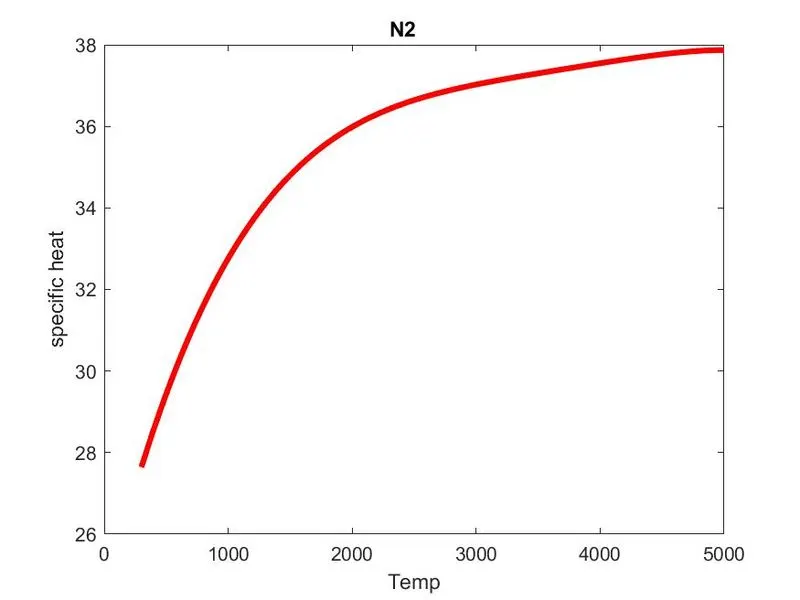
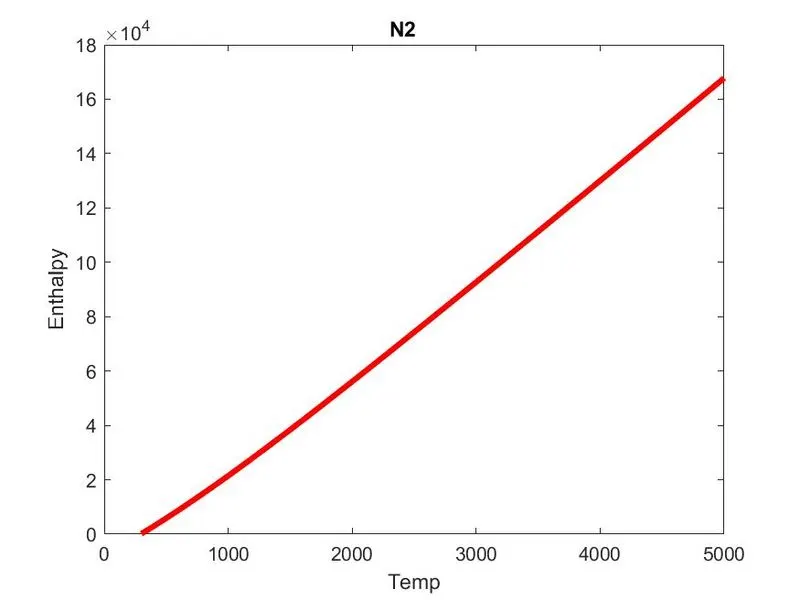
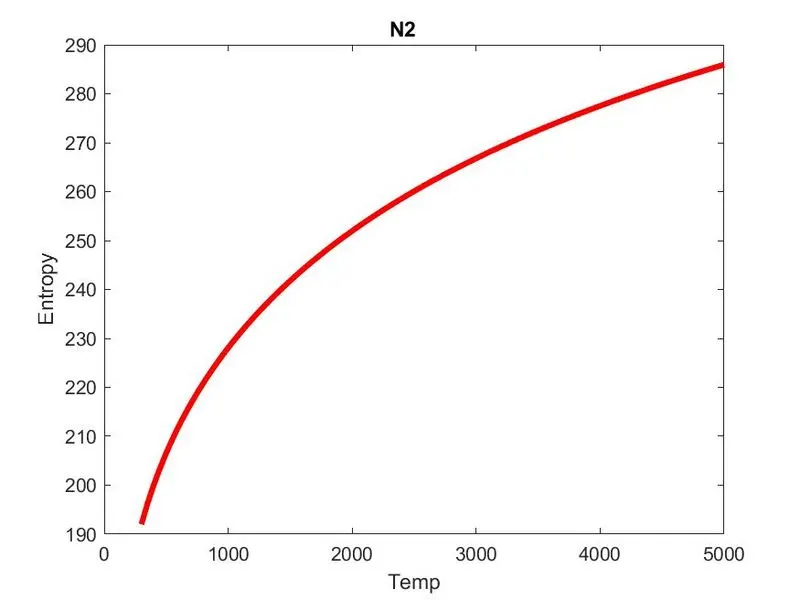
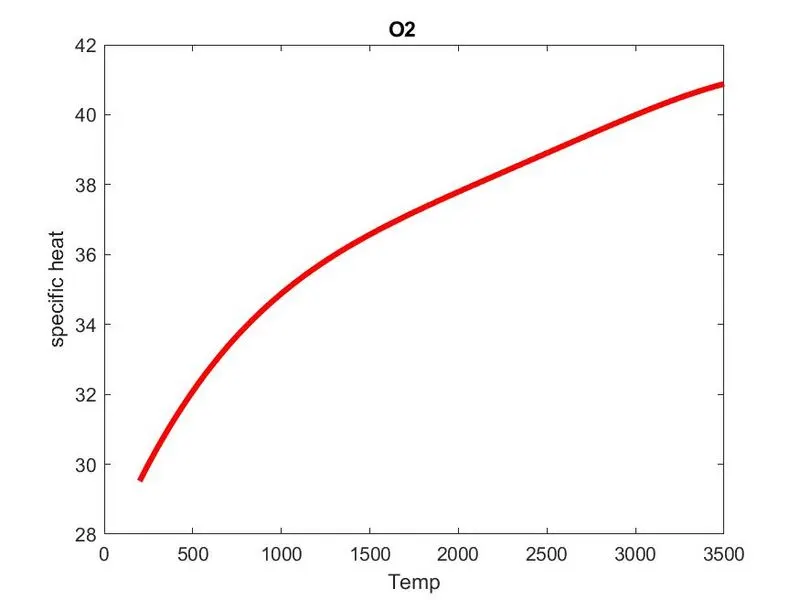
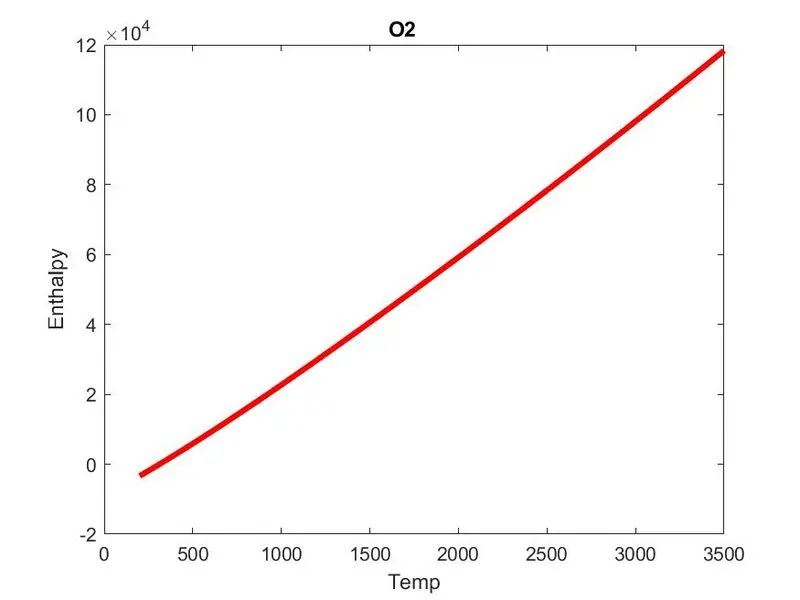
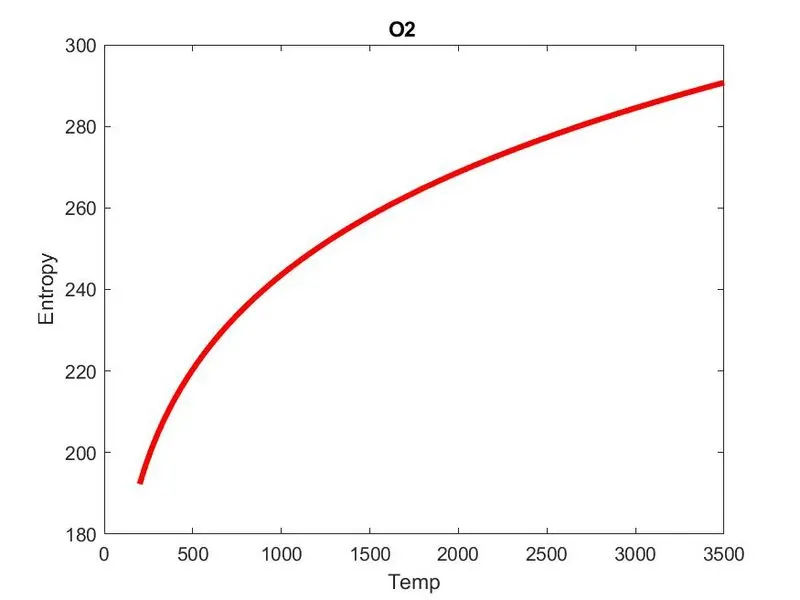
Graphs for `O_2,N_2 and Co_2` are shown below
Graphs for `Co_2`
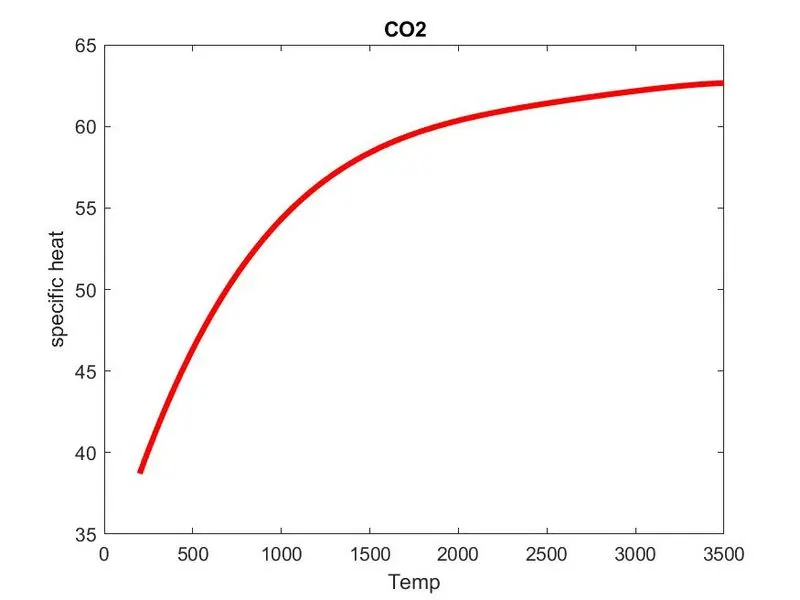
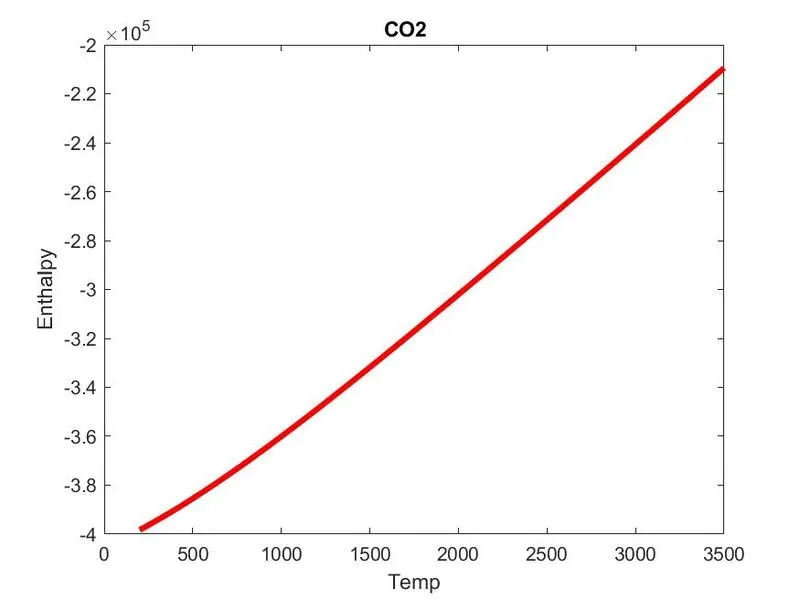
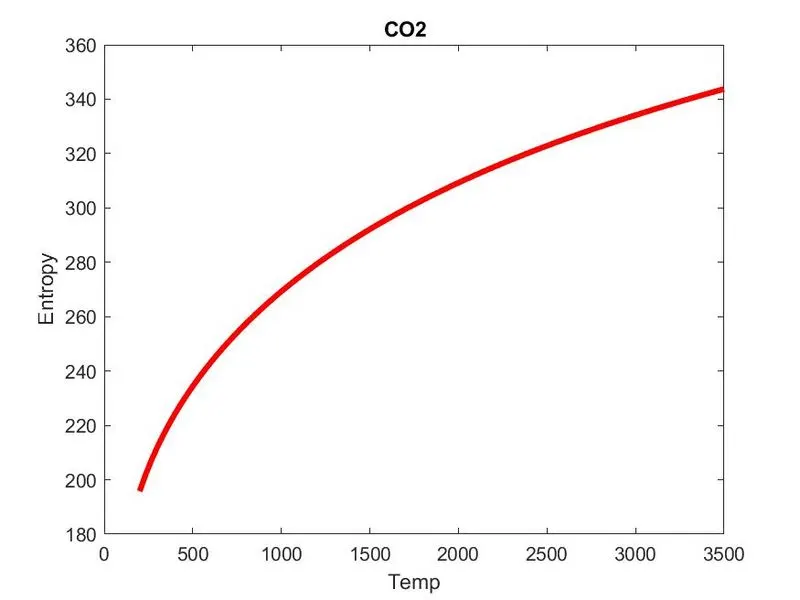
graph for `N_2`
Graph of `O_2`
Folders saved in the current directory
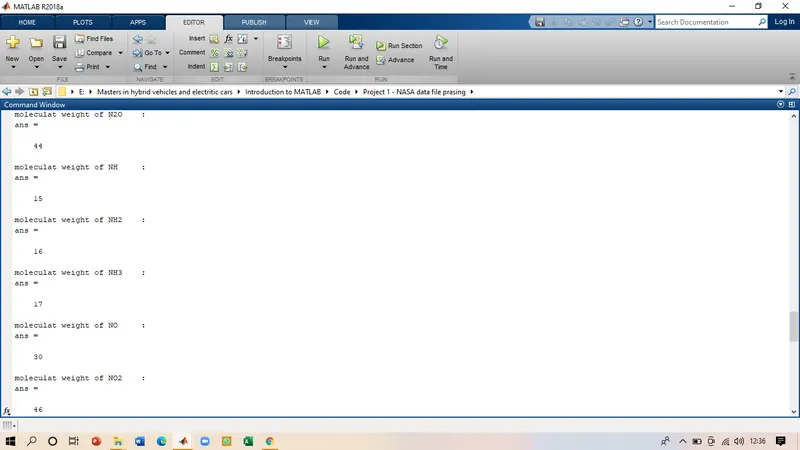
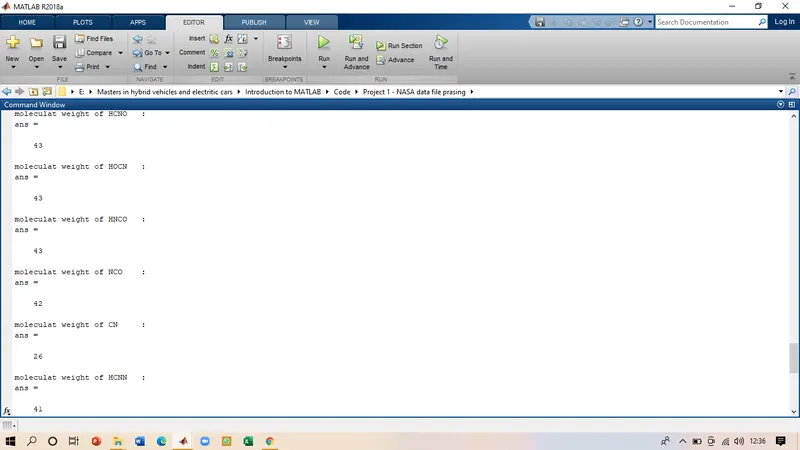
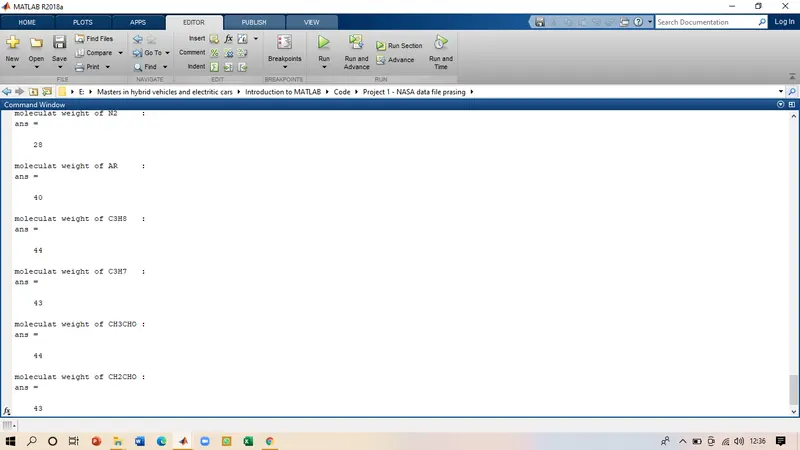
The molecular weight of the species.
observation: -
- As we can see the code has calculated the values for the specific heat, Enthalpy, and entropy for all the 53 species in the data file even the plots are also plots accordingly and stored in the respective folders.
- The enthalpy is a linear positive slope because enthalpy is a thermodynamic quantity that increases with the increase in temperature.
- The molecular weight for all the species is also calculated and was displayed in the command window.
Error: -
The one error which was seen in the coating was getting blank plots with nothing on it.
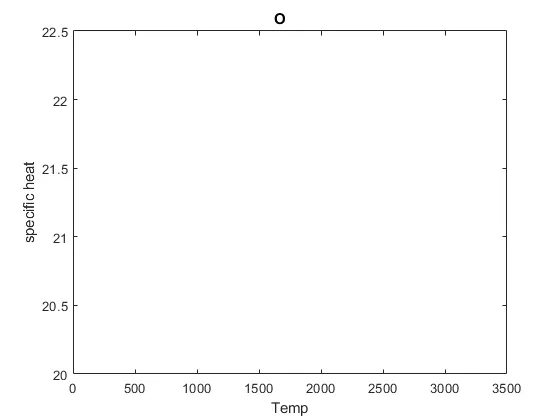
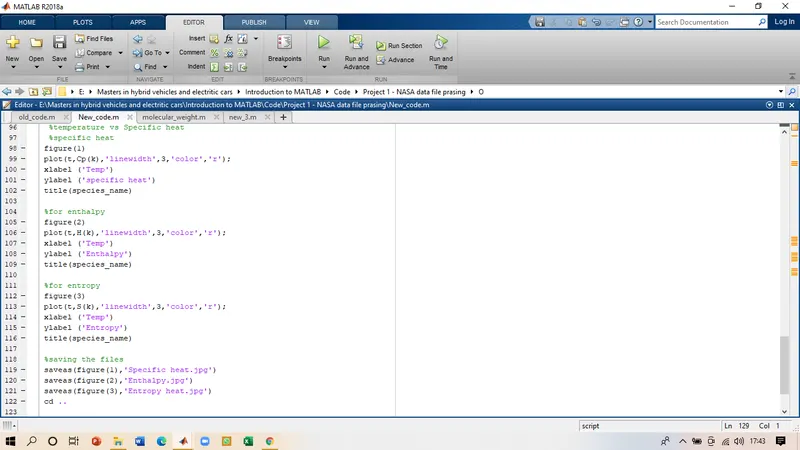
- The error was caused because of using the wrong variable in the plot command, in the main code for calculating the Cp, H, and S values we will be using the Cp(k) variable to save the values. But for plotting, I used the same to the plot, which actually confused the plot for considering the 'k' as the variable used in the for a loop. This was solved by removing the 'k' from the plot command and we got the plot.
- These were other small errors which were just typing errors, which were solved by replacing them with the right character.
Conclusion: -
In the end, we can conclude that the code is able to do a proper file parsing of the NASA data file and calculated the values and plotting them. Storing each species graphs in the respective folders. Also calculating the molecular weight for all the species in the file and displaying them in the command window.