forword kinematics of a 2R robotics arm using MATLAB-project-skill lync
- Aim :
The aim of the project is to simulate the forward kinematics of a 2R Robotic Arm.
- OBJECTIVE:
The robot consists of two arms(2R).The arm of the robot is in kinematic state which is about to move around an angle of 0degrees to 180degrees.
- Governing equations
- Position of link 1 is calculated by using 2 end Coordinates i.e. at base & end link 1
(x0,y0) = (0,0)
(x1,y1) = (l1*cos(θ1), l1*sin(θ1))
- Position of link 2 is calculated by using the arm manipulator end using
(x2,y2) = (x1 + l2*cos(θ2), y1 + l2*sin(θ2))
- Theory :
A robotic arm is a type of mechanical arm, usually programmable. The arm may be the sum total of the mechanism or may be part of a more complex robot. The links of such a manipulator are connected by joints allowing either rotational motion or translational (linear) displacement. The links of the manipulator can be considered to form a kinematic chain. The terminus of the kinematic chain of the manipulator is called the end effector. An end effector is the device at the end of a robotic arm, designed to interact with the environment.
The kinematic analysis is the relationships between the positions, velocities, and accelerations of the links of a manipulator. The kinematics separate in two types, direct kinematics and inverse kinemtics.
In forward kinematics, the length of each link and the angle of each joint is
given and we have to calculate the position of any point in the work volume of the
robot.
- DESCRIPTION OF THE PROGRAM:
first inputs parameter are define which has length of both links and angles of both the links where theta1 and theta 2 has 10 values between 0 and 90 and linespace function was used to divided it into 10 period and saved into theta 1 and theta 2 arrays since we have different set of angles and used each one simultaneosly we used for loop where first for loop is for getting values using first angle and second for loop is to get values form the second loop thenl determined the position of links by considering its co-ordinates as per manipulator . there are two links . The first link consists of starting co ordinates and ending co-ordinatres .the starting point of link 1 is fixed to the origin and its coordinates are x0 = 0 ; y0 = 0 and the ending coordinates of link 1 are x1 = l1*cosd( theta1) ; y1 = l1*sind(theta1) the ending coordinates of link 1 is the starting coordinates of link 2 thereforethe starting coordinates of link 2 are (x1, y1) and the ending coordinates of link 2 are x2 = x1 + l2*cosd(theta2) ; y2 = y1 + l2*sind(theta2).
Now plot command is used for plotting the lines of the coordinates in order to get plot then for getthing individual an array M is embedded M(ct) = getframes(gcf) Where gcf means 'get current window '
To generate a movie with all frames movie comand is used .further videofile = VideoWriter('forward_kinematics.avi','Uncompressed AVI'); is used for creating a video.
MATLAB CODE
%forward kinematics of 2R robotic arm manipulator
clear all
close all
clc
%inputs
l1 = 1;
l2 = 0.5;
theta1 = linspace(0,90,10);
theta2 = linspace(0,90,10);
%for loop
ct=1;
%counter
for i = 1:length(theta1);
    THETA1 = theta1(i);
    for j=1: length(theta2)
        THETA2 = theta2(j);
 % coordinates

 x0= 0;
 y0 =0;

 x1 = l1*cosd(THETA1);
 y1 = l1*sind(THETA1);

 x2 = x1 + 12*cosd(THETA2);
 y2 = y1 + 12*sind(THETA2);

 %plotting

 plot([x0 x1],[y0 y1],[x1 x2],[y1 y2],'linewidth',3)
 axis([-0.1 1.5 0 1.5])
 pause(0.03)
 M(ct) = getframe(gcf);
 ct = ct+1;


   end
end

movie(M)
videofile = VideoWriter('forward_kinematics.avi','Uncompressed AVI');
open(videofile)
writeVideo(videofile,M)
close(videofile)
- plot :
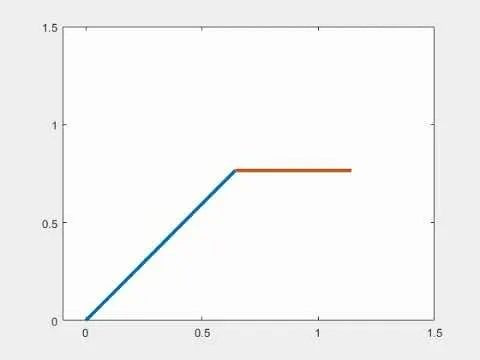
For the better understanding of the simulation please refer to the video link provided below
- CONCLUSION:
Thus simulation of the forward kinematics of a 2R Robotic Arm using matlab and animation are also done. We can observe the movement of link1 and link2 in the first quadrant.This can be usefull for understanding the workspace covered by two arm robotic systemWe can observe the movement of link1 and link2 in the first quadrant.This can be usefull for understanding the workspace covered by two arm robotic system