Forward Kinematics of 2R Robotic Arm
AIM - Write a program in Matlab to simulate the forward kinematics of a 2R Robotic Arm.
OBJECTIVE - Creating an animation file of the plot.
THEORY -
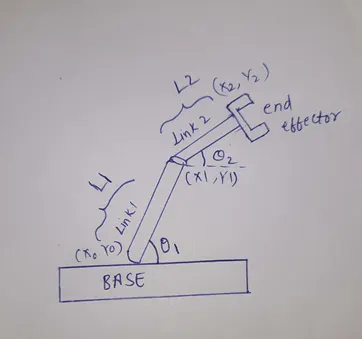
A robotic is a programmable mechanical arm which is similar to the function of human hand. It has various segments which closely resemble the shoulder, an elbow, and a wrist of a human arm. The end of the robotic arm is the " END EFFECTOR". It is designed to work with the environment in which the robotic arm is to be used. The function of the robotic arm is to move the end effector from one location to the other location based on the commands received by the computer. The possible locations that a robot can reach is termed as the " WORKSPACE".
In order to trace the location of the robot a set of equations are defined with help of the forward kinematics.
L1 is the length of the link 1 in metres.
L2 is the length of the link 2 in metres.
theta1 is the angle made by the link 1 with the base
theta2 is the angle made by the link2 with respect to the link 1.
ALGORITHM
STEP 1: Assign the fixed values of length of link1 and 2 as l1= 1, l2= 0.5 and also theta1 and theta2 with help of the linspace command
STEP 2: Set the initial value of the counter.
STEP 3: Loop the values of theta1 and theta2 until their respective lengths and save them in other variables let us say THETA1, THETA2. Since for every value of theta1 there exists multiple values of theta2 other loop is defined.
STEP 4: By using the forward kinematic equations plot the graph, X0=0 is the initial x co-ordinate for the link 1
Y0=0 is the initial y co-ordinate for the link 1.
X1=l1*cosd (THETA1) is the final X co-ordinate for the link 1 and initial x co-ordinate for the link 2.
Y1=l1*sind(THETA1) is the final y co-ordinate for the link 1 and initial y co-ordinate for the link 2.
X2= X1+l2*cosd(THETA2); final x co-ordinate for the link 2.
Y2=Y1+l1*sind(THETA2); final y co-ordinate for the link 2.
STEP 5: Introduce a pause and increment the value of the counter and for creating the movie get individual frames and save them in an array.
STEP 6: Create a videofile and write the video.
PROGRAM CODE
% Forward kinematics of the 2 R robotic arm

clear all

close all

clc

 % Fixed inputs

 l1=1; % length of the link 1 which is fixed to the base

 l2=0.5; % length of the link 2

 theta1= linspace(0,90,10); % angle made by link 1 with the base % For having multiple values of theta

 theta2= linspace(0,90,10); % angle made by the link 2

 ct=1; % setting the initial value of the counter.

 for i=1:length(theta1) % For looping different values of theta 1

     THETA1=theta1(i);

     for j=1:length(theta2) % For looping different values of theta 2 with respect to theta 1

     THETA2=theta2(j);

      X0=0; % initial x co-ordinate for the link 1

      Y0=0; % initial y co-ordinate for the link 1

      X1=l1*cosd(THETA1); % Final X co-ordinate for the link 1 and initial x co-ordinate for the link 2

      Y1=l1*sind(THETA1); % % Final y co-ordinate for the link 1 and initial y co-ordinate for the link 2

      X2= X1+l2*cosd(THETA2); % final x co-ordinate for the link 2

      Y2=Y1+l1*sind(THETA2);% final y co-ordinate for the link 2

     %plotting

     plot([X0 X1],[Y0 Y1],[X1 X2],[Y1 Y2],'linewidth',3) % For plotting the robotic arm on the axis and keeping the width of line as 3 units

     axis([-0.1 1.5 0 1.5]) % For maintaining the values in the axis

     pause(0.1) % for introducing the pause before moving the next plot

     M(ct)=getframe(gcf); % getting the individual frames and saving them in an array

     ct=ct+1; % for incrementing the counter

     end

 end

 movie(M) % to create a movie from the individual frames

 videofile= VideoWriter('forward_kinematics.avi','Uncompressed avi'); % creates a video file from the array and control its properties

 open(videofile)

 writeVideo(videofile,M) % writing the movie in the videofile.

 close(videofile)
ERRORS OCCURRED
- This is the first error occurred in the formula for determining X1 I forget to use the multiplication operator(*). Due to this l1cosd is considered as a variable.
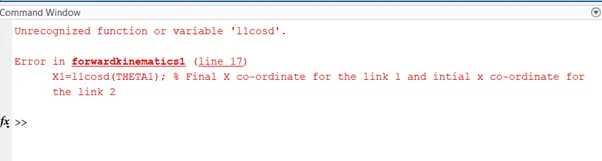
RECTIFYING THE ERROR
In between l1 and cosd I used the multiplication operator and hence the error is rectified.
- The array for saving the frames is taken as M. But here I used ‘m’ instead of the ‘M’.
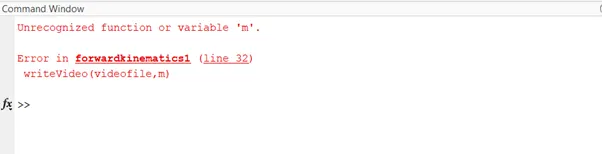
RECTIFYING THE ERROR
‘M’ is replaced in place of ‘m’.
RESULTS
Hence for every value of theta1, theta2 will vary multiple time(In our case 10 times).
https://drive.google.com/file/d/1pbk_jL4OesDio4MXVKehWZffa81ggefQ/view?usp=sharing.
CONCLUSION
Thus the Forward kinematics of a 2R ROBOTIC ARM is studied and an animation is made