Electric Rickshaw modelling
Target:-
To make an Electric 3 wheeler i.e., electric rickshaw
Objective:-
Create a detailed MATLAB model of an electric rickshaw (three-wheel passenger vehicle) as per the details below:
- Rear wheels driven by PM brushed type motor
- Assume efficiency points of motor controller and motor
- Make an excel sheet of all input and assumed data
Results: For any three standard driving cycles show energy consumption, the temperature rise of the motor and controller for 100 km constant speed driving at 45 kmph.
Theory:-
The vehicles which get their driving power source from a Battery are known as Pure Electric Vehicles. Whereas the vehicles that use 2 power sources such as Battery and IC Engine could also be called Hybrid Electric Vehicles. There are only a few vehicles in our country which come with the option of HEV such as Toyota Prius, Lexus LS 500h, BMW i8. From all these vehicles we have not seen higher demand as they have a higher initial range and the consumers in India usually fall to purchase the cars in the price bracket of 6 to 12 Lakhs and in that range they do not get an option to experience any Hybrid/Electric options.
Motors and Controls both account for the DC Drive.
I have used Brushless DC Motor, Simple Voltage Source, and PWM signal for the EV Drivetrain.
EV batteries undergo cycles of 'discharge' that occur when driving and 'charge' when the car's plugged in. Repeating this process over time affects the amount of charge the battery can hold. This decreases the range and time needed between each journey to charge.
Battery and electric motor working together is surprisingly simple – the battery connects to one or more electric motors, which drive the wheels. When you press the accelerator the car instantly feeds power to the motor, which gradually consumes the energy stored in the batteries. Electric motors also work as generators, so when you take your foot off the throttle the car begins to slow down by converting its forward motion back into electricity – this happens more strongly if you hit the brakes. This regenerative braking recovers energy that would otherwise be lost, storing it in the battery again and so improving the car's range.
Why EV?
There are majorly 5 reasons why one should opt for an EV
- Low Maintenance
- Eco Friendly
- Silent operation
- Low running cost
- Incentives from Government
Out of all these reasons the major which should be considered before deciding for vehicle purchase is that the initial cost for an EV might be higher but when the vehicle is used for subsequent years like 3-4 years the initial cost would surely be compensated as the fuel efficiency nearly falls at 1-2 Rs per km as the charging cost per kW in India ranges to Rs 7-15 which includes as Metro Cities and in this range if the vehicle is set at charging the vehicle usually delivers the efficiency of 6-7km per kW of charging. The battery has a life of nearly 10-12 years and then the batteries could be scrapped for a use of any low energy required resource. This in general is going to account for the overall smart purchase as currently, the government is also promoting the purchase of EVs at higher levels as the EV are the future. Dependency upon Fossil Fuels could not be considered for a long duration as we do not have an assurance for the cost to remain constant. Taking an example of our country the cost is booming at the highest peak and in the coming years, it might change as well. The journeys travelled in an EV are worth the ride as it electrifies all your journeys and gives you joy while driving.
Components used in an EV -
- Electric Traction Motor
- Cooling System
- Power Electronics Controller
- Auxiliary Battery
- Traction Battery Pack
- Transmission
- Converter
Together these components when merged with a usual vehicle gives us an EV. Many system-level variations have to be made and considered for the efficient operations of the vehicle. The vehicle tests have to go through several regions where it is extremely cold and where it is extremely hot. In all these components the major cost contribution is by the Traction Motor and the Batteries everything else does not cost at that higher range.
Blocks Required:-
| Sl. NO. |
|
|
||||
| 1. | Tire | 3 | ||||
| 2. | Vehicle Body | 1 | ||||
| 3. | Simple gear | 1 | ||||
| 4. | Brush Type Dc Motor | 1 | ||||
| 5. | Rotational Reference | 1 | ||||
| 6. | Dc - Dc Converter H- Bridge | 1 | ||||
| 7. | Controlled PWM Voltage | 1 | ||||
| 8. | Electrical Reference | 3 | ||||
| 9. | Controlled voltage source | 2 | ||||
| 10. | Multiport | 1 | ||||
| 11. | Longitudinal Driver | 1 | ||||
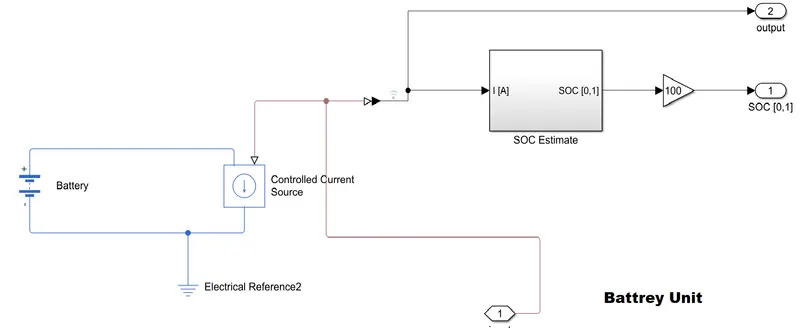
| 12. | Battery | 1 | ||||
| 13. | Current Sensor | 1 | ||||
| 14. | Simulink to PS converter | 3 | ||||
| 15. | PS to Simulink converter | 4 | ||||
| 16. | Controlled current source | 1 | ||||
| 17. | PS-Simulator | 1 | ||||
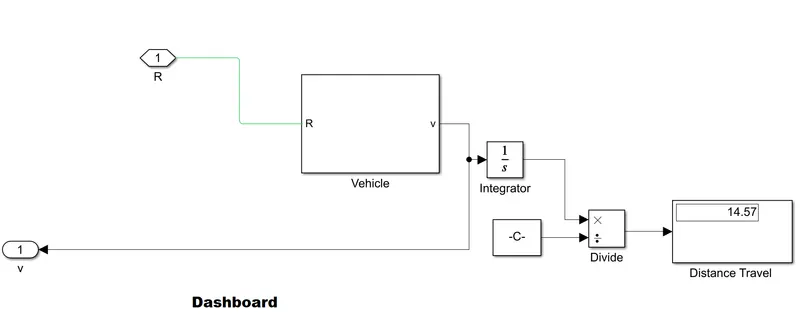
| 18. | Half gauge | 1 | ||||
| 19. | Display | 2 | ||||
| 20. | Slider | 1 | ||||
| 21. | Radio Button | 1 | ||||
| 22. | Solver Configuration | 1 | ||||
| 23. | Scope | 5 | ||||
| 24. | Divide | 1 | ||||
| 25. | Constant | 4 | ||||
| 26. | PS constant | 2 | ||||
| 27. | Side shaft | 1 | ||||
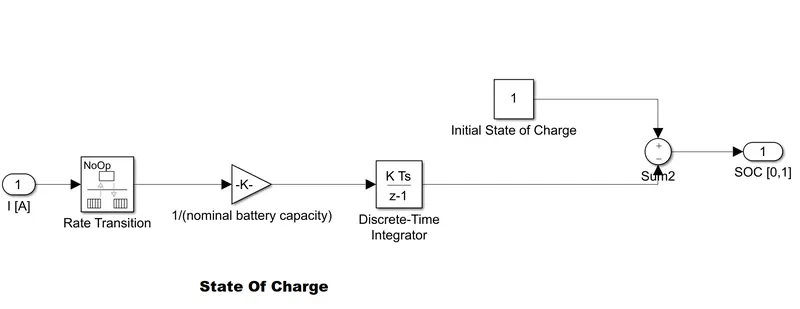
| 28. | Gain | 5 | ||||
| 29. | Rate Transitions | 1 | ||||
| 30. | Sum | 1 | ||||
| 31. | Controlled Current Source | 1 | ||||
| 32. | Display Port | 3 | ||||
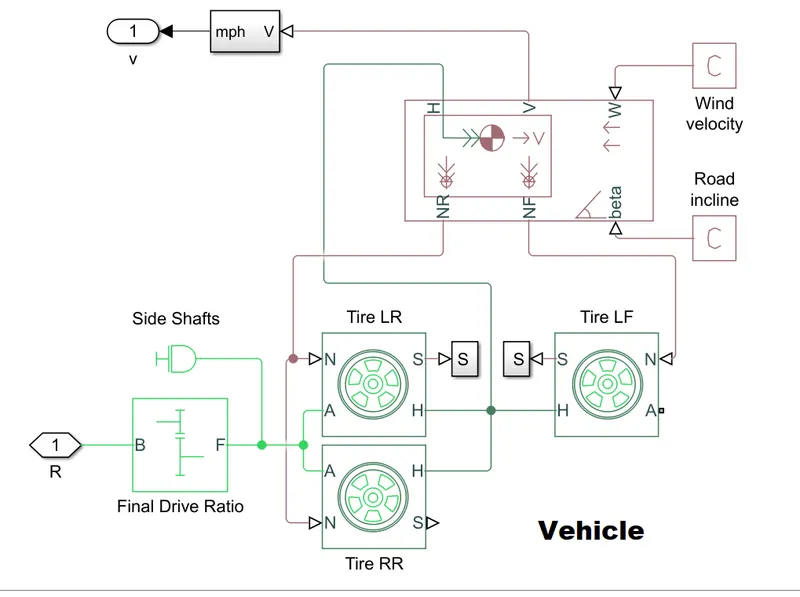
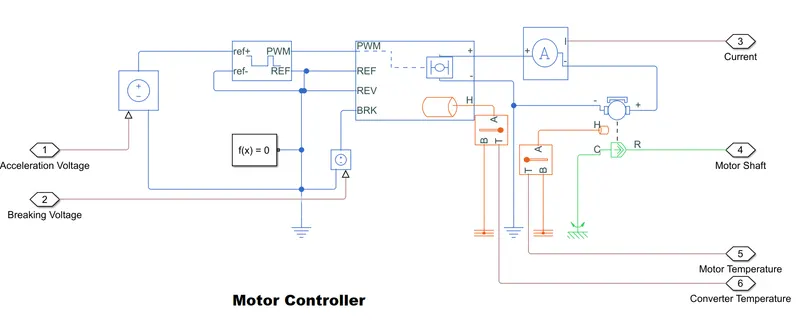
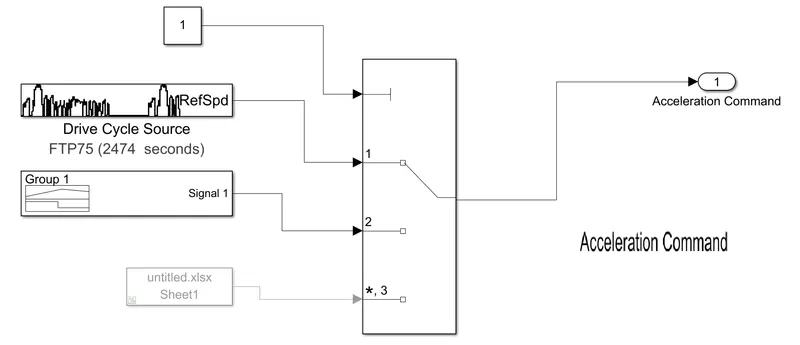
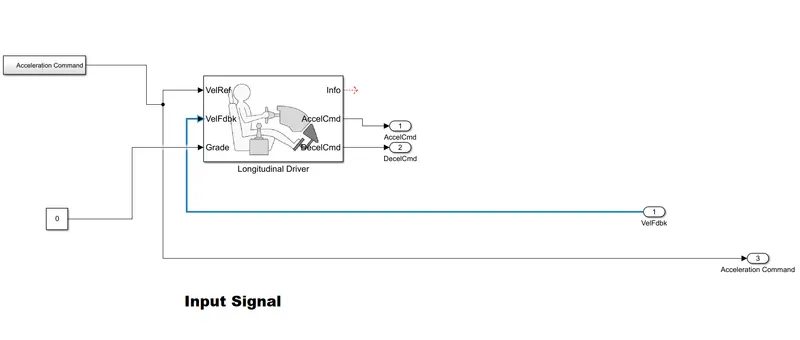
Solutions:-
|
 |
||||
|
 |
||||
|
 |
||||
|
 |
||||
|
 |
||||
|
 |
||||
|
 |
Observation:-
| Actual speed Vs Controller input | 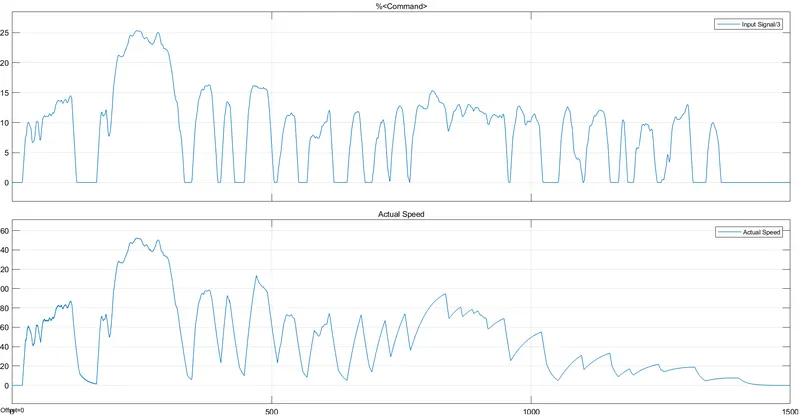 |
| Converter Temperature | 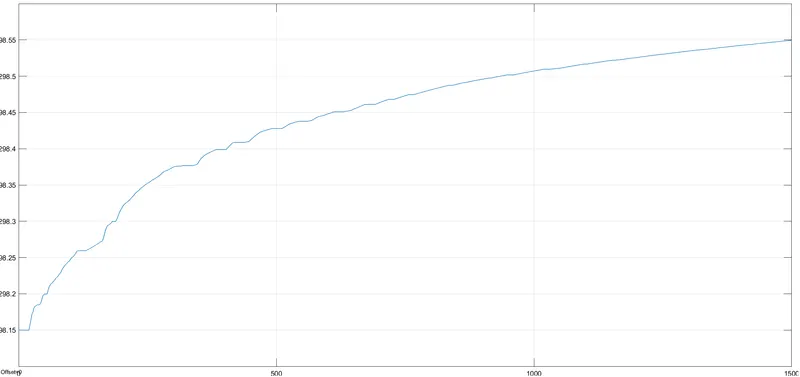 |
| Motor Temperature | 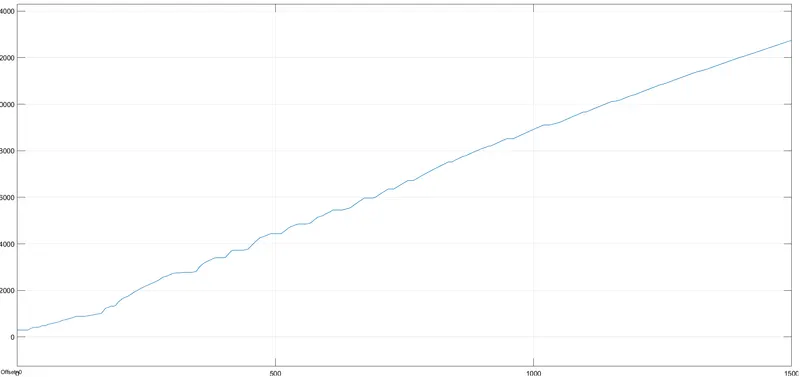 |
| State Of Charge(Battery Percentage) | 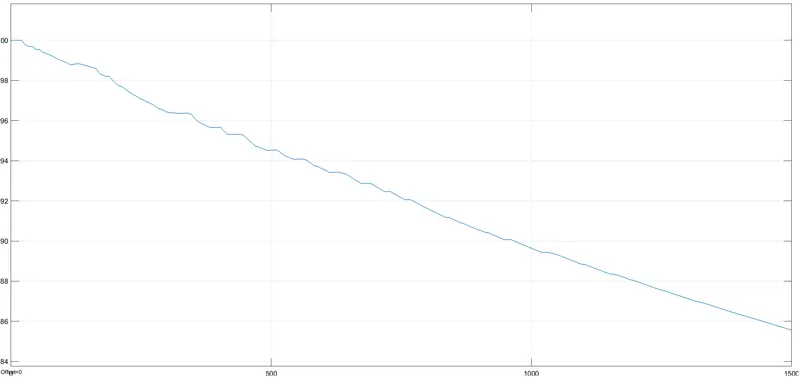 |
| Current | 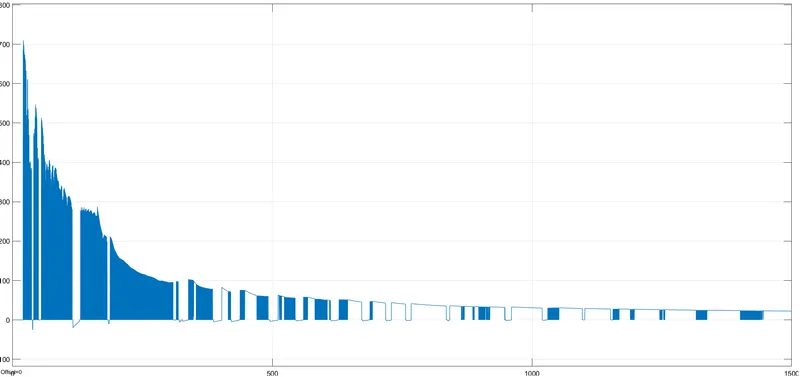 |
| Speed,Distance and Battery Percentage | 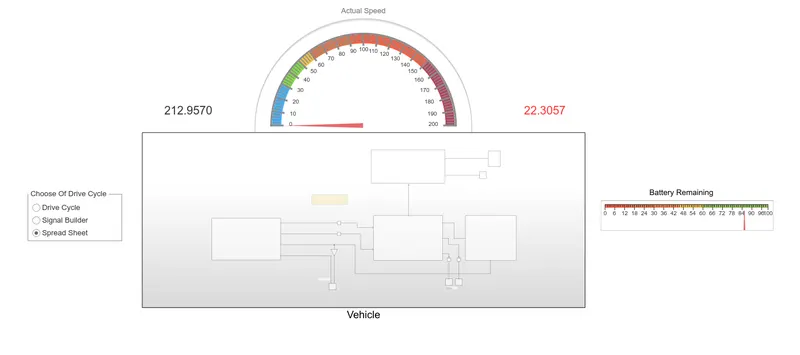 |
Conclusion:-
From this, we get concluded that when we run the vehicle that we develop the above for around 42min it drained around 30% of the battery and it has been travelled around 3 km and as we all know that the EVs are very energy efficient and it costs us less and this is safety because the front part of the vehicle is only having one motor. As my vehicle is very energy efficient and cost-effective and with a wind velocity of 5kmph