Drafting of various geometries using Chamfer, Fillet tool in AutoCad
AIM :- To draft various geometric modify and draw tool ( chamfer , fillet , trim , offset , copy , move ) in AutoCAD .
INTRODUCTION :- Auto cad provides unique drafting tool that are used in drawing of engineering component , design , and
infrastructure . it also minimize human errors and help the user to bring their imagination to with accuracy .
PROCEDURE :-
1:- To draft fig 1
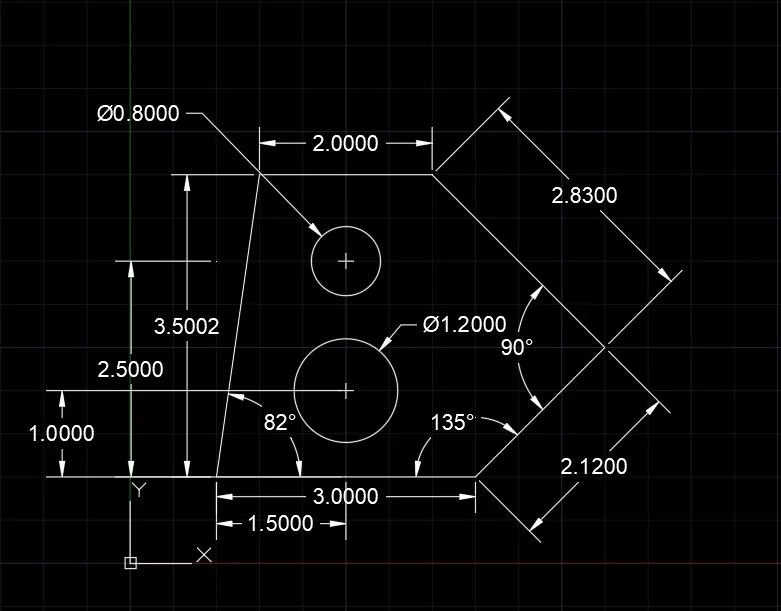
. command : line
. specify first point : 1,1
. specify next point : @3<0
. specify next point : @2.12<45
. specify next point : @2.83< 135
. specify next point : @2<-180
. specify next point : close
. press enter
. command : circle
. specify centre point of circle : 2.5,2
. specify radius of circle : D
. specify diameter of circle : 1.2
. press ENTER
. command : circle
. specify centre point of circle : 2.5,3.5
. specify diameter of circle : 0.80
. Preass ENTER
2:- To draft fig 2
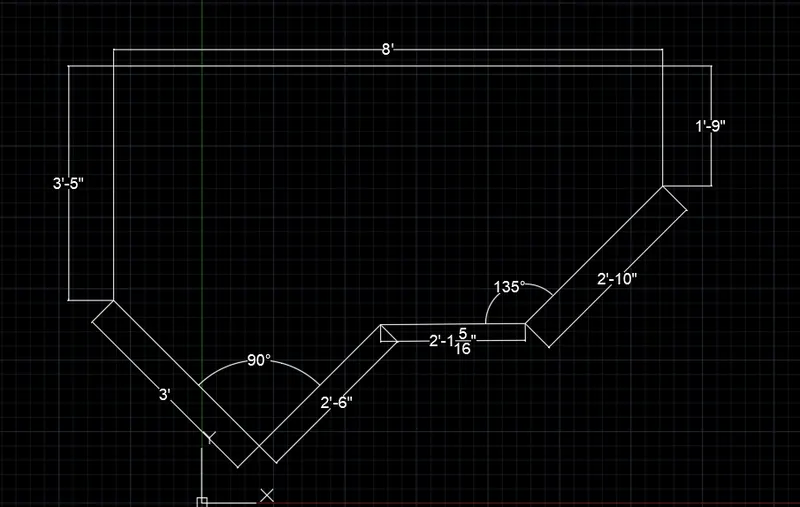
. setting > units > architectural > feet
. coommand : line
. specify first point : 10,10
. specify next point : @3'<45
. specify next point : @3'5"<90
. specify next point : @8'<0
. specify next point : @1'9"<270
. specify next point : @2'10"< 225
. press ENTER
. command : line
. specify first point : put cursor below of the left side of the drawing
. specify next point : @2'6"<45
. specify next point : connect remaning two point of the drawing
. press ENTER
3:- To draft fig 3
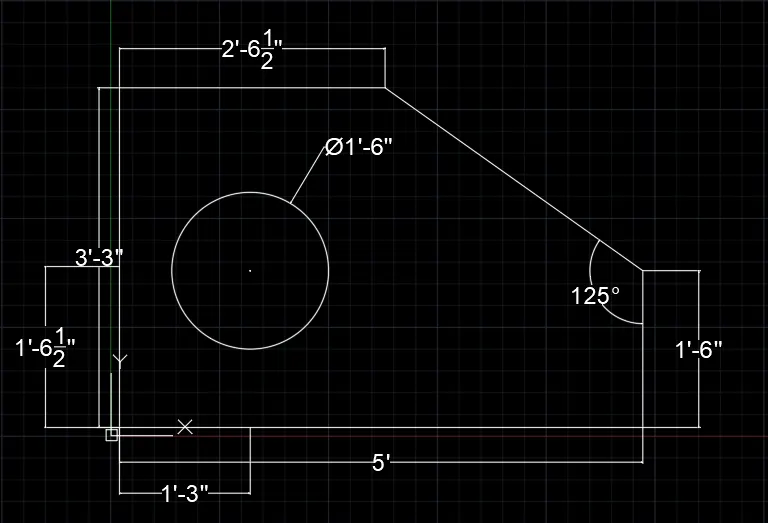
. command : line
. specify first point : 1,1
. specify next point : @3'3"<90
. specify next point : @2'6.5"<0
. press ENTER
. command : line
. specify first point : put cursor bottom corner of left side of drawing
. specify next point : @5'0.1"<0
. specify next point : @1'6"<90
. press ENTER
. command : line
. specify first point : put cursor bottom corner of left side drawing
. specify next point : @1'3"<0
. specify next point : @1'6"<90
. press ENTER
. command : circle
. specify centre point of the circle : put cursor at top line draw previous dimenssion
. specify radius of the circle : D
. specify diameter of the circle : 1'6"
. press ENTER
4:- To draft fig 4
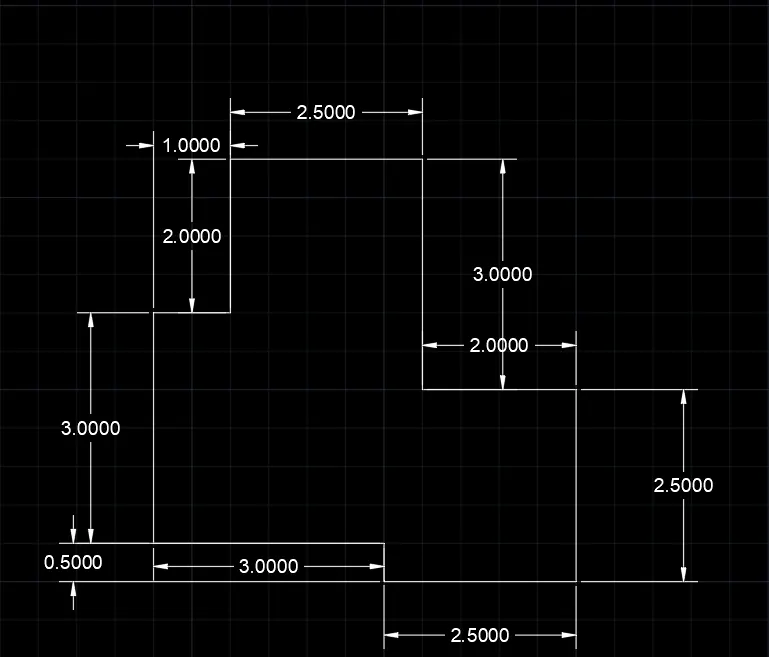
. command : line
. specify first point : 10,10
. specify next point : @0.50<90
. specify next point : @3<180
. specify next point : @3<90
. specify next point : @1<0
. specify next point : @2<90
. specify next poit : @2.50<0
. specify next point : @3<270
. specify next point : @2<0
. specify next point : @2.50<270
. specify next point : close
5: To draft fig 5 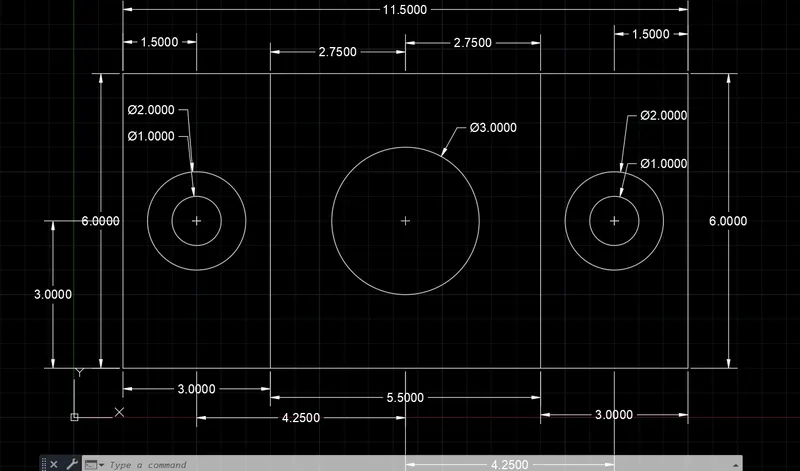
. command : line
. specify first point : 1,1
. specify next point : @6<90
. specify next poit : @11.50<0
. specify next point : @6<270
. specify next point : close
. press ENTER
. command : OFFSET
. specify offset distance : 3
. press space bar
. specify offset distance : 8.5
. press ENTER
. command : circle
. specify centre point of circle : 2.5,4
. specify radius of circle : D
. specify diameter of circle : 2
. press space bar
. specify centre of circle : 2.5,4
. specify radius of circle : D
. specify diameter of circle : 1
. press space bar
. specify centre of circle : 6.75,4
. specify radius of circle : D
. specify diameter of circle : 3
. press space bar
. specify centre point of circle : 11,4
. specify radius of circle : D
. specify diameter of circle : 2
. press space bar
. specify centre of circle : 11,4
. specify radius of circle : D
. specify diameter of circle : 1
. press ENTER
6:- to draft fig 6
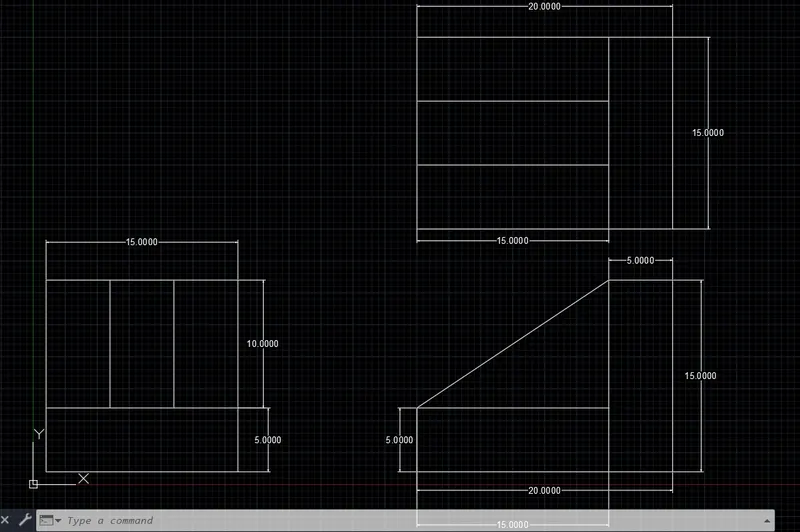
. for fig 1 : - left side of diagram
. command : line
. specify first point : 10,10
. specify next point : @15<0
. specify next point : @5<90
. specify next point : @15<180
. specify next point : @5<270
. press enter
. command : line
. specify first point : put on cursor top corner of left side of the dragram
. specify next point : @10<90
. press ENTER
. comman : offset
. specify offset distance : 5
. offset all the line are required and complete the diagram
. for fig no 2 :- right side of diagram
. command : line
. specify first point : 30,10
. specify next point : @20<0
. specify next point : @15<90
. specify next point : @5<180
. specify next point : @10<270
. specify next point : @15<180
. press ENTER
. command : line
. specify first point : put cursor top corner of left side of digram
. specify next point : connect between two line left side top corner and right side top corner
. for fig no 3 :- right side top diagram
. command : line
. specify first point : 30,30
. specify next point : @20,0
. specify next point : @15<90
. specify next point : @20<180
. specify next point : @15<270
. press ENTER
. command : offset
. speficy offset distance : 5
. offset all the line required for diagram
. press ENTER
. command : trim
. Trim : crossing
. trim all the unrequired edges
. press enter
7:- To draft fig 7
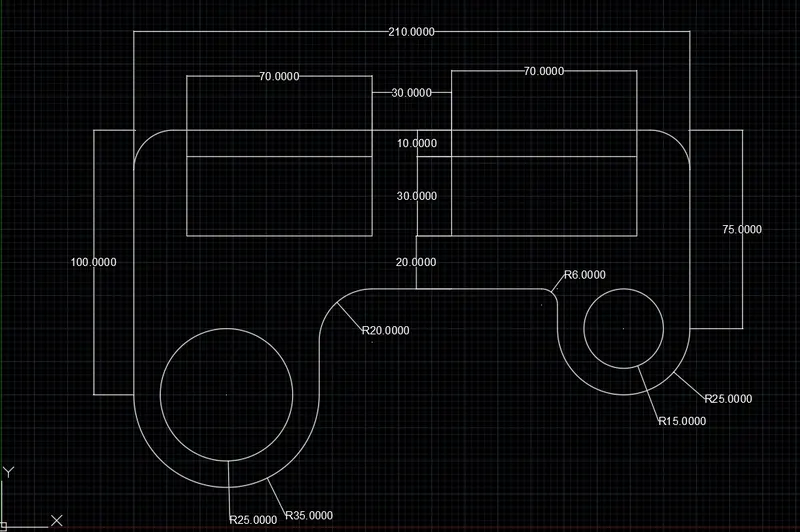
. command : line
. specify first point : 50,50
. specify next point : @100<90
. specify next point : @210<0
. specify next point : @75<270
. specify next poit : @50<180
. specify next point : @15<90
. press ENTER
. command : line
. specify first point : put cursor bottom of left side line of drawing
. specify next point : @70<0
. specify next point : @40<90
. press ENTER
. command : line
. specify first point : put cursor previous command line
. specify next point : connect two line horizontally
. press ENTER
. command : polyline
. specify first point : 70,110
. specify next point : @30<90
. specify next point : @70<0
. specify next point : @30<270
. specify next point : close
. press ENTER
. select previous draw rectangle
. command : copy
. speficy base point : put cursor mid point of rectangle and strech horizontally right side
. specify second point : 100
. press ENTER
. command : fillet
. select first object : radius
. specify fillet radius : 15
. press space bar
. specify first object : radius
. specify fillet radius : 15
. press space bar
. specify first object : radius
. speficy fillet radius : 6
. press space bar
. specify first object : radius
. specify fillest radius : 20
. press ENTER
. command : circle
. specify centre point of circle : put cursor on line of horizontal distance 70 bottom side
. specify radius of circle : 35
. press space bar
. specify centre point of circle : put cursor previous centre
. specify radius of circle : 25
. press space bar
. specify centre of circle : put cursor on horizontal line of right side dimenssion 50 at bottom line
. specify radius of circle : 25
. press space bar
. specify centre of circle : put cursor on previous centre
. specify radius of circle : 15
. press ENTER
. command : trim
. select an object to trim : crossing
. specify first corner : select unwanted part of drawing and trim it
8:- To draft fig no 8
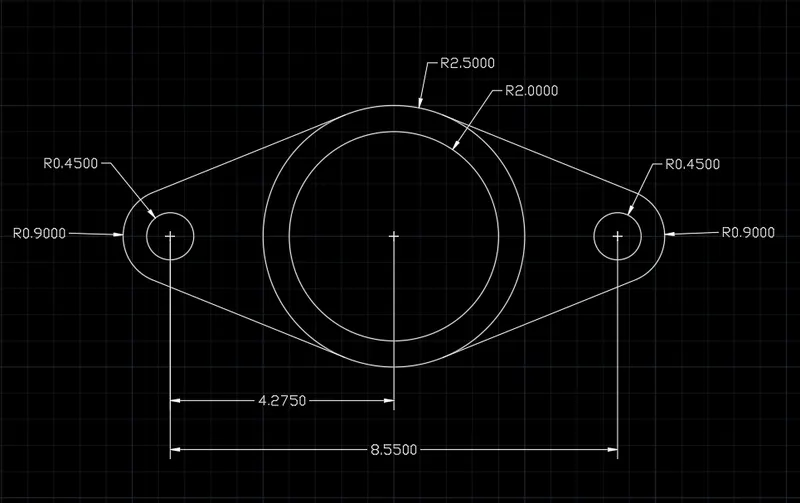
. command : circle
. specify centre point of circle : 15,15
. specify radius of circle : 2.5
. press space bar
. specify centre point of circle : put cursor previous centre of circle
. specify radius of circle : 2
. press ENTER
. command : line
. specify first point of circle : put cursor on previous centre point of circle
. specify next point : @4.275<180
. specify next point : @4.275<0
. press ENTER
. command : circle
. specify centre point of circle : put cursor on end point of previously horizontal line
. specify radius of circle : 0.45
. press space bar
. specify centre of circle : put cursor on previous centre point
. specify radius of circle : 0.90
. press space bar
. specify centre of circle : put cursor at right side horizontal line on end point
. specify radius of circle : 0.45
. press space bar
. specify centre of circle : 0.90
. put object snap on and select tangent option
. command : line
. specify first point : draw tangent of circle radius 2.5 and right circle of radius 0.90
. press space bar
. specify first point : draw tangent of circle radius 2.5 and left circle of radis 0.90
. press ENTER
. command : trim
. trim : crossing
. specify first corner point : trim all unwanted part of diagram
. press ENTER
9:- To draft fig no 9
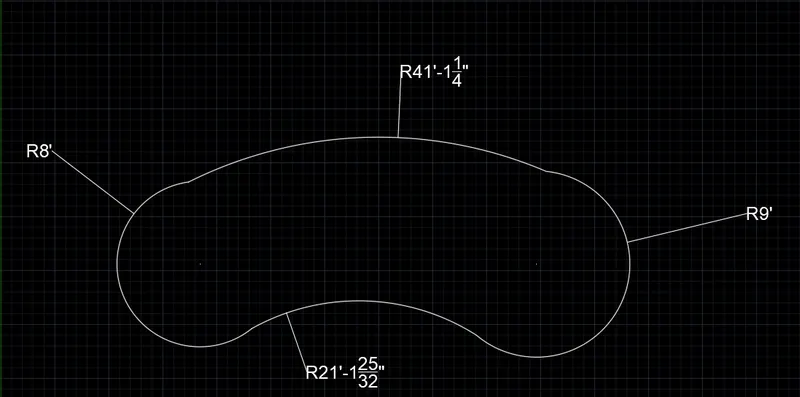
. command : line
. specify first point : choosing randomly origin
. specify next point : @32'6"<0
. press ENTER
. command : circle
. specify centre of circle : put cursor left side of end point of a horizontal line
. specify radius of circle : 8'
. press space bar
. specify centre point of circle : put cursor at right of horizontal line at end point
. specify radius of circle : 9'
. press ENTER
. select ribbon bar > select arc > select start , end , radius
. put cursor of start point is right side of circle and touch the arc line to the circle then put cursor of end point is at left side of circle and touch arc line to the left circle at top of of both circle
. specify radius of arc : 41'8"
. press bar
. put cursor of start point is at right side of circle at bottom of circle the put cursor of end point of left side of circle
and touch the arc line to the left circle at bottom side of circle
. specify radius of circle : 20'10"
. press ENTER
. command : trim
. trim : crossing
. specify corner point trim object : trim the all unwanted part of diagram
. press ENTER
10:- To draft fig no 10
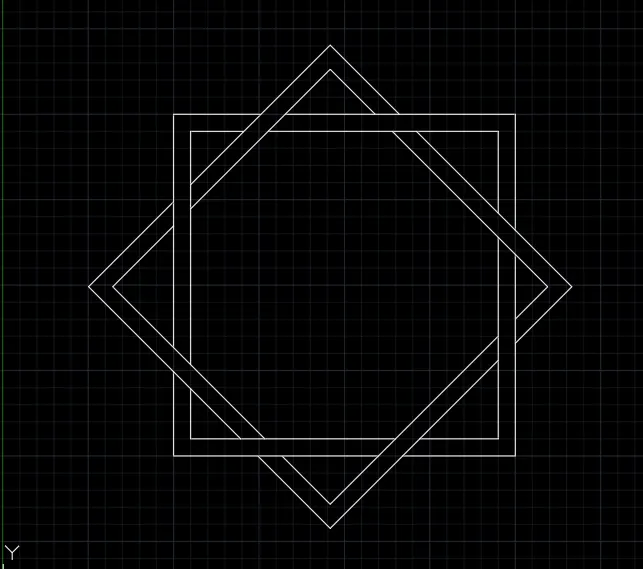
. Commmand : polyline
. specify first point : click anywhere on the page
. specify next point : @10<90
. specify next point : @10<0
. specify next point : @10<270
. specify next point : @10<180
. press ENTER
. command : polyline
. specify first point : take mid point of rectangle and refer the left side of the rectangle few distance at that referance
and click the cursor at point
. specify next point : @10<45
. specify next point : @10<315
. specify next point : @10<225
. specify next point : @close
. press ENTER
. command : offset
. specify object distance : 0.5
. press space bar
. specify object distance : 0.5
. press ENTER
. command : trim
. trim : crossing
. trim all the object that is not required for draft
11:- To draft fig no 11
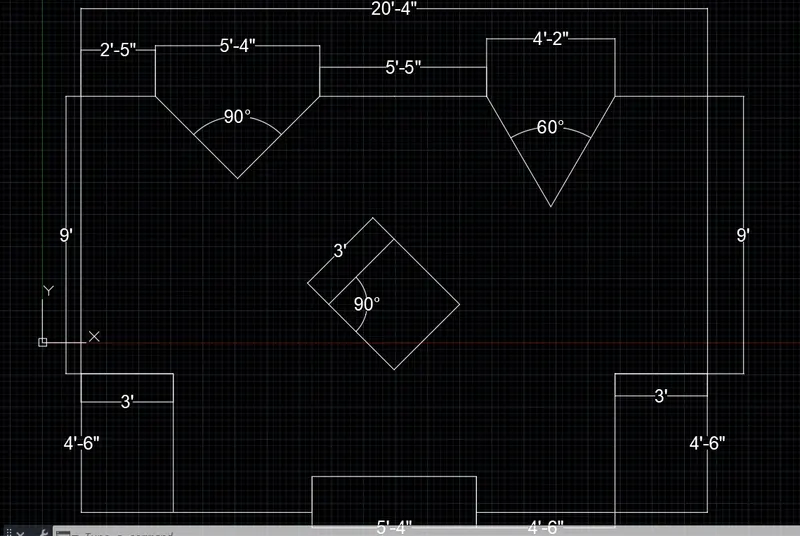
. command : line
. specify first point : click on the any point on the sheet
. specify next point : @9'<90
. specify next point : @10'2"<0
. specify next point : @10'2"<0
. specify next point : @9'<270
. specify next point : @3'<180
. specify next point : @4'6"<270
. specify next point : @4'6"<180
. specify next point : @1'2"< 90
. specify next point : @5'4"<180
. specify next point : @1'2"< 270
. specify next point : @4'6"<180
. specify next point : @4'6"<90
. specify next point :@3'<180
. press ENTER
. command : Line
. specify first point : put cursor on the left side of 10'2" dimmenssional horizontal line on mid point of 2'8" distance at
left and right
. specify next point : put cursor previous mid point and mark the vertical distance at 2'8"
. specify next point : join the end point of previous mark line and join to the vertical end point
. command : line
. specify first point : put cursor on the right side of 10'2" dimenssional line of mid point and mark distance left and right
at distance 2'1"
. specify next point : put cursor on previous mid point and mark vertical line 3'7"
. specify next point : join the vertical and horizontal end point
. press ENTER
. command trim
. trim : crossing
. specify trim object : trim the all unwanted object in the darft
. command : line
. specify first point : put cursor enfd point of 10'2" of line at end point and mark the distance vertically 6'9"
. specify next point : put cursor on the end point on the vertical line
. specify next point : @2'1.5"<180
. specify next point : put cursor on the end point of previous line
. specify nect point : @3'<45
. specify next point : @3'<315
. specify next point : @3'<225
. specify next point : close
. press ENTER
. command : trim
. trim : crossing
. select trim obeject : trim all the unwanted part of draft