Drafting of various geometries using Chamfer, Fillet tool in AutoCad
C1: DECIMAL
AIM AND INTRODUCTION:To draft a geometry using a autocad tools.
PROCEDURE:
Step 1: Create by using a polyline command PLINE
Step 2: specify point @3<0
Step 3:Specify next point @2.12<45
Step 3:Specify next point @2.83<135
Step 4:Specify next point @2<270
Step 5: close
Step 6: Circle command and dia of 1.20
Step 7:Repeat Circle command and dia of 0.80
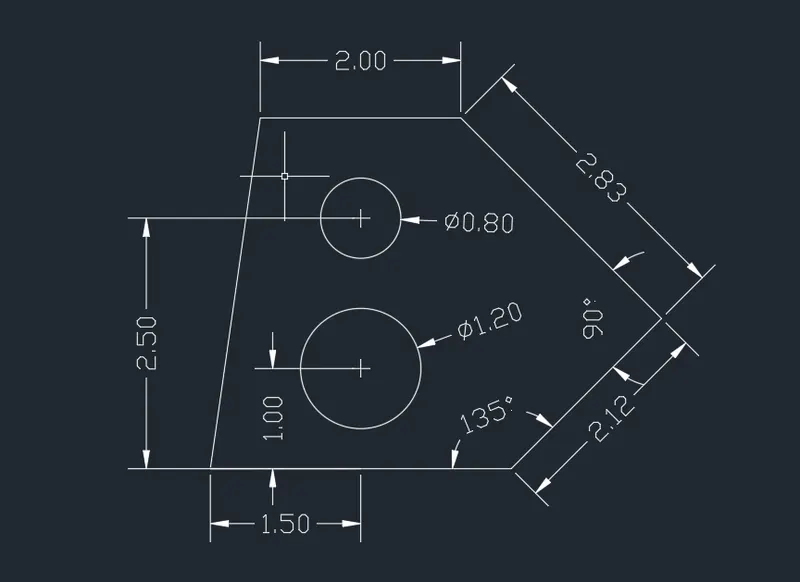
Results:Drafting a tool using pline and circle commands.
C2:
AIM AND INTRODUCTION:To draft a geometry using a autocad tools.
PROCEDURE:
step 1:Polar tracking is on 45,90,135,.......
step 2:specify the first point @2'6" <45
step 3: specify the next point @3'<45
step 4:specify the next point @2'5"<90
step 5: so\pecify the next point @8'
step 6:specify the next point @1'9"
step 6: specify the next point @2'5"
step 7: close
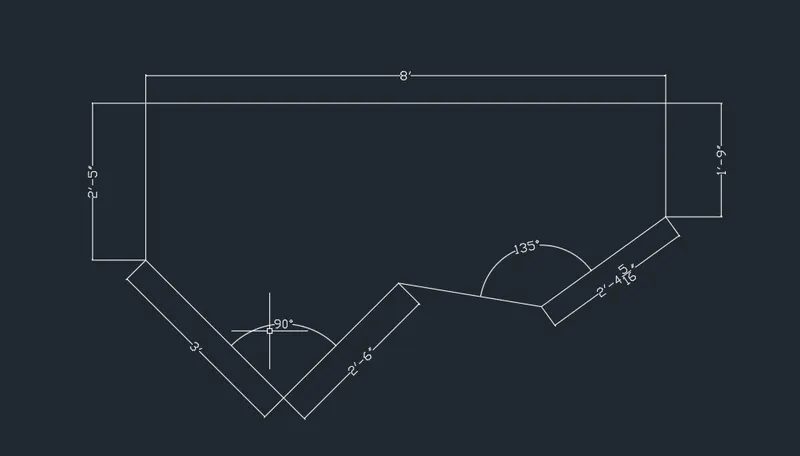
Results:Drafting a geometry using a polar tracking on.
C3:
AIM AND INTRODUCTION:To draft a geometry using a autocad tools.
PROCEDURE:
step 1:specify the first point 1"6"
step 2:specify the next points @5'1",@3'3",@2'6.5"
step 3:close
step 4:Marking a point @1'3" and 1'6" inside the geometry by using line command
step 5:circle by centre ,diameter
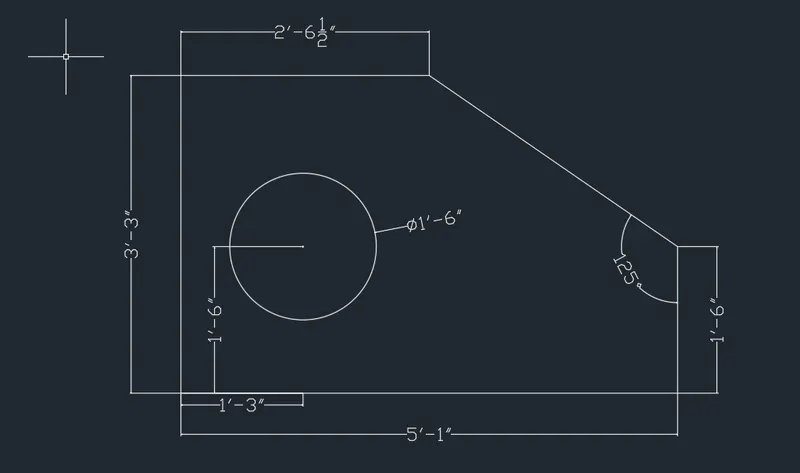
Results:Drawing a geometry by using circle command by raius,diameter.
C4:
AIM AND INTRODUCTION:To draft a geometry using a autocad tools.
PROCEDURE:
step 1:specify the first point @2
step 2: specify the next points @2.5,@2.5,@0.5,@3,@3,@1,@2,@2.5.
step 3:close
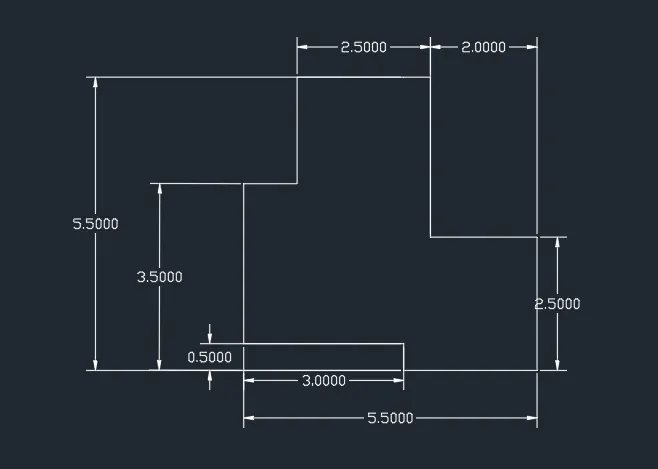
Results:Creating a geometry ny using line tool and polar tracking 90,180.......
C5:
AIM AND INTRODUCTION:To draft a geometry using a autocad tools.
PROCEDURE:
step 1:specify the first point @11.5
step 2: specify the next point @6,@1.5,@4.25,@4.25,@1.5
step 3:close
step 4:mark the midpoint from the bottom @3
step 5:Draw a circles using circle command centre,diameter1 &2
step 6:Draw a circle at the centre og the geometry @2.75 by using circle command by centre,diameter.
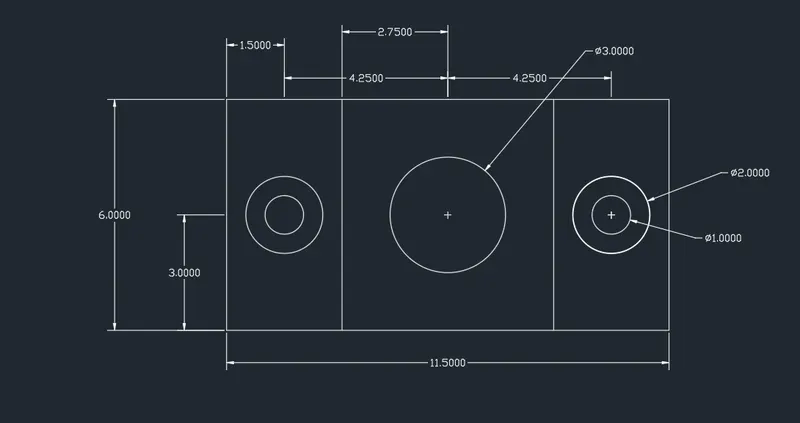
Results:creating a geometry by using line and circle commands.
C6:
AIM AND INTRODUCTION:To draft a geometry using a autocad tools.
PROCEDURE:
step 1:By using a line command draw the geometry
step 2:Draw the line of 2units
step 3:Give the offset 0.5 units horizantally and one offset vertically
step 4:By using trim command trim the unneccesary lines
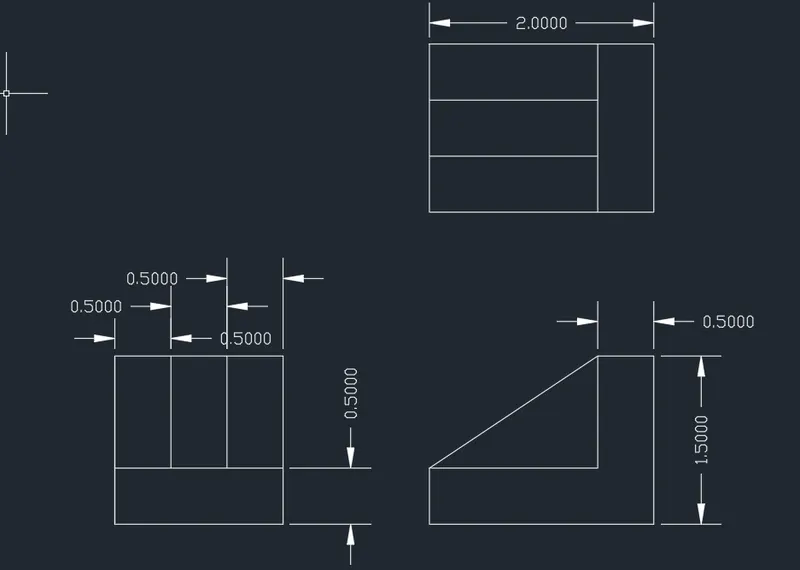
Results:Creating a geometry using trim and offsets.
C7:
AIM AND INTRODUCTION:To draft a geometry using a autocad tools.
PROCEDURE:
step 1:draw a line using a line tool
step 2:specify the first point 100
step 3:specify the next point 210
step 4:specify the next point 75
step 5:draw aa circle using a circle command by centre,diameter
step 6:draw a arc of radius for given radius using arc tool by start end radius
step 7:draw a rectangles using polygon options by giving number of sides 4,@70,30
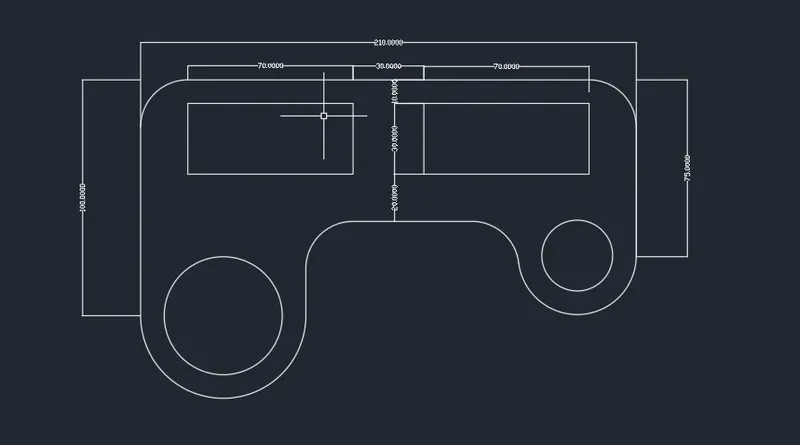
Results:Creating a geometry by using line,circle and arc tool.
C8:
AIM AND INTRODUCTION:To draft a geometry using a autocad tools.
PROCEDURE:
step 1:Draw a circles by using circle command of centre,diameter 4&5
step 2:Draw a line of 8.55 units by using a line command
step 3:By knowing the distance of 4.275 units draw a circles of dia and radius 0.9 units respectively on both sides
step 4:By using line command draw the tangents to the circles and unnecessary part of the circles will be trimmed using a trim tool
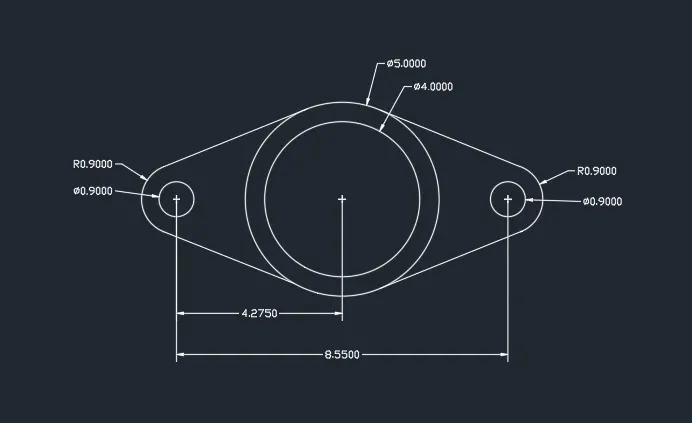
Results:Creating a geometry by using line,circle and trim tools.
C9:
AIM AND INTRODUCTION:To draft a geometry using a autocad tools.
PROCEDURE:
step 1:Draw a circle of radius 8' by using circle tool centre,radius
step 2:Draw a circle of radius 9' by using circle tool centre radius @ distance of 32'6"
step 3:Draw a circle of radius 41'8" by using circle tool of tan,tan,radius
step 4:Draw a circle of radius 20'10" by using circle tool of tan,tan,radius
step 5:Trim the unnecessary part using a trim tool
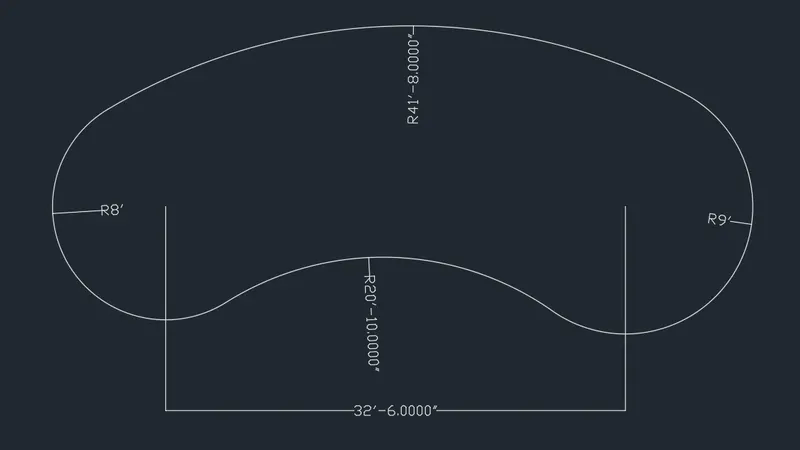
Results:Creating a geometry using circle and line tool
C10:
AIM AND INTRODUCTION:To draft a geometry using a autocad tools.
PROCEDURE:
step 1:Draw a geometry using a polygon tool
step 2:copy the geometry using copy tool and rotate to <45
step 3:trim the unnecessary part using trim tool

Results:Creating a geometry using a polygon and trim tool
C11:
AIM AND INTRODUCTION:To draft a geometry using a autocad tools.
PROCEDURE:
step 1:Draw a geometry using line tool 10'2" mark the midpoint of that line draw a <90 and <60 by polar tracking
step 2:Draw a line of 9'
step 3:Draw a line of 3' ,4'6",4'6",1'2",4'6",4'6"13'6"
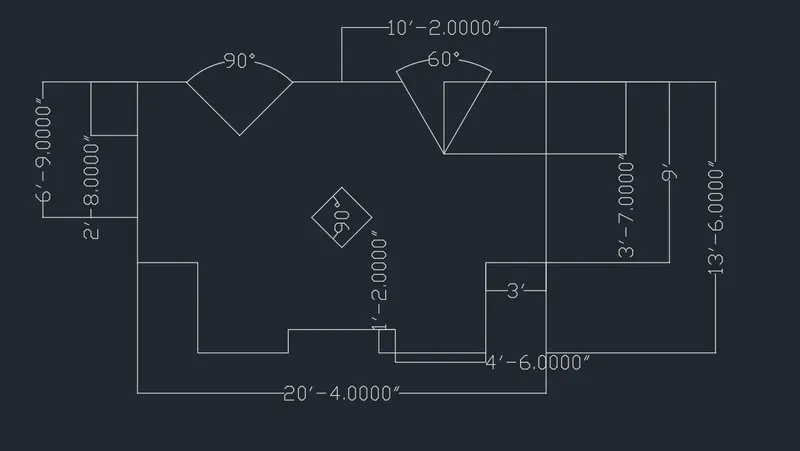
Results:Creating a geometry using a line tool ,polar tracking and geometric center.