Creation of geometries by Coordinate system methods using AutoCad
P-1
Aim and introduction:Creating geometry using line tool in absolute coordinate system.
Procedure:
Steps:
- Choosing the line tool
- Line Specify the first point :2,1
- Specify the next point:2,7
- Specify the next point:8,7
- Specify the next point:8,6
- Specify the next point:3,6
- Specify the next point:3,2
- Specify the next point:8,2
- Specify the next point:8,1
- Specify the next point:C

Result:Geometry by using absolute coordinate system.
Aim and introduction:Creating geometry using line tool in relative rectangular coordinate system.
Procedure:
Steps:
- Choose the Line tool
- Line specify first point: 2,1
- Specify the next point:@0,6
- Specify the next point:@6,0
- Specify the next point:@0,-1
- Specify the next point:@-5,0
- Specify the next point:@0,-4
- Specify the next point:@5,0
- Specify the next point:@0,-1
- Specify the next point:C
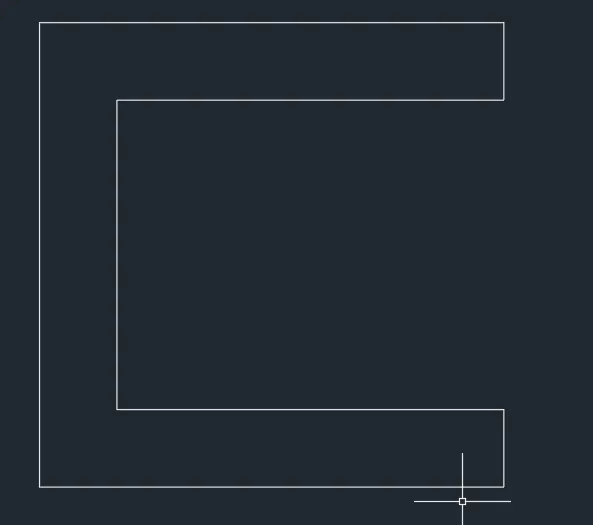
Result:Geometry by using relative rectangular coordinate system.
Aim and introduction:Creating geometry using line tool in relative polar coordinate system.
Procedure:
Steps:
- Choose the Line tool
- Specify first point:2,1
- Specify the next point:@6<90
- Specify the next point:@6<0
- Specify the next point:@1<270
- Specify the next point:@5<180
- Specify the next point:@4<270
- Specify the next point:@5<0
- Specify the next point:@1<270
- Specify the next point:C
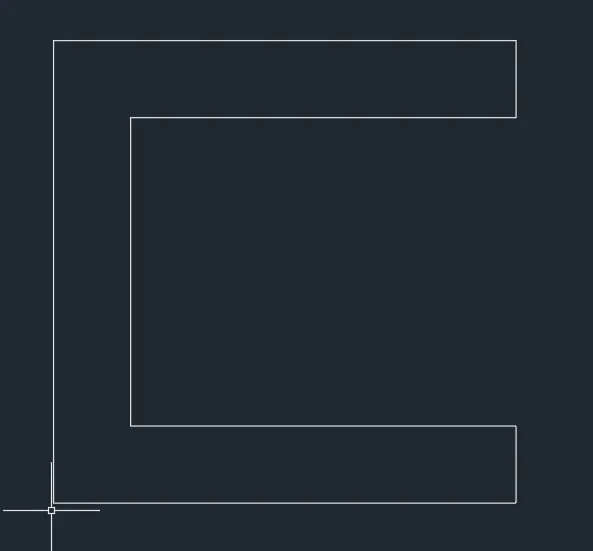
Result:Geometry by using relative polar coordinate system.
Aim and introduction:Creating geometry using line tool in direct distance entry method
Procedure:
Steps:
- Choose the Line tool
- Specify first point:2,1
- Specify the next point:Position the cursor and enter the distance 6
- Specify the next point:Position the cursor and enter the distance 6
- Specify the next point:Position the cursor and enter the distance 1
- Specify the next point:Position the cursor and enter the distance 5
- Specify the next point:Position the cursor and enter the distance 4
- Specify the next point:Position the cursor and enter the distance 5
- Specify the next point:Position the cursor and enter the distance 1
- Specify the next point:C

Result:Geometry by using line tool by direct distance entry method.
P-2
Aim and introduction:Creating geometry using line tool in absolute coordinate system.
Procedure:
Steps:
- Choosing the line tool
- Line Specify the first point :2,1
- Specify the next point:4,8
- Specify the next point:7,8
- Specify the next point:9,1
- Specify the next point:6,1
- Specify the next point:6,5
- Specify the next point:5,5
- Specify the next point:5,1
- Specify the next point:C

Result:Geometry by using absolute coordinate system.
Aim and introduction:Creating geometry using line tool in relative rectangular coordinate system.
Procedure:
Steps:
- Choose the Line tool
- Line specify first point: 2,1
- Specify the next point:@2,7
- Specify the next point:@3,0
- Specify the next point:@2,7
- Specify the next point:@-3,0
- Specify the next point:@0,4
- Specify the next point:@-1,0
- Specify the next point:@0,-4
- Specify the next point:C

Result:Geometry by using relative rectangular coordinate system.
Aim and introduction:Creating geometry using line tool in relative polar coordinate system.
Procedure:
Steps:
- Choose the Line tool
- Specify first point:2,1
- Specify the next point:@3<0
- Specify the next point:@4<90
- Specify the next point:@1<0
- Specify the next point:@4<270
- Specify the next point:@3<0
- Specify the next point:@7<105
- Specify the next point:@3<180
- Specify the next point:C

Result:Geometry by using relative polar coordinate system.
Aim and introduction:Creating geometry using line tool in direct distance entry method
Procedure:
Steps:
- Choose the Line tool
- Specify first point:2,1
- Specify the next point:Position the cursor and enter the distance 3
- Specify the next point:Position the cursor and enter the distance 4
- Specify the next point:Position the cursor and enter the distance 1
- Specify the next point:Position the cursor and enter the distance 4
- Specify the next point:Position the cursor and enter the distance 3
- Specify the next point:Position the cursor and enter the distance7
- Specify the next point:Position the cursor and enter the distance 3
- Specify the next point:C

Result:Geometry by using line tool by direct distance entry method.
P-4
Aim and introduction:Creating geometry using line tool in relative rectangular coordinate system.
Procedure:
Steps:
- Choose the Line tool
- Line specify first point: 2,1
- Specify the next point:@0,7
- Specify the next point:@1,0
- Specify the next point:@2,-3
- Specify the next point:@2,3
- Specify the next point:@1,0
- Specify the next point:@0,-7
- Specify the next point:@-1,0
- Specify the next point:@0,4
- Specify the next point:@-2,-2
- Specify the next point:@-2,2
- Specify the next point:@0,-4
- Specify the next point:C

Result:Geometry by using relative rectangular coordinate system.
P-5
Aim and introduction:Creating geometry using line tool in polar coordinate system.
Procedure:
Steps:
- Choose the Line tool
- Line specify first point: 2,1
- Specify the next point:@
- Specify the next point:@8<90
- Specify the next point:@7<0
- Specify the next point:@8<270
- Specify the next point:@4<180
- Specify the next point:@1<90
- Specify the next point:@3<0
- Specify the next point:@6<90
- Specify the next point:@5<180
- Specify the next point:@7<270
- Specify the next point:C
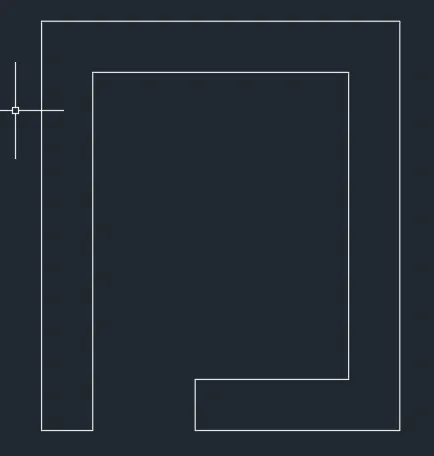
Result:Geometry by using relative polar coordinate system.
P-7
Aim and introduction:Creating geometry using line tool in polar coordinate system.
Procedure:
Steps:
- Choose the Line tool
- Line specify first point: 2,1
- Specify the next point:@6<90
- Specify the next point:@8<0
- Specify the next point:@6<270
- Specify the next point:C
- Choose the rectangle command
- Specify first point:3,2
- Specify the corners:2,3
- Choose the rectangle command
- Specify first point:6,2
- Specify the corners:2,3

Result:Geometry by using relative polar coordinate system.
P-8
Aim and introduction:Creating geometry using line tool in polar coordinate system.
Procedure:
Steps:
- Choose the Line tool
- Line specify first point: 0,0
- Specify the next point:@2<90
- Specify the next point:@4<0
- Specify the next point:@4<90
- Specify the next point:@3<180
- Specify the next point:@2<90
- Specify the next point:@8<0
- Specify the next point:@2<270
- Specify the next point:@3<180
- Specify the next point:@4<270
- Specify the next point:@4<0
- Specify the next point:@2<270
- Specify the next point:C
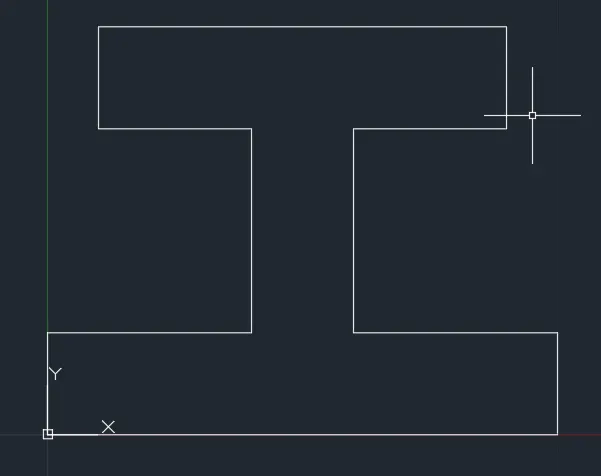
Result:Geometry by using relative polar coordinate system.
P-9
Aim and introduction:Creating geometry using line tool in relative rectangular coordinate system.
Procedure:
Steps:
- Choose the Line tool
- Line specify first point: 1,1
- Specify the next point:@0,7
- Specify the next point:@4,-2
- Specify the next point:@0,-2
- Specify the next point:@-3,0
- Specify the next point:@0,-2
- Specify the next point:@1,0
- Specify the next point:@0,1
- Specify the next point:@3,0
- Specify the next point:@0,-2
- Specify the next point:C
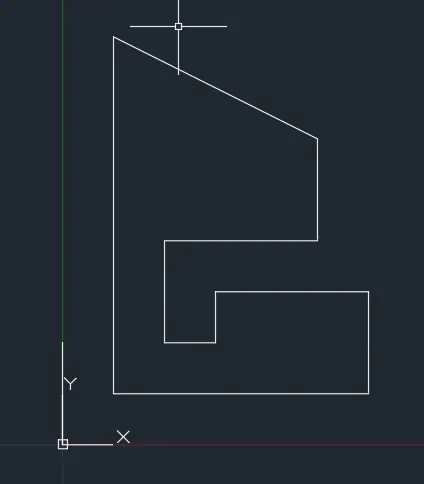
Result:Geometry by using relative rectangular coordinate system.
P-10
Aim and introduction:Creating geometry using line tool in polar coordinate system.
Procedure:
Steps:
- Choose the Line tool
- Line specify first point: 1,1
- Specify the next point:@7<90
- Specify the next point:@5<0
- Specify the next point:@4<270
- Specify the next point:@3<180
- Specify the next point:@3<270
- Specify the next point:C
- Choose rectangle tool
- Specify first point:2,5
- Specify corner points:3,2
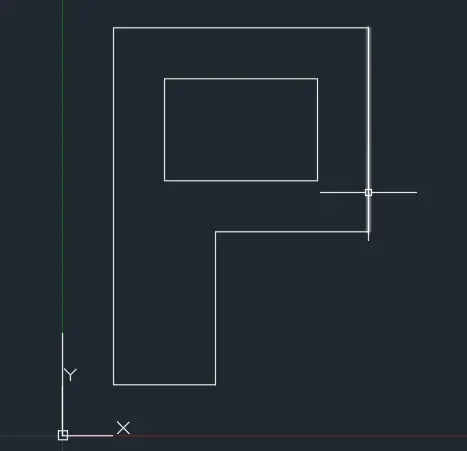
Result:Geometry by using relative polar coordinate system
PROFILE WOOD
Aim and introduction:Creating geometry using line tool in relative rectangular coordinate system.
Procedure:
Steps:
- Choose the Line tool
- Line specify first point: 0,0
- Specify the next point:@0,1
- Specify the next point:@2,0
- Specify the next point:@0,5
- Specify the next point:@-2,0
- Specify the next point:@5,3
- Specify the next point:@5,-3
- Specify the next point:@0,-1
- Specify the next point:@-2,0
- Specify the next point:@0,-4
- Specify the next point:@2,0
- Specify the next point:@0,-1
- Specify the next point:C
- Choose circle command by center and radius
- Specify center point for the circle
- Specify radius of the circle
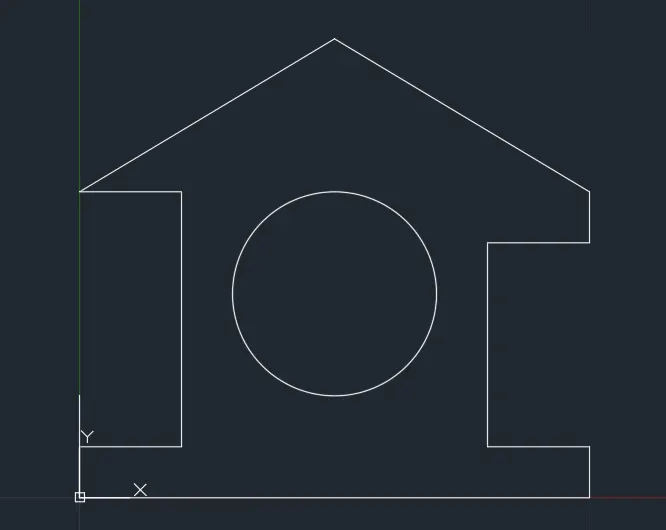
Result:Geometry by using relative polar coordinate system and using a circle.
Queen post truss
Aim and introduction:Creating queen post truss using a line tool
Procedure:
Steps:
- Choose the Line tool
- Line specify first point: 1,1
- Specify the next point:@0,4
- Specify the next point:@5<45
- Specify the next point:@5<315
- Specify the next point:@-3.536,0
- Specify the next point:@2.536,1
- Specify the next point:@0,-1
- Specify the next point:@-2.536,0
- Specify the next point:@0,3.536
- Specify the next point:@5<225
- Specify the next point:@3.536,0
- Specify the next point:@-2.536,1
- Specify the next point:@0,-1
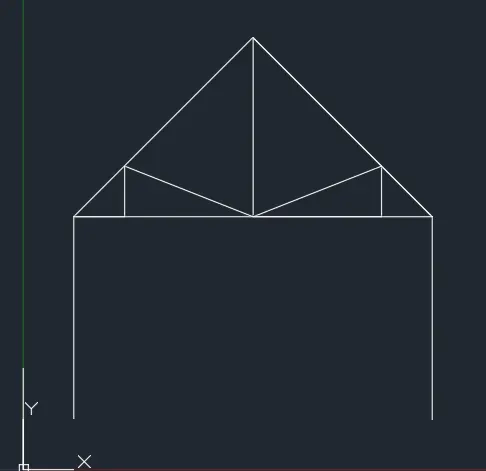
Results:Queen post truss using a line tool.
MONO PITCH
Aim and introduction:Creating a mono pitch using a line tool.
Procedure:
Steps:
- Choose line tool
- Specify first point:1,1
- Specify next point:@6,2
- Specify next point:@0,-2
- Specify next point:@-2,1.333
- Specify next point:@0,-1.333
- Specify next point:@-2,0.667
- Specify next point:@0,-0.667
- Specify next point:@-2,0
- Specify next point:@4,0
- Specify next point:@2,0
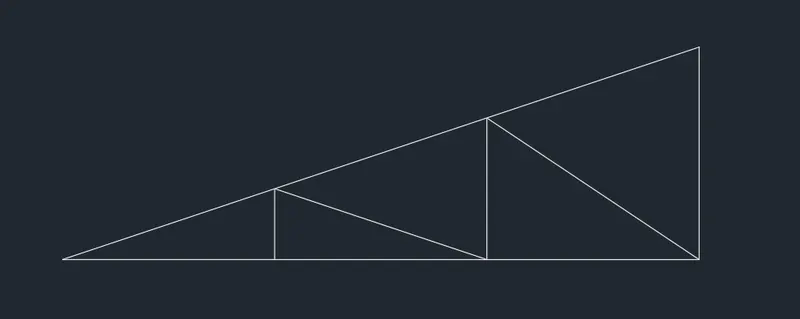
Results:Mono pitch using a line tool.