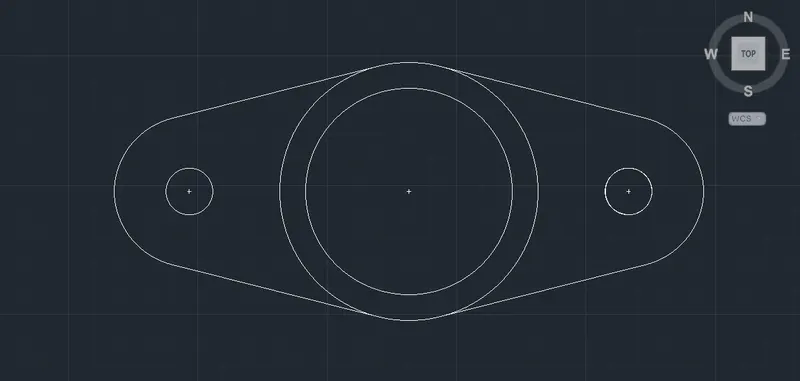
Drafting of various geometries using Chamfer, Fillet tool in AutoCad
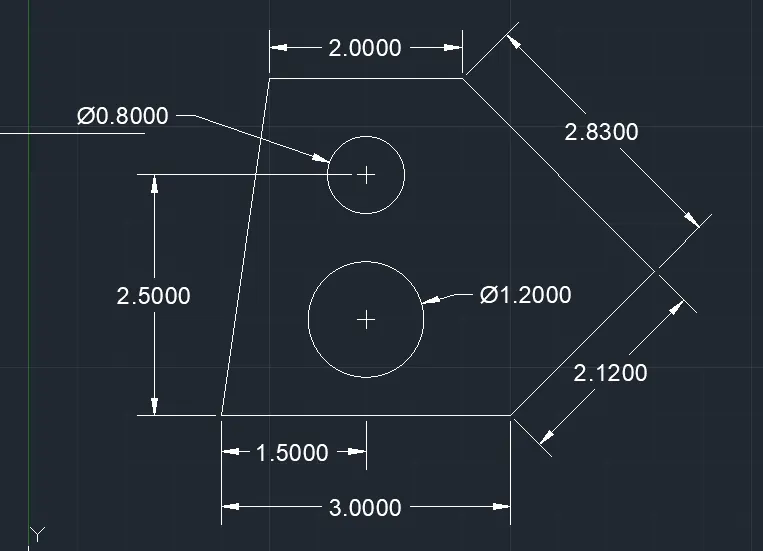
1.
Command: l
LINE
Specify first point: 2,2
Specify next point or [Undo]: 1.5
Specify next point or [Undo]: 1.5
Specify next point or [Close/Undo]: <45
Angle Override: 45
Specify next point or [Close/Undo]: 2.12
Specify next point or [Close/Undo]: <135
Angle Override: 135
Specify next point or [Close/Undo]: 2.83
Specify next point or [Close/Undo]: 2.0
Specify next point or [Close/Undo]: 1.0
Specify next point or [Close/Undo]: 1.50
Command: _circle
Specify center point for circle or [3P/2P/Ttr (tan tan radius)]:
Specify radius of circle or [Diameter] <1.2000>: D
Specify diameter of circle <2.4000>: 1.2
Command: c
CIRCLE
Specify center point for circle or [3P/2P/Ttr (tan tan radius)]:
Specify radius of circle or [Diameter] <0.6000>: d
Specify diameter of circle <1.2000>: 0.8
2.
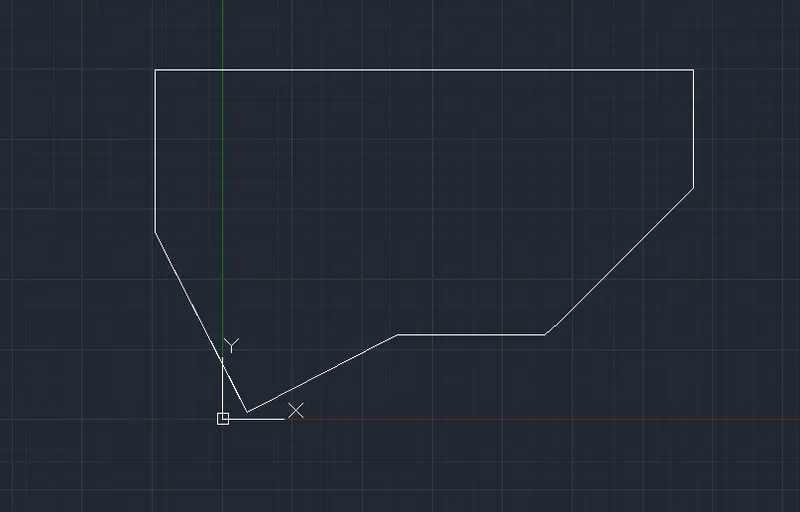
Command: _line
Specify first point:
Specify next point or [Undo]: 2'6"
Resuming LINE command.
Specify next point or [Undo]: <45
Angle Override: 45
Specify next point or [Undo]: 2'10"
Specify next point or [Close/Undo]: Zero length line created at (7'-0.07", 3'-5.33", 0'-0.00")
Specify next point or [Close/Undo]: 1'9"
Specify next point or [Close/Undo]: 8'
Specify next point or [Close/Undo]: 2'5"
Specify next point or [Close/Undo]: Zero length line created at (-0'-11.93", 2'-9.33", 0'-0.00")
Specify next point or [Close/Undo]: *Cancel*
Let the perpendicular option will be on in the Object snap by pressing F3
Draw a line perpendicular the line
Close the line command
3.
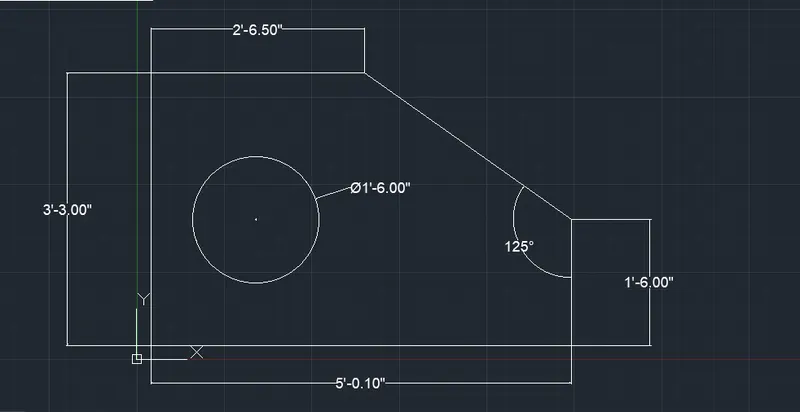
Command: l
LINE
Specify first point: 2,2
Specify next point or [Undo]: 5'0.1"
Specify next point or [Undo]: 1'6.0"
Command: l
LINE
Specify first point:
Specify next point or [Undo]: 1'6"
Specify next point or [Undo]: 2'7"
Specify next point or [Close/Undo]: 2'6.5"
Specify next point or [Close/Undo]: 1"3.0"
Point or option keyword required.
Specify next point or [Close/Undo]: *Cancel*
Command: l
LINE
Specify next point or [Undo]: 1'3"
Specify next point or [Close/Undo]: *Cancel*
Command: c
Command: _circle
Specify centre point for circle or [3P/2P/Ttr (tan tan radius)]:
Specify radius of circle or [Diameter]: D
Specify diameter of circle: 1'6"
Erase the unwanted lines
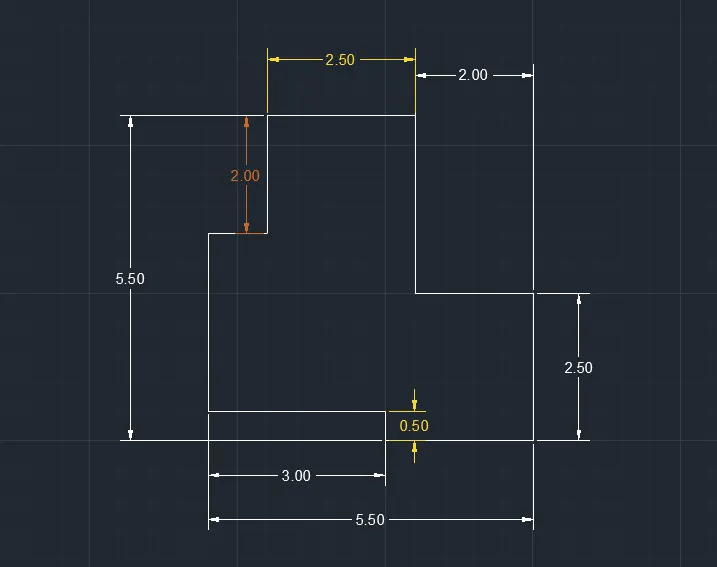
4.
Command: L
LINE
Specify first point:
Specify next point or [Undo]: <Ortho on> 2.5
Specify next point or [Undo]: 2.5
Specify next point or [Close/Undo]: 2
Specify next point or [Close/Undo]: *Cancel*
Command: l
LINE
Specify first point:
Specify next point or [Undo]: 0.5
Specify next point or [Undo]: 3.0
Specify next point or [Close/Undo]: 3
Specify next point or [Close/Undo]: 1.0
Specify next point or [Close/Undo]: 2
Specify next point or [Close/Undo]: 2.5
Specify next point or [Close/Undo]: *Cancel*
5.
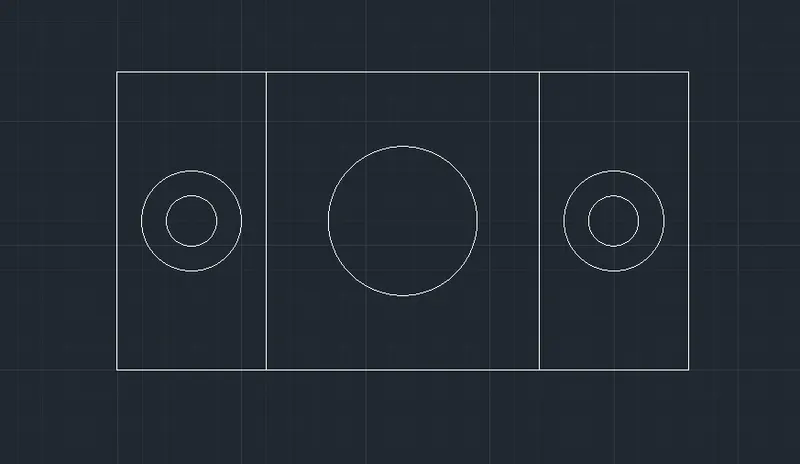
Command: _line
Specify first point:
Specify next point or [Undo]: <Ortho on> 1.50
Specify next point or [Undo]: 4.25
Specify next point or [Close/Undo]: 4.25
Specify next point or [Close/Undo]: 1.5
Specify next point or [Close/Undo]: 3.0
Specify next point or [Close/Undo]: 3.0
Specify next point or [Close/Undo]: 3.0
Specify next point or [Close/Undo]: 5.25
Specify next point or [Close/Undo]: 3.0
Specify next point or [Close/Undo]: 0.5
Specify next point or [Close/Undo]: 5.50
Specify next point or [Close/Undo]: 3.0
Specify next point or [Close/Undo]: U
Specify next point or [Close/Undo]: 3.0
Specify next point or [Close/Undo]: 6.0
Specify next point or [Close/Undo]: *Cancel*
Command:
Using Command Offset create to line
Command: c
CIRCLE
Specify center point for circle or [3P/2P/Ttr (tan tan radius)]:
Specify radius of circle or [Diameter] <2.0000>: d
Specify diameter of circle <4.0000>: 2
Command: c
CIRCLE
Specify center point for circle or [3P/2P/Ttr (tan tan radius)]:
Specify radius of circle or [Diameter] <1.0000>: D
Specify diameter of circle <2.0000>: 2
Command: c
CIRCLE
Specify center point for circle or [3P/2P/Ttr (tan tan radius)]:
Specify radius of circle or [Diameter] <1.0000>: D
Specify diameter of circle <2.0000>: 1
Command: c
CIRCLE
Specify center point for circle or [3P/2P/Ttr (tan tan radius)]:
Specify radius of circle or [Diameter] <0.5000>: D
Specify diameter of circle <1.0000>: 3
Figure is ready
6.
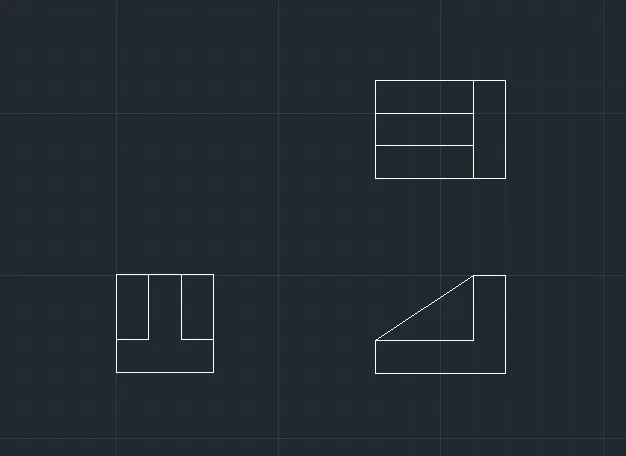
Command: _line
Specify first point:
Specify next point or [Undo]: <Ortho on> .5
Specify next point or [Undo]: .5
Specify next point or [Close/Undo]: .5
Specify next point or [Close/Undo]: 1.0
Specify next point or [Close/Undo]: 0.5
Specify next point or [Close/Undo]: 0.5
Specify next point or [Close/Undo]: 0.5
Specify next point or [Close/Undo]: 0.5
Specify next point or [Close/Undo]: 0.5
Specify next point or [Close/Undo]: 1.5
Specify next point or [Close/Undo]: 0.5
Specify next point or [Close/Undo]: C
Command: l
LINE
Specify first point:
Specify next point or [Undo]: .5
Specify next point or [Undo]: 2.0
Specify next point or [Close/Undo]: 1.5
Specify next point or [Close/Undo]: 0.5
Specify next point or [Close/Undo]: 1.0
Specify next point or [Close/Undo]:
Specify next point or [Close/Undo]: C
Command: l
LINE
Specify first point:
Specify next point or [Undo]:
Specify next point or [Undo]: *Cancel*
Command: L
LINE
Specify first point:
Specify next point or [Undo]:
Specify next point or [Undo]: 0.5
Specify next point or [Close/Undo]: 1.5
Specify next point or [Close/Undo]: 0.5
Specify next point or [Close/Undo]: 0.5
Specify next point or [Close/Undo]: 0.5
Specify next point or [Close/Undo]: 1.5
Specify next point or [Close/Undo]: 1.5
7.
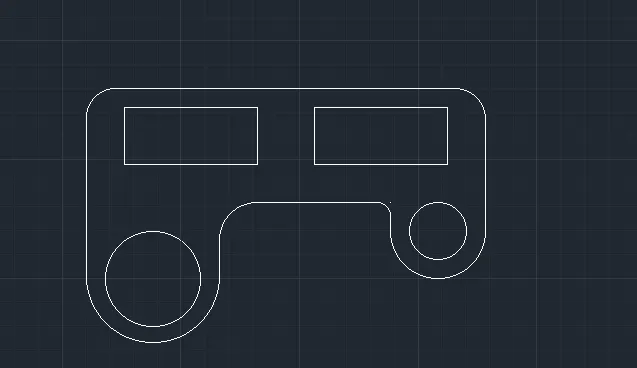
Command: L
LINE
Specify first point:
Specify next point or [Undo]: 100
Specify next point or [Close/Undo]: 20
Specify next point or [Close/Undo]: 70
Specify next point or [Close/Undo]: 30
Specify next point or [Close/Undo]: 70
Specify next point or [Close/Undo]: 20
Specify next point or [Close/Undo]: 75
Command: _fillet
Current settings: Mode = TRIM, Radius = 15.00
Command: _fillet
Current settings: Mode = TRIM, Radius = 15.00
Command: offset
Offset distance 10
Command: offset
Offset distance 30
Command: Arc
Draw an arc of radius 35
Command: Circle
Draw a circle of Diameter 50 from the centre of the arc
From other corner
Command: Arc
Draw an arc of radius 25
Command: Circle
Draw a circle of Diameter 30 from the centre of the arc
Using Xline command Draw a line horizontally from the triangle at 20 units
Close the command
Using Line command Draw the extra lines <ortho on >
Closing the line command
Command: _fillet
Current settings: Mode = TRIM, Radius = 25.00
Command: _fillet
Current settings: Mode = TRIM, Radius = 6.00
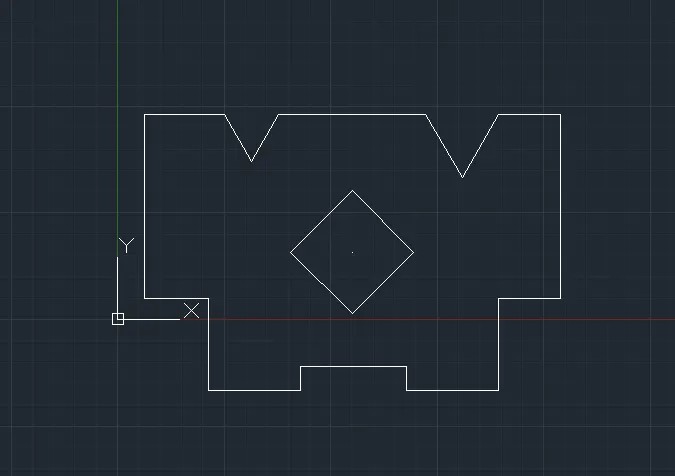
8.
Command:
Command: _line
Specify first point:
Specify next point or [Undo]: 3'7"
Specify next point or [Undo]: Zero length line created at (7'-10.54", 10'-0.51", 0'-0.00")
Specify next point or [Close/Undo]: <60
Angle Override: 60
Specify next point or [Close/Undo]: 2'8"
Specify next point or [Close/Undo]: <120
Angle Override: 120
Specify next point or [Close/Undo]: 2'8"
Specify next point or [Close/Undo]: Zero length line created at (5'-2.54", 10'-0.51", 0'-0.00")
Specify next point or [Close/Undo]: 6'9"
Specify next point or [Close/Undo]: 10'2"
Specify next point or [Close/Undo]: 9'
Specify next point or [Close/Undo]: *Cancel*
Command:
Command: circle
Draw a circle of 3’
Command polygon
Draw a polygon of 4 edges,
The radius of polygon is1.5’<45
Command: TR
TRIM the unwanted lines.
9.
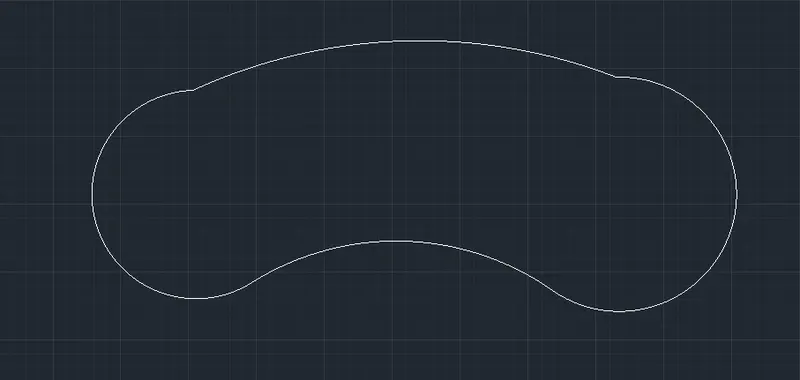
Command: _line
Specify first point:
Specify next point or [Undo]: 32'6"
Specify next point or [Undo]: *Cancel*
Command: _circle
Specify center point for circle or [3P/2P/Ttr (tan tan radius)]:
Specify radius of circle or [Diameter] <4'-0.00">: 8'
Command:
Command: _circle
Specify center point for circle or [3P/2P/Ttr (tan tan radius)]:
Specify radius of circle or [Diameter] <8'-0.00">: 9’
Command: FILLET
Current settings: Mode = TRIM, Radius = 41'-8.00"
Select first object or [Undo/Polyline/Radius/Trim/Multiple]: R
Specify fillet radius <41'-8.00">: 20'10"
Select first object or [Undo/Polyline/Radius/Trim/Multiple]:
Select second object or shift-select to apply corner or [Radius]:
Specify end point of arc:
Specify center point of arc (hold Ctrl to switch direction) or [Angle/Direction/Radius]: _r
Specify radius of arc (hold Ctrl to switch direction): 41'8"
10.
Command: L
LINE
Specify first point:
Specify next point or [Undo]: 4.275
Specify next point or [Close/Undo]:4.275
Command: _circle
Specify center point for circle or [3P/2P/Ttr (tan tan radius)]:
Specify dia,eter of circle : 4’
Command: _circle
Specify center point for circle or [3P/2P/Ttr (tan tan radius)]:
Specify diameter of circle: 5’
Command: _circle
Specify center point for circle or [3P/2P/Ttr (tan tan radius)]:
Specify diameter of circle: 0.9’
Specify center point for circle or [3P/2P/Ttr (tan tan radius)]:
Specify diameter of circle] : 0.9’
Let the tangent will be on in the Object snap by pressing F3
Draw the tangent of the circle using the command line
At last trim the unwanted lines using the command TRIM