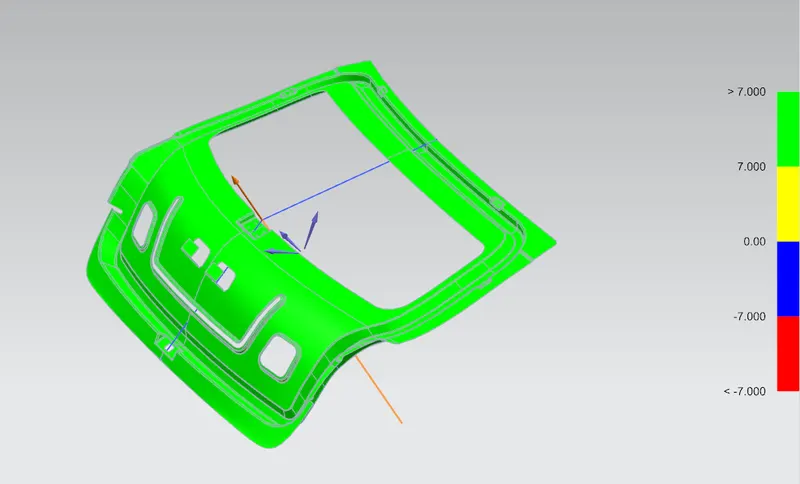
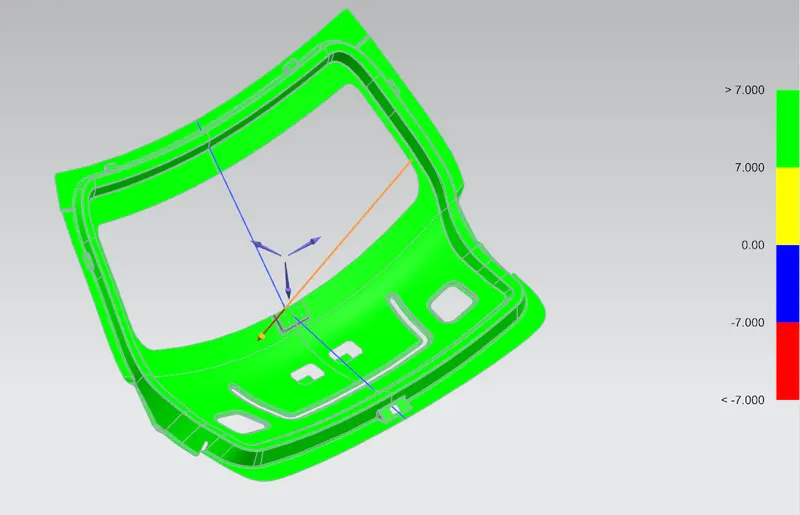
Design of backdoor
Back door inner panel
- First open the class a surface in assembly ,
- Crate the new part and extract the surface using the wave geometry feature, then rectify the all the uneven surface in that class A surface.
- Create the tooling direction which will pass through the centre and perpendicular to the part it will helpful for design and manufacturing purposes.
- Offset the corrected surface about 1.7 mm then to create the lowest portion of the inner panel again offset 30mm
- Offsetting curve on surface on lower surface then trim it,
- Made law extension with respect to tooling direction ,then using the trim and extend feature we keep the required surface .
- And provide the edge blend of 3.75 mm every corner
- For hinge placement I provide the emboss on the top, first created the plan then draw the line and low extend in perpendicular to the plane,
- Then again law extended the surface and trim the sheet using trim and extend feature to get require SHAPE then made 2 holes on that surface.
- This process is same for both gas stay, provide 3.75mm edge blend for every corner.
- For WM I create the simple open emboss then made 2 holes on it.
- Below the back door windshield surface provide the some emboss that will help during wiring of WM assembly or some electrical works inside the inner panel of the door. And also it will dissipate the force occurred during collision.
- For hemming purpose trim the edges of the surface about 2mm.
- Then mirror the hole body with respect to the plane, sew the both surface find any gap between surface.
- Then created the striker emboss, at first create the line by joining the centre point of both hinge hole, create the circle at the centre line, then adjust the circle so that the line which is perpendicular to the tangent line of the circle is placed in proper position.
- Then law extend and make the emboss using trim and extend feature. After that provide some edge blend of 3.75 and made hole for sticker placement.
- After that thicken the component
Back door outer lower and upper panel
- Create the part file and extract the surface using wave geometry feature.
- We created the hemming region by offsetting the surface about 2.65mm then trim the surface.
- Low extended the surface and create the bend using edge blend by three face feature.
- Then provide some hemming relief the bending edge , then thicken the surface about 0.75mm.
For reinforcement of (LH hinge, RH hinge, LH Gas stay, RH Gas stay, WM and Stricker)
- At first Create the new part file then extract the hinge surface From thicken back door inner panel.
- Remove sharp corner and provide some relief in surface after that thicken the surface about 1.5mm.
DRAFT ANALYSIS.