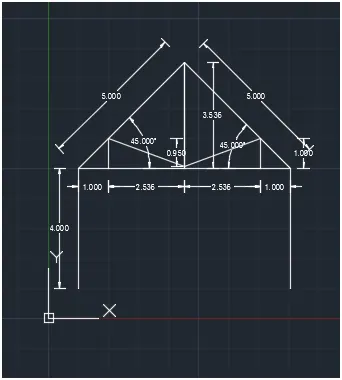
Creation of geometries by Coordinate system methods using AutoCad
P1
AIM:
To draw the following drawing by using Absolute co-ordinate system.
Procedure:
- Type L on the command line and press enter.
- Type (2,1) on the command line and press enter.
- Type (8,1) on the command line and press enter.
- Type (8,2) on the command line and press enter.
- Type (3,2) on the command line and press enter.
- Type (3,6) on the command line and press enter.
- Type (8,6) on the command line and press enter.
- Type (8,7) on the command line and press enter.
- Type (2,7) on the command line and press enter.
- Type C on the command line and press enter.
Result:
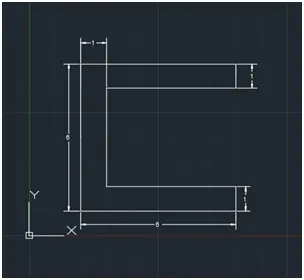
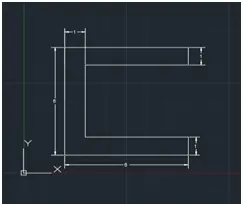
AIM:
To draw the following drawing by using Relative co-ordinate system.
Procedure:
- Type L on the command line and press enter.
- Type (2,1) on the command line and press enter.
- Type @6,0 on the command line and press enter.
- Type @0,1 on the command line and press enter.
- Type @-5,0 on the command line and press enter.
- Type @0,4 on the command line and press enter.
- Type @5,0 on the command line and press enter.
- Type @0,1on the command line and press enter.
- Type @-6,0 on the command line and press enter.
- Type C on the command line and press enter.
Result:
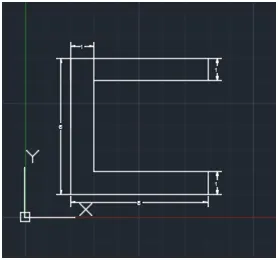
AIM:
To draw the following drawing by using Polar co-ordinate system.
Procedure:
- Type L on the command line and press enter.
- Type (2,1) on the command line and press enter.
- Type @6<0 on the command line and press enter.
- Type @1<90 on the command line and press enter.
- Type @5<180 on the command line and press enter.
- Type @4<90 on the command line and press enter.
- Type @5<0on the command line and press enter.
- Type @1<90on the command line and press enter.
- Type @6<180on the command line and press enter.
- Type C on the command line and press enter.
Result:
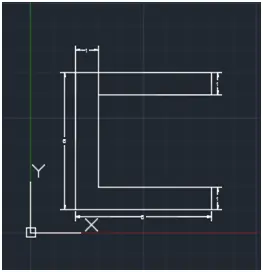
AIM:
To draw the following drawing by using Direct Distance Entry.
Procedure:
- Type L on the command line and press enter.
- Specify the next point by move the cursor in the right side and entre 6
- Move the cursor upward direction and entre 1
- Move the cursor left direction and entre 5
- Move the cursor upward direction and entre 4
- Move the cursor in the right side and entre 5
- Move the cursor upward direction and entre 1
- Move the cursor left direction and entre 6
- Type C on the command line and press enter.
Result:
P2
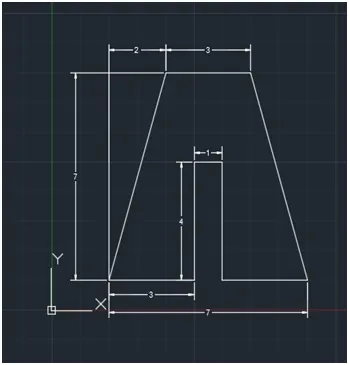
AIM:
To draw the following drawing by using Absolute co-ordinate system.
Procedure:
- Type L on the command line and press enter.
- Type (5,1) on the command line and press enter.
- Type (5,5) on the command line and press enter.
- Type (6,5) on the command line and press enter.
- Type (6,1) on the command line and press enter.
- Type (9,1) on the command line and press enter.
- Type (7,8) on the command line and press enter.
- Type (4,8) on the command line and press enter.
- Type C on the command line and press enter.
Result:
AIM:
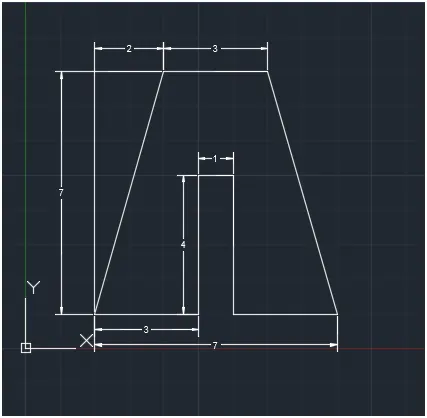
To draw the following drawing by using Relative co-ordinate system.
Procedure:
- Type L on the command line and press enter.
- Type (2,1) on the command line and press enter.
- Type @3,0 on the command line and press enter.
- Type @0,4 on the command line and press enter.
- Type @1,0 on the command line and press enter.
- Type @0,-4 on the command line and press enter.
- Type @3,0 on the command line and press enter.
- Type @-3,7on the command line and press enter.
- Type @-3,0 on the command line and press enter.
- Type C on the command line and press enter.
Result:
AIM:
To draw the following drawing by using Polar co-ordinate system.
Procedure:
- Type L on the command line and press enter.
- Type (2,1) on the command line and press enter.
- Type @3<0 on the command line and press enter.
- Type @4<90 on the command line and press enter.
- Type @1<0 on the command line and press enter.
- Type @4<270 on the command line and press enter.
- Type @3<0 on the command line and press enter.
- Type @7<106 on the command line and press enter.
- Type @3<180 on the command line and press enter.
- Type C on the command line and press enter.
Result:
AIM:
To draw the following drawing by using Direct Distance Entry.
Procedure:
- Type L on the command line and press enter.
- Specify the next point by move the cursor in the right side and entre 3
- Move the cursor upward direction and entre 4
- Move the cursor Right side and entre 1
- Move the cursor downward direction and entre 4
- Move the cursor in the right side and entre 3
- Move the cursor upward direction and entre 7 and press tab and entre angle 106
- Move the cursor left direction and entre 3
- Type C on the command line and press enter.
Result:
P4
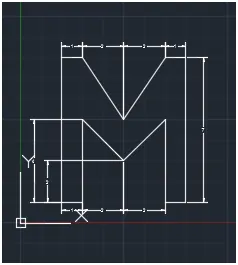
AIM:
To draw the following drawing by using Relative co-ordinate system.
Procedure:
- Type L on the command line and press enter.
- Type (2,1) on the command line and press enter.
- Type @1,0 on the command line and press enter.
- Type @0,4 on the command line and press enter.
- Type @2,-2 on the command line and press enter.
- Type @2,2 on the command line and press enter.
- Type @0,-4 on the command line and press enter.
- Type @1,0 on the command line and press enter.
- Type @0,7 on the command line and press enter.
- Type @-1,0 on the command line and press enter.
- Type @-2,-3 on the command line and press enter.
- Type @-2,3 on the command line and press enter.
- Type @-1,0 on the command line and press enter.
- Type C on the command line and press enter.
Result:
P5
AIM:
To draw the following drawing by using Polar co-ordinate system.
Procedure:
- Type L on the command line and press enter.
- Type (2,1) on the command line and press enter.
- Type @1<0 on the command line and press enter.
- Type @7<90 on the command line and press enter.
- Type @5<0 on the command line and press enter.
- Type @6<270 on the command line and press enter.
- Type @3<180 on the command line and press enter.
- Type @1<270 on the command line and press enter.
- Type @4<0on the command line and press enter.
- Type @8<90 on the command line and press enter
- Type @7<180 on the command line and press enter
- Type C on the command line and press enter.
Result:
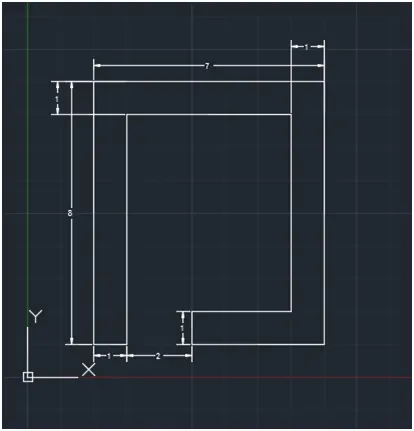
P7
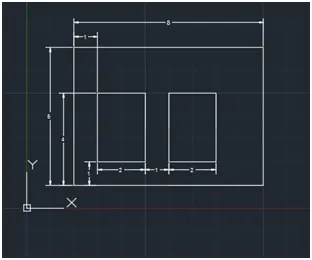
AIM:
To draw the following drawing by using Absolute co-ordinate system.
Procedure:
- Type L on the command line and press enter.
- Type (2,1) on the command line and press enter.
- Type (10,1) on the command line and press enter.
- Type (10,7) on the command line and press enter.
- Type (2,7) on the command line and press enter.
- Type C on the command line and press enter.
- Type L on the command line and press enter.
- Type (3,2) on the command line and press enter.
- Type (5,2) on the command line and press enter.
- Type (5,5) on the command line and press enter.
- Type (3,5) on the command line and press enter.
- Type C on the command line and press enter.
- Type L on the command line and press enter.
- Type (6,2) on the command line and press enter.
- Type (8,2) on the command line and press enter.
- Type (8,5) on the command line and press enter.
- Type (6,5) on the command line and press enter.
- Type C on the command line and press enter.
P-8
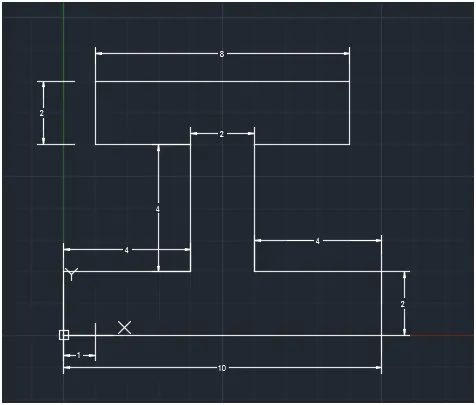
AIM:
To draw the given diagram by using Relative Co-ordinate System.
Procedure:
- Type L on the command line and press enter
- Type 0,0 on the command line and press enter
- Type @10,0 on the command line and press enter
- Type @0,1 on the command line and press enter
- Type @-4,0 on the command line and press enter
- Type @0,-4 on the command line and press enter
- Type @3,0 on the command line and press enter
- Type @0,2 on the command line and press enter
- Type @-8,0 on the command line and press enter
- Type @0,-2 on the command line and press enter
- Type @-3,0 on the command line and press enter
- Type @0,-4 on the command line and press enter
- Type @4,0 on the command line and press enter
- Type @0,-2 on the command line and press enter
- Press C and enter to finish the line command
P-9
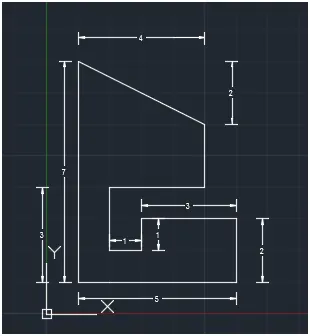
AIM:
To draw the given diagram by using Relative Co-ordinate System.
Procedure:
- Type L on the command line and press enter
- Type 0,0 on the command line and press enter
- Type @5,0 on the command line and press enter
- Type @0,5 on the command line and press enter
- Type @-3,0 on the command line and press enter
- Type @0,-1 on the command line and press enter
- Type @-1,0 on the command line and press enter
- Type @0,-2 on the command line and press enter
- Type @3,0 on the command line and press enter
- Type @0,2 on the command line and press enter
- Type @-4,2 on the command line and press enter
- Press C and enter to finish the line command
P-10
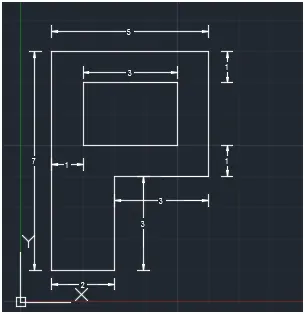
AIM:
To draw the given diagram by using Polar Co-ordinate System.
Procedure:
- Type L on the command line and press enter
- Type 1,1 on the command line and press enter
- Type @2<0 on the command line and press enter
- Type @3<90 on the command line and press enter
- Type @3<0 on the command line and press enter
- Type @4<90 on the command line and press enter
- Type @5<180 on the command line and press enter
- Type C on the command line and press enter
- Type 5,2 on the command line and press enter
- Type @3<0 on the command line and press enter
- Type @2<90 on the command line and press enter
- Type @3<180 on the command line and press enter
- Type C on the command line and press enter
Profile and Trusses
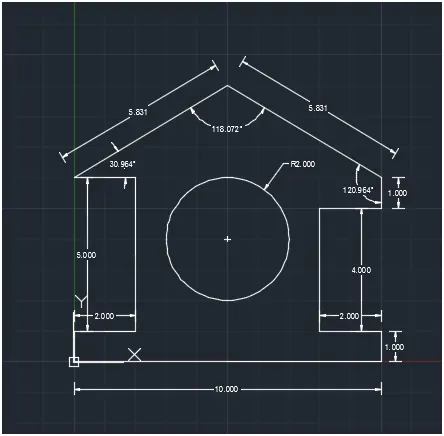
AIM:
To draw the profile and the trusses using Polar Co-ordinate System.
Procedure:
- Type L on the command line and press enter
- Type 0,0 on the command line and press enter
- Type @10<0 on the command line and press enter
- Type @1<90 on the command line and press enter
- Type @2<180 on the command line and press enter
- Type @4<90 on the command line and press enter
- Type @2<0 on the command line and press enter
- Type @1<90 on the command line and press enter
- Type @5.831<120.764 on the command line and press enter
- Type @5.831<120.764on the command line and press enter
- Type @2<0 on the command line and press enter
- Type @5<270 on the command line and press enter
- Type @2<180 on the command line and press enter
- Type C on the command line and press enter
- Type 5,2 on the command line and press enter
- Type C on the command line and press enter
- Type 5,4 on the command line and press enter
- Assign 2 Radius on the command line and press enter
Queen Post Truss
AIM:
To draw the profile and the trusses using Polar Co-ordinate System.
Procedure:
- Type L on the command line and press enter
- Type 1,1 on the command line and press enter
- Type @4<90 on the command line and press enter
- Type @1<0 on the command line and press enter
- Type @1<90on the command line and press enter
- Type @2.7077<21 on the command line and press enter
- Type @3.4855<90 on the command line and press enter
- Type @5<135 on the command line and press enter
- Type 8,1 on the command line and press enter
- Type @4<90 on the command line and press enter
- Type @1<180 on the command line and press enter
- Type @1<90on the command line and press enter
- Type @2.7077<159 on the command line and press enter
- Type @3.4855<90 on the command line and press enter
- Type @5<45 on the command line and press enter