Creation of geometries by Coordinate system methods using AutoCad
Name: Allan Bryan Jayson Cruz
Course: Master’s Certification Program in High-Rise Building Design & Analysis
Date: September 18, 2021
Creation Of Geometries by Coordinate System Methods Using AutoCAD
CHALLENGE
AutoCAD Conditions:
*AutoCAD is set as Absolute Coordinate.
Cartesian Plane Conditions / Grid Conditions:
*Origin is set as (0,0).
*The cartesian plane is a 10x10 square unit divided into 1x1 square units.
Legends for Direct Distance Entry Method:
*Point "Right" = <0
*Point "Up" = <90
*Point "Left" = <180
*Point "Down" = <270
********************************************************
PROBLEM 1
Image:
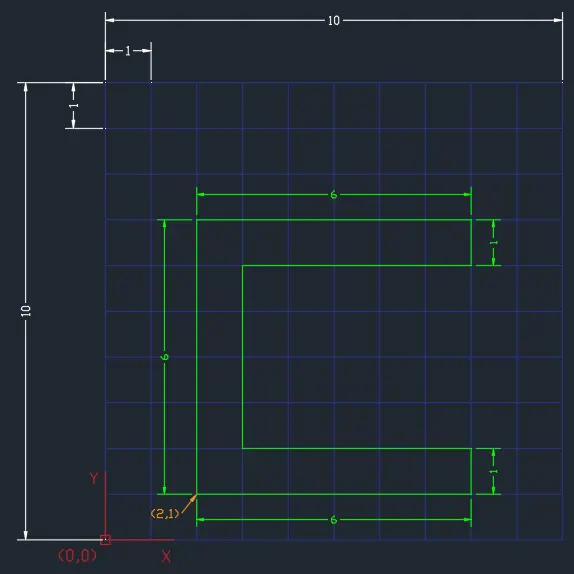
Procedure:
Cartesian Coordinate System Method
- Select the Line tool
- Specify first point: 2,1
- Specify next point: 2,7
- Specify next point: 8,7
- Specify next point: 8,6
- Specify next point: 3,6
- Specify next point: 3,2
- Specify next point: 8,2
- Specify next point: 8,1
- Specify last point: 2,1 or Close
Relative Rectangular Coordinate Method
- Select the Line tool
- Specify first point: 2,1
- Specify next point: @0,6
- Specify next point: @6,0
- Specify next point: @0,-1
- Specify next point: @-5,0
- Specify next point: @0,-4
- Specify next point: @5,0
- Specify next point: @0,-1
- Specify last point: @-6,0 or Close
Relative Polar Coordinate Method
- Select the Line tool
- Specify first point: 2,1
- Specify next point: @6<90
- Specify next point: @6<0
- Specify next point: @1<270
- Specify next point: @5<180
- Specify next point: @4<270
- Specify next point: @5<0
- Specify next point: @1<270
- Specify last point: @6<180 or Close
Direct Distance Entry Method (Ortho ON)
- Select the Line tool
- Specify first point: 2,1
- Specify next point: Point "Up", 6
- Specify next point: Point "Right", 6
- Specify next point: Point "Down", 1
- Specify next point: Point "Left", 5
- Specify next point: Point "Down", 4
- Specify next point: Point "Right", 5
- Specify next point: Point "Down", 1
- Specify last point: Point "Left", 6 or Close
********************************************************
PROBLEM 2
Image:
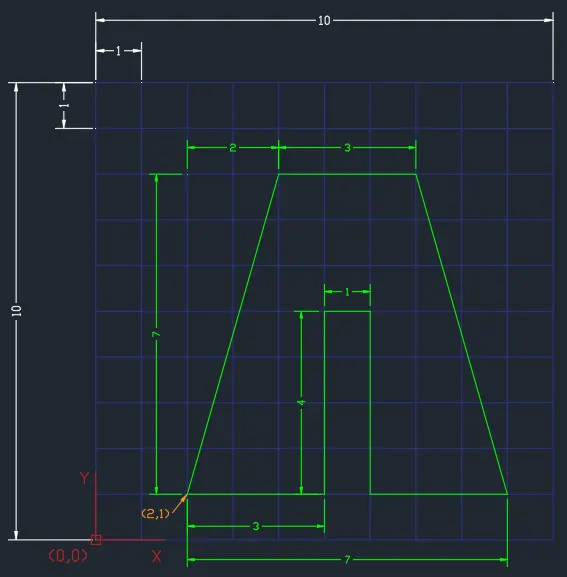
Procedure:
Cartesian Coordinate System Method
- Select the Line tool
- Specify first point: 2,1
- Specify next point: 4,8
- Specify next point: 7,8
- Specify next point: 9,1
- Specify next point: 6,1
- Specify next point: 6,5
- Specify next point: 5,5
- Specify next point: 5,1
- Specify last point: 2,1 or Close
Relative Rectangular Coordinate Method
- Select the Line tool
- Specify first point: 2,1
- Specify next point: @2,7
- Specify next point: @3,0
- Specify next point: @2,-7
- Specify next point: @-3,0
- Specify next point: @0,4
- Specify next point: @-1,0
- Specify next point: @0,-4
- Specify last point: @-3,0 or Close
Relative Polar Coordinate Method
- Select the Line tool
- Specify first point: 2,1
- Specify next point: @7.28<74.05
- Specify next point: @3<0
- Specify next point: @7.25<-74.05
- Specify next point: @3<180
- Specify next point: @4<90
- Specify next point: @1<180
- Specify next point: @4<270
- Specify last point: @3<180 or Close
Direct Distance Entry Method (Ortho ON)
- Select the Line tool
- Specify first point: 2,1
- Specify next point: Point "At < 74.05", 7.28
- Specify next point: Point "Right", 3
- Specify next point: Point "At < -74.05 (285.95)", 7.28
- Specify next point: Point "Left", 3
- Specify next point: Point "Up", 4
- Specify next point: Point "Left", 1
- Specify next point: Point "Down", 4
- Specify last point: Point "Left", 3 or Close
********************************************************
PROBLEM 4
Image:
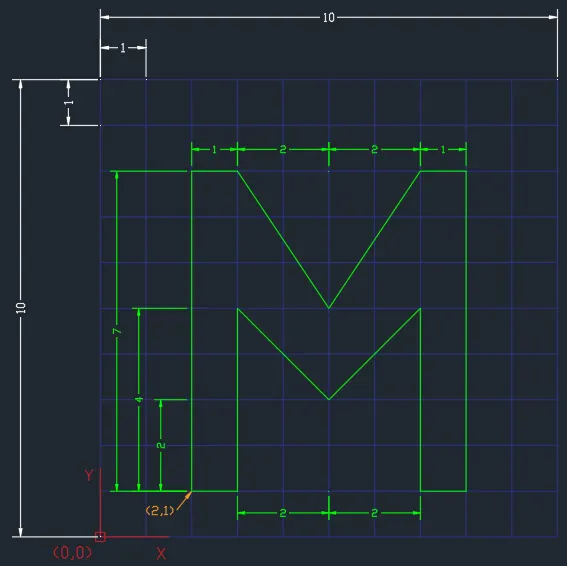
Procedure:
Cartesian Coordinate System Method
- Select the Line tool
- Specify first point: 2,1
- Specify next point: 2,8
- Specify next point: 3,8
- Specify next point: 5,5
- Specify next point: 7,8
- Specify next point: 8,8
- Specify next point: 8,1
- Specify next point: 7,1
- Specify next point: 7,5
- Specify next point: 5,3
- Specify next point: 3,5
- Specify next point: 3,1
- Specify last point: 2,1 or Close
Relative Rectangular Coordinate Method
- Select the Line tool
- Specify first point: 2,1
- Specify next point: @0,7
- Specify next point: @1,0
- Specify next point: @2,-3
- Specify next point: @2,3
- Specify next point: @1,0
- Specify next point: @0,-7
- Specify next point: @-1,0
- Specify next point: @0,4
- Specify next point: @-2,-2
- Specify next point: @-2,2
- Specify next point: @0,-4
- Specify last point: @-1,0 or Close
Relative Polar Coordinate Method
- Select the Line tool
- Specify first point: 2,1
- Specify next point: @7<90
- Specify next point: @1<0
- Specify next point: @3.61<-56.31
- Specify next point: @3.61<56.31
- Specify next point: @1<0
- Specify next point: @7<270
- Specify next point: @1<180
- Specify next point: @4<90
- Specify next point: @2.83<-135
- Specify next point: @2.83<135
- Specify next point: @4<270
- Specify last point: @1<180 or Close
Direct Distance Entry Method (Ortho ON)
- Select the Line tool
- Specify first point: 2,1
- Specify next point: Point "Up", 7
- Specify next point: Point "Right", 1
- Specify next point: Point "At < -56.31 (303.69)", 3.61
- Specify next point: Point "At < 56.31", 3.61
- Specify next point: Point "Right", 1
- Specify next point: Point "Down", 7
- Specify next point: Point "Left", 1
- Specify next point: Point "Up", 4
- Specify next point: Point "At < -135 (225)", 2.83
- Specify next point: Point "At < 135 (225)", 2.83
- Specify next point: Point "Down", 4
- Specify last point: Point "Left", 3 or Close
********************************************************
PROBLEM 5
Image:
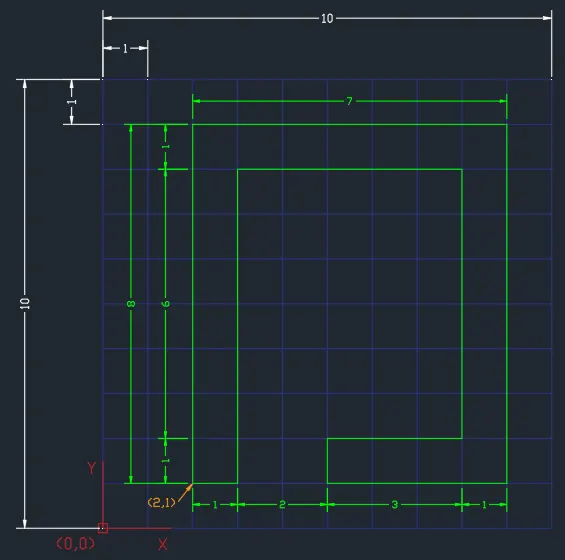
Procedure:
Cartesian Coordinate System Method
- Select the Line tool
- Specify first point: 2,1
- Specify next point: 2,9
- Specify next point: 9,9
- Specify next point: 9,1
- Specify next point: 5,1
- Specify next point: 5,2
- Specify next point: 8,2
- Specify next point: 8,8
- Specify next point: 3,8
- Specify next point: 3,1
- Specify last point: 2,1 or Close
Relative Rectangular Coordinate Method
- Select the Line tool
- Specify first point: 2,1
- Specify next point: @0,8
- Specify next point: @7,0
- Specify next point: @0,-8
- Specify next point: @-4,0
- Specify next point: @0,1
- Specify next point: @3,0
- Specify next point: @0,6
- Specify next point: @-5,0
- Specify next point: @0,-7
- Specify last point: @-1,0 or Close
Relative Polar Coordinate Method
- Select the Line tool
- Specify first point: 2,1
- Specify next point: @8<90
- Specify next point: @7<0
- Specify next point: @8<270
- Specify next point: @4<180
- Specify next point: @1<90
- Specify next point: @3<180
- Specify next point: @6<90
- Specify next point: @5<180
- Specify next point: @7<270
- Specify last point: @1<180 or Close
Direct Distance Entry Method (Ortho ON)
- Select the Line tool
- Specify first point: 2,1
- Specify next point: Point "Up", 8
- Specify next point: Point "Right", 7
- Specify next point: Point "Down", 8
- Specify next point: Point "Left", 4
- Specify next point: Point "Up", 1
- Specify next point: Point "Right", 3
- Specify next point: Point "Up", 6
- Specify next point: Point "Left", 5
- Specify next point: Point "Down", 7
- Specify last point: Point "Left", 1 or Close
********************************************************
PROBLEM 7
Image:
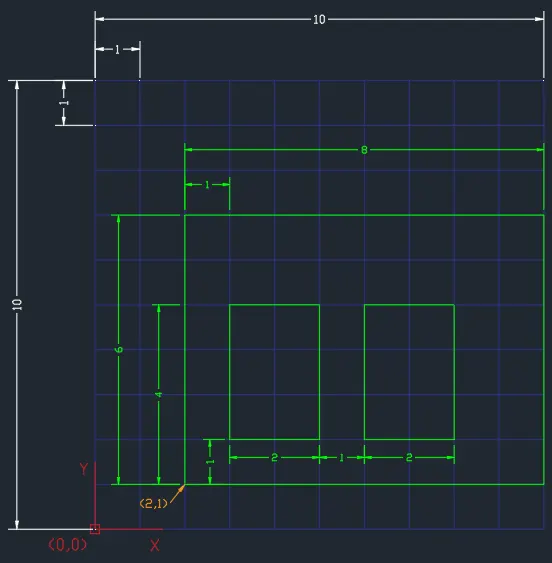
Procedure:
Cartesian Coordinate System Method
- Select the Line tool
- Specify first point: 2,1
- Specify next point: 2,7
- Specify next point: 10,7
- Specify next point: 10,1
- Specify last point: 2,1 or Close
- Select the Line tool
- Specify first point: 3,2
- Specify next point: 3,5
- Specify next point: 5,5
- Specify next point: 5,2
- Specify last point: 3,2 or Close
- Select the Line tool
- Specify first point: 6,2
- Specify next point: 6,5
- Specify next point: 8,5
- Specify next point: 8,2
- Specify last point: 6,2 or Close
Relative Rectangular Coordinate Method
- Select the Line tool
- Specify first point: 2,1
- Specify next point: @0,6
- Specify next point: @8,0
- Specify next point: @0,-6
- Specify last point: @-8,0 or Close
- Select the Line tool
- Specify first point: 3,2
- Specify next point: @0,3
- Specify next point: @2,0
- Specify next point: @0,-3
- Specify last point: @-2,0 or Close
- Select the Line tool
- Specify first point: 6,2
- Specify next point: @0,3
- Specify next point: @2,0
- Specify next point: @0,-3
- Specify last point: @-2,0 or Close
Relative Polar Coordinate Method
- Select the Line tool
- Specify first point: 2,1
- Specify next point: @6<90
- Specify next point: @8<0
- Specify next point: @6<270
- Specify last point: @8<180 or Close
- Select the Line tool
- Specify first point: 3,2
- Specify next point: @3<90
- Specify next point: @2<0
- Specify next point: @3<270
- Specify last point: @2<180 or Close
- Select the Line tool
- Specify first point: 6,2
- Specify next point: @3<90
- Specify next point: @2<0
- Specify next point: @3<270
- Specify last point: @2<180 or Close
Direct Distance Entry Method (Ortho ON)
- Select the Line tool
- Specify first point: 2,1
- Specify next point: Point "Up", 6
- Specify next point: Point "Right", 8
- Specify next point: Point "Down", 6
- Specify last point: Point "Left", 8 or Close
- Select the Line tool
- Specify first point: 3,2
- Specify next point: Point "Up", 3
- Specify next point: Point "Right", 2
- Specify next point: Point "Down", 3
- Specify last point: Point "Left", 2 or Close
- Select the Line tool
- Specify first point: 6,2
- Specify next point: Point "Up", 3
- Specify next point: Point "Right", 2
- Specify next point: Point "Down", 3
- Specify last point: Point "Left", 2 or Close
********************************************************
PROBLEM 8
Image:
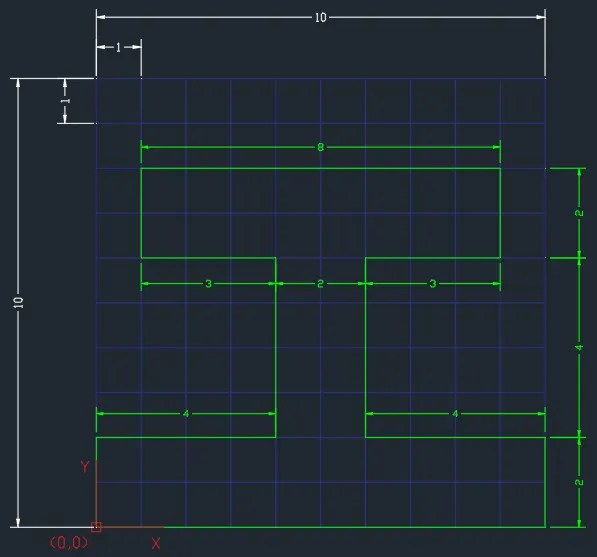
Procedure:
Cartesian Coordinate System Method
- Select the Line tool
- Specify first point: 0,0
- Specify next point: 0,2
- Specify next point: 4,2
- Specify next point: 4,6
- Specify next point: 1,6
- Specify next point: 1,8
- Specify next point: 9,8
- Specify first point: 9,7
- Specify next point: 6,7
- Specify next point: 6,2
- Specify next point: 10,2
- Specify next point: 10,0
- Specify last point: 0,0 or Close
Relative Rectangular Coordinate Method
- Select the Line tool
- Specify first point: 0,0
- Specify next point: @0,2
- Specify next point: @4,0
- Specify next point: @0,4
- Specify next point: @-3,0
- Specify next point: @0,2
- Specify next point: @8,0
- Specify next point: @0,-2
- Specify next point: @-3,0
- Specify next point: @0,-4
- Specify next point: @4,0
- Specify next point: @0,-2
- Specify last point: @-10,0 or Close
Relative Polar Coordinate Method
- Select the Line tool
- Specify first point: 0,0
- Specify next point: @2<90
- Specify next point: @4<0
- Specify next point: @4<90
- Specify next point: @3<180
- Specify next point: @2<90
- Specify next point: @8<0
- Specify next point: @2<270
- Specify next point: @3<180
- Specify next point: @4<270
- Specify next point: @4<0
- Specify next point: @2<270
- Specify last point: @10<180 or Close
Direct Distance Entry Method (Ortho ON)
- Select the Line tool
- Specify first point: 0,0
- Specify next point: Point "Up", 2
- Specify next point: Point "Right", 4
- Specify next point: Point "Up", 4
- Specify next point: Point "Left", 3
- Specify next point: Point "Up", 2
- Specify next point: Point "Right", 8
- Specify next point: Point "Down", 2
- Specify next point: Point "Left", 3
- Specify next point: Point "Down", 4
- Specify next point: Point "Right", 4
- Specify next point: Point "Down", 2
- Specify last point: Point "Left", 10 or Close
********************************************************
PROBLEM 9
Image:
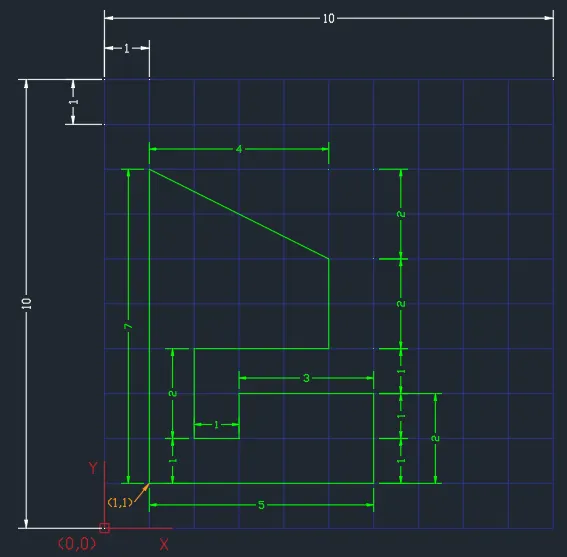
Procedure:
Cartesian Coordinate System Method
- Select the Line tool
- Specify first point: 1,1
- Specify next point: 1,8
- Specify next point: 5,6
- Specify next point: 5,4
- Specify next point: 2,4
- Specify next point: 2,2
- Specify next point: 3,2
- Specify first point: 3,3
- Specify next point: 6,3
- Specify next point: 6,1
- Specify last point: 1,1 or Close
Relative Rectangular Coordinate Method
- Select the Line tool
- Specify first point: 1,1
- Specify next point: @0,7
- Specify next point: @4,2
- Specify next point: @0,-2
- Specify next point: @-3,0
- Specify next point: @0,-2
- Specify next point: @1,0
- Specify next point: @0,1
- Specify next point: @3,0
- Specify next point: @0,-2
- Specify last point: @-5,0 or Close
Relative Polar Coordinate Method
- Select the Line tool
- Specify first point: 1,1
- Specify next point: @7<90
- Specify next point: @4.47<-26.57
- Specify next point: @2<270
- Specify next point: @3<180
- Specify next point: @2<270
- Specify next point: @1<0
- Specify next point: @1<90
- Specify next point: @3<0
- Specify next point: @2<270
- Specify last point: @5<180 or Close
Direct Distance Entry Method (Ortho ON)
- Select the Line tool
- Specify first point: 1,1
- Specify next point: Point "Up", 7
- Specify next point: Point "At < -26.57 (333.43)", 4.47
- Specify next point: Point "Down", 2
- Specify next point: Point "Left", 3
- Specify next point: Point "Down", 2
- Specify next point: Point "Right", 1
- Specify next point: Point "Up", 1
- Specify next point: Point "Right", 3
- Specify next point: Point "Down", 2
- Specify last point: Point "Left", 5 or Close
********************************************************
PROBLEM 10
Image:
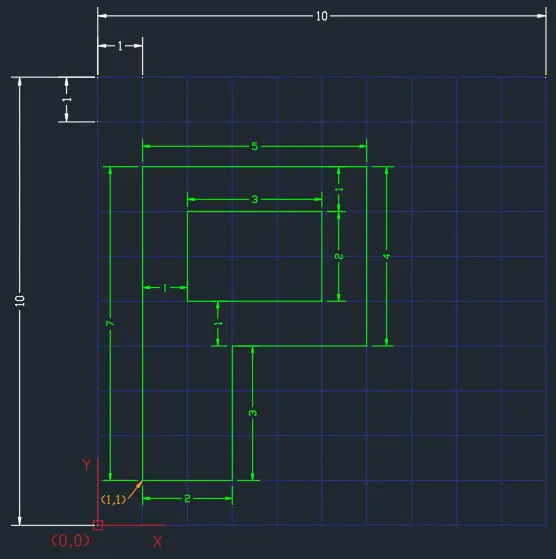
Procedure:
Cartesian Coordinate System Method
- Select the Line tool
- Specify first point: 1,1
- Specify next point: 1,8
- Specify next point: 6,8
- Specify next point: 6,4
- Specify next point: 3,4
- Specify next point: 3,1
- Specify last point: 1,1 or Close
- Select the Line tool
- Specify first point: 2,5
- Specify next point: 2,7
- Specify first point: 5,7
- Specify next point: 5,5
- Specify last point: 2,5 or Close
Relative Rectangular Coordinate Method
- Select the Line tool
- Specify first point: 1,1
- Specify next point: @0,7
- Specify next point: @5,0
- Specify next point: @0,-4
- Specify next point: @-3,0
- Specify next point: @0,-3
- Specify last point: @2,0 or Close
- Select the Line tool
- Specify first point: 2,5
- Specify next point: @0,2
- Specify next point: @3,0
- Specify next point: @0,-2
- Specify last point: @-3,0 or Close
Relative Polar Coordinate Method
- Select the Line tool
- Specify first point: 1,1
- Specify next point: @7<90
- Specify next point: @5<0
- Specify next point: @4<270
- Specify next point: @3<180
- Specify next point: @3<270
- Specify last point: @2<180 or Close
- Select the Line tool
- Specify first point: 2,5
- Specify next point: @2<90
- Specify next point: @3<0
- Specify next point: @2<270
- Specify last point: @3<180 or Close
Direct Distance Entry Method (Ortho ON)
- Select the Line tool
- Specify first point: 1,1
- Specify next point: Point "Up", 7
- Specify next point: Point "Right", 5
- Specify next point: Point "Down", 4
- Specify next point: Point "Left", 3
- Specify next point: Point "Down", 3
- Specify last point: Point "Left", 2 or Close
- Select the Line tool
- Specify first point: 2,5
- Specify next point: Point "Up", 2
- Specify next point: Point "Right", 3
- Specify next point: Point "Down", 2
- Specify last point: Point "Left", 3 or Close
********************************************************
PROFILE-WOOD
Image:
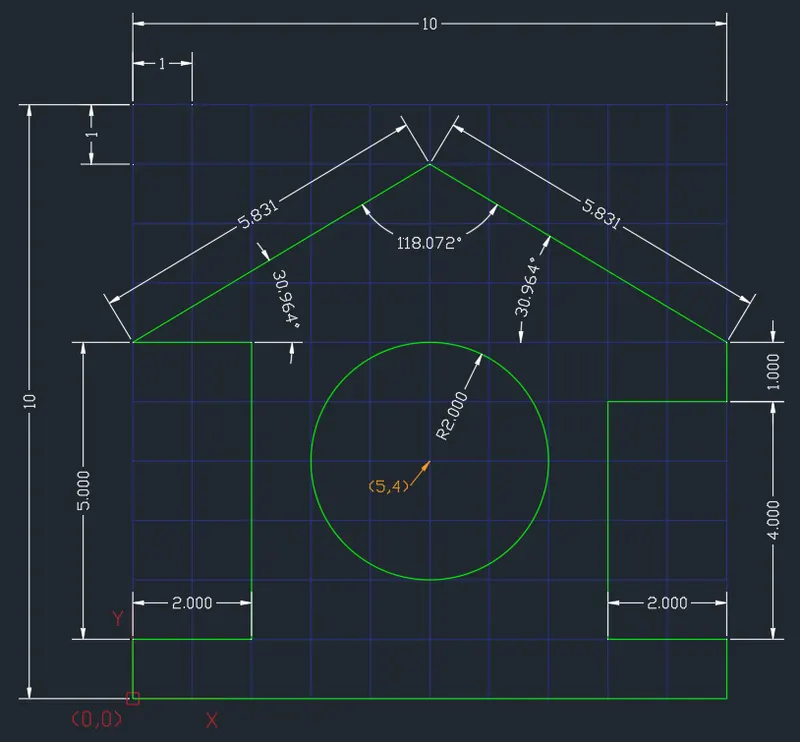
Procedure:
- Select the Line tool
- Specify first point: 0,0
- Specify next point: @1<90
- Specify next point: @2<0
- Specify next point: @5<90
- Specify next point: @2<180
- Specify next point: @5.831<30.964
- Specify next point: @5.831<-30.964
- Specify next point: @1<270
- Specify next point: @2<180
- Specify next point: @4<270
- Specify next point: @2<0
- Specify next point: @1<270
- Specify last point: @10<180 or Close
- Select the Circle tool
- Specify first point: 5,4
- Specify radius: 2
********************************************************
QUEEN POST TRUSS
Image:
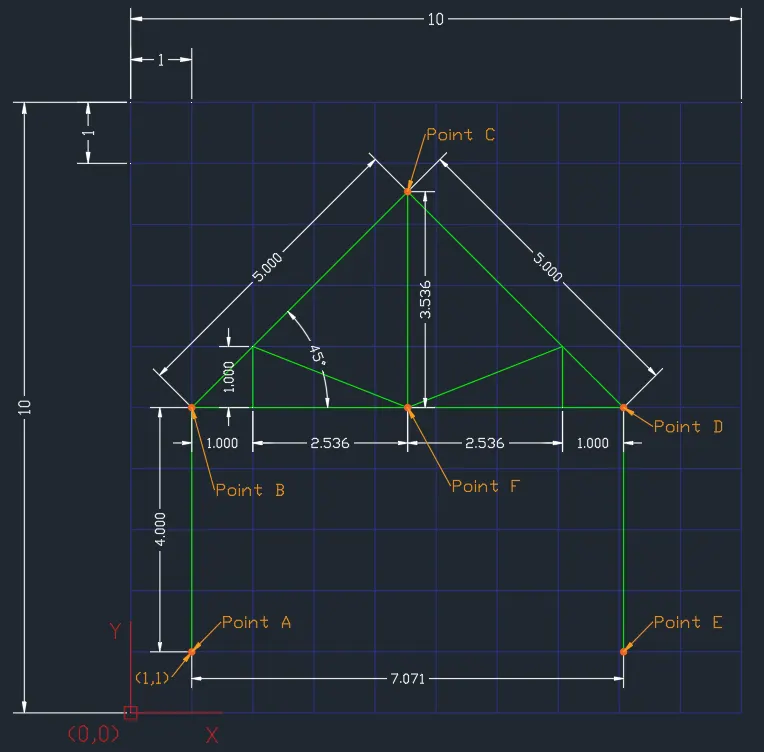
Procedure:
- Select the Line tool
- Specify first point: 1,1 (Point A)
- Specify next point: @4<90 (Point B)
- Specify next point: @5<45 (Point C)
- Specify next point: @5<-45 (Point D)
- Specify next point: @4<270 (Point E) , End
- Select the Line tool
- Connect Point B and Point D
- Set mid point of line as Point F, End
- Select the Line tool
- Connect Point C and Point F, End
- Select the Line tool
- Specify first point: 2,5
- Specify next point: @1<90
- Specify next point: @2.726<-21.524
- Specify next point: @2.726<21.524
- Specify next point: @1<270 , End
********************************************************
MONO PITCH
Image:
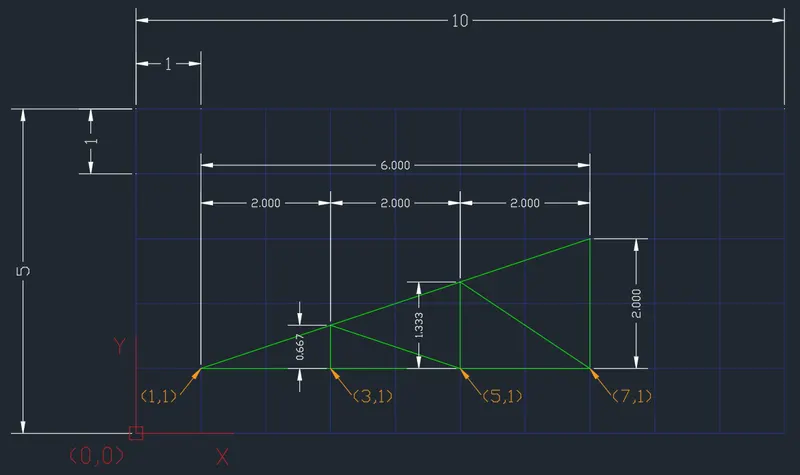
Note: Height of the cartesian plane is reduced to 5 for better image.
Procedure:
- Select the Line tool
- Specify first point: 1,1
- Specify next point: 7,2
- Specify next point: 7,1
- Specify last point: 1,1 or Close
- Select the Line tool
- Specify first point: 3,1
- Specify next point: @0.667<90
- Specify next point: 5,1
- Specify next point: @1.333<90
- Specify next point: 7,1 , End