Creation of geometries by Coordinate system methods using AutoCad
AIM:
To create the geometrics using all the coordinate system methods from the line tool in AutoCAD and to create civil related drawing using the tools in AutoCAD.
Procedure:
- Initially set the template(imperial) and units(decimal).
- Type startup in the command line and then insert the values 1.Then go to application menu--select new--then a dialouge box appears, that is create drawing ,to start from scratchIn this dialogue box,initially set the default settings as imperial and in the advanced set up choose the units as decimal.
- To draw a line:always follow the command while drawing a line
- Ribbon--Home--Draw panel--line
- Toolbar--Draw--line
- Menubar--Draw--Line
- Tool pallettes--Draw--line
- Command--Line or L
P-1
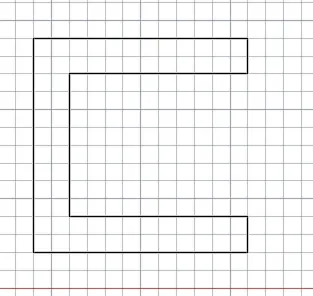
- Specify first point: 2,1
- Specify next point or [Undo]: 8,1
- Specify next point or [Undo]: 8,2
- Specify next point or [Close/Undo]: 3,2
- Specify next point or [Close/Undo]: 3,6
- Specify next point or [Close/Undo]: 8,6
- Specify next point or [Close/Undo]: 8,7
- Specify next point or [Close/Undo]: 2,7
- Specify next point or [Close/Undo]: 2,1
2nd Method Line
- Specify first point: 2,1
- Specify next point or [Undo]: @6,0
- Specify next point or [Undo]: @0,1
- Specify next point or [Close/Undo]: @-5,0
- Specify next point or [Close/Undo]: @0,4
- Specify next point or [Close/Undo]: @5,0
- Specify next point or [Close/Undo]: @0,1
- Specify next point or [Close/Undo]: @-6,0
- Specify next point or [Close/Undo]: @0,-6
- Specify next point or [Close/Undo]: *Cancel*
3 Method LINE
- Specify first point: 2,1
- Specify next point or [Undo]: @6<0
- Specify next point or [Undo]: @1<90
- Specify next point or [Close/Undo]: @5<180
- Specify next point or [Close/Undo]: @4<90
- Specify next point or [Close/Undo]: @5<0
- Specify next point or [Close/Undo]: @1<90
- Specify next point or [Close/Undo]: @6<180
- Specify next point or [Close/Undo]: @6<270
- Specify next point or [Close/Undo]: *Cancel*
P-2
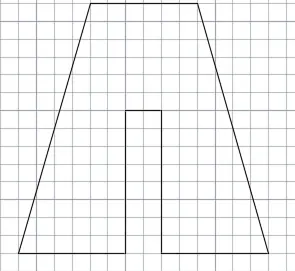
1st Method
- Specify first point: 2,1
- Specify next point or [Undo]: 5,1
- Specify next point or [Undo]: 5,5
- Specify next point or [Close/Undo]: 6,5
- Specify next point or [Close/Undo]: 6,1
- Specify next point or [Close/Undo]: 9,1
- Specify next point or [Close/Undo]: 7,9
- Specify next point or [Close/Undo]: 4,9
- Specify next point or [Close/Undo]: 2,1
LINE
2nd Method
- Specify first point: 2,1
- Specify next point or [Undo]: @3,0
- Specify next point or [Undo]: @0,4
- Specify next point or [Close/Undo]: @1,0
- Specify next point or [Close/Undo]: @0,-4
- Specify next point or [Close/Undo]: @3,0
- Specify next point or [Close/Undo]: @-2,7
- Specify next point or [Close/Undo]: @-3,0
- Specify next point or [Close/Undo]: @-2,-7
- Specify next point or [Close/Undo]: *Cancel*
3rd method:
LINE
- Specify first point: 2,1
- Specify next point or [Undo]: @3<0
- Specify next point or [Undo]: @4<90
- Specify next point or [Close/Undo]: @1<0
- Specify next point or [Close/Undo]: @4<270
- Specify next point or [Close/Undo]: @3<0
- Specify next point or [Close/Undo]: @7<105
- Specify next point or [Close/Undo]: @3<180
- Specify next point or [Close/Undo]: @7<255
- Specify next point or [Close/Undo]: *Cancel*
P-3
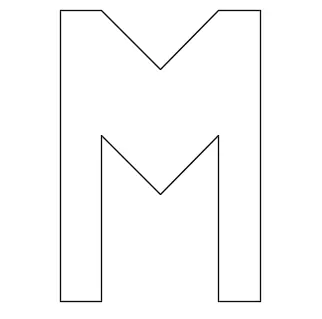
- LINE
- Specify first point: 2,1
- Specify next point or [Undo]: @7<90
- Specify next point or [Undo]: @1<0
- Specify next point or [Close/Undo]: @2<315
- Specify next point or [Close/Undo]: @2<45
- Specify next point or [Close/Undo]: @1<0
- Specify next point or [Close/Undo]: @7<270
- Specify next point or [Close/Undo]: @1<180
- Specify next point or [Close/Undo]: @4<90
- Specify next point or [Close/Undo]: @2<225
- Specify next point or [Close/Undo]: @2<135
- Specify next point or [Close/Undo]: @4<270
- Specify next point or [Close/Undo]: @1<180
- Specify next point or [Close/Undo]: *Cancel*
P-4
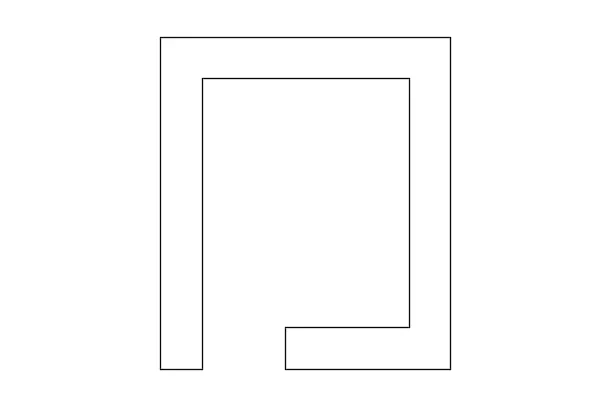
- Specify first point: 2,1
- Specify next point or [Undo]: @8<90
- Specify next point or [Undo]: @7<0
- Specify next point or [Close/Undo]: @8<270
- Specify next point or [Close/Undo]: @4<180
- Specify next point or [Close/Undo]: @1<90
- Specify next point or [Close/Undo]: @3<0
- Specify next point or [Close/Undo]: @6<90
- Specify next point or [Close/Undo]: @5<180
- Specify next point or [Close/Undo]: @7<270
- Specify next point or [Close/Undo]: @1<180
- Specify next point or [Close/Undo]: *Cancel*
P-5
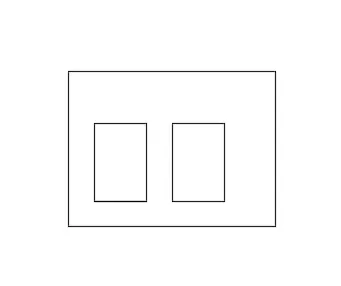
- LINE
- Specify first point: 2,1
- Specify next point or [Undo]: @6<90
- Specify next point or [Undo]: @8<0
- Specify next point or [Close/Undo]: @6<270
- Specify next point or [Close/Undo]: @8<180
- Specify next point or [Close/Undo]: *Cancel*
- Command: L
- LINE
- Specify first point: 3,2
- Specify next point or [Undo]: @3<90
- Specify next point or [Undo]: @2<0
- Specify next point or [Close/Undo]: @3<270
- Specify next point or [Close/Undo]: @2<180
- Specify next point or [Close/Undo]: *Cancel*
- LINE
- Specify first point: 6,2
- Specify next point or [Undo]: @3<90
- Specify next point or [Undo]: @2<0
- Specify next point or [Close/Undo]: @3<270
- Specify next point or [Close/Undo]: @2<180
- Specify next point or [Close/Undo]: *Cancel*
P-6
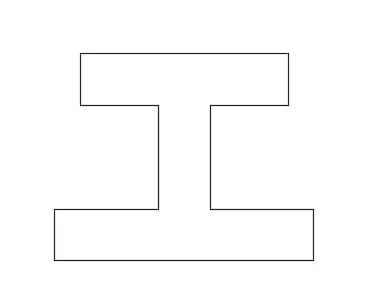
- Specify first point: 0,0
- Specify next point or [Undo]: @2<90
- Specify next point or [Undo]: @4<0
- Specify next point or [Close/Undo]: @4<90
- Specify next point or [Close/Undo]: @3<180
- Specify next point or [Close/Undo]: @2<90
- Specify next point or [Close/Undo]: @8<0
- Specify next point or [Close/Undo]: @2<270
- Specify next point or [Close/Undo]: @3<180
- Specify next point or [Close/Undo]: @4<270
- Specify next point or [Close/Undo]: @4<0
- Specify next point or [Close/Undo]: @2<270
- Specify next point or [Undo]: @10<180
P-7
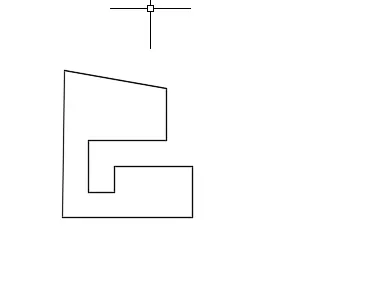
- LINE
- Specify first point: 1,1
- Specify next point or [Undo]: @5<0
- Specify next point or [Undo]: @2<90
- Specify next point or [Close/Undo]: @3<180
- Specify next point or [Close/Undo]: @1<270
- Specify next point or [Close/Undo]: @1<180
- Specify next point or [Close/Undo]: @2<90
- Specify next point or [Close/Undo]: @3<0
- Specify next point or [Close/Undo]: @2<90
- Specify next point or [Close/Undo]: @4<170
- Specify next point or [Close/Undo]: C
P-8
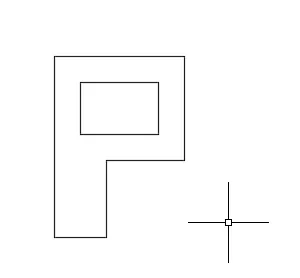
- LINE
- Specify first point: 1,1
- Specify next point or [Undo]: @2<0
- Specify next point or [Undo]: @3<90
- Specify next point or [Close/Undo]: @3<0
- Specify next point or [Close/Undo]: @4<90
- Specify next point or [Close/Undo]: @5<180
- Specify next point or [Close/Undo]: @7<270
- Specify next point or [Close/Undo]: C
- LINE
- Specify first point: 2,5
- Specify next point or [Undo]: @2<90
- Specify next point or [Undo]: @3<0
- Specify next point or [Close/Undo]: @2<270
- Specify next point or [Close/Undo]: @3<180
- Specify next point or [Close/Undo]: *Cancel*
1.PROFILE WOOD
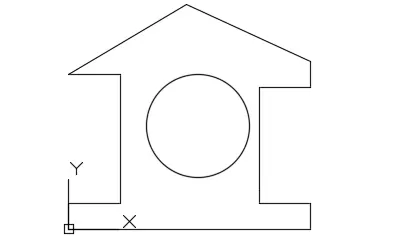
- LINE
- Specify first point: 0,0
- Specify next point or [Undo]: @1<90
- Specify next point or [Undo]: @2<0
- Specify next point or [Close/Undo]: @5<90
- Specify next point or [Close/Undo]: @2<180
- Specify next point or [Close/Undo]: @5.291<30.545
- Specify next point or [Close/Undo]: @5.291<335.535
- Specify next point or [Close/Undo]: @1<270
- Specify next point or [Close/Undo]: @2<180
- Specify next point or [Close/Undo]: @4<270
- Specify next point or [Close/Undo]: @0.498<270
- Specify next point or [Close/Undo]: @2<0
- Specify next point or [Close/Undo]: @1<270
- Specify next point or [Close/Undo]: @10<180
- Specify next point or [Undo]: *Cancel*
- CIRCLE
- Specify center point for circle or [3P/2P/Ttr (tan tan radius)]: 5,4
- Specify radius of circle or [Diameter]: 2
- Command: *Cancel*
2. QUEEN POST TRUSS
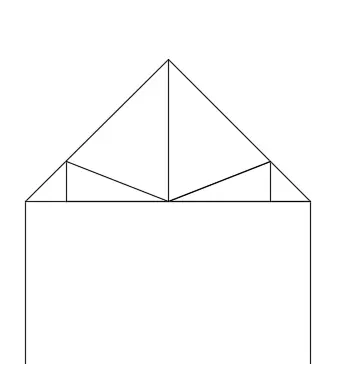
- LINE
- Specify first point: 1,1
- Specify next point or [Undo]: @0,4
- Specify next point or [Undo]: @5<45
- Specify next point or [Close/Undo]: @5<315
- Specify next point or [Close/Undo]: @0,-4
- Specify next point or [Close/Undo]: *Cancel*
- Command: L
- LINE
- Specify first point: 1,5
- Specify next point or [Undo]: @1,0
- Specify next point or [Undo]: @2.536,0
- Specify next point or [Close/Undo]: @2.536,0
- Specify next point or [Close/Undo]: @1,0
- Specify next point or [Close/Undo]: *Cancel*
- Command: L
- LINE
- Specify first point: 2,5
- Specify next point or [Undo]: @0,1
- Specify next point or [Undo]: *Cancel*
- Command: L
- LINE
- Specify first point: 7.0720,5
- Specify next point or [Undo]: @0,1
- Specify next point or [Undo]: *Cancel*
- Command: L
- LINE
- Specify first point: 2,6
- Specify next point or [Undo]: @2.536,-1
- Specify next point or [Undo]: *Cancel*
- Command: L
- LINE
- Specify first point: @7.0720,6
- Specify next point or [Undo]: *Cancel*
- Command: L
- LINE
- Specify first point: 7.0720,6
- Specify next point or [Undo]: @-2.536,-1
- Specify next point or [Undo]: *Cancel*
- Command: L
- LINE
- Specify first point: 4.536,5
- Specify next point or [Undo]: @0,3.535
- Specify next point or [Undo]: *Cancel*
3.MONO PITCH
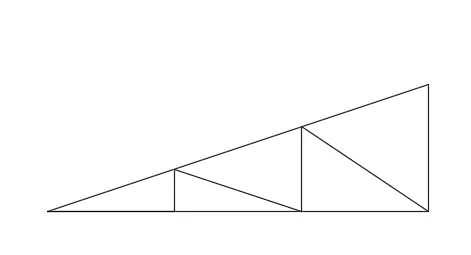
LINE
Specify first point: 1,1
Specify next point or [Undo]: 3,1
Specify next point or [Undo]: 5,1
Specify next point or [Close/Undo]: 7,1
Specify next point or [Close/Undo]: 7,3
Specify next point or [Close/Undo]: 1,1
Specify next point or [Close/Undo]: 3,1
Specify next point or [Close/Undo]: 3,1.667
Specify next point or [Close/Undo]: *Cancel*
Command: L
LINE
Specify first point:
Specify next point or [Undo]: @5,1
Specify next point or [Undo]: _u
Specify next point or [Undo]: 5,1
Specify next point or [Undo]: 5,2.333
Specify next point or [Close/Undo]: 7,1
Specify next point or [Close/Undo]: *Cancel*