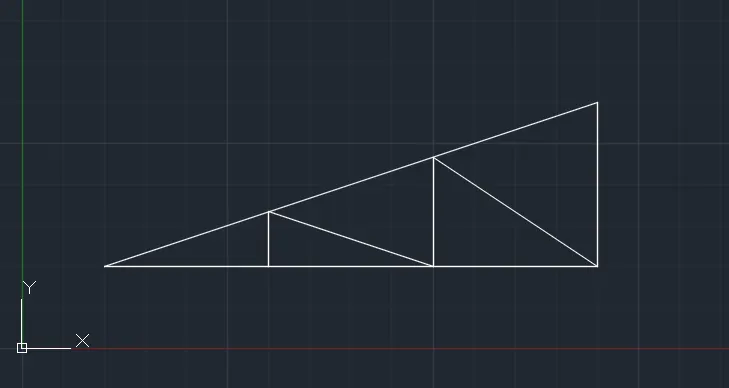
Creation of geometries by Coordinate system methods using AutoCad
AIM:
-To create the geometrics of the given pictures as per their dimensions using all the co-ordinates system method from line tool and circle tool if required
-To draw the profile and the trusses using any coordinate system methods
INTRODUCTION:
AutoCAD is a commercial computer-aided design (CAD) and drafting software application.AutoCAD is used in industry, by architects, project managers, engineers, graphic designers, city planners and other professionals. It was supported by 750 training centers worldwide in 1994
AutoCAD was derived from a program that began in 1977, and then released in 1979 called Interact CAD, also referred to in early Autodesk documents as MicroCAD, which was written prior to Autodesk's (then Marinchip Software Partners) formation by Autodesk cofounder Michael Riddle.
The first version by Autodesk was demonstrated at the 1982 Comdex and released that December. AutoCAD supported CP/M-80 computers.As Autodesk's flagship product, by March 1986 AutoCAD had become the most ubiquitous CAD program worldwide. The 2021 release marked the 35th major release of AutoCAD for Windows. The 2021 release marked the 11th consecutive year of AutoCAD for Mac. The native file format of AutoCAD is .dwg. This and, to a lesser extent, its interchange file format .dwf, have become de facto, if proprietary, standards for CAD data interoperability, particularly for 2D drawing exchange. AutoCAD has included support for .dwf, a format developed and promoted by Autodesk, for publishing CAD data.
PROCEDURE :
*On the Start tab, click Start New Drawing. This opens a new drawing based on the default drawing template file. If a default drawing template file is not specified, the Select Template dialog box is displayed, from which you can choose an appropriate drawing template file.
*Right-click a file tab, and choose New to display the Select Template dialog box.
*Click Application menu --> New --> Drawing.
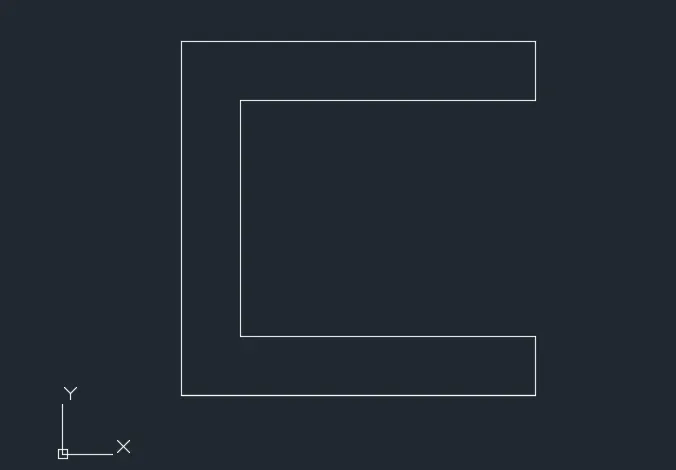
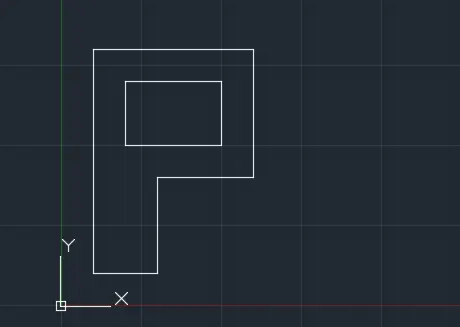
PROCEDURE FOR P1:
*Absolute coordinate system:
-select line tool from the ribbon,as it shows specify first point in command bar
enter(2,1) as the origin
-specify next point as (2,7)
-specify next point as (8,7)
-specify next point as (8,6)
-specify next point as (3,6)
-specify next point as (3,2)
-specify next point as (8,2)
-specify next point as (8,1)
enter close "c" command in the command bar
*Relative rectangular coordinate:
-select line tool from the ribbon,as it shows specify first point in command bar
enter(2,1) as the origin
-specify next point as (@0,6)
-specify next point as (@6,0)
-specify next point as (@0,-1)
-specify next point as (@-5,0)
-specify next point as (@0,-4)
-specify next point as (@5,0)
-specify next point as (@0,-1)
-specify next point as (@-6,0) or enter close "c" command in the command bar
*Polar coordinate:
select line tool from the ribbon,as it shows specify first point in command bar
enter(2,1) as the origin
-specify next point as (@6<90)
-specify next point as (@6<0)
-specify next point as (@1<270)
-specify next point as (@5<180)
-specify next point as (@4<270)
-specify next point as (@5<0)
-specify next point as (@1<270)
-specify next point as (@6<180) or enter close "c" command in the command bar
*Direct distance method:
select line tool from the ribbon,as it shows specify first point in command bar
enter(2,1) as the origin
enter the length '6' and the cursor in the Y direction w.r.t the origin
enter the length '6' and the cursor in the X direction w.r.t the origin
enter the length '1' and the cursor in the Y direction w.r.t the origin
enter the length '5' and the cursor in the X direction w.r.t the origin
enter the length '4' and the cursor in the Y direction w.r.t the origin
enter the length '5' and the cursor in the X direction w.r.t the origin
enter the length '1' and the cursor in the Y direction w.r.t the origin
enter the length '6' and the cursor in the X direction w.r.t the origin or enter close "c" command in the command bar
OUTPUT:
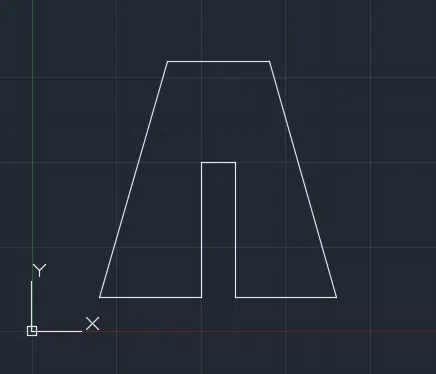
PROCEDURE FOR P2:
*Absolute coordinate system:
-select line tool from the ribbon,as it shows specify first point in command bar
enter(2,1) as the origin
-specify next point as (4,8)
-specify next point as (7,8)
-specify next point as (9,1)
specify next point as (6,1)
specify next point as (6,5)
specify next point as (5,5)
specify next point as (5,1)
specify next point as (2,1) or enter close "c" command in the command bar
*Relative rectangular coordinate:
-select line tool from the ribbon,as it shows specify first point in command bar
enter(2,1) as the origin
specify next point as (@2,7)
specify next point as (@3,0)
specify next point as (@2,-7)
specify next point as (@-3,0)
specify next point as (@0,4)
specify next point as (@-1,0)
specify next point as (@0,-4)
specify next point as (@-3,0) or enter close "c" command in the command bar
*Polar coordinate:
select line tool from the ribbon,as it shows specify first point in command bar
enter(2,1) as the origin
specify next point as (@7<74.05)
specify next point as (@3<0)
specify next point as (@7<285.95)
specify next point as (@3<180)
specify next point as (@4<90)
specify next point as (@1<180)
specify next point as (@4<270)
specify next point as (@3<180) or enter close "c" command in the command bar
*Direct distance method:
select line tool from the ribbon,as it shows specify first point in command bar
enter(2,1) as the origin
enter the length '7' and the cursor at an angle to X & Y direction w.r.t the origin
enter the length '3' and the cursor in the +X direction w.r.t the origin
enter the length '7' and the cursor at an angle to X & Y direction w.r.t the origin
enter the length '3' and the cursor in the -X direction w.r.t the origin
enter the length '4' and the cursor in the +Y direction w.r.t the origin
enter the length '1' and the cursor in the -X direction w.r.t the origin
enter the length '4' and the cursor in the -Y direction w.r.t the origin
enter the length '3' and the cursor in the -X direction w.r.t the origin or enter close "c" command in the command bar
OUTPUT:
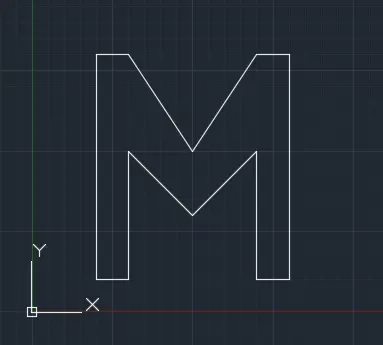
PROCEDURE FOR P3:
*Absolute coordinate system:
-select line tool from the ribbon,as it shows specify first point in command bar
enter(2,1) as the origin
specify next point as (2,8)
specify next point as (3,8)
specify next point as (5,5)
specify next point as (3,8)
specify next point as (8,9)
specify next point as (8,1)
specify next point as (7,1)
specify next point as (7,5)
specify next point as (5,3)
specify next point as (3,5)
specify next point as (3,1)
specify next point as (2,1) or enter close "c" command in the command bar
*Relative rectangular coordinate:
-select line tool from the ribbon,as it shows specify first point in command bar
enter(2,1) as the origin
specify next point as (@0,7)
specify next point as (@1,0)
specify next point as (@2,-3)
specify next point as (@1,0)
specify next point as (@0,-7)
specify next point as (@-1,0)
specify next point as (@0,4)
specify next point as (@-2,-2)
specify next point as (@-2,2)
specify next point as (@0,-4)
specify next point as (@-1,0)
specify next point as (@0,-1) or enter close "c" command in the command bar
*Polar coordinate:
select line tool from the ribbon,as it shows specify first point in command bar
enter(2,1) as the origin
specify next point as (@7<90)
specify next point as (@1<0)
specify next point as (@3.6<304)
specify next point as (@3.6<56)
specify next point as (@1<0)
specify next point as (@7<270)
specify next point as (@1<180)
specify next point as (@4<90)
specify next point as (@2.8<225)
specify next point as (@2.8<135)
specify next point as (@4<270)
specify next point as (@1<180) or enter close "c" command in the command bar
*Direct distance method:
select line tool from the ribbon,as it shows specify first point in command bar
enter(2,1) as the origin
enter the length '7' and the cursor in the +Y direction w.r.t the origin
enter the length '1' and the cursor in the +X direction w.r.t the origin
enter the length '3.6' and the cursor at an angle to -X & -Y direction w.r.t the origin
enter the length '3.6' and the cursor at an angle to +X & +Y direction w.r.t the origin
enter the length '1' and the cursor in the +X direction w.r.t the origin
enter the length '7' and the cursor in the -Y direction w.r.t the origin
enter the length '1' and the cursor in the -X direction w.r.t the origin
enter the length '4' and the cursor in the +Y direction w.r.t the origin
enter the length '2.8' and the cursorat an angle to X & Y direction w.r.t the origin
enter the length '2.8' and the cursor at an angle to X & Y direction w.r.t the origin
enter the length '4' and the cursor in the -Y direction w.r.t the origin
enter the length '1' and the cursor in the -X direction w.r.t the origin or enter close "c" command in the command bar
OUTPUT:
PROCEDURE FOR P4:
*Absolute coordinate system:
-select line tool from the ribbon,as it shows specify first point in command bar
enter(2,1) as the origin
specify next point as (2,9)
specify next point as (9,9)
specify next point as (9,1)
specify next point as (5,1)
specify next point as (5,2)
specify next point as (8,2)
specify next point as (8,8)
specify next point as (3,8)
specify next point as (3,1)
specify next point as (2,10) OR enter close "c" command in the command bar
*Relative rectangular coordinate:
-select line tool from the ribbon,as it shows specify first point in command bar
enter(2,1) as the origin
specify next point as (@0,8)
specify next point as (@7,0)
specify next point as (@0,-8)
specify next point as (@-4,0)
specify next point as (@0,1)
specify next point as (@3,0)
specify next point as (@0,6)
specify next point as (@-5,0)
specify next point as (@0,-7)
specify next point as (@-1,0) or enter close "c" command in the command bar
*Polar coordinate:
select line tool from the ribbon,as it shows specify first point in command bar
enter(2,1) as the origin
specify next point as (@8<90)
specify next point as (@7<0)
specify next point as (@8<270)
specify next point as (@4<180)
specify next point as (@1<90)
specify next point as (@3<0)
specify next point as (@6<90)
specify next point as (@5<180)
specify next point as (@7<270)
specify next point as (@1<180) or enter close "c" command in the command bar
*Direct distance method:
select line tool from the ribbon,as it shows specify first point in command bar
enter(2,1) as the origin
enter the length '8' and the cursor in the +Y direction w.r.t the origin
enter the length '7' and the cursor in the +X direction w.r.t the origin
enter the length '8' and the cursor in the -Y direction w.r.t the origin
enter the length '4' and the cursor in the -X direction w.r.t the origin
enter the length '1' and the cursor in the +Y direction w.r.t the origin
enter the length '3' and the cursor in the +X direction w.r.t the origin
enter the length '6' and the cursor in the +Y direction w.r.t the origin
enter the length '5' and the cursor in the -X direction w.r.t the origin
enter the length '7' and the cursor in the -Y direction w.r.t the origin
enter the length '1' and the cursor in the -X direction w.r.t the origin or enter close "c" command in the command bar
OUTPUT:
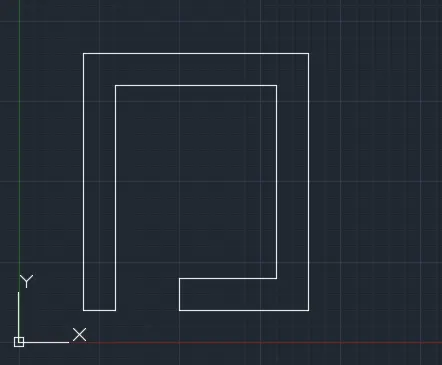
PROCEDURE FOR P5:
*Absolute coordinate system:
-select line tool from the ribbon,as it shows specify first point in command bar
enter(2,1) as the origin
specify next point as (2,7)
specify next point as (10,7)
specify next point as (10,1)
enter close "c" and use line command
specify first point as (3,2)
specify next point as (3,5)
specify next point as (5,5)
enter close "c" and use line command
specify first point as (6,2)
specify next point as (6,5)
specify next point as (8,5)
enter close "c" command
*Relative rectangular coordinate:
-select line tool from the ribbon,as it shows specify first point in command bar
enter(2,1) as the origin
specify next point as (@0,6)
specify next point as (@8,0)
specify next point as (@0,6)
enter close "c" and use line command
specify first point as (3,2)
specify next point as (@0,3)
specify next point as (@2,0)
specify next point as (@0,-3)
enter close "c" and use line command
specify first point as (6,2)
specify next point as (@0,3)
specify next point as (@2,0)
specify next point as (@0,-3)
enter close "c" command in the command bar
*Polar coordinate:
select line tool from the ribbon,as it shows specify first point in command bar
enter(2,1) as the origin
specify next point as (@6<90)
specify next point as (@8<0)
specify next point as (@6<270)
enter close "c" and use line command
specify first point as (3,2)
specify next point as (@3<90)
specify next point as (@2<0)
specify next point as (@3<270)
enter close "c" and use line command
specify first point as (6,2)
specify next point as (@3<90)
specify next point as (@2<0)
specify next point as (@3<270)
enter close "c" command in the command bar
*Direct distance method:
select line tool from the ribbon,as it shows specify first point in command bar
enter(2,1) as the origin
enter the length '6' and the cursor in the +Y direction w.r.t the origin
enter the length '8' and the cursor in the +X direction w.r.t the origin
enter the length '1' and the cursor in the -Y direction w.r.t the origin
enter close "c" and use line command
specify first point (3,2)
enter the length '3' and the cursor in the +Y direction w.r.t the origin
enter the length '2' and the cursor in the +X direction w.r.t the origin
enter the length '3' and the cursor in the -Y direction w.r.t the origin
enter close "c" and use line command
specify first point (6,2)
enter the length '3' and the cursor in the +Y direction w.r.t the origin
enter the length '2' and the cursor in the +X direction w.r.t the origin
enter the length '3' and the cursor in the -Y direction w.r.t the origin
enter close "c" command in the command bar
OUTPUT:
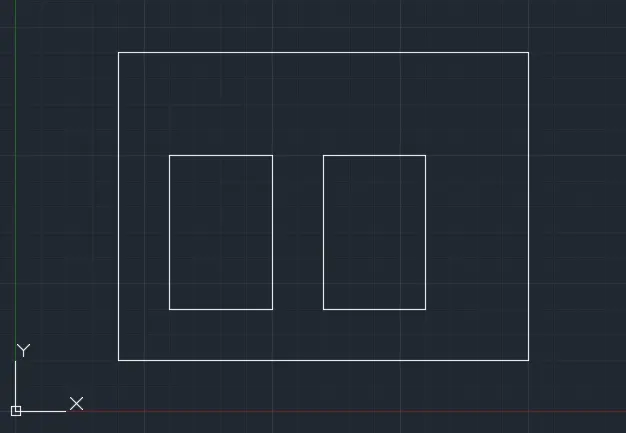
PROCEDURE FOR P6:
*Absolute coordinate system:
-select line tool from the ribbon,as it shows specify first point in command bar
enter(0,0) as the origin
specify next point as (0,2)
specify next point as (4,2)
specify next point as (4,6)
specify next point as (1,6)
specify next point as (1,8)
specify next point as (9,8)
specify next point as (9,6)
specify next point as (6,6)
specify next point as (6,2)
specify next point as (10,2)
specify next point as (10,0)
enter close "c" command in the command bar
*Relative rectangular coordinate:
-select line tool from the ribbon,as it shows specify first point in command bar
enter(0,0) as the origin
specify next point as (@0,2)
specify next point as (@4,0)
specify next point as (@0,4)
specify next point as (@-3,0)
specify next point as (@0,2)
specify next point as (@8,0)
specify next point as (@0,-2)
specify next point as (@-3,0)
specify next point as (@0,4)
specify next point as (@4,0)
specify next point as (@0,-2)
specify next point as (@-10,0)
enter close "c" command in the command bar
*Polar coordinate:
select line tool from the ribbon,as it shows specify first point in command bar
enter(0,0) as the origin
specify next point as (@2<90)
specify next point as (@4<0)
specify next point as (@4<90)
specify next point as (@3<180)
specify next point as (@2<90)
specify next point as (@8<0)
specify next point as (@2<270)
specify next point as (@3<180)
specify next point as (@4<270)
specify next point as (@4<0)
specify next point as (@2<270)
specify next point as (@10<180)
enter close "c" command in the command bar
*Direct distance method:
select line tool from the ribbon,as it shows specify first point in command bar
enter(2,1) as the origin
enter the length '1' and the cursor in the +Y direction w.r.t the origin
enter the length '4' and the cursor in the +X direction w.r.t the origin
enter the length '4' and the cursor in the +Y direction w.r.t the origin
enter the length '3' and the cursor in the -X direction w.r.t the origin
enter the length '2' and the cursor in the +Y direction w.r.t the origin
enter the length '8' and the cursor in the +X direction w.r.t the origin
enter the length '2' and the cursor in the -Y direction w.r.t the origin
enter the length '3' and the cursor in the -X direction w.r.t the origin
enter the length '4' and the cursor in the -Y direction w.r.t the origin
enter the length '4' and the cursor in the +X direction w.r.t the origin
enter the length '2' and the cursor in the -Y direction w.r.t the origin
enter the length '10' and the cursor in the -x direction w.r.t the origin
enter close "c" command in the command bar
OUTPUT:
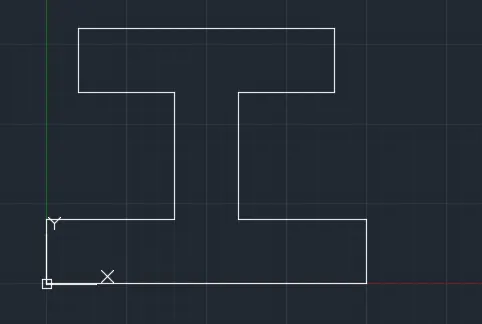
PROCEDURE FOR P7:
*Absolute coordinate system:
-select line tool from the ribbon,as it shows specify first point in command bar
enter(1,1) as the origin
specify next point as (1,8)
specify next point as (5,6)
specify next point as (5,4)
specify next point as (2,2)
specify next point as (3,2)
specify next point as (3,3)
specify next point as (6,3)
specify next point as (6,1)
enter close "c" command in the command bar
*Relative rectangular coordinate:
-select line tool from the ribbon,as it shows specify first point in command bar
enter(1,1) as the origin
specify next point as (@0,7)
specify next point as (@4,-2)
specify next point as (@0,-2)
specify next point as (@-3,0)
specify next point as (@0,-2)
specify next point as (@1,0)
specify next point as (@0,1)
specify next point as (@3,0)
specify next point as (@0,-2)
enter close "c" command in the command bar
*Polar coordinate:
select line tool from the ribbon,as it shows specify first point in command bar
enter(1,1) as the origin
specify next point as (@7<90)
specify next point as (@<333)
specify next point as (@2<270)
specify next point as (@3<180)
specify next point as (@2<270)
specify next point as (@1<0)
specify next point as (@1<90)
specify next point as (@3<0)
specify next point as (@2<270)
specify next point as (@5<180)
or enter close "c" command in the command bar
*Direct distance method:
select line tool from the ribbon,as it shows specify first point in command bar
enter(1,1) as the origin
enter the length '7' and the cursor in the +Y direction w.r.t the origin
enter the length '4' and the cursor at an angle to X & Y direction w.r.t the origin
enter the length '2' and the cursor in the -Y direction w.r.t the origin
enter the length '3' and the cursor in the -X direction w.r.t the origin
enter the length '2' and the cursor in the -Y direction w.r.t the origin
enter the length '1' and the cursor in the +X direction w.r.t the origin
enter the length '1' and the cursor in the +Y direction w.r.t the origin
enter the length '3' and the cursor in the +X direction w.r.t the origin
enter the length '2' and the cursor in the -Y direction w.r.t the origin
enter the length '5' and the cursor in the -X direction w.r.t the origin
or enter close "c" command in the command bar
OUTPUT:
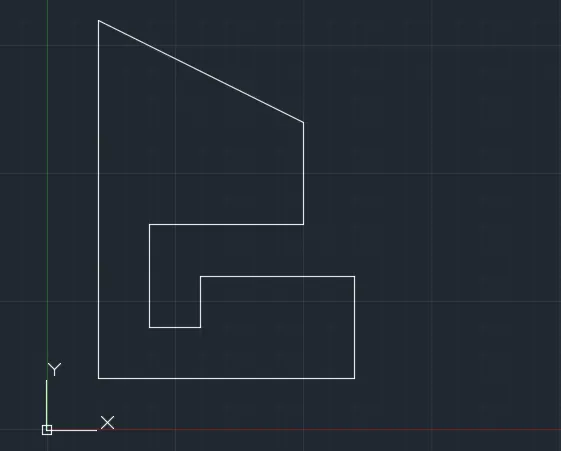
PROCEDURE FOR P8:
*Absolute coordinate system:
-select line tool from the ribbon,as it shows specify first point in command bar
enter(1,1) as the origin
specify next point as (1,8)
specify next point as (6,8)
specify next point as (6,4)
specify next point as (3,4)
specify next point as (3,1)
enter close "c" and use line command
specify first point as (2,5)
specify next point as (2,7)
specify next point as (5,7)
specify next point as (5,5)
enter close "c" and use line command
*Relative rectangular coordinate:
-select line tool from the ribbon,as it shows specify first point in command bar
enter(1,1) as the origin
specify next point as (@0,7)
specify next point as (@5,0)
specify next point as (@0,-4)
specify next point as (@-3,0)
specify next point as (@0,-3)
specify next point as (@-2,0)
enter close "c" and use line command
specify first point as (2,5)
specify next point as (@0,2)
specify next point as (@3,0)
specify next point as (@0,-2)
specify next point as (@-3,0)
enter close "c" command in the command bar
*Polar coordinate:
select line tool from the ribbon,as it shows specify first point in command bar
enter(1,1) as the origin
specify next point as (@7<90)
specify next point as (@5<0)
specify next point as (@4<270)
specify next point as (@3<180)
specify next point as (@3<270)
specify next point as (@2<1800)
enter close "c" and use line command
specify first point as (2,5)
specify next point as (@2<90)
specify next point as (@3<0)
specify next point as (@2<270)
specify next point as (@3<180)
enter close "c" command in the command bar
*Direct distance method:
select line tool from the ribbon,as it shows specify first point in command bar
enter(1,1) as the origin
enter the length '7' and the cursor in the +Y direction w.r.t the origin
enter the length '5' and the cursor at an angle to X & Y direction w.r.t the origin
enter the length '4' and the cursor in the -Y direction w.r.t the origin
enter the length '3' and the cursor in the -X direction w.r.t the origin
enter the length '3' and the cursor in the -Y direction w.r.t the origin
enter the length '2' and the cursor in the -X direction w.r.t the origin
enter close "c" and use line command
specify first point (2,5)
enter the length '2' and the cursor in the +Y direction w.r.t the origin
enter the length '3' and the cursor in the +X direction w.r.t the origin
enter the length '2' and the cursor in the -Y direction w.r.t the origin
enter the length '3' and the cursor in the -X direction w.r.t the origin
enter close "c" command in the command bar
OUTPUT:
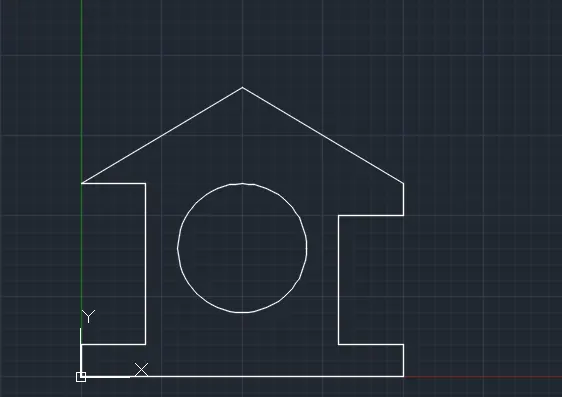
PROCEDURE FOR PROFILE WOOD:
*Absolute coordinate system:
-select line tool from the ribbon,as it shows specify first point in command bar
enter(0,0) as the origin
specify next point as (0,2)
specify next point as (10,2)
specify next point as (10,1)
specify next point as (8,1)
specify next point as (8,5)
specify next point as (10,5)
specify next point as (10,6)
specify next point as (5,9)
specify next point as (0,6)
specify next point as (2,6)
specify next point as (2,1)
specify next point as (0,1)
enter close "c" command in the command bar
-select circle tool from the ribbon,select centre radius
specify the point (5,4)
enter the radius '2'
press 'esc' to complete
OUTPUT:
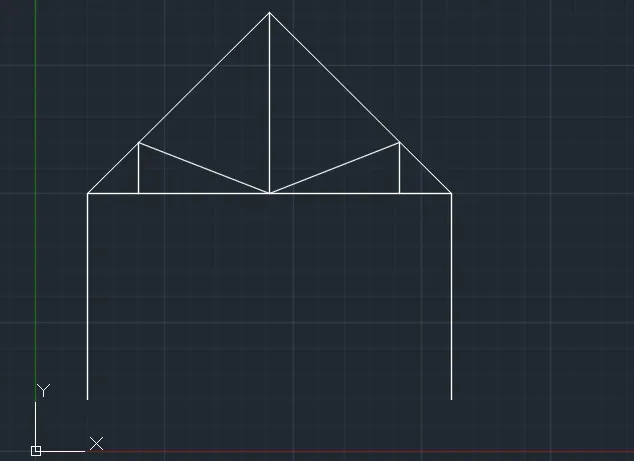
PROCEDURE FOR QUEEN POST:
*Polar coordinate:
select line tool from the ribbon,as it shows specify first point in command bar
enter(1,1) as the origin
specify next point as (@4<90)
specify next point as (@5<45)
specify next point as (@5<315)
specify next point as (@4<270)
press 'esc' and use line command 'l'
specify first point as (1,5)
specify next point as (@7<0) and enter
press 'esc' and use line command 'l'
specify first point as (2,5)
specify next point as (@1<90)
specify next point as (@2.536<292)
specify next point as (@3.535<90) and enter
press 'esc' and use line command 'l'
specify first point as (6,5)
specify next point as (@1<90)
specify next point as (@2.536<202)
press 'esc' to finish
OUTPUT:
PROCEDURE FOR MONOPITCH:
*Absolute coordinate system:
-select line tool from the ribbon,as it shows specify first point in command bar
enter(1,1) as the origin
specify next point as (7,3)
specify next point as (7,1)
press close 'c' and enter line comand 'l'
specify first point as (3,1)
specify next point as (3,1.667)
specify next point as (5,1)
specify next point as (5,2.33)
specify next point as (7,1) and enter
press 'esc' to finish
OUTPUT: