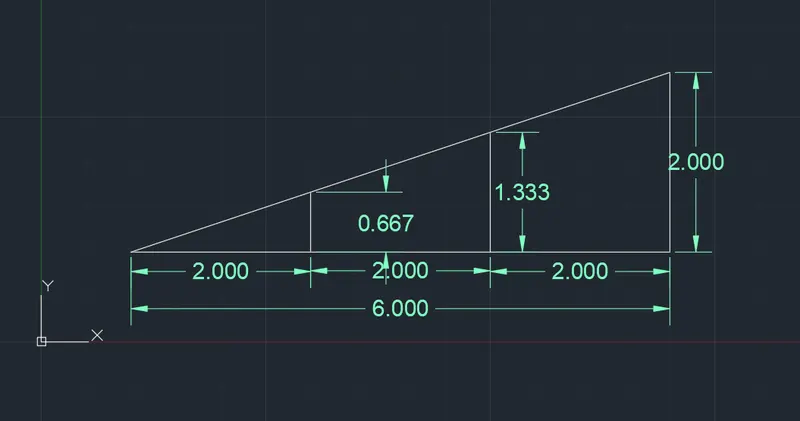
Creation of geometries by Coordinate system methods using AutoCad
Aim : To create the geometries by coordinate system method using Autocad
Introduction :
Types of coordinate systems
- Absolute coordinate system : Coordinates in the form of X, Y, Z which is related to origin of the coordinates.
- Relative coordinate system : Coordinates in the form of @X, @Y, @Z which is related to last point of coordinates.
- Polar coordinate system : Coordinates in the form of @X<angle, @Y<angle, @Z<angle which is related to last point of coordinates.
- Direct entry method : This is the easiest method in which values are given through keyboard and direction given to mouse.
Procedure for default settings
- Open autocad application
- Type Qnew and open new drawing
- In create new drawing select wizard
- Select advanced setup
- Set units measurement as engineering, angle as decimal degree, angle measure as east, angle direction as clockwise, area as 9x12 inches and close the tab.
- Now enable the dynamic input, right click dynamic input and choose dynamic input settings. Go to pointer input setting and set default to cartesian format.
Problem 1.
Using absolute coordinate system
- Enter line in command bar
- Specify first point as 2,1
- Specify next point as 8,1
- Specify next point as 8,2
- Specify next point as 3,2
- Specify next point as 3,6
- Specify next point as 8,6
- Specify next point as 8,7
- Specify next point as 2,7
- Specify last point as 2,1 or press close
Using relative coordinate system
- Enter line in command bar
- Specify first point as 2,1
- Specify next point as @6,0
- Specify next point as @0,1
- Specify next point as @-5,0
- Specify next point as @0,4
- Specify next point as @5,0
- Specify next point as @0,1
- Specify next point as @-6,0
- Specify last point as @0,-6 or press close
Using polar coordinate system
- Enter line in command bar
- Specify first point as 2,1
- Specify next point as @6<0
- Specify next point as @1<90
- Specify next point as @5<180
- Specify next point as @4<90
- Specify next point as @5<0
- Specify next point as @1<90
- Specify next point as @6<180
- Specify last point as @6< 270 or press close
Using Direct distance entry
- Enter line in command bar
- Specify first point as 2,1
- Specify next point as 6 by moving cursor in east direction
- Specify next point as 1 by moving cursor in north direction
- Specify next point as 5 by moving cursor in west direction
- Specify next point as 4 by moving cursor in north direction
- Specify next point as 5 by moving cursor in east direction
- Specify next point as 1 by moving cursor in north direction
- Specify next point as 6 by moving cursor in west direction
- Specify next point as 6 by moving cursor in south direction or press close
Result :
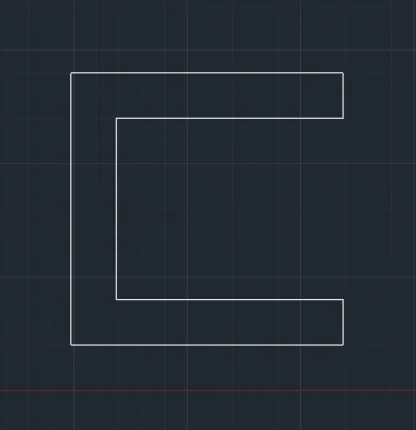
Problem 2 :
Using absolute coordinate system
- Enter line in command bar
- Specify first point as 2,1
- Specify next point as 5,1
- Specify next point as 5,5
- Specify next point as 6,5
- Specify next point as 6,1
- Specify next point as 9,1
- Specify next point as 7,8
- Specify next point as 4,8
- Specify last point as 2,1 or press close
Using relative coordinate system
- Enter line in command bar
- Specify first point as 2,1
- Specify next point as @3,0
- Specify next point as @0,4
- Specify next point as @1,0
- Specify next point as @0,-4
- Specify next point as @3,0
- Specify next point as @-2,7
- Specify next point as @-3,0
- Specify last point as @-2,-7 or press close
Using polar coordinate system
- Enter line in command bar
- Specify first point as 2,1
- Specify next point as @3<0
- Specify next point as @4<90
- Specify next point as @1<0
- Specify next point as @4<270
- Specify next point as @3<0 (assume point a)
- Specify next point as @7<90 ( assume point b)
- Specify next point as @2<180 ( assume point c)
- Join point a and c using line command
- Erase line ab and bc
- Specify next point @3<180 from point c
- Close the diagram using line command
Using Direct distance entry
- Enter line in command bar
- Specify first point as 2,1
- Specify next point as 3 by moving cursor in east direction
- Specify next point as 4 by moving cursor in north direction
- Specify next point as 1 by moving cursor in east direction
- Specify next point as 4 by moving cursor in south direction
- Specify next point as 3 by moving cursor in east direction (assume point a)
- Specify next point as 7 by moving cursor in north direction (assume point b)
- Specify next point as 2 by moving cursor in west direction (assume point c)
- Join point a and c using line command
- Erase line ab and bc
- Specify next point as 3 by moving cursor in west direction
- Close the diagram using line comand
Result :
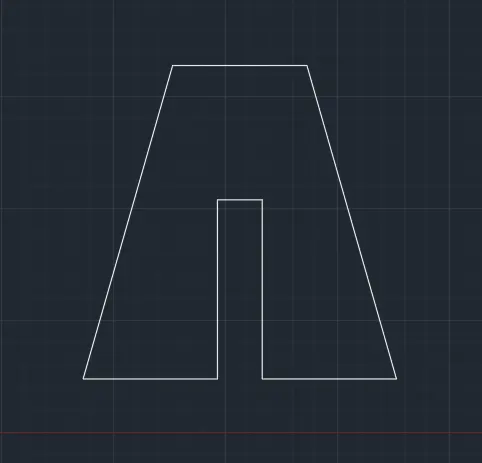
Problem 3.
Using absolute coordinate system
- Enter line in command bar
- Specify first point as 2,1
- Specify next point as 3,1
- Specify next point as 3,5
- Specify next point as 5,3
- Specify next point as 7,5
- Specify next point as 7,1
- Specify next point as 8,1
- Specify next point as 8,8
- Specify next point as 7,8
- Specify next point as 5,5
- Specify next point as 3,8
- Specify next point as 2,8
- Specify last point as 2,1 or press close

Problem 4:
Using polar coordinate system
- Enter line in command bar
- Specify first point as 2,1
- Specify next point as @1<0
- Specify next point as @7<90
- Specify next point as @5<0
- Specify next point as @6<270
- Specify next point as @3<180
- Specify next point as @1<270
- Specify next point as @4<0
- Specify next point as @8<90
- Specify next point as @7<180
- Specify next point as @8<270
Result :
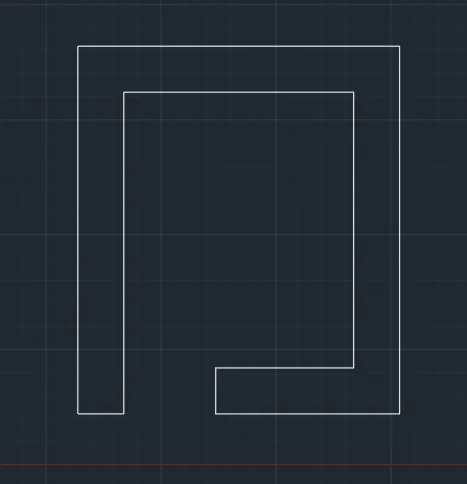
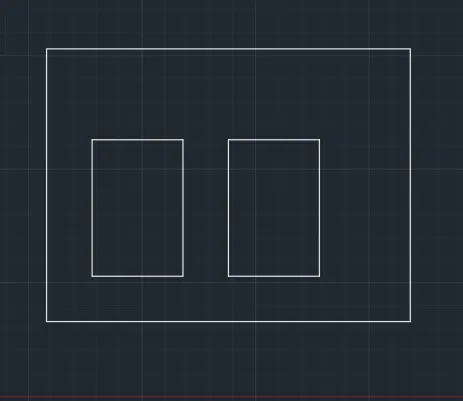
Problem 5 :
Using absolute coordinate system
- Enter line in command bar
- Specify first point as 2,1
- Specify next point as 10,1
- Specify next point as 10,7
- Specify next point as 2,7
- Specify next point as 2,1 or press close
- Specify next point as 3,2
- Specify next point as 3,5
- Specify next point as 5,5
- Specify next point as 5,2
- Specify next point as 3,2 or press close
- Specify next point as 6,2
- Specify next point as 6,5
- Specify next point as 8,5
- Specify next point as 8,2
- Specify next point as 6,2 or press close
Problem 6:
Using polar coordinate system
- Enter line in command bar
- Specify first point as 0,0
- Specify next point as @2<90
- Specify next point as @4<0
- Specify next point as @4<90
- Specify next point as @3<180
- Specify next point as @2<90
- Specify next point as @8<0
- Specify next point as @2<270
- Specify next point as @3<180
- Specify next point as @4<270
- Specify next point as @4<0
- Specify next point as @2<270
- Specify next point as @10<180 or press close
Result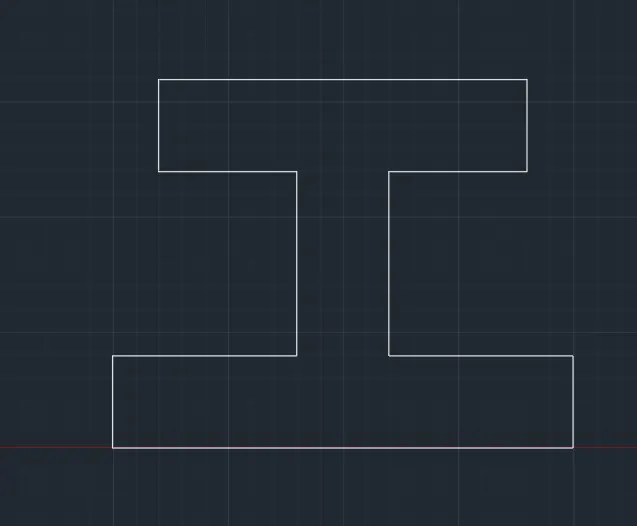
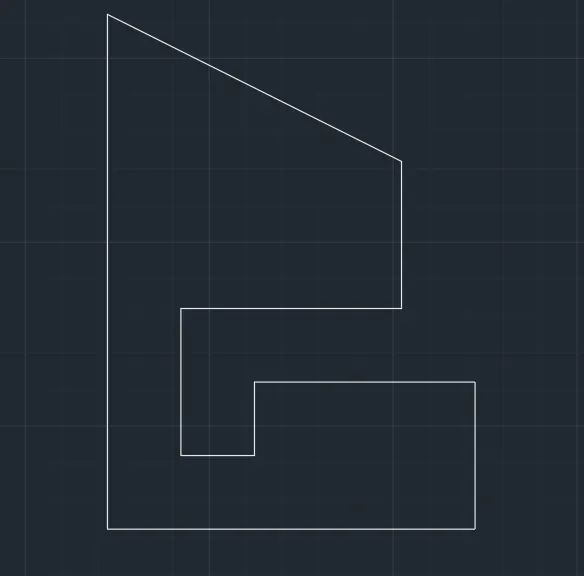
Problem 7:
Using relative coordinate system
- Enter line in command bar
- Specify first point as 1,1
- Specify next point as @5,0
- Specify next point as @0,2
- Specify next point as @-3,0
- Specify next point as @0,-1
- Specify next point as @-1,0
- Specify next point as @0,2
- Specify next point as @3,0
- Specify next point as @0,2
- Specify next point as @2,-4
- Specify next point as @0,-7 or press close
Result :
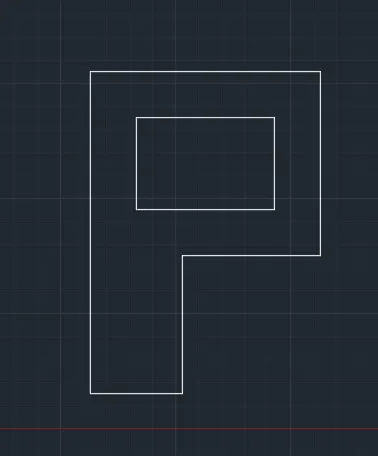
Problem 8 :
Using absolute coordinate system
- Enter line in command bar
- Specify first point as 1,1
- Specify next point as 3,1
- Specify next point as 3,4
- Specify next point as 6,4
- Specify next point as 6,8
- Specify next point as 1,8
- Specify next point as 1,1 or press close
- Again enter command line
- Specify next point as 2,5
- Specify next point as 2,7
- Specify next point as 5,7
- Specify next point as 5,5
- Specify next point as 2,5 or press close
Result
Problem 9 :
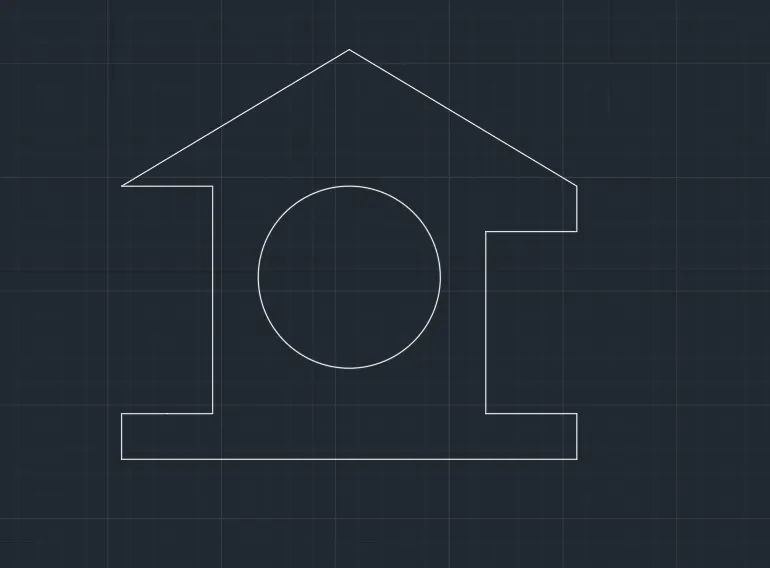
Using absolute coordinate system
- Enter line in command bar
- Specify first point as 0,0
- Specify next point as 10,0
- Specify next point as 10,1
- Specify next point as 8,1
- Specify next point as 8,5
- Specify next point as 10,5
- Specify next point as 10,6
- Specify next point as 5,9
- Specify next point as 0,6
- Specify next point as 2,6
- Specify next point as 2,1
- Specify next point as 0,1
- Press close
- Press circle (two point) in home tab and enter coordinate (3,4) and (7,4)
Result :
Problem 10
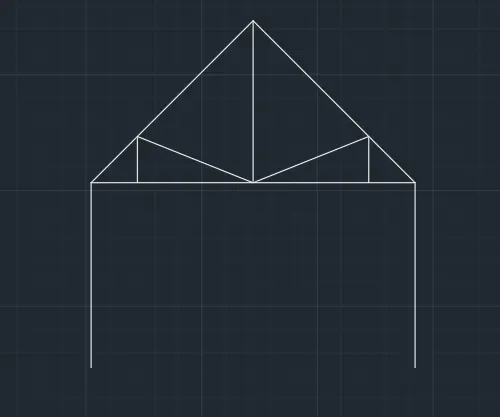
Using absolute coordinate system
- Enter line in command bar
- Specify first point as 1,1
- Specify next point as 1,5
- Specify next point as 5.5,8.5
- Specify next point as 8,5
- Specify next point as 8,1
- Press enter and again enter command line
- Specify next point as 5,1
- Specify next point as 8,5
- Press enter and again enter command line
- Specify next point as 2,5
- Specify next point as 2,6
- Specify next point as 4.5,5
- Specify next point as 7,6
- Specify next point as 7,5
Result
Problem 11
Using absolute coordinate system
- Enter line in command bar
- Specify first point as 1,1
- Specify next point as 3,1
- Specify next point as 5,1
- Specify next point as 7,1
- Specify next point as 7,3
- Press close and again enter command line
- Specify next point as 3,0.667
- Specify next point as 5,1
- Specify next point as 5,1.333
- Specify next point as 7,1
Result