Creation of geometries by Coordinate system methods using AutoCad
- AIM :
- Create the geometries from P1 to P2 using all the coordinates system methods. By using the Line tool to create the geometries. use the circle tool in some cases .
- SOFTWARE USED :
- Autodesk autocad 2021
- PROCEDURE :
- first open the autocad software
- give command the software QNEW or go to the application menu and click the NEW option
- then click on ADVANCE SEETING
- select matric seeting
- unit in decimal having precision 0.0
- template :Acad.dwg
- angle
- decimal degree
- angle measure
- east (clockwise direction)
- select the area 10*10
- click on finished option
- EXAMPLE : 1
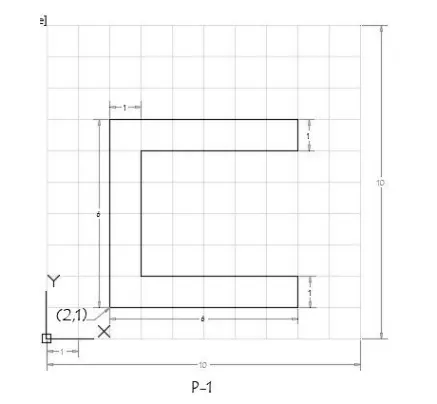
-
- Types of coordinate system is given below :
- absolute coordinate system
- relative rectangular system
- relative polar coordinate system
- direct distence entry method
- ABSOLUTE COORDINATE SYSTEM :
- give the line command to the autocad software
- 2,1 starting point a
- b=2,7
- c=8,7
- d=8,6
- e=3,6
- f=3,2
- g=8,2
- h=8,1
- then closed.
- RELATIVE RECTANGULAR COORDINATES :
- line command
- a=@2,1 that is starting point
- b=@0,6 i.e dx:0 units dy: 6 units
- c=@6,0 i.e dx: 6 units dy: 0 units
- d=@0,-1 i.e dx:0 units dy:-1 units
- e=@-5,0 i.e dx:-5 units dy:0 units
- f=@ 0,-4 i.e dx :0 units dy : -4 units
- g=@5,0 i.e dx: 5 units dy : 0 units
- h =@0,-1 i.e dx: 0 units dy :-1 units
- closed .
- RELATIVE POLAR COORDINATES :
- line command
- a=@2,1 starting point
- b=@6<90
- c=@6<0
- d=@1<270
- e=@5<180
- f=@4<270
- g=@5<0
- h=@1<270
- then closed
- DIRECT DISTANCE ENTRY :
- line command
- 6 cursor facing to north direction
- 6 cursor facing to east direction
- 1 cursor facing to south direction
- 5 cursor facing to west direction
- 4 cursor facing to south direction
- 5 cursor facing to east directon
- 1 cursor facing to south direction
- closed .
- RESULT :
-
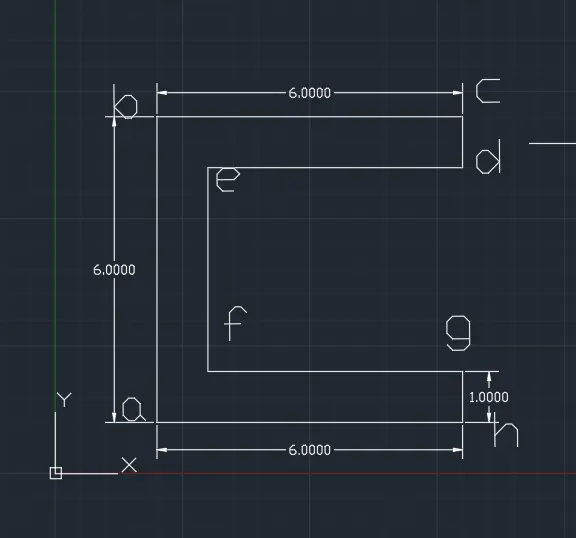
- EXAMPLE :2
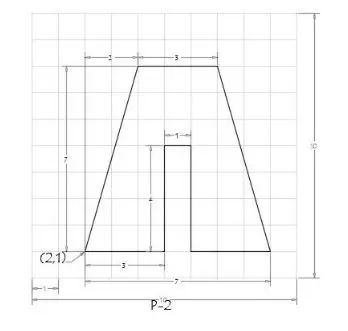
- PROCEDURE :
- ABSOLUTE COORDINATE SYSTEM :
- give line command
- a= 2,1 starting point
- b=2,8
- c=7,8
- d=9,1
- e=6,1
- f=6,5
- g=5,5
- h=5,1
- closed.
- RELATIVE RECTANGULAR COORDINATE :
- line command
- a=2,1 starting point
- b=@2,7 i.e dx:2 units dy :7 units
- c=@3,0 i.e dx: 3 units dy :0 units
- d=@2,-7 i.e dx:2 units dy:-7 units
- e=@-3,0 i.e dx:-3 units dy:0 units
- f=@0,4 i.e dx:0 units dy:4 units
- g=@-1,0 i.e dx:-1 units dy:0 units
- h=@ 0,-4 i.e dx:0 units dy:-4 units
- closed
- RELATIVE POLAR COORDINATES :
- line command
- a=2,1 starting points
- @7<90 (line one )
- @2<0 (line two )
- then joined the points and get b point
- delete line one and line two
- c=@3<0
- @7<270 (line three)
- @2<0 (line four)
- joint the endpoint of line c and line four and get point d
- delete line three and four
- e=@3<180
- f=@4<90
- g=@1<180
- h=@4<270
- closed.
- DIRECT DISTENCE ENTRY :
- line command
- 7 upward (line a to#)
- 2 right direction (line # to b )
- joint point c and b
- delete line a to # and # to b
- 3 right direction (b to c)
- 7 downward direction (line c to #)
- 2 right directon (line # to d)
- join the point c and d
- delete the line c to # and # to d
- 3 left direction (line d to e)
- 4 upward direction ( line e to f )
- 1 left direction (line f to g)
- 4 downward direction (g to h)
- then closed .
- RESULTS :
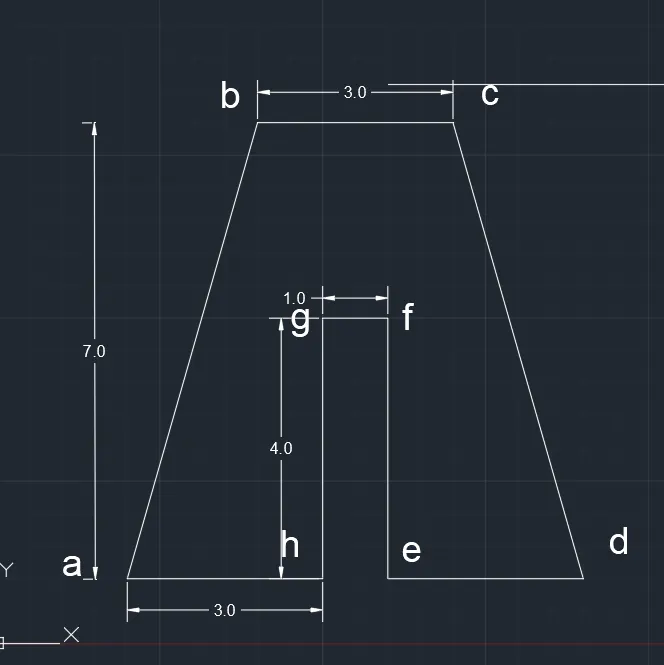
- EXAMPLE :3
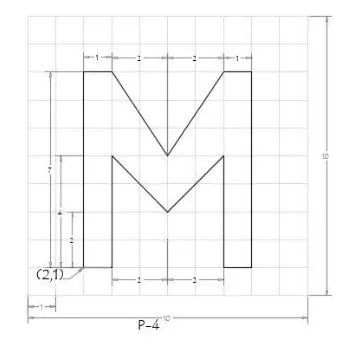
- PROCEDURE :
- ABSOLUTE COORDINATE SYSTEM :
- a= 2,1 starting points
- b=2,8
- c=3,8
- d=5,5
- e=7,8
- f=8,8
- g=8,1
- h=7,1
- i=7,5
- j=5,3
- k=3,5
- l=3,1
- closed
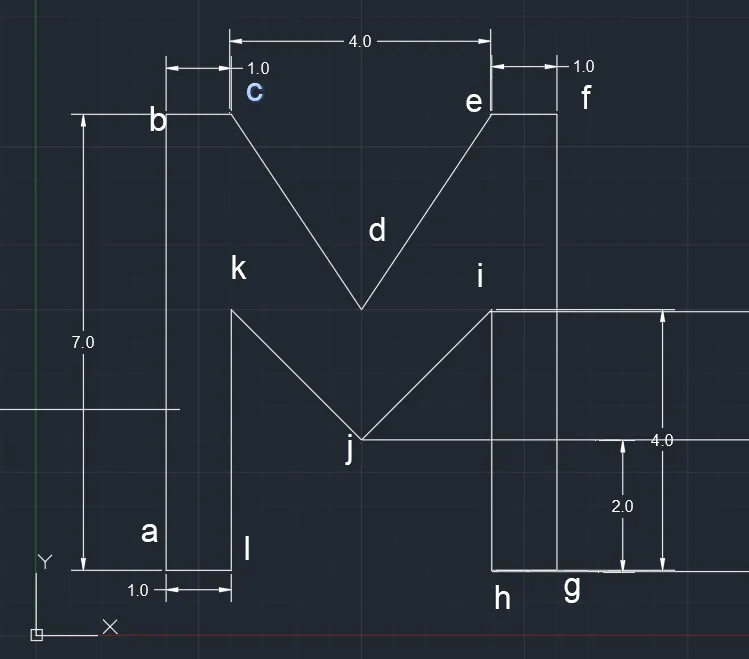
- RELATIVE RECTANGULAR COORDINATE :
- line command
- a=2,1 statting points
- b=0,7 i.e dx:0 units and dy:7 units
- c=1,0 i.e dx:1 units and dy: 0 units
- d=2,-3 i.e dx:2 units and dy:-3 units
- e=2,3 i.e dx:2 units and dy: 3 units
- f=1,0 i.e dx:1 units and dy:0 units
- g=0,-7 i.e dx:0 units and dy:-7 units
- h=-1,0 i.e dx:-1 units and dy:0 units
- i=0,4 i.e dx:0 units and dy:4 units
- j=-2,-2 i,e dx:-2 units and dy :-2 units
- k=-2,2 i.e dx:-2 units and dy :2 units
- l=0,-4 i.e dx:o units and dy :-4 units
- then closed.
- RESULTS :
- EXAMPLE :4
- PROCEDURE :
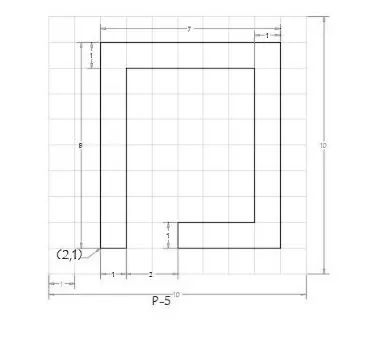
- ABSOLUTE COORDINATE METHOD :
- Line command
- a=2,1 starting points
- b=2,9
- c=9,9
- d=9,1
- e=5,1
- f=5,2
- g=8,2
- h=8,8
- i=3,8
- j=3,1
- then closed
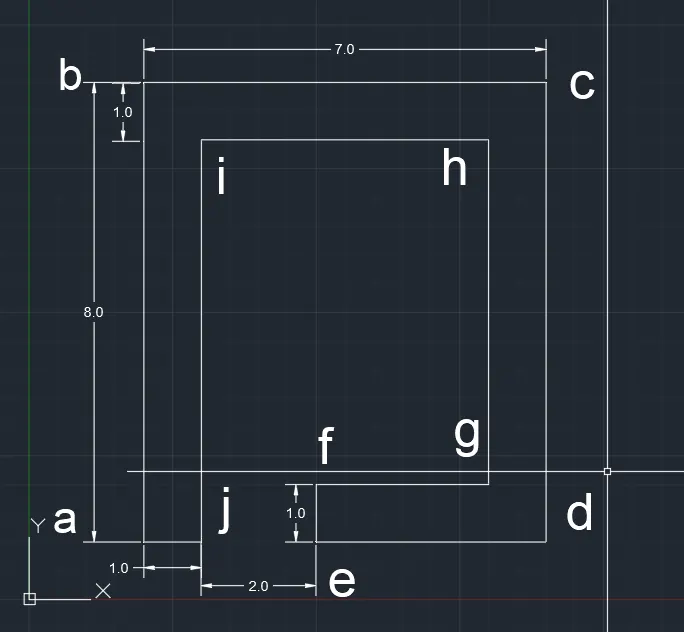
- RELATIVE RECTANGULAR COORDINATE :
- give line command
- a=2,1 starting points
- b=@0,8 i.e dx:0 units and dy:8 units
- c=@7,0 i.e dx;7 units and dy:0 units
- d=@0,-8 i.e dx:0 units and dy:-8 units
- e=@-4,0 i.e dx:-4 units and dy:0 units
- f =@0,1 i.e dx:0 units and dy:1 units
- g=@4,0 i.e dx: 4 units and dy:0 units
- h =@0,6 i.e dx:0 units and dy:6 units
- i=@-5,0 i.e dx:-5 units and dy:0 units
- j=@0,-7 i.e dx:0 units and dy:-7 units
- then closed .
- RESULTS :
- EXAMPLE : 5
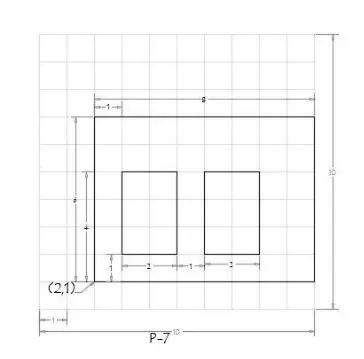
- PROCEDURE :
- ABSOLUTE COORDINATE SYSTEM:
- give the line command to autocad
- a=2,1 that is starting point
- b=2,7
- c=10,7
- d=10,1
- closed
- line command
- e=3,2
- f=3,5
- g=5,5
- h=5,2
- closed
- line command
- i=6,2
- j=6,5
- k=8,5
- l=8,2
- closed
- RELATIVE RECTANGULAR COORDINATE :
- Line command
- a=2,1 starting point
- b=0,6
- c=8,0
- d=0,-6
- closed
- line command
- e=3,2
- f=0,3
- g=2,0
- h=0,-3
- closed
- line command
- i=6,2
- j=0,3
- k=2,0
- l=0,-3
- closed
- RESULTS :
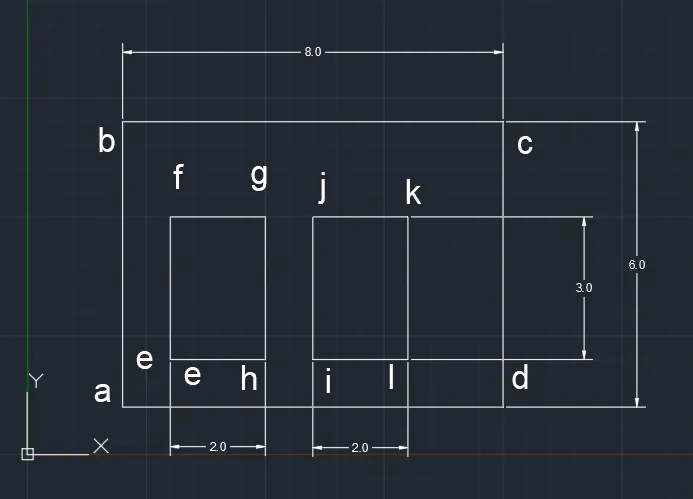
- EXAMPLE :6
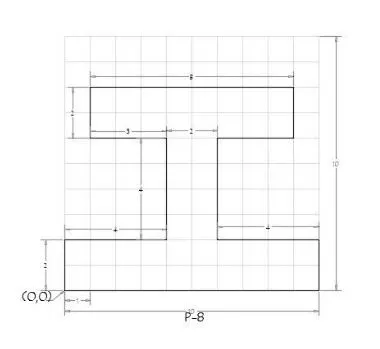
- PROCEDURE:
- ABSOLUTE COORDINATE SYSTEM:
- give the line command
- a=0,0
- b=0,2
- c=4,2
- d=4,6
- e=1,6
- f=1,8
- g=9,8
- h=9,6
- i=6,6
- j=6,2
- k=10,2
- l=10,0
- then closed.
- RELATIVE POLAR COORDINATE METHOD :
- a=0,0 starting points
- b=@2<90
- c=@4<0
- d=@4<90
- e=@3<180
- f=@2<90
- g=@8<0
- h=@2<270
- i=@3<180
- j=@4<270
- k=@4<0
- l=@2<270
- then closed
- RESULTS :
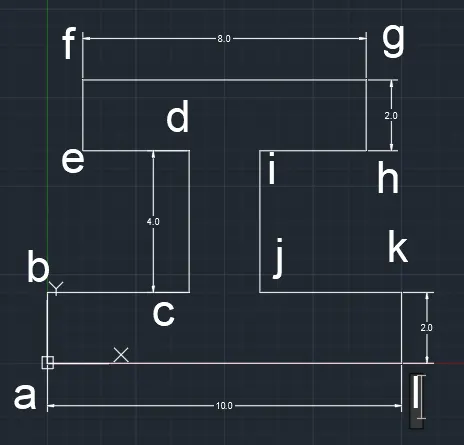
- EXAMPLE: 7
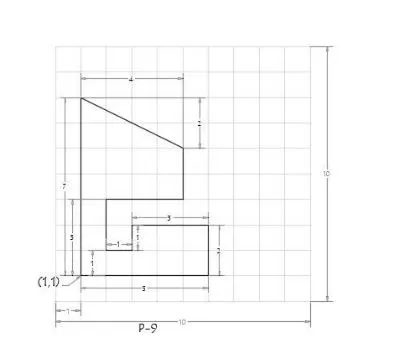
- PROCEDURE
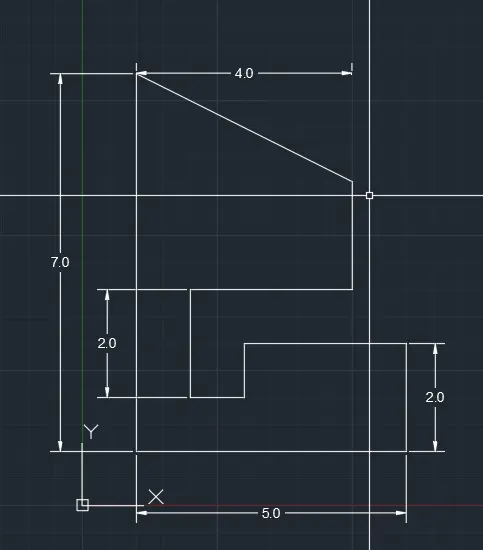
- ABSOLUTE COORDINATE SYSTEM :
- Line command
- a=1,1
- b=1,8
- c=5,6
- d=5,4
- e=2,4
- f=2,2
- g=3,2
- h=3,3
- i=6,3
- j=6,1
- then closed
- RESULTS :
- EXAMPLE: 8
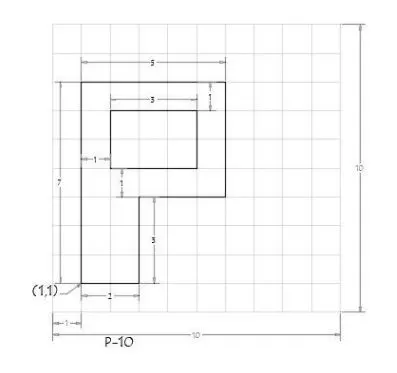
- PROCEDURE:
- ABSOLUTE COORDINATE SYSTEM :
- line command
- a=1,1 starting point
- b=1,8
- c=6,8
- d=6,4
- e=3,4
- f=3,1
- closed
- g=2,5
- h=2,7
- i=5,7
- j=5,5
- closed
- RELATIVE POLAR COORDINATE SYSTEM:
- Line command
- a=1,1
- b=@7<90
- c=@5<0
- d=@4<270
- e=@3<180
- f=@3<270
- closed
- g=2,5 starting point
- h=2<90
- i=3<0
- j=2<270
- closed
- RESULTS:
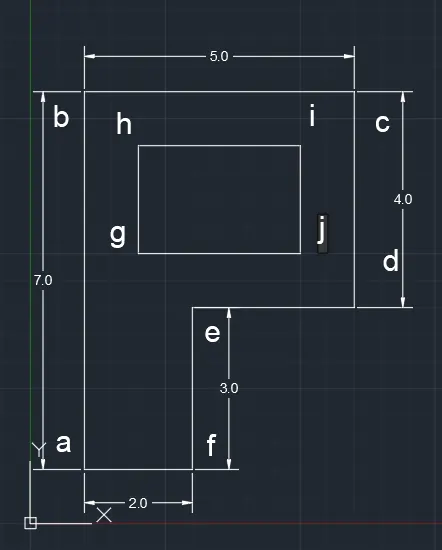
- Draw the profile and the trusses using any coordinate system methods. The dimensions are there for references.
- EXAMPLE : WOOD
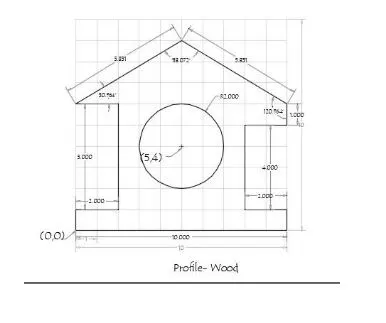
- PROCEDURE :
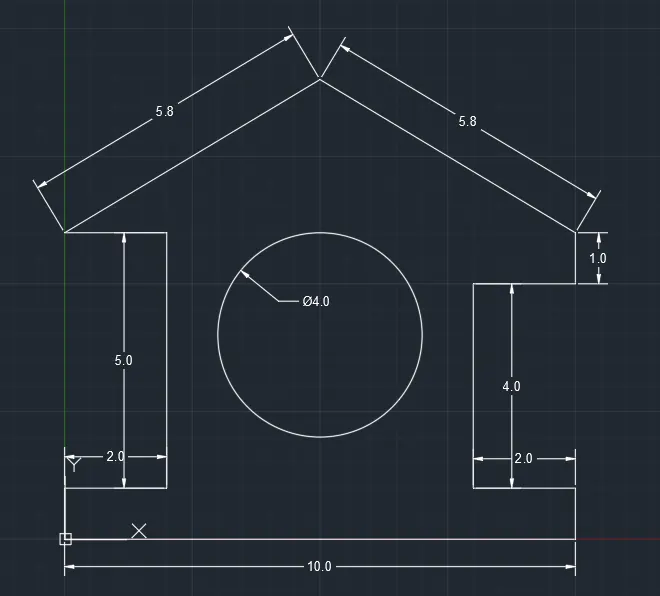
- ABSOLUTE COORDINATE METHOD:
- line command
- 0,0 starting point
- 0,1
- 2,1
- 2,6
- 0,6
- 5,9
- 10,6
- 8,5
- 8,1
- 10,1
- 10,0
- closed
- RESULTS :
- EXAMPLE :QUEEN POST TRUSS
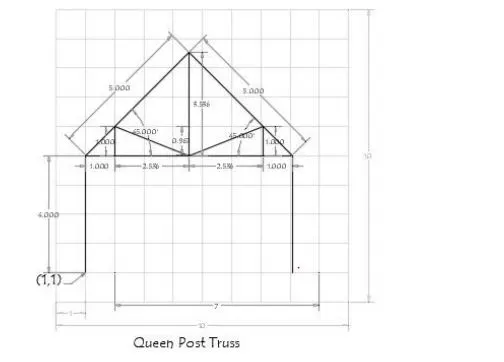
- PROCEDURE :
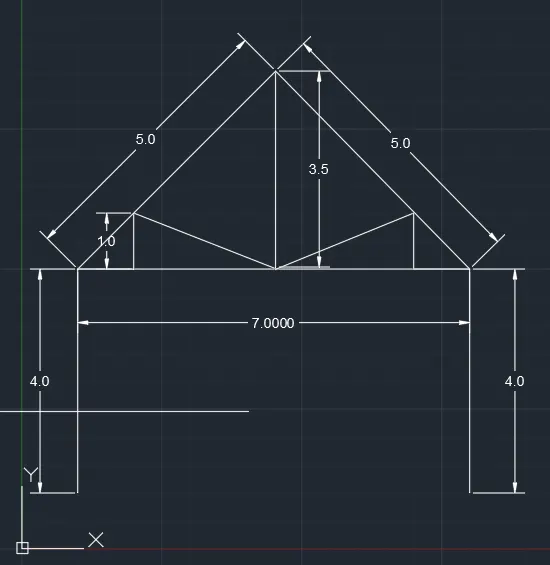
- RELATIVE POLAR COORDINATE SYSTEM :
- Line command
- 1,1
- @4<90
- @7<0
- @4<270
- enter
- then give the line command
- 1,5 starting point
- @5<45 point f
- enter
- line command
- 8,5
- @5<45
- @3.5<270
- enter
- line command
- 1,5
- @1<0
- @1<90
- joint both point
- and enter
- line commnd
- 8,5
- @1<180
- @1<90
- using line join point
- and prase enter
- RESULTS :
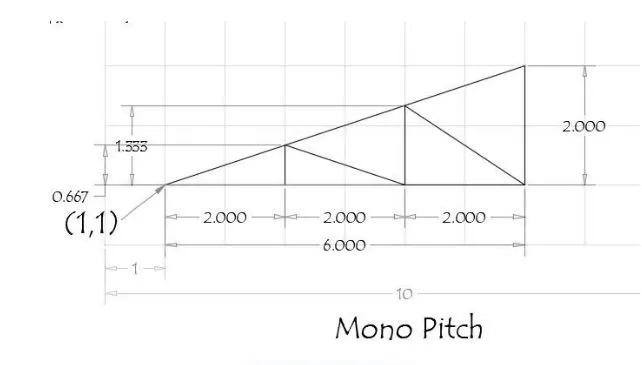
- EXAMPLE :MONO PITCH
- PROCEDURE:
- ABSOLUTE COORDINATE SYSTEM :
- line command
- 1,1
- 3,1
- 5,1
- 7,3
- then closed
- give the line command
- 3,1
- 3,1.66
- 5,1
- 5,2.33
- 7,1
- closed
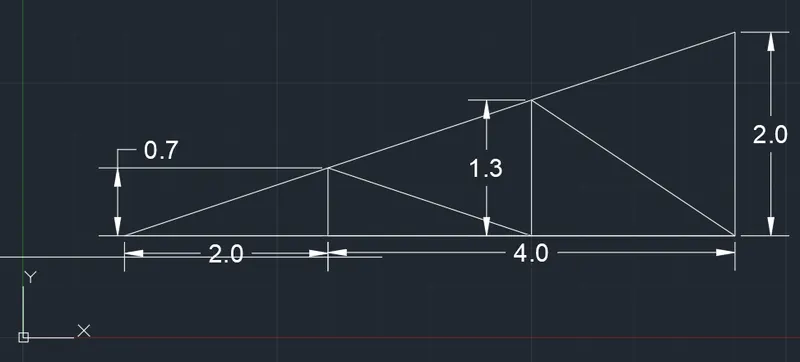
- RESULTS :
IN THIS WAY THIS ALL EXAMPLES ARE SOLVED BY FOUR TYPES OF COORDINATE SYSTEM NAME GIVEN BELOW :
- ABSOLUTE COORDINATE SYSTEM
- RELATIVE RECTANGULAR COORDINATE SYSTEM
- RELATIVE POLAR COORDINATE METHOD
- DIRECT DISTANCE ENTRY METHOD
- BY USING AUTODESK AUTOCAD 2021 VERSION