Creation of geometries by Coordinate system methods using AutoCad
Aim: To draw the given drawings using Autocad 2023
Introduction: Autocad is a commercial Computer Aided Design(CAD), It is marked and developed as Autodesk. It was first released on december 1982. Autocad derived from a program, which was beganed in 1977 and then released in 1979 called as Interact CAD, and also called in early documents od autocad as microCAD, Auto desk cofounder was Michael Riddle.
The first version of cad was released in december 1982 and was supported on CP/M-80 computers, By march 1986 Aotocad has became most uniquitous cad program worldwide. The file format of autocad was .dwg, and its interchange file format to DXF. In year 2022 the Autocad 36th major version was released and the 12th consecutive year of Autocad foe Mac.
CAD is a technology which replaces manual drawing with automated process, if you are a drafter, desingner, architect or engineer you have been used 2D or 3D CAD programs i.e., Autocad or Autocad LT software. Autocad helps you in draft construction documentation, explore ideas for design, viaualise concepts through photorealistic renderings and gives how a design performs in real world.
Aurocad mailnly used by industries, architects, engineers, city planners, project managers, graphic designers and other professionals.
P-1:
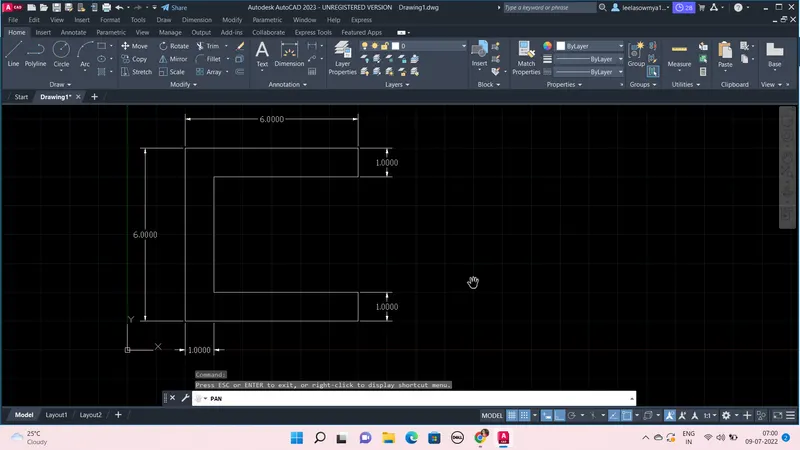
Steps:
By relative co-ordinate system:
- Open new file in Autocad use Imperial Template and the Decimal Units
- Limits of the sheet has to be set and was done by, Type limits in command line and set first point as (0,0) and upper right corner as (10,10)
- Now take line command, enter first point as (2,1)
- next points one by one to complete given drawing are as follows
(@6,0) (@0,1) (@-5,0) (@0,4) (@5,0) (@0,1) (@-6,0) and then type C enter or give point (@0,-6)
By absolute co-ordinate system:
- Open new file in Autocad use Imperial Template and the Decimal Units
- Limits of the sheet has to be set and was done by, Type limits in command line and set first point as (0,0) and upper right corner as (10,10)
- Now take line command, enter first point as (2,1)
- next points one by one to complete given drawing are as follows
(8,1) (8,2) (3,3) (3,6) (8,6) ( 8,7) (2,7) then close
P-2:
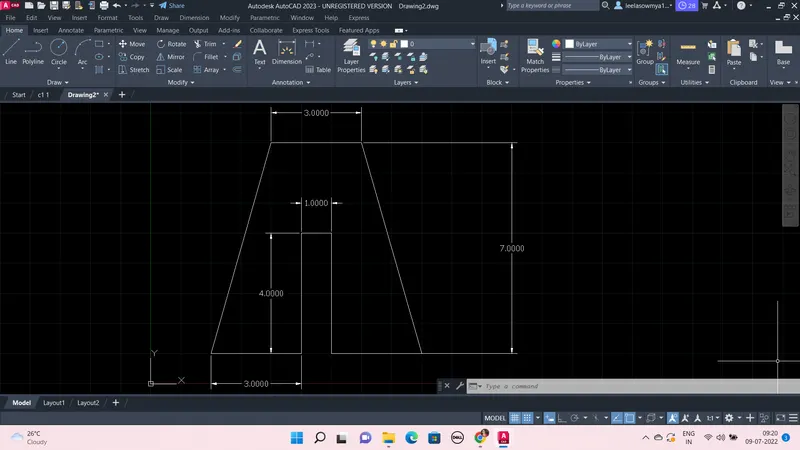
Steps:
- Open new file in Autocad use Imperial Template and the Decimal Units
- Limits of the sheet has to be set and was done by, Type limits in command line and set first point as (0,0) and upper right corner as (10,10)
- Now take line command, enter first point as (2,1)
- We can use direct distance method by simply moving cursor in required direction and giving required length of the line
this we can do as, from (2,1) on ortho mode, keep cursor in X direction and give length as 3 units, next in Y direction 4units, then in X 1unit, then in -Y 4units, and in X 3units, now from this give point (@-2,7) and 3units in -X direction and close.
Relative co-ordinate system:
points are (2,1) (@3,0) (@0,4) (@1,0) (@0,-4) (@3,0) (@-2,7) (@-3,0) and close
Absolute co-ordinate system:
points are (2,1) ( 5,1) (5,5) (6,5) (6,1) (9,1) (7,8) (4,8) and then close
P-4:
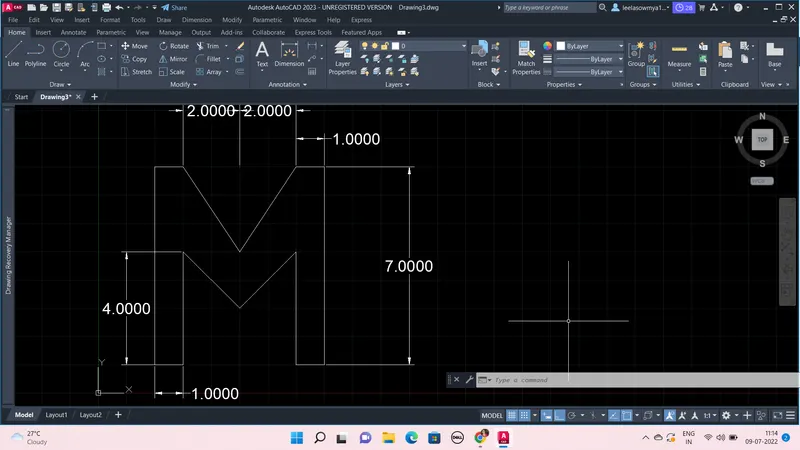
Steps:
- Open new file in Autocad use Imperial Template and the Decimal Units
- Limits of the sheet has to be set and was done by, Type limits in command line and set first point as (0,0) and upper right corner as (10,10)
- Now take line command, enter first point as (2,1) and then give points (@1,0) (@0,4) (@2,-2) (@2,2) (@0,-4) (@1,0) (@0,7) (@-1,0) (@-2,-3) (@-2,3) (@-1,0) and then close.
P-5:
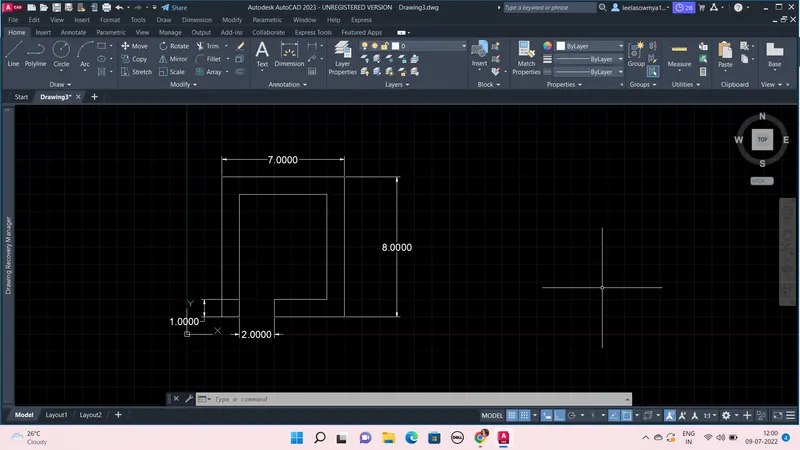
Steps:
- Open new file in Autocad use Imperial Template and the Decimal Units
- Limits of the sheet has to be set and was done by, Type limits in command line and set first point as (0,0) and upper right corner as (10,10)
- Take rectangle command and give first point as (2,1) and give opposite corner as (@7,8) i.e., a rectangle of 7x8 is created
- Now go to offset on modify panel and give distance 1 unit and click inside, a rectangle is create inside the 7x8 rectangle with an offset of one unit
- Then take line command give first point as (3,2) and 1 unit in -Y direction, and again take L and give first point as (5,2) and 1 unit in -Y direction.
- Then by using Trim command, remove the lines in between
By using Line command:
give first point as (2,1) and then (@1,0) (@0,7) (@5,0) (@0,-6) (@-3,0) (@0,-1) (@4,0) (@0,8) (@-7,0) (@0,-8)
P-7:
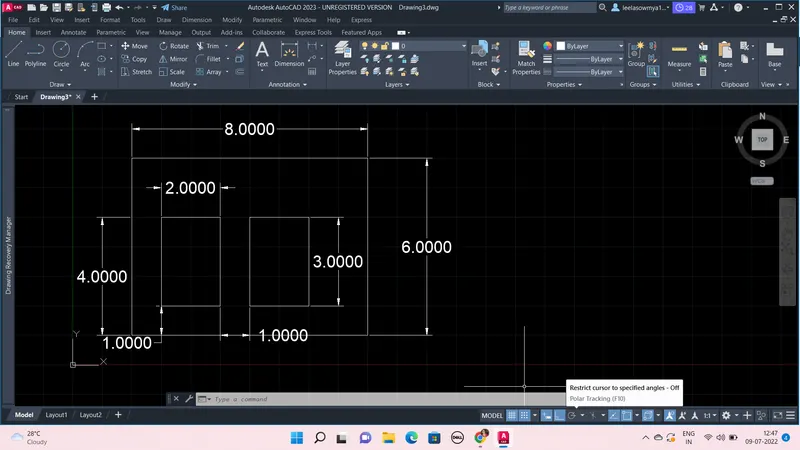
Steps:
- Open new file in Autocad use Imperial Template and the Decimal Units
- Limits of the sheet has to be set and was done by, Type limits in command line and set first point as (0,0) and upper right corner as (10,10)
- Take rectangle command and give first point as (2,1) and give opposite corner as (@8,6) i.e., a rectangle of 8X6 is created
- Take rectangle command and give first point as (3,2) and opposite corner as (@2,3)
- Use copy command and select inner rectangle and select basepoint as corner point and displace by 3 unitsin X direction.
By using line command:
Take line give first point (2,1) and then (@8,0) (@0,6) (@-8,0) then close
again line first point (3,2) and then (@2,0) (@0,3) (@-2,0) then close
Line first point (6,2) and then (@2,0) (@0,3) (@-2,0) then close
P-8:
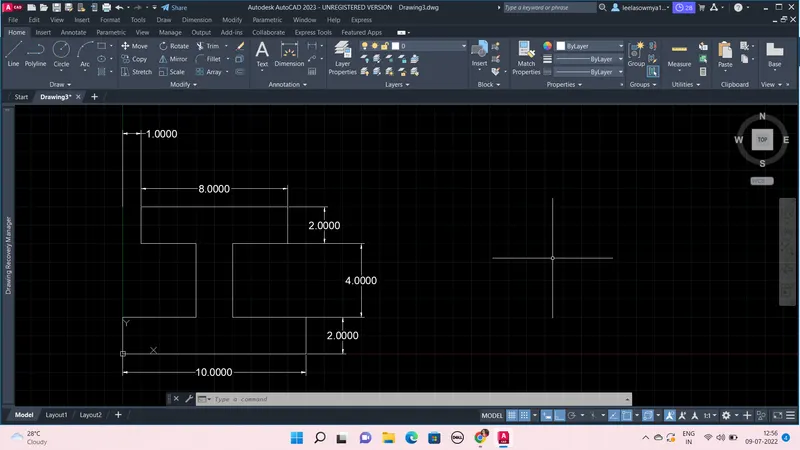
Steps:
- Open new file in Autocad use Imperial Template and the Decimal Units
- Limits of the sheet has to be set and was done by, Type limits in command line and set first point as (0,0) and upper right corner as (10,10)
- Take rectangle command and give first point as (0,0) and give opposite corner as (@10,2) i.e., a rectangle of 10X2 is created
- Again take rec give first point as (4,2) and opposite corner is (@2,4), then again take rec give first point as (1,6) and then (@8,2)
- Then use trim command and trim the lines.
By using line command:
Take line and give first point as (0,0) and then (@10,0) (@0,2) (@-4,0) (@0,4) (@3,0) (@0,2) (@-8,0) (@0,-2) (@3,0) (@0,-4) (@-4,0) and the close
P-9:
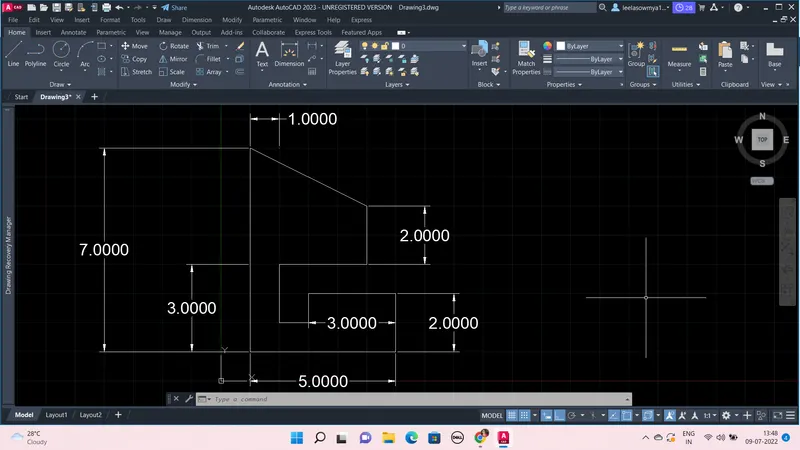
Steps:
- Open new file in Autocad use Imperial Template and the Decimal Units
- Limits of the sheet has to be set and was done by, Type limits in command line and set first point as (0,0) and upper right corner as (10,10)
- Take line command give first point as (1,1) and next points are (@5,0) (@0,2) (@-3,0) (@0,-1) (@-1,0) (@0,2) (@3,0) (@0,2) (@-4,2) then close
P-10:
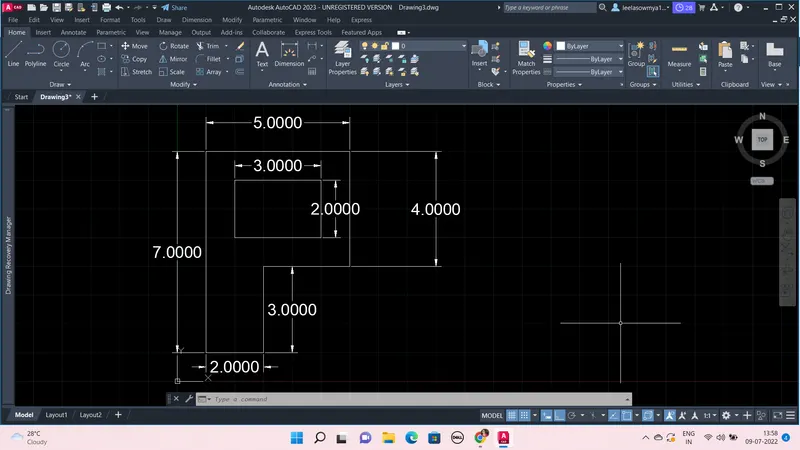
Steps:
- Open new file in Autocad use Imperial Template and the Decimal Units
- Limits of the sheet has to be set and was done by, Type limits in command line and set first point as (0,0) and upper right corner as (10,10)
- Take line command give first point as (1,1) and next points are (@2,0) (@0,3) (@0,4) (@-5,0) then close
- Again take line, first point is (2,5) (@3,0) (@0,2) (@-3,0) and then close
Profile wood:
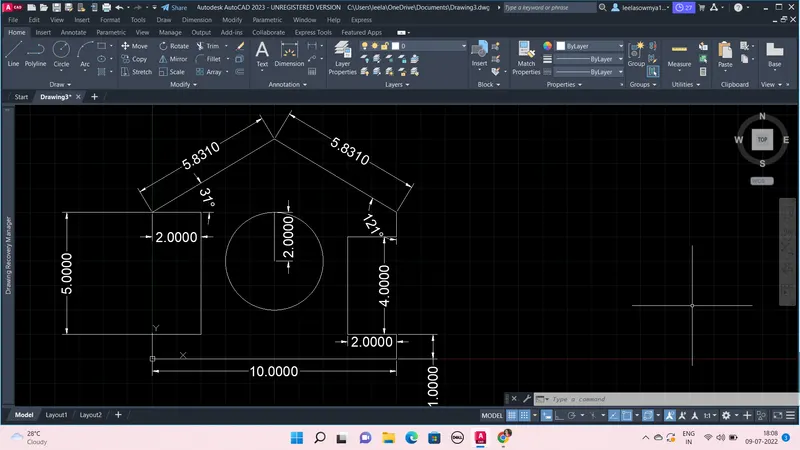
Steps:
- Open new file in Autocad use Imperial Template and the Decimal Units
- Limits of the sheet has to be set and was done by, Type limits in command line and set first point as (0,0) and upper right corner as (10,10)
- Take line command give first point as (0,0) and next points are (@10,0) (@0,1) (@-2,0) (@0,4) (@2,0) (@0,1)
- Now draw line taking first point as (5,0) and end point as (5,9)
- Now join (5,9) and last point i.e., (@0,1), now from (5,9) draw lines with points (@-5,-3) (@2,0) (@0,-5) (@-2,0) (@0,-1)
- Now draw circle with center as (5,4) and radius equal to 2units.
Queen post Truss:
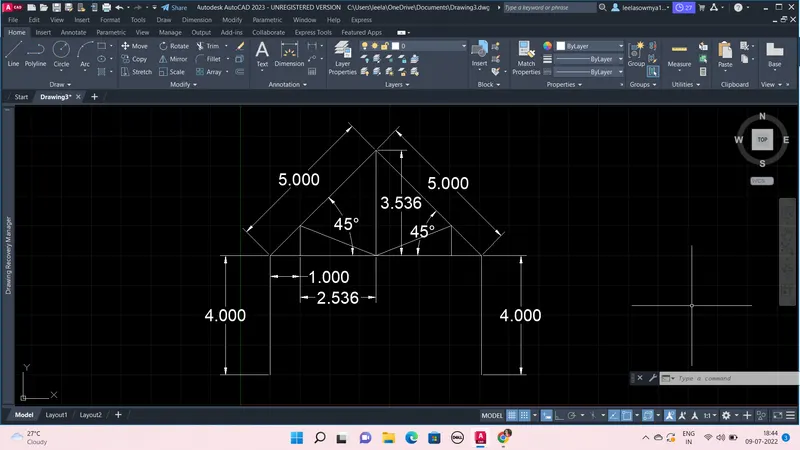
Steps:
- Open new file in Autocad use Imperial Template and the Decimal Units
- Limits of the sheet has to be set and was done by, Type limits in command line and set first point as (0,0) and upper right corner as (10,10)
- Take line command give first point as (1,1) and next points are (@0,4) (@1,0) (@2.536,0) (@2.536,0) (@1,0) (@5<135) (@5<225)
- from point (@1,0) draw line 1 unit by direct distance method and from point (@2.536,0) draw line of (@0,3.536) and similarly draw 1 unit in Y direction from another (@1,0) point
- And join the required lines and from right corner draw line 4units in -Y direction
Mono pitch:
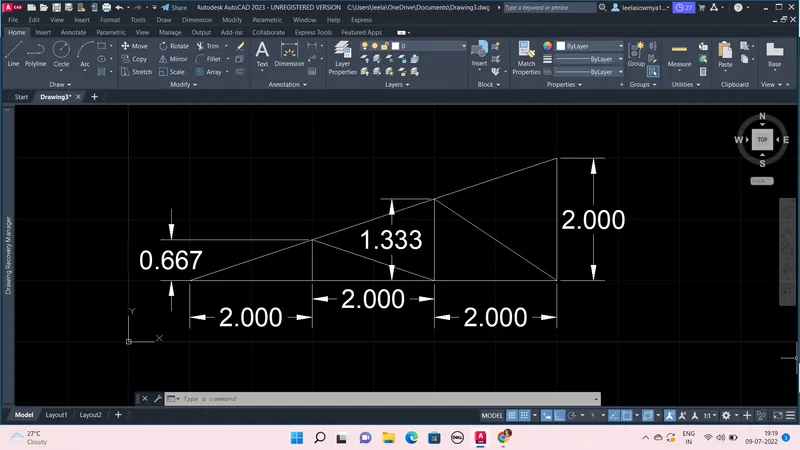
Steps:
- Open new file in Autocad use Imperial Template and the Decimal Units
- Limits of the sheet has to be set and was done by, Type limits in command line and set first point as (0,0) and upper right corner as (10,10)
- Take line command give first point as (1,1) and next points are (@2,0) (@2,0) (@2,0) (@0,2) (@-6,-2)
- Now draw line from point (@2,0) {which is at 2 units from (1,1)} and the next points are (@0,0.667) (@2,-0.667) (@0,1.333) (@2,-1.333)
By using line command and circle command(at required) the above all figures drawn.