Creation of geometries by Coordinate system methods using AutoCad
TASK:- Create the geometries from P1 to P2 using all the coordinates system methods. You need to use the Line tool to create the geometries. Where required you need to use the circle tool.
Please read the drawings and find out the missing dimensions before working on the sketches.
Note: Use the Imperial Template and the Decimal Units to draft the features. Dimensions are there for
references.
AIM
A.. To create the geometries from P1 to P2 using all the coordinates system methods and P3 to P10 by any one cordinate system.
B.. To draw theprofile and the trusses using any coordinate system methods. The diamensions are there for reference.
INTRODUCTION
Coordinate system:-
AutoCAD use 2D and 3D Cartesian coordinate systems that locate data at fixed coordinates. The x-, y-, and z-coordinates are not inherently geographic locations; they are locations relative to an arbitrary geometric origin (0,0,0). The x-axis can be thought of as an easting direction and the y-axis as a northing direction, but they do not necessarily translate to grid directions in your spatial data.
1.Absolute Coordinate system:
Absolute Coordinates uses the Cartesian System to specify a position in the X, Y, and (if needed) Z axes to locate a point from the 0-X, 0-Y, and 0-Z (0,0,0) point. To locate a point using the Absolute Coordinate system, type the X-value, Y-value, and, if needed, the Z-value separated by commas (with no spaces).
2.Relative Coordinates system
Relative coordinates are based on the last point entered. Use relative coordinates when you know the location of a point in relation to the previous point.
To specify relative coordinates, precede the coordinate values with an @ sign. For example, entering @3,4 specifies a point 3 units along the X axis and 4 units along the Y axis from the last point specified.
a..Relative Rectangular Coordinate system:
After first points entered, your next points can be entered by specifying the next coordinate compare/relative from the first points. The relative coordinate started with symbol “@” tell AutoCAD it was a relative coordinates. Using relative coordinate, points entered by typing @x,y [Enter].
b...Relative Polar coordinate system:
Polar coordinates used when you need to draw the next points at specify angle. Polar coordinates system in AutoCAD specifies distance length at which angle. Using polar coordinate, points entered by typing @distance
3.Direct Distance Entry Method System:
This is the most common and easiest system used for drafting in Autocad. Values are provided through keyboard and direction is guided through the mouse.
COMMANDS USED:-
1. Line Command
2. Dimlinear command
3. Text command
4. Circle command
PROCEDURE:-
- Go to start menu, select AutoCad
- Click on START DRAWING
- In the command line type in: STARTUP [ENTER]
- ENTER new value of startup:1
- Go to Application Menu and select New
- In the 'Create New Drwawing' dialog box, select the 'emperial system' in the 'Start from Scratch' option.
- Set the limits by entering LIMITS in the command tab. The lower - Left corner is specified as 0,0 and the upper - right corner is specified as 100,100.
[NOTE:- The above procedure is followed each time a new drawing is created.]
A. To create the geometries from P1 to P2 using all the coordinate system
1.Drafting the geometry for P1 using all the coordinate system methods 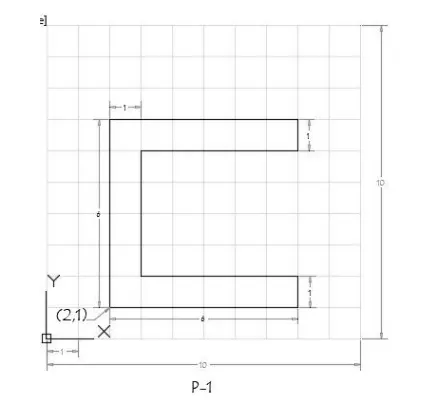 a). Absolute coordinate system:
Command: l
LINE Specify first point: 2,1
Specify next point or [Undo]: 8,1
Specify next point or [Undo]: 8,2
Specify next point or [Close/Undo]: 3,2
Specify next point or [Close/Undo]: 3,6
Specify next point or [Close/Undo]: 8,6
Specify next point or [Close/Undo]: 8,7
Specify next point or [Close/Undo]: 2,7
Specify next point or [Close/Undo]: close
b). Relative Rectangular coordinate system:
Command: l
LINE Specify first point: 2,1
Specify next point or [Undo]: @6,0
Specify next point or [Undo]: @0,1
Specify next point or [Close/Undo]: @-5,0
Specify next point or [Close/Undo]: @0,4
Specify next point or [Close/Undo]: @5,0
Specify next point or [Close/Undo]: @0,1
Specify next point or [Close/Undo]: @-6,0
Specify next point or [Close/Undo]: CLOSE
c). Relative Polar coordinate system:
Command: L
LINE Specify first point: 2,1
Specify next point or [Undo]: @6<0
Specify next point or [Undo]: @1<90
Specify next point or [Close/Undo]: @5<180
Specify next point or [Close/Undo]: @4<90
Specify next point or [Close/Undo]: @5<0
Specify next point or [Close/Undo]: @1<90
Specify next point or [Close/Undo]: @6<180
Specify next point or [Close/Undo]: CLOSE
d). Direct Distance entry method:
Command: L
LINE Specify first point: 2,1
Specify next point or [Undo]: 6
Specify next point or [Undo]: 1
Specify next point or [Close/Undo]: 5
Specify next point or [Close/Undo]: 4
Specify next point or [Close/Undo]: 5
Specify next point or [Close/Undo]: 1
Specify next point or [Close/Undo]: 6
Specify next point or [Close/Undo]: C
RESULT:
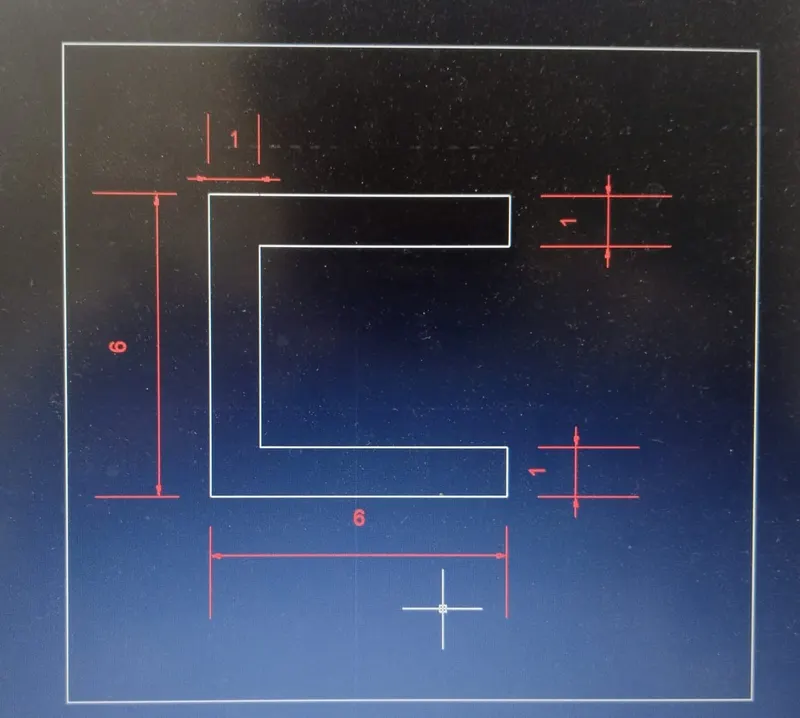
2.Drafting the geometry for P2 using all the coordinate system methods
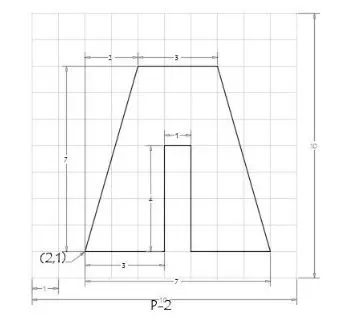 a). Absolute coordinate system:
Command: l
LINE Specify first point: 2,1
Specify next point or [Undo]: 5,1
Specify next point or [Undo]: 5,5
Specify next point or [Close/Undo]: 6,5
Specify next point or [Close/Undo]: 6,1
Specify next point or [Close/Undo]: 9,1
Specify next point or [Close/Undo]: 7,8
Specify next point or [Close/Undo]: 4,8
Specify next point or [Close/Undo]: close
b). Relative Rectangular coordinate system:
Command: l
LINE Specify first point: 2,1
Specify next point or [Undo]: @3,0
Specify next point or [Undo]: @0,4
Specify next point or [Close/Undo]: @1,0
Specify next point or [Close/Undo]: @0,-4
Specify next point or [Close/Undo]: @3,0
Specify next point or [Close/Undo]: @-2,7
Specify next point or [Close/Undo]: @-3,0
Specify next point or [Close/Undo]: CLOSE
c). Relative Polar coordinate system:
Command: L
LINE Specify first point: 2,1
Specify next point or [Undo]: @3<0
Specify next point or [Undo]: @4<90
Specify next point or [Close/Undo]: @1<90
Specify next point or [Close/Undo]: @4<270
Specify next point or [Close/Undo]: @3<0
Specify next point or [Close/Undo]: @7<106
Specify next point or [Close/Undo]: @3<180
Specify next point or [Close/Undo]: CLOSE
d). Direct Distance entry method:
Command: L
LINE Specify first point: 2,1
Specify next point or [Undo]: 3
Specify next point or [Undo]: 4
Specify next point or [Close/Undo]: 1
Specify next point or [Close/Undo]: 4
Specify next point or [Close/Undo]: 3
Specify next point or [Close/Undo]: 7
Specify next point or [Close/Undo]: 6
Specify next point or [Close/Undo]: 3
RESULT:
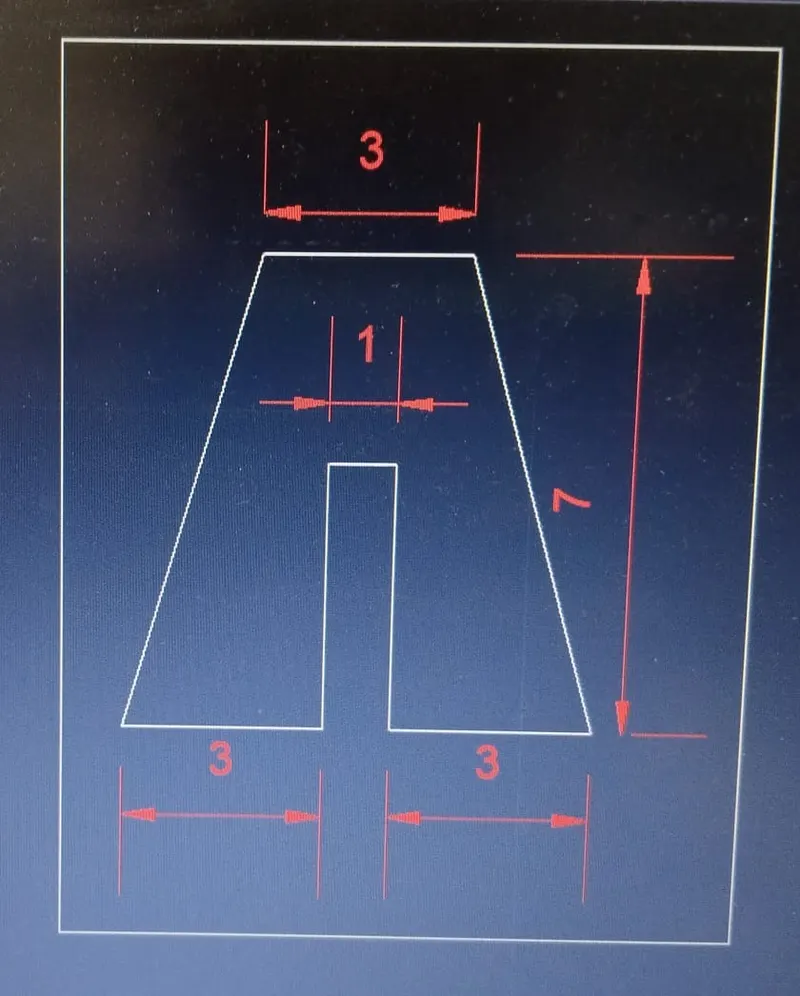
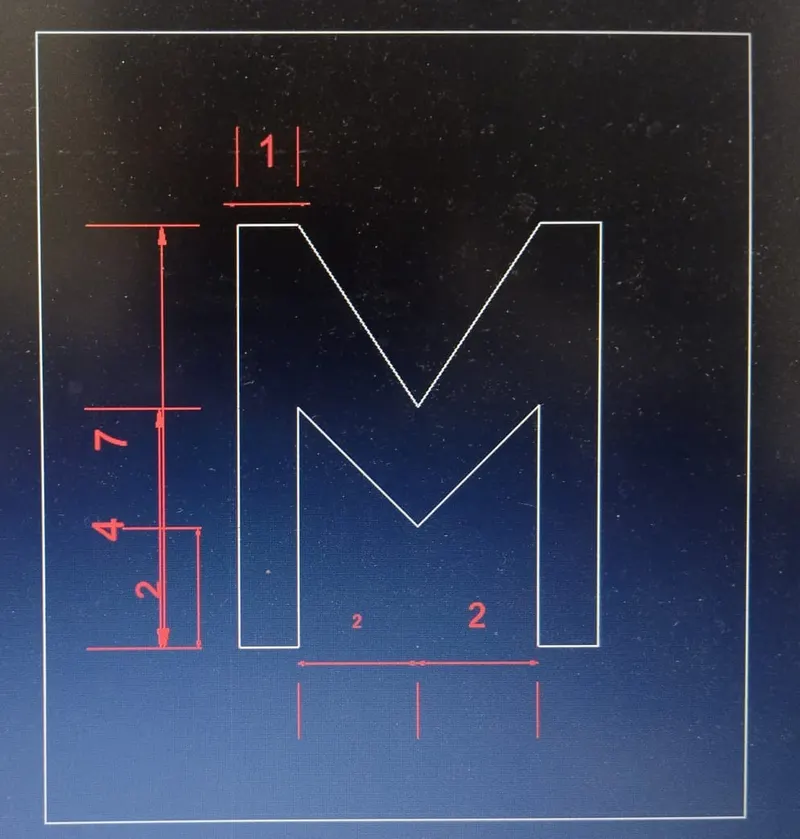
3.Drafting the geometry for P4 using absolute coordinate system methods
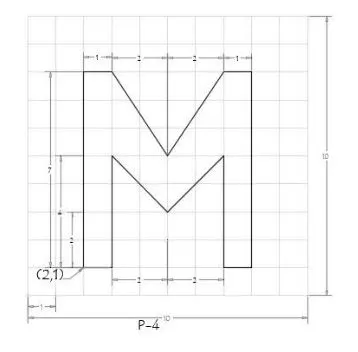 Absolute coordinate system:
Command: l
LINE Specify first point: 2,1
Specify next point or [Undo]: 3,1
Specify next point or [Undo]: 3,5
Specify next point or [Close/Undo]: 5,3
Specify next point or [Close/Undo]: 7,5
Specify next point or [Close/Undo]: 7,1
Specify next point or [Close/Undo]: 8,1
Specify next point or [Close/Undo]: 8,8 Specify next point or [Close/Undo]: 7,8
Specify next point or [Close/Undo]: 5,5
Specify next point or [Close/Undo]: 3,8
Specify next point or [Close/Undo]: 2,8
Specify next point or [Close/Undo]: close
RESULT:
4.Drafting the geometry for P5 using Relative rectangular coordinate system methods:
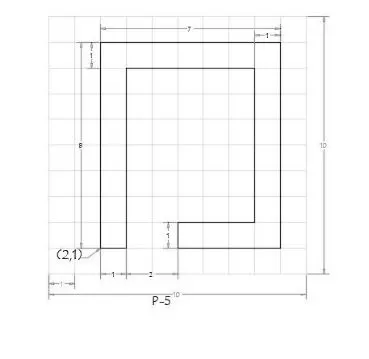
Relative Rectangular coordinate system:
Command: l
LINE Specify first point: 2,1
Specify next point or [Undo]: @1,0
Specify next point or [Undo]: @0,7
Specify next point or [Close/Undo]: @5,0
Specify next point or [Close/Undo]: @0,-6
Specify next point or [Close/Undo]: @-3,0
Specify next point or [Close/Undo]: @0,-1
Specify next point or [Close/Undo]: @4,0 Specify next point or [Close/Undo]: @0,8
Specify next point or [Close/Undo]: @-7,0
Specify next point or [Close/Undo]: CLOSE
RESULT:
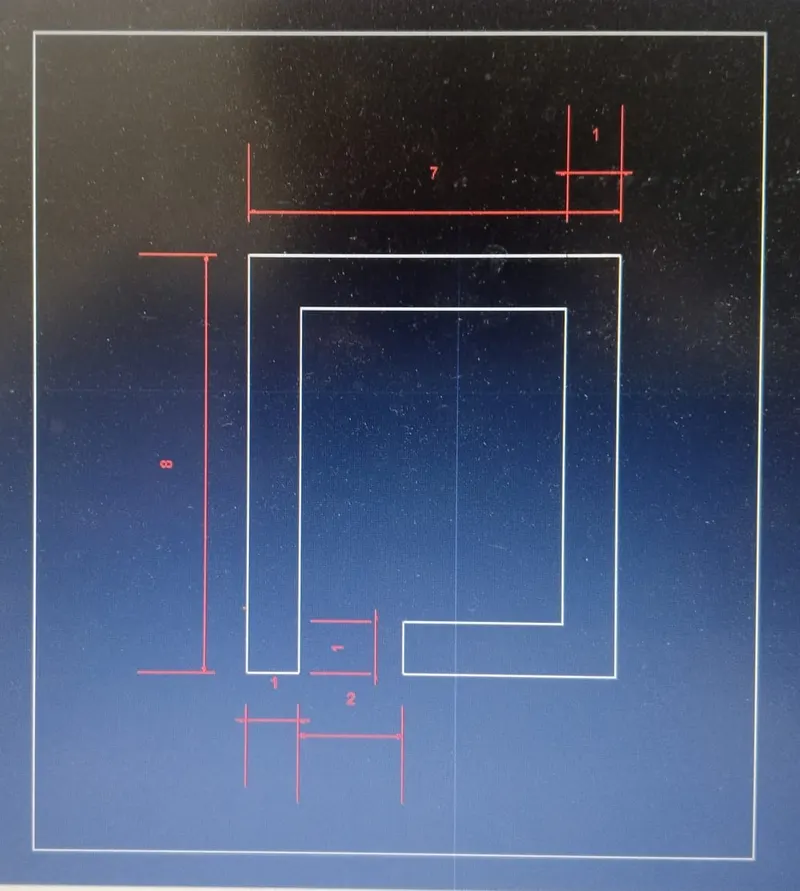
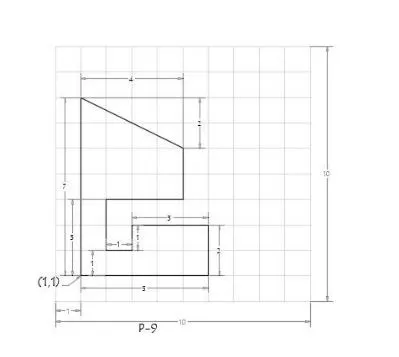
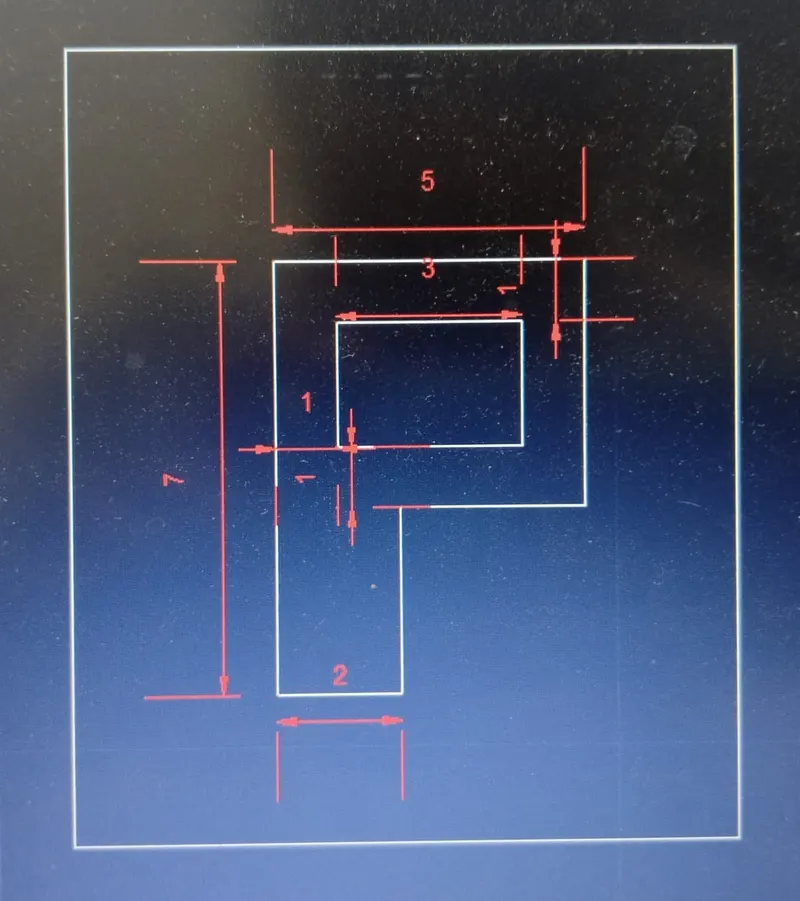
5.Drafting the geometry for P7 using Absolute coordinate system methods:
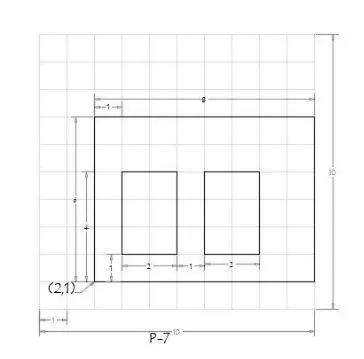
Absolute coordinate system:
Command: l
LINE Specify first point: 2,1
Specify next point or [Undo]: 10,1
Specify next point or [Undo]: 10,7
Specify next point or [Close/Undo]: 2,7 Specify next point or [Close/Undo]: close Command: l
Specify next point or [Close/Undo]: 3,2
Specify next point or [Close/Undo]: 5,2
Specify next point or [Close/Undo]: 5,5
Specify next point or [Close/Undo]: 3,5
Specify next point or [Close/Undo]: close Command: l
Specify next point or [Close/Undo]: 6,2
Specify next point or [Close/Undo]: 8,2
Specify next point or [Close/Undo]: 8,5
Specify next point or [Close/Undo]: 6,5
Specify next point or [Close/Undo]: close
RESULT:
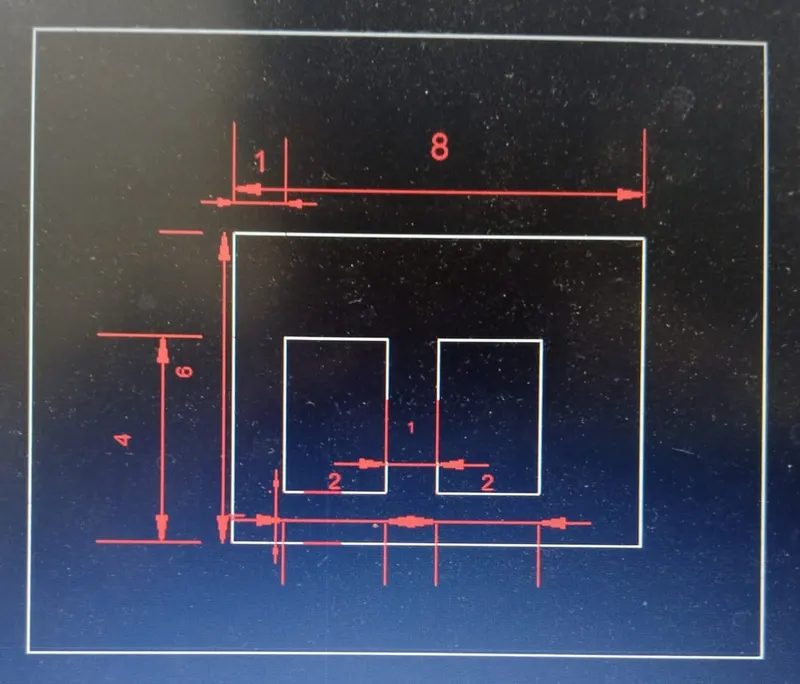
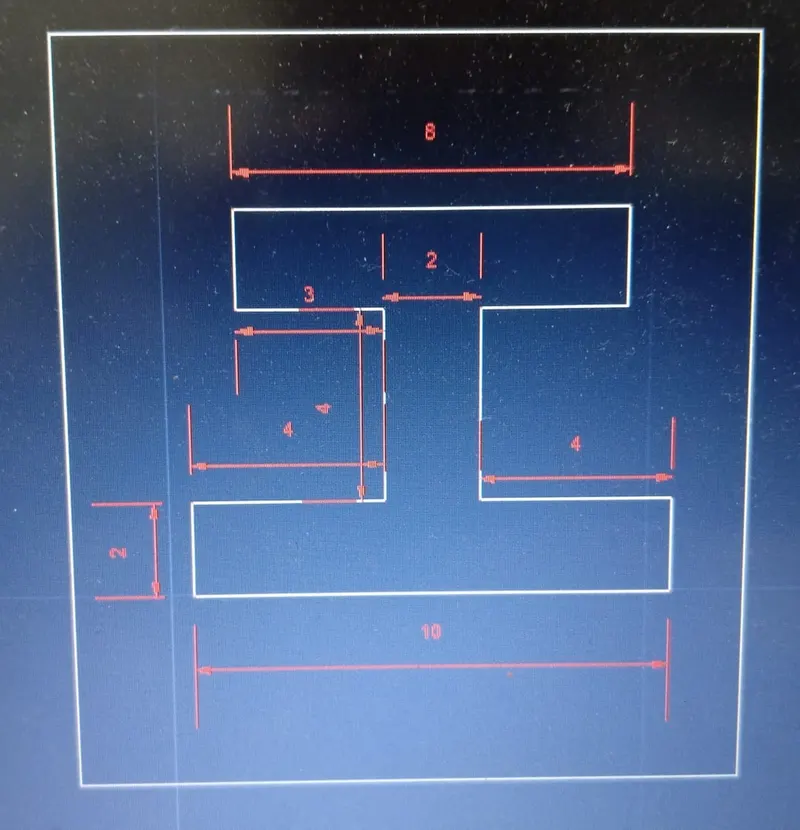
6.Drafting the geometry for P8 using relative rectangular coordinate system methods:
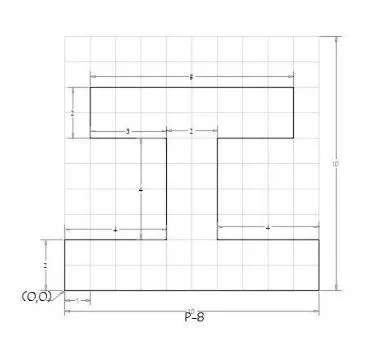
Relative Rectangular coordinate system:
Command: l
LINE Specify first point: 0,0
Specify next point or [Undo]: @10,0
Specify next point or [Undo]: @0,2
Specify next point or [Close/Undo]: @-4,0
Specify next point or [Close/Undo]: @0,4
Specify next point or [Close/Undo]: @3,0
Specify next point or [Close/Undo]: @0,2
Specify next point or [Close/Undo]: @-8,0 Specify next point or [Close/Undo]: @0,-2
Specify next point or [Close/Undo]: @3,0
Specify next point or [Close/Undo]: @0,-4 Specify next point or [Close/Undo]: @-4,0
Specify next point or [Close/Undo]: CLOSE
RESULT:
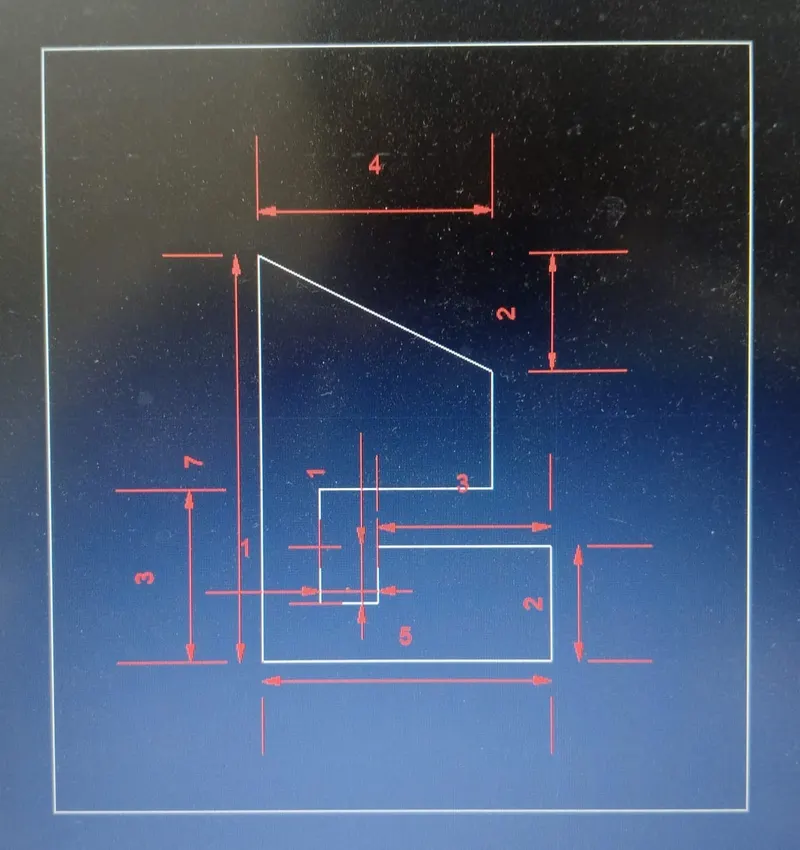
7.Drafting the geometry for P9 using Absolute coordinate system methods:
Absolute coordinate system:
Command: l
LINE Specify first point: 1,1
Specify next point or [Undo]: 6,1
Specify next point or [Undo]: 6,3
Specify next point or [Close/Undo]: 3,3
Specify next point or [Close/Undo]: 3,2
Specify next point or [Close/Undo]: 2,2
Specify next point or [Close/Undo]: 2,4
Specify next point or [Close/Undo]: 5,4 Specify next point or [Close/Undo]: 5,6
Specify next point or [Close/Undo]: 1,8
Specify next point or [Close/Undo]: close
RESULT:
8.Drafting the geometry for P10 using relative polar coordinate system methods:
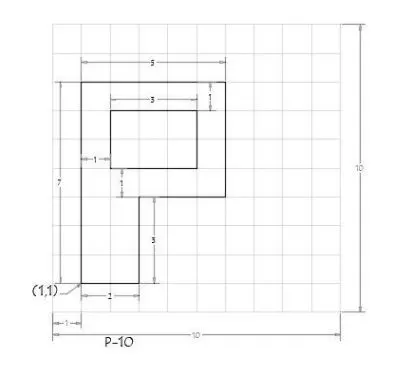
Relative Polar coordinate system:
Command: L
LINE Specify first point: 1,1
Specify next point or [Undo]: @2<0
Specify next point or [Undo]: @3<90
Specify next point or [Close/Undo]: @3<0
Specify next point or [Close/Undo]: @4<90
Specify next point or [Close/Undo]: @5<180 Specify next point or [Close/Undo]: CLOSE LINE Specify first point: 2,5
Specify next point or [Close/Undo]: @3<0
Specify next point or [Close/Undo]: @2<90 Specify next point or [Close/Undo]: @3<180
Specify next point or [Close/Undo]: CLOSE
RESULT:
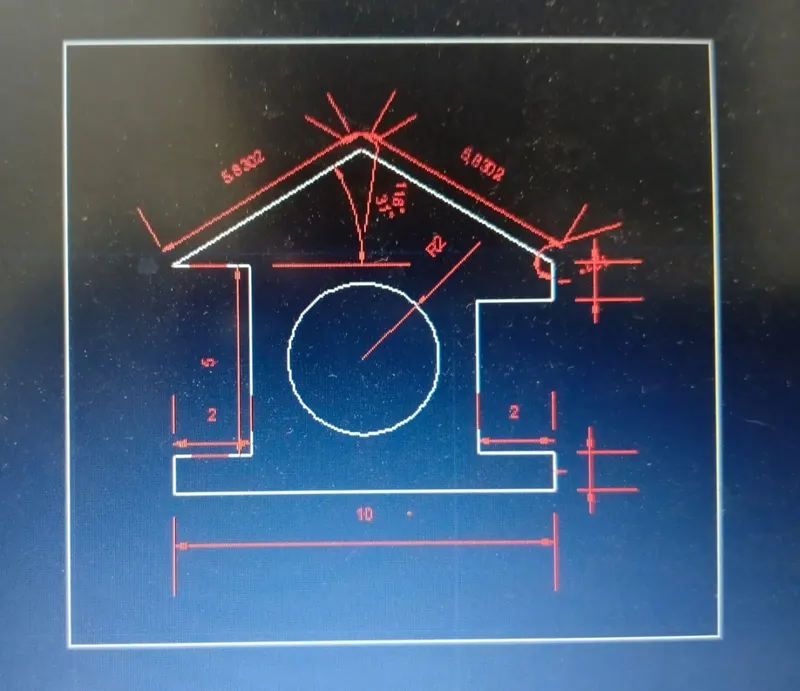
9.Drafting the wood - profile using direct distance entry method:
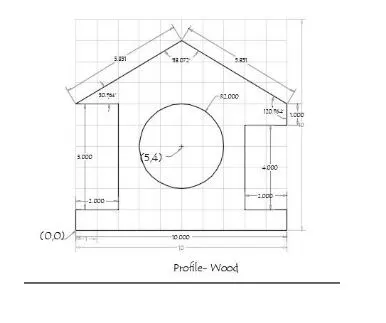
Direct Distance entry method:
Command: L
LINE Specify first point: 0,0
Specify next point or [Undo]: 10
Specify next point or [Undo]: 1
Specify next point or [Close/Undo]: 2
Specify next point or [Close/Undo]: 4
Specify next point or [Close/Undo]: 2
Specify next point or [Close/Undo]: 1 Specify next point or [Close/Undo]: <149.036 Angle override:149
Specify next point or [Close/Undo]: 5.8311
Specify next point or [Close/Undo]: <210.964 Angle override:211 Specify next point or [Close/Undo]: 5.531
Specify next point or [Close/Undo]: 2
Specify next point or [Close/Undo]: 5
Specify next point or [Close/Undo]: 2
Specify next point or [Close/Undo]: CLOSE
RESULT:
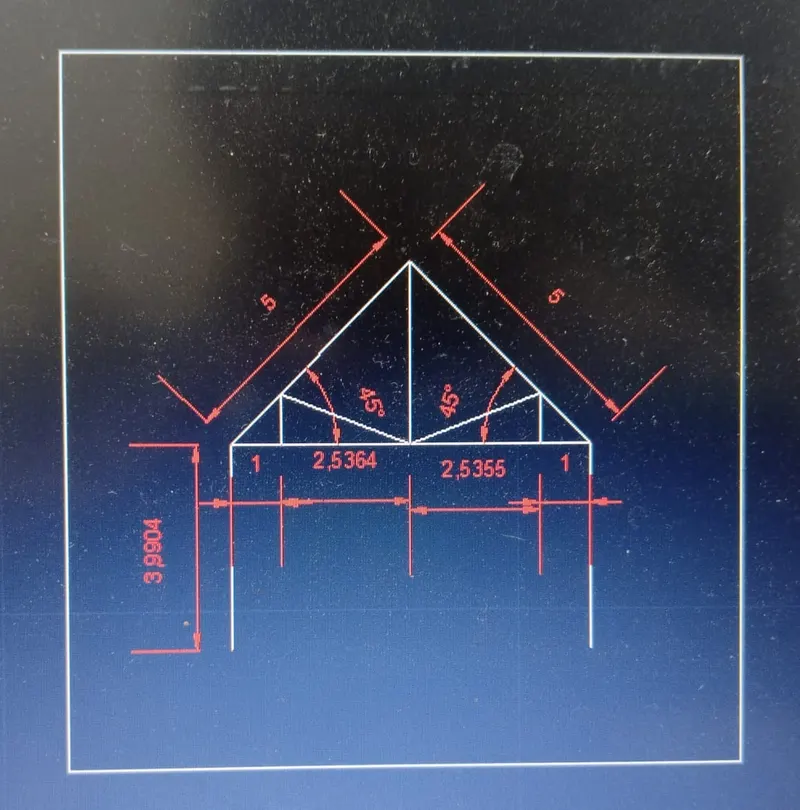
10.Drafting the Queen Post Truss using relative polar coordinate method:
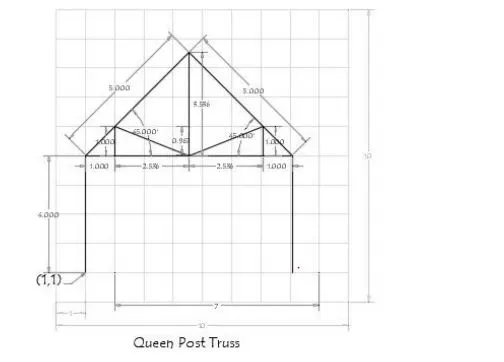
Relative Polar coordinate system:
Command: L
LINE Specify first point: 1,1
Specify next point or [Undo]: @4<90
Specify next point or [Undo]: @5<45
Specify next point or [Close/Undo]: @5<315 Specify next point or [Close/Undo]: @4<270
Specify next point or [Close/Undo]: *CANCEL* Command: L LINE Specify first point: 1,5
Specify next point or [Undo]: @1<0
Specify next point or [Undo]: @2.53555<338
Specify next point or [Close/Undo]: @2.7256<22 Specify next point or [Close/Undo]: @1<270
Specify next point or [Close/Undo]: *CANCEL* Command: L LINE Specify first point: 2,5 Specify next point or [Undo]: @1<90
Specify next point or [Undo]: @2.7256<338
Specify next point or [Close/Undo]: @2.7256<22
Specify next point or [Close/Undo]: @1<270 Specify next point or [Close/Undo]: *CANCEL* Command: L LINE Specify first point: 4.5,5 Specify next point or [Undo]: @3.53571<90
Specify next point or [Close/Undo]: *CANCEL*
RESULT:
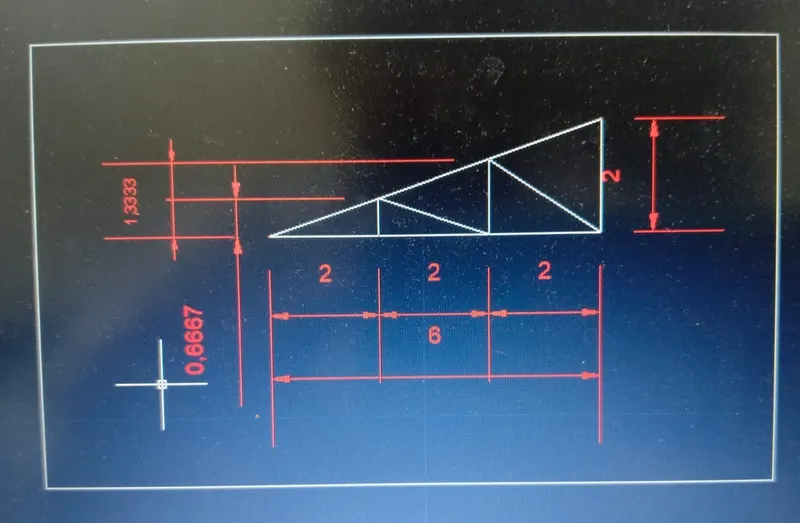
11.Drafting the mono pitch using absolute coordinate method:
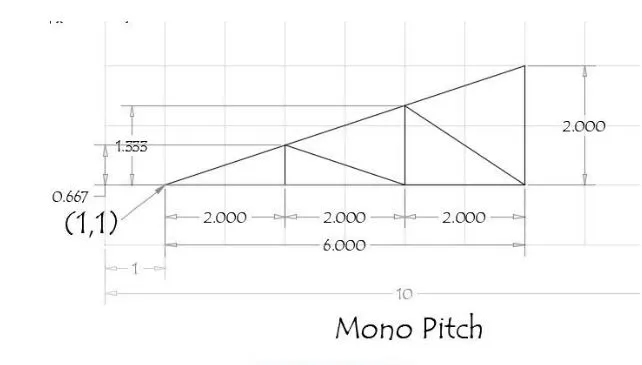
Absolute coordinate system:
Command: l
LINE Specify first point: 1,1
Specify next point or [Undo]: 7,1
Specify next point or [Undo]: 7,3 Specify next point or [Close/Undo]: close Command: l LINE Specify first point: 3,1
Specify next point or [Undo]: 3,1.667
Specify next point or [Undo]: 5,1
Specify next point or [Close/Undo]: 5,2.333
Specify next point or [Close/Undo]: 7,1
Specify next point or [Close/Undo]: close
RESULT: