Creation of geometries by Coordinate system methods using AutoCad
AIM- To create the geometry P1 using all co ordinate method in autocad.
Procedure-
absolute co ordinate method
select line tool from ribbon tab
Specify first point:( 2,1)
Specify next point or [Undo]: 8,1
Specify next point or [Undo]: 8,2
Specify next point or [Close/Undo]: 3,2
Specify next point or [Close/Undo]: 3,6
Specify next point or [Close/Undo]: 8,6
Specify next point or [Close/Undo]: 8,7
Specify next point or [Close/Undo]: 2,7
Specify next point or [Close/Undo]: C
relative co-ordinate system
select line from ribbon tab,Then Specify first point: (2,1)
Specify next point or [Undo]: @6,0
Specify next point or [Undo]: @0,1
Specify next point or [Close/Undo]: @-5,0
Specify next point or [Close/Undo]: @0,4
Specify next point or [Close/Undo]: @5,0
Specify next point or [Close/Undo]: @0,1
Specify next point or [Close/Undo]: @-6,0
Specify next point or [Close/Undo]: C
Polar co ordinate system
select line using L command from keyboard ,and then Specify first point: (2,1)
Specify next point or [Undo]: @6<0
Specify next point or [Undo]: @1<90
Specify next point or [Close/Undo]: @5<180
Specify next point or [Close/Undo]: @4<90
Specify next point or [Close/Undo]: @5<0
Specify next point or [Close/Undo]: @1<90
Specify next point or [Close/Undo]: @6<180
Specify next point or [Close/Undo]: C
Direct distance entry method
select line command from ribbon tab,and then specify the first point :(2,1)
specify next point:6(x direction)
specify next point:1(y direction)
specify next point:5 (-x diection)
specify next point:4(y direction)
specify next point:5(x direction)
specify next point:1 (y direction)
specify next point:6 (-xdirection)
then close.
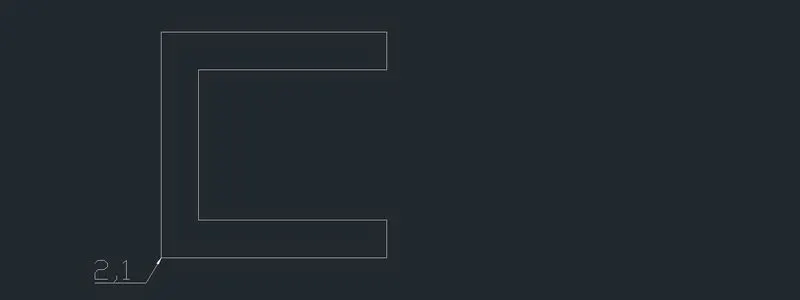
p1
AIM- To create the geometry P2 using all co ordinate method in autocad.
Procedure-
Absolute co ordinate system
select line tool from ribbon tab
Specify first point: (2,1)
Specify next point or [Undo]: 5,1
Specify next point or [Undo]: 5,5
Specify next point or [Close/Undo]: 6,5
Specify next point or [Close/Undo]: 6,1
Specify next point or [Close/Undo]: 9,1
Specify next point or [Close/Undo]: 7,8
Specify next point or [Close/Undo]: 4,8
Specify next point or [Close/Undo]: C
Relative co ordinate system
select line tool from ribbon tab
Specify first point: (2,1)
Specify next point or [Undo]: @3,0
Specify next point or [Undo]: @0,4
Specify next point or [Close/Undo]: @1,0
Specify next point or [Close/Undo]: @0,-4
Specify next point or [Close/Undo]: @3,0
Specify next point or [Close/Undo]: @-2,7
Specify next point or [Close/Undo]: @-3,0
Specify next point or [Close/Undo]: C
polar co ordinate system
Command: _line
Specify first point: (2,1)
Specify next point or [Undo]: @3<0
Specify next point or [Undo]: @4<90
Specify next point or [Close/Undo]: @1<0
Specify next point or [Close/Undo]: @4<270
Specify next point or [Close/Undo]: @3<0
Specify next point or [Close/Undo]: @7<105
Specify next point or [Close/Undo]: @3<180
Specify next point or [Close/Undo]: C
direct distance entry method
Select command line using L command,
Specify first point: (2,1)
Specify next point or [x direction]: 3
Specify next point or [y direction]: 4
Specify next point or [x direction]: 1
Specify next point or [-y direction]: 4
Specify next point or [x direction]: 3
Specify next point or [y direction]: 7
Specify next point or [-x direction]: 3
Specify next point or [Close/Undo]: C
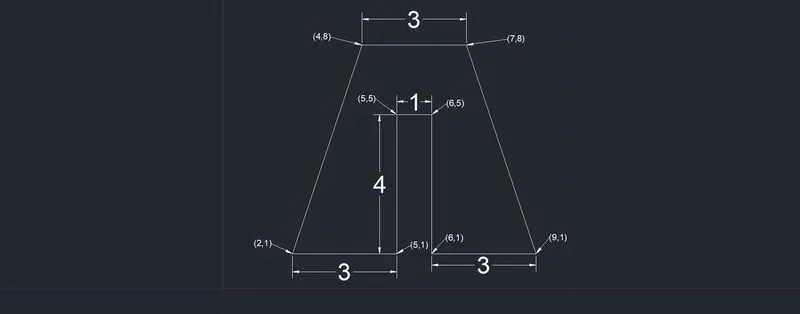
P2
Aim- To create geometry p4 using relative co ordinate system.
Procedure-Command: _line
Specify first point: (2,1)
Specify next point or [Undo]: @1,0
Specify next point or [Undo]: @0,4
Specify next point or [Close/Undo]: @2,-2
Specify next point or [Close/Undo]: @2,2
Specify next point or [Close/Undo]: @0,-4
Specify next point or [Close/Undo]: @1,0
Specify next point or [Close/Undo]: @0,7
Specify next point or [Close/Undo]: @-1,0
Specify next point or [Close/Undo]: @-2,-3
Specify next point or [Close/Undo]: @-2,3
Specify next point or [Close/Undo]: @-1,0
Specify next point or [Close/Undo]: C
p4
Aim- To create geometry p5 using relative coordinate system.
Procedure-select LINE command.
Specify next point or [Undo]: @0,6
Specify next point or [Undo]: @7,0
Specify next point or [Close/Undo]: @0,-6
Specify next point or [Close/Undo]: @-4,0
Specify next point or [Close/Undo]: @0,1
Specify next point or [Close/Undo]: @3,0
Specify next point or [Close/Undo]: @0,4
Specify next point or [Close/Undo]: @-5,0
Specify next point or [Close/Undo]: @0,-5
Specify next point or [Close/Undo]: C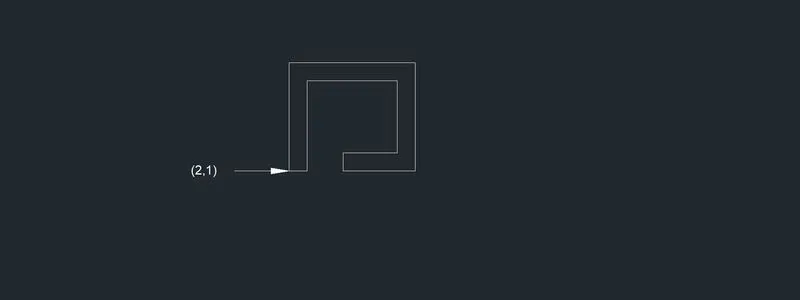
p5
Aim- To create geometry p7 using relative co ordinate system.
Prcedure-select line command
Specify first point: (2,1)
Specify next point or [Undo]: @0,6
Specify next point or [Undo]: @8,0
Specify next point or [Close/Undo]: @0,-6
Specify next point or [Close/Undo]: C
select line command from keyboard typing L,
Specify first point: 3,2
Specify next point or [Undo]: @0,3
Specify next point or [Undo]: @2,0
Specify next point or [Close/Undo]: @0,-3
Specify next point or [Close/Undo]:
select line tool from ribbon tab
Specify first point: (6,2)
Specify next point or [Undo]: @0,3
Specify next point or [Undo]: @2,0
Specify next point or [Close/Undo]: @0,-3
Specify next point or [Close/Undo]: C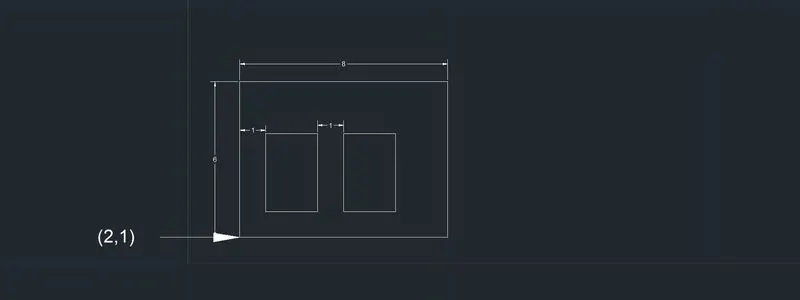
p7
Aim- To create geometry p8 using relative co ordinate system.
Prcedure- select line tool from ribbon tool, and then
Specify first point: (0,0)
Specify next point or [Undo]: @0,2
Specify next point or [Undo]: @4,0
Specify next point or [Close/Undo]: @0,4
Specify next point or [Close/Undo]: @-3,0
Specify next point or [Close/Undo]: @0,2
Specify next point or [Close/Undo]: @8,0
Specify next point or [Close/Undo]: @0,-2
Specify next point or [Close/Undo]: @-3,0
Specify next point or [Close/Undo]: @0,-4
Specify next point or [Close/Undo]: @4,0
Specify next point or [Close/Undo]: @0,-2
Specify next point or [Close/Undo]: C
p8
Aim- To create geometry p9 using relative co ordinate system.
Procedure-select LINE command. and specify first point as(1,1)
Specify next point or [Undo]: @5,0
Specify next point or [Undo]: @0,2
Specify next point or [Close/Undo]: @-3,0
Specify next point or [Close/Undo]: @0,-1
Specify next point or [Close/Undo]: @-1,0
Specify next point or [Close/Undo]: @0,2
Specify next point or [Close/Undo]: @3,0
Specify next point or [Close/Undo]: @0,2
Specify next point or [Close/Undo]: @-4,2
Specify next point or [Close/Undo]: C
p9
Aim- To create geometry p10 using relative coordnate system.
Procedure-select command line
Specify first point: (1,1)
Specify next point or [Undo]: @0,7
Specify next point or [Undo]: @5,0
Specify next point or [Close/Undo]: @0,-4
Specify next point or [Close/Undo]: @-3,0
Specify next point or [Close/Undo]: @0,-3
select command line
Specify first point: (2,5)
Specify next point or [Undo]: @3,0
Specify next point or [Undo]: @0,2
Specify next point or [Close/Undo]: @-3,0
Specify next point or [Close/Undo]: C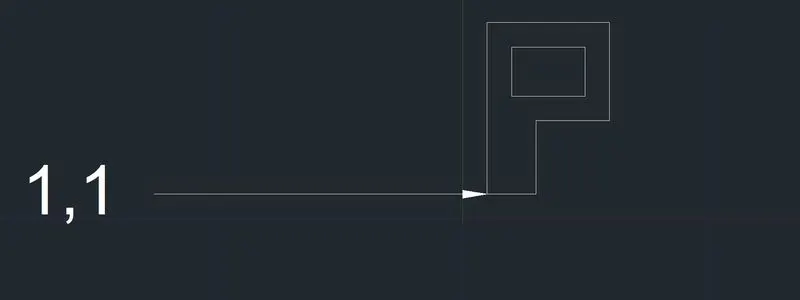
Aim- To create geometry of profile wood using any co ordinate system.
Procedure- select line tool from ribbon tab, then
Specify first point: (0,0)
Specify next point or [Undo]: @10,0
Specify next point or [Close/Undo]: @0,1
Specify next point or [Close/Undo]: @-2,0
Specify next point or [Close/Undo]: @0,4
Specify next point or [Close/Undo]: @2,0
Specify next point or [Close/Undo]: @0,1
Specify next point or [Close/Undo]: @-5,5.831
Specify next point or [Close/Undo]: @-5,-5831
Specify next point or [Close/Undo]: @2,0
Specify next point or [Close/Undo]: @0,-5
Specify next point or [Close/Undo]: @-2,0
specify the next point or[close/undo]:c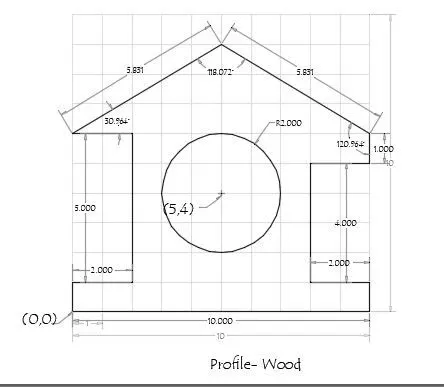
Aim-To create the geometry of queen post truss using any co ordinate system.
Procedure-
select line tool from ribbon tab, then
Specify first point: (1,1)
Specify next point or [Undo]: @0,4
Specify next point or [Close/Undo]: @5,<45
Specify next point or [Close/Undo]: @5,<315
Specify next point or [Close/Undo]: @0,-4
in command line type 'L' and enter the coordinate as (1,5)
then enter@1,0 and press enter key,
again in command line specify @2.536,0 then press enter
Specify next point or [Close/Undo]: @2.536,0
Specify next point or [Close/Undo]: @1,0
select line tool from ribbon tab, and put the co ordinate (2,5)
Specify next point or [Close/Undo]: @0,1
select line command and specify co ordinate as (2,6)
Specify next point or [Close/Undo]: @2.536,-1
select line tool and enter the co ordinate as (7,6)
Specify next point or [Close/Undo]: @-2.536,-1
select line command and enter co ordinate as (4.536,5)
Specify next point or [Close/Undo]: @0,3.535
close and escape.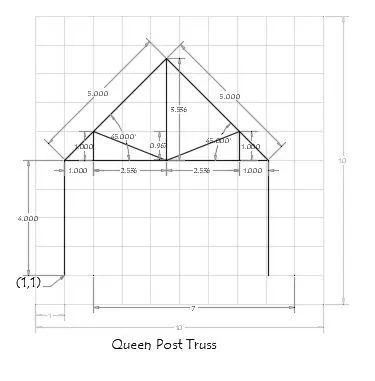
Aim- To create mono pitch using any co ordinate system.
Procedure-
select LINE command ,and specify first co ordinate as(1,1)
Specify next point or [Undo]: @6,2
Specify next point or [Undo]: @0,-2
Specify next point or [Close/Undo]: @-2,1.333
Specify next point or [Close/Undo]: @0,-1.333
Specify next point or [Close/Undo]: @2,
select LINE command Specify first point: @1,1
Specify next point or [Undo]: @4,0
Specify next point or [Undo]: @-2,.667
Specify next point or [Close/Undo]: @0,-.667
Specify next point or [Close/Undo]:c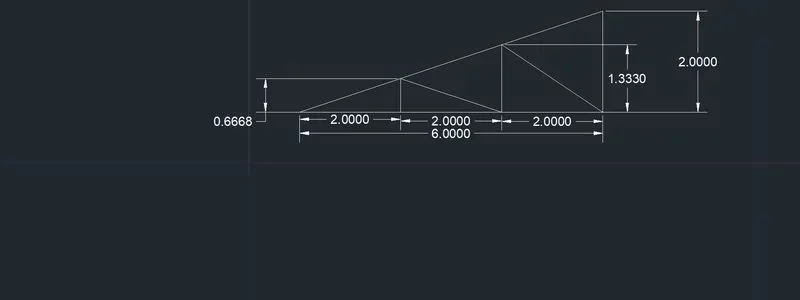
mono pitch