Creation of geometries by Coordinate system methods using AutoCad
AIM:
- Create the geometries from PI to P2 using all the coordinates system methods. By using the Line tool to create the geometries. use the circle tool in some cases.
SOFTWARE USED:
Autodesk autocad 2021
PROCEDURE:
- first open the autocad software
- give command the software QNEW or go to the application menu and click the NEW option
- then click on ADVANCE SEETING
- select matric seeting
- unit in decimal having precision 0.0.
- template Acad.dwg
- angle
- decimal degree
- angle measure
- east (clockwise direction).
- select the area 10'10
- click on finished option
EXAMPLE: 1
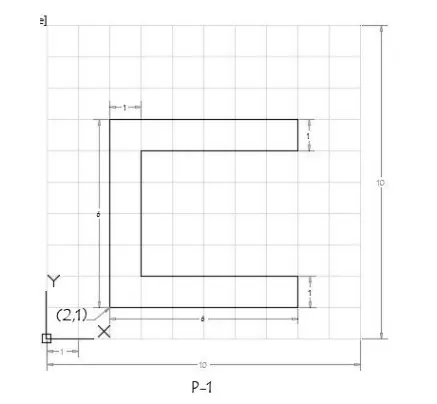
Types of coordinate system is given below:
absolute coordinate system
relative rectangular system
relative polar coordinate system
direct distence entry method
ABSOLUTE COORDINATE SYSTEM:
- give the line command to the autocad software
- 2,1 starting point a
- b=2,7
- c=8,7
- d-8,6
- e=3,6
- f=3,2
- g=8,2
- h=8,1
- then closed
RELATIVE RECTANGULAR COORDINATES:
- line command
- a-@2,1 that is starting point
- b-@0,6 le dx0 units dy: 6 units
- c-@6,0 LB dx: 6 units dy: 0 units
- d-@0,-1ie dx0 units dy-1 units
- e-@-5,0 le ax-5 units dy0 units
- f=@0,-4 Le dx 0 units dy: -4 units.
- g=@5,0 ie dx 5 unitsdy:0 units
- h=0,-1ie dx: 0 units dy-1 units
- closed
RELATIVE POLAR COORDINATES:
- line command
- a-@2,1 starting point
- b=@6<90
- c=@6<0
- d=@1<270
- e=@5-180
- f=@4<270
- g=@5<0
- h=@1<270
- then closed
DIRECT DISTANCE ENTRY:
- line command
- 6 cursor facing to north direction
- 6 cursor facing to east direction
- 1 cursor facing to south direction
- 5 cursor facing to wast direction
- 4 cursor facing to south direction
- 5 cursor facing to east direction
- 1 cursor facing to south direction
- closed
RESULT:
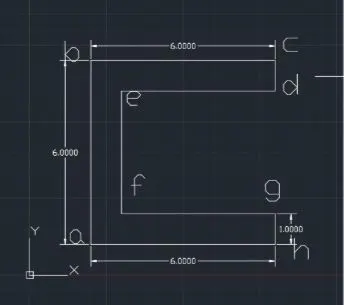
Example : 2
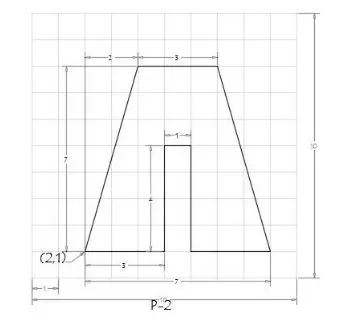
PROCEDURE:
ABSOLUTE COORDINATE SYSTEM:
- give line command
- a-2,1 starting point
- b=2,8
- c=7,8
- d=9,1
- e=6,1
- f=6,5
- g=5,5
- h=5,1
- closed
RELATIVE RECTANGULAR COORDINATE:
- line command
- a-2,1 starting point
- b-@2,7 Le,dx:2 units dy :7 units
- c-@3,0 Le dx 3 units dy :0 units
- d=@2,-7 Le dx:2 units dy:-7 units
- e=@-3,0.1.e dx:-3 units dy:0 units
- f=@0,4 le dx:0 units dy:4 units
- g=@-1,0 Ledx-1 units dy-0 units
- h=@0-4 Lo dx0 units dy-4 units:
- closed
RELATIVE POLAR COORDINATES:
- line command
- a=2,3 starting points
- @7<90 (line one)
- @2<0 (line two)
- then joined the points and get b point
- delete line one and line two
- @7<270 (line three).
- @2<0 (line four)
- joint the endpoint of line c and line four and gel point di
- delete line three and four
- e-3<180
- f=@4<90
- g=@1<180
- h=@4<270
- closed
DIRECT DISTENCE ENTRY:
- line command
- 7 upward (ine a tall)
- 2 right direction (line #t to b)
- joint point c and b
- delete line a to # and # to b
- 3 right direction (bloc).
- 7 downward direction (line a to #]
- 2 right directon (line # to d)
- join the point c and d
- delete the line c to # and #to d
- 3 left direction (lined to e)
- 4 upward direction (line e to t)
- I left direction (line 1 to g)
- 4 downward direction (g to h)
- then closed.
RESULTS:
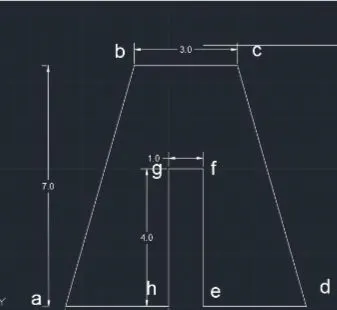
Example 3
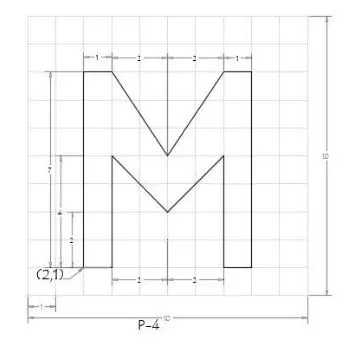
PROCEDURE:
ABSOLUTE COORDINATE SYSTEM:
- a= 2,1 starting points
- b=2,8
- C=3,8
- d=5,5
- e=7,8
- My Career
- Services New
- f=8,8
- g=8,1
- h=7,1
- i=7,5
- j=-5,3
- k=3,5
- closed
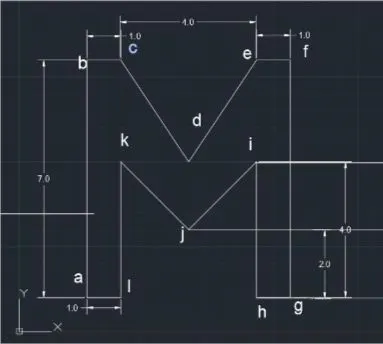
RELATIVE RECTANGULAR COORDINATE:
- line command
- a=2,1 statting points
- b-0,7 be dx:0 units and dy:7 units
- c=10 Le dxl units and dy: 0 units
- d=2,-3 le dx:2 units and dy:-3 units
- e-23 le dx:2 units and dy: 3 units
- f=10 le dx1 units and dy:0 units
- g=0,-7 xa cx:0 units and dy-7 units
- h=-10 Le cx-1 units and dy:0 units 0,4 Le dx0 units and dy 4 units
- j=-2-2,0 dx-2 units and dy--2 units
- k=-2.210 dx-2 units and dy 2 units
- 1-0, 4ie dxo units and dy-4 units .
- then closed.
RESULTS
Example 4
- Procedure
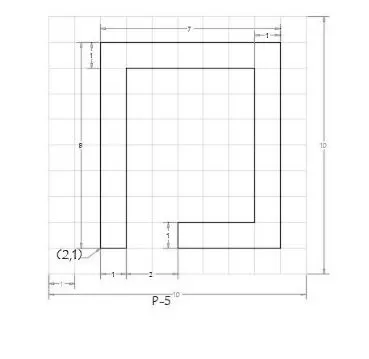
ABSOLUTE COORDINATE METHOD:
- Line command
- a=2,1 starting points
- b=2,9
- c=9,9
- d=9,1
- e=5,1
- f=5,2
- g=8,2
- h=8,8
- i=3,8
- j-3,1
- then closed
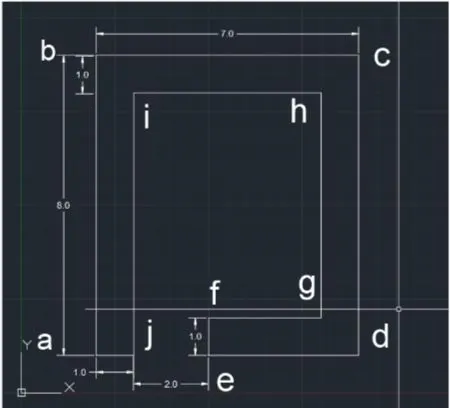
RELATIVE RECTANGULAR COORDINATE:
- give line command
- a=2,1 starting points
- b=0,8 ie dx0 units and dy 8 units
- c=@7,0 le dx,7 units and dy:0 units
- d=@0,- 8 le dx:0 units and ay:-8 units
- e=@-4,0 Lo dx-4 units and ay:0 units
- f=@0,1 i.e dx:0 units and dyl units
- g=@4,0 i.e dx: 4 units and dy.0 units
- h=@0,6 ie dx0 units and dy:6 units
- i=5,0 ie de-5 units and dy 0 units
- j=@0,-7 ie dx0 units and dy-7 units .
- then closed.
RESULTS:
Example 5
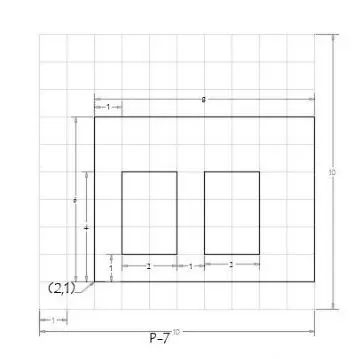
Procedure :
ABSOLUTE COORDINATE SYSTEM:
- give the line command to autocad
- a=2,1 that is starting point
- b=2,7
- c=10,7
- d-10,1
- closed
- line command
- e=3,5
- g=5,5
- h=5,2
- closed
- line command
- i=6,2
- j=6,5
- k=8,5
- l=8,2
- closed
RELATIVE RECTANGULAR COORDINATE:
- Line command
- a=2,1 starting point
- b=0,6
- c=8,0
- d=0,-6
- closed
- line command
- e=3,2
- f=0,3
- g=2,0
- h=0,-3
- closed
- line command
- i=6,2
- j=0,3
- k=2,0
- l=0,-3
- closed
RESULTS:
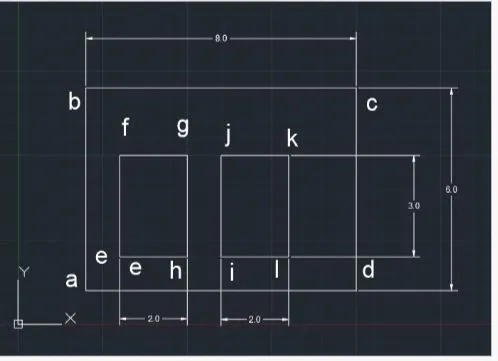
Example 6
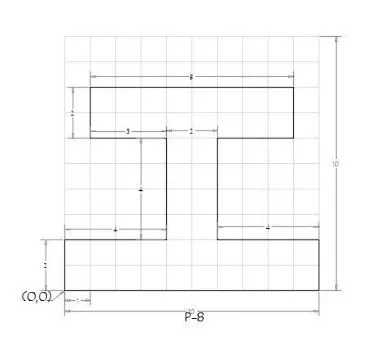
PROCEDURE:
ABSOLUTE COORDINATE SYSTEM:
- give the line command
- a = 0,0
- B = 0,2
- c = 4,2
- d = 4, 6
- e = 1,6
- f = 1,8
- g = 9,8
- h = 9,6
- i = 6,6
- i = 6,6
- j = 6,2
- k = 10,2
- l = 10, 0
- then closed
RELATIVE POLAR COORDINATE METHOD:
- a=0,0 starting points
- b = @2 < 90
- c = @4<0
- d = @4<90
- e = @3<180
- f = @2<90
- g = @8<0
- h=@2<270
- i = @3<180
- j = @4<270
- k= @4<0
- l = @2<270
- then closed
RESULTS:
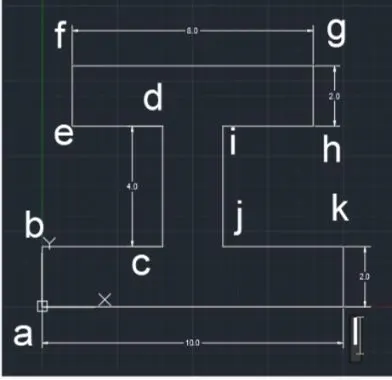
Example : 7
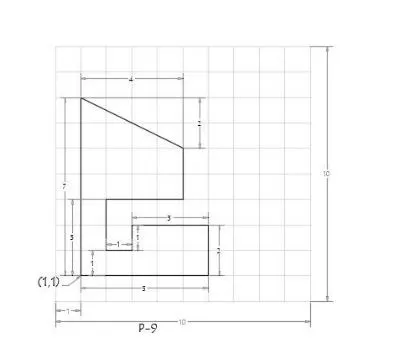
PROCEDURE
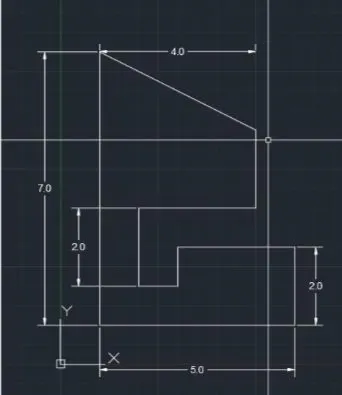
ABSOLUTE COORDINATE SYSTEM
- Line command
- a=1,1
- b=1,8
- c=5,6
- d=5,4
- e=2,4
- f=2,2
- g=3,2
- h=3,3
- i=6,3
- j=6,1
- Then Closed
RESULT
Example : 8
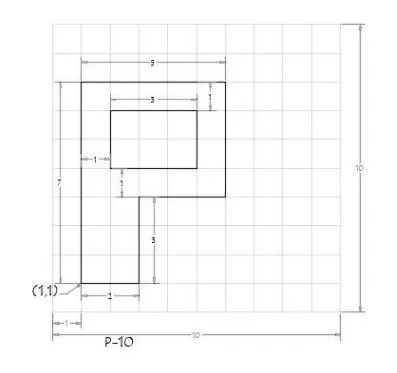
PROCEDURE
ABSOLUTE CORDINATE SYSTEM
- Line comand
- a=1,1 starting point
- b=1,8
- c=6,8
- d=6,4
- e=3,4
- f=3,1
- closed
- g=2,5
- h=2,7
- i=5,7
- j=5,5
- Closed
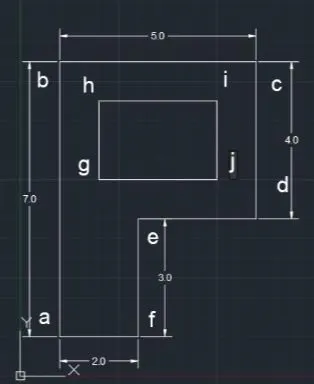
RELATIVE POLAR CORDINATE SYSTEM
- Line command
- a=1,1
- b=@7<90
- c=@5<0
- d=@4<270
- e=@3<180
- f=@3<270
- Closed
- g=2,5 starting point
- h=2<90
- i=3<0
- j=2<270
- Closed
RESULT
Example 9
Procedure
ABSOLUTE COORDINATE METHOD:
- Line command
- 0,0 starting point
- 0,1
- 2,1
- 2,6
- 0,6
- 5,9
- 10,6
- 8,5
- 8,1
- 10,1
- 10,0
- Closed
RESULT
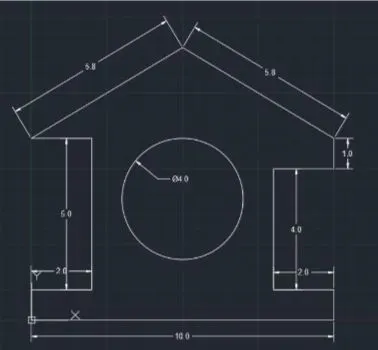
Example 10
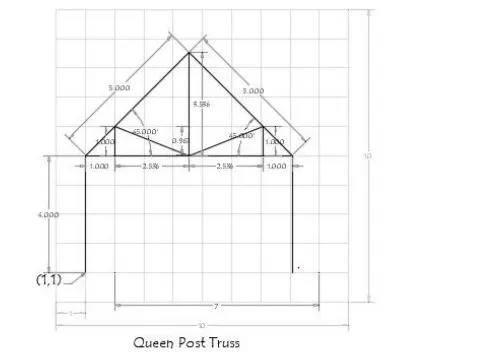
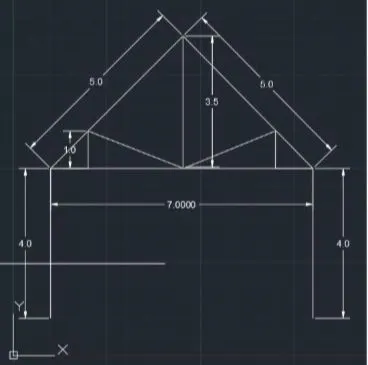
PROCEDURE:
RELATIVE POLAR COORDINATE SYSTEM:
- Line command
- 1,1
- @4<90
- 4<270
- Enter
- then give the line command
- 1,5 starting point
- 5<45 point f
- enter
- line command
- 8,5
- @5<45
- @3.5<270
- anter
- line command
- 1,5
- @1<90
- Joint both point
- and enter
- line commnd
- 8,5
- @1<180
- @1<90
- using line join point
- and prase enter
RESULTS:
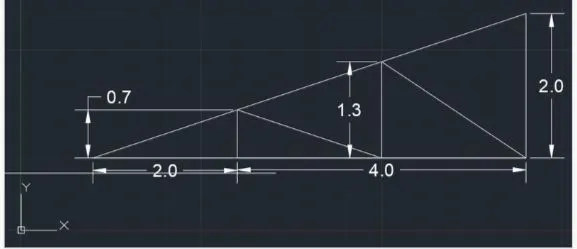
Example 11 : Mono Pitch
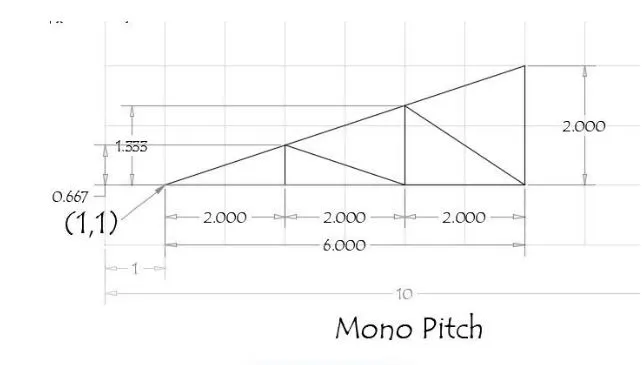
ABSOLUTE COORDINATE METHOD:
- Line command
- 1,1
- 3,1
- 5,1
- 7,3
- Then closed
- Give the line command
- 3,1
- 3,1.66
- 5,1
- 5,2.33
- 7,1
- Closed
RESULT
IN THIS WAY THIS ALL EXAMPLES ARE SOLVED BY FOUR TYPES OF COORDINATE SYSTEM NAME GIVEN BELOW :
- ABSOLUTE COORDINATE SYSTEM
- RELATIVE RECTANGULAR COORDINATE SYSTEM
- RELATIVE POLAR COORDINATE METHOD
- DIRECT DISTANCE ENTRY METHOD
- BY USING AUTODESK AUTOCAD 2021 VERSION