Creation of geometries by Coordinate system methods using AutoCad
Ans 1 :
Command: L
LINE
Specify first point: 2,1
Specify next point or [Undo]: @6,0
Specify next point or [Undo]: @0,1
Specify next point or [Close/Undo]: @-5,0
Specify next point or [Close/Undo]: @0,5
Specify next point or [Close/Undo]: _u
Specify next point or [Close/Undo]: *Cancel*
Command: *Cancel*
Command: L
LINE
Specify first point:
Specify next point or [Undo]: @0,4
Specify next point or [Undo]: @5,0
Specify next point or [Close/Undo]: @0,1
Specify next point or [Close/Undo]: @-6,0
Specify next point or [Close/Undo]: @0,-6
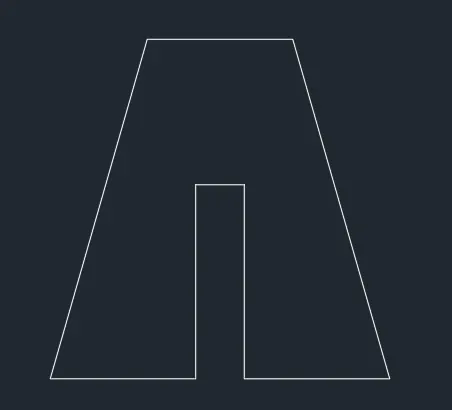
Ans 2 :
Command: L
LINE
Specify first point: 2,1
Specify next point or [Undo]: @3,0
Specify next point or [Undo]: @0,4
Specify next point or [Close/Undo]: @1,0
Specify next point or [Close/Undo]: @0,-4
Specify next point or [Close/Undo]: @3,0
Specify next point or [Close/Undo]: @-2,7
Specify next point or [Close/Undo]: @-3,0
Specify next point or [Close/Undo]: *Cancel*
Automatic save to C:\Users\HP\AppData\Local\Temp\Drawing2_1_5397_2da8a944.sv$ ...
Command:
Command: L
LINE
Specify first point:
Specify next point or [Undo]: @-2,-7
Ans 3 :
Command: L
LINE
Specify first point: 2,1
Specify next point or [Undo]: @1,0
Specify next point or [Undo]: @0,4
Specify next point or [Close/Undo]: @2,-2
Specify next point or [Close/Undo]: @2,2
Specify next point or [Close/Undo]: @0,-4
Specify next point or [Close/Undo]: @1,0
Specify next point or [Close/Undo]: @0,7
Specify next point or [Close/Undo]: @-2,-3
Specify next point or [Close/Undo]: u
Specify next point or [Close/Undo]: @-1,0
Specify next point or [Close/Undo]: @-2,-3
Specify next point or [Close/Undo]: @-2,3
Specify next point or [Close/Undo]: @-1,0
Specify next point or [Close/Undo]: @0,-7
Specify next point or [Close/Undo]: *Cancel*

Ans 4 :
Command: L
LINE
Specify first point: 2,1
Specify next point or [Undo]: @1,0
Specify next point or [Undo]: @0,7
Specify next point or [Close/Undo]: @5,0
Specify next point or [Close/Undo]: @0,-6
Specify next point or [Close/Undo]: @-3,0
Specify next point or [Close/Undo]: @0,-1
Specify next point or [Close/Undo]: @4,0
Specify next point or [Close/Undo]: @0,8
Specify next point or [Close/Undo]: @-7,0
Specify next point or [Close/Undo]: @0,-8
Specify next point or [Close/Undo]:

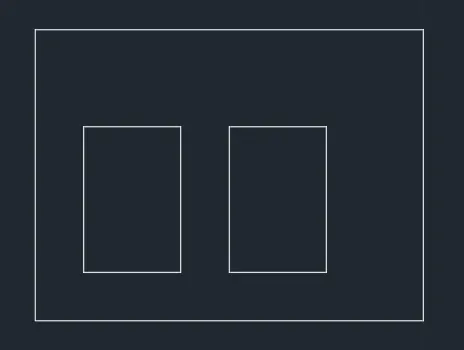
Ans 5 :
Command: L
LINE
Specify first point: 2,1
Specify next point or [Undo]: @8,0
Specify next point or [Undo]: @0,6
Specify next point or [Close/Undo]: @-8,0
Specify next point or [Close/Undo]: @0,-6
Specify next point or [Close/Undo]: *Cancel*
Command: L
LINE
Specify first point: 3,2
Specify next point or [Undo]: @2,0
Specify next point or [Undo]: @0,3
Specify next point or [Close/Undo]: @-2,0
Specify next point or [Close/Undo]: @0,-3
Specify next point or [Close/Undo]: *Cancel*
Command: L
LINE
Specify first point: 6,2
Specify next point or [Undo]: @2,0
Specify next point or [Undo]: @0,3
Specify next point or [Close/Undo]: @-2,0
Specify next point or [Close/Undo]: @0,-3
Specify next point or [Close/Undo]: *Cancel*
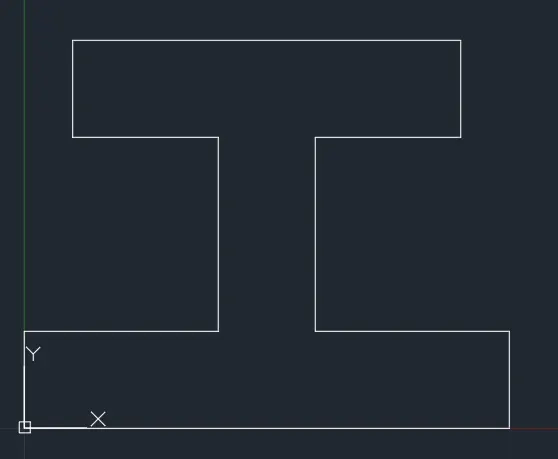
Ans 6 :
Command: L
LINE
Specify first point: 0,0
Specify next point or [Undo]: @10,0
Specify next point or [Undo]: @0,2
Specify next point or [Close/Undo]: @-4,0
Specify next point or [Close/Undo]: @0,4
Specify next point or [Close/Undo]: @3,0
Specify next point or [Close/Undo]: @0,2
Specify next point or [Close/Undo]: @-8,0
Specify next point or [Close/Undo]: @0,-2
Specify next point or [Close/Undo]: @3,0
Specify next point or [Close/Undo]: @0,-4
Specify next point or [Close/Undo]: @-4,0
Specify next point or [Close/Undo]: @0,-2
Specify next point or [Close/Undo]: *Cancel*
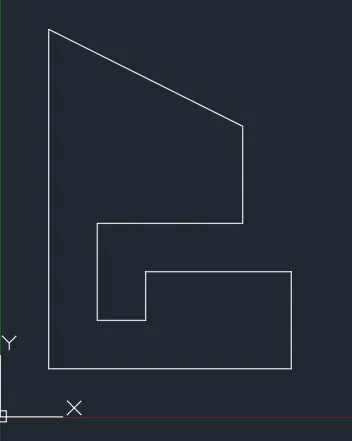
Ans 7 :
Command: L
LINE
Specify first point: 1,1
Specify next point or [Undo]: @5,0
Specify next point or [Undo]: @0,2
Specify next point or [Close/Undo]: @-3,0
Specify next point or [Close/Undo]: @0,-1
Specify next point or [Close/Undo]: @-1,0
Specify next point or [Close/Undo]: @0,2
Specify next point or [Close/Undo]: @3,0
Specify next point or [Close/Undo]: @2,0
Specify next point or [Close/Undo]: u
Specify next point or [Close/Undo]: @0,2
Specify next point or [Close/Undo]: @-4,-2
Specify next point or [Close/Undo]: u
Specify next point or [Close/Undo]: @-4,2
Specify next point or [Close/Undo]: @0,-7
Specify next point or [Close/Undo]: *Cancel*
Ans 8 :
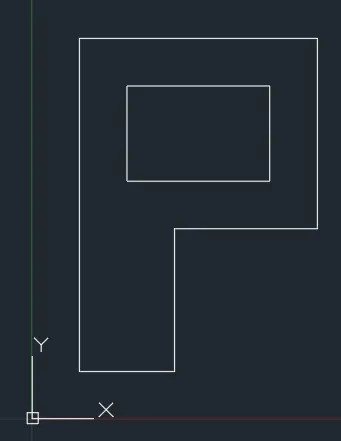
Command: L
LINE
Specify first point: 1,1
Specify next point or [Undo]: @2,0
Specify next point or [Undo]: @0,3
Specify next point or [Close/Undo]: @3,0
Specify next point or [Close/Undo]: @0,4
Specify next point or [Close/Undo]: @-5,0
Specify next point or [Close/Undo]: @0,-7
Specify next point or [Close/Undo]: *Cancel*
Command: L
LINE
Specify first point: 2,5
Specify next point or [Undo]: @3,0
Specify next point or [Undo]: @0,2
Specify next point or [Close/Undo]: @-3,0
Specify next point or [Close/Undo]: @0,-2
Specify next point or [Close/Undo]: *Cancel*
Ans 9 :
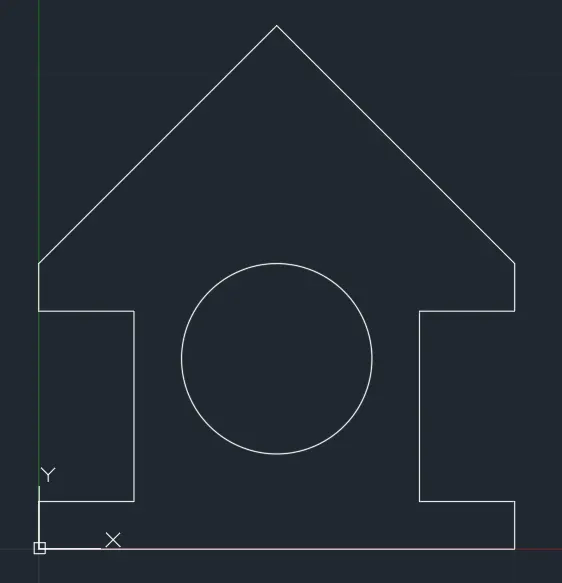
Command: L
LINE
Specify first point: 0,0
Specify next point or [Undo]: @10,0
Specify next point or [Undo]: @0,<
Point or option keyword required.
Specify next point or [Undo]: 1°
Point or option keyword required.
Specify next point or [Undo]: @0,1
Specify next point or [Close/Undo]: @-2,<
Point or option keyword required.
Specify next point or [Close/Undo]: 0°
Point or option keyword required.
Specify next point or [Close/Undo]: @-2,0
Specify next point or [Close/Undo]: 0.4
Specify next point or [Close/Undo]: u
Specify next point or [Close/Undo]: @0,4
Specify next point or [Close/Undo]: @2,<
Point or option keyword required.
Specify next point or [Close/Undo]: 0°
Point or option keyword required.
Specify next point or [Close/Undo]: @2,0
Specify next point or [Close/Undo]: @-5,5
Specify next point or [Close/Undo]: u
Specify next point or [Close/Undo]: @0,<
Point or option keyword required.
Specify next point or [Close/Undo]: 1°
Point or option keyword required.
Specify next point or [Close/Undo]: @0,1
Specify next point or [Close/Undo]: @-5,5
Specify next point or [Close/Undo]: @-5,-5
Specify next point or [Close/Undo]: @0,-1
Specify next point or [Close/Undo]: @2,0
Specify next point or [Close/Undo]: @0,-4
Specify next point or [Close/Undo]: @-2,<
Point or option keyword required.
Specify next point or [Close/Undo]: 0°
Point or option keyword required.
Specify next point or [Close/Undo]: @-2,0
Specify next point or [Close/Undo]: @0,-1
Specify next point or [Close/Undo]:
Command: C CIRCLE
Specify center point for circle or [3P/2P/Ttr (tan tan radius)]: 5,4
Specify radius of circle or [Diameter]: 4
Command: U CIRCLE
Command: C CIRCLE
Specify center point for circle or [3P/2P/Ttr (tan tan radius)]: 5,4
Specify radius of circle or [Diameter]: 2
Ans 10 :
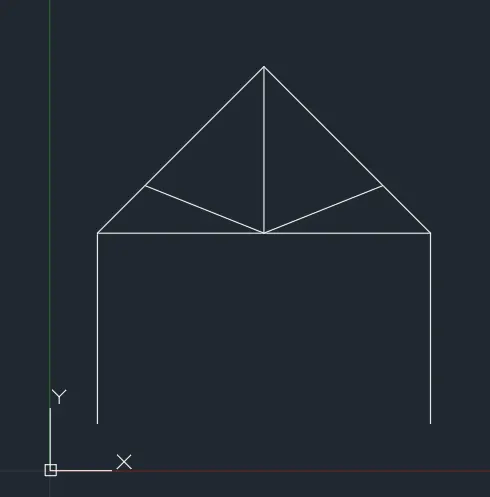
LINE
Specify first point: 1,1
Specify next point or [Undo]: @0,4
Specify next point or [Undo]: @7,0
Specify next point or [Close/Undo]: @-3.5,3.5
Specify next point or [Close/Undo]: @-3.5,-3.5
Specify next point or [Close/Undo]: *Cancel*
Command: L
LINE
Specify first point: 5.5,5.5
Specify next point or [Undo]: *Cancel*
Command: *Cancel*
Command: L
LINE
Specify first point: 4.5,5
Specify next point or [Undo]: @0,3.5
Specify next point or [Undo]: *Cancel*
Command: L
LINE
Specify first point: 4.5,5
Specify next point or [Undo]: @2.5,1
Specify next point or [Undo]: *Cancel*
Command: L
LINE
Specify first point: 4.5,5
Specify next point or [Undo]: @-2.5,2.5
Specify next point or [Undo]: u
Specify next point or [Undo]: @-2.5,1
Specify next point or [Undo]: *Cancel*
Command: L
LINE
Specify first point: 8,5
Specify next point or [Undo]: @0,-4
Specify next point or [Undo]: *Cancel*
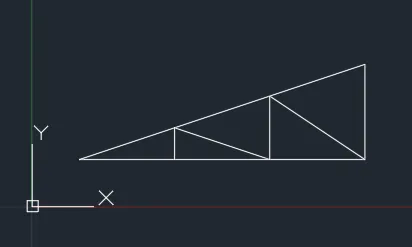
Ans 11 :
Command: L LINE
Specify first point: 1,1
Specify next point or [Undo]: @6,<
Point or option keyword required.
Specify next point or [Undo]: 0°
Point or option keyword required.
Specify next point or [Undo]: @6,0
Specify next point or [Undo]: @0,<
Point or option keyword required.
Specify next point or [Undo]: 2°
Point or option keyword required.
Specify next point or [Undo]: @0,2
Specify next point or [Close/Undo]: @-6,-2
Specify next point or [Close/Undo]: *Cancel*
Command: L
LINE
Specify first point: 3,1
Specify next point or [Undo]: @0,1
Specify next point or [Undo]: u
Specify next point or [Undo]: @0,.667
Specify next point or [Undo]: @2,-.667
Specify next point or [Close/Undo]: @0,1.333
Specify next point or [Close/Undo]: @2,-1.333
Specify next point or [Close/Undo]: *Cancel*