Creation of geometries by Coordinate system methods using AutoCad
1. AIM:
To learn absolute co-ordinate system.
- To begin with in the search bar type L for the line and fix the first point by typing 2,1
- Then select the second point with the commenting of 0,6
- Third point 6,0
- Fourth point 0, -1
- fifth point is -5, -5
- sixth point is 6,0
- seventh point is 0, -1
- Eighth point is -6,0
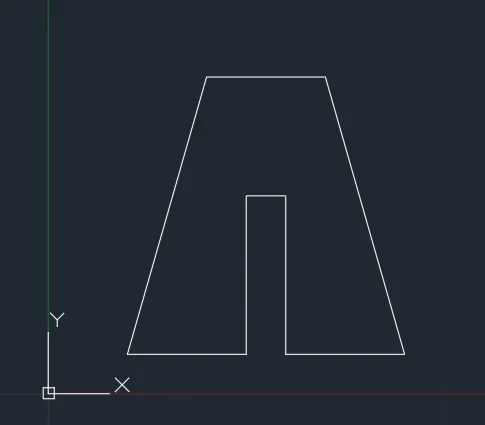
2.
- To begin with in the search bar type L for the line and fix the first point by typing 2,1
- Draw a line by typing 3,7
- second point is 3,0
- third point is 2, -7
- and then fourth point -3,0.
- fifth point is 0,4
- sixth point is -1,0
- seventh point is 0, -4
- then close the drawing by using the command "c"
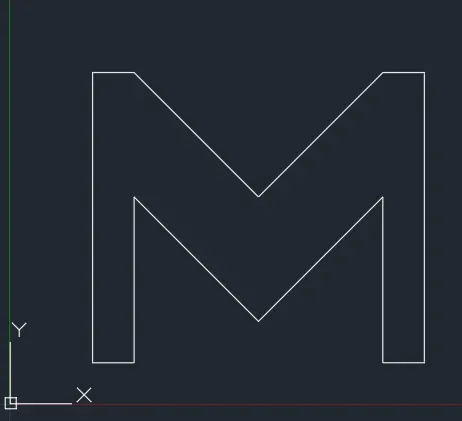
3.
- To begin with in the search bar type L for the line and fix the first point by typing 2,1
- Draw a line by typing 0,7
- second point is 1,0
- third point is 2, -3
- and then fourth point 2,3.
- fifth point is 1,0
- sixth point is 0, -7
- seventh point is -1,0
- Eight point is 0,4
- ninth point is -2, -2
- tenth point is -2,2
- eleventh point is 0, -4
- then close the drawing by using the command "c"
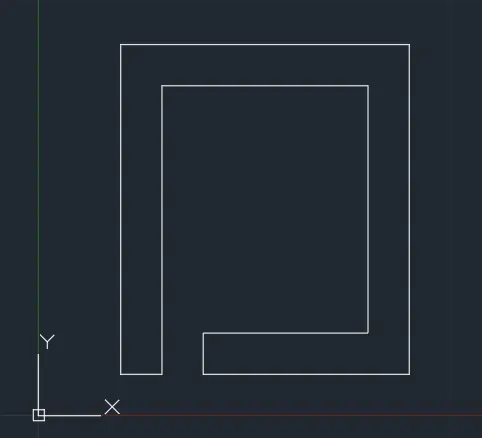
4.
- To begin with in the search bar type L for the line and fix the first point by typing 2,1
- Draw a line by typing 0,8
- second point is 7,0
- third point is 0, -8
- and then fourth point -4,0.
- fifth point is 0,1
- sixth point is 3,0
- seventh point is 0,6
- Eight point is -5,0
- ninth point is 0, -7
- then close the drawing by using the command "c"
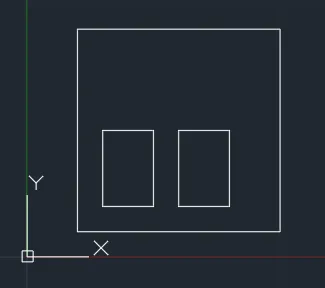
5.
- To begin with in the search bar type L for the line and fix the first point by typing 2,1
- Draw a line by typing 0,8
- second point is 8,0
- third point is 0, -8
- Finally close the drawing by using the command "c"
First Rectangular:
- Start another point by typing 3,2.
- then second point is 0,3
- third point is 2,0
- Fourth point is 0, -3
- Close the rectangular by typing "C"
Second Rectangular:
- Start another point by typing 6,2.
- then second point is 0,3
- third point is 2,0
- Fourth point is 0, -3
- Close the rectangular by typing "C"
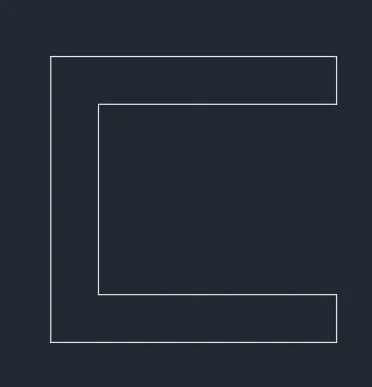
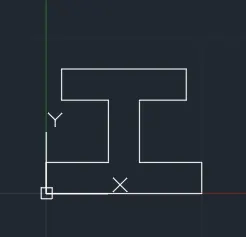
6.
- To begin with in the search bar type L for the line and fix the first point by typing 0,2
- Draw a line by typing 4,0
- second point is 4,0
- third point is -3, 0
- and then fourth point 0,2.
- fifth point is 8,0
- sixth point is 0, -2
- seventh point is -3,0
- Eight point is 4, 0
- ninth point is 0, -2
- then close the drawing by using the command "c"
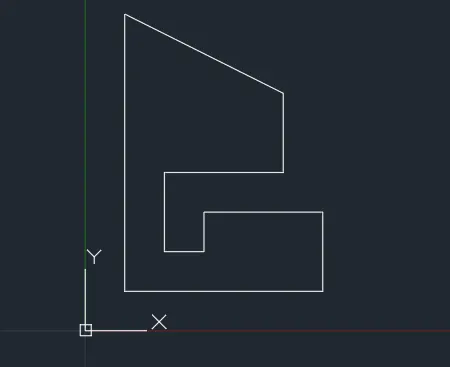
7.
- To begin with in the search bar type L for the line and fix the first point by typing 1,1
- Draw a line by typing 0,7
- second point is 4, -2
- third point is -3, 0
- and then fourth point 0, -2.
- fifth point is 1,0
- sixth point is 0, 1
- seventh point is 3,0
- Eight points is 0, -2
- then close the drawing by using the command "c"
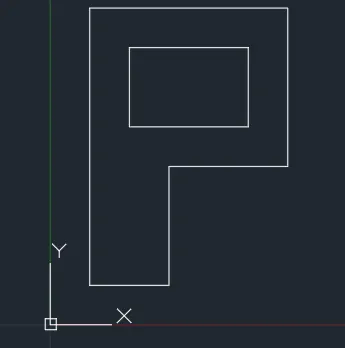
8.
- To begin with in the search bar type L for the line and fix the first point by typing 1,1
- Draw a line by typing 0,7
- second point is 0, -4
- third point is -3, 0
- and then fourth point 0, -3.
- then close the drawing by using the command "c"
Rectangular:
- Start another point by typing 2,4.
- then second point is 0,3
- third point is 3,0
- Fourth point is 0, -3
- Close the rectangular by typing "C"
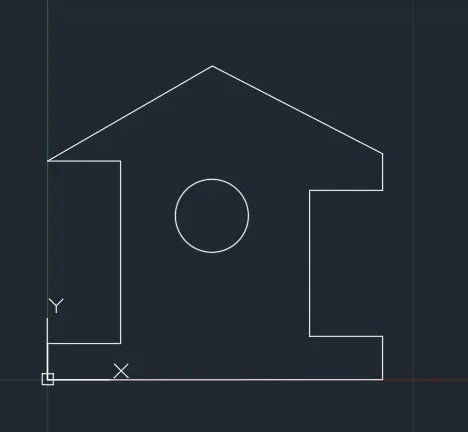
9.
- To begin with in the search bar type L for the line and fix the first point by typing 0,1
- Draw a line by typing 1,0
- second point is 0, 5
- third point is -2, 0
- and then fourth point 5.12<30.
- fifth point is 5.12
- sixth point is 0, -1
- seventh point is -2,0
- Eighth points are 0, -4
- Ninth point is 1,0
- tenth point is 0, -1
- then close the drawing by using the command "c"
For Circle:
Type "C" for Circle
then Type 5,4 with radius 1.000.