Creation of Column Schedule and Drawing Template using AutoCad
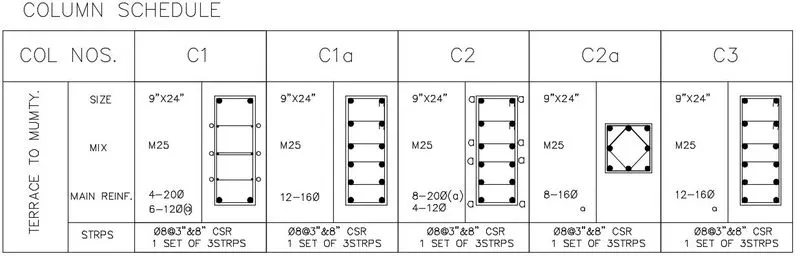
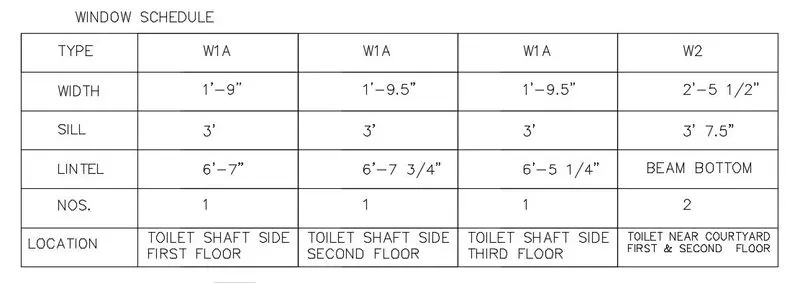
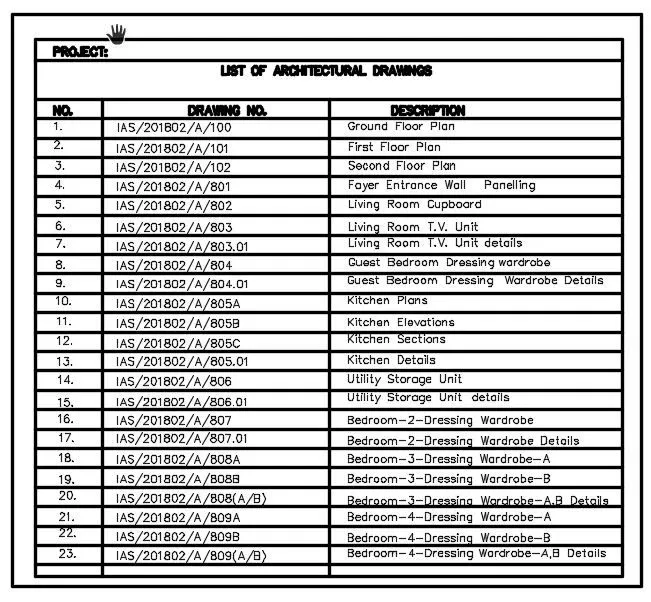
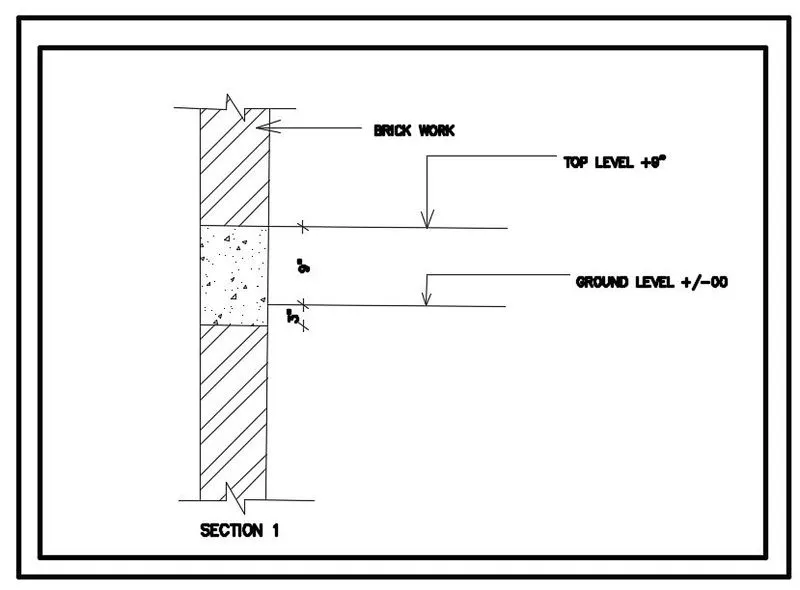
AIM: To Create a column schedule, window schedule, drawing template, list of drawing schedule and beam details as shown in the figure.
PROCEDURE: 1. To create column schedule.
1.New sheet- units-feet-ok.
2.Limits- 0'-0" and 12'-9".
3. zoom-All.
4. Select Line tool and draw the table till C1 and using Dtext and hint given in question mention the specifications.
5. Draw the reinforcement details and hatch it, mention the size , mix and other detailing.
6. Now copy the half table to create and edit CA1a, C2, C2a and C3.
2. To create window schedule.
1.New sheet- units-feet-ok.
2.Limits- 0'-0" and 12'-9".
3. zoom-All.
4. Select Line tool and draw the table till W1A first column.
5. Using Dtext write down the width, sill , lintel, nos, location details.
6. Now copy the half table to create and edit rest of the columnst till W2.
3. To draw the drawing template.
1.New sheet- units-feet-ok.
2.Limits- 0'-0" and 12'-9".
3. zoom-All.
4. Select Line tool and draw the table.
5. Using Mtext write down the details of project, firm, drawing sheet, revision , scale etc.
6. Also mention the notes to follow while reading the drawing at site.

4. To create list of drawing schedule.
1.New sheet- units-feet-ok.
2.Limits- 0'-0" and 12'-9".
3. zoom-All.
4. Select Line tool and draw the tables and lable the header line using bold font.
5. Using Mtext write down the serial numbers , drawing numbers, and description of each drawing.
5. To draw beam details.
1.New sheet- units-feet-ok.
2.Limits- 0'-0" and 12'-9".
3. zoom-All.
4. Select Line tool and draw the beam section as shown.
5. Using Mtext label the Top level and ground level.
6. Hatch the brick work and concrete area.
7. Annotate to give dimensions.
RESULTS:The given drawings of column schedule, window schedule, drawing template, list of drawing schedule and beam details are successfully drawn as shown in the figure.