Creating Kitchen layout, Hatching of Architectural elements and sectional view of an Industrial Building in AutoCad
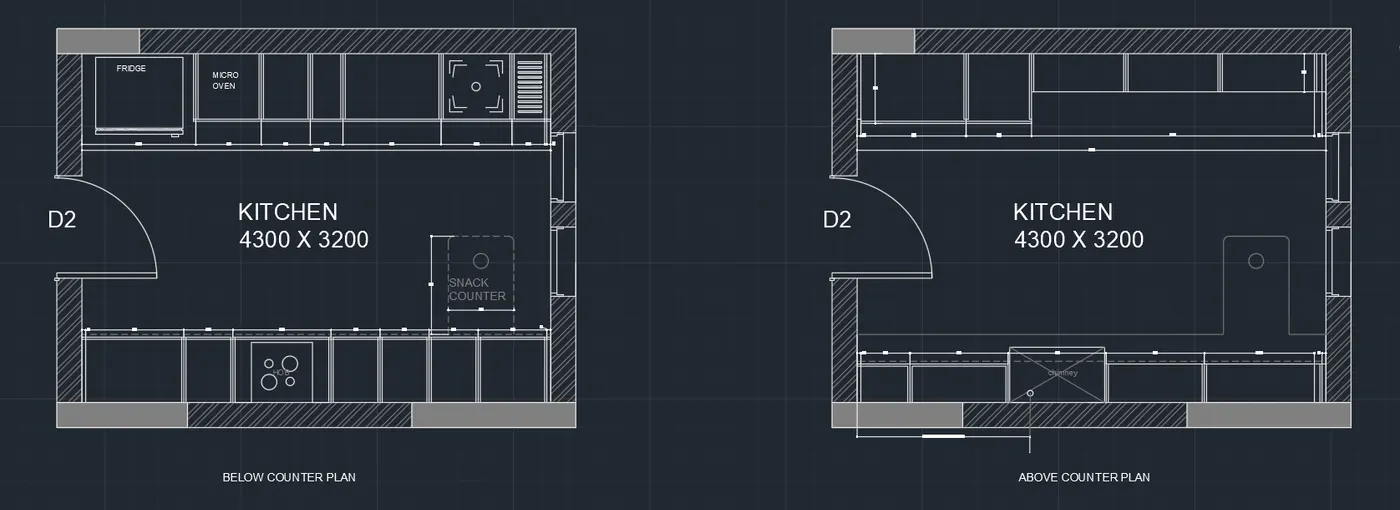
1) AIM : TO CREATE THE KITCHEN LAYOUT ACCORDING TO THE ARCHITYECTURAL PLAN GIVEN IN THE PDF FILE
COMMANDS USED:
- LINE
- COPY
- DIMLINEAR
- DIMSTYLE
- RECTANGLE
- CHANGE PROPERTIES
- TEXT STYLE
- OFFSET
- HATCH
THE FOLLOWING COMMANDS HAS BEEN USED WHILE DRAFTING THE KITCHEN LAYOUT
COMMANDS USED IN COMMAND BAR :
Specify opposite corner or [Height/Justify/Line spacing/Rotation/Style/Width/Columns]:
Command: Specify opposite corner or [Fence/WPolygon/CPolygon]:
Command:
Command:
Command: _properties
Command:
Command:
Command: Specify opposite corner or [Fence/WPolygon/CPolygon]: *Cancel*
Command: *Cancel*
Command:
Command: CP
COPY 1 found
Current settings: Copy mode = Multiple
Specify base point or [Displacement/mOde] :
Specify second point or [Array] :
Specify second point or [Array/Exit/Undo] :
Specify second point or [Array/Exit/Undo] : *Cancel*
Command: Specify opposite corner or [Fence/WPolygon/CPolygon]:
Command:
Command:
Command:
Command: _mtedit
Command:
Command:
Command:
Command: _mtedit
Command: CIRCLE
Specify center point for circle or [3P/2P/Ttr (tan tan radius)]:
Specify radius of circle or [Diameter] <67>:
Command: L
LINE
Specify first point:
Specify next point or [Undo]: *Cancel*
Command: L
LINE
Specify first point:
Specify next point or [Undo]: 115
Specify next point or [Undo]: *Cancel*
Command: LINE
Specify first point:
Specify next point or [Undo]: 115
Specify next point or [Undo]: *Cancel*
Command: Specify opposite corner or [Fence/WPolygon/CPolygon]:
Command: MI
MIRROR 2 found
Specify first point of mirror line:
Specify second point of mirror line:
Erase source objects? [Yes/No] : N
Command: Specify opposite corner or [Fence/WPolygon/CPolygon]:
Command: MI
MIRROR 4 found
Specify first point of mirror line:
Specify second point of mirror line:
Erase source objects? [Yes/No] : N
Command:
Command: MIRROR
Select objects: *Cancel*
Command: *Cancel*
Command: *Cancel*
Command: L
LINE
Specify first point:
Specify next point or [Undo]:
Specify next point or [Undo]:
Specify next point or [Close/Undo]: *Cancel*
Command: Specify opposite corner or [Fence/WPolygon/CPolygon]:
Command: MI
MIRROR 2 found
Specify first point of mirror line:
Specify second point of mirror line:
Erase source objects? [Yes/No] : N
Command: Specify opposite corner or [Fence/WPolygon/CPolygon]:
Command: Specify opposite corner or [Fence/WPolygon/CPolygon]:
Command: MI
MIRROR 4 found
Specify first point of mirror line:
Specify second point of mirror line:
Erase source objects? [Yes/No] : N
Command: L
LINE
Specify first point:
Specify next point or [Undo]:
Specify next point or [Undo]: *Cancel*
Command: O
OFFSET
Current settings: Erase source=No Layer=Source OFFSETGAPTYPE=0
Specify offset distance or [Through/Erase/Layer] <35>: 20
Select object to offset or [Exit/Undo] :
Specify point on side to offset or [Exit/Multiple/Undo] :
Select object to offset or [Exit/Undo] : *Cancel*
Command:
Command: _.erase 1 found
Command: O
OFFSET
Current settings: Erase source=No Layer=Source OFFSETGAPTYPE=0
Specify offset distance or [Through/Erase/Layer] <20>: 15
Select object to offset or [Exit/Undo] :
Specify point on side to offset or [Exit/Multiple/Undo] :
Select object to offset or [Exit/Undo] : *Cancel*
Command: ARC
Specify start point of arc or [Center]:
Specify second point of arc or [Center/End]:
Specify end point of arc: *Cancel*
Command: ARC
Specify start point of arc or [Center]:
Specify second point of arc or [Center/End]: E
Specify end point of arc:
Specify center point of arc (hold Ctrl to switch direction) or [Angle/Direction/Radius]: *Cancel*
Command: ARC
Specify start point of arc or [Center]:
Specify second point of arc or [Center/End]: E
Specify end point of arc:
Specify center point of arc (hold Ctrl to switch direction) or [Angle/Direction/Radius]: *Cancel*
Command: CIRCLE
Specify center point for circle or [3P/2P/Ttr (tan tan radius)]: *Cancel*
Command: L
LINE
Specify first point:
Specify next point or [Undo]:
Specify next point or [Undo]: *Cancel*
Command: LINE
Specify first point:
Specify next point or [Undo]:
Specify next point or [Undo]:
Specify next point or [Close/Undo]: *Cancel*
Command: C
CIRCLE
Specify center point for circle or [3P/2P/Ttr (tan tan radius)]:
Specify radius of circle or [Diameter] <37>:
Command: *Cancel*
Command: CIRCLE
Specify center point for circle or [3P/2P/Ttr (tan tan radius)]:
Specify radius of circle or [Diameter] <8>:
Command: *Cancel*
Command: TR
TRIM
Current settings: Projection=UCS, Edge=None, Mode=Quick
Select object to trim or shift-select to extend or
[cuTting edges/Crossing/mOde/Project/eRase]: *Cancel*
Command: *Cancel*
Command: TR
TRIM
Current settings: Projection=UCS, Edge=None, Mode=Quick
Select object to trim or shift-select to extend or
[cuTting edges/Crossing/mOde/Project/eRase]:
Select object to trim or shift-select to extend or
[cuTting edges/Crossing/mOde/Project/eRase/Undo]:
Select object to trim or shift-select to extend or
[cuTting edges/Crossing/mOde/Project/eRase/Undo]:
Specify next fence point or [Undo]:
Specify next fence point or [Undo]:
Specify next fence point or [Undo]:
Specify next fence point or [Undo]:
Select object to trim or shift-select to extend or
[cuTting edges/Crossing/mOde/Project/eRase/Undo]: *Cancel*
Command:
Command: _.erase 1 found
Command: CIRCLE
Specify center point for circle or [3P/2P/Ttr (tan tan radius)]:
Specify radius of circle or [Diameter] <7>:
Command: *Cancel*
Command: TR
TRIM
Current settings: Projection=UCS, Edge=None, Mode=Quick
Select object to trim or shift-select to extend or
[cuTting edges/Crossing/mOde/Project/eRase]:
Select object to trim or shift-select to extend or
[cuTting edges/Crossing/mOde/Project/eRase/Undo]:
Select object to trim or shift-select to extend or
[cuTting edges/Crossing/mOde/Project/eRase/Undo]:
Specify next fence point or [Undo]:
Specify next fence point or [Undo]:
Specify next fence point or [Undo]:
Specify next fence point or [Undo]:
Select object to trim or shift-select to extend or
[cuTting edges/Crossing/mOde/Project/eRase/Undo]:
Select object to trim or shift-select to extend or
[cuTting edges/Crossing/mOde/Project/eRase/Undo]:
Specify next fence point or [Undo]:
Specify next fence point or [Undo]:
Specify next fence point or [Undo]:
Specify next fence point or [Undo]:
Select object to trim or shift-select to extend or
[cuTting edges/Crossing/mOde/Project/eRase/Undo]: *Cancel*
Command: Specify opposite corner or [Fence/WPolygon/CPolygon]:
Command: Specify opposite corner or [Fence/WPolygon/CPolygon]:
Command: CP
COPY 5 found
Current settings: Copy mode = Multiple
Specify base point or [Displacement/mOde] :
Specify second point or [Array] :
Specify second point or [Array/Exit/Undo] :
Specify second point or [Array/Exit/Undo] :
Specify second point or [Array/Exit/Undo] :
Specify second point or [Array/Exit/Undo] :
Specify second point or [Array/Exit/Undo] :
Specify second point or [Array/Exit/Undo] : *Cancel*
Command: Specify opposite corner or [Fence/WPolygon/CPolygon]:
Command: _.erase 18 found
Command: Specify opposite corner or [Fence/WPolygon/CPolygon]:
Command: _.erase 12 found
Command: Specify opposite corner or [Fence/WPolygon/CPolygon]:
Command: Specify opposite corner or [Fence/WPolygon/CPolygon]:
Command: CP
COPY 5 found
Current settings: Copy mode = Multiple
Specify base point or [Displacement/mOde] :
Specify second point or [Array] : 45
Specify second point or [Array/Exit/Undo] : *Cancel*
Command: Specify opposite corner or [Fence/WPolygon/CPolygon]:
Command: COPY
5 found
Current settings: Copy mode = Multiple
Specify base point or [Displacement/mOde] :
Specify second point or [Array] : 45
Specify second point or [Array/Exit/Undo] : *Cancel*
Command: Specify opposite corner or [Fence/WPolygon/CPolygon]:
Command: COPY
5 found
Current settings: Copy mode = Multiple
Specify base point or [Displacement/mOde] :
Specify second point or [Array] : 45
Specify second point or [Array/Exit/Undo] : *Cancel*
Command: Specify opposite corner or [Fence/WPolygon/CPolygon]:
Command: COPY
5 found
Current settings: Copy mode = Multiple
Specify base point or [Displacement/mOde] :
Specify second point or [Array] : 45
Specify second point or [Array/Exit/Undo] : *Cancel*
Command: Specify opposite corner or [Fence/WPolygon/CPolygon]:
Command: CP
COPY 5 found
Current settings: Copy mode = Multiple
Specify base point or [Displacement/mOde] :
Specify second point or [Array] : 45
Specify second point or [Array/Exit/Undo] : *Cancel*
Command: Specify opposite corner or [Fence/WPolygon/CPolygon]:
Command: COPY
5 found
Current settings: Copy mode = Multiple
Specify base point or [Displacement/mOde] :
Specify second point or [Array] : 45
Specify second point or [Array/Exit/Undo] : *Cancel*
Command: Specify opposite corner or [Fence/WPolygon/CPolygon]:
Command: COPY
5 found
Current settings: Copy mode = Multiple
Specify base point or [Displacement/mOde] : 45
Specify second point or [Array] : *Cancel*
Command: Specify opposite corner or [Fence/WPolygon/CPolygon]:
Command: COPY
5 found
Current settings: Copy mode = Multiple
Specify base point or [Displacement/mOde] :
Specify second point or [Array] : 45
Specify second point or [Array/Exit/Undo] : *Cancel*
Command: Specify opposite corner or [Fence/WPolygon/CPolygon]:
Command: CP
COPY 5 found
Current settings: Copy mode = Multiple
Specify base point or [Displacement/mOde] :
Specify second point or [Array] : 45
Specify second point or [Array/Exit/Undo] : *Cancel*
Command: DIMLIN
DIMLINEAR
Specify first extension line origin or<select>:</select>
Specify second extension line origin:
Specify dimension line location or
[Mtext/Text/Angle/Horizontal/Vertical/Rotated]: *Cancel*
Command: DIMLINEAR
Specify first extension line origin or<select>:</select>
Specify second extension line origin: 73.15
Specify dimension line location or
[Mtext/Text/Angle/Horizontal/Vertical/Rotated]:
Dimension text = 73.15
Command: Specify opposite corner or [Fence/WPolygon/CPolygon]:
Command: Specify opposite corner or [Fence/WPolygon/CPolygon]:
Command: CP
COPY 5 found
Current settings: Copy mode = Multiple
Specify base point or [Displacement/mOde] :
Specify second point or [Array] : 45
Specify second point or [Array/Exit/Undo] : *Cancel*
Command: Specify opposite corner or [Fence/WPolygon/CPolygon]: *Cancel*
Command: Specify opposite corner or [Fence/WPolygon/CPolygon]:
Command: CP
COPY 5 found
Current settings: Copy mode = Multiple
Specify base point or [Displacement/mOde] :
Specify second point or [Array] : 45
Specify second point or [Array/Exit/Undo] : *Cancel*
Command: Specify opposite corner or [Fence/WPolygon/CPolygon]:
Command: _.erase 1 found
Command:
Command:
Command: _qsave
Command: Regenerating model.
Command:
Command: _qsave
Command:
Command:
Command: _qsave
** CONTINUE DIMENSION **
Specify endpoint of dimension line:
Dimension text = 1010
** CONTINUE DIMENSION **
Specify endpoint of dimension line:*Cancel*
Command: DIMLINEAR
Specify first extension line origin or<select>:</select>
Specify second extension line origin:
Specify dimension line location or
[Mtext/Text/Angle/Horizontal/Vertical/Rotated]:
Dimension text = 35
Command: *Cancel*
Command:
Command:
** STRETCH **
Specify stretch point or [Base point/Copy/Undo/eXit]:
Command: *Cancel*
Command:
Command:
** STRETCH **
Specify stretch point or [Base point/Copy/Undo/eXit]:
Command: *Cancel*
Command: C
CIRCLE
Specify center point for circle or [3P/2P/Ttr (tan tan radius)]:
Specify radius of circle or [Diameter]:
Command: DIMLIN
DIMLINEAR
Specify first extension line origin or<select>:</select>
Specify second extension line origin: 1650
Specify dimension line location or
[Mtext/Text/Angle/Horizontal/Vertical/Rotated]:
Dimension text = 1585
Command: *Cancel*
Command: L
LINE
Specify first point:
Specify next point or [Undo]:
Specify next point or [Undo]: *Cancel*
Command:
Command: _.erase 1 found
Command: L
LINE
Specify first point:
Specify next point or [Undo]:
Specify next point or [Undo]: *Cancel*
Command:
Command:
** STRETCH **
Specify stretch point or [Base point/Copy/Undo/eXit]:
Command: *Cancel*
Command: Specify opposite corner or [Fence/WPolygon/CPolygon]:
Command:
Command: _.erase 1 found
Command:
Command: *Cancel*
Command: L
LINE
Specify first point:
Specify next point or [Undo]:
Specify next point or [Undo]: *Cancel*
Command:
Command:
Command:
Command: *Cancel*
Command:
Command: *Cancel*
Command:
Command:
Command:
Command: _TEXTEDIT
Current settings: Edit mode = Multiple
Select an annotation object or [Undo/Mode]: *Cancel*
Command: Specify opposite corner or [Fence/WPolygon/CPolygon]:
Command: Specify opposite corner or [Fence/WPolygon/CPolygon]:
Command: _.erase 41 found
Dimension extension disassociated.
Dimension disassociated.
Dimension disassociated.
Dimension disassociated.
Dimension disassociated.
Dimension disassociated.
Dimension disassociated.
Dimension disassociated.
Command:
Command:
Command:
Command: Specify opposite corner or [Fence/WPolygon/CPolygon]:
Command: _.erase 57 found
Command: Specify opposite corner or [Fence/WPolygon/CPolygon]:
Command: _.erase 2 found
Command: Specify opposite corner or [Fence/WPolygon/CPolygon]:
Command: _.erase 9 found
Command: Specify opposite corner or [Fence/WPolygon/CPolygon]:
Command: Specify opposite corner or [Fence/WPolygon/CPolygon]:
Command: _.erase 9 found
Command: L
LINE
Specify first point:
Specify next point or [Undo]: 35
Specify next point or [Undo]: 600
Specify next point or [Close/Undo]: *Cancel*
Command: L
LINE
Specify first point:
Specify next point or [Undo]: *Cancel*
Command:
Command: *Cancel*
Command: L
LINE
Specify first point:
Specify next point or [Undo]:
Specify next point or [Undo]: *Cancel*
Command: O
OFFSET
Current settings: Erase source=No Layer=Source OFFSETGAPTYPE=0
Specify offset distance or [Through/Erase/Layer] <15>: 965
Select object to offset or [Exit/Undo] :
Specify point on side to offset or [Exit/Multiple/Undo] :
Select object to offset or [Exit/Undo] : *Cancel*
Command: OFFSET
Current settings: Erase source=No Layer=Source OFFSETGAPTYPE=0
Specify offset distance or [Through/Erase/Layer] <965>: 600
Select object to offset or [Exit/Undo] :
Specify point on side to offset or [Exit/Multiple/Undo] :
Select object to offset or [Exit/Undo] : *Cancel*
Command: OFFSET
Current settings: Erase source=No Layer=Source OFFSETGAPTYPE=0
Specify offset distance or [Through/Erase/Layer] <600>: 2595
Select object to offset or [Exit/Undo] :
Specify point on side to offset or [Exit/Multiple/Undo] : *Cancel*
Command: O
OFFSET
Current settings: Erase source=No Layer=Source OFFSETGAPTYPE=0
Specify offset distance or [Through/Erase/Layer] <2595>:
Select object to offset or [Exit/Undo] :
Specify point on side to offset or [Exit/Multiple/Undo] :
Select object to offset or [Exit/Undo] : *Cancel*
Command:
Command: CP
COPY 1 found
Current settings: Copy mode = Multiple
Specify base point or [Displacement/mOde] :
Specify second point or [Array] :
Specify second point or [Array/Exit/Undo] : *Cancel*
Command: O
OFFSET
Current settings: Erase source=No Layer=Source OFFSETGAPTYPE=0
Specify offset distance or [Through/Erase/Layer] <2595>: 35
Select object to offset or [Exit/Undo] :
Specify point on side to offset or [Exit/Multiple/Undo] :
Select object to offset or [Exit/Undo] : *Cancel*
Command: O
OFFSET
Current settings: Erase source=No Layer=Source OFFSETGAPTYPE=0
Specify offset distance or [Through/Erase/Layer] <35>: *Cancel*
Command: *Cancel*
Command: *Cancel*
Command: DIMLIN
DIMLINEAR
Specify first extension line origin or<select>:</select>
Specify second extension line origin: 350
Specify dimension line location or
[Mtext/Text/Angle/Horizontal/Vertical/Rotated]:
Dimension text = 350
Command: L
LINE
Specify first point:
Specify next point or [Undo]:
Specify next point or [Undo]: *Cancel*
Command:
Command:
** STRETCH **
Specify stretch point or [Base point/Copy/Undo/eXit]:
Command: *Cancel*
Command: TR
TRIM
Current settings: Projection=UCS, Edge=None, Mode=Quick
Select object to trim or shift-select to extend or
[cuTting edges/Crossing/mOde/Project/eRase]:
Select object to trim or shift-select to extend or
[cuTting edges/Crossing/mOde/Project/eRase/Undo]:
Select object to trim or shift-select to extend or
[cuTting edges/Crossing/mOde/Project/eRase/Undo]:
Select object to trim or shift-select to extend or
[cuTting edges/Crossing/mOde/Project/eRase/Undo]: *Cancel*
Command:
Command: _.erase 1 found
Command: '_quickcalc
Command: *Cancel*
Command: O
OFFSET
Current settings: Erase source=No Layer=Source OFFSETGAPTYPE=0
Specify offset distance or [Through/Erase/Layer] <35>: 865
Select object to offset or [Exit/Undo] :
Specify point on side to offset or [Exit/Multiple/Undo] :
Select object to offset or [Exit/Undo] :
Specify point on side to offset or [Exit/Multiple/Undo] :
Select object to offset or [Exit/Undo] : *Cancel*
Command: O
OFFSET
Current settings: Erase source=No Layer=Source OFFSETGAPTYPE=0
Specify offset distance or [Through/Erase/Layer] <865>: 20
Select object to offset or [Exit/Undo] :
Specify point on side to offset or [Exit/Multiple/Undo] :
Select object to offset or [Exit/Undo] :
Select object to offset or [Exit/Undo] :
Specify point on side to offset or [Exit/Multiple/Undo] :
Select object to offset or [Exit/Undo] :
Specify point on side to offset or [Exit/Multiple/Undo] :
Select object to offset or [Exit/Undo] :
Specify point on side to offset or [Exit/Multiple/Undo] :
Select object to offset or [Exit/Undo] :
Specify point on side to offset or [Exit/Multiple/Undo] :
Select object to offset or [Exit/Undo] :
Specify point on side to offset or [Exit/Multiple/Undo] :
Select object to offset or [Exit/Undo] :
Specify point on side to offset or [Exit/Multiple/Undo] :
Select object to offset or [Exit/Undo] :
Specify point on side to offset or [Exit/Multiple/Undo] :
Select object to offset or [Exit/Undo] :
Specify point on side to offset or [Exit/Multiple/Undo] :
Select object to offset or [Exit/Undo] : *Cancel*
Command: TR
TRIM
Current settings: Projection=UCS, Edge=None, Mode=Quick
Select object to trim or shift-select to extend or
[cuTting edges/Crossing/mOde/Project/eRase]:
Select object to trim or shift-select to extend or
[cuTting edges/Crossing/mOde/Project/eRase/Undo]:
Select object to trim or shift-select to extend or
[cuTting edges/Crossing/mOde/Project/eRase/Undo]: *Cancel*
Command: L
LINE
Specify first point:
Specify next point or [Undo]:
Specify next point or [Undo]: *Cancel*
Command: LINE
Specify first point:
Specify next point or [Undo]:
Specify next point or [Undo]: *Cancel*
Command: L
LINE
Specify first point:
Specify next point or [Undo]:
Specify next point or [Undo]: *Cancel*
Command: O
OFFSET
Current settings: Erase source=No Layer=Source OFFSETGAPTYPE=0
Specify offset distance or [Through/Erase/Layer] <20>: 20
Select object to offset or [Exit/Undo] :
Specify point on side to offset or [Exit/Multiple/Undo] :
Select object to offset or [Exit/Undo] :
Specify point on side to offset or [Exit/Multiple/Undo] :
Select object to offset or [Exit/Undo] : *Cancel*
Command:
Command: _.erase 1 found
Command: L
LINE
Specify first point:
Specify next point or [Undo]:
Specify next point or [Undo]: *Cancel*
Command: LINE
Specify first point:
Specify next point or [Undo]:
Specify next point or [Undo]: *Cancel*
Command: DIMLIN
DIMLINEAR
Specify first extension line origin or<select>:</select>
Specify second extension line origin:
Specify dimension line location or
[Mtext/Text/Angle/Horizontal/Vertical/Rotated]:
Dimension text = 640
Command:
Command:
Command:
Command: _TEXTEDIT
Current settings: Edit mode = Multiple
Select an annotation object or [Undo/Mode]: *Cancel*
Command: DIMLIN
DIMLINEAR
Specify first extension line origin or<select>:</select>
Specify second extension line origin:
Specify dimension line location or
[Mtext/Text/Angle/Horizontal/Vertical/Rotated]:
Dimension text = 35
Command:
Command:
** CONTINUE DIMENSION **
Specify endpoint of dimension line:
Dimension text = 965
** CONTINUE DIMENSION **
Specify endpoint of dimension line:
Dimension text = 600
** CONTINUE DIMENSION **
Specify endpoint of dimension line:*Cancel*
Command: *Cancel*
Command: DIMLINEAR
Specify first extension line origin or<select>:</select>
Specify second extension line origin:
Specify dimension line location or
[Mtext/Text/Angle/Horizontal/Vertical/Rotated]:
Dimension text = 2595
Command: DIMLINEAR
Specify first extension line origin or<select>:</select>
Specify second extension line origin:
Specify dimension line location or
[Mtext/Text/Angle/Horizontal/Vertical/Rotated]:
Dimension text = 35
Command:
Automatic save to C:\Users\hrush\AppData\Local\Temp\Drawing1_1_20851_289b6cea.sv$ ...
Command:
Command: DIMLIN
DIMLINEAR
Specify first extension line origin or<select>:</select>
Specify second extension line origin:
Specify dimension line location or
[Mtext/Text/Angle/Horizontal/Vertical/Rotated]:
Dimension text = 350
Command:
Command:
Command: _qsave
2)
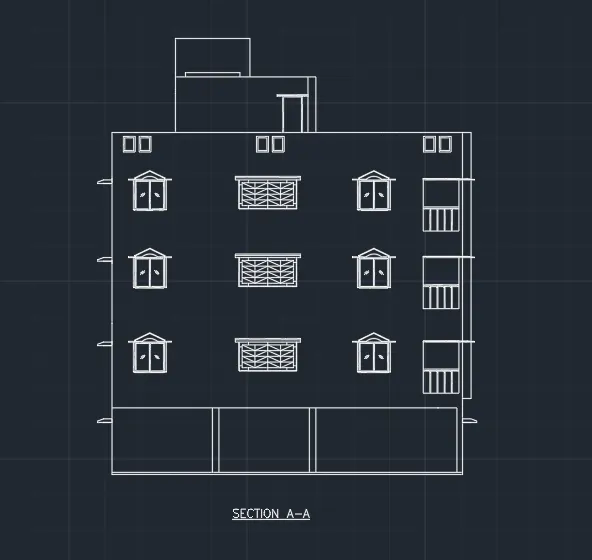
AIM: TO CREATE THE ELEVATION OF PLAN FROM CHALLENGE 7 WITH THE HATCHES & BLOCK
COMMANDS USED TO CREATE THE ELEVATION :
- HATCH
- BLOCK
- LINE
- COPY
- OFFSET
- ERASE
COMMANDS USED WITH DETAILS ARE AS FOLLOWS :
Specify next fence point or [Undo]:
Specify next fence point or [Undo]:
Specify next fence point or [Undo]:
Select object to trim or shift-select to extend or
[cuTting edges/Crossing/mOde/Project/eRase/Undo]:
Select object to trim or shift-select to extend or
[cuTting edges/Crossing/mOde/Project/eRase/Undo]:
Specify next fence point or [Undo]:
Specify next fence point or [Undo]:
Specify next fence point or [Undo]:
Specify next fence point or [Undo]:
Select object to trim or shift-select to extend or
[cuTting edges/Crossing/mOde/Project/eRase/Undo]:
Select object to trim or shift-select to extend or
[cuTting edges/Crossing/mOde/Project/eRase/Undo]:
Select object to trim or shift-select to extend or
[cuTting edges/Crossing/mOde/Project/eRase/Undo]: *Cancel*
Command:
Command:
** STRETCH **
Specify stretch point or [Base point/Copy/Undo/eXit]:
Command: *Cancel*
Command:
Command: _.erase 1 found
Command: E
ERASE
Select objects: *Cancel*
Command: *Cancel*
Command: *Cancel*
Command: EX
EXTEND
Current settings: Projection=UCS, Edge=None, Mode=Quick
Select object to extend or shift-select to trim or
[Boundary edges/Crossing/mOde/Project]:
Select object to extend or shift-select to trim or
[Boundary edges/Crossing/mOde/Project/Undo]: *Cancel*
Command: *Cancel*
Command: TR
TRIM
Current settings: Projection=UCS, Edge=None, Mode=Quick
Select object to trim or shift-select to extend or
[cuTting edges/Crossing/mOde/Project/eRase]:
Select object to trim or shift-select to extend or
[cuTting edges/Crossing/mOde/Project/eRase/Undo]:
Select object to trim or shift-select to extend or
[cuTting edges/Crossing/mOde/Project/eRase/Undo]: *Cancel*
Command: EX
EXTEND
Current settings: Projection=UCS, Edge=None, Mode=Quick
Select object to extend or shift-select to trim or
[Boundary edges/Crossing/mOde/Project]:
Select object to extend or shift-select to trim or
[Boundary edges/Crossing/mOde/Project/Undo]:
Specify next fence point or [Undo]:
Specify next fence point or [Undo]:
Specify next fence point or [Undo]:
Specify next fence point or [Undo]:
Select object to extend or shift-select to trim or
[Boundary edges/Crossing/mOde/Project/Undo]: *Cancel*
Command:
Command:
Command:
Command:
Command: _.erase 4 found
Command:
Command:
Command:
Command: _.erase 3 found
Command:
Command: _.erase 1 found
Command: Specify opposite corner or [Fence/WPolygon/CPolygon]:
Command:
Command:
Command: _.erase 4 found
Command: Specify opposite corner or [Fence/WPolygon/CPolygon]:
Command: _.erase 3 found
Command:
Command:
Command:
Command:
Command: _.erase 4 found
Command:
Command:
** STRETCH **
Specify stretch point or [Base point/Copy/Undo/eXit]:
Command: *Cancel*
Command: L
LINE
Specify first point:
Specify next point or [Undo]:
Specify next point or [Undo]: *Cancel*
Command: LINE
Specify first point:
Specify next point or [Undo]:
Specify next point or [Undo]: *Cancel*
Command:
Command: *Cancel*
Command: TR
TRIM
Current settings: Projection=UCS, Edge=None, Mode=Quick
Select object to trim or shift-select to extend or
[cuTting edges/Crossing/mOde/Project/eRase]:
Select object to trim or shift-select to extend or
[cuTting edges/Crossing/mOde/Project/eRase/Undo]:
Select object to trim or shift-select to extend or
[cuTting edges/Crossing/mOde/Project/eRase/Undo]:
Select object to trim or shift-select to extend or
[cuTting edges/Crossing/mOde/Project/eRase/Undo]: *Cancel*
Command:
Command:
Command:
Command: J
JOIN 3 found
3 lines joined into 1 line
Command:
Command: O
OFFSET
Current settings: Erase source=No Layer=Source OFFSETGAPTYPE=0
Specify offset distance or [Through/Erase/Layer] <500>: 250
Specify point on side to offset or [Exit/Multiple/Undo] :
Command: *Cancel*
Command: *Cancel*
Command: O
OFFSET
Current settings: Erase source=No Layer=Source OFFSETGAPTYPE=0
Specify offset distance or [Through/Erase/Layer] <250>: 250
Select object to offset or [Exit/Undo] :
Specify point on side to offset or [Exit/Multiple/Undo] :
Select object to offset or [Exit/Undo] : *Cancel*
Command: L
LINE
Specify first point:
Specify next point or [Undo]:
Specify next point or [Undo]: *Cancel*
Command: LINE
Specify first point:
Specify next point or [Undo]:
Specify next point or [Undo]: *Cancel*
Command: *Cancel*
Command: Specify opposite corner or [Fence/WPolygon/CPolygon]:
Command: _.erase 2 found
Command: Specify opposite corner or [Fence/WPolygon/CPolygon]:
Command: M
MOVE 1 found
Specify base point or [Displacement] :
Specify second point or :
Command: *Cancel*
Command:
Command: M
MOVE 1 found
Specify base point or [Displacement] :
Specify second point or :
Command: *Cancel*
Command:
Command: Specify opposite corner or [Fence/WPolygon/CPolygon]:
Command:
Command:
** STRETCH **
Specify stretch point or [Base point/Copy/Undo/eXit]:
Command: *Cancel*
Command:
Command: _.erase 1 found
Command: Specify opposite corner or [Fence/WPolygon/CPolygon]:
Command: M
MOVE 87 found
Specify base point or [Displacement] :
Specify second point or : 175
Command:
Command:
** STRETCH **
Specify stretch point or [Base point/Copy/Undo/eXit]:
Command: *Cancel*
Command:
Command:
** STRETCH **
Specify stretch point or [Base point/Copy/Undo/eXit]:
Command: *Cancel*
Command:
Command:
** STRETCH **
Specify stretch point or [Base point/Copy/Undo/eXit]:
Command: *Cancel*
Command:
Command:
** STRETCH **
Specify stretch point or [Base point/Copy/Undo/eXit]:
Command: *Cancel*
Command: Regenerating model.
Command:
** STRETCH **
Specify stretch point or [Base point/Copy/Undo/eXit]:
Command: *Cancel*
Command: L
LINE
Specify first point:
Specify next point or [Undo]:
Specify next point or [Undo]: *Cancel*
Command:
Command:
** STRETCH **
Specify stretch point or [Base point/Copy/Undo/eXit]:
Command: LINE
Specify first point:
Specify next point or [Undo]:
Specify next point or [Undo]: *Cancel*
Command:
Command: M
MOVE 1 found
Specify base point or [Displacement] :
Specify second point or :
Command: *Cancel*
Command: L
LINE
Specify first point:
Specify next point or [Undo]: 125
Specify next point or [Undo]: *Cancel*
Command: LINE
Specify first point:
Specify next point or [Undo]: 100
Specify next point or [Undo]:
Specify next point or [Close/Undo]: *Cancel*
Command: Specify opposite corner or [Fence/WPolygon/CPolygon]:
Command:
Command: _.erase 1 found
Command: L
LINE
Specify first point:
Specify next point or [Undo]: 60
Specify next point or [Undo]: *Cancel*
Command:
Command: _.erase 1 found
Command: L
LINE
Specify first point:
Specify next point or [Undo]: 12
Specify next point or [Undo]:
Specify next point or [Close/Undo]: *Cancel*
Command: L
LINE
Specify first point: 125
Specify next point or [Undo]: *Cancel*
Command: L
LINE
Specify first point:
Specify next point or [Undo]: 125
Specify next point or [Undo]: 12
Specify next point or [Close/Undo]:
Specify next point or [Close/Undo]: *Cancel*
Command: LINE
Specify first point:
Specify next point or [Undo]: 125
Specify next point or [Undo]: 12
Specify next point or [Close/Undo]:
Specify next point or [Close/Undo]: *Cancel*
Command: EX
EXTEND
Current settings: Projection=UCS, Edge=None, Mode=Quick
Select object to extend or shift-select to trim or
[Boundary edges/Crossing/mOde/Project]:
Path does not intersect with the bounding edge.
Select object to extend or shift-select to trim or
[Boundary edges/Crossing/mOde/Project/Undo]: *Cancel*
Command: EX
EXTEND
Current settings: Projection=UCS, Edge=None, Mode=Quick
Select object to extend or shift-select to trim or
[Boundary edges/Crossing/mOde/Project]:
Path does not intersect with the bounding edge.
Select object to extend or shift-select to trim or
[Boundary edges/Crossing/mOde/Project/Undo]: *Cancel*
Command:
Command:
** STRETCH **
Specify stretch point or [Base point/Copy/Undo/eXit]:
Command: *Cancel*
Command: L
LINE
Specify first point:
Specify next point or [Undo]:
Specify next point or [Undo]: *Cancel*
Command: Specify opposite corner or [Fence/WPolygon/CPolygon]:
Command: *Cancel*
Command: TR
TRIM
Current settings: Projection=UCS, Edge=None, Mode=Quick
Select object to trim or shift-select to extend or
[cuTting edges/Crossing/mOde/Project/eRase]:
Select object to trim or shift-select to extend or
[cuTting edges/Crossing/mOde/Project/eRase/Undo]:
Select object to trim or shift-select to extend or
[cuTting edges/Crossing/mOde/Project/eRase/Undo]: *Cancel*
Command: Specify opposite corner or [Fence/WPolygon/CPolygon]:
Command: CP
COPY 7 found
Current settings: Copy mode = Multiple
Specify base point or [Displacement/mOde] :
Specify second point or [Array] :
Specify second point or [Array/Exit/Undo] : *Cancel*
Command: Specify opposite corner or [Fence/WPolygon/CPolygon]:
Command: MI
MIRROR 7 found
Specify first point of mirror line:
Specify second point of mirror line:
Erase source objects? [Yes/No] : y
Command:
Command:
Command: _qsave
Current settings: Erase source=No Layer=Source OFFSETGAPTYPE=0
Specify offset distance or [Through/Erase/Layer] <250>: 250
Select object to offset or [Exit/Undo] :
Specify point on side to offset or [Exit/Multiple/Undo] :
Select object to offset or [Exit/Undo] : *Cancel*
Command: L
LINE
Specify first point:
Specify next point or [Undo]:
Specify next point or [Undo]: *Cancel*
Command: LINE
Specify first point:
Specify next point or [Undo]:
Specify next point or [Undo]: *Cancel*
Command: *Cancel*
Command: Specify opposite corner or [Fence/WPolygon/CPolygon]:
Command: _.erase 2 found
Command: Specify opposite corner or [Fence/WPolygon/CPolygon]:
Command: M
MOVE 1 found
Specify base point or [Displacement] :
Specify second point or :
Command: *Cancel*
Command:
Command: M
MOVE 1 found
Specify base point or [Displacement] :
Specify second point or :
Command: *Cancel*
Command:
Command: Specify opposite corner or [Fence/WPolygon/CPolygon]:
Command:
Command:
** STRETCH **
Specify stretch point or [Base point/Copy/Undo/eXit]:
Command: *Cancel*
Command:
Command: _.erase 1 found
Command: Specify opposite corner or [Fence/WPolygon/CPolygon]:
Command: M
MOVE 87 found
Specify base point or [Displacement] :
Specify second point or : 175
Command:
Command:
** STRETCH **
Specify stretch point or [Base point/Copy/Undo/eXit]:
Command: *Cancel*
Command:
Command:
** STRETCH **
Specify stretch point or [Base point/Copy/Undo/eXit]:
Command: *Cancel*
Command:
Command:
** STRETCH **
Specify stretch point or [Base point/Copy/Undo/eXit]:
Command: *Cancel*
Command:
Command:
** STRETCH **
Specify stretch point or [Base point/Copy/Undo/eXit]:
Command: *Cancel*
Command: Regenerating model.
Command:
** STRETCH **
Specify stretch point or [Base point/Copy/Undo/eXit]:
Command: *Cancel*
Command: L
LINE
Specify first point:
Specify next point or [Undo]:
Specify next point or [Undo]: *Cancel*
Command:
Command:
** STRETCH **
Specify stretch point or [Base point/Copy/Undo/eXit]:
Command: LINE
Specify first point:
Specify next point or [Undo]:
Specify next point or [Undo]: *Cancel*
Command:
Command: M
MOVE 1 found
Specify base point or [Displacement] :
Specify second point or :
Command: *Cancel*
Command: L
LINE
Specify first point:
Specify next point or [Undo]: 125
Specify next point or [Undo]: *Cancel*
Command: LINE
Specify first point:
Specify next point or [Undo]: 100
Specify next point or [Undo]:
Specify next point or [Close/Undo]: *Cancel*
Command: Specify opposite corner or [Fence/WPolygon/CPolygon]:
Command:
Command: _.erase 1 found
Command: L
LINE
Specify first point:
Specify next point or [Undo]: 60
Specify next point or [Undo]: *Cancel*
Command:
Command: _.erase 1 found
Command: L
LINE
Specify first point:
Specify next point or [Undo]: 12
Specify next point or [Undo]:
Specify next point or [Close/Undo]: *Cancel*
Command: L
LINE
Specify first point: 125
Specify next point or [Undo]: *Cancel*
Command: L
LINE
Specify first point:
Specify next point or [Undo]: 125
Specify next point or [Undo]: 12
Specify next point or [Close/Undo]:
Specify next point or [Close/Undo]: *Cancel*
Command: LINE
Specify first point:
Specify next point or [Undo]: 125
Specify next point or [Undo]: 12
Specify next point or [Close/Undo]:
Specify next point or [Close/Undo]: *Cancel*
Command: EX
EXTEND
Current settings: Projection=UCS, Edge=None, Mode=Quick
Select object to extend or shift-select to trim or
[Boundary edges/Crossing/mOde/Project]:
Path does not intersect with the bounding edge.
Select object to extend or shift-select to trim or
[Boundary edges/Crossing/mOde/Project/Undo]: *Cancel*
Command: EX
EXTEND
Current settings: Projection=UCS, Edge=None, Mode=Quick
Select object to extend or shift-select to trim or
[Boundary edges/Crossing/mOde/Project]:
Path does not intersect with the bounding edge.
Select object to extend or shift-select to trim or
[Boundary edges/Crossing/mOde/Project/Undo]: *Cancel*
Command:
Command:
** STRETCH **
Specify stretch point or [Base point/Copy/Undo/eXit]:
Command: *Cancel*
Command: L
LINE
Specify first point:
Specify next point or [Undo]:
Specify next point or [Undo]: *Cancel*
Command: Specify opposite corner or [Fence/WPolygon/CPolygon]:
Command: *Cancel*
Command: TR
TRIM
Current settings: Projection=UCS, Edge=None, Mode=Quick
Select object to trim or shift-select to extend or
[cuTting edges/Crossing/mOde/Project/eRase]:
Select object to trim or shift-select to extend or
[cuTting edges/Crossing/mOde/Project/eRase/Undo]:
Select object to trim or shift-select to extend or
[cuTting edges/Crossing/mOde/Project/eRase/Undo]: *Cancel*
Command: Specify opposite corner or [Fence/WPolygon/CPolygon]:
Command: CP
COPY 7 found
Current settings: Copy mode = Multiple
Specify base point or [Displacement/mOde] :
Specify second point or [Array] :
Specify second point or [Array/Exit/Undo] : *Cancel*
Command: Specify opposite corner or [Fence/WPolygon/CPolygon]:
Command: MI
MIRROR 7 found
Specify first point of mirror line:
Specify second point of mirror line:
Erase source objects? [Yes/No] : y
Command:
Command:
Command: _qsave
Command: REC
RECTANG
Specify first corner point or [Chamfer/Elevation/Fillet/Thickness/Width]:
Specify other corner point or [Area/Dimensions/Rotation]:
Command: O
OFFSET
Current settings: Erase source=No Layer=Source OFFSETGAPTYPE=0
Specify offset distance or [Through/Erase/Layer] <250>: 50
Select object to offset or [Exit/Undo] :
Specify point on side to offset or [Exit/Multiple/Undo] :
Select object to offset or [Exit/Undo] : *Cancel*
Command: Specify opposite corner or [Fence/WPolygon/CPolygon]:
Command: MI
MIRROR 2 found
Specify first point of mirror line:
Specify second point of mirror line:
Erase source objects? [Yes/No] : n
Command: Specify opposite corner or [Fence/WPolygon/CPolygon]:
Command: CP
COPY 4 found
Current settings: Copy mode = Multiple
Specify base point or [Displacement/mOde] :
Specify second point or [Array] : _from Base point: : 400
Specify second point or [Array/Exit/Undo] : *Cancel*
Command: XL
XLINE
Specify a point or [Hor/Ver/Ang/Bisect/Offset]:
Specify through point:
Specify through point: *Cancel*
Command: Specify opposite corner or [Fence/WPolygon/CPolygon]:
Command: CP
COPY 4 found
Current settings: Copy mode = Multiple
Specify base point or [Displacement/mOde] :
Specify second point or [Array] : _from Base point: : 400
Specify second point or [Array/Exit/Undo] : *Cancel*
Command: TR
TRIM
Current settings: Projection=UCS, Edge=None, Mode=Quick
Select object to trim or shift-select to extend or
[cuTting edges/Crossing/mOde/Project/eRase]:
Select object to trim or shift-select to extend or
[cuTting edges/Crossing/mOde/Project/eRase/Undo]:
Select object to trim or shift-select to extend or
[cuTting edges/Crossing/mOde/Project/eRase/Undo]: *Cancel*
Command: *Cancel*
Command: L
LINE
Specify first point: *Cancel*
Command: Specify opposite corner or [Fence/WPolygon/CPolygon]:
Command: CP
COPY 4 found
Current settings: Copy mode = Multiple
Specify base point or [Displacement/mOde] :
Specify second point or [Array] :
Specify second point or [Array/Exit/Undo] : *Cancel*
Command:
Command: _.erase 1 found
Command: L
LINE
Specify first point:
Specify next point or [Undo]:
Specify next point or [Undo]:
Specify next point or [Close/Undo]:
Specify next point or [Close/Undo]: *Cancel*
Command: O
OFFSET
Current settings: Erase source=No Layer=Source OFFSETGAPTYPE=0
Specify offset distance or [Through/Erase/Layer] <50>: 25
Select object to offset or [Exit/Undo] :
Specify point on side to offset or [Exit/Multiple/Undo] :
Select object to offset or [Exit/Undo] :
Select object to offset or [Exit/Undo] :
Select object to offset or [Exit/Undo] :
Specify point on side to offset or [Exit/Multiple/Undo] :
Select object to offset or [Exit/Undo] :
Specify point on side to offset or [Exit/Multiple/Undo] :
Select object to offset or [Exit/Undo] : *Cancel*
Command: F
FILLET
Current settings: Mode = TRIM, Radius = 0.0000
Select first object or [Undo/Polyline/Radius/Trim/Multiple]:
Select second object or shift-select to apply corner or [Radius]:
Command: FILLET
Current settings: Mode = TRIM, Radius = 0.0000
Select first object or [Undo/Polyline/Radius/Trim/Multiple]:
Select second object or shift-select to apply corner or [Radius]:
Command: *Cancel*
Command:
Command: *Cancel*
Command:
Command:
Command: J
JOIN 2 found
2 lines joined into 1 line
Command: Specify opposite corner or [Fence/WPolygon/CPolygon]:
Command: O
OFFSET
Current settings: Erase source=No Layer=Source OFFSETGAPTYPE=0
Specify offset distance or [Through/Erase/Layer] <25>: Specify second point:
Specify point on side to offset or [Exit/Multiple/Undo] : *Cancel*
Command: OFFSET
Current settings: Erase source=No Layer=Source OFFSETGAPTYPE=0
Specify offset distance or [Through/Erase/Layer] <263>: Specify second point:
Select object to offset or [Exit/Undo] :
Specify point on side to offset or [Exit/Multiple/Undo] :
Select object to offset or [Exit/Undo] : *Cancel*
Command: L
LINE
Specify first point:
Specify next point or [Undo]:
Specify next point or [Undo]: 50
Specify next point or [Close/Undo]: *Cancel*
Command: LINE
Specify first point:
Specify next point or [Undo]: 199
Specify next point or [Undo]: 50
Specify next point or [Close/Undo]:
Specify next point or [Close/Undo]: *Cancel*
Command: LINE
Specify first point:
Specify next point or [Undo]:
Specify next point or [Undo]: *Cancel*
3)
AIM: TO SHOW THE SECTIONAL VIEW OF INDUSTRIAL BUILDING WITH HATCHES & ANNOTATION ARE AS FOLLOWS
COMMANDS USED ARE AS FOLLOWS :
- LINE
- OFFSET
- COPY
- TRIM
- ERASE
- BLOCK
- INSERT
- ATTRIBUTE
- SCALE
COMMANDS THAT ARE USED DURING DRAWING IS AS FOLLOWS :
Command:
Command:
** STRETCH **
Specify stretch point or [Base point/Copy/Undo/eXit]:
Command: *Cancel*
Command:
Command:
** STRETCH **
Specify stretch point or [Base point/Copy/Undo/eXit]:
Command: *Cancel*
Command:
Command:
Command: _qsave
Command: Regenerating model.
Specify opposite corner or [Fence/WPolygon/CPolygon]:
Command: _.erase 1 found
Command: MT
MTEXT
Current text style: "Standard" Text height: 2.5 Annotative: No
Specify first corner:
Specify opposite corner or [Height/Justify/Line spacing/Rotation/Style/Width/Columns]:
Command: Specify opposite corner or [Fence/WPolygon/CPolygon]:
Command:
Command:
Command: _properties
Command:
Command: *Cancel*
Command: DIMLIN
DIMLINEAR
Specify first extension line origin or <select object>:
Specify second extension line origin:
Specify dimension line location or
[Mtext/Text/Angle/Horizontal/Vertical/Rotated]:
Dimension text = 5475
Command: XL
XLINE
Specify a point or [Hor/Ver/Ang/Bisect/Offset]:
Specify through point:
Specify through point:
Command: XLINE
Specify a point or [Hor/Ver/Ang/Bisect/Offset]:
Specify through point:
Specify through point:
Command:
Command: _.erase 1 found
Command: XL
XLINE
Specify a point or [Hor/Ver/Ang/Bisect/Offset]:
Specify through point:
Specify through point: *Cancel*
Command: XLINE
Specify a point or [Hor/Ver/Ang/Bisect/Offset]:
Specify through point:
Specify through point:
Command: XLINE
Specify a point or [Hor/Ver/Ang/Bisect/Offset]:
Specify through point:
Specify through point:
Command: Specify opposite corner or [Fence/WPolygon/CPolygon]:
Command:
Command: *Cancel*
Command: DIMLIN
DIMLINEAR
Specify first extension line origin or <select object>:
Specify second extension line origin:
Specify dimension line location or
[Mtext/Text/Angle/Horizontal/Vertical/Rotated]:
Dimension text = 5320
Command: DIMLINEAR
Specify first extension line origin or <select object>:
Specify second extension line origin:
Specify dimension line location or
[Mtext/Text/Angle/Horizontal/Vertical/Rotated]:
Dimension text = 5550
Command: DIMLINEAR
Specify first extension line origin or <select object>:
Specify second extension line origin:
Specify dimension line location or
[Mtext/Text/Angle/Horizontal/Vertical/Rotated]:
Dimension text = 375
Command:
Command: *Cancel*
Command: Specify opposite corner or [Fence/WPolygon/CPolygon]:
Command:
Command:
** STRETCH **
Specify stretch point or [Base point/Copy/Undo/eXit]:
Command: *Cancel*
Command: L
LINE
Specify first point:
Specify next point or [Undo]:
Specify next point or [Undo]:
Specify next point or [Close/Undo]:
Specify next point or [Close/Undo]: *Cancel*
Command: MT
MTEXT
Current text style: "Standard" Text height: 2.5 Annotative: No
Specify first corner:
Specify opposite corner or [Height/Justify/Line spacing/Rotation/Style/Width/Columns]:
Command: Specify opposite corner or [Fence/WPolygon/CPolygon]:
Command:
Command:
** STRETCH **
Specify stretch point or [Base point/Copy/Undo/eXit]:
Command: *Cancel*
Command: MT
MTEXT
Current text style: "Standard" Text height: 2.5 Annotative: No
Specify first corner:
Specify opposite corner or [Height/Justify/Line spacing/Rotation/Style/Width/Columns]:
Command: Specify opposite corner or [Fence/WPolygon/CPolygon]:
Command:
Command: *Cancel*
Command:
Command:
** STRETCH **
Specify stretch point or [Base point/Copy/Undo/eXit]:
Automatic save to C:\Users\hrush\AppData\Local\Temp\Drawing1_1_4940_28924ab6.sv$ ...
Command:
Command: *Cancel*
Command: Specify opposite corner or [Fence/WPolygon/CPolygon]:
Command:
Command:
Command: _copyclip 5 found
Command: *Cancel*
Command: Specify opposite corner or [Fence/WPolygon/CPolygon]:
Command: CP
COPY 5 found
Current settings: Copy mode = Multiple
Specify base point or [Displacement/mOde]
Specify second point or [Array]
Specify second point or [Array/Exit/Undo]
Command:
Command:
Command:
Command: _mtedit
Command:
Command:
Command:
Command: _mtedit
Command:
Command:
Command:
Command: _TEXTEDIT
Current settings: Edit mode = Multiple
Select an annotation object or [Undo/Mode]:
Select an annotation object or [Undo/Mode]:
Select an annotation object or [Undo/Mode]:
Select an annotation object or [Undo/Mode]: *Cancel*
Command: DIMLIN
DIMLINEAR
Specify first extension line origin or <select object>:
Specify second extension line origin:
Non-associative dimension created.
Specify dimension line location or
[Mtext/Text/Angle/Horizontal/Vertical/Rotated]:
Dimension text = 375
Command:
Command:
Command:
Command: _TEXTEDIT
Current settings: Edit mode = Multiple
Select an annotation object or [Undo/Mode]: *Cancel*
Command: DIMLIN
DIMLINEAR
Specify first extension line origin or <select object>:
Specify second extension line origin:
Specify dimension line location or
[Mtext/Text/Angle/Horizontal/Vertical/Rotated]: *Cancel*
Command: DIMLINEAR
Specify first extension line origin or <select object>:
Specify second extension line origin:
Specify dimension line location or
[Mtext/Text/Angle/Horizontal/Vertical/Rotated]:
Dimension text = 100
Command: *Cancel*
Command: DIMLINEAR
Specify first extension line origin or <select object>:
Specify second extension line origin:
Specify dimension line location or
[Mtext/Text/Angle/Horizontal/Vertical/Rotated]:
Dimension text = 200
Command:
Command: *Cancel*
Command:
Command:
** STRETCH **
Specify stretch point or [Base point/Copy/Undo/eXit]:
Command: *Cancel*
Command: DIMLINEAR
Specify first extension line origin or <select object>:
Specify second extension line origin:
Specify dimension line location or
[Mtext/Text/Angle/Horizontal/Vertical/Rotated]:
Dimension text = 25
Command: *Cancel*
Command:
Command:
** MOVE WITH LEADER **
Specify destination point:
Command: *Cancel*
Command:
Command:
** MOVE TEXT ONLY **
Specify destination point:
Command: *Cancel*
Command: Specify opposite corner or [Fence/WPolygon/CPolygon]:
Command: CP
COPY 5 found
Current settings: Copy mode = Multiple
Specify base point or [Displacement/mOde]
Specify second point or [Array]
Specify second point or [Array/Exit/Undo]
Command:
Command:
Command:
Command: _mtedit
Command:
Command:
Command:
Command: _mtedit
Command:
Command: CP
COPY 1 found
Current settings: Copy mode = Multiple
Specify base point or [Displacement/mOde]
Specify second point or [Array]
Specify second point or [Array/Exit/Undo]
Command:
Command:
Command:
Command: _mtedit
Command: *Cancel*
Command:
Command:
Command:
Command: '_.quickproperties
Command:
Command: '_.quickproperties
Command:
Command: '_.quickproperties
Command: *Cancel*
Command:
Command:
Command:
Command: _mtedit
Command: *Cancel*
Command: Specify opposite corner or [Fence/WPolygon/CPolygon]:
Command: *Cancel*
Command: Specify opposite corner or [Fence/WPolygon/CPolygon]: *Cancel*
Command: Specify opposite corner or [Fence/WPolygon/CPolygon]:
Command:
Command: M
MOVE 6 found
Specify base point or [Displacement]
Specify second point or
Command: *Cancel*
Command: Specify opposite corner or [Fence/WPolygon/CPolygon]:
Command: _.erase 4 found
Dimension disassociated.
Dimension disassociated.
Dimension disassociated.
Command: _u INTELLIPAN INTELLIZOOM INTELLIZOOM
Command: _u ERASE
Command: TR
TRIM
Current settings: Projection=UCS, Edge=None, Mode=Quick
Select object to trim or shift-select to extend or
[cuTting edges/Crossing/mOde/Project/eRase]:
Select object to trim or shift-select to extend or
[cuTting edges/Crossing/mOde/Project/eRase/Undo]:
Select object to trim or shift-select to extend or
[cuTting edges/Crossing/mOde/Project/eRase/Undo]:
Specify next fence point or [Undo]:
Specify next fence point or [Undo]:
Specify next fence point or [Undo]:
Specify next fence point or [Undo]:
Select object to trim or shift-select to extend or
[cuTting edges/Crossing/mOde/Project/eRase/Undo]: _u
Command has been completely undone.
Select object to trim or shift-select to extend or
[cuTting edges/Crossing/mOde/Project/eRase]:
Select object to trim or shift-select to extend or
[cuTting edges/Crossing/mOde/Project/eRase/Undo]:
Select object to trim or shift-select to extend or
[cuTting edges/Crossing/mOde/Project/eRase/Undo]:
Select object to trim or shift-select to extend or
[cuTting edges/Crossing/mOde/Project/eRase/Undo]:
Select object to trim or shift-select to extend or
[cuTting edges/Crossing/mOde/Project/eRase/Undo]:
Select object to trim or shift-select to extend or
[cuTting edges/Crossing/mOde/Project/eRase/Undo]:
Select object to trim or shift-select to extend or
[cuTting edges/Crossing/mOde/Project/eRase/Undo]:
Select object to trim or shift-select to extend or
[cuTting edges/Crossing/mOde/Project/eRase/Undo]: *Cancel*
Command: L
LINE
Specify first point:
Specify next point or [Undo]:
Specify next point or [Undo]: *Cancel*
Command:
Command: _.erase 1 found
Command: L
LINE
Specify first point: *Cancel*
Command: L
LINE
Specify first point:
Specify next point or [Undo]: *Cancel*
Command: LINE
Specify first point:
Specify next point or [Undo]:
Specify next point or [Undo]: *Cancel*
Command: LINE
Specify first point:
Specify next point or [Undo]:
Specify next point or [Undo]: *Cancel*
Command:
Automatic save to C:\Users\hrush\AppData\Local\Temp\Drawing1_1_4940_28924ab6.sv$ ...