Creating Conceptual mass in REVIT and Creation of Sinusoidal curve and a Parametric stadium using Dynamo
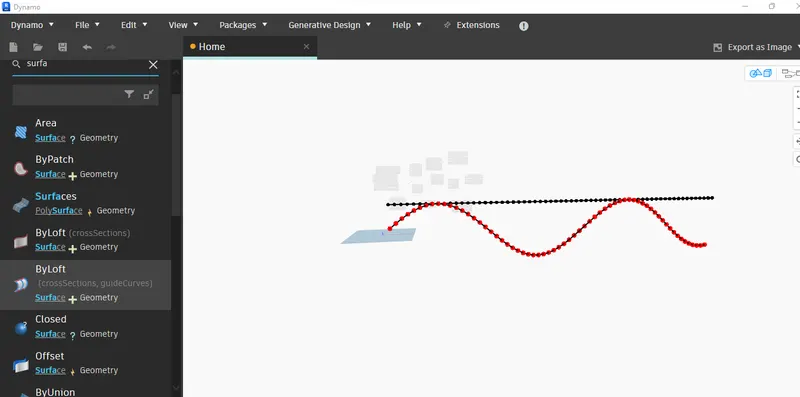
1) AIM & INTRODUCTION : Using dynamo create sinusoidal points and create a curve and a surface out of the curve
PROCEDURE :Open dynamo -search integer slider and copy 3 more by using copy paste ,rename it as start end step , for making sinusoidal points and change values as 12,650,10 respectively ,search range -select range with start end step ,search point by coordinates (xyz ) axis,search code block and copy the excisting coordinate integer slider ,search math.sin ,connect range 1st to point by coordinate first x., change code block value into 50 ,range list to angle in math.sin connect,connect range list x to 2nd point by coordinate ,search product (multiple ) connect code block 2nd to point by coordinate to z,coonect math.sin into y of 2nd point by coordinate ,connect math.sin double to x of multiple coordinate block ,connect code block to y of multiple coordinate block,multiple coordinate block connect to z of 1st point by coordinate,to make sinusoidal curve search nurbs select nurbs by control points -insert list -search list -list create - copy one more
connect 1 st point by coordinate to nurbs by control point , 2nd point by coordinate to 2nd nurbs by control point,search list and add 1 more items in it ,connect 1st nurb curve of nurbs by control system to item 0 of list,connect 2nd nurb curve of nurbs by control system to item 1 of list,search surface by loft (cross section , guidcurves) , connect list into cross section ok
RESULT: succesfully created sinusoidal points and create a curve and a surface out of the curve using dynamo
PROJECT REPORT :
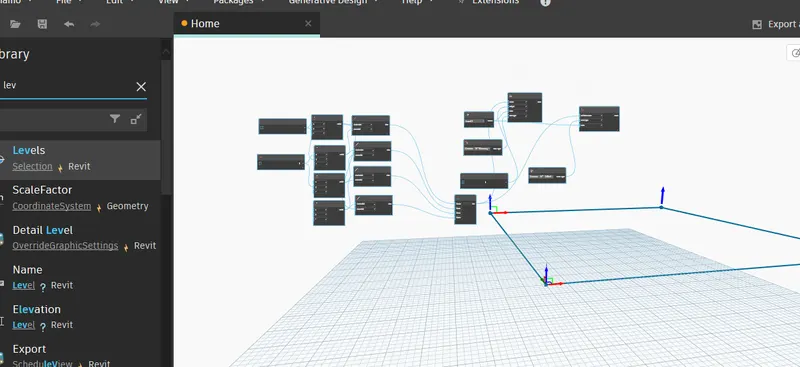
2)AIM & INTRODUCTION : create conceptual layout of floor plan using dynamo
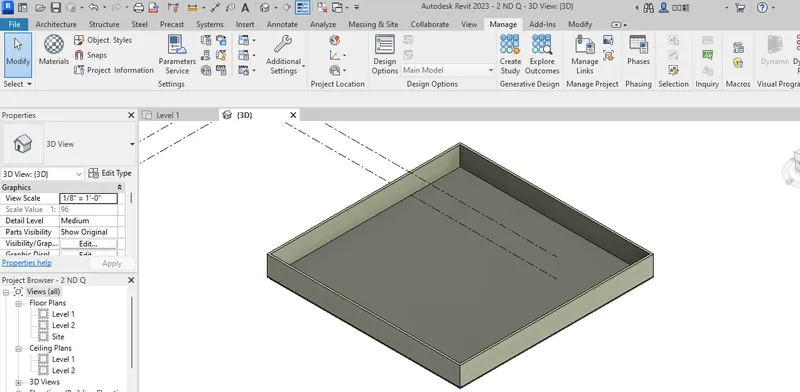
PROCEDURE :OPEN dynamo search integer slider - copy 1 more,assign values as 100 in both ,search point by coordinates (x,y,z) and copy 3 more ,connect first integer slider to x of point by coordinate,connect second integer slider to y of point by coordinate ,connect third integer slider to x of point by coordinate 2nd,connect fourth integer slider to y of point by coordinate 2nd ,search line by start end point , and copy 3 more ,connect 1st point by coordinate to start point of line by start point ofline by section point , connect 2nd point by coordinate to end point of line by end point of line by section point , connect 1st point by coordinate 2 to 4th end point of line by section point , connect 2nd point by coordinate 2 to 2nd start point line by section point,connect 3rd point by coordinate to 2nd end point of line by section point, connect 3rd point by coordinate to 3rd start point of line by section point, connect 4th point by coordinate to 3rd end point of line by section point , connect 4th point by coordinate to 4th start point of line by section point, search list and add 3 more items to list,connect line by section point 1st line to itemo of list,connect line by section point 2nd line to item1 of list,connect line by section point 3rd line to item2 of list, connect line by section point 4th line to item3 of list , search for levels ,wall types,integer slider ,set level as 1, set wall type ,integer slider 10,search wall(by curve and height ) ,connect list to curve (wall) ,levels to level (wall),wall type to wall type ,integer slider to height , to create floor ,go to dynamo -search for floor types - floor (by outline type and level)-connect wall to outline curves of floor by outline type and level - select a floor type ,coonect levels to level of floor by outline type and level
RESULT : Created conceptual layout of floor using dynamo
PROJECT REPORT:
3) AIM & INTRODUCTION: to create an array of elements and change properties by using dynamo
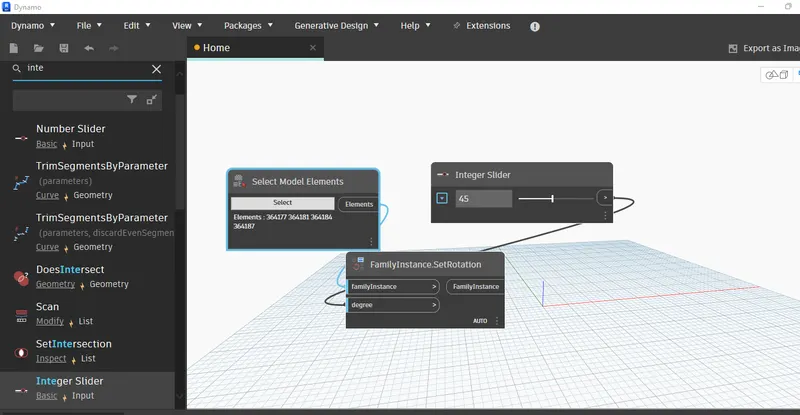
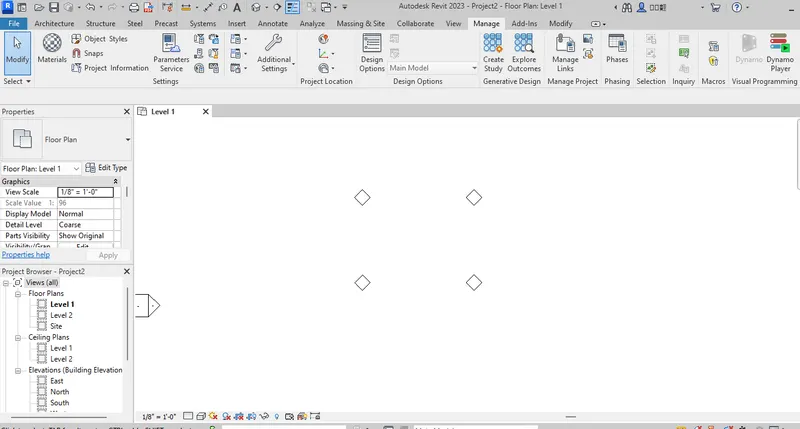
PROCEDURE : open revit -place architectural column place 4 ,open dynamo , search model elements and select with multiples ,search set by rotation - family instances rotation- integer slider
element select all the columns -integer set as 45 degree,connect elements to family instances rotation -degree as integer slider - open revit propery change is visible
RESULT : created an array of elements and change properties by using dynamo succesfully
REPORT FORMAT:
4) AIM & INTRODUCTION :create a conceptual mass using revit and develop a parametric column
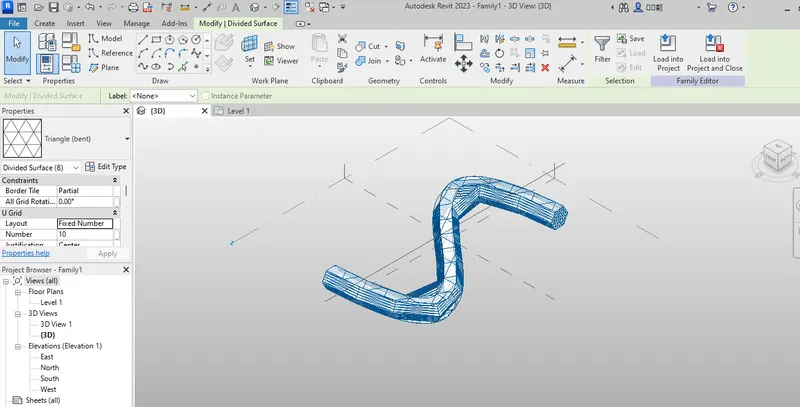
PROCEDURE :open revit - new - conceptual mass - metric mass- click open -ok, setting elevation click level 0 offset 12 ft ,go to floor plan -model line - spline through points - just like s shape .go to 3d view -to set plane - set - direct point - similarly point
choose the circumside polygon in all atb the height of 12" in each point -create select the curve select the first circumside polygon -create form- solid form
click solid - material , select all solid mass click filter ,choose only form untick remaining -select all - divide surface - property from property bar - triangular bend
RESULT :created a conceptual mass using revit and develop a parametric column succesfully
REPORT FORMAT :
5)AIM & INTRODUCTION : creating a parametric stadium using dynamo in revit
PROCEDURE :open dynamo -search for integer slider and copy one more ,rename it as no. of levels and floor to floor height
search code block and type 0..#levels.. floor height, connect level to level and floor height to floor height
search point coordinates , connect code block to z of coordinate system by origin,create 4 integer sliders,rename it as width ,length,bottom floor rotation and top floor rotation respectively
search for rectangle ,connect coordinate system by origin to cs of rectangle by width ,length,connect width to width of rectangle,length to length of rectangle,bottom rotation -0,top rotation -200,search code block and type bottom..top..#levels; connect bottom to bottom of code block,top to top,1st level to levels,search point by coordinates,search origin ,connect code block to z of point by coordinate and code block topoint last by origin ,add 4 nos of integer sliders and rename as width,length,top roation and bottom rotation respectively ,search for rectangle ,connect coordinate system by origin into cs of rectangle,width to width,length to length
add a code block type bottom..top..#levels , connect bottom to bottom of code block and top to top ,no of levels to levels ,search origin ,vector z axis ,rotate (origin,axis,degrees) ,connect rectangle to geometry rotate ,point origin to origin ,connect code block to degrees ,vector z to axis,
surface ,search poly surface by loft,geometry to cross section
RESULT : created a parametric stadium using dynamo in revit succesfully
REPORT FORMAT: