Creating 3D Isometric view of various structural elements in AutoCAD
1)
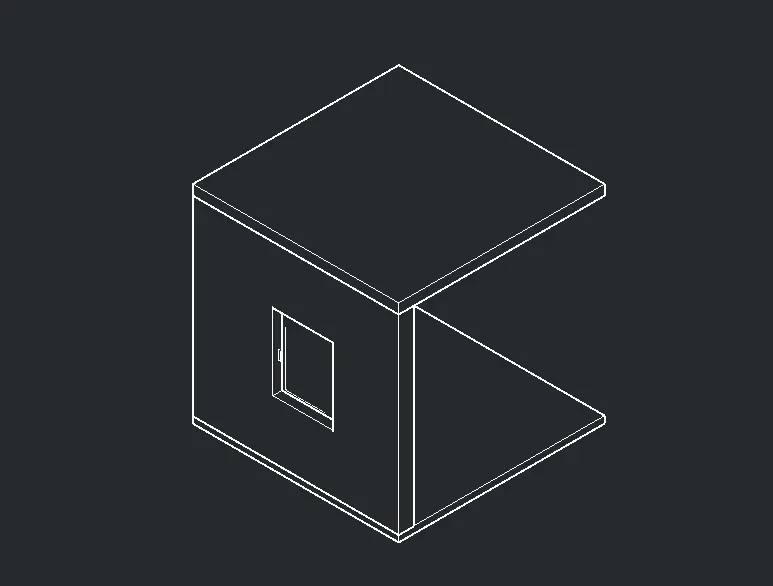
AIM: TO MAKE THE 3D ISOMETRIC VIEW OF THE PLAN OF THE BUILDING WITH THE GIVEN ELEVATION
PLAN VIE OF THE BUILDING
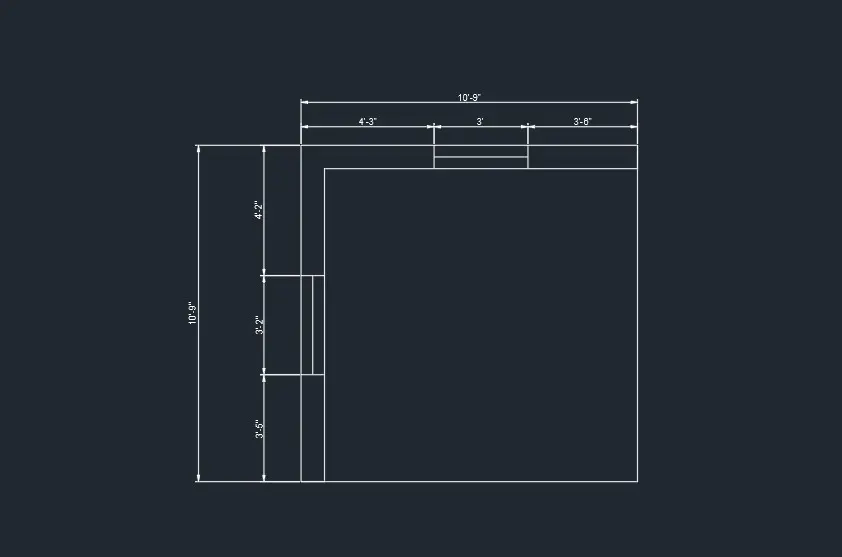
COMMANDS USED ARE AS FOLLOWS:
- UNITS
- DIMENSIONSTYLE
- LINE
- RECTANGLE
- OFFSET
- PLAN
- UCS
- EXTRUDE
- COPY
- UNION
- HIDDEN
- 3D ORBIT
THE DETAILED EXPLANATION OF THE COMMANDS USED ARE AS FOLLOWS:
Command: *Cancel*
Command: UCS
Current ucs name: *NO NAME*
Specify origin of UCS or [Face/NAmed/OBject/Previous/View/World/X/Y/Z/ZAxis] :
Specify point on X-axis or :
Specify point on the XY plane or :
Command: REC
RECTANG
Specify first corner point or [Chamfer/Elevation/Fillet/Thickness/Width]:
Specify other corner point or [Area/Dimensions/Rotation]:
Command: _u
Command: _u RECTANG
Command: _u INTELLIZOOM INTELLIZOOM
Command: *Cancel*
Command: UCS
Current ucs name: *NO NAME*
Specify origin of UCS or [Face/NAmed/OBject/Previous/View/World/X/Y/Z/ZAxis] :
Specify point on X-axis or : *Cancel*
Command: UCS
Current ucs name: *NO NAME*
Specify origin of UCS or [Face/NAmed/OBject/Previous/View/World/X/Y/Z/ZAxis] : F
Select face of solid, surface, or mesh:
No 3D solid, surface or mesh detected.
Command: REC
RECTANG
Specify first corner point or [Chamfer/Elevation/Fillet/Thickness/Width]:
Specify other corner point or [Area/Dimensions/Rotation]: *Cancel*
Command:
Command: *Cancel*
Command: DI
DIST
Specify first point:
Specify second point or [Multiple points]: *Cancel*
Command: DIST
Specify first point:
Specify second point or [Multiple points]: *Cancel*
Command: REC
RECTANG
Specify first corner point or [Chamfer/Elevation/Fillet/Thickness/Width]:
Specify other corner point or [Area/Dimensions/Rotation]:
Specify other corner point or [Area/Dimensions/Rotation]: 9
Command: Specify opposite corner or [Fence/WPolygon/CPolygon]:
Command: RO
ROTATE
Current positive angle in UCS: ANGDIR=counterclockwise ANGBASE=0.00
1 found
Specify base point:
Specify rotation angle or [Copy/Reference] <0.00>: *Cancel*
Command: Specify opposite corner or [Fence/WPolygon/CPolygon]:
Command: 3DROTATE
Current positive angle in UCS: ANGDIR=counterclockwise ANGBASE=0.00
1 found
Specify base point:
** ROTATE **
Specify rotation angle or [Base point/Copy/Undo/Reference/eXit]: Regenerating model.
Automatic save to C:\Users\hrush\AppData\Local\Temp\Drawing1_1_4940_481237b2.sv$ ...
Command:
Command: *Cancel*
Command: *Cancel*
Command: Specify opposite corner or [Fence/WPolygon/CPolygon]:
Command: M
MOVE 1 found
Specify base point or [Displacement] :
Specify second point or :
Command:
Command: *Cancel*
Command:
Command: EXTRUDE
Current wire frame density: ISOLINES=4, Closed profiles creation mode = Solid
1 found
Specify height of extrusion or [Direction/Path/Taper angle/Expression] <-0'-6">: 3'
Command: *Cancel*
Command: REC
RECTANG
Specify first corner point or [Chamfer/Elevation/Fillet/Thickness/Width]:
Specify other corner point or [Area/Dimensions/Rotation]: *Cancel*
Command:
Command: *Cancel*
Command: REC
RECTANG
Specify first corner point or [Chamfer/Elevation/Fillet/Thickness/Width]:
Specify other corner point or [Area/Dimensions/Rotation]:
Specify other corner point or [Area/Dimensions/Rotation]: 9
Command: Specify opposite corner or [Fence/WPolygon/CPolygon]:
Command: 3DROTATE
Current positive angle in UCS: ANGDIR=counterclockwise ANGBASE=0.00
1 found
Specify base point:
** ROTATE **
Specify rotation angle or [Base point/Copy/Undo/Reference/eXit]: Regenerating model.
Command: Specify opposite corner or [Fence/WPolygon/CPolygon]:
Command: CO
COPY 1 found
Current settings: Copy mode = Multiple
Specify base point or [Displacement/mOde] :
Specify second point or [Array] :
Specify second point or [Array/Exit/Undo] : *Cancel*
Command:
Command: MOVE
1 found
Specify base point or [Displacement] :
Specify second point or : 4'
Command: *Cancel*
Command:
Command:
** STRETCH **
Specify stretch point or [Base point/Copy/Undo/eXit]:
Command: *Cancel*
Command: Specify opposite corner or [Fence/WPolygon/CPolygon]:
Command: _.erase 1 found
Command:
Command: 3DMOVE
1 found
Specify base point or [Displacement] :
Specify displacement <0'-0", 0'-0", 0'-0">: *Cancel*
Regenerating model.
Command:
Command: *Cancel*
Command: Specify opposite corner or [Fence/WPolygon/CPolygon]:
Command: M
MOVE 1 found
Specify base point or [Displacement] :
Specify second point or :
Command:
Command: M
MOVE 1 found
Specify base point or [Displacement] :
Specify second point or : 4'
Command:
Command: EXTRUDE
Current wire frame density: ISOLINES=4, Closed profiles creation mode = Solid
1 found
Specify height of extrusion or [Direction/Path/Taper angle/Expression] <-3'-0">:
Command: UCS
Current ucs name: *NO NAME*
Specify origin of UCS or [Face/NAmed/OBject/Previous/View/World/X/Y/Z/ZAxis] : F
Select face of solid, surface, or mesh:
Enter an option [Next/Xflip/Yflip] :
Command: PLAN
Enter an option [Current ucs/Ucs/World] : C
Regenerating model.
Command: REC
RECTANG
Specify first corner point or [Chamfer/Elevation/Fillet/Thickness/Width]:
Specify other corner point or [Area/Dimensions/Rotation]:
Command:
Command: MOVE
1 found
Specify base point or [Displacement] :
Specify second point or :
Command: *Cancel*
Command: O
OFFSET
Current settings: Erase source=No Layer=Source OFFSETGAPTYPE=0
Specify offset distance or [Through/Erase/Layer] <0'-1">: 3
Select object to offset or [Exit/Undo] :
Specify point on side to offset or [Exit/Multiple/Undo] :
Select object to offset or [Exit/Undo] : *Cancel*
Command: O
OFFSET
Current settings: Erase source=No Layer=Source OFFSETGAPTYPE=0
Specify offset distance or [Through/Erase/Layer] <0'-3">: 4
Select object to offset or [Exit/Undo] :
Specify point on side to offset or [Exit/Multiple/Undo] :
Select object to offset or [Exit/Undo] : *Cancel*
Command: Specify opposite corner or [Fence/WPolygon/CPolygon]:
Command: M
MOVE 3 found
Specify base point or [Displacement] :
Specify second point or :
Command: Regenerating model.
Command: 3DO
3DORBIT Press ESC or ENTER to exit, or right-click to display shortcut-menu.
Regenerating model.
Command: 3DO
3DORBIT Press ESC or ENTER to exit, or right-click to display shortcut-menu.
Regenerating model.
Command:
Command: M
MOVE 1 found
Specify base point or [Displacement] :
Specify second point or : 3
Command:
Command: M
MOVE 1 found
Specify base point or [Displacement] :
Specify second point or : 4.5
Command:
Command: EXTRUDE
Current wire frame density: ISOLINES=4, Closed profiles creation mode = Solid
1 found
Specify height of extrusion or [Direction/Path/Taper angle/Expression] <-3'-0">: 6
Command: *Cancel*
Command: *Cancel*
Command:
Command: EXTRUDE
Current wire frame density: ISOLINES=4, Closed profiles creation mode = Solid
1 found
Specify height of extrusion or [Direction/Path/Taper angle/Expression] <-0'-6">: 4.5
Command: Regenerating model.
Command: UCS
Current ucs name: *NO NAME*
Specify origin of UCS or [Face/NAmed/OBject/Previous/View/World/X/Y/Z/ZAxis] : w
Command:
Command:
Command: *Cancel*
Command: REC
RECTANG
Specify first corner point or [Chamfer/Elevation/Fillet/Thickness/Width]:
Specify other corner point or [Area/Dimensions/Rotation]:
Command:
Command: EXTRUDE
Current wire frame density: ISOLINES=4, Closed profiles creation mode = Solid
1 found
Specify height of extrusion or [Direction/Path/Taper angle/Expression] <-0'-5">: 4
Command: REC
RECTANG
Specify first corner point or [Chamfer/Elevation/Fillet/Thickness/Width]:
Specify other corner point or [Area/Dimensions/Rotation]:
Command:
Command: EXTRUDE
Current wire frame density: ISOLINES=4, Closed profiles creation mode = Solid
1 found
Specify height of extrusion or [Direction/Path/Taper angle/Expression] <0'-4">: 6
Command:
Command: *Cancel*
Command:
Command: _.erase 1 found
Command: REC
RECTANG
Specify first corner point or [Chamfer/Elevation/Fillet/Thickness/Width]:
Specify other corner point or [Area/Dimensions/Rotation]:
Command:
Command: EXTRUDE
Current wire frame density: ISOLINES=4, Closed profiles creation mode = Solid
1 found
Specify height of extrusion or [Direction/Path/Taper angle/Expression] <0'-6">: 4
Command: *Cancel*
Command: *Cancel*
Command: _vscurrent
Enter an option [2dwireframe/Wireframe/Hidden/Realistic/Conceptual/Shaded/shaded with Edges/shades of Gray/SKetchy/X-ray/Other] <2dwireframe>: _h
Command: UNION
Select objects: 1 found
Select objects: 1 found, 2 total
Select objects: 1 found, 3 total
Select objects: 1 found, 4 total
Select objects:
Command: *Cancel*
Command: *Cancel*
Command: *Cancel*
Command: *Cancel*
Command: *Cancel*
Command: 3DO
3DORBIT Press ESC or ENTER to exit, or right-click to display shortcut-menu.
Command: UNION
Select objects: 1 found
Select objects: 1 found, 2 total
Select objects: 1 found, 3 total
Select objects: 1 found, 4 total
Select objects:
Command: 3DO
3DORBIT Press ESC or ENTER to exit, or right-click to display shortcut-menu.
Command: *Cancel*
Command: 3DO
3DORBIT Press ESC or ENTER to exit, or right-click to display shortcut-menu.
Command:
Command: 3DO
3DORBIT Press ESC or ENTER to exit, or right-click to display shortcut-menu.
Command:
Command:
Command: _qsave
THE SCREENSHOT OF THE 3D ISOMETRIC VIEW IS AS FOLLOWS :
2)
AIM:
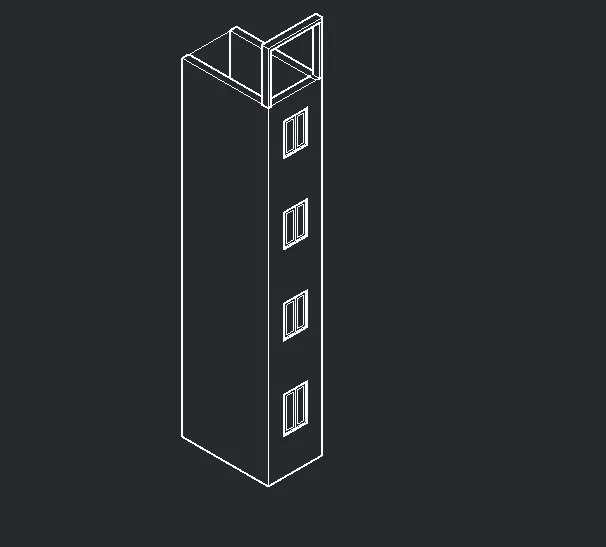
TO CREATE THE 3D VIEW OF THE BUILDING FACADE AS GIVEN IN THE QUESTION WITH THJE WINDOW DETAILS .
PLAN VIEW OF THE BUILDING FACADE :
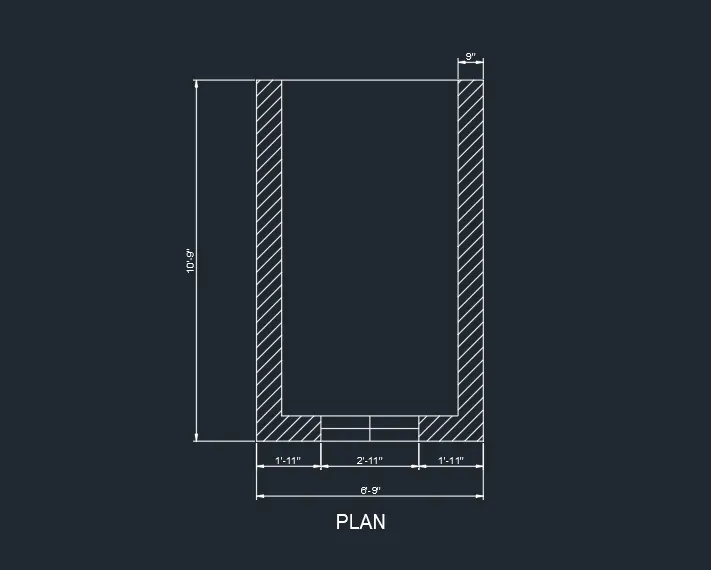
COMMANDS USED ARE AS FOLLOWS:
- UNITS
- DIMSTYLE
- LINE
- OFFSET
- COPY
- RECTANGLE
- UCS
- EXTRUDE
- HIDDEN
THE FOLLOWING STEPS WERE FOLLOWED DURING THE DRAWING :
Current positive angle in UCS: ANGDIR=counterclockwise ANGBASE=0.00
1 found
Specify base point:
** ROTATE **
Specify rotation angle or [Base point/Copy/Undo/Reference/eXit]: Regenerating model.
Command: Specify opposite corner or [Fence/WPolygon/CPolygon]:
Command: 3DROTATE
Current positive angle in UCS: ANGDIR=counterclockwise ANGBASE=0.00
1 found
Specify base point:
** ROTATE **
Specify rotation angle or [Base point/Copy/Undo/Reference/eXit]: Regenerating model.
Command: Specify opposite corner or [Fence/WPolygon/CPolygon]:
Command: CP
COPY 1 found
Current settings: Copy mode = Multiple
Specify base point or [Displacement/mOde] :
Specify second point or [Array] :
Specify second point or [Array/Exit/Undo] : *Cancel*
Command:
Command: EXTRUDE
Current wire frame density: ISOLINES=4, Closed profiles creation mode = Solid
1 found
Specify height of extrusion or [Direction/Path/Taper angle/Expression] <-0'-9">:
Command: Specify opposite corner or [Fence/WPolygon/CPolygon]:
Command: CP
COPY 1 found
Current settings: Copy mode = Multiple
Specify base point or [Displacement/mOde] :
Specify second point or [Array] :
Specify second point or [Array/Exit/Undo] : *Cancel*
Command:
Command: EXTRUDE
Current wire frame density: ISOLINES=4, Closed profiles creation mode = Solid
1 found
Specify height of extrusion or [Direction/Path/Taper angle/Expression] <4'-6">:
Command: Specify opposite corner or [Fence/WPolygon/CPolygon]:
Command: CP
COPY 1 found
Current settings: Copy mode = Multiple
Specify base point or [Displacement/mOde] :
Specify second point or [Array] :
Specify second point or [Array/Exit/Undo] : *Cancel*
Command:
Command: EXTRUDE
Current wire frame density: ISOLINES=4, Closed profiles creation mode = Solid
1 found
Specify height of extrusion or [Direction/Path/Taper angle/Expression] <5'-11">:
Command: UNION
Select objects: 1 found
Select objects: Specify opposite corner: 0 found
Select objects: *Cancel*
Command: *Cancel*
Command: *Cancel*
Command: _vscurrent
Enter an option [2dwireframe/Wireframe/Hidden/Realistic/Conceptual/Shaded/shaded with Edges/shades of Gray/SKetchy/X-ray/Other] <2dwireframe>: _s
Command: UNION
Select objects: 1 found
Select objects: 1 found, 2 total
Select objects: 1 found, 3 total
Select objects: 1 found, 4 total
Select objects: 1 found (1 duplicate), 4 total
Select objects: 1 found, 5 total
Select objects: 1 found, 6 total
Select objects:
Command: *Cancel*
Command: *Cancel*
Command: _vscurrent
Enter an option [2dwireframe/Wireframe/Hidden/Realistic/Conceptual/Shaded/shaded with Edges/shades of Gray/SKetchy/X-ray/Other] : _2d Regenerating model.
Command: Specify opposite corner or [Fence/WPolygon/CPolygon]:
Command: CP
COPY 1 found
Current settings: Copy mode = Multiple
Specify base point or [Displacement/mOde] :
Specify second point or [Array] :
Specify second point or [Array/Exit/Undo] : *Cancel*
Command:
Command: EXTRUDE
Current wire frame density: ISOLINES=4, Closed profiles creation mode = Solid
1 found
Specify height of extrusion or [Direction/Path/Taper angle/Expression] <5'-11">:
Command: *Cancel*
Command: *Cancel*
Command: *Cancel*
Command: _vscurrent
Enter an option [2dwireframe/Wireframe/Hidden/Realistic/Conceptual/Shaded/shaded with Edges/shades of Gray/SKetchy/X-ray/Other] <2dwireframe>: _s
Command: UNION
Select objects: 1 found
Select objects: 1 found, 2 total
Select objects:
Command: Specify opposite corner or [Fence/WPolygon/CPolygon]:
Command: *Cancel*
Command: *Cancel*
Command: _vscurrent
Enter an option [2dwireframe/Wireframe/Hidden/Realistic/Conceptual/Shaded/shaded with Edges/shades of Gray/SKetchy/X-ray/Other] : _2d Regenerating model.
Command: *Cancel*
Command: *Cancel*
Command: _vscurrent
Enter an option [2dwireframe/Wireframe/Hidden/Realistic/Conceptual/Shaded/shaded with Edges/shades of Gray/SKetchy/X-ray/Other] <2dwireframe>: _h
Command: PLAN
Enter an option [Current ucs/Ucs/World] :
Command: L
LINE
Specify first point:
Specify next point or [Undo]:
Resuming LINE command.
Specify next point or [Undo]: 6'5
Specify next point or [Undo]: *Cancel*
Command: LINE
Specify first point:
Specify next point or [Undo]: 6'5
Specify next point or [Undo]:
Specify next point or [Close/Undo]: *Cancel*
Command: O
OFFSET
Current settings: Erase source=No Layer=Source OFFSETGAPTYPE=0
Specify offset distance or [Through/Erase/Layer] <0'-3">: 4
Select object to offset or [Exit/Undo] :
Specify point on side to offset or [Exit/Multiple/Undo] :
Select object to offset or [Exit/Undo] :
Specify point on side to offset or [Exit/Multiple/Undo] :
Select object to offset or [Exit/Undo] :
Specify point on side to offset or [Exit/Multiple/Undo] :
Select object to offset or [Exit/Undo] : *Cancel*
Command: TR
TRIM
Current settings: Projection=UCS, Edge=None, Mode=Quick
Select object to trim or shift-select to extend or
[cuTting edges/Crossing/mOde/Project/eRase]:
Select object to trim or shift-select to extend or
[cuTting edges/Crossing/mOde/Project/eRase/Undo]:
Select object to trim or shift-select to extend or
[cuTting edges/Crossing/mOde/Project/eRase/Undo]:
Select object to trim or shift-select to extend or
[cuTting edges/Crossing/mOde/Project/eRase/Undo]:
Select object to trim or shift-select to extend or
[cuTting edges/Crossing/mOde/Project/eRase/Undo]: *Cancel*
Command:
Command: 3DO
3DORBIT Press ESC or ENTER to exit, or right-click to display shortcut-menu.
Command: L
LINE
Specify first point:
Specify next point or [Undo]: 9
Specify next point or [Undo]: *Cancel*
Command: LINE
Specify first point:
Specify next point or [Undo]: 9
Specify next point or [Undo]: *Cancel*
Command:
Command:
Command: Specify opposite corner or [Fence/WPolygon/CPolygon]:
Command:
Command: O
OFFSET
Current settings: Erase source=No Layer=Source OFFSETGAPTYPE=0
Specify offset distance or [Through/Erase/Layer] <0'-4">: 9
Select object to offset or [Exit/Undo] :
Specify point on side to offset or [Exit/Multiple/Undo] :
Select object to offset or [Exit/Undo] :
Specify point on side to offset or [Exit/Multiple/Undo] :
Select object to offset or [Exit/Undo] : *Cancel*
Command:
Automatic save to C:\Users\hrush\AppData\Local\Temp\BUILDING FACADE QUESTION 2_1_4940_fb054275.sv$ ...
Command:
Command:
Command: _.erase 2 found
Command: L
LINE
Specify first point:
Specify next point or [Undo]: 9
Specify next point or [Undo]: *Cancel*
Command:
Command:
Command: *Cancel*
Command:
Command: *Cancel*
Command: *Cancel*
Command:
Command:
Command:
Command: _.erase 2 found
Command:
Command:
Command: _.erase 2 found
Command: _u ERASE
Command: _u INTELLIZOOM
Command: _u ERASE
Command:
Command:
Command:
Command:
Command:
Command:
Command:
Command:
Command:
Command: *Cancel*
Command: _u INTELLIZOOM INTELLIZOOM INTELLIZOOM INTELLIZOOM INTELLIZOOM INTELLIZOOM INTELLIZOOM INTELLIZOOM INTELLIZOOM INTELLIZOOM INTELLIZOOM
Command: _u LINE
Command: _u INTELLIZOOM
Command: _u ERASE
Command: _u OFFSET
Command: _u INTELLIZOOM INTELLIZOOM INTELLIZOOM INTELLIZOOM
Command: _u
Command: BO
BOUNDARY
Pick internal point: Selecting everything...
Selecting everything visible...
Analyzing the selected data...
Analyzing internal islands...
Pick internal point:
1 loop extracted.
1 Region created.
BOUNDARY created 1 region
Command: EXTRUDE
Current wire frame density: ISOLINES=4, Closed profiles creation mode = Solid
Select objects to extrude or [MOde]: 1 found
Select objects to extrude or [MOde]:
Specify height of extrusion or [Direction/Path/Taper angle/Expression] <5'-11">: 9
Command: UCS
Current ucs name: *NO NAME*
Specify origin of UCS or [Face/NAmed/OBject/Previous/View/World/X/Y/Z/ZAxis] : w
Command: Specify opposite corner or [Fence/WPolygon/CPolygon]:
Command: _.erase 1 found
Command: REC
RECTANG
Specify first corner point or [Chamfer/Elevation/Fillet/Thickness/Width]:
Specify other corner point or [Area/Dimensions/Rotation]:
Too many objects selected for INTERSECT
Command: *Cancel*
Command: REC
RECTANG
Specify first corner point or [Chamfer/Elevation/Fillet/Thickness/Width]:
Specify other corner point or [Area/Dimensions/Rotation]: *Cancel*
Command: RECTANG
Specify first corner point or [Chamfer/Elevation/Fillet/Thickness/Width]:
Specify other corner point or [Area/Dimensions/Rotation]:
Checking 990 intersections...
Command: 3DO
3DORBIT Press ESC or ENTER to exit, or right-click to display shortcut-menu.
Command: REC
RECTANG
Specify first corner point or [Chamfer/Elevation/Fillet/Thickness/Width]:
Specify other corner point or [Area/Dimensions/Rotation]: *Cancel*
Command: *Cancel*
Command: 3DO
3DORBIT Press ESC or ENTER to exit, or right-click to display shortcut-menu.
Command: UCS
Current ucs name: *WORLD*
Specify origin of UCS or [Face/NAmed/OBject/Previous/View/World/X/Y/Z/ZAxis] :
Specify point on X-axis or : *Cancel*
Command: UCS
Current ucs name: *WORLD*
Specify origin of UCS or [Face/NAmed/OBject/Previous/View/World/X/Y/Z/ZAxis] : F
Select face of solid, surface, or mesh:
Enter an option [Next/Xflip/Yflip] :
Command: *Cancel*
Command: REC
RECTANG
Specify first corner point or [Chamfer/Elevation/Fillet/Thickness/Width]:
Specify other corner point or [Area/Dimensions/Rotation]: *Cancel*
Command: *Cancel*
Command: 3DO
3DORBIT Press ESC or ENTER to exit, or right-click to display shortcut-menu.
Command:
Command: 3DO
3DORBIT Press ESC or ENTER to exit, or right-click to display shortcut-menu.
Command: UCS
Current ucs name: *NO NAME*
Specify origin of UCS or [Face/NAmed/OBject/Previous/View/World/X/Y/Z/ZAxis] : w
Command:
Command: *Cancel*
THE SCREENSHOT OF THE FOLLOWING BUILDING FACADE IS SHOWN BELOW:
3)
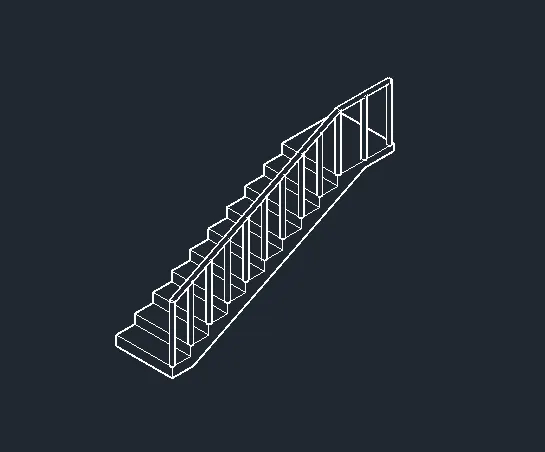
AIM: TO CREATE THE ISOMETRIC 3D VIEW OF THE STAIRCASE WITH THE PLAN & ELEVATION GIVEN IN THE QUESTION
PLAN VIEW OF THE STAIRCASE IS AS FOLLOWS :
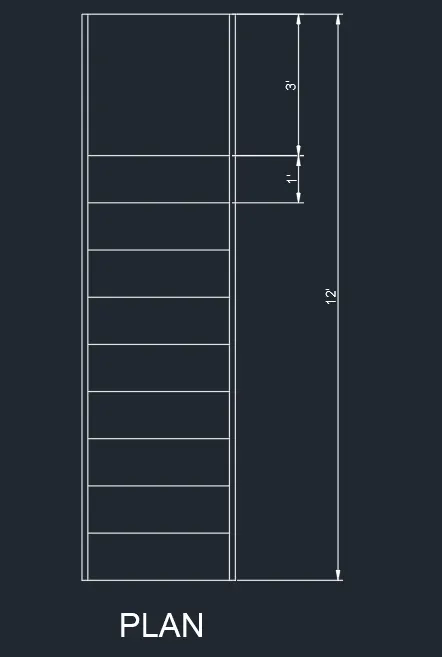
COMMANDS USED ARE AS FOLLOWS:
- UNITS
- DIMSTYLE
- LINE
- COPY
- BOUNDARY
- 3DROTATE
- EXTRUDE
- 3DPOLY
- SWEEP
THE FOLLOWING COMMANDS SETUP WERE USED :
Command: *Cancel*
Command: DIMLIN
DIMLINEAR
Specify first extension line origin or
Specify second extension line origin:
Specify dimension line location or
[Mtext/Text/Angle/Horizontal/Vertical/Rotated]:
Dimension text = 12'
Command: MT
MTEXT
Current text style: "Standard" Text height: 3" Annotative: No
Specify first corner:
Specify opposite corner or [Height/Justify/Line spacing/Rotation/Style/Width/Columns]:
Command: *Cancel*
Command: Specify opposite corner or [Fence/WPolygon/CPolygon]:
Command:
Command:
Command: _properties
Command:
Command: *Cancel*
Command:
Command:
** STRETCH **
Specify stretch point or [Base point/Copy/Undo/eXit]:
Command: *Cancel*
Command: Regenerating model.
Regenerating model.
Automatic save to C:\Users\hrush\AppData\Local\Temp\Drawing1_1_4940_7375decd.sv$ ...
Command:
Command: L
LINE
Specify first point:
Specify next point or [Undo]: 6
Specify next point or [Undo]: 1'
Specify next point or [Close/Undo]: 6
Specify next point or [Close/Undo]: 1'
Specify next point or [Close/Undo]: 6
Specify next point or [Close/Undo]: 1'
Specify next point or [Close/Undo]: 6
Specify next point or [Close/Undo]: 1'
Specify next point or [Close/Undo]: 6
Specify next point or [Close/Undo]: 1'
Specify next point or [Close/Undo]: 6
Specify next point or [Close/Undo]: 1'
Specify next point or [Close/Undo]: 6
Specify next point or [Close/Undo]: 1'
Specify next point or [Close/Undo]: 6
Specify next point or [Close/Undo]: 1'
Specify next point or [Close/Undo]: 6
Specify next point or [Close/Undo]: 1'
Specify next point or [Close/Undo]: 6
Specify next point or [Close/Undo]: 3'
Specify next point or [Close/Undo]: *Cancel*
Command: L
LINE
Specify first point:
Specify next point or [Undo]: 4
Specify next point or [Undo]: *Cancel*
Command: L
LINE
Specify first point:
Specify next point or [Undo]:
Specify next point or [Undo]: *Cancel*
Command: O
OFFSET
Current settings: Erase source=No Layer=Source OFFSETGAPTYPE=0
Specify offset distance or [Through/Erase/Layer] <1'-0">: 6
Select object to offset or [Exit/Undo] :
Specify point on side to offset or [Exit/Multiple/Undo] :
Select object to offset or [Exit/Undo] : *Cancel*
Command: Specify opposite corner or [Fence/WPolygon/CPolygon]:
Command:
Command: _.erase 1 found
Command: L
LINE
Specify first point:
Specify next point or [Undo]:
Specify next point or [Undo]: *Cancel*
Command: F
FILLET
Current settings: Mode = TRIM, Radius = 0'-0"
Select first object or [Undo/Polyline/Radius/Trim/Multiple]:
Select second object or shift-select to apply corner or [Radius]:
Command: *Cancel*
Command: L
LINE
Specify first point:
Specify next point or [Undo]:
Specify next point or [Undo]: *Cancel*
Command: F
FILLET
Current settings: Mode = TRIM, Radius = 0'-0"
Select first object or [Undo/Polyline/Radius/Trim/Multiple]:
Select second object or shift-select to apply corner or [Radius]:
Command: Regenerating model.
Command: Specify opposite corner or [Fence/WPolygon/CPolygon]:
Command: 3DROTATE
Current positive angle in UCS: ANGDIR=counterclockwise ANGBASE=0.00
24 found
Specify base point:
** ROTATE **
Specify rotation angle or [Base point/Copy/Undo/Reference/eXit]: *Cancel*
Regenerating model.
Command: Specify opposite corner or [Fence/WPolygon/CPolygon]:
Command: 3DROTATE
Current positive angle in UCS: ANGDIR=counterclockwise ANGBASE=0.00
24 found
Specify base point:
** ROTATE **
Specify rotation angle or [Base point/Copy/Undo/Reference/eXit]: *Cancel*
Regenerating model.
Command: Specify opposite corner or [Fence/WPolygon/CPolygon]:
Command: 3DROTATE
Current positive angle in UCS: ANGDIR=counterclockwise ANGBASE=0.00
24 found
Specify base point:
** ROTATE **
Specify rotation angle or [Base point/Copy/Undo/Reference/eXit]: *Cancel*
Regenerating model.
Command: Specify opposite corner or [Fence/WPolygon/CPolygon]:
Command: 3DROTATE
Current positive angle in UCS: ANGDIR=counterclockwise ANGBASE=0.00
24 found
Specify base point:
** ROTATE **
Specify rotation angle or [Base point/Copy/Undo/Reference/eXit]: *Cancel*
Regenerating model.
Command: Specify opposite corner or [Fence/WPolygon/CPolygon]:
Command: 3DROTATE
Current positive angle in UCS: ANGDIR=counterclockwise ANGBASE=0.00
24 found
Specify base point:
** ROTATE **
Specify rotation angle or [Base point/Copy/Undo/Reference/eXit]: *Cancel*
Regenerating model.
**** System Variable Changed ****
1 of the monitored system variables has changed from the preferred value. Use SYSVARMONITOR command to view changes.
Command: _u
**** No System Variable Changed ****
Command: _u 3DROTATE
Command: _u 3DROTATE
Command: _u INTELLIZOOM INTELLIZOOM Regenerating model.
Command: _u 3DROTATE
Command: _u 3DROTATE
Command: _u 3DROTATE
Command: _u INTELLIZOOM
Command: _u '.VIEWCUBEACTION Regenerating model.
Command: _u INTELLIZOOM INTELLIZOOM INTELLIZOOM
Command: _u FILLET
Command: F
FILLET
Current settings: Mode = TRIM, Radius = 0'-0"
Select first object or [Undo/Polyline/Radius/Trim/Multiple]:
Select second object or shift-select to apply corner or [Radius]:
Command: BO
BOUNDARY
Pick internal point: Selecting everything...
Selecting everything visible...
Analyzing the selected data...
Analyzing internal islands...
Pick internal point:
1 loop extracted.
1 Region created.
BOUNDARY created 1 region
Command: Regenerating model.
Command: 3DROTATE
Current positive angle in UCS: ANGDIR=counterclockwise ANGBASE=0.00
Select objects: Specify opposite corner: 25 found
Select objects:
Specify base point:
Pick a rotation axis: *Cancel*
Regenerating model.
Command: Specify opposite corner or [Fence/WPolygon/CPolygon]:
Command: *Cancel*
Command: 3DROTATE
Current positive angle in UCS: ANGDIR=counterclockwise ANGBASE=0.00
Select objects: Specify opposite corner: 25 found
Select objects:
Specify base point:
Pick a rotation axis: XAXIS
Invalid 2D point.
Pick a rotation axis:
Specify angle start point or type an angle: 90
Regenerating model.
Command:
Automatic save to C:\Users\hrush\AppData\Local\Temp\Drawing1_1_4940_7375decd.sv$ ...
Command:
Command: EXTRUDE
Current wire frame density: ISOLINES=4, Closed profiles creation mode = Solid
1 found
Specify height of extrusion or [Direction/Path/Taper angle/Expression]: 3'
Command: UCS
Current ucs name: *WORLD*
Specify origin of UCS or [Face/NAmed/OBject/Previous/View/World/X/Y/Z/ZAxis] :
Specify point on X-axis or :
Specify point on the XY plane or :
Command: C
CIRCLE
Specify center point for circle or [3P/2P/Ttr (tan tan radius)]:
Specify radius of circle or [Diameter]: 2
Command:
Command: _.erase 1 found
Command: C
CIRCLE
Specify center point for circle or [3P/2P/Ttr (tan tan radius)]:
Specify radius of circle or [Diameter] <0'-2">: D
Specify diameter of circle <0'-4">: 2
Command:
Command: EXTRUDE
Current wire frame density: ISOLINES=4, Closed profiles creation mode = Solid
1 found
Specify height of extrusion or [Direction/Path/Taper angle/Expression] <3'-0">: 3'
Command:
Command: CP
COPY 1 found
Current settings: Copy mode = Multiple
Specify base point or [Displacement/mOde] :
Specify second point or [Array] :
Specify second point or [Array/Exit/Undo] : *Cancel*
Command: Specify opposite corner or [Fence/WPolygon/CPolygon]:
Command: _.erase 1 found
Command:
Command: CP
COPY 1 found
Current settings: Copy mode = Multiple
Specify base point or [Displacement/mOde] :
Specify second point or [Array] : *Cancel*
Command: *Cancel*
Command:
Command: CP
COPY 1 found
Current settings: Copy mode = Multiple
Specify base point or [Displacement/mOde] :
Specify second point or [Array] :
Specify second point or [Array/Exit/Undo] :
Specify second point or [Array/Exit/Undo] :
Specify second point or [Array/Exit/Undo] :
Specify second point or [Array/Exit/Undo] :
Specify second point or [Array/Exit/Undo] :
Specify second point or [Array/Exit/Undo] :
Specify second point or [Array/Exit/Undo] :
Specify second point or [Array/Exit/Undo] :
Specify second point or [Array/Exit/Undo] :
Specify second point or [Array/Exit/Undo] :
Specify second point or [Array/Exit/Undo] : *Cancel*
Command:
Command:
** STRETCH **
Specify stretch point or [Base point/Copy/Undo/eXit]:
Command: *Cancel*
Command:
Command:
** STRETCH **
Specify stretch point or [Base point/Copy/Undo/eXit]:
Command: *Cancel*
Command: 3DPOLY
Specify start point of polyline:
Specify endpoint of line or [Undo]:
Specify endpoint of line or [Undo]:
Specify endpoint of line or [Close/Undo]: *Cancel*
Command: C
CIRCLE
Specify center point for circle or [3P/2P/Ttr (tan tan radius)]:
Specify radius of circle or [Diameter] <0'-1">: D
Specify diameter of circle <0'-2">: 2
Command: SWEEP
Current wire frame density: ISOLINES=4, Closed profiles creation mode = Solid
Select objects to sweep or [MOde]: 1 found
Select objects to sweep or [MOde]:
Select sweep path or [Alignment/Base point/Scale/Twist]:
Command: *Cancel*
Command: *Cancel*
Command: _vscurrent
Enter an option [2dwireframe/Wireframe/Hidden/Realistic/Conceptual/Shaded/shaded with Edges/shades of Gray/SKetchy/X-ray/Other] <2dwireframe>: _h
Command: UCS
Current ucs name: *NO NAME*
Specify origin of UCS or [Face/NAmed/OBject/Previous/View/World/X/Y/Z/ZAxis] : W
Command:
Command:
Command: _qsave
THE SCREENSHOT OF THE 3D STAIRCASE IS AS FOLLOWS :
4)
AIM : TO CREATE THE 3D VIEW OF THE WALL WITH SPREAD FOOTING , TO CREATE THE DOOR OPENING ONLY & ASSUMING THE COPING & PARAPET WALL DIMENSION.
PLAN VIEW OF THE WALL WITH FOOTING :
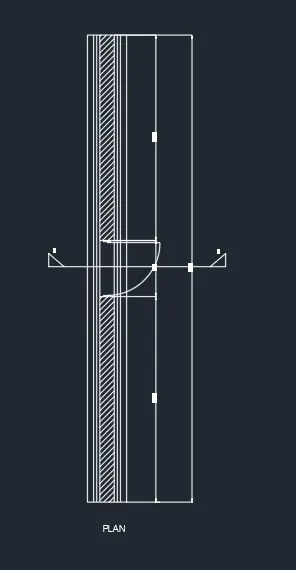
COMMANDS USED ARE AS FOLLOWS:
- UNITS
- DIMSTYLE
- LINE
- COPY
- RECTANGLE
- EXTRUDE
- OFFSET
- UCS
- 3DOBJECT
- UNION
- HIDDEN
- MATERIAL PROPERTIES
- RENDER
THE FOLLOWING COMMAND HISTORY IS AS FOLLOWS:
Command: *Cancel*
Command: REC
RECTANG
Specify first corner point or [Chamfer/Elevation/Fillet/Thickness/Width]:
Specify other corner point or [Area/Dimensions/Rotation]:
Command: *Cancel*
Command: RECTANG
Specify first corner point or [Chamfer/Elevation/Fillet/Thickness/Width]:
Specify other corner point or [Area/Dimensions/Rotation]:
Command: REC
RECTANG
Specify first corner point or [Chamfer/Elevation/Fillet/Thickness/Width]:
Specify other corner point or [Area/Dimensions/Rotation]:
Command:
Command:
** STRETCH **
Specify stretch point:50
Command:
** STRETCH **
Specify stretch point:50
Command: *Cancel*
Command:
Command: EXTRUDE
Current wire frame density: ISOLINES=4, Closed profiles creation mode = Solid
1 found
Specify height of extrusion or [Direction/Path/Taper angle/Expression] <-600.00>: 400
Command: REC
RECTANG
Specify first corner point or [Chamfer/Elevation/Fillet/Thickness/Width]:
Specify other corner point or [Area/Dimensions/Rotation]:
Command:
Command:
** STRETCH **
Specify stretch point:50
Command:
** STRETCH **
Specify stretch point:50
Command: EXTRUDE
Current wire frame density: ISOLINES=4, Closed profiles creation mode = Solid
1 found
Specify height of extrusion or [Direction/Path/Taper angle/Expression] <-400.00>: 400
Command: REC
RECTANG
Specify first corner point or [Chamfer/Elevation/Fillet/Thickness/Width]:
Specify other corner point or [Area/Dimensions/Rotation]:
Command: _u INTELLIZOOM
Command: REC
RECTANG
Specify first corner point or [Chamfer/Elevation/Fillet/Thickness/Width]:
Specify other corner point or [Area/Dimensions/Rotation]:
Command:
Command:
** STRETCH **
Specify stretch point:100
Command:
** STRETCH **
Specify stretch point:100
Command: EXTRUDE
Current wire frame density: ISOLINES=4, Closed profiles creation mode = Solid
1 found
Specify height of extrusion or [Direction/Path/Taper angle/Expression] <-400.00>: 300
Command:
Command: EXTRUDE
Current wire frame density: ISOLINES=4, Closed profiles creation mode = Solid
1 found
Specify height of extrusion or [Direction/Path/Taper angle/Expression] <-300.00>: 3300
Command: *Cancel*
Command: EXTRUDE
Current wire frame density: ISOLINES=4, Closed profiles creation mode = Solid
Select objects to extrude or [MOde]: 1 found
Select objects to extrude or [MOde]:
Specify height of extrusion or [Direction/Path/Taper angle/Expression] <3300.00>: 3300
Command: *Cancel*
Command: REC
RECTANG
Specify first corner point or [Chamfer/Elevation/Fillet/Thickness/Width]:
Specify other corner point or [Area/Dimensions/Rotation]:
Command:
Command: M
MOVE 1 found
Specify base point or [Displacement] <Displacement>:
Specify second point or <use first point as displacement>: 2100
Command:
Command:
Command:
Command: _.erase 3 found
Command:
Command: EXTRUDE
Current wire frame density: ISOLINES=4, Closed profiles creation mode = Solid
1 found
Specify height of extrusion or [Direction/Path/Taper angle/Expression] <3300.00>:
Command: REC
RECTANG
Specify first corner point or [Chamfer/Elevation/Fillet/Thickness/Width]:
Specify other corner point or [Area/Dimensions/Rotation]:
Command:
Command: EXTRUDE
Current wire frame density: ISOLINES=4, Closed profiles creation mode = Solid
1 found
Specify height of extrusion or [Direction/Path/Taper angle/Expression] <1200.00>: 150
Command: REC
RECTANG
Specify first corner point or [Chamfer/Elevation/Fillet/Thickness/Width]:
Specify other corner point or [Area/Dimensions/Rotation]:
Command:
Command: EXTRUDE
Current wire frame density: ISOLINES=4, Closed profiles creation mode = Solid
1 found
Specify height of extrusion or [Direction/Path/Taper angle/Expression] <150.00>: 600
Command: REC
RECTANG
Specify first corner point or [Chamfer/Elevation/Fillet/Thickness/Width]:
Specify other corner point or [Area/Dimensions/Rotation]: 150
Command:
Command: EXTRUDE
Current wire frame density: ISOLINES=4, Closed profiles creation mode = Solid
1 found
Specify height of extrusion or [Direction/Path/Taper angle/Expression] <600.00>: 75
Command: Specify opposite corner or [Fence/WPolygon/CPolygon]:
Command: Specify opposite corner or [Fence/WPolygon/CPolygon]:
Command: M
MOVE 1 found
Specify base point or [Displacement] <Displacement>:
Specify second point or <use first point as displacement>: *Cancel*
Command: REC
RECTANG
Specify first corner point or [Chamfer/Elevation/Fillet/Thickness/Width]:
Specify other corner point or [Area/Dimensions/Rotation]: *Cancel*
Specify other corner point or [Area/Dimensions/Rotation]: *Cancel*
Command: Specify opposite corner or [Fence/WPolygon/CPolygon]:
Command: _.erase 1 found
Command: REC
RECTANG
Specify first corner point or [Chamfer/Elevation/Fillet/Thickness/Width]:
Specify other corner point or [Area/Dimensions/Rotation]:
Specify other corner point or [Area/Dimensions/Rotation]: *Cancel*
Command: REC
RECTANG
Specify first corner point or [Chamfer/Elevation/Fillet/Thickness/Width]:
Specify other corner point or [Area/Dimensions/Rotation]: 7500
Command: Specify opposite corner or [Fence/WPolygon/CPolygon]:
Command: *Cancel*
Command: Specify opposite corner or [Fence/WPolygon/CPolygon]:
Command: _.erase 1 found
Command: REC
RECTANG
Specify first corner point or [Chamfer/Elevation/Fillet/Thickness/Width]:
Specify other corner point or [Area/Dimensions/Rotation]:
Specify other corner point or [Area/Dimensions/Rotation]: 150
Command: Specify opposite corner or [Fence/WPolygon/CPolygon]:
Command: *Cancel*
Command: DISTANCE
DISTANCE = 0.00 (read only)
Command: DI
DIST
Specify first point:
Specify second point or [Multiple points]:
Distance = 4500.00, Angle in XY Plane = 270.00, Angle from XY Plane = 0.00
Delta X = 0.00, Delta Y = -4500.00, Delta Z = 0.00
Command: *Cancel*
Command: Specify opposite corner or [Fence/WPolygon/CPolygon]:
Command: _.erase 1 found
Command: REC
RECTANG
Specify first corner point or [Chamfer/Elevation/Fillet/Thickness/Width]:
Specify other corner point or [Area/Dimensions/Rotation]: 150
Command: Specify opposite corner or [Fence/WPolygon/CPolygon]:
Command: _.erase 1 found
Command: REC
RECTANG
Specify first corner point or [Chamfer/Elevation/Fillet/Thickness/Width]:
Specify other corner point or [Area/Dimensions/Rotation]:
Specify other corner point or [Area/Dimensions/Rotation]: 150
Command: Specify opposite corner or [Fence/WPolygon/CPolygon]:
Command: EXTRUDE
Current wire frame density: ISOLINES=4, Closed profiles creation mode = Solid
1 found
Specify height of extrusion or [Direction/Path/Taper angle/Expression] <-75.00>: 75
Command: Specify opposite corner or [Fence/WPolygon/CPolygon]:
Command: M
MOVE 1 found
Specify base point or [Displacement] <Displacement>:
Specify second point or <use first point as displacement>:
Command: UNION
Select objects: 1 found
Select objects: 1 found, 2 total
Select objects:
Command: UNION
Select objects: Specify opposite corner: 0 found
Select objects: 1 found
Select objects: 1 found, 2 total
Select objects: 1 found, 3 total
Select objects:
Command:
Command: _.erase 1 found
Command:
Command: _.erase 1 found
Command: *Cancel*
Command: *Cancel*
Command: _vscurrent
Enter an option [2dwireframe/Wireframe/Hidden/Realistic/Conceptual/Shaded/shaded with Edges/shades of Gray/SKetchy/X-ray/Other] <2dwireframe>: _s
Command: Regenerating layout.
Regenerating model - caching viewports.
Restoring cached viewports.
*Cancel*
Command: *Cancel*
Command: _vscurrent
Enter an option [2dwireframe/Wireframe/Hidden/Realistic/Conceptual/Shaded/shaded with Edges/shades of Gray/SKetchy/X-ray/Other] <Shaded>: _2d Regenerating model.
Command: REC
RECTANG
Specify first corner point or [Chamfer/Elevation/Fillet/Thickness/Width]:
Specify other corner point or [Area/Dimensions/Rotation]:
Automatic save to C:\Users\hrush\AppData\Local\Temp\WALL & FOOTING_1_4940_a5e06b49.sv$ ...
Command:
Command:
Command: EXTRUDE
Current wire frame density: ISOLINES=4, Closed profiles creation mode = Solid
1 found
Specify height of extrusion or [Direction/Path/Taper angle/Expression] <-75.00>: 150
Command: REC
RECTANG
Specify first corner point or [Chamfer/Elevation/Fillet/Thickness/Width]:
Specify other corner point or [Area/Dimensions/Rotation]:
Specify other corner point or [Area/Dimensions/Rotation]: 150
Command: L
LINE
Specify first point:
Specify next point or [Undo]: 50
Specify next point or [Undo]: *Cancel*
Command: L
LINE
Specify first point:
Specify next point or [Undo]: 50
Specify next point or [Undo]: *Cancel*
Command: L
LINE
Specify first point:
Specify next point or [Undo]: 50
Specify next point or [Undo]:
Specify next point or [Close/Undo]: *Cancel*
Command: L
LINE
Specify first point:
Specify next point or [Undo]: 50
Specify next point or [Undo]:
Specify next point or [Close/Undo]: *Cancel*
Command: L
LINE
Specify first point:
Specify next point or [Undo]:
Specify next point or [Undo]: *Cancel*
Command: *Cancel*
Command: *Cancel*
Command: _vscurrent
Enter an option [2dwireframe/Wireframe/Hidden/Realistic/Conceptual/Shaded/shaded with Edges/shades of Gray/SKetchy/X-ray/Other] <2dwireframe>: _h
Command:
Command:
Command:
Command:
Command:
Command:
Command:
Command:
Command:
Command:
Command:
Command:
Command:
Command:
Command:
Command:
Command:
Command:
Command:
Command:
Command:
Command: RR
RENDER
Command: Specify opposite corner or [Fence/WPolygon/CPolygon]:
Command:
Automatic save to C:\Users\hrush\AppData\Local\Temp\WALL & FOOTING_1_4940_a5e06b49.sv$ ...
THE FOLLOWING SCREEN SHOT OF THE 3D IMAGE OF WALL & FOOTING IS FOLLOWED ALSO THE RENDER FILE IS UPLOADED:
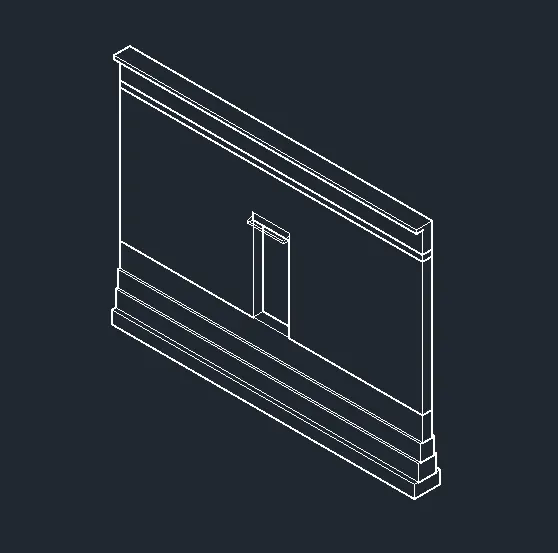
THE RENDER IMAGE OF THE WALL FOOTING
RESSULT:
ALL THE 3D ISOMETRIC & THE PLAN & ELEVATION VIEW HAS BEEN SUBMITTED WITH THE SCREENSHOT AS WELL AS THE CAD FILE ALSO THE RENDER FILE IS UPLOADED FOR THE LAST QUESTION.