Assignment 7-Side Pole Crash Simulation Challenge
SIDE POLL CRASH
OBJECTIVE: To set up the given side model of the car and crash it against a rigid poll to obtain the desired result .
- Sectional force in the cross member.
- Intrusion at B pillar,hinge pillar and fuel tank region.
- Peak velocity of an inner node of the door.
Case setup and execution:
- First we import the given model using the radioss solver deck.
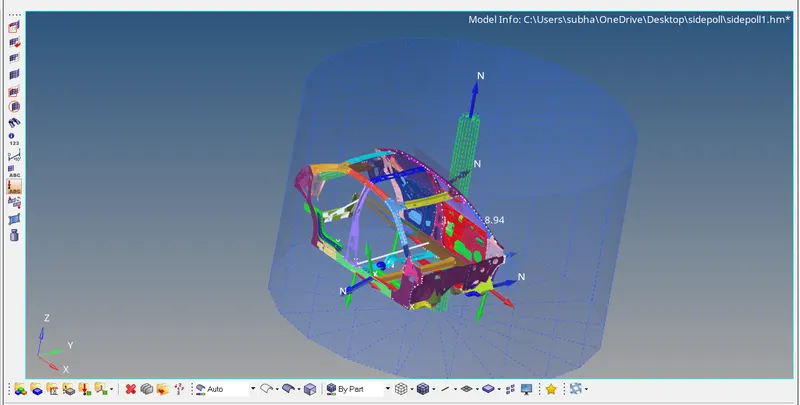
- Now we create a rigid poll for the crash. We can create this using right click in the model browser. After creating we select the node where we want to create the rigid poll and then enter the appropriate properties of the wall.
- Create a type 7 contact.
- Now we check for the COG and total mass of the model by going under the tools tab. We now do mass balancing by adding masses to make sure that the total mass is about 700. Now we check the COG again to make sure its at the right place.( Center of the model , near driver seat).
- Now we create intrusion at nodes near hinge,fuel tank and Bpillar by using the temp nodes.
- For creating the section forces, we have to create a frame first, and then create the section. For this we go to the solver browser and right click to select the 'frame>mov' and then select the node1>node2>node3 appropriatly. Once this is created we again use right click to select 'sect' and then select the referance frame id. Now we enter the node1,node2,node3 id's here again, and select the elements for grshell id.
- Repeat step 6 for both cross sections.
- Now we create a node at the inside of the door to obtain the peak velocity. The output can be requested by creating an output block for this particular node.
- To get all our required outputs, we need to create an outputblock. This can be done in the model broswer using the right click. We create as many output blocks as required for us.(Rigid wall,peak velocityintrusions,section forces)
- Create a boundary condition of Inivel and give the value of 8.94 in the Y direction.
- Now go to the engine cards and make sure the engine run time is 80ms and change the engine_dt_noda to 0.0005ms.
- Finally we can check for any errors by going to the tools tab and selecting the model checker>radiossblock.
- If we get no errors we are good to run the simulation.Go to the analysis tab and hit radioss by selecting include connectors and giving number of threads as 4( -nt 4).
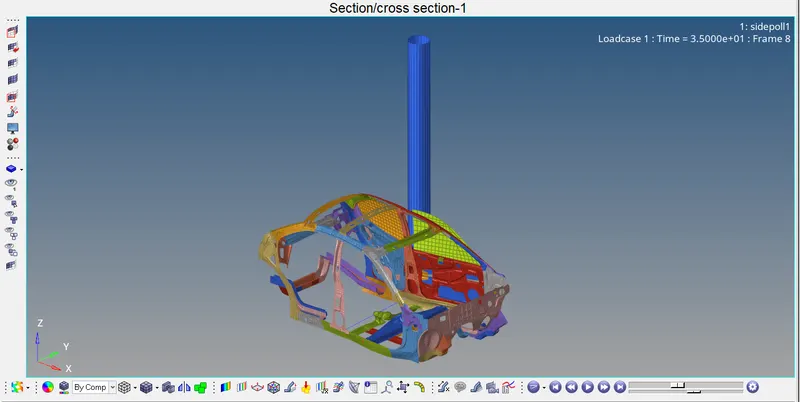
- After the simulation is done we can open the H3d file in hyperview and the T01 file in hypergraph2d and view our results.
Images and Graphs of the simulation:
Model setp:
H3d file:
Results:
- Energy plots
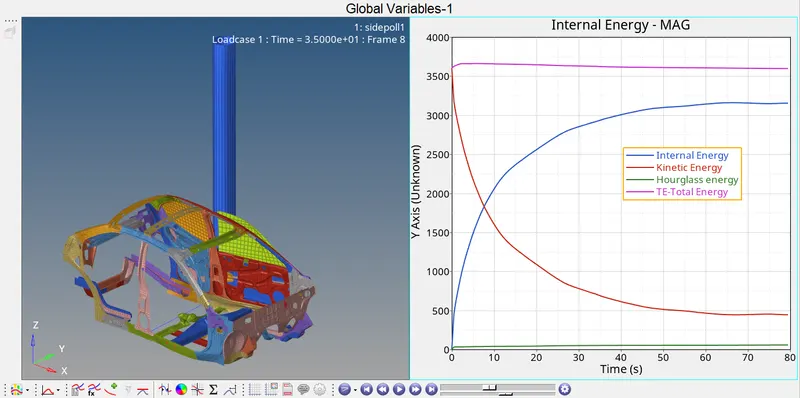
- The kinetic energy goes on decreasing like a parabolic curve from 3500 to 500
- Hourglass energy remains constant just above 0
- Internal energy increases from 0 to about 3250
- Total energy remains almost constant just above 3500
2. Cross section forces
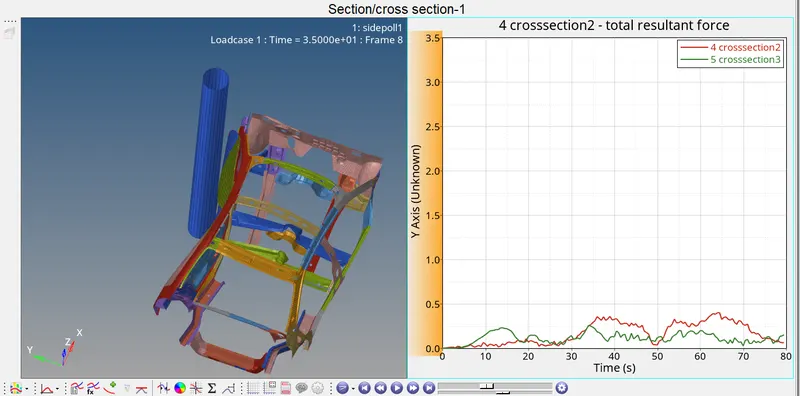
- Cross sectional forces of both the cross sections are totally irregular and we can clearly understand that the deformation on the cross section 1 is not equal to cross section 2.
- Also from the plot is understable that the cross section 1 has higher deformation than the other cross section.(orange colour plot).
3. Peak velocity
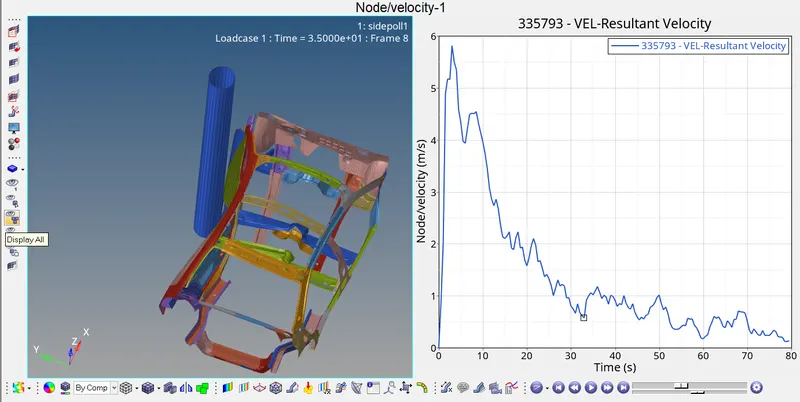
- Peak velocity can be observed at the 5th second with about 5.8m/s.
4. Rigid wall
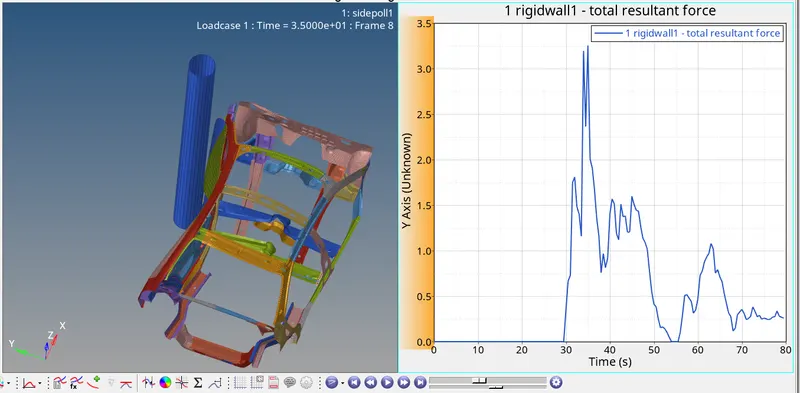
- The rigid wall force remains at 0 till 30th second and the increases to a maximum value of 3.25 and then finally drops to around 0.25 at 80th second.
5. Intrusions
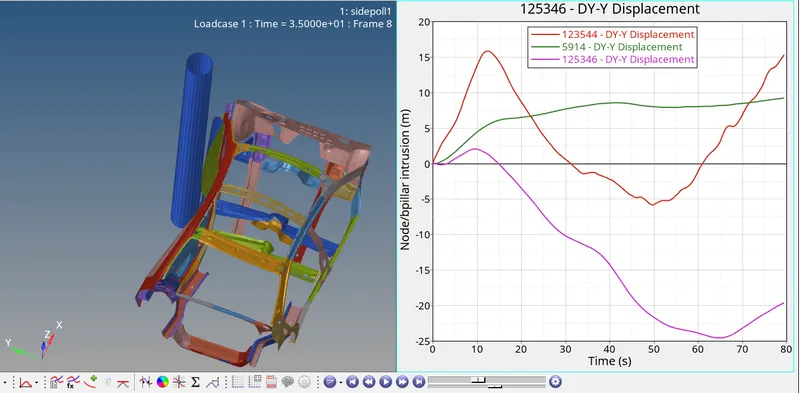
- The intrusions of Fuel tank, Bpillar and Hinge joint is shown in the figure above.
- 123544 represents Bpillar
- 5914 represents Hinge joint
- 125346 representx the fuel tank.
Intrusion calculation:
- Bpillar
Initial distance between Bpillar nodes = 1334.
Displacement after the crash =16
Final intrusion = 1334-16 =1318
2. Hinge joint
Initial distance between Hinge joint = 1295
Displacement after the crash = 8
Final intrusion = 1295 - 8 = 1287
CONCLUSION:
The given model has been succesfully simulated to obtain the desired results:
- Energy plots:
- Kinetic energy decreases from 3500 to 500
- Hourglass remains constant
- Internal energy increases as the simulation progress
- Total energy remains almost a constant
2. Cross section forces:
- The plots have been obtained , and the curves for most of them are irregular.
- we understand that the deformation of cross section 1 higher than second one.
3. Rigid wall:
- Rigid wall forces reach a maximum value of 3.25 during 35th second.
4. Peak velocity:
- Peak velocity is 5.8m/s at the 5th second
5. Intrusion:
- Bpillar-1318
- Hinge joint-1287
The simulation files drive link is uploaded in the form of notepad as the zip folder was not getting attatched directly.