Assignment 5-RADIOSS Interfaces & Study of Effect of Notches Challenge
Crashworthiness Analysis using HyperMesh and Radioss
#Assignment 5-RADIOSS Interfaces & Study of Effect of Notches Challenge
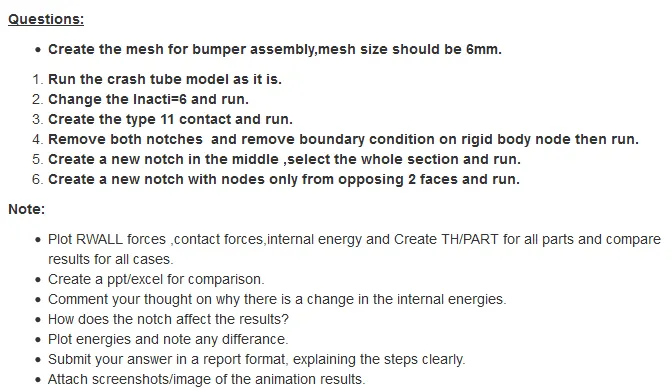
AIM: Creating mesh for bumper assembly, simulating and analysis of crash tube model.
OBJECTIVES:
- Bumper Assembly
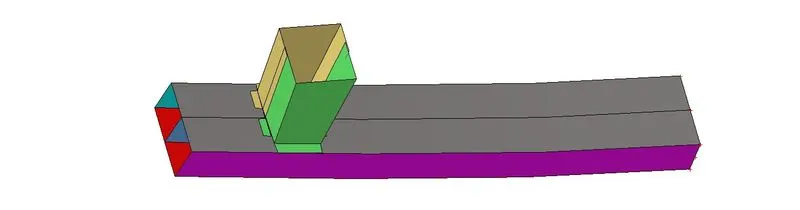
(1). Creating mesh for Bumper Assembly and connecting the whole component with a 2D collector.
- Crush Tube
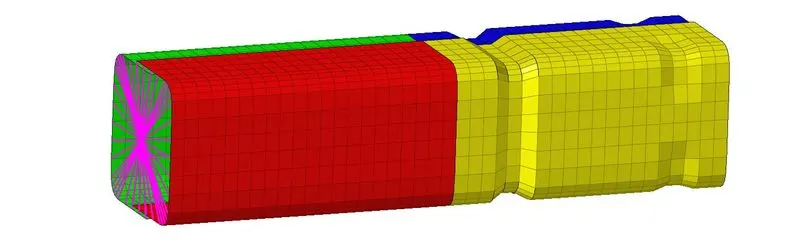
(2). Case 1- Simulating and analysing crush tube model as it is given in challenge.
(3). Case 2- Simulating and analysing crush tube model after Changing Inacti = 6 in group’s self contact collector.
(4). Case 3- Simulating and analysing crush tube model after Creating Type 11 Parameters.
(5). Case 4- Simulating and analysing crush tube model after removing both notches and boundary condition.
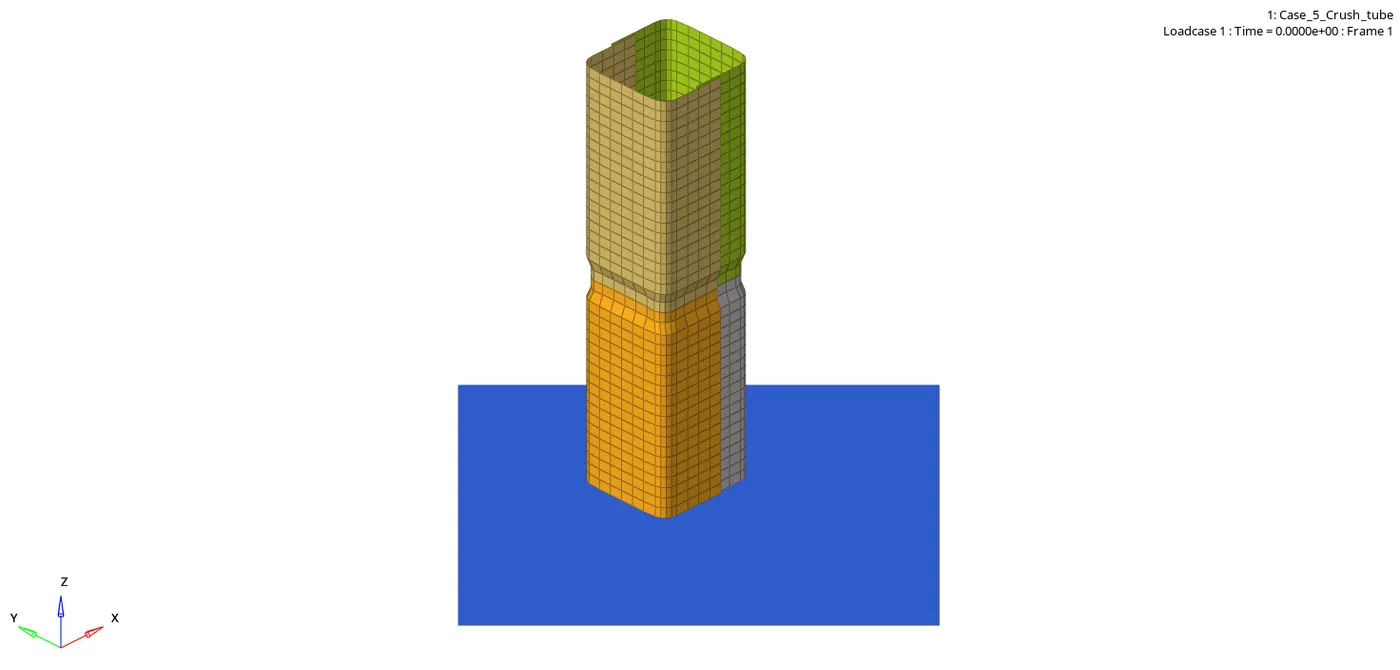
(6). Case 5-Simulating and analysing crush tube model after creating a new notch in the middle of the whole component.
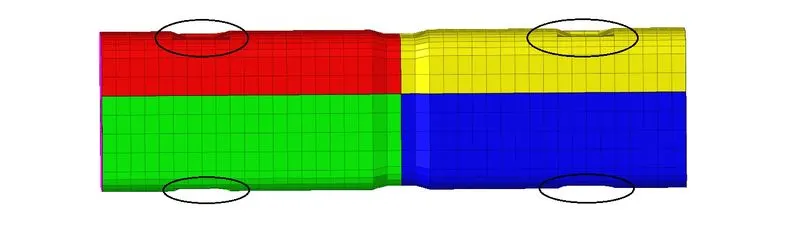
(7). Case 6- Simulating and analysing crush tube model after creating a new notch on opposite two faces of the component.
PROCEDURE FOR OBJECTIVE 1 : Creating mesh for Bumper Assembly and connecting the whole component with a 2D collector.
STEP 1: Import the Bumper_Assembly.hm file to hyperworks.
STEP 2: Do the geometry clean by and attach the free end surface to its respective part.
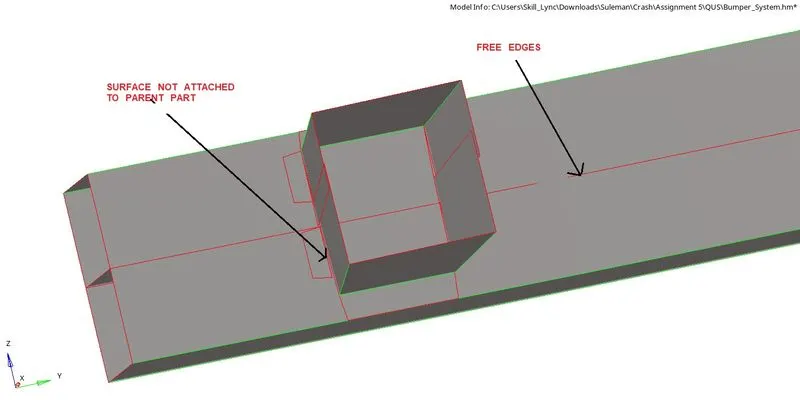
Following commands used-
- Surface drag along vector panel
- Surface edit trim with surface
- Surface edit extend line to surface
- Deleting surface quick edit panel.
- Suppressing edges quick edit panel.
- Split surface to line quick edit panel
- Replace point to retain point quick edit panel.
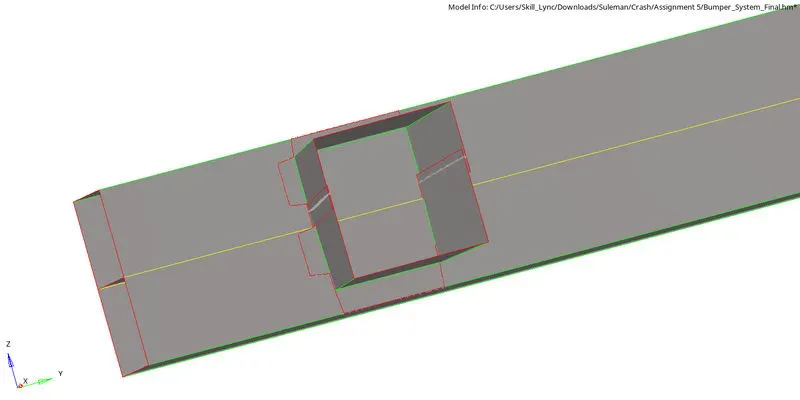
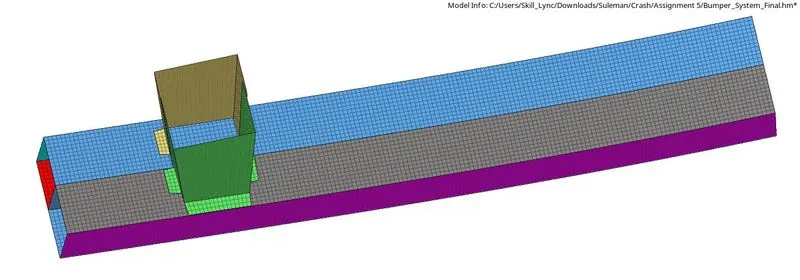
STEP 3: 2D Meshing with element size 6 mm
*2D>automesh>select surface>element size(6mm)>mesh type(mixed)>mesh
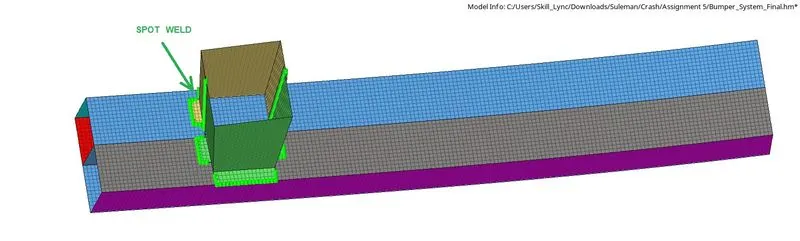
STEP 4: Connecting whole parts with 2D connectors, Spot weld connector is good to use here.
*2D>connectors>spot>type(weld)>select node list>select 2 components>tolerance(5mm)>diameter(5mm)>create.

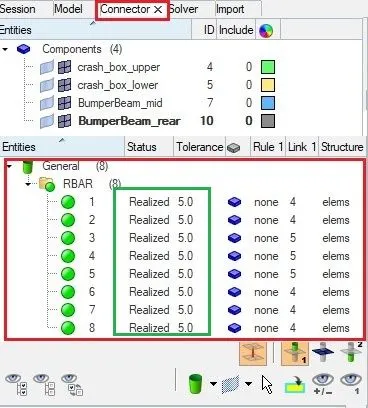
We can see that a new tab has been created with the name of connector and we can see how many connectors have been created and we should make sure that connectors should be realized.
RESULTS OF OBJECTIVE 1 :
PROCEDURE FOR OBJECTIVE 2 : Case 1- Simulating and analysing crush tube model as it is given in challenge.
STEP 1: Open Hyperworks in Radioss solver.
STEP 2: Import Solver desk Crash_Tube_0000.rad file
STEP 3: Simulating model as it is.
*Analysis>Radioss>save as input Case_1_Crash_Tube_0000.rad file>Checkbox include collectors>Write (-nt 4) in options>Click Radioss
STEP 4: Switch to Hyper view
STEP 5: select local model and result Case_1_Crash_Tube.h3d file
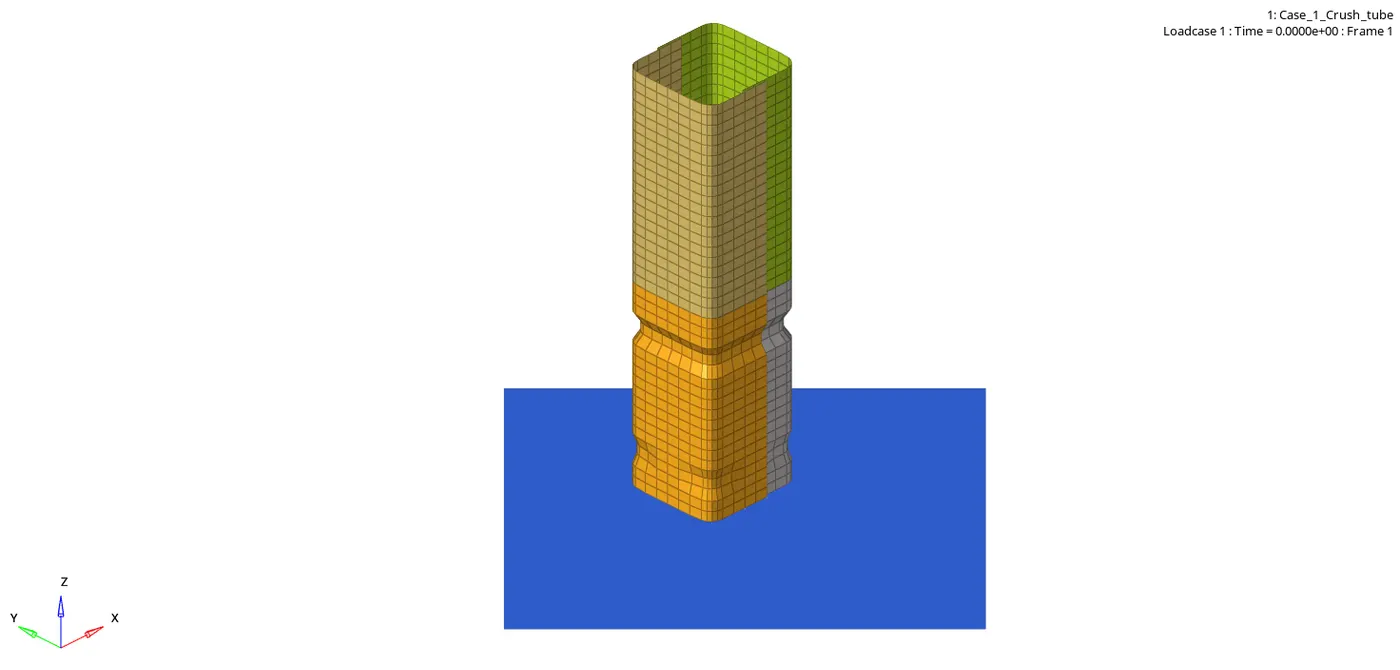
STEP 6: Checking the number of cycles it takes, energy error, mass error and simulation time.
- Number of cycles = 83496
- Energy error = -3.8%
- Mass error = 0.0
- Simulation time = Starter+Engine run time = 140.16 s
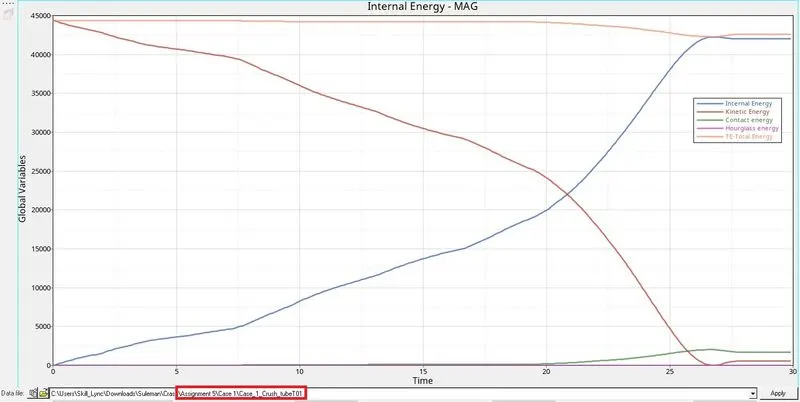
STEP 7: Observing Kinetic,Internal,Hourglass,Contact and Total engines. Switch to Hypergraph 2D, upload Case_1_Crash_TubeT01
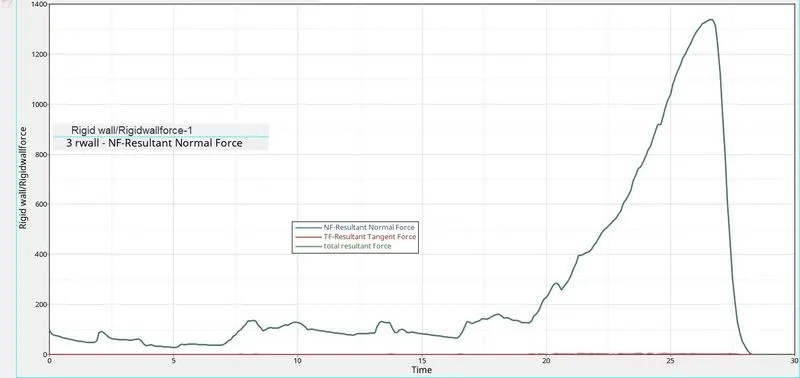
STEP 8: Observing Rigid Wall Forces
PROCEDURE FOR OBJECTIVE 3 : Case 2- Simulating and analysing crush tube model after Changing Inacti = 6 in group’s self contact collector.
STEP 1: Open Hyperworks in Radioss solver. Import Solver desk Case_2_Crush_Tube_0000.rad file
STEP 2: Changing Inacti = 6 in group’s self contact collector.
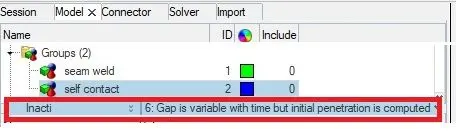
STEP 3:
*Analysis>Radioss>save as input Case_2_Crush_Tube_0000.rad file>Checkbox include collectors>Write (-nt 4) in options>Click Radioss
STEP 4: Switch to Hyper view
STEP 5: select local model and result Case_2_Crush_Tube.h3d file
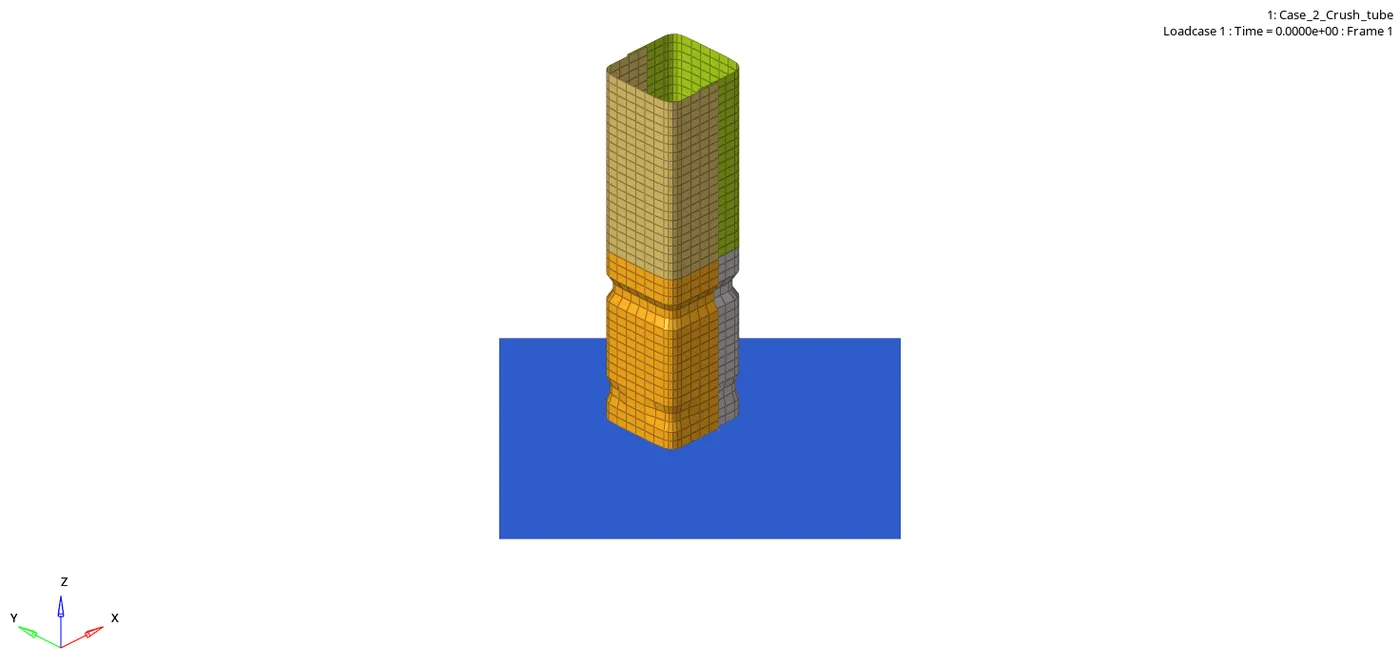
STEP 6: Checking the number of cycles it takes, energy error, mass error and simulation time.
- Number of cycles = 83496
- Energy error = -3.8%
- Mass error = 0.0
- Simulation time = Starter+Engine run time = 139.47 s
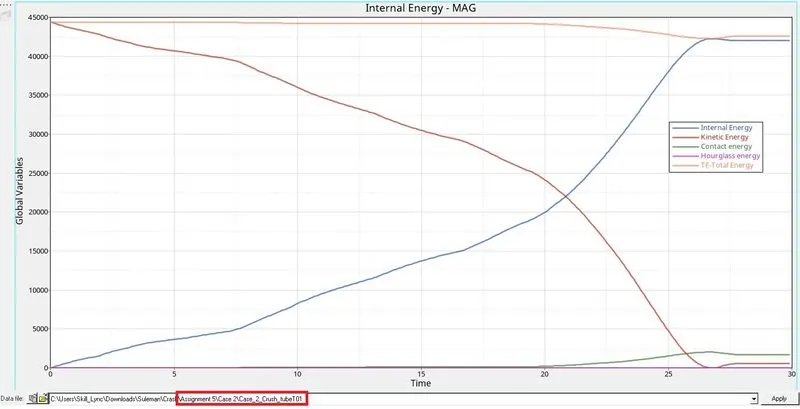
STEP 7: Observing Kinetic,Internal,Hourglass,Contact and Total engines. Switch to Hypergraph 2D, upload Case_2_Crush_TubeT01
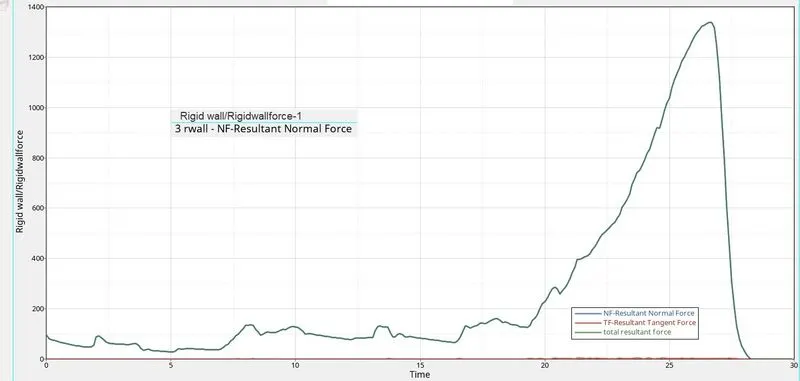
STEP 8: Observing Rigid Wall Forces
PROCEDURE FOR OBJECTIVE 4 : Case 3- Simulating and analysing crush tube model after Creating Type 11 Parameters.
STEP 1: Open Hyperworks in Radioss solver. Import Solver desk Case_2_Crush_Tube_0000.rad file
STEP 2: Creating Type 11 Parameters
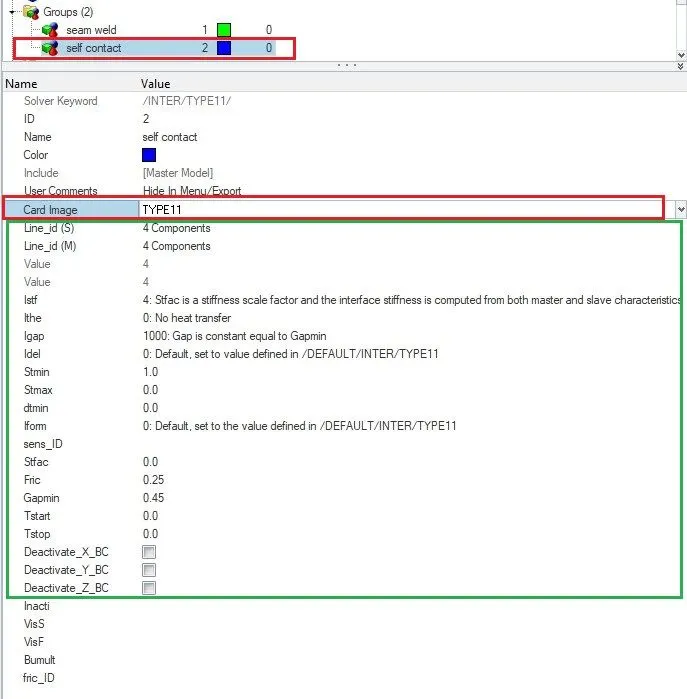
STEP 3:
*Analysis>Radioss>save as input Case_3_Crush_Tube_0000.rad file>Checkbox include collectors>Write (-nt 4) in options>Click Radioss
STEP 4: Switch to Hyper view
STEP 5: select local model and result Case_3_Crush_Tube.h3d file
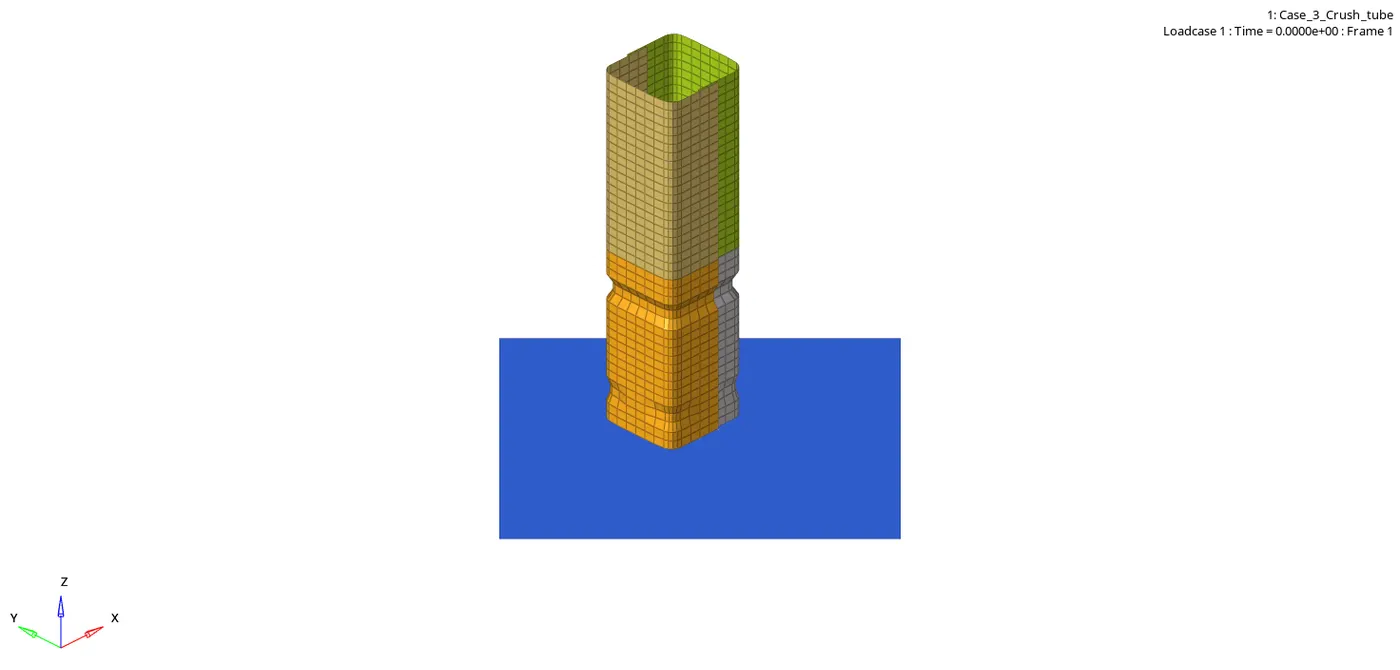
STEP 6: Checking the number of cycles it takes, energy error, mass error and simulation time.
- Number of cycles = 413904
- Energy error = -3.1%
- Mass error = 0.0
- Simulation time = Starter+Engine run time = 706.74 s
STEP 7: Observing Kinetic,Internal,Hourglass,Contact and Total engines. Switch to Hypergraph 2D, upload Case_3_Crush_TubeT01
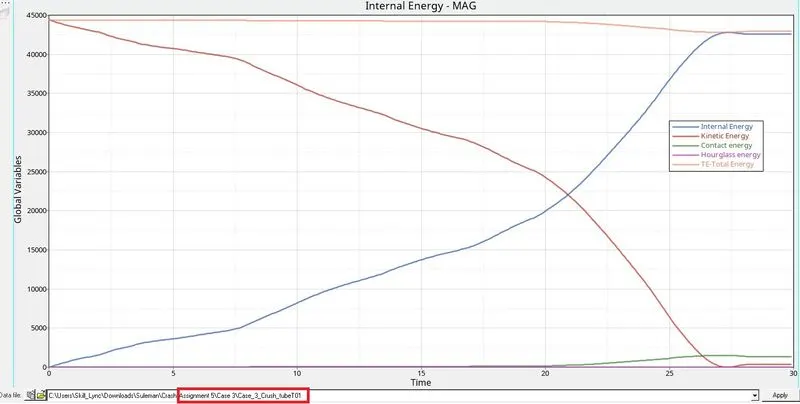
STEP 8: Observing Rigid Wall Forces
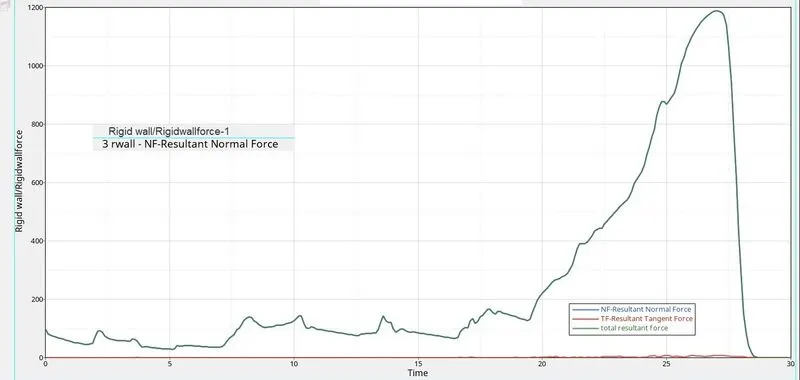
PROCEDURE FOR OBJECTIVE 5 : Case 4- Simulating and analysing crush tube model after removing both notches and deleting boundary condition.
STEP 1: Open Hyperworks in Radioss solver. Import Solver desk Case_2_Crush_Tube_0000.rad file
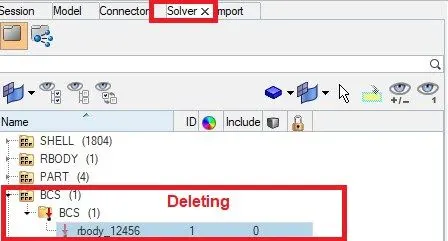
STEP 2: Removing both the notches and deleting boundary condition.
- Removing Both the noches by using Align Nodes Panel.
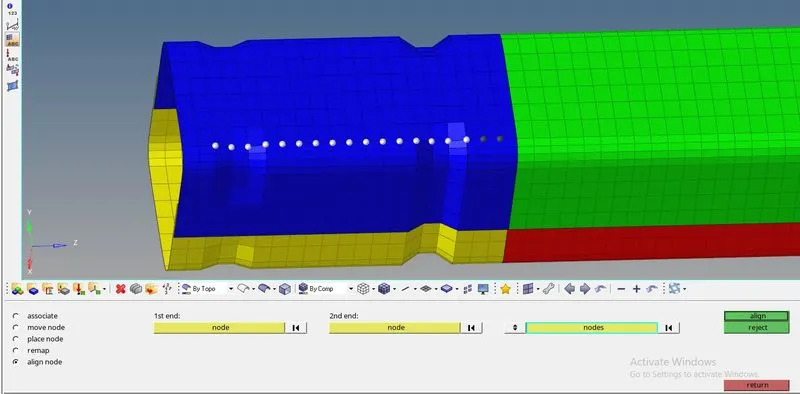

- Deleting boundary condition.
STEP 3:
*Analysis>Radioss>save as input Case_4_Crush_Tube_0000.rad file>Checkbox include collectors>Write (-nt 4) in options>Click Radioss
STEP 4: Switch to Hyper view
STEP 5: select local model and result Case_4_Crush_Tube.h3d file
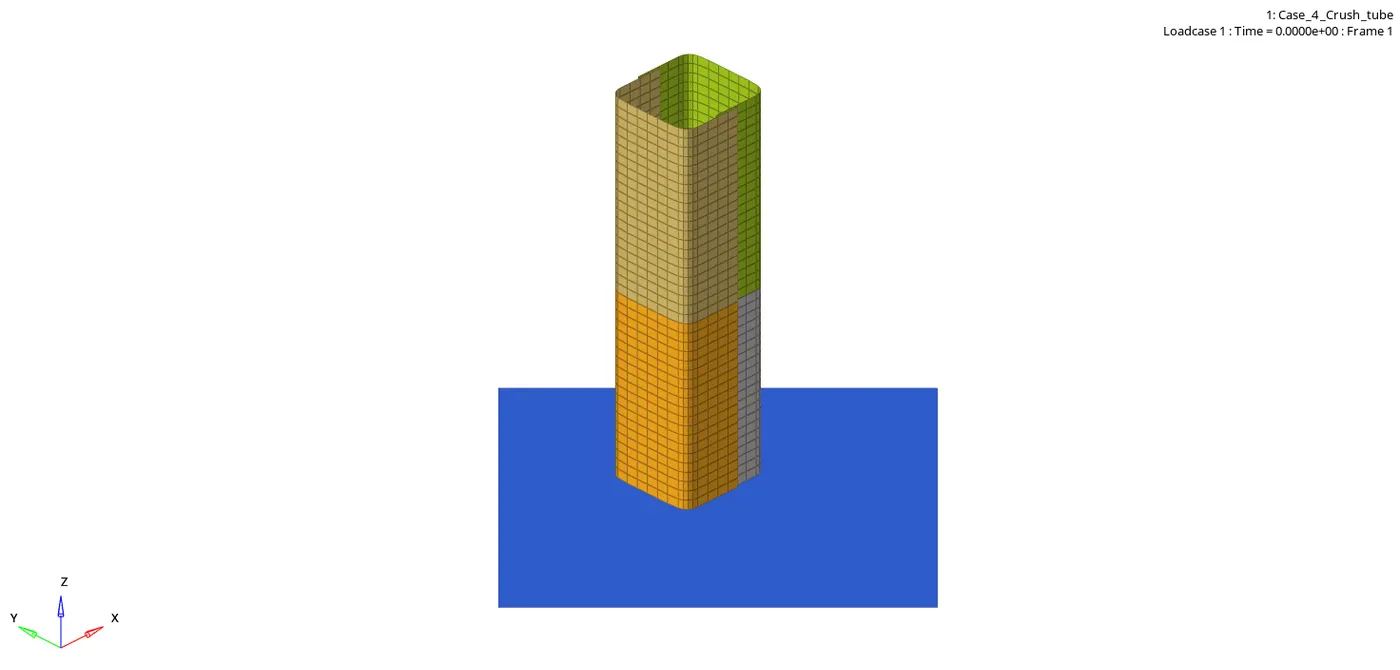
STEP 6: Checking the number of cycles it takes, energy error, mass error and simulation time.
- Number of cycles = 268738
- Energy error = -2.3 %
- Mass error = 0.0
- Simulation time = Starter+Engine run time = 458.37 s
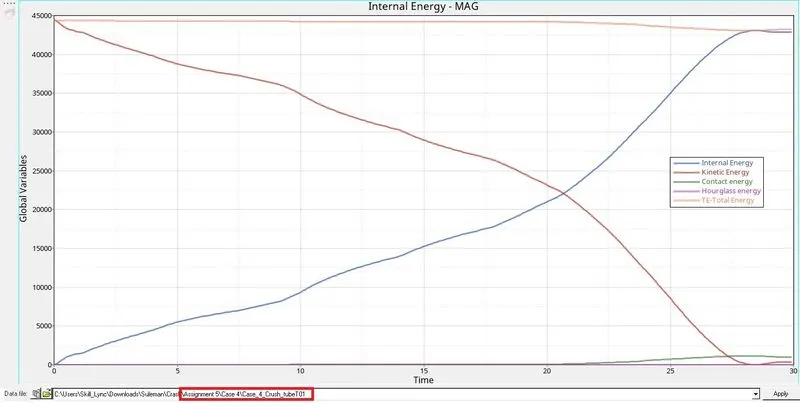
STEP 7: Observing Kinetic,Internal,Hourglass,Contact and Total engines. Switch to Hypergraph 2D, upload Case_4_Crush_TubeT01
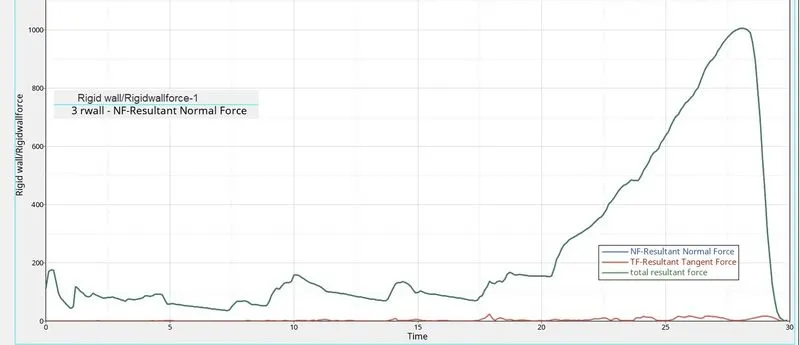
STEP 8: Observing Rigid Wall Forces
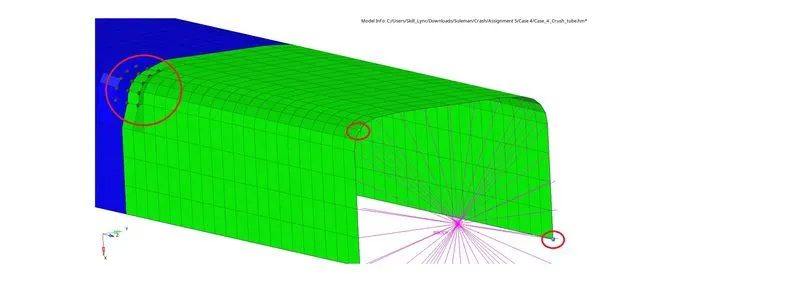
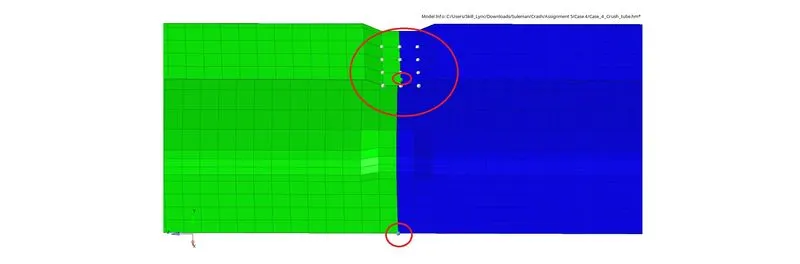
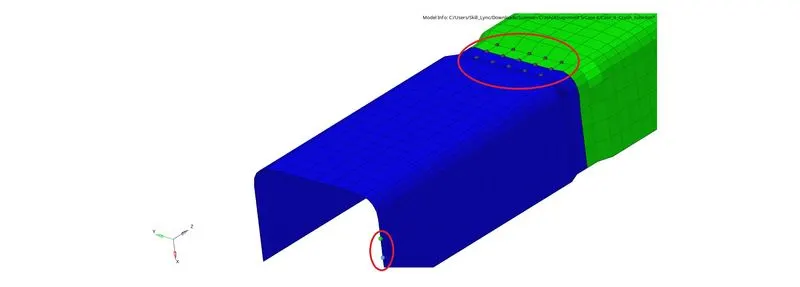
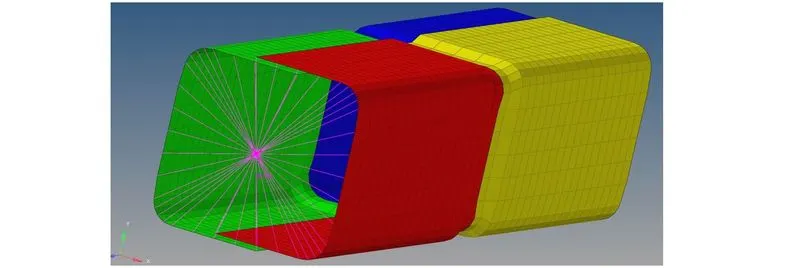
PROCEDURE FOR OBJECTIVE 6 : Case 5-Simulating and analysing crush tube model after creating a new notch in the middle of the whole component.
STEP 1: Open Hyperworks in Radioss solver. Import Solver desk Case_4_Crush_Tube_0000.rad file
STEP 2: Creating a new notch in the middle of the whole component.
- Translating nodes by giving vector direction
STEP 3:
*Analysis>Radioss>save as input Case_5_Crush_Tube_0000.rad file>Checkbox include collectors>Write (-nt 4) in options>Click Radioss
STEP 4: Switch to Hyper view
STEP 5: select local model and result Case_5_Crush_Tube.h3d file
STEP 6: Checking the number of cycles it takes, energy error, mass error and simulation time.
- Number of cycles = 265789
- Energy error = -1.8 %
- Mass error = 0.0
- Simulation time = Starter+Engine run time = 463.33s
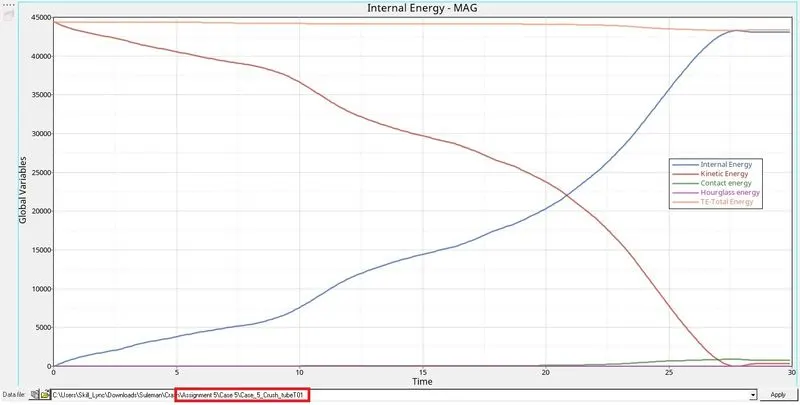
STEP 7: Observing Kinetic,Internal,Hourglass,Contact and Total engines. Switch to Hypergraph 2D, upload Case_5_Crush_TubeT01
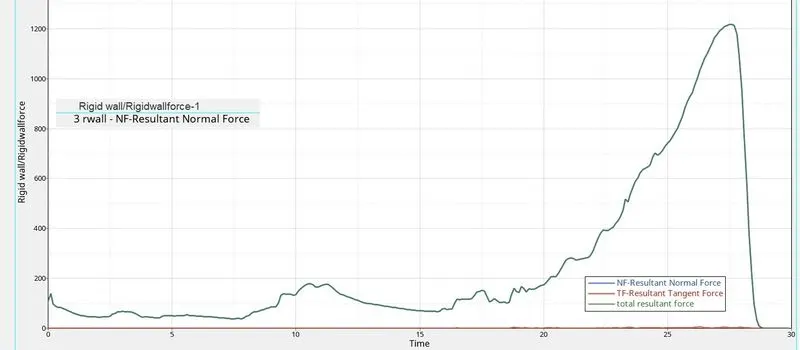
STEP 8: Observing Rigid Wall Forces
PROCEDURE FOR OBJECTIVE 7 : Case 6- Simulating and analysing crush tube model after creating a new notch on opposite two faces of the component.
STEP 1: Open Hyperworks in Radioss solver. Import Solver desk Case_5_Crush_Tube_0000.rad file
STEP 2: Creating a new notch on opposite two faces of the component.
STEP 3:
*Analysis>Radioss>save as input Case_6_Crush_Tube_0000.rad file>Checkbox include collectors>Write (-nt 4) in options>Click Radioss
STEP 4: Switch to Hyper view
STEP 5: select local model and result Case_6_Crush_Tube.h3d file
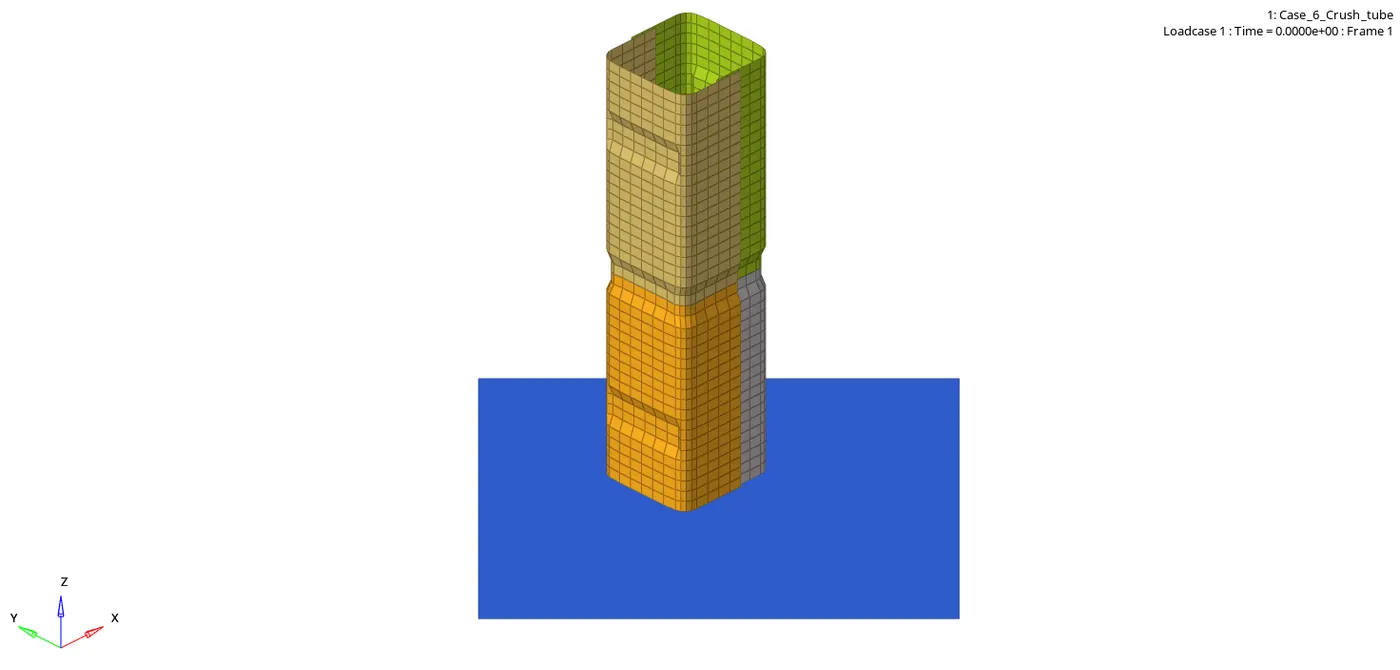
STEP 6: Checking the number of cycles it takes, energy error, mass error and simulation time.
- Number of cycles = 365188
- Energy error = -2.1%
- Mass error = 0.0
- Simulation time = Starter+Engine run time = 639.73 s
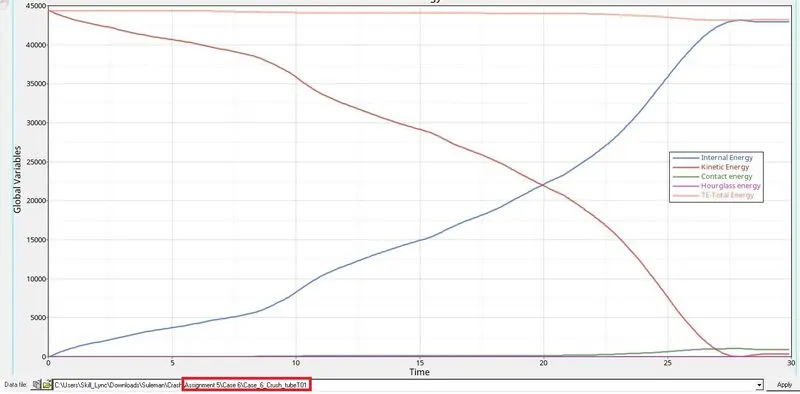
STEP 7: Observing Kinetic,Internal,Hourglass,Contact and Total engines. Switch to Hypergraph 2D, upload Case_6_Crush_TubeT01
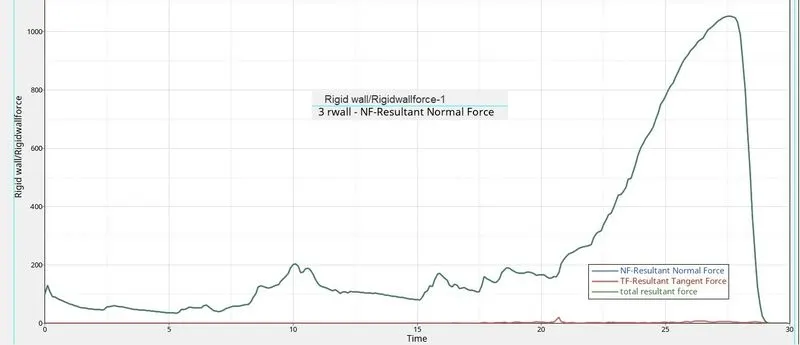
STEP 8: Observing Rigid Wall Forces
OBSERVATIONS:
Case 1: In case 1, notches are away from the middle of the component and four more notches are made on the same side of each corner. Total resultant forces reach a peak of 1350KN at 26.5 seconds and Kinetic energy and internal energy intersect each other at 22500 KN at 21 seconds.
Case 2: In case 2 we won’t find any differences after changing it to Inacti=6,we didn’t make changes to the structure of the crush tube, The results we got were almost the same as case 1.
Case 3: In case 3 we created the type 11 contact,we didn’t make changes to the structure of the crush tube, We saw that total resultant force was decreased to 1200KN at 27 seconds. Here also Kinetic energy and internal energy intersect each other at 22500 KN at 21 seconds.
Case 4: In case 4 we removed both the notches from the crush tube, so there was no notches in the component it was completely align, we saw that there is sudden increase of total resultant force after 0 seconds and then it reaches peak at 1000KN at 28 seconds, we also saw that there was disturbance in resultant tangent force in the rigid wall graph between 15 to 30 seconds. Here also Kinetic energy and internal energy intersect each other at 22500 KN at 21 seconds.
Case 5: In case 5 we make a notches in the middle around the component we saw again there is increases in total resultant forces than earlier case with 1210KN at 27.5 seconds
Case 6: In case 6 we make more notches in the opposite face of the component, we saw that there is sudden increases in total resultant force at 10 second due to opposite notches which we didn’t found in earlier cases but peak of total resultant force again decreased to 1020KN at 27.5 seconds, here kinetic energy and Internal energy intersect each other at just 20 seconds at 20 seconds with 22500KN force, which also we didn’t saw in earlier cases.
|
No. of Cycles |
Energy Error |
Mass Error |
Simulation Time |
|
|
Case 1 |
83496 |
-3.8% |
0.0 |
140.16 s |
|
Case 2 |
83496 |
-3.8% |
0.0 |
139.47 s |
|
Case 3 |
413904 |
-3.1% |
0.0 |
706.74 s |
|
Case 4 |
268738 |
-2.3 % |
0.0 |
458.37 s |
|
Case 5 |
265789 |
-1.8 % |
0.0 |
463.33 s |
|
Case 6 |
365188 |
-2.1% |
0.0 |
639.73 s |
LEARNINGS:
- 2D Meshing
- Joining components with 2D spot weld connectors.
- Importing starter file runname_0000.rad file
- Using Radioss command
- Running runnane.h3D file in Hyperview to see animation
- Reading runname_0001.out file
- Using Hypergraph 2D.
- Observing energies graph
- Observing rigid wall forces.
- Changing Type 11 parameters.
___________________________________________________________________________________________________________