assignment 5
*objective:-
-To create the mesh for the bumper assembly with mesh size of 6 mm.
-After that compare the results of simulation for given cases:-
1) Run the crash tube model as it is.
2) Change the Inacti=6 and run.
3) Create the type 11 contact and run.
4) Remove both notches and remove boundary condition on rigid body node then run.
5) Create a new notch in the middle ,select the whole section and run.
6) Create a new notch with nodes only from opposing 2 faces and run.
*procedure:-
*To create the mesh for the bumper assembly with mesh size of 6 mm.
-First of all impoirt the model in the hypermesh. For that choose the radioss profile.
-After that import the model using import model opction.(import solver deck>import model)
-select geometry color mode is by topo and cleanup the geometry.
-For the meshing use auto mesh command and put the value of element size is 6 mm & select elemnt type is only quads and the mesh the component surface by surface.

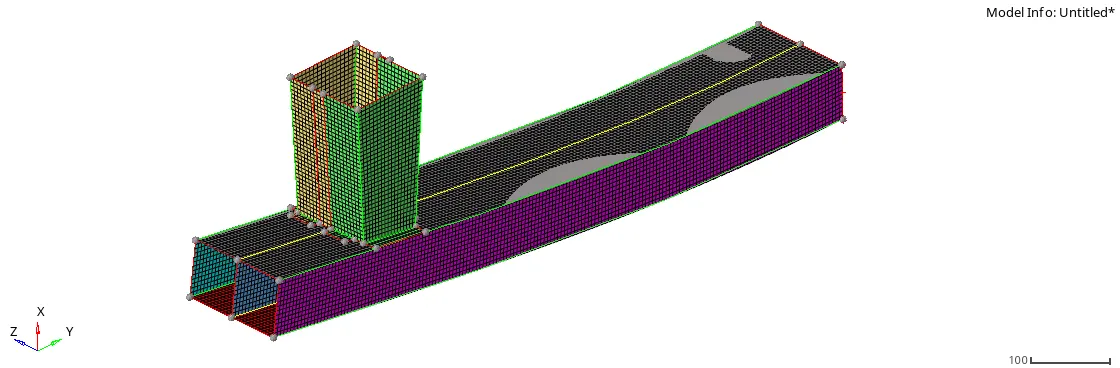
compare the results of simulation for given cases:-
case 1:-
*Run the crash tube model as it is.
-First of all import the crush_tube_0000.rad in radioss solver.
-here run the model as it, then not any changes require in any properties.
-Now go to radioss command(Analysis>radioss), and provide the name is crash_tube_oooo.rad.
-Here main noted point is provide the value in the opction is -nt 4.

-After that open the hyperview and load the model as a h3d file format.

-Now go to counter opction and select same properties show in below image.

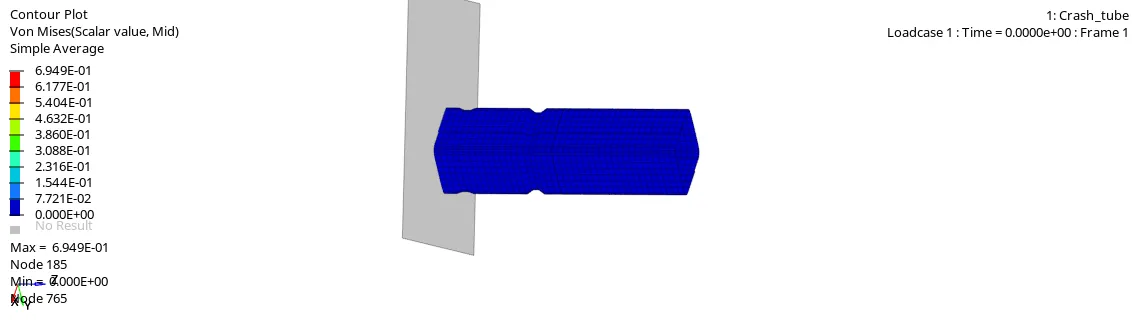
*Plot of internal energy vs time:-
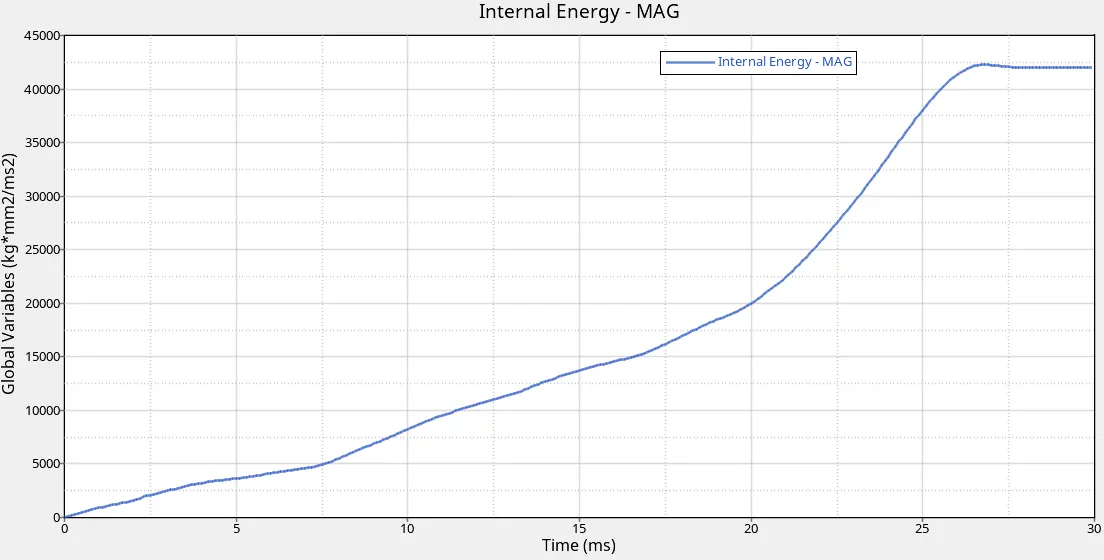
-From this plot we conclude that internal energy is increase linearly up to certain time and after that it increase rapidly.It is due to impact of tube against wall.
*Plot of Various energy vs time:-
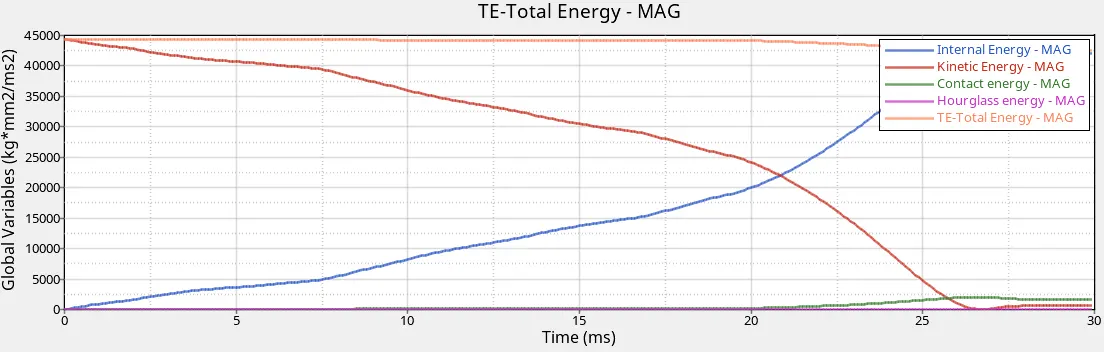
-The kinetic energy is decrease gradually and after that it increase sligtly.
-The contact energy is zero up the before the impact and from the impact its increase some value.
-Hourglass energy is zero over the simulation due to the QEPH element formulation.
*Plot of rigid wall force vs time:-
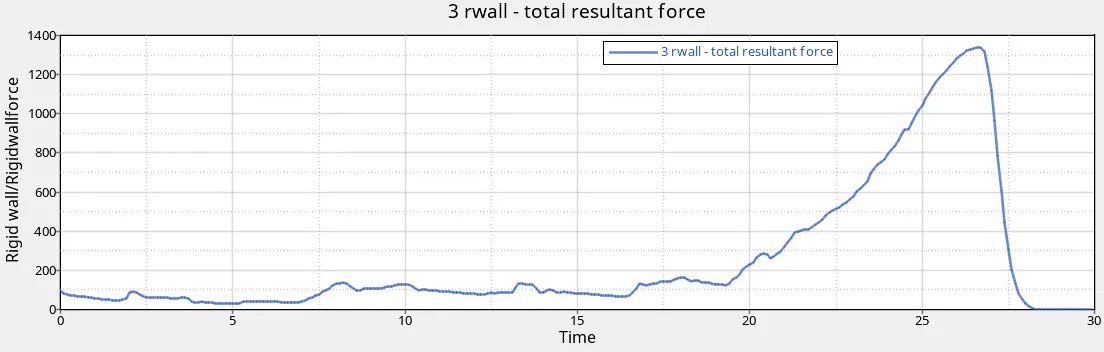
-The resultant force is increase and attains a peak value at the time of impact and after that it decrease.
case 2:-
Change the Inacti=6 and run.
-First of all open hypermesh and go to the application and choose hypercrash opction.
-here, most imp point is choose the unit system is Kn mm ms kg
-import the crush_tube_0000.rad in hyper crash.(file>import>radioss)
-After that go to browser>contact interface>self contact.
-here we change the inacti is 6.
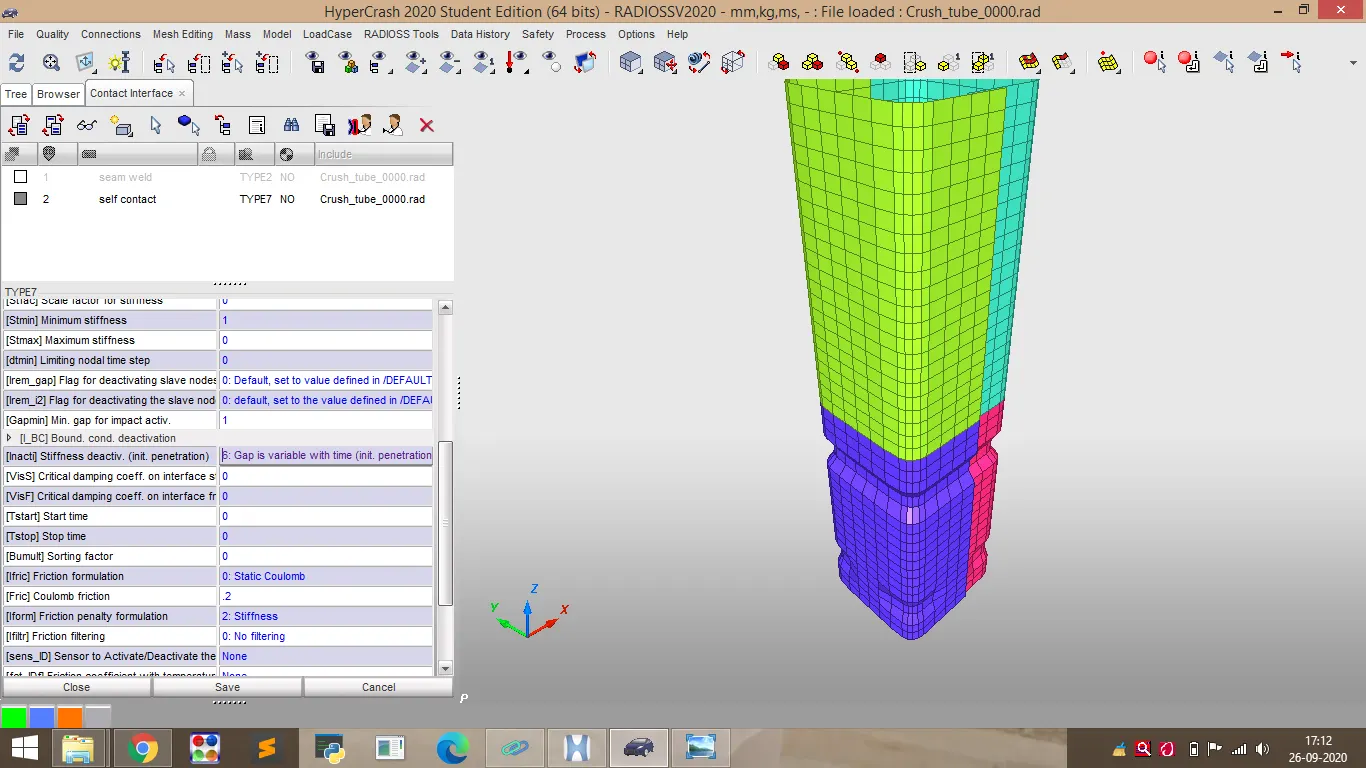
-After that export the model as a name of case2_0000.rad
-Now we open the hypercrash and open this file.(case2_0000.rad)
-go to radioss command(Analysis>radioss), and provide the name is case2_oooo.rad.
-After that open the hyperview and load the model as a h3d file format.

-Now go to counter opction and select same properties .(case-1)
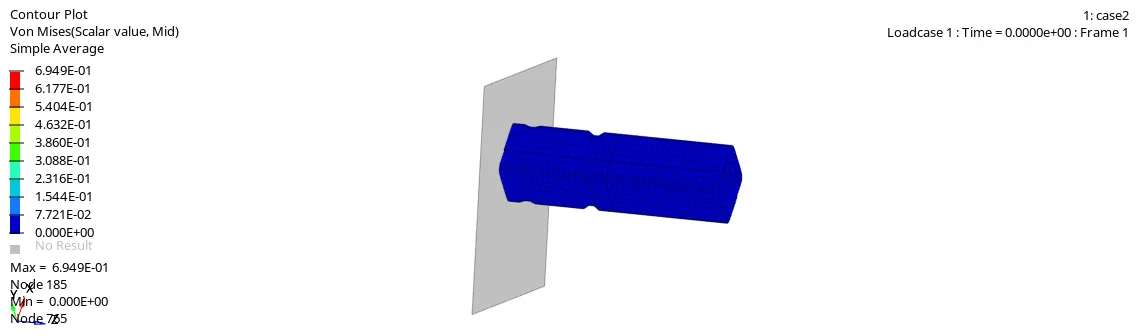
-The von mises counter is :-
*Plot of internal energy vs time:-
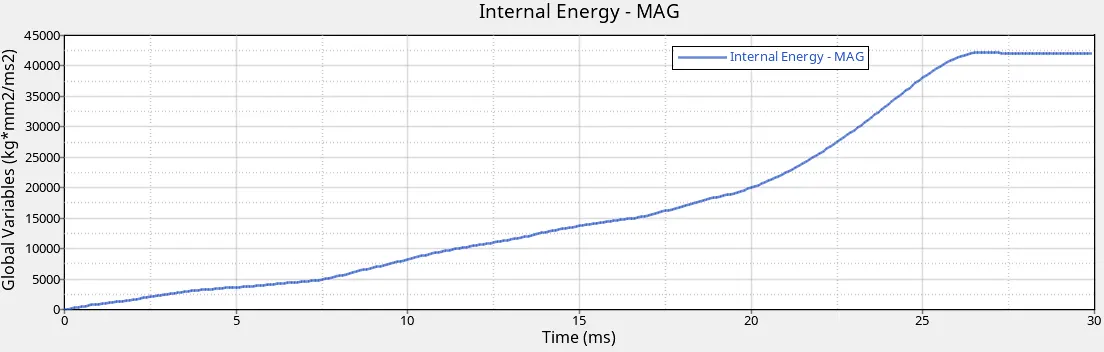
-From this plot we conclude that internal energy is increase linearly up to certain time and after that it increase rapidly.It is due to impact of tube against wall.
*Plot of Various energy vs time:-
-The kinetic energy is decrease gradually and after that it increase sligtly.
-The contact energy is zero up the before the impact and from the impact its increase some value.
-Hourglass energy is zero over the simulation due to the QEPH element formulation.
*Plot of rigid wall force vs time:-
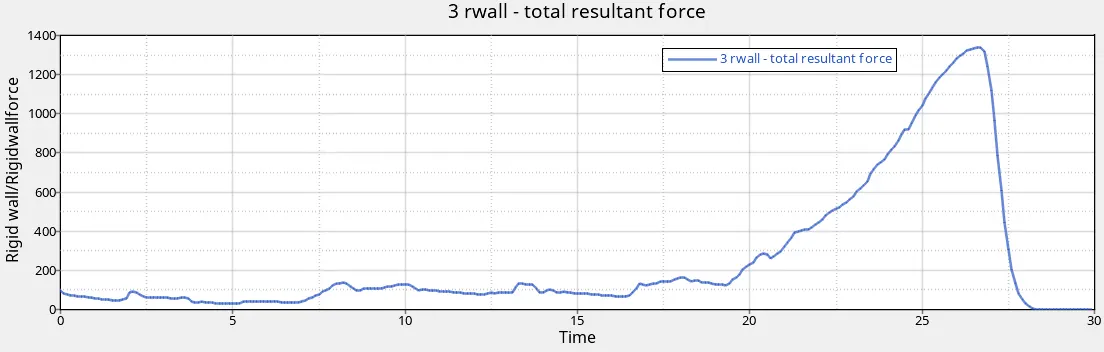
-The resultant force is increase and attains a peak value at the time of impact and after that it decrease.
*comparision between case 1 & 2:-
-We use type 7 for case 1 & 2 ,it means node to surface contact. The main disadvantage is it does not consider the contact of edge of the slave element with master surface.
-In case 1 we use the inacti value is assignd to 0,so it consider the default penetration.
-In case 2 we use the inacti value is 6, so it consider the gap is varible with time.
-But overall result is not more different for case 1& 2.
case 3:-
Create the type 11 contact and run.
-once again import the crush_tube_0000.rad in hyper crash.(file>import>radioss)
-After that go to browser and create new contact interface.
-Here we choose the edge to edge.(type11)
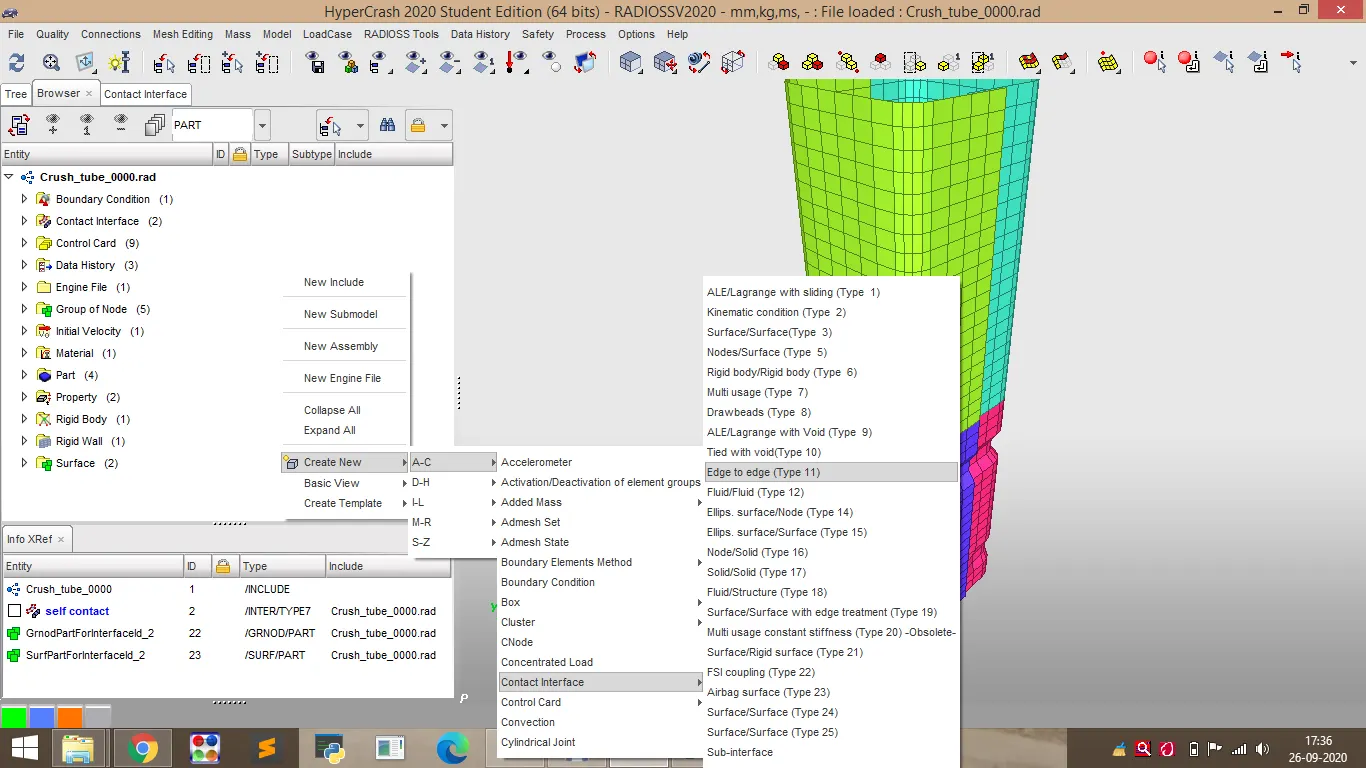
-Change the properties as per showing in video, it is change for generate the better result.
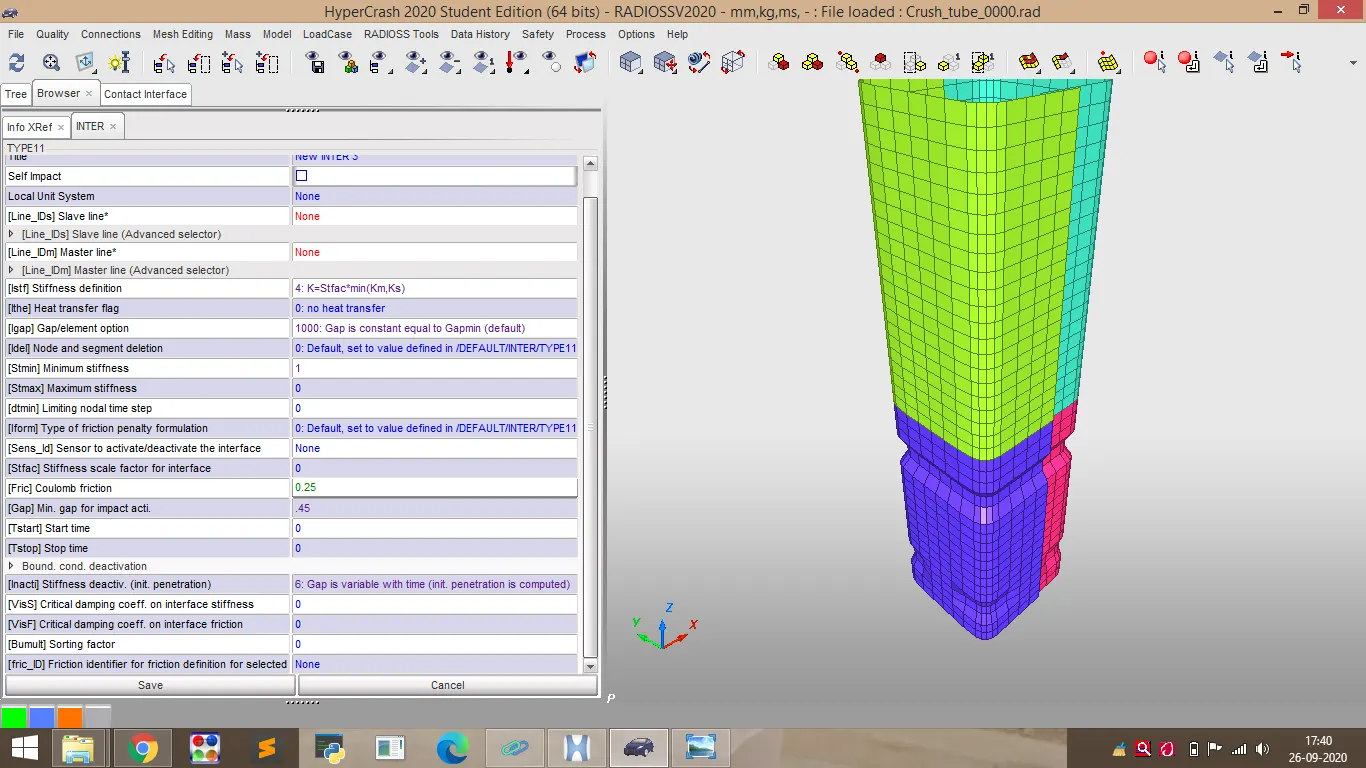
-After that export the file as a case3_0000.rad file.
-Now we open the hypercrash and open this file.(case3_0000.rad)
-go to radioss command(Analysis>radioss), and provide the name is case3b_oooo.rad.
-After that open the hyperview and load the model as a h3d file format.
-Go to counter opction and select same properties .(case-1)
-The von mises counter is :-
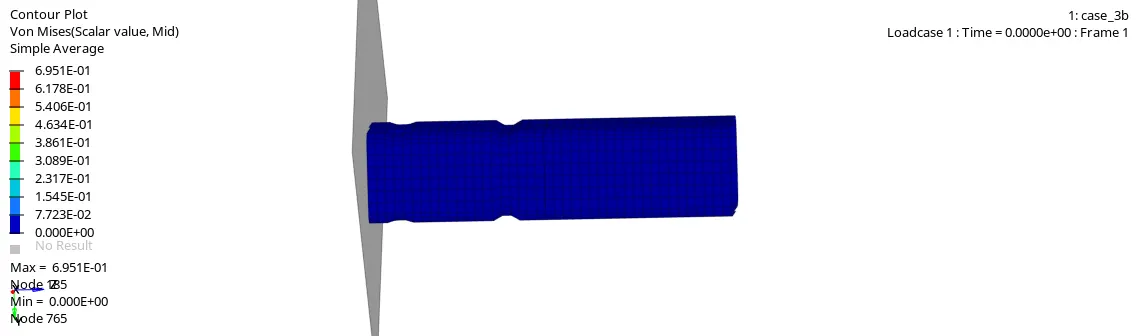
*Plot of internal energy vs time:-
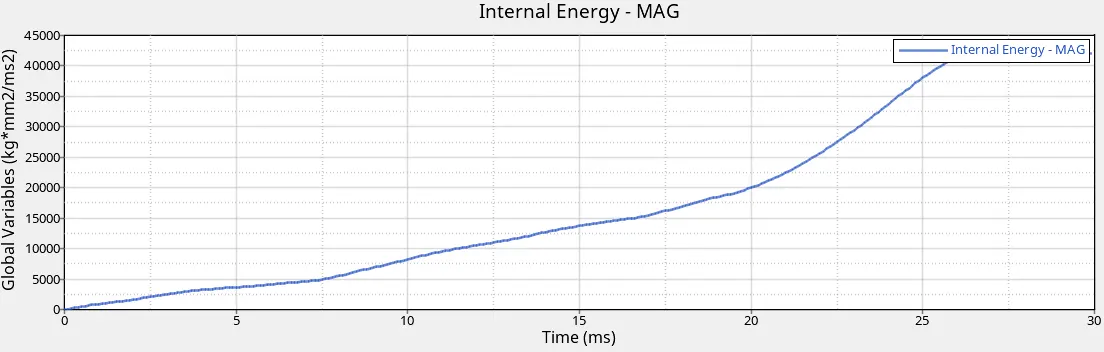
-From this plot we conclude that internal energy is increase linearly up to certain time and after that it increase rapidly.It is due to impact of tube against wall.
*Plot of Various energy vs time:-
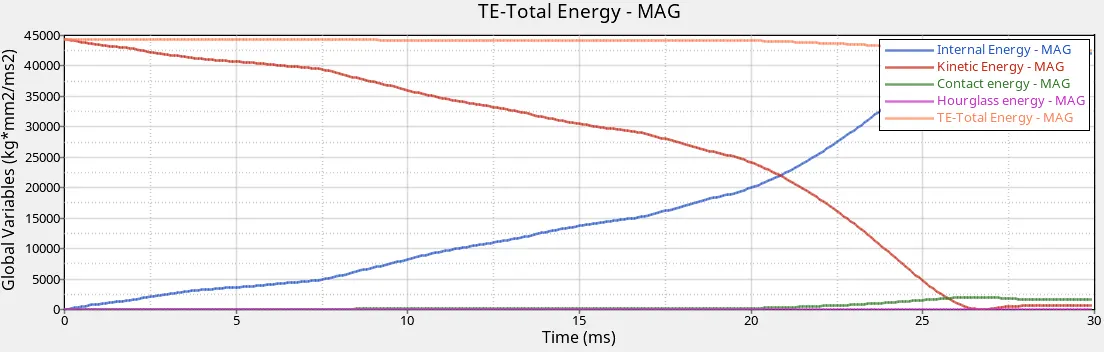
-The kinetic energy is decrease gradually and after that it increase sligtly.
-The contact energy is zero up the before the impact and from the impact its increase some value.
-Hourglass energy is zero over the simulation due to the QEPH element formulation.
*Plot of rigid wall force vs time:-
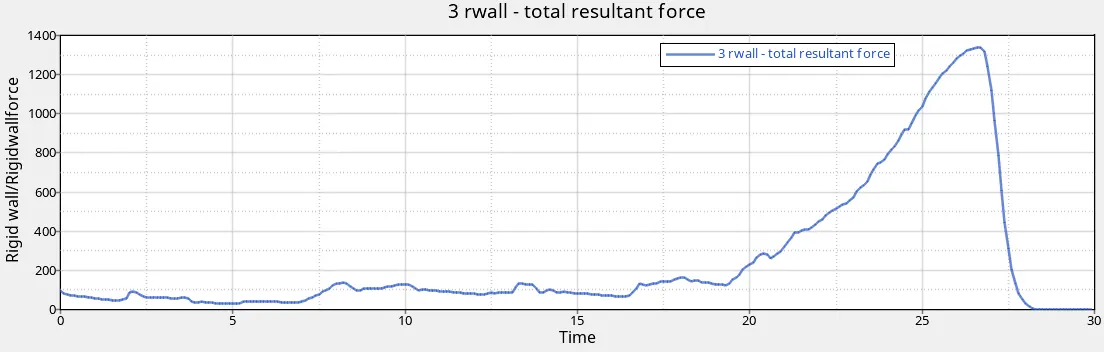
-The resultant force is increase and attains a peak value at the time of impact and after that it decrease.
case 4:-
Remove both notches and remove boundary condition on rigid body node then run.
-Import the crush_tube_0000.rad in hypermesh.
-After that remove the notches using the allign node command.(geom>node edit>allign node)
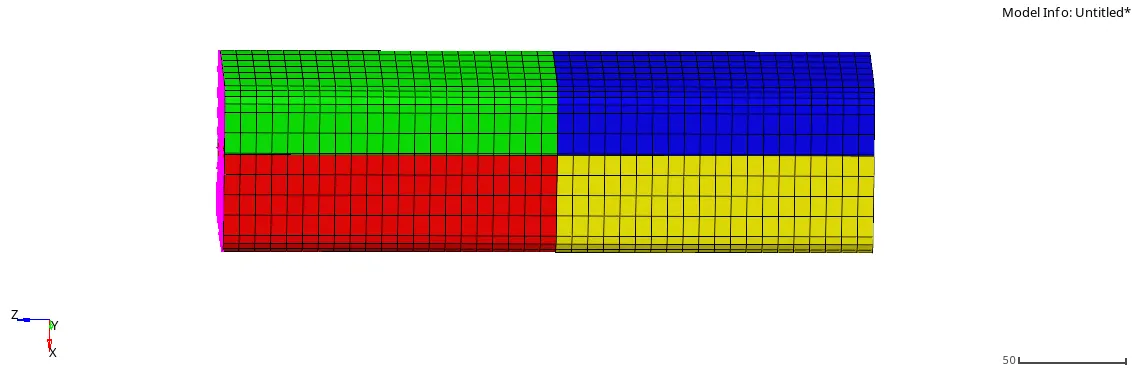
-Also remove the boundary condition.
-go to radioss command(Analysis>radioss), and provide the name is case4_oooo.rad.
-After that open the hyperview and load the model as a h3d file format.
-Go to counter opction and select same properties .(case-1)
-The von mises counter is :-
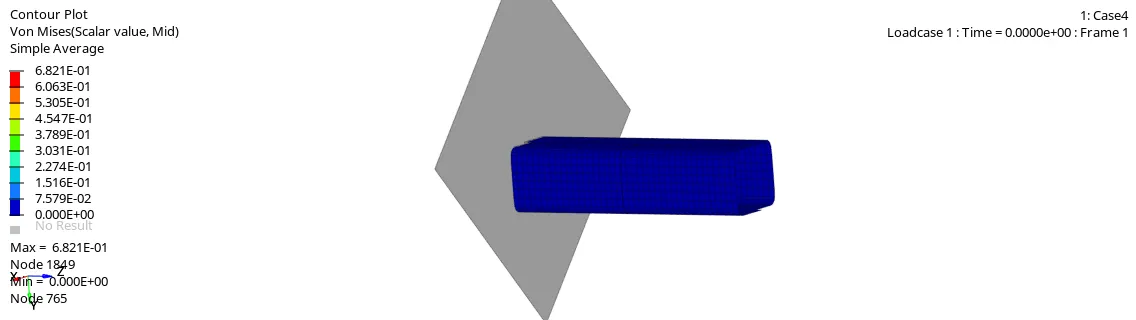
*Plot of internal energy vs time:-
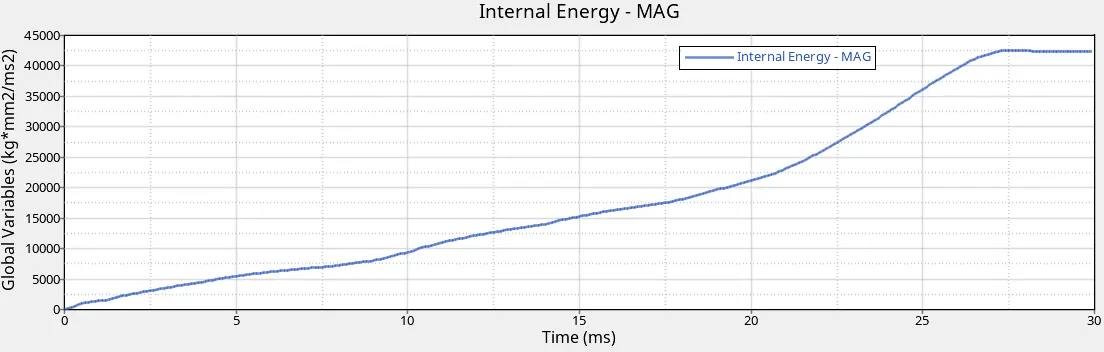
-From this plot we conclude that internal energy is increase linearly up to certain time and after that it increase rapidly.It is due to impact of tube against wall.
*Plot of Various energy vs time:-
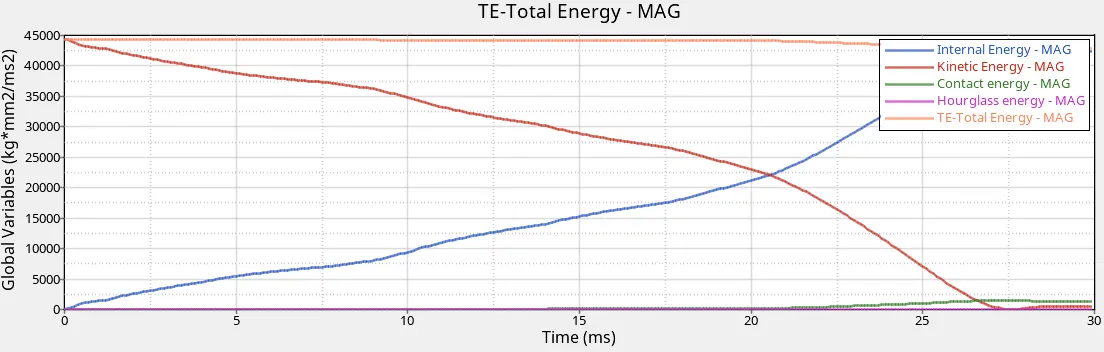
-The kinetic energy is decrease gradually and after that it increase sligtly.
-The contact energy is zero up the before the impact and from the impact its increase some value.
-Hourglass energy is zero over the simulation due to the QEPH element formulation.
*Plot of rigid wall force vs time:-
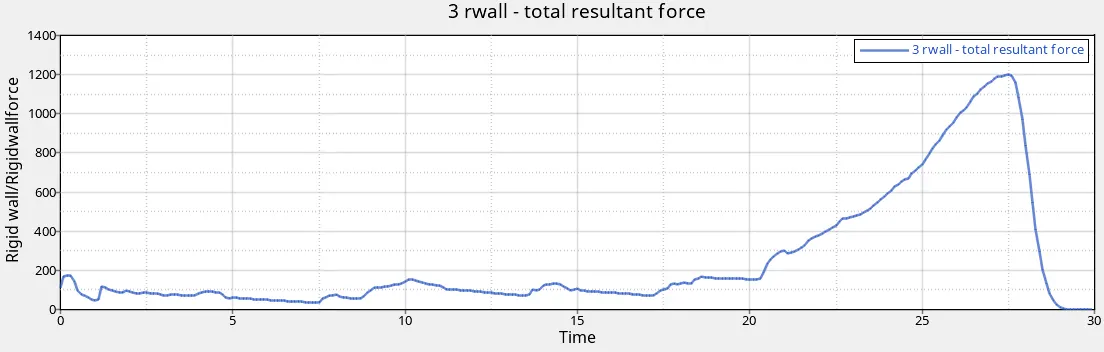
-The resultant force is increase and attains a peak value at the time of impact and after that it decrease.
*comparision between case 3 & 4:-
-In case 3 we use type 11 contact, its define edge to edge contact.It is similar to type 7 contact in terms of gap definition.
-In case 4 all boundary conditions are removed and remove the all notches.
The contact energy in case of 4 obtain is 1571 J whereas in case 3 it is obtain 2019.5 J, It is higher due to the present of notches.
case 5:-
Create a new notch in the middle ,select the whole section and run.
-Import the crush_tube_0000.rad in hypermesh.
-Create the notche in the middle using the allign node command.(geom>node edit>allign node)
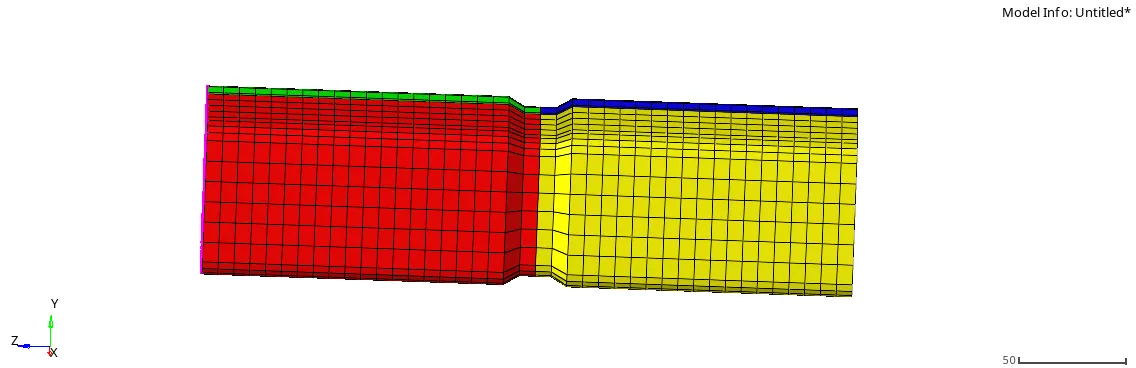
-go to radioss command(Analysis>radioss), and provide the name is case4_oooo.rad.
-After that open the hyperview and load the model as a h3d file format.
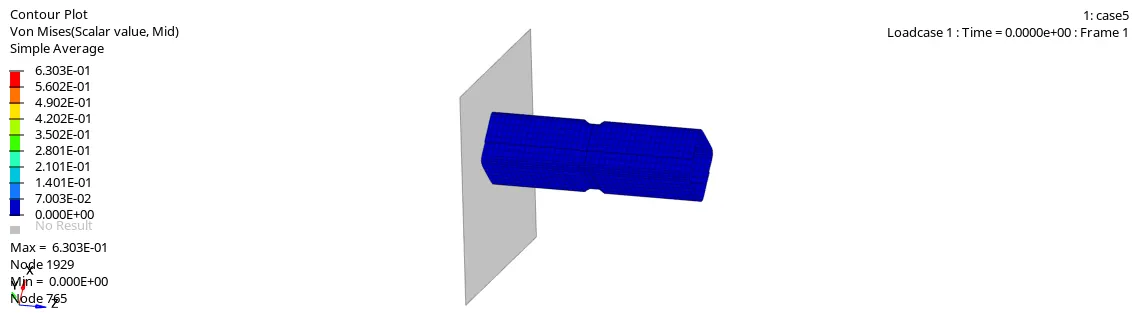
-Go to counter opction and select same properties .(case-1)
*The von mises counter is :-
*Plot of internal energy vs time:-
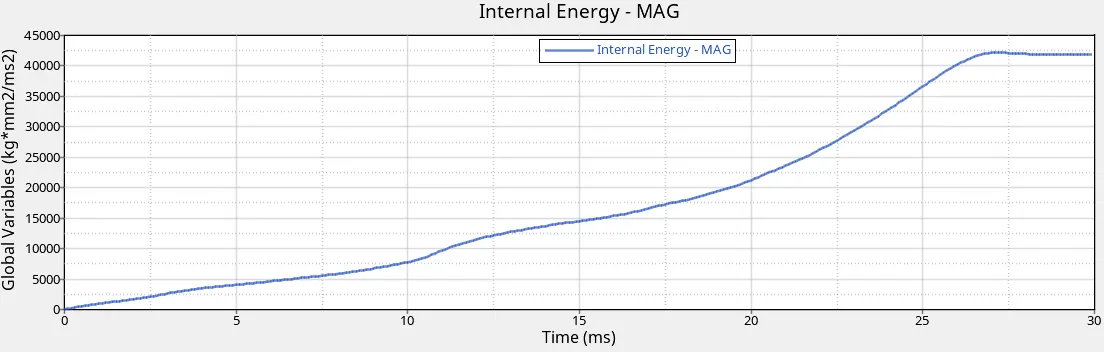
-From this plot we conclude that internal energy is increase linearly up to certain time and after that it increase rapidly.It is due to impact of tube against wall.
*Plot of various energy vs time:-
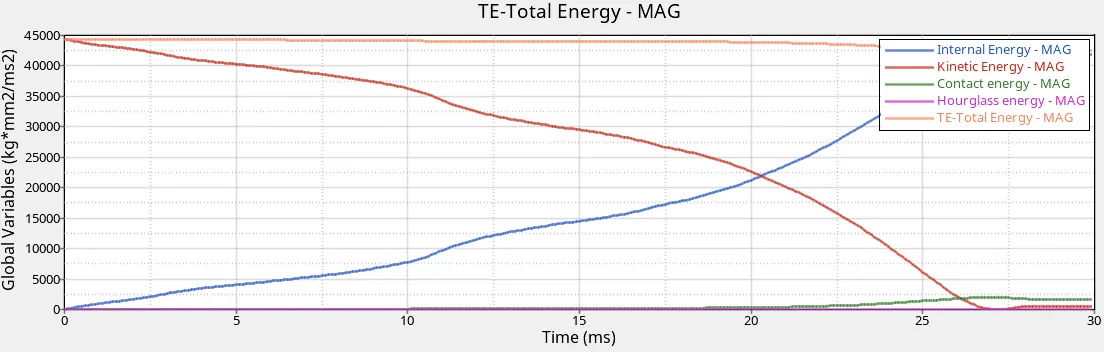
-The kinetic energy is decrease gradually and after that it increase sligtly.
-The contact energy is zero up the before the impact and from the impact its increase some value.
-Hourglass energy is zero over the simulation due to the QEPH element formulation.
*Plot of rigid wall force vs time:-
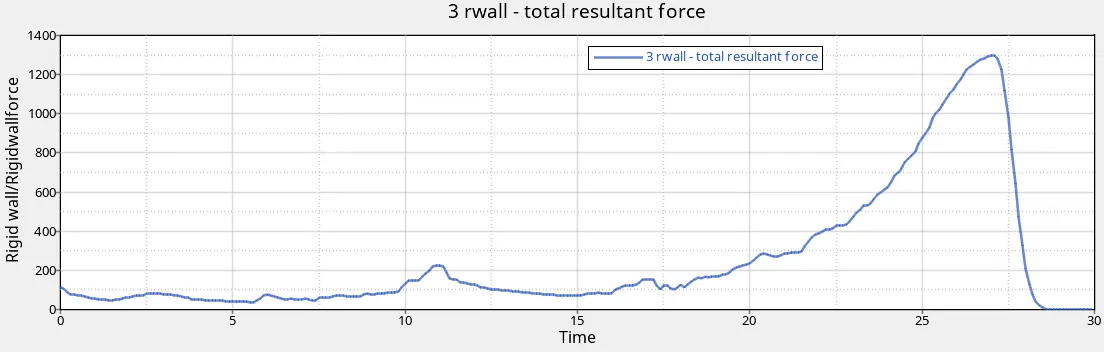
-The resultant force is increase and attains a peak value at the time of impact and after that it decrease.
case 6:-
Create a new notch with nodes only from opposing 2 faces and run.
-Import the crush_tube_0000.rad in hypermesh.
-Create the notche in the middle using the allign node command.(geom>node edit>allign node)
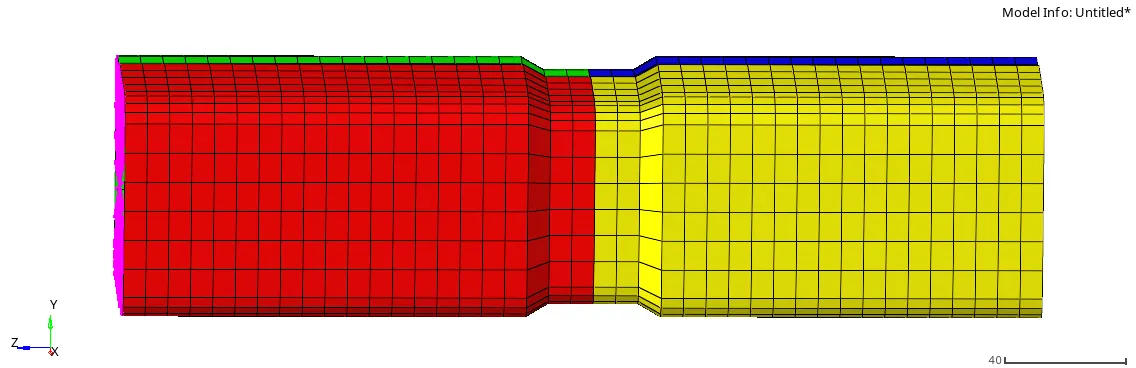
-go to radioss command(Analysis>radioss), and provide the name is case4_oooo.rad.
-After that open the hyperview and load the model as a h3d file format.
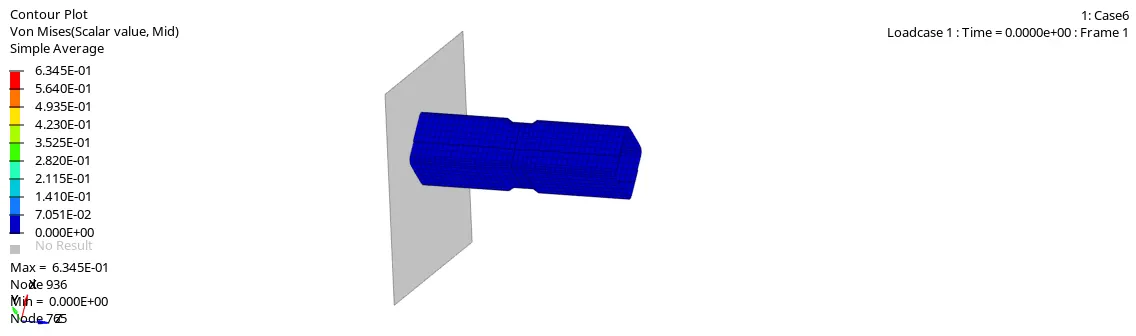
-Go to counter opction and select same properties .(case-1)
-The von mises counter is :-
*Plot of internal energy vs time:-
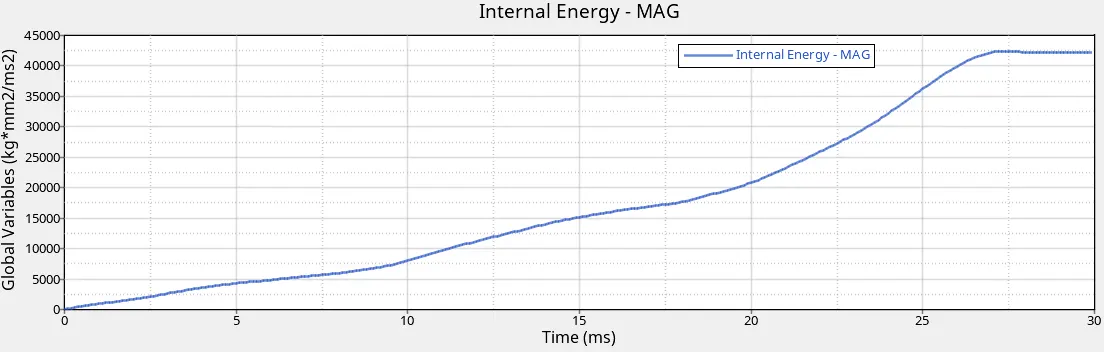
-From this plot we conclude that internal energy is increase linearly up to certain time and after that it increase rapidly.It is due to impact of tube against wall.
*Plot of Various energy vs time:-
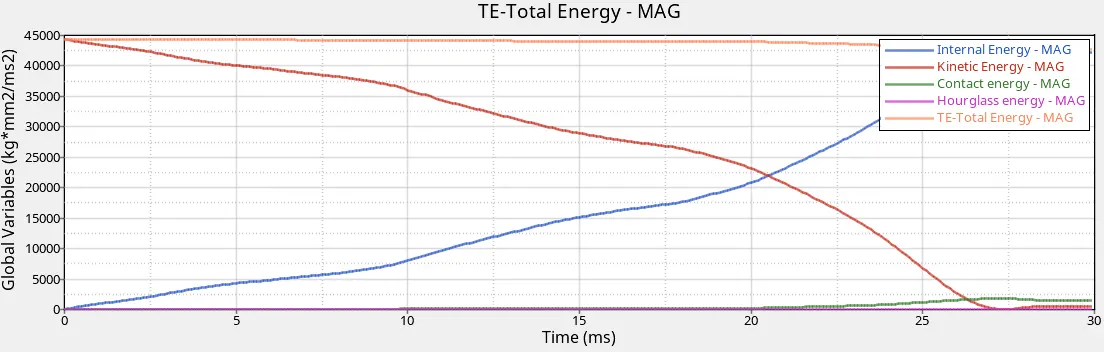
-The kinetic energy is decrease gradually and after that it increase sligtly.
-The contact energy is zero up the before the impact and from the impact its increase some value.
-Hourglass energy is zero over the simulation due to the QEPH element formulation.
*Plot of rigid wall force vs time:-
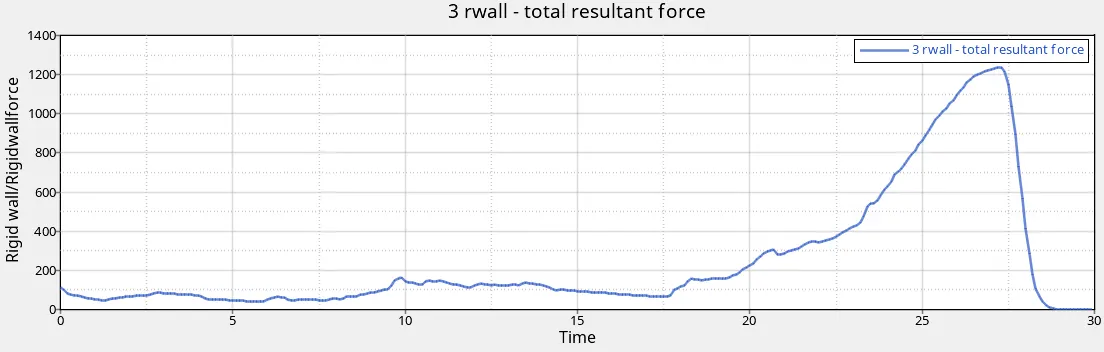
-The resultant force is increase and attains a peak value at the time of impact and after that it decrease.
*comparision between case 5 & 6:-
-The von mises stress is lower in case 5 compare to case 6. It is due to the uniform distribution of notches.
-The contact energy in case 5 obtain is 2151.8 J & in case 6 obtain is 1856.65 j.its value is higher due to the present of notches.
-The resultant force is produce more in case 6 compare to case 5.
*comparision of energy error, mass error & simulation for all cases:-
| Simulation cases | Energy error(%) | Mass error(%) | Simulation time(sec) |
| Case1 | -3.8 | 0 | 243.92 |
| Case2 | -3.8 | 0 | 260.37 |
| Case3 | -3.8 | 0 | 251.58 |
| Case4 | -3.0 | 0 | 237.25 |
| Case5 | -3.8 | 0 | 261.92 |
| Case6 | -3.5 | 0 | 241.15 |