ASSIGNMENT 4
RADIOSS MATERIAL LAWS CHALLENGE
OBJECTIVE:
1. To understand more about the material cards and it's properties
2. To visualize the changes in the 7 cases when changing the properties
3. To plot the graphs for the 7 cases and understand the difference between each case.
4. To finalize which case would represent the on field scenario
CASE 1:
CARD IMAGE: M2_PLAS_JOHNS_ZERIL (LAW 2 - ISOTROPIC ELASTO PLASTIC LAW)
FAILURE CARD SPECIFIED YES, WITHOUT CHANGES IN IFFAIL_SH, DADV AND IXFEM
EPS_P_MAX: 0.151
SIMULATION:
1. The FAILURE_JOHNSON_0000.rad file is imported into hypmermesh.
2. The cards are verified and then the simulation is run by going into ANALYSIS-> RADIOSS-> SPECIFY PATH IN SAVE AS-> OPTIONS-> -nt 4 (to include 4 cores for processing)-> RADIOSS.
3. After the simulation is complete the files are created in the specified folder. We can check the energy errors, mass error by going into FAILURE_JOHNSON_0001.out file.
4. After the energy errors and mass errors are checked we can import the .h3d file into hyperview
5. The hyperview is accessed from the client selector and the .h3d files are imported from the specified folder that were created.
6. The animation was played and the visuals were observed
7. The von misses stress was plotted using the contour option in hyperview
8. From the client selector the hypergraph2d is selected. The T01 file is imported from the specified folder and the graphs for various energies are plotted.
RESULT
SIMULATION DETAILS
ENERGY ERROR= 0.8%
MASS ERROR= 0
SIMULATION RUN TIME= 89.29 s
NUMBER OF CYCLES= 49380
VON MISES
The maximum stress observed in Von mises stress was 2.752e+2n/mm2
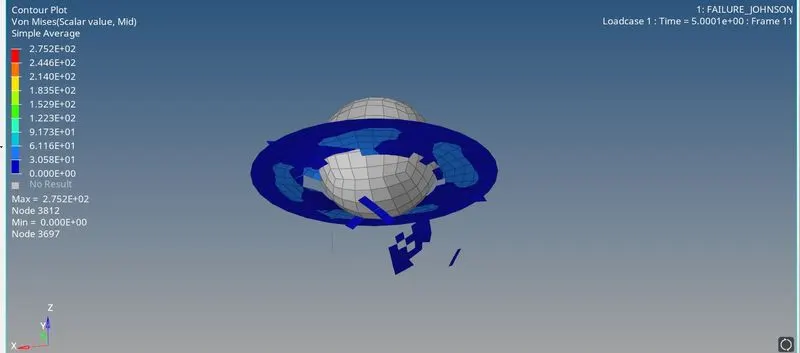
The elements are getting cracked and deleted when the maximum stress was obtained on the particular material. This was due to the fact that EPS_p max value has been defined.
ENERGY GRAPHS
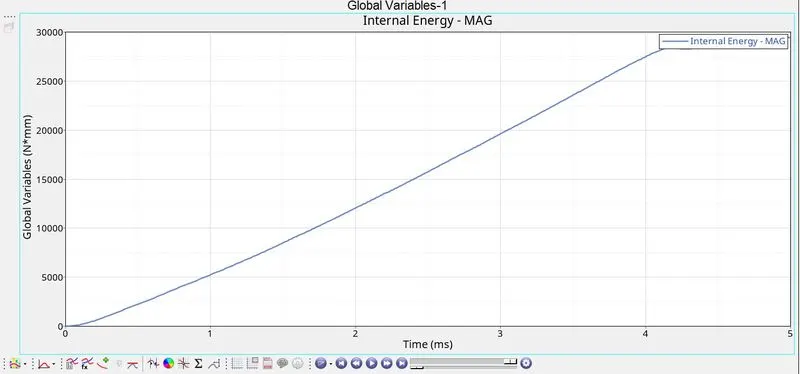
INTERNAL ENERGY
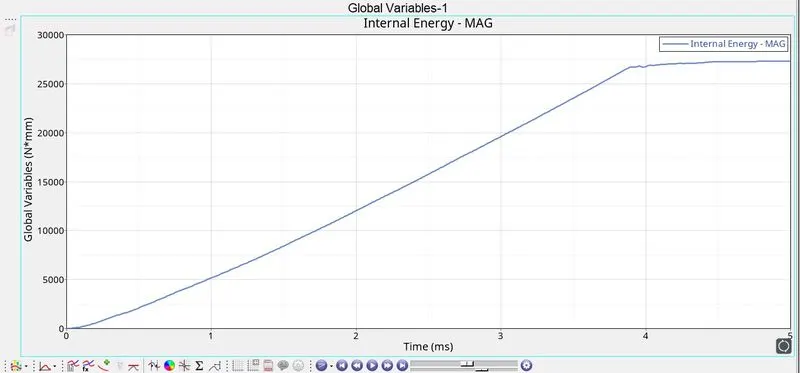
The internal energy keeps increasing and after deletiion of the elements at 4ms the energy becomes constant.
RIGID WALL FORCES
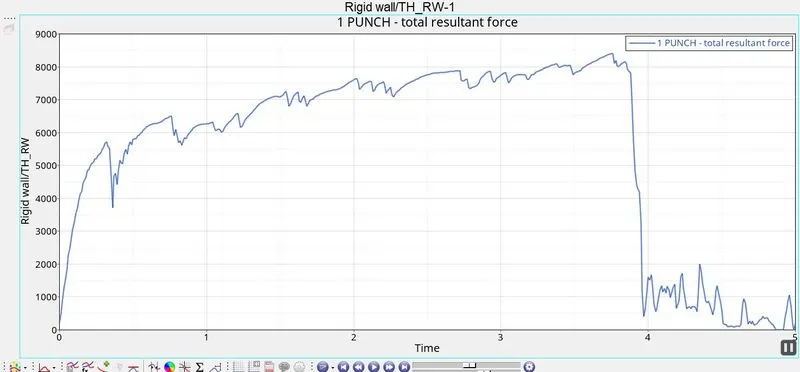
The rigid wall forces keep increasing upto 4ms and then drop down after the deletion of the elements.
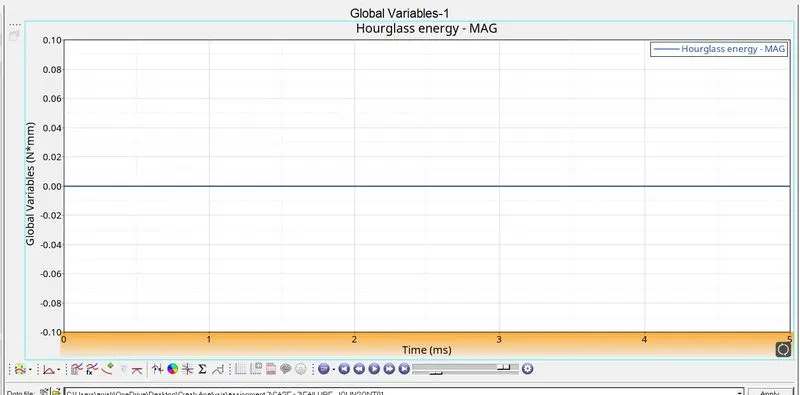
HOURGLASS ENERGY
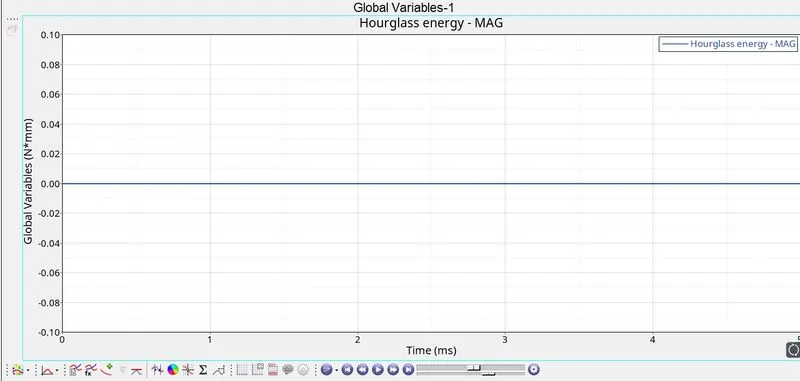
There is no hourglass energy because we have used the recommended properties to prevent hourglass energy.
KINETIC ENERGY
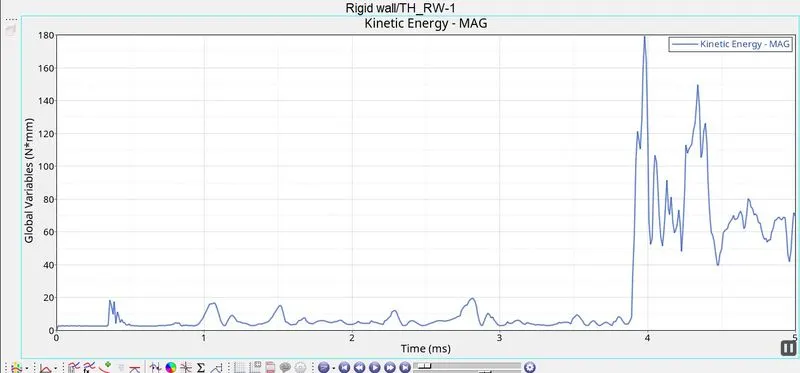
There is a sudden surge in kinetic energy when the elements start getting deleted from the model.
TOTAL ENERGY
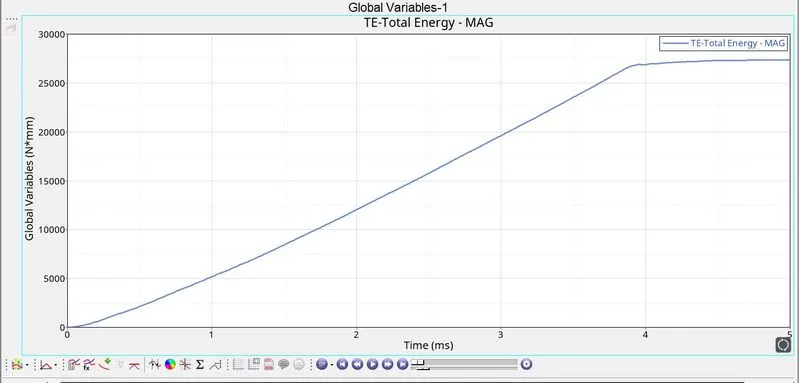
The internal energy keeps increasing and becomes constant when the elements are deleted from the model.
CASE 2:
CARD IMAGE: M2_PLAS_JOHNS_ZERIL (LAW 2 - ISOTROPIC ELASTO PLASTIC LAW)
FAILURE CARD SPECIFIED: YES, WITH CHANGES IN IFFAIL_SH =1, DADV=1 AND IXFEM=1
EPS_P_MAX: 0.151
SIMULATION:
1. The values in the FAIL/JOHNSON card are edited with respect to the values provided in the question.
2. The simulation is run by going into ANALYSIS-> RADIOSS-> SPECIFY PATH IN SAVE AS-> OPTIONS-> -nt 4 (to include 4 cores for processing)-> RADIOSS.
3. After the simulation is complete the files are created in the specified folder. We can check the energy errors, mass error by going into FAILURE_JOHNSON_0001.out file.
4. After the energy errors and mass errors are checked we can import the .h3d file into hyperview
5. The hyperview is accessed from the client selector and the .h3d files are imported from the specified folder that were created.
6. The animation was played and the visuals were observed
7. The von misses stress was plotted using the contour option in hyperview
8. From the client selector the hypergraph2d is selected. The T01 file is imported from the specified folder and the graphs for various energies are plotted.
RESULT
SIMULATION DETAILS:
ENERGY ERROR= 4.1%
MASS ERROR= 0
SIMULATION RUN TIME= 95.71 s
NUMBER OF CYCLES= 49217
VON MISES
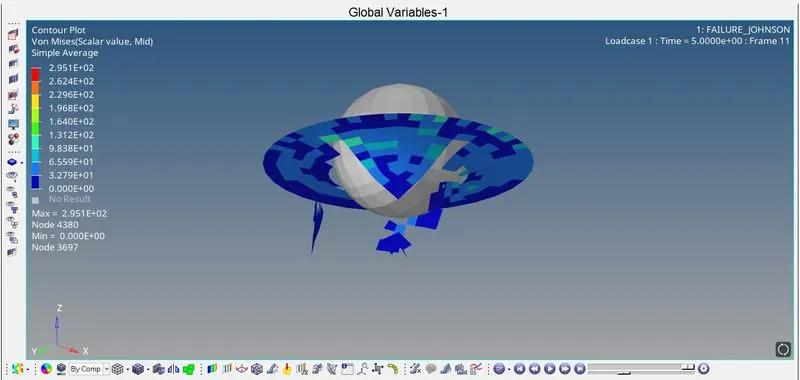
The maximum stress value observed in von mises are 2.951e+2 n/mm2
Some elements are deleted while other elements are still present in the model. The elements dont all break at a particular time but it takes palce gradually.
ENERGY GRAPHS
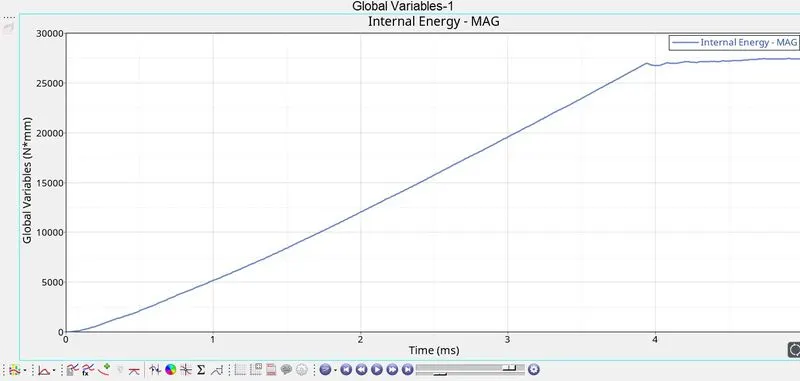
INTERNAL ENERGY
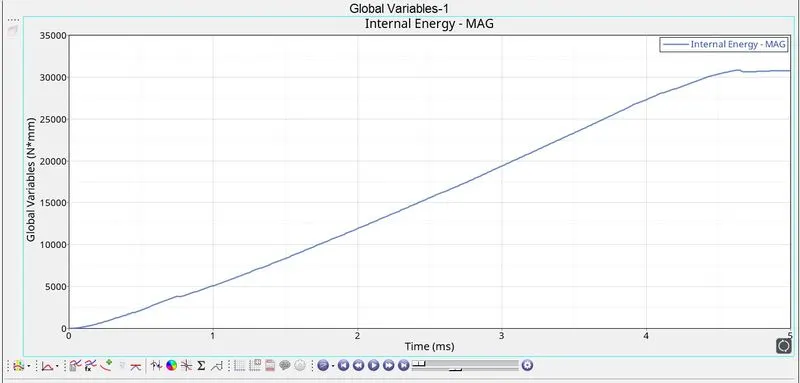
The internal energy does not stablise at 4ms but takes more time and the max internal energy is also higher than CASE 1. This is because it takes more time for the elememts to get delted from the model.
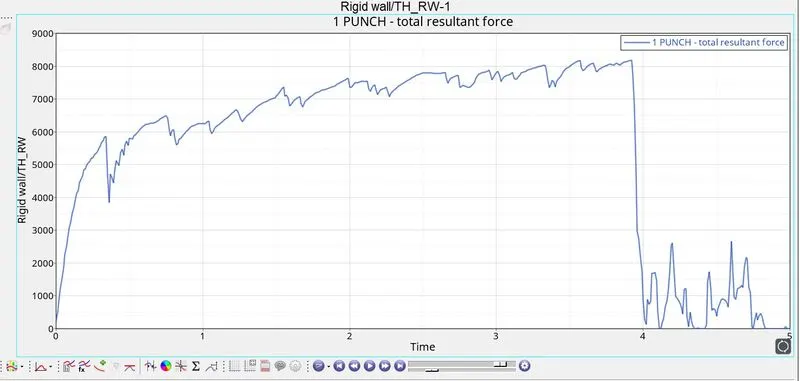
RIGID WALL FORCES
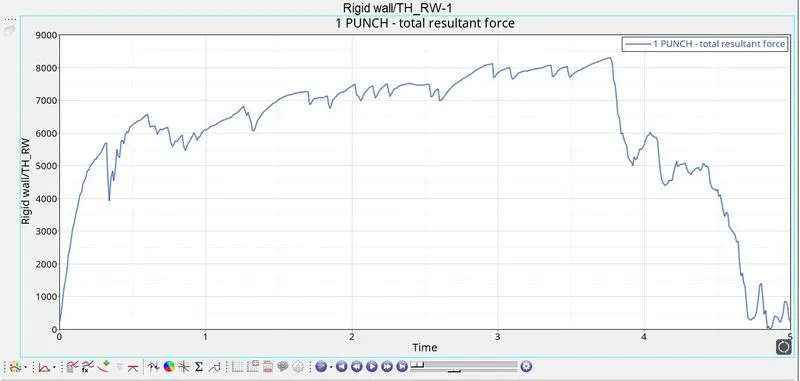
The rigid wall forces does not drop significantly but rather drops slowly like how it should have taken place in a real life scenario.This is because of failure properties assigned to it which makes it more accurate.
HOURGLASS ENERGY
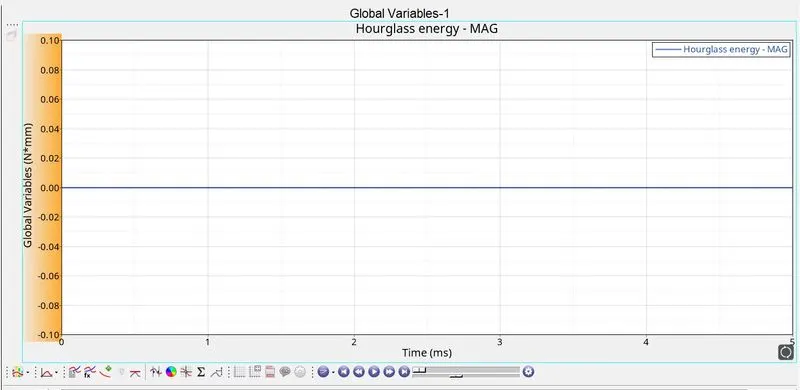
The hourglass energy is constant because of the recommended properties used in the property card which prevents the formation of hourghlass energy.
KINETIC ENERGY
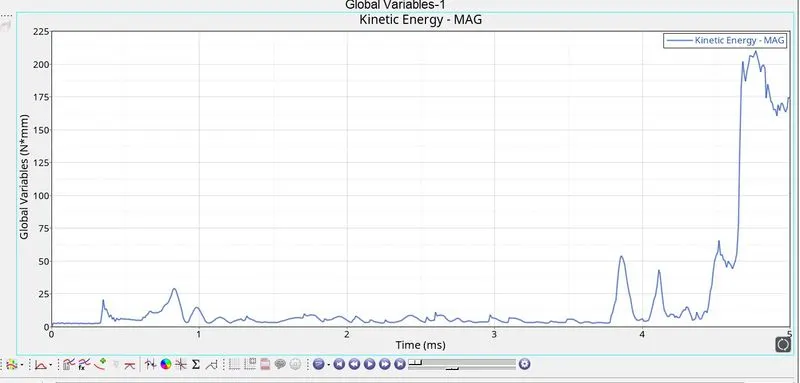
The kinetic energy increases with little fluctuation and climbs rapidle when the elements are getting deleted from the model. The deletion of the elemetns only take place after 4ms.
TOTAL ENERGY
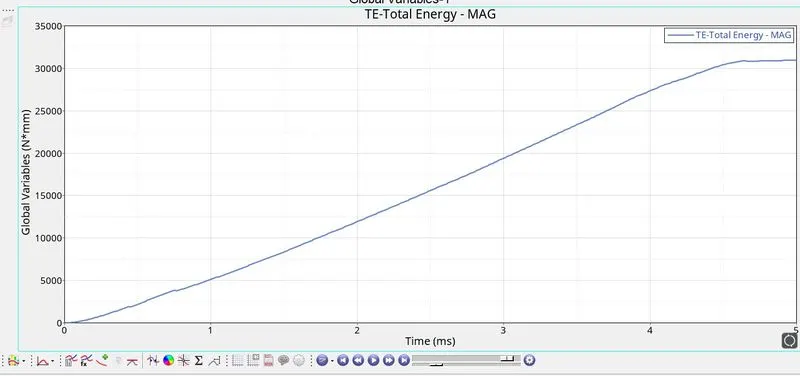
The total energy increases upto 30000 and becomes constant after the elements are deleted from the model. The deletion of the elements take place only after 4ms.
CASE-3:
CARD IMAGE: M2_PLAS_JOHNS_ZERIL (LAW 2 - ISOTROPIC ELASTO PLASTIC LAW)
FAILURE CARD SPECIFIED: NO
EPS_P_MAX: 0.151
SIMULATION:
1. The FAIL/JOHNSON card is deleted under the failure tab
2. The simulation is run by going into ANALYSIS-> RADIOSS-> SPECIFY PATH IN SAVE AS-> OPTIONS-> -nt 4 (to include 4 cores for processing)-> RADIOSS.
3. After the simulation is complete the files are created in the specified folder. We can check the energy errors, mass error by going into FAILURE_JOHNSON_0001.out file.
4. After the energy errors and mass errors are checked we can import the .h3d file into hyperview
5. The hyperview is accessed from the client selector and the .h3d files are imported from the specified folder that were created.
6. The animation was played and the visuals were observed
7. The von misses stress was plotted using the contour option in hyperview
8. From the client selector the hypergraph2d is selected. The T01 file is imported from the specified folder and the graphs for various energies are plotted.
RESULTS:
SIMULATION DETAILS:
ENERGY ERROR= 0.8%
MASS ERROR= 0
SIMULATION RUN TIME= 90.26 s
NUMBER OF CYCLES= 49408
VON MISES:
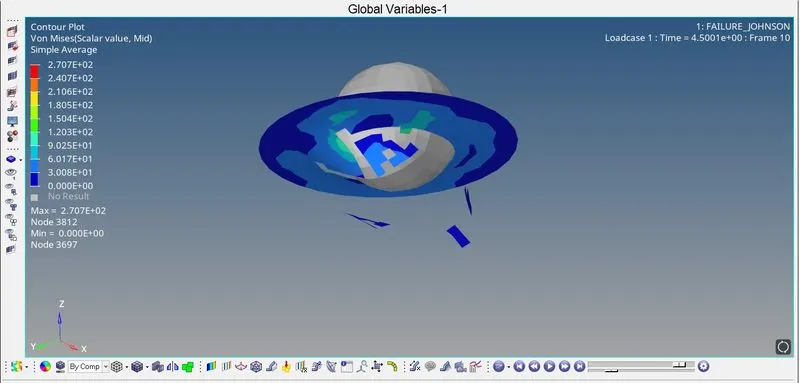
The maximum Von Mises stress is 2.707e+2n/mm2.
The elements get deleted from the model.
ENERGY GRAPHS:
INTERNAL ENERGY
The internal energy keeps increasing in a steady manner and becomes constant after the elemetns are deleted from the model. The energy becomes constant a little before 4ms
RIGID WALL FORCES
The rigid wall forces start dropping immediately as soon as the elements start breaking a little before 4ms. Unlike CASE 2 there is a sharp fall in the rwall forces when the elemetns get deleted.
HOURGLASS ENERGY
There is no hourglass energy present because we are using the recommended properties to prevent hourglass energy in the system.
KINETIC ENERGY
There is a sudden surge in kinetic energy as soon as the elements start getting deleted.
TOTAL ENERGY
There is steady increase in total energy of the system and it becomes constant after the elemetns get deletd.
CASE 4:
CARD IMAGE: M2_PLAS_JOHNS_ZERIL (LAW 2 - ISOTROPIC ELASTO PLASTIC LAW)
FAILURE CARD SPECIFIED: NO
EPS_P_MAX: 0
SIMULATION:
1. The EPS_p_max value in the material card is changed from 0.151 to 0
2. The simulation is run by going into ANALYSIS-> RADIOSS-> SPECIFY PATH IN SAVE AS-> OPTIONS-> -nt 4 (to include 4 cores for processing)-> RADIOSS.
3. After the simulation is complete the files are created in the specified folder. We can check the energy errors, mass error by going into FAILURE_JOHNSON_0001.out file.
4. After the energy errors and mass errors are checked we can import the .h3d file into hyperview
5. The hyperview is accessed from the client selector and the .h3d files are imported from the specified folder that were created.
6. The animation was played and the visuals were observed
7. The von misses stress was plotted using the contour option in hyperview
8. From the client selector the hypergraph2d is selected. The T01 file is imported from the specified folder and the graphs for various energies are plotted.
RESULT:
SIMULATION DETAILS
ENERGY ERROR= 3%
MASS ERROR= 0
SIMULATION RUN TIME= 124.75 s
NUMBER OF CYCLES= 48737
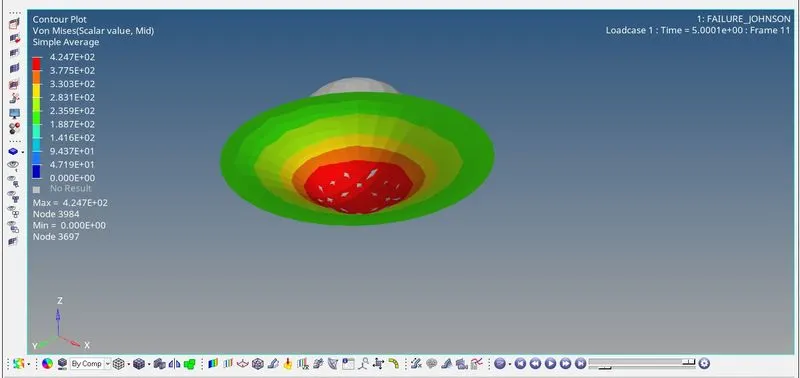
VON MISES
The maximum Von Mises stress in 4.247e+2n/mm2.
The elements are not getting deleted this is because there is no eps_p_max value defined in the material. The von mises stress are also high compared to other cases.
ENERGY GRAPHS
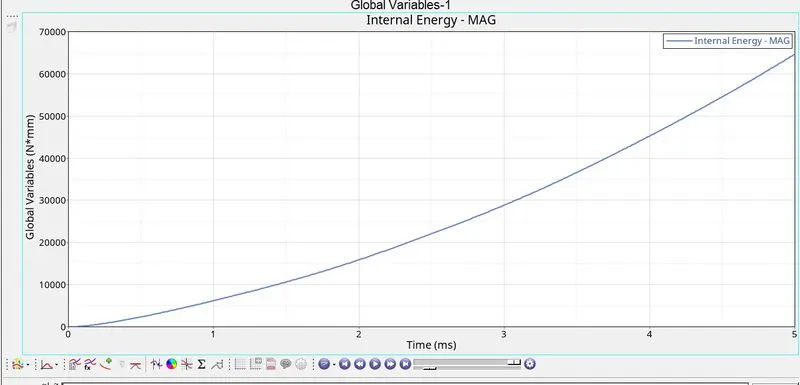
INTENRAL ENERGY
The internal energy keeps building up in the system as the elements are not deleted
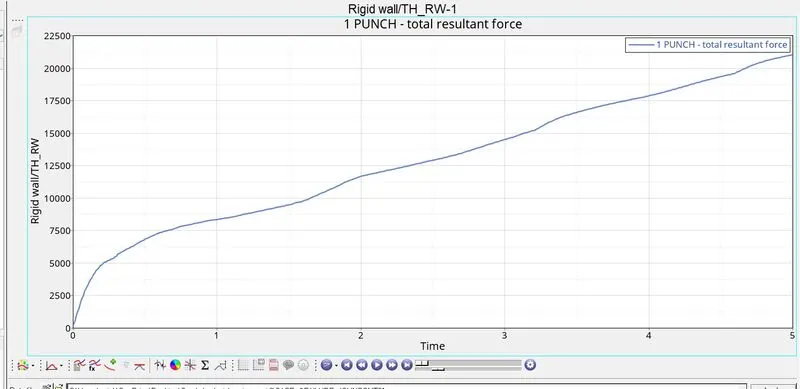
RIGID WALL FORCES
As there are no elements being deleted the rigid wall forces keep increasing over the period of time.
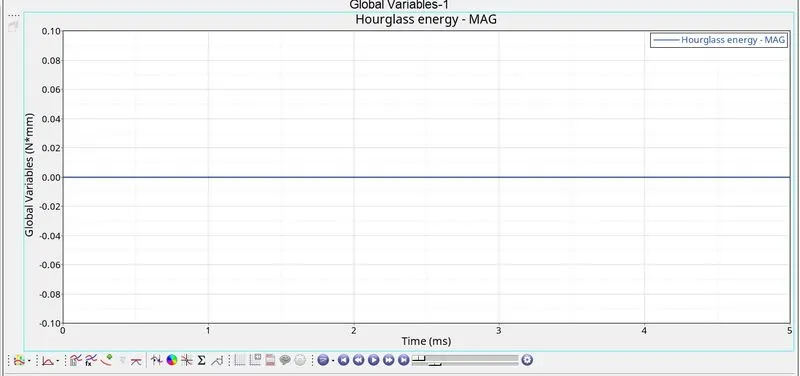
HOURGLASS ENERGY
There is no hourglass energy present becuase we are useing the best recommended properties to prevent hourglass energy in the system.
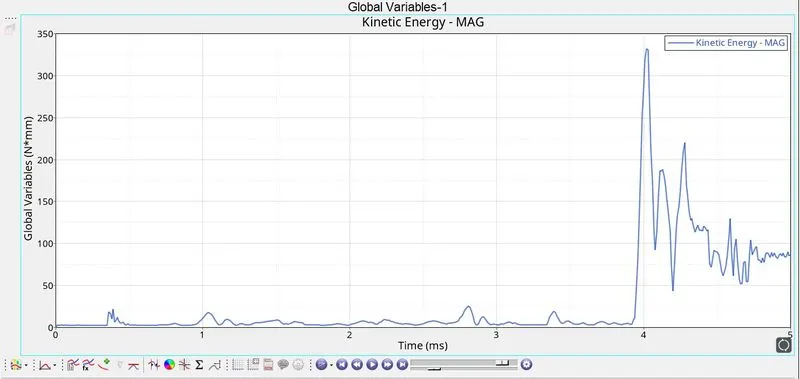
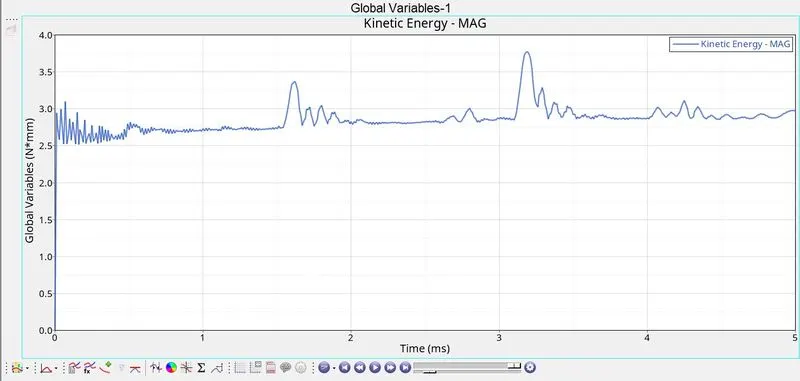
KINETIC ENERGY
The kinetic energy is very low in this case compared to other cases. This means that there is resistance offered by the material.
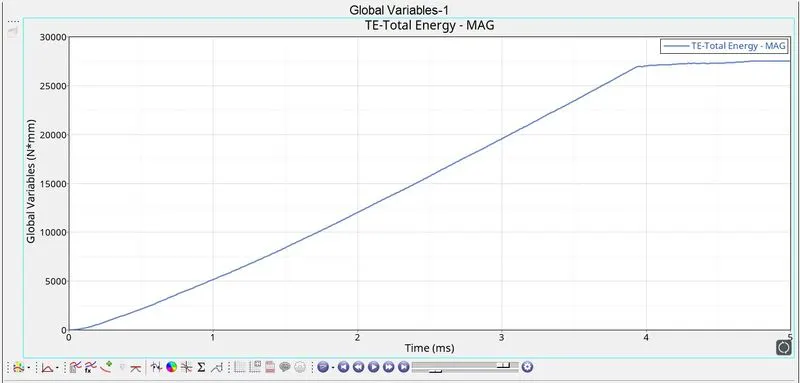
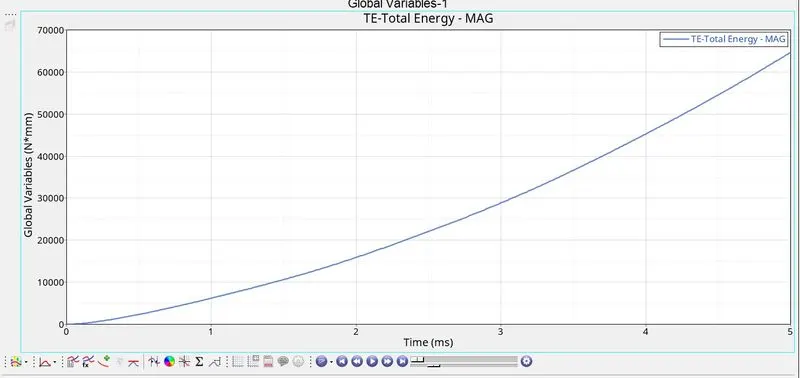
TOTAL ENERGY
The total energy keeps increasing over the period of time and does not stablise oe become a constant at any point.
CASE 5:
CARD IMAGE: M1_ELAST (LAW 1 - ISOTROPIC ELASTIC LAW)
FAILURE CARD SPECIFIED: NO
SIMULATION:
1. The material law is changed from law2 to law 1. This can be done by going to the material tab and changing the law in card image
2. The simulation is then run by going into ANALYSIS-> RADIOSS-> SPECIFY PATH IN SAVE AS-> OPTIONS-> -nt 4 (to include 4 cores for processing)-> RADIOSS.
3. After the simulation is complete the files are created in the specified folder. We can check the energy errors, mass error by going into FAILURE_JOHNSON_0001.out file.
4. After the energy errors and mass errors are checked we can import the .h3d file into hyperview
5. The hyperview is accessed from the client selector and the .h3d files are imported from the specified folder that were created.
6. The animation was played and the visuals were observed
7. The von misses stress was plotted using the contour option in hyperview
8. From the client selector the hypergraph2d is selected. The T01 file is imported from the specified folder and the graphs for various energies are plotted.
RESULT:
SIMULATION DETAILS
ENERGY ERROR= 1.3%
MASS ERROR= 0
SIMULATION RUN TIME= 85.94 s
NUMBER OF CYCLES= 47969
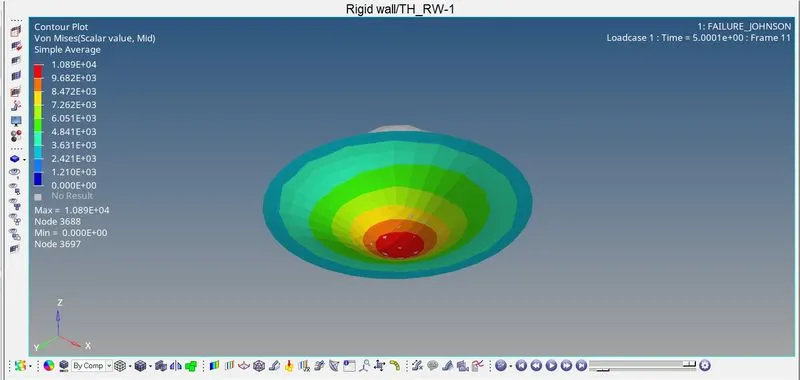
VON MISES
The maximum Von Mises stress is 1.089e+4n/mm2.
The stress developed is very high when compared to other cases. The elements are not getting deleted because of the change in material law to elastiuc law.
ENERGY GRAPHS:
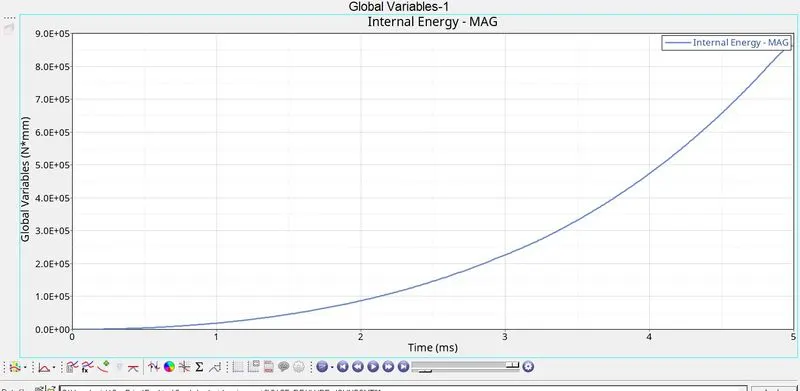
INTERNAL ENERGY
The internal energy developed in the model is very high when compared to other cases. As there is no deletion of elements the enegy does not stabilise or become constant.
RIGID WALL FORCES
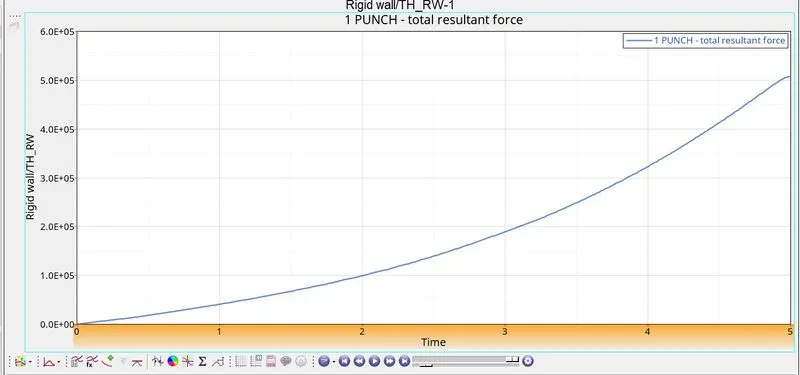
The rigid wall forces are also high when compared to all other cases. There is a smooth inclination of force.
HOURGLASS ENERGY
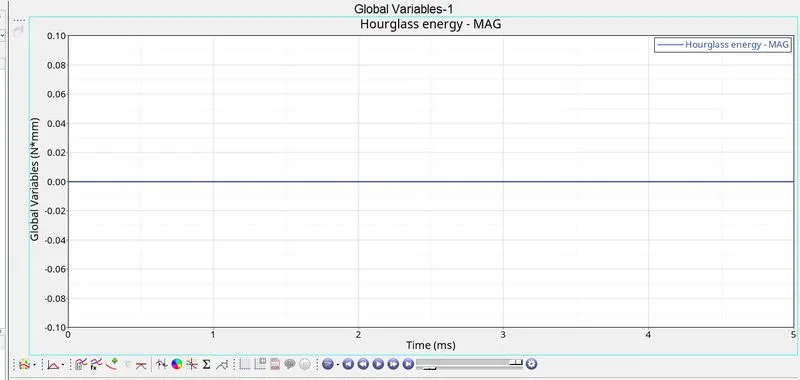
There is no hourglass energy present because the best recommended properties are being used to prevent the hourglass energy.
KINETIC ENERGY
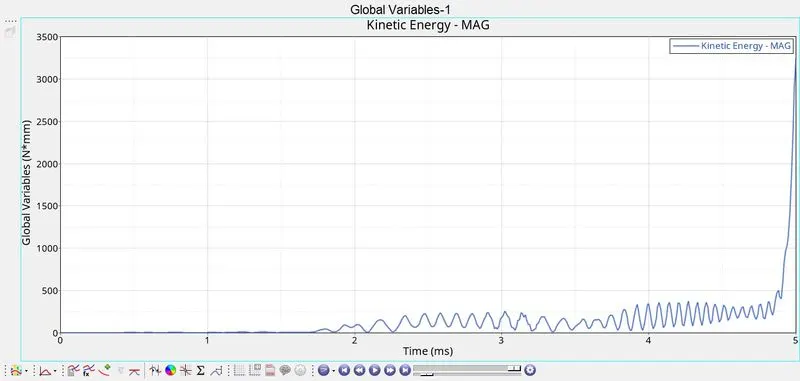
The kinetic energy is low in th begining and then there is a sudden steep inclination in the energy. The kinetic energy in this case is higher compared to other cases.
TOTAL ENERGY
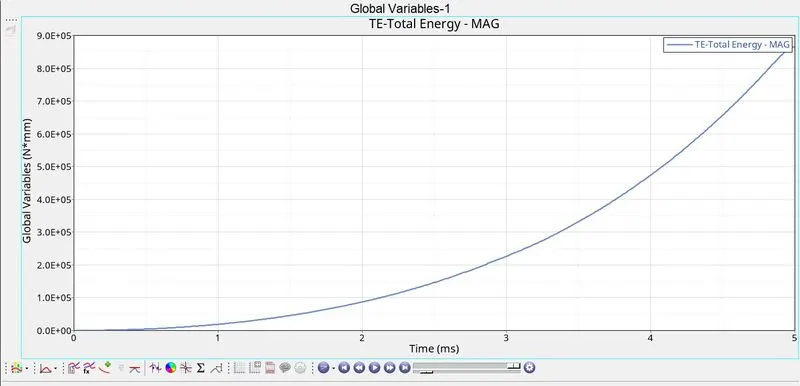
The total energy in the system is also high when compared to other cases.
CASE -6:
CARD IMAGE: M27_PLAS_BRIT (LAW 2 - ELASTIC PLASTIC BRITTLE)
FAILURE CARD SPECIFIED: NO
SIMULATION:
1. The LAW27_0000.rad file is imported into hypmermesh.
2. The cards are verified and then the simulation is run by going into ANALYSIS-> RADIOSS-> SPECIFY PATH IN SAVE AS-> OPTIONS-> -nt 4 (to include 4 cores for processing)-> RADIOSS.
3. After the simulation is complete the files are created in the specified folder. We can check the energy errors, mass error by going into FAILURE_JOHNSON_0001.out file.
4. After the energy errors and mass errors are checked we can import the .h3d file into hyperview
5. The hyperview is accessed from the client selector and the .h3d files are imported from the specified folder that were created.
6. The animation was played and the visuals were observed
7. The von misses stress was plotted using the contour option in hyperview
8. From the client selector the hypergraph2d is selected. The T01 file is imported from the specified folder and the graphs for various energies are plotted.
RESULTS:
SIMULATION DETAILS
ENERGY ERROR= 0.8%
MASS ERROR= 0
SIMULATION RUN TIME= 90.12 s
NUMBER OF CYCLES= 49508
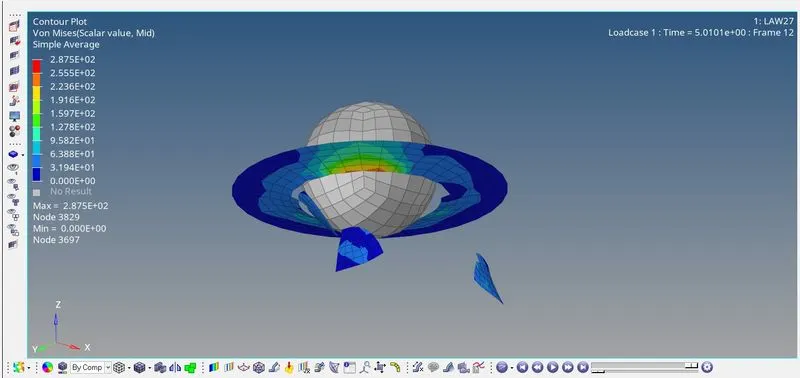
VON MISES STRESS
The maximum Von Mises stress observed is 2.875e+2n/mm2.
The size of elements being deleted is larger when compared to other cases.
INTERNAL ENERGY
The intenral energy climbs up and then after the elements are delted the energy still keeps climbing at a slower speed.
RIGID WALL FORCES
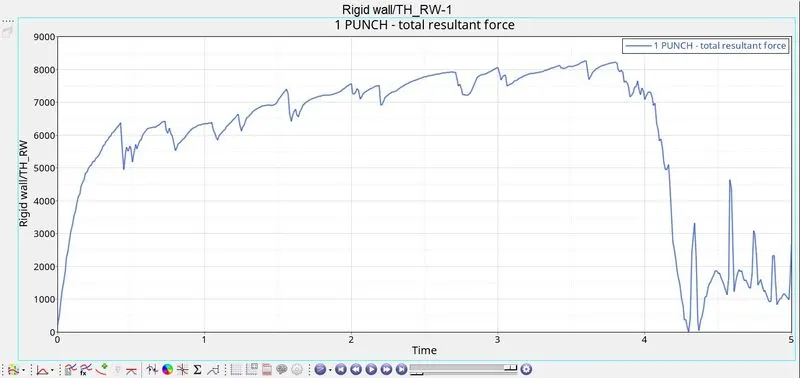
The rigid wall forces keeps climbing with respect to time and drops down after the elements are deleted and spikes up and down again.
HOURGLASS ENERGY
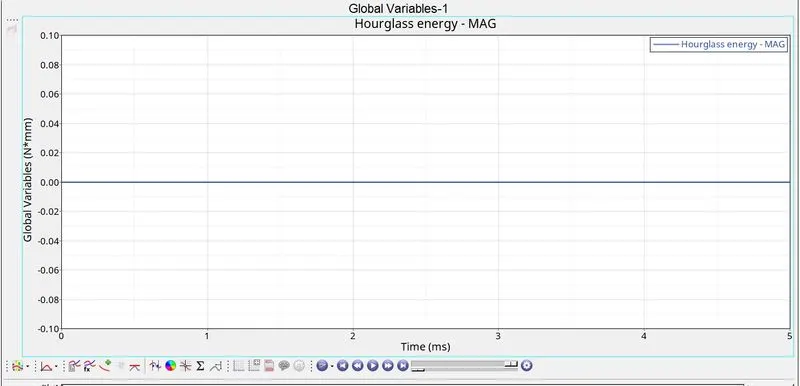
The hourglass energy is not present because the best recommended properties are being used to prevent hourglass energy.
KINETIC ENERGY
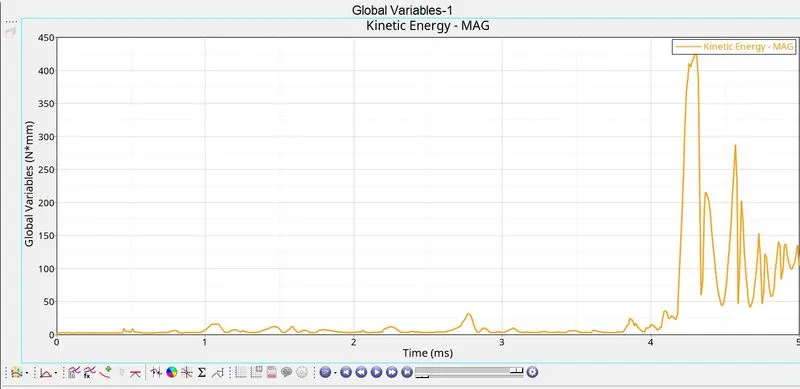
The kinetic energy begins with a small value and then sudden surge in kinetic energy takes place when the elements are deleted.
TOTAL ENERGY
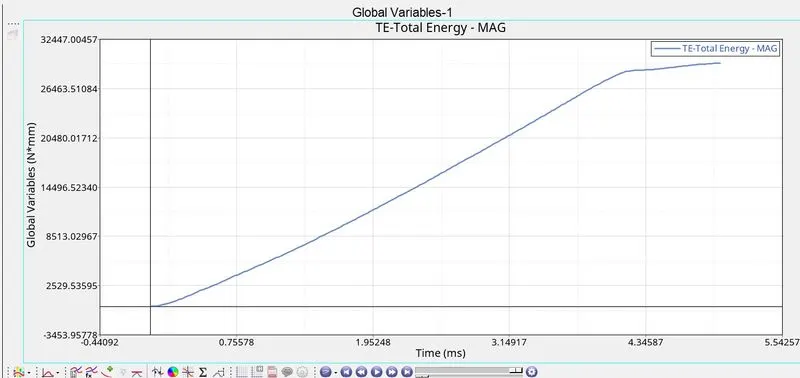
The total energy keeps climbing and when the element breaks the energy keeps climing at a slower pace.
CASE-7:
CARD IMAGE: M36_PLAS_TAB (LAW 36 - ELASTIC PLASTIC TABULATED LAW)
FAILURE CARD SPECIFIED: NO
fct_ID: SPECIFIED - CURVE (x = 0, 4.84405e-4, 0.00111878, 0.0032105, 0.00478134; y=300, 360.13, 390.56, 442.82, 465.98)
SIMULATION:
1. The material law is changed from law 1 to law36.The material law is changed under materials tab and then set card image as M36_PLAS_TAB
2. The n_funct is assigned a value of 1 and the fct_id is assigned to a curve with the given values
3. The curve is created by going to the curve tab and right clicking and going to create. The new curve is created by entering the values of x and y respectively.
4.the fct_id is selected as the newly created curve.
5. The simulation is run by going into ANALYSIS-> RADIOSS-> SPECIFY PATH IN SAVE AS-> OPTIONS-> -nt 4 (to include 4 cores for processing)-> RADIOSS.
6. After the simulation is complete the files are created in the specified folder. We can check the energy errors, mass error by going into FAILURE_JOHNSON_0001.out file.
7. After the energy errors and mass errors are checked we can import the .h3d file into hyperview
8. The hyperview is accessed from the client selector and the .h3d files are imported from the specified folder that were created.
9. The animation was played and the visuals were observed
10. The von misses stress was plotted using the contour option in hyperview
11. From the client selector the hypergraph2d is selected. The T01 file is imported from the specified folder and the graphs for various energies are plotted.
RESULTS:
SIMULATION DETAILS
ENERGY ERROR= -1.7%
MASS ERROR= 0
SIMULATION RUN TIME= 106.05 s
NUMBER OF CYCLES= 52204
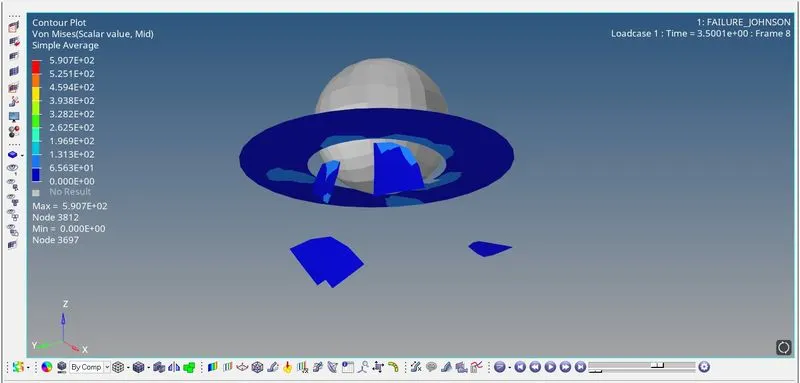
VON MISES
The maximum Von Mises stress observed is 5.907e+2n/mm2.
The elements are getting deleted before the end of the simulation time.
ENERGY GRAPHS
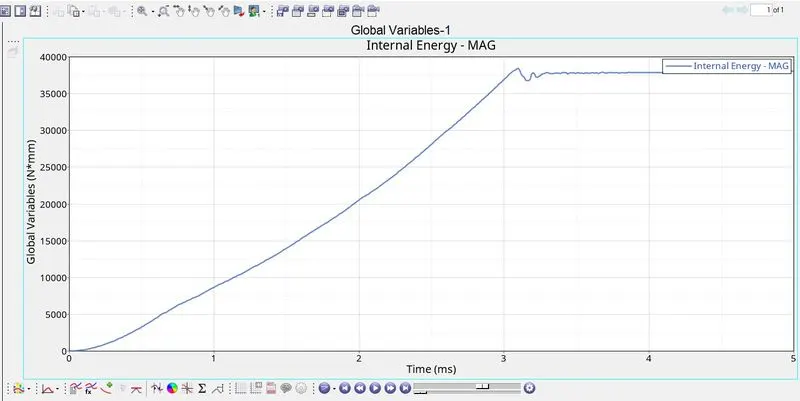
INTERNAL ENERGY
The internal energy increases and then drops a bit just after 3ms and becomes stable after that. The elements are deleted just after 3ms.
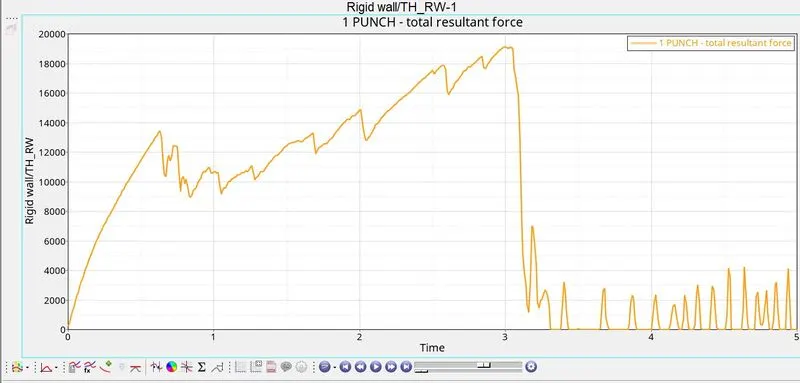
RIGID WALL FORCES
The rigid wall forces keeps increasing untill the elements get deleted. After the elements get deleted the forces drop down and keep fluctuating.
HOURGLASS ENERGY
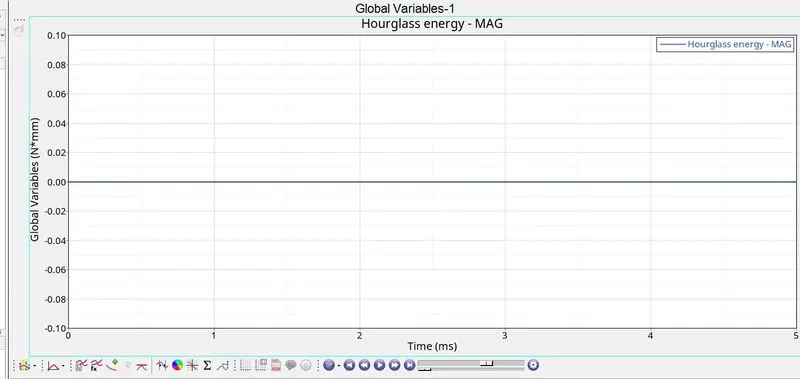
The hour glass energy is not present because the best recommended settings are being used to prevent hourglass enregy.
KINETIC ENERGY
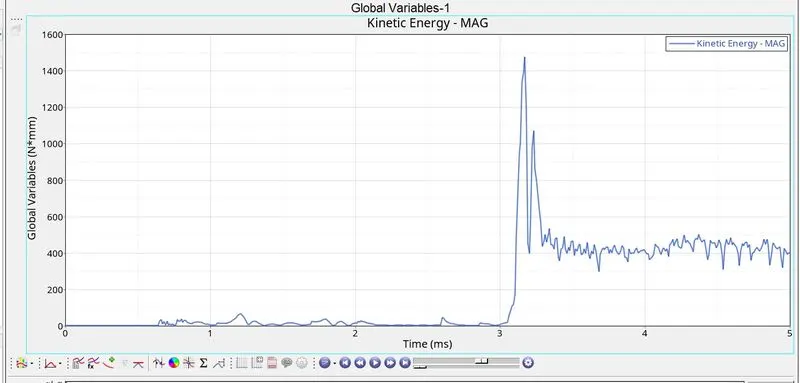
The kinetic energy in this case is high compared to other cases.The kinetic energy starts of with a low value and the surges steeply after the elements are deleted from the model.
TOTAL ENERGY
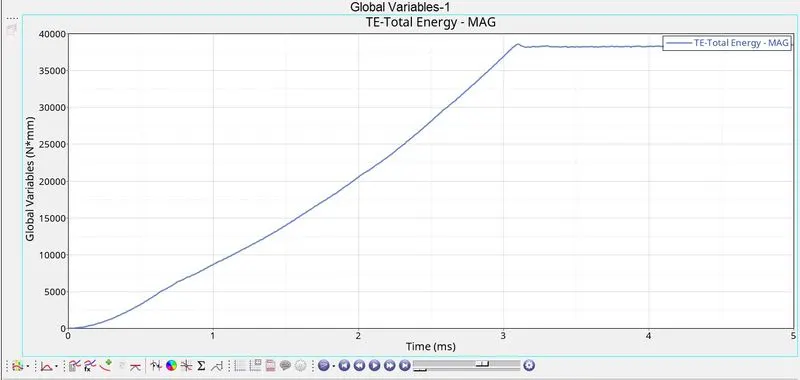
The total energy in this case begins to climb upto 39000 and then becomes stable after the elements are deleted from the system.
TABULAR DATA:
|
CASE
|
CASE 1
|
CASE 2
|
CASE 3
|
CASE 4
|
CASE 5
|
CASE 6
|
CASE 7
|
|
M. LAW
|
M2_PLAS_
JOHNS_ZERIL
|
M2_PLAS_
JOHNS_ZERIL
|
M2_PLAS_
JOHNS_ZERIL
|
M2_PLAS_
JOHNS_ZERIL
|
M1_ELAST
|
M27_PLAS_BRIT
|
M36_PLAS_TAB
|
|
PROPERTY CHANGE
|
-
|
IXFEM=1, dadv=1, ifail_sh=1
|
FAILURE CARD DELETED,
|
EPS_max=0
|
-
|
-
|
-
|
|
SIMULATION TIME
|
89.29 s
|
95.71 s
|
90.26 s
|
124.75 s
|
85.94 s
|
90.12 s
|
106.05 s
|
|
NO. OF CYCLES
|
49380
|
49217
|
49408
|
48737
|
47969
|
49508
|
52204
|
|
ELEMENT DELETION
|
YES
|
YES
|
YES
|
NO
|
NO
|
YES
|
YES
|
|
MAX VON MISES STRESS
|
275.2
|
295.1
|
270.7
|
424.7
|
10890.0
|
287.5
|
590.7
|
|
TOTAL ENERGY
|
26000
|
31000
|
27000
|
65000
|
8.5e+5
|
29000
|
38000
|
|
MAX RIGID WALL FORCES
|
8000
|
8200
|
8200
|
21125
|
5.05e+5
|
8100
|
18000
|
All the 7 cases were carried out and tested in hypermesh. The results were analyzed and it was observed that in CASE -4 and CASE-5 the elements were not deleted even under high stresses which is unreaistic in real life and not suited for a real case scenario.
Law 1 can be used for elastic materials.
Law 27 can be used for brittle materials.
Law 36 can be used to feed lab results directly into the simulation and the results seem to do justice in that case.
Law 36 can be used in real case scenarios