Assignment 4
objective:For the given components change the material cards and the properties as given in the videos and then run the simulation and then compare the results of the simulation.
procedure-case-1:
1.Import the material model given - FAILURE_JOHNSON_0000.rad
2.open the properties in the browser and assign the best recommended properties for the ishell,ismstr,ish3n,N,ithick,iplas
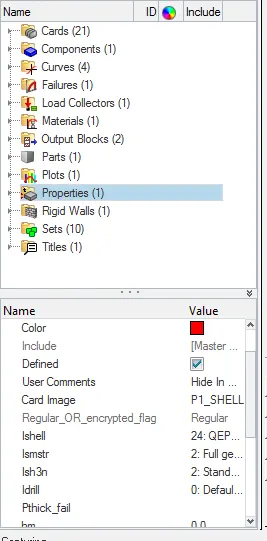
fig shows the property card for case1
3.create the material card as per the case1 recommendation.
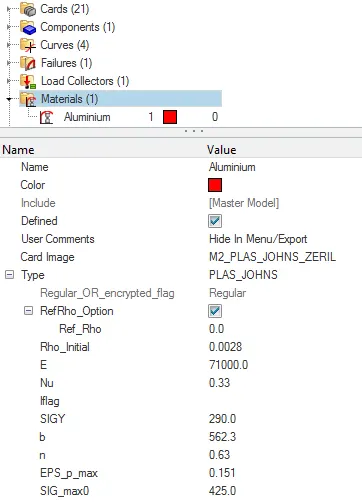
fig shows the recommended material card for the case1
4.create the failure card for the failure johnson .
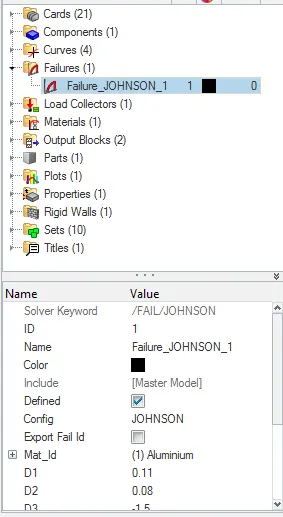
fig shows the failure card for case1
3.After making the all settings then go to the radioss option in that use export options as all and run options analysis and run number as 1 and then click the radioss and radioss block shows the run simulation and the radioss files is generated.
4.Afer the radioss files is generated check the failure_johnson_0001 out file for the energy error and the mass error and note down.
The mass error in the case1 is about to be 0% and the energy error is about the min is -0.3% to max energy of 0.8%
5.After the run of the simulation then save the model as law2_epsmax_failure.
6.Then switch to hyperview section in that import the h3d file and go to contour option in that select the vonmises stress and then run the simulation and note down the min and max value with the particular nodes .
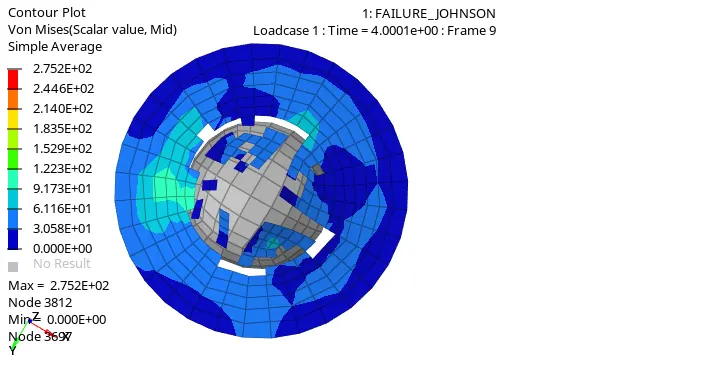
fig shows the contour plot of von mises the min max value for the failure will be min is 0 at node3697 and the max value of 2.752E+02 at node 3812.
7.After the hyperview section then change to hypergraph 2d view by swap of the windows and select the t01 file and then open that file.
8.Then note down the internal energy ,kinetic energy and the resulatant forces .
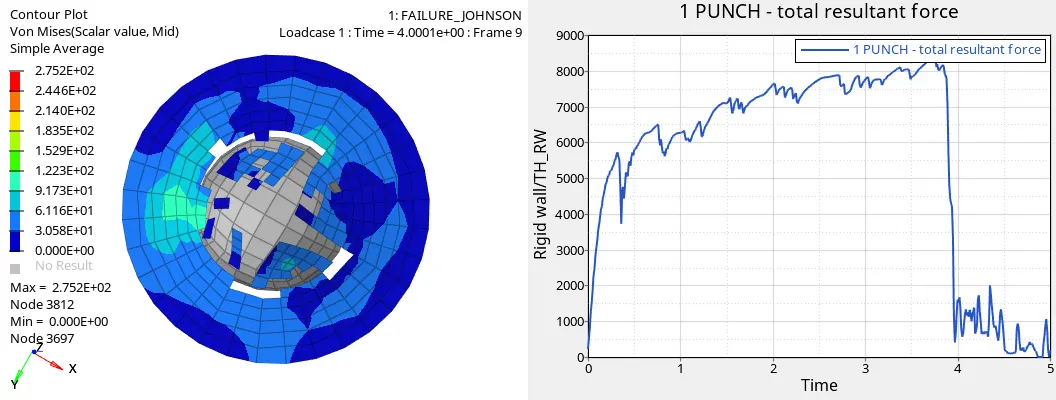
fig shows the total resultant forces.
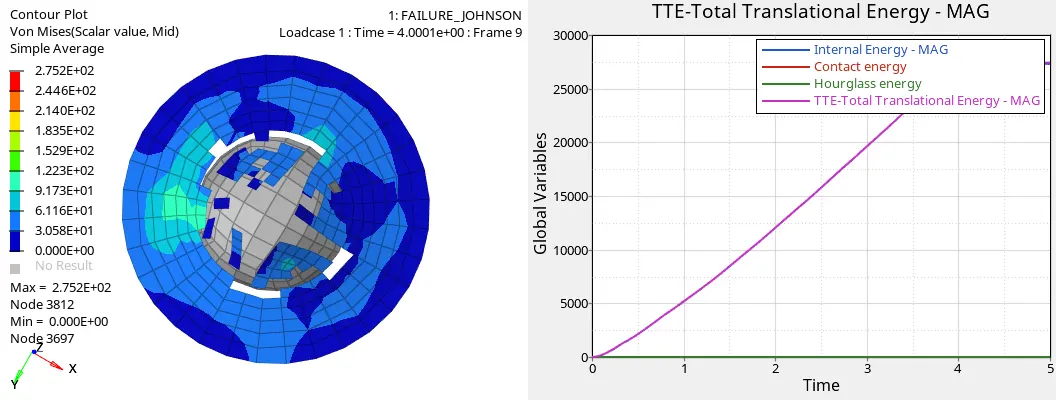
fig shows the energies that varies with respect to time
In this the hour glass energy remains constant and total translational energy and contact energy varies with time.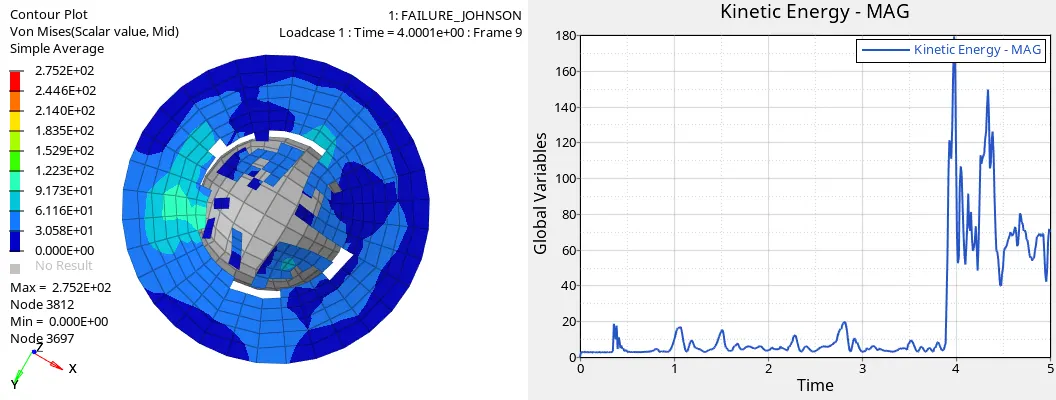
fig shows the variation of the kinetic energy with time
9.Note down the simulation time and the no of cycles for case1 is simulation time is 89.20sec and no of cycles is 49380.
10.Save all the files in the separate folder.
procedure:case2
1.Import the material model given - FAILURE_JOHNSON_0000.rad
2.open the properties in the browser and assign the best recommended properties for the ishell,ismstr,ish3n,N,ithick,iplas
fig shows the property card for case2
3.create the material card as per the case2 recommendation
fig shows the recommended material card for the case2
4.create the failure card for the failure johnson as recommended for case 2 compared to case1.
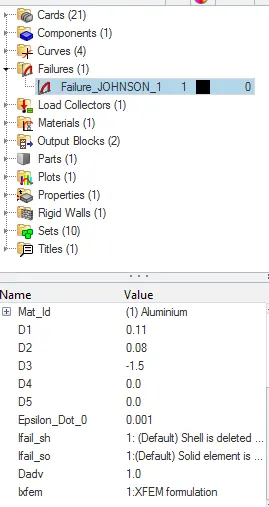
fig shows the failure card for case2
3.After making the all settings then go to the radioss option in that use export options as all and run options analysis and run number as 1 and then click the radioss and radioss block shows the run simulation and the radioss files is generated.
4.Afer the radioss files is generated check the law2_0001 out file for the energy error and the mass error and note down.
5.The mass error in the case2 is about to be 0% and the energy error is about the min is -0.3% to max energy of 4.1%.
6.After the run of the simulation then save the model as law2_epsmax_crack
7.Then switch to hyperview section in that import the h3d file and go to contour option in that select the vonmises stress and then run the simulation and note down the min and max value with the particular nodes.
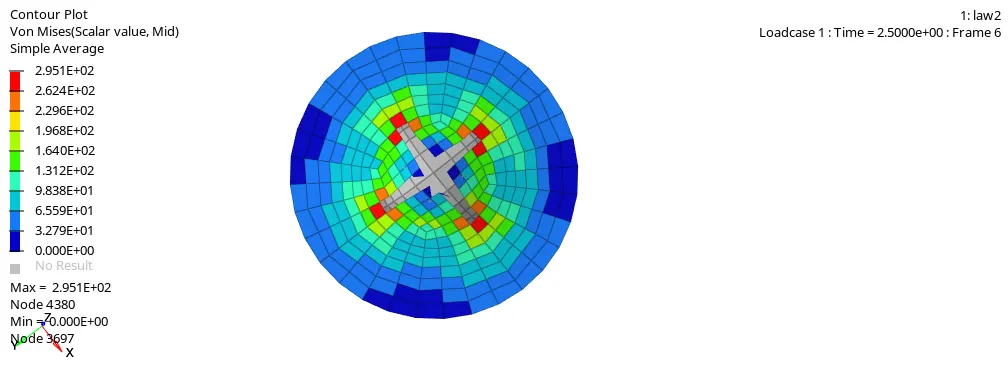
fig shows the plot of vonmises stress is minimum crack of 0 at node 3697 and maximum of 2.951E+02 at node of 4380.
7.After the hyperview section then change to hypergraph 2d view by swap of the windows and select the t01 file and then open that file.
8.Then note down the internal energy ,kinetic energy and the resulatant forces .
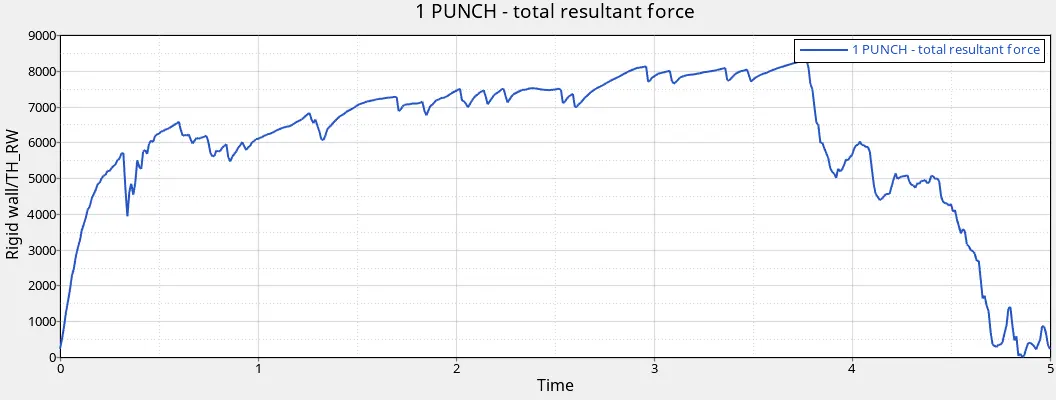
fig shows the total resultant forces.
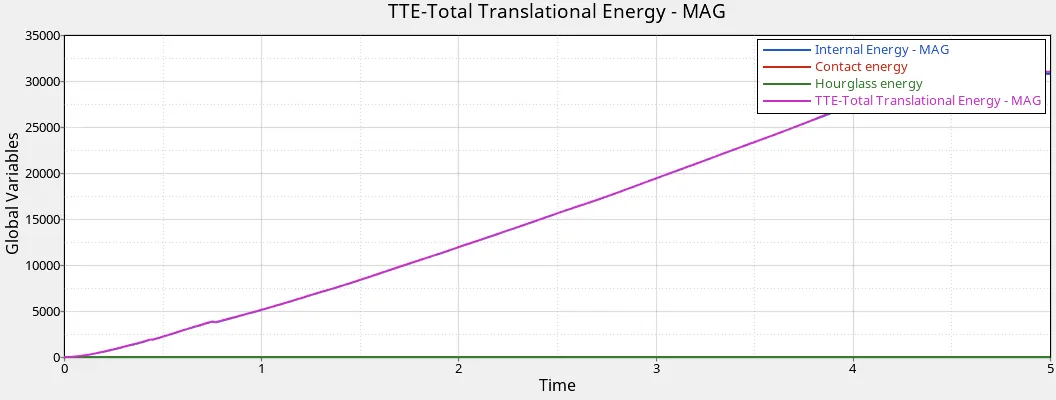
fig shows the variation of energies with respect to time
In this the hour glass energy remains constant and tte energies varies with respect to time.
9.Note down the simulation time and the no of cycles for case2 is simulation time is :162.59sec and no of cycles is 49217.
10.Save all the files in the separate folder.
procedure: case3
1.Import the material model given - FAILURE_JOHNSON_0000.rad
2.open the properties in the browser and assign the best recommended properties for the ishell,ismstr,ish3n,N,ithick,iplas
fig shows the property card for case3
3.create the material card as per the case3 recommendation
4.Delete the failure card as recommended for the case3
5.After making the all settings then go to the radioss option in that use export options as all and run options analysis and run number as 1 and then click the radioss and radioss block shows the run simulation and the radioss files is generated.
6.After the radioss files is generated check the failure_0001_johnson out file for the energy error and the mass error and note down.
7.The mass error in the case3 is about to be 0% and the energy error is about the min is -0.3% to max energy of 0.8%.
8.After the run of the simulation then save the model as law2_epsmax_nofail.
9.Then switch to hyperview section in that import the h3d file and go to contour option in that select the vonmises stress and then run the simulation and note down the min and max value with the particular nodes.
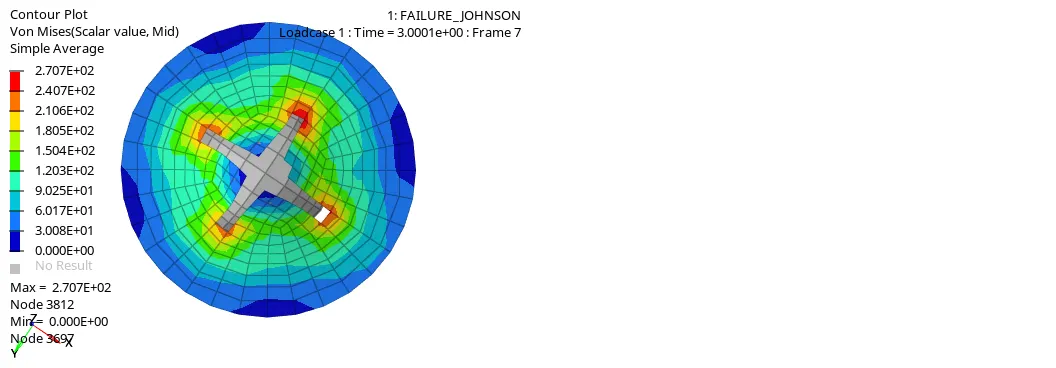
fig shows the von mises stress is max of 2.707E+02 at node 3812 and min of 0.000E+00 at node 3697
10.After the hyperview section then change to hypergraph 2d view by swap of the windows and select the t01 file and then open that file.
11.Then note down the internal energy ,kinetic energy and the resulatant forces .
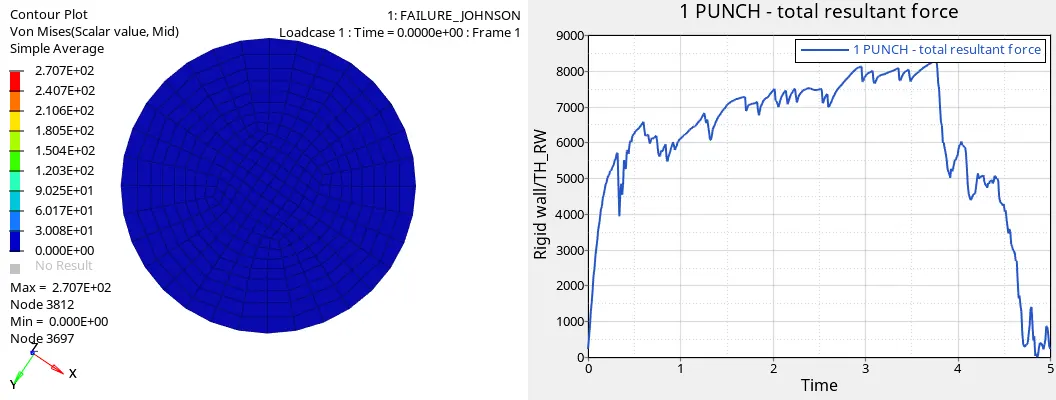
fig shows the resultant forces
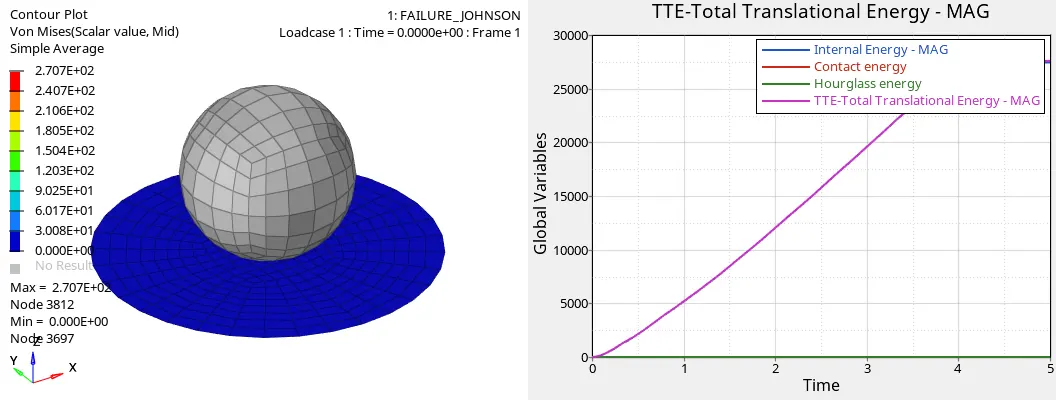
fig shows the hourglass energy is constant and the tte energies varies with time.
9.Note down the simulation time and the no of cycles for the case3 is simulation time is 93.40sec and total no of cycles is 49408.
10.Save all the files in the separate folder.
procedure: case4
1.Import the material model given - FAILURE_JOHNSON_0000.rad
2.open the properties in the browser and assign the best recommended properties for the ishell,ismstr,ish3n,N,ithick,iplas
fig shows the property card for case4
3.create the material card as per recommended in case 4 that eps_max value is deleted
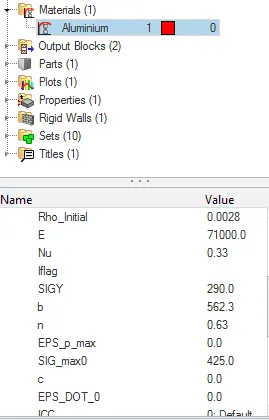
fig shows the material card with delete of eps_max value
4.No failure card in this case
5.After making the all settings then go to the radioss option in that use export options as all and run options analysis and run number as 1 and then click the radioss and radioss block shows the run simulation and the radioss files is generated.
6.After the radioss files is generated check the failure_0001_johnson out file for the energy error and the mass error and note down.
7.The mass error in the case4 is about to be 0% and the energy error is about the min is -0.3% to max energy of 1.1%.
8.After the run of the simulation then save the model as law2.
9.Then switch to hyperview section in that import the h3d file and go to contour option in that select the vonmises stress and then run the simulation and note down the min and max value with the particular nodes.
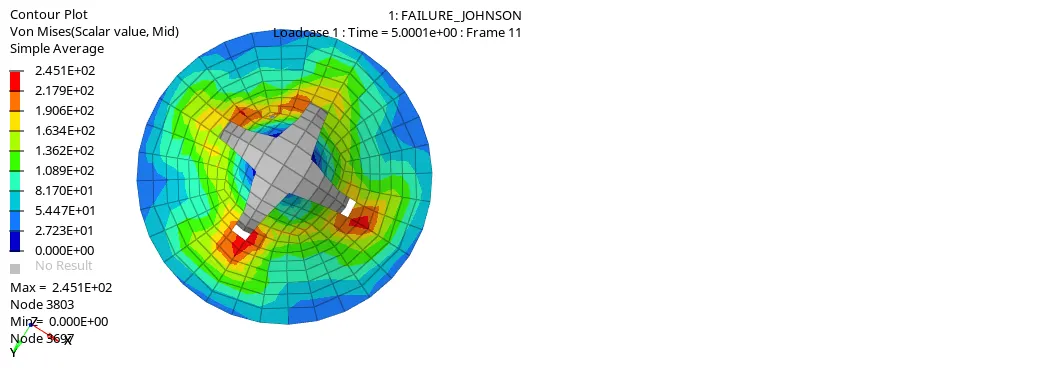
fig shows the vonmises stress is max of 2.451E+02 at a node 3803 and min of 0 at node 3697.
10.After the hyperview section then change to hypergraph 2d view by swap of the windows and select the t01 file and then open that file
11.Then note down the internal energy ,kinetic energy and the resulatant forces .
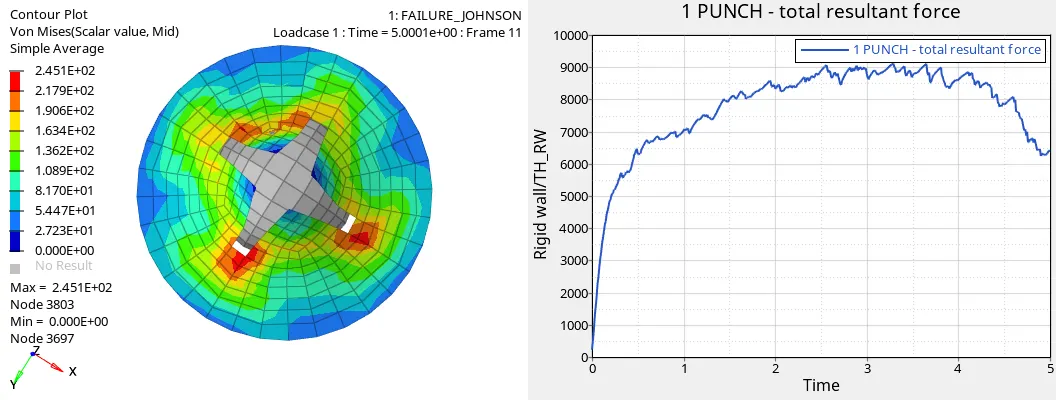
fig shows the total resultant force
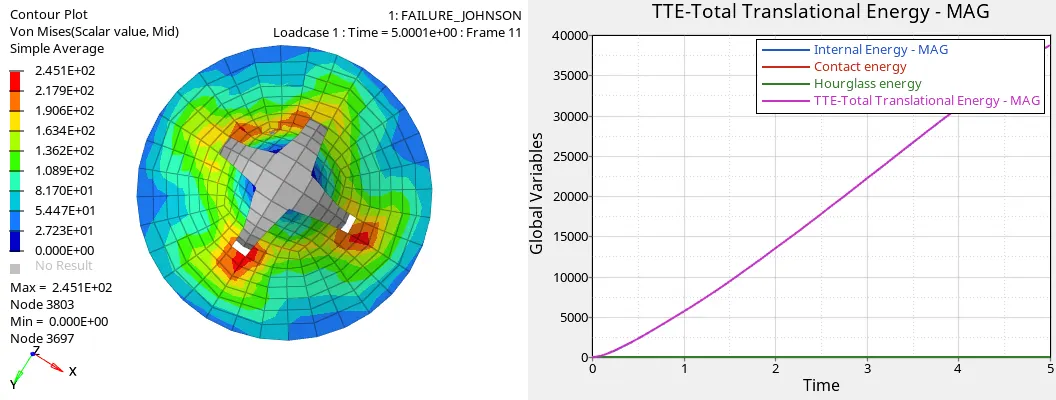
fig shows the hourglass energy is constant and the internal energy and tte energies are variying with respect to time
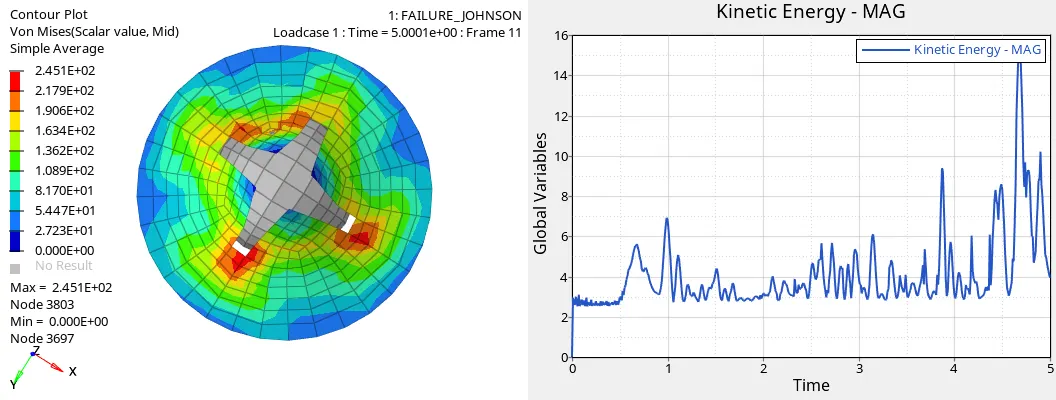
fig shows the kinetic energy varies with respect to time
9.Note down the simulation time and the no of cycles for the case4 is simulation time is 91.83sec and total no of cycles is 49304.
10.Save all the files in the separate folder.
procedure: case5
1.Import the material model given - FAILURE_JOHNSON_0000.rad
2.open the properties in the browser and assign the best recommended properties for the ishell,ismstr,ish3n,N,ithick,iplas
fig shows the property card for case5
3.create a material card as per the case5 i.e( material card has changed to law1 )
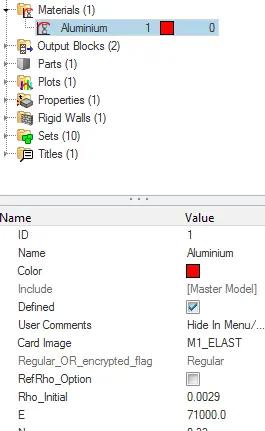
fig shows the card image of the material change to law1
4.No failure card in this case
5.After making the all settings then go to the radioss option in that use export options as all and run options analysis and run number as 1 and then click the radioss and radioss block shows the run simulation and the radioss files is generated.
6.After the radioss files is generated check the failure_0001_johnson out file for the energy error and the mass error and note down.
7.The mass error in the case5 is about to be 0% and the energy error is about the is -0.3% t of -0.1%.
8.After the run of the simulation then save the model as law1.
9.Then switch to hyperview section in that import the h3d file and go to contour option in that select the vonmises stress and then run the simulation and note down the min and max value with the particular nodes.
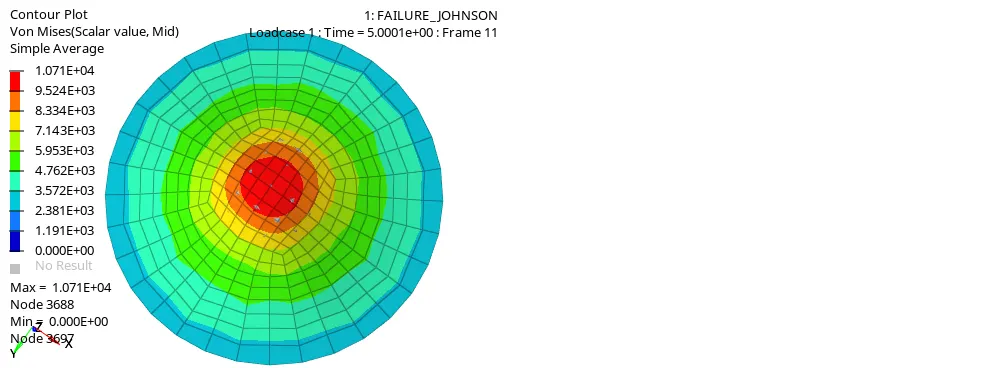
fig shows the vonmises stress is max of 1.071E+04 at node 3688 and min of 0 at the node 3697
10.After the hyperview section then change to hypergraph 2d view by swap of the windows and select the t01 file and then open that file
11.Then note down the internal energy ,kinetic energy and the resulatant forces .
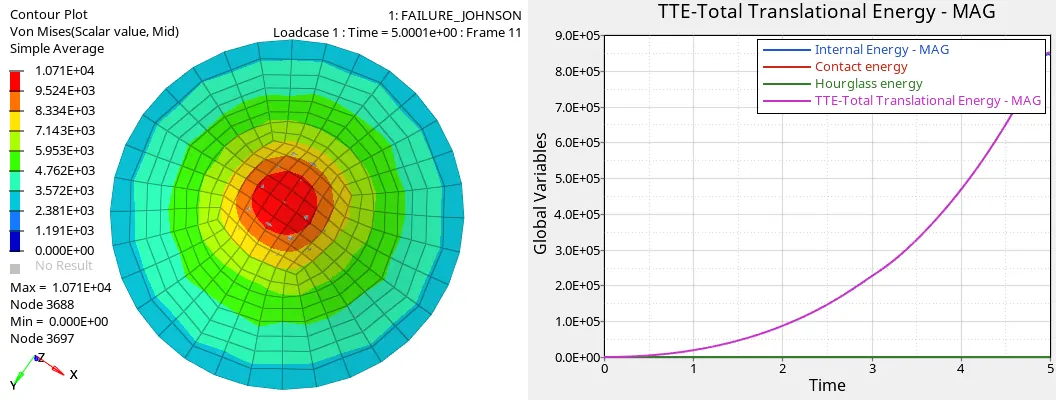
fig shows the hourglass energy is constant and the tte energies can be varies with respect to time.
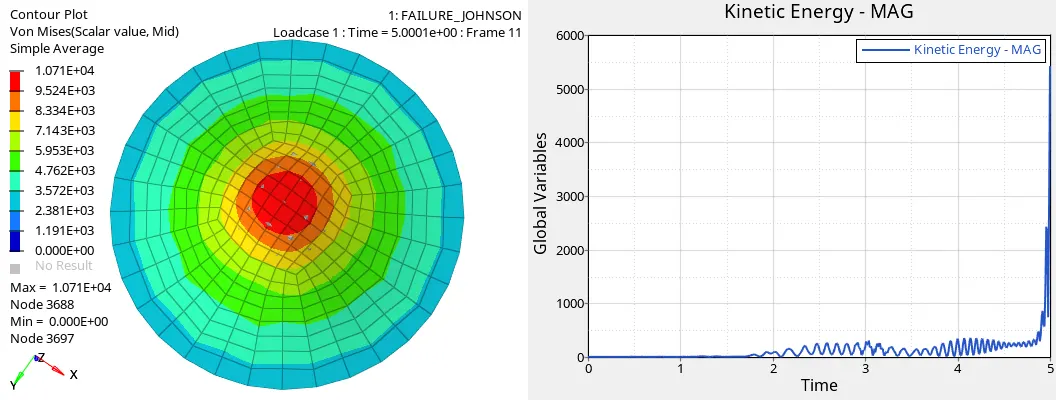
fig shows the kinetic energy varies with time
9.Note down the simulation time and the no of cycles for the case5 is simulation time is 83.05sec and total no of cycles is 47132.
10.Save all the files in the separate folder.
procedure:case6
1.Import the material model given -LAW27_0000.rad
2.open the properties in the browser and assign the best recommended properties for the ishell,ismstr,ish3n,N,ithick,iplas
fig shows the properties card for case6
3.create the material card as per recommended and change the material card to law27
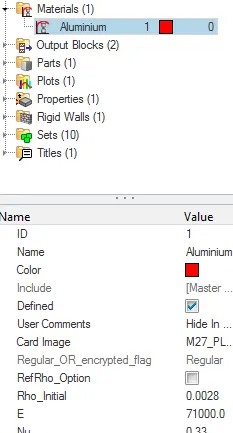
fig shows the material card for case6
4.No failure card in this case
5.After making the all settings then go to the radioss option in that use export options as all and run options analysis and run number as 1 and then click the radioss and radioss block shows the run simulation and the radioss files is generated.
6.After the radioss files is generated check the law27_0001 out file for the energy error and the mass error and note down.
7.The mass error in the case5 is about to be 0% and the energy error is about the is -0.3% t of 0.6%.
8.After the run of the simulation then save the model as law1.
9.Then switch to hyperview section in that import the h3d file and go to contour option in that select the vonmises stress and then run the simulation and note down the min and max value with the particular nodes.
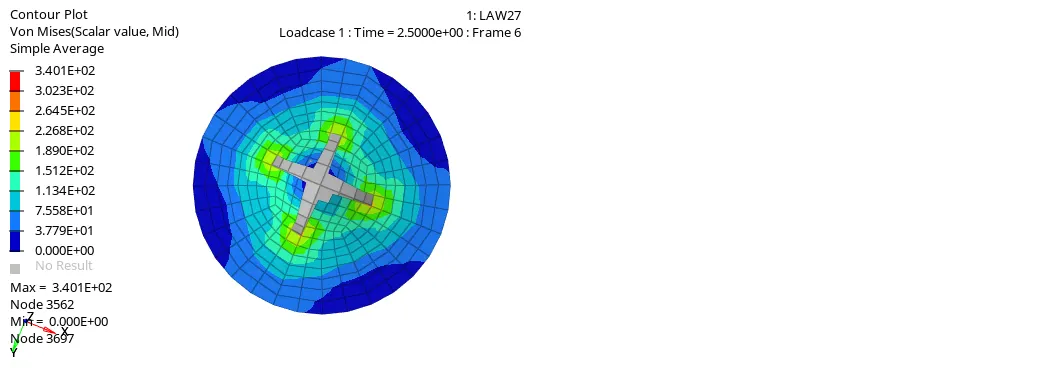
fig shows the vonmises stress is max of 3.401E+02 at node 3562 and min 0 at node 3697
10.After the hyperview section then change to hypergraph 2d view by swap of the windows and select the t01 file and then open that file
11.Then note down the internal energy ,kinetic energy and the resulatant forces .
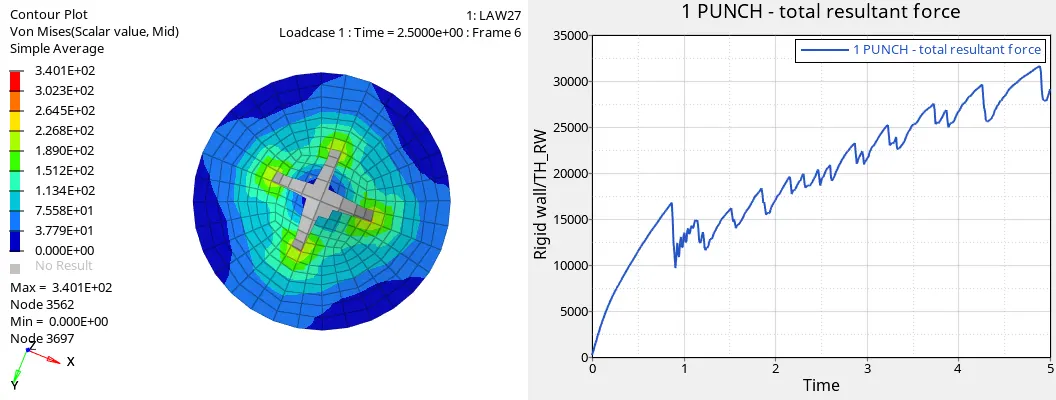
fig shows the total resultant force varies with time.
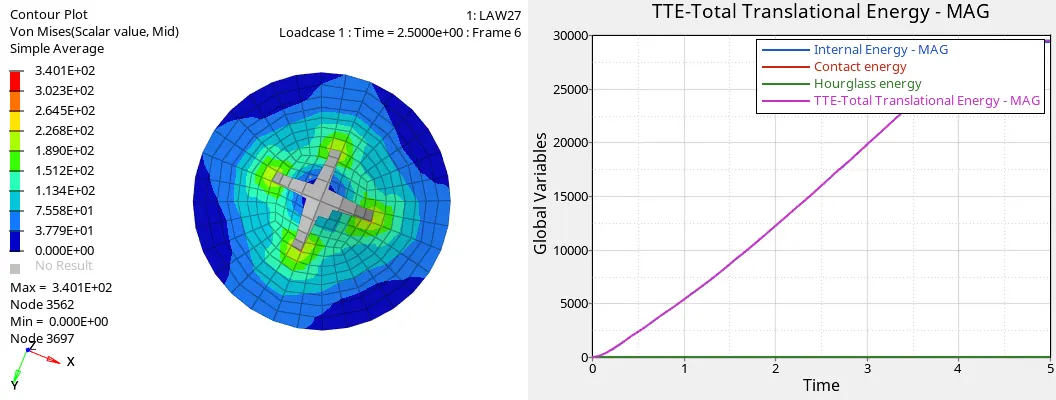
fig shows the hourglass energy is constant and the tte energies are varies with time
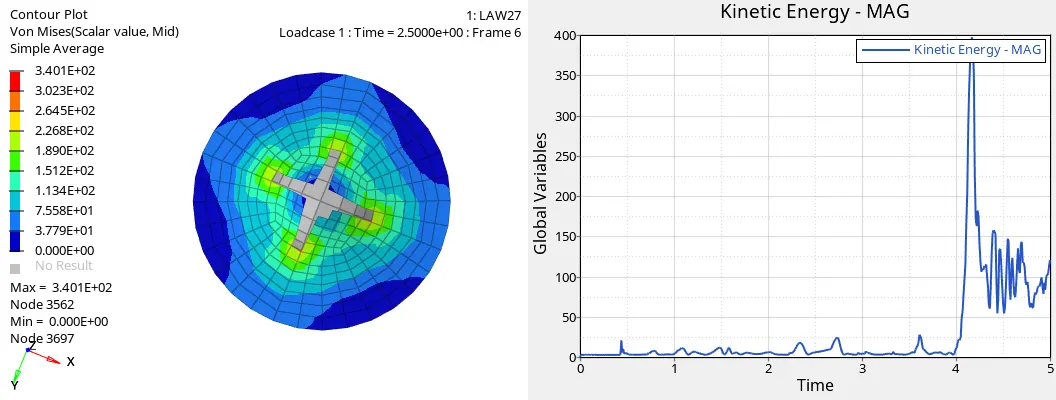
fig shows the variation of kinetic energy with respect to time
9.Note down the simulation time and the no of cycles for the case6 is simulation time is 91.13sec and total no of cycles is 49965.
10.Save all the files in the separate folder.
procedure: case7
1.Import the material model given - FAILURE_JOHNSON_0000.rad
2.open the properties in the browser and assign the best recommended properties for the ishell,ismstr,ish3n,N,ithick,iplas
fig shows the property card for case7
3.create the material card as per recommended and change the material card to law36
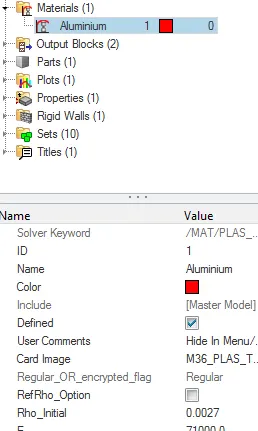
fig shows the change of card image as the law36
4.create the new curve using the N_funct which is assigned as 1,fct_ID created using curve
5.Enter the x and y values as per requirement so then click enter the each values that shows the form of the new curve.
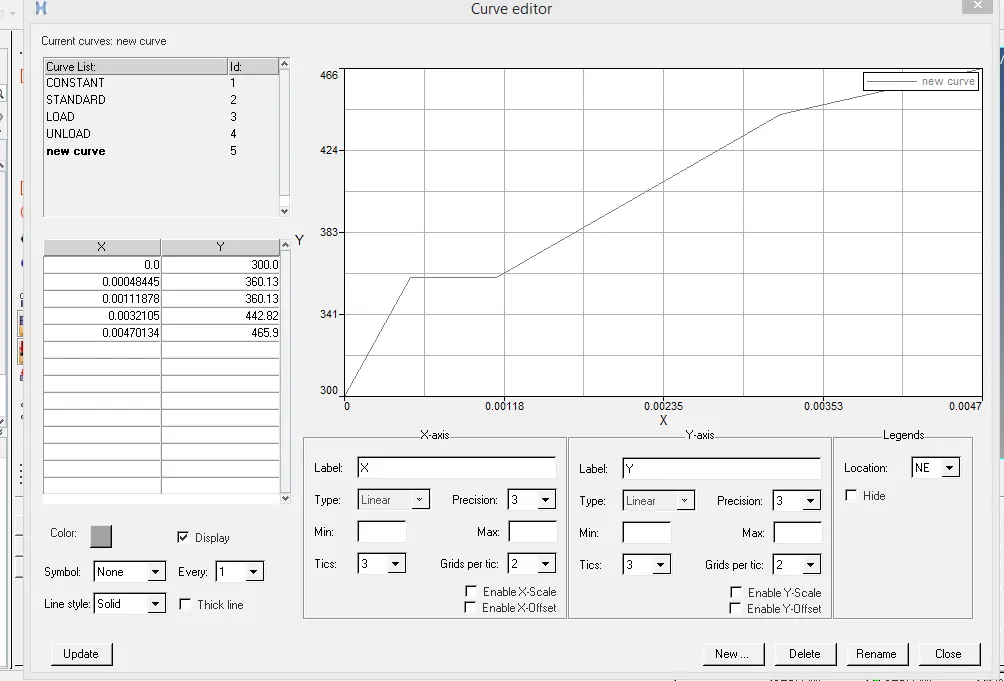
fig shows the create of the new curve
4.No failure card in this case
5.After making the all settings then go to the radioss option in that use export options as all and run options analysis and run number as 1 and then click the radioss and radioss block shows the run simulation and the radioss files is generated.
6.After the radioss files is generated check the failure_0001_johnson out file for the energy error and the mass error and note down.
7.The mass error in the case6 is about to be 0% and the energy error is about the is -0.3% t of 0.8%.
8.After the run of the simulation then save the model as law36.
9.Then switch to hyperview section in that import the h3d file and go to contour option in that select the vonmises stress and then run the simulation and note down the min and max value with the particular nodes.
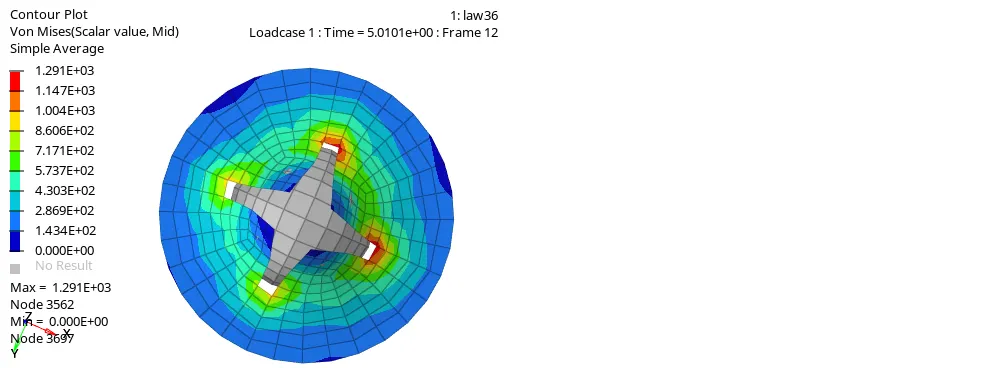
fig shows the max vonmises stress at value of 1.291E+03 at node 3562 and min 0 at node 3697.
10.After the hyperview section then change to hypergraph 2d view by swap of the windows and select the t01 file and then open that file
11.Then note down the internal energy ,kinetic energy and the resulatant forces.
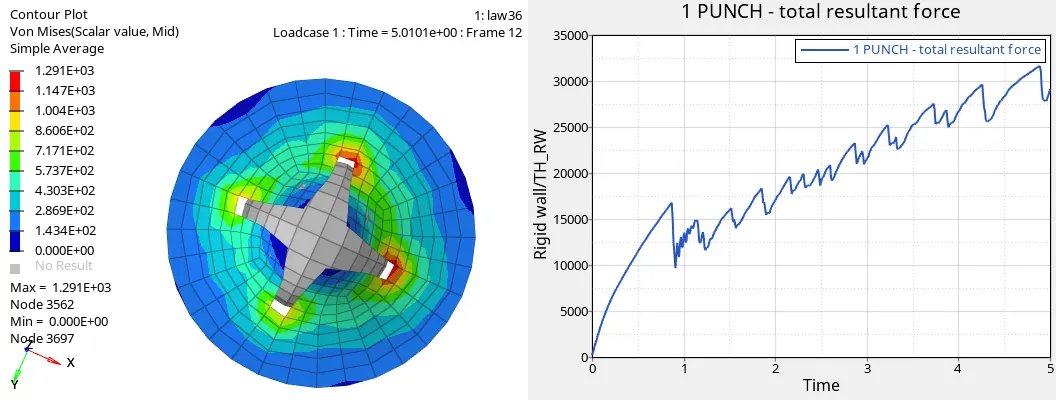
fig shows the total resultant force varies with time
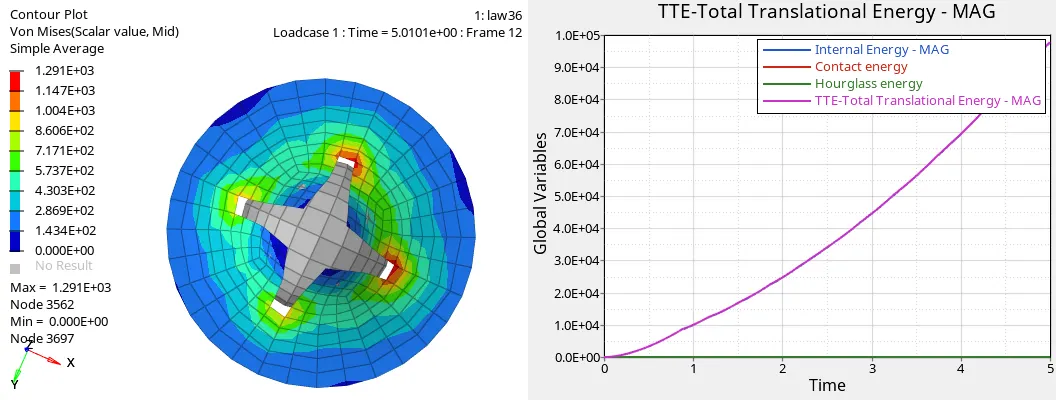
fig shows the hourglass energy remains constant and the tte energies increase with respect to time
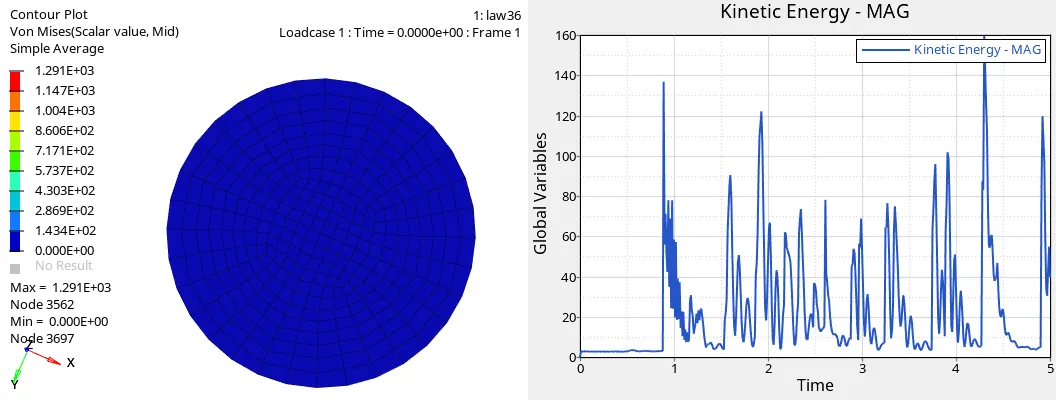
fig shows the variation of kinetic energy with respect to time
9.Note down the simulation time and the no of cycles for the case7 is simulation time is 96.14sec and total no of cycles is 53164.
10.Save all the files in the separate folder.
comparision and observations
compare between the simulation time and no of cycles
| cases | simulation time(sec) | no of cycles |
| case1 | 89.20 | 49380 |
| case2 | 162.59 | 49217 |
| case3 | 93.40 | 49408 |
| case4 | 91.83 | 49304 |
| case5 | 83.05 | 47132 |
| case6 | 91.13 | 49965 |
| case7 | 96.14 | 53164 |
compare between the mass and energy errors
The mass errors is almost zero or nil in all cases.
Energy errors
case1:Error increases from -0.3 to 0.8%
case2:Error increases from -0.3 to 4.1%
case3:Error increases from -0.3 to 0.8%
case4:Error increases from -0.3 to 1.1%
case5:Error reduces to -0.3 to -0.1%
case6:Error increases from -0.3 to 0.6%
case7:Error increases from -0.3 to 0.8%
Errors varies due to change in material card and the properties
Animation comparision as shown in the respective figures in the case1 to case7 that elements are deleted fully and partially depends upon the material card change and the properties and the failure cards.
conclusion:In these assignment learnt about the how to change the material card and the property id and to check the mass and the energy errors and also compare the results.