Assignment 3-2D Element Formulation Challenge
Objective
1.Using the crash beam file from the previous assignment, change the run time to 55 ms.
2. Change the number of animation steps during simulation to a minimum of 25 and maximum of 60.
3. Run the base simulation without any modification to element properties.
4. At the end of the simulation, do the energy error and mass error checks and determine whether results would be acceptable.
5. If acceptable, Plot rigid wall forces, internal energy, hourglass energy, contact energy, total energy of the simulations.
6. Change all the shell elements properties to recommended properties, save this as separate, rad files and run the simulation.
7. Follow steps 5 and 6.
8. Create a brief report comparing all the results from steps 5 and 6 for both simulations.
9. Comment whether there is any change in the results and why there is any change in the result.
Procedure
Objective 1
1. Import the 0000.rad file into hypermesh by using import solver deck option.
2. To Change the runtime click on the ENG_RUN card and change the value infront of Tstop to 55.
Objective 2
1. calculate the Tfreq of animation by dividing the runtime(55) by the number of desired animation steps(40)
2. Select ENG_ANIM_DT card and change Tfreq value to 1.375
Objective 3
Run the base simulation
1. Go to Analysis>>Radios and save the model in a local directory.
2. From the local directory import and run the .h3d file to run the animation
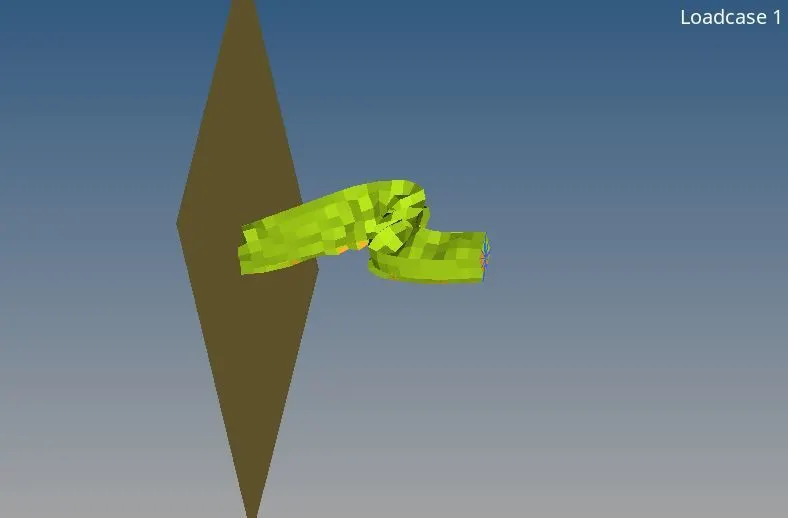
Objective 4
Energy and Mass error check
1. Open the 0001.out file in a text editor and scroll down to obtain the energy error and mass error values at the end of the simulation.
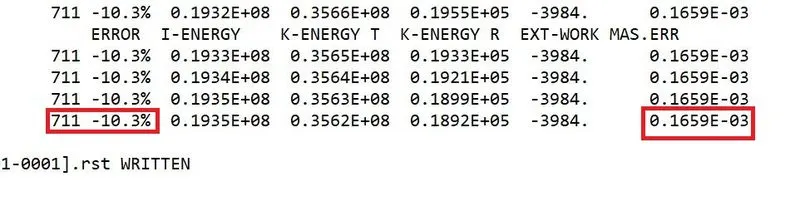
2. From the file the energy error is -10.3% and mass error is 0.1653E-03
3. The Enerrgy error is negative and greater than -15% and the mass error is sufficiently small. Therefore, the results are acceptable.
Objective 5
Plot rigid wall forces, internal energy, hourglass energy, contact energy and the total energy
1. Open hypergraph 2d and import the T01 file.
2. from the interface select the required variable and the plot the graphs
3. Rigid wall force plot
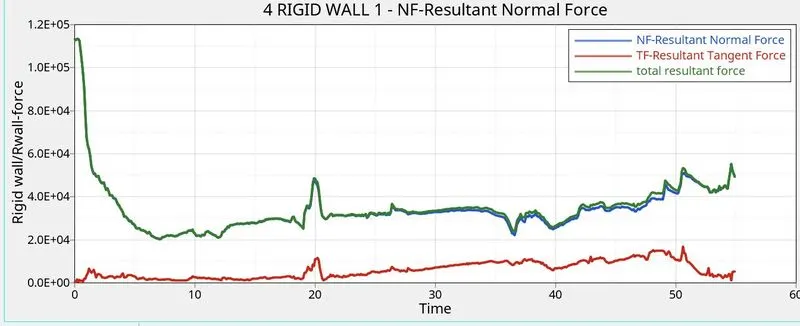
4. Energy plots
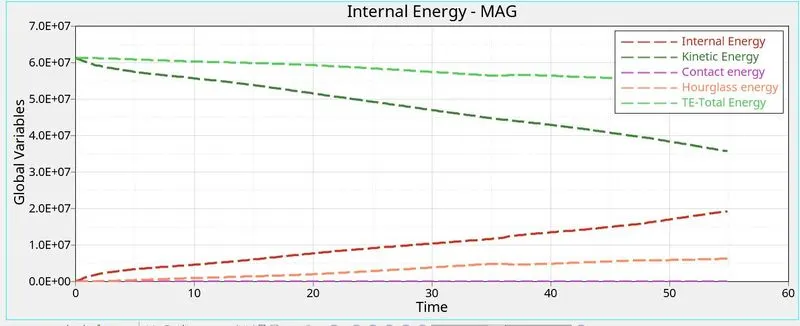
Objective 6
Change the shell elements properties and run the simulation.
1. Import 0000.rad file into hypermesh and make the changes as in objective 1 and 2
2. To change shell properties edit the properties card for hat section and close-out panel with parameters given below.
| Parameters |
|
Ishell =24 |
|
Ismstr=2 |
|
Ish3n=2 |
| N=5 |
|
Ithick=1 |
|
Iplas=1 |
3. Follow the steps mentioned in objective 3 and 4 to run the simulation and obtain the energy and mass error
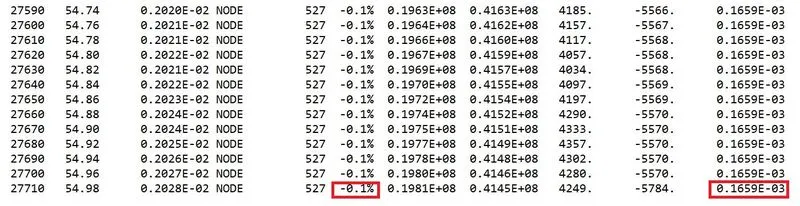
4. From the file the energy error is -0.1% and mass error is 0.1653E-03
5. The Enerrgy error is negative and greater than -15% and the mass error is sufficiently small. Therefore, the results are acceptable.
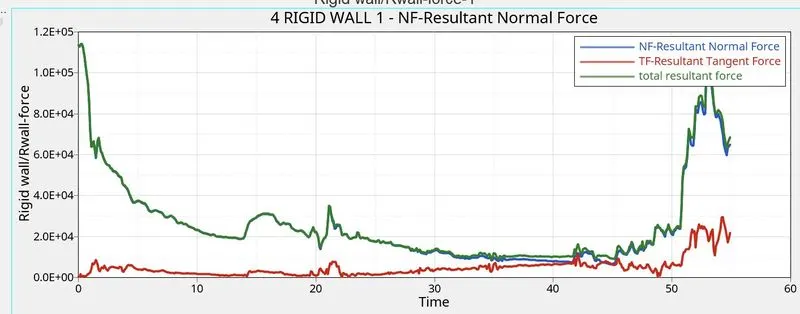
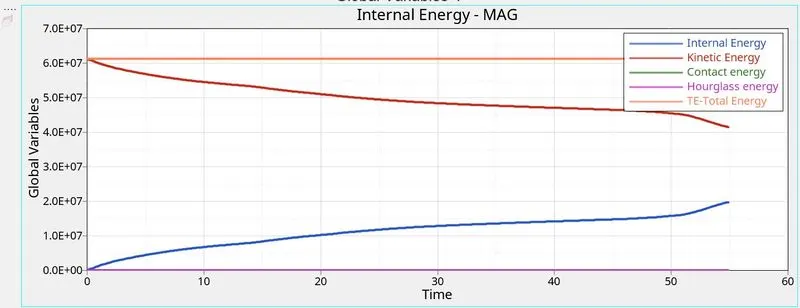
6. Follow steps mentioned in objective 5 to obtain the required graphs
Rigid wall force plot
Energy plots
Objective 8
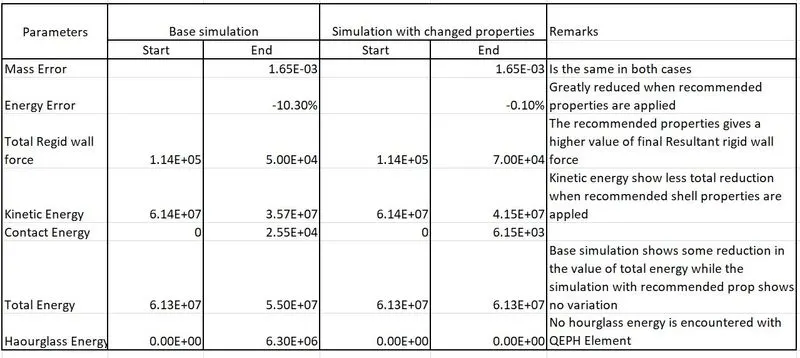
Comparison of the two simulation.
Objective 9
Change in the result
The recommended properties give a closer approximation as is idicated by low values of energy error and hourglass energy, along with low value of contact energy and very low variation in total energy during the simulation.
The recommended properties helps in creating a mores uitable solution solution because of thier inherent characterstics.
Result
1. The runtime and animation steps are modified for the simulation.
2. Simulation are created for base properties and recommended properties
3. Energy error and mass error are obtained for both simulation and energy and rigid wall force are plotted.
4. A subjective comparison is attained for the two simulations.
Learning outcome
1. Creating and running simultions with different input properties and simulation options.
2. Obtaining outputs in form of forces and energy plot during the runtime.