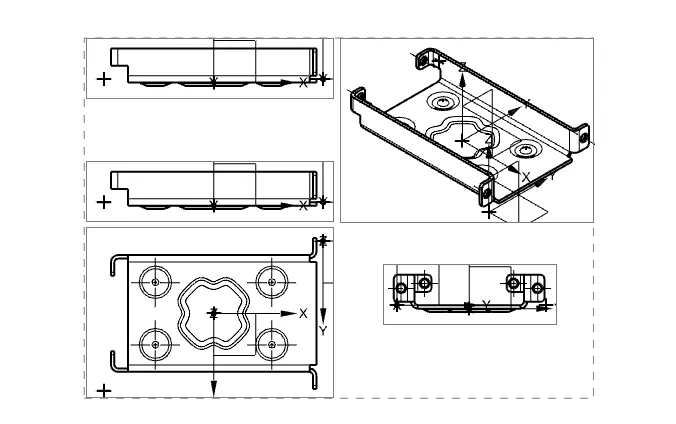
Advanced Sheet Metal Design Using NX Cad Challenge_1_Casing Design
1.CASING DESIGN(SOMNATH DAS)
2.Used sheet metal NX software for proformed this design.it's very usefuly design as per industrial requirement .
3.CASING DESIGN : Used variety of tool for making this design from NX software .
4.Design methodology / approach :
Start NX12 created new sheet for making this desing.
Create a skatch >Changing design parameter>Adding a solid sheet and cutout>Bending >Adding flanges>Breaking corners>unbending the metal sheet >Adding hole>Adding dimple(Sketch)>Adding dimple>Adding beads >Rebend>Drafting .
5.Description:
Create a skatch : XY plane drawn recteangle centred at the origin with an x-length of 60mm and a y- width of 50mm
Changed design parameter:In the sheet metal preferences dialog box set all the four global parameter to 1mm .
TAB : Creates a base feature by extruding a sketch along a vector by a thickness value or add material to a planer face .additional planer selection can be added to generate bends as part of the base feature .
BENDING :Lift material along the contour of a sketch that simulates a stamping tool.
FLANGES:Adds a flat flange at the angle to a planer face and adds a bend between the two.
BREAK CORNOR:Rounds or chamfers a sharp cornor of a tab or flanges .
UNBENDING THE SHEET METAL SHEET:Flattern a bend and the material adjacent to the bends.
DIMPLE:Lifts an area of the model inside a sketch that simulates a stamping tool.
BEAD:Lifts material along the countour of a sketch that simulates stamping tool.
RE-BENDING : Restore an unbend freture to it's previous bent state along with any fretures added after after the unbend freture .
DRAFTING : Strat the drafting application which provides tool to create and maintain drawing of the desing model .