A MATLAB program to simulate the forward kinematics of a 3R Robotic Arm
AIM OF THE PROJECT:
To write a MATLAB program to simulate the forward kinematics of a 3R Robotic Arm.
INTRODUCTION:
A robotic arm is a kind of mechanical device that is generally used to do repetitive work easily. Repetitive work like welding, painting using the spray, and many more different-different types of repetitive work. In industry usually, a robotic arm with two arms is used. Sometimes three arms robotic arms are also used in the Industry. The main parts of a Robotic arm are the shoulder, elbow, and wrist or end effector.
The total area of space in which the end effector of a robotic arm reach and able to perform work is generally defined by the workspace.
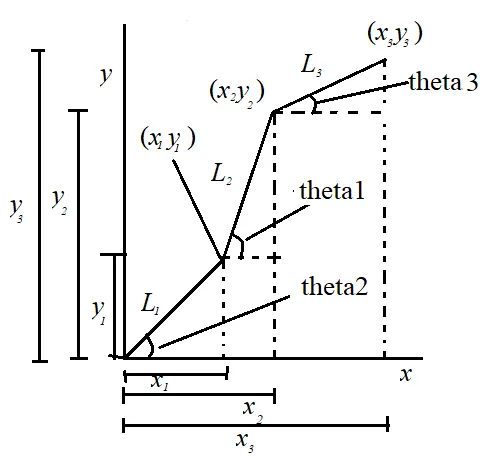
SIMPLE CONSTRUCTION AND GOVERNING EQUATIONS:
In the above-shown figure, simple construction of the arms of a 2R robotic arm is shown. The data extracted from the above-shown diagram is shown below,
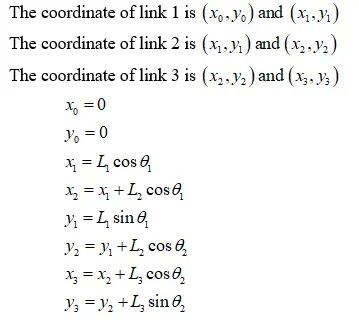
MATLAB PROGRAM:
MATLAB program for the single position of the 2R Robotic arm.
clear all

close all

clc

l1 = 0.5;

l2 = 0.5;

l3 = 0.5;

theta1 = 45;

theta2 = 30;

theta3 = 20;

x0 = 0;

y0 = 0;

x1 = l1*cosd(theta1);

x2 = x1 + l2*cosd(theta2);

x3 = x2 + l3*cosd(theta3);

y1 = l1*sind(theta1);

y2 = y1 + l2*sind(theta2);

y3 = y2 + l3*sind(theta3);

line([x0,x1],[y0,y1],'linewidth',4,'color','r');

line([x1,x2],[y1,y2],'linewidth',4,'color','b');

line([x2,x3],[y2,y3],'linewidth',4,'color','b');

grid on

xlabel('x-axis')

ylabel('y-axis')
OUTPUT:
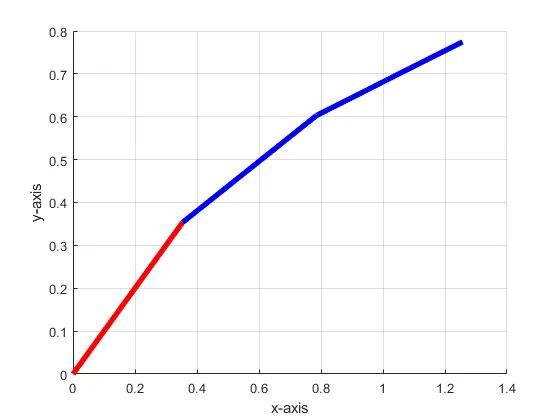
MATLAB program for simulating the 2R Robotic arm.
If we want to simulate the robotic arm, then we have to change the position angle of the robotic arm every time. So, consider, the angle of the arm varies between 0 and 90 degrees 10 time. For repetitive work, we have to use for loop also. In this specific problem, we can ask then we have to use for loop two times. So, we will use nested for loop.
Program without holding the position:
clear all

close all

clc

l1 = 0.5;

l2 = 0.5;

l3 = 0.5;

theta1 = linspace(1,90,10);

theta2 = linspace(1,90,10);

theta3 = linspace(1,90,10);

ct = 1;

for i = 1:length(theta1)

    THETA1 = theta1(i);

    for j =1:length(theta2)

     THETA2 = theta2(j);

     for k = 1:length(theta3)

         THETA3 = theta3(k);

     x0 = 0;

     y0 = 0;

     x1 = l1*cosd(THETA1);

     y1 = l1*sind(THETA1);

     x2 = x1 + l2*cosd(THETA2);

     x3 = x2 + l3*cosd(THETA3);

     y2 = y1 + l2*sind(THETA2);

     y3 = y2 + l3*sind(THETA3);

     plot([x0,x1],[y0,y1],[x1,x2],[y1,y2],[x2,x3],[y2,y3],'linewidth',4);

     axis([-0.1 1.5 0 1.5]);

     pause(0.000003)

     grid on

     ct = ct + 1;

      M(ct) = getframe(gcf);

    end

    end

end

 movie(M)

videofile = videowriter('forward_kine.avi','Uncompressed AVI');

open(videofile)

writevideo(videofile,M)

close(videofile)
OUTPUT:
https://youtu.be/p0Odxb4TAqY
Program with holding the position:
clear all

close all

clc

l1 = 0.5;

l2 = 0.5;

l3 = 0.5;

theta1 = linspace(1,90,10);

theta2 = linspace(1,90,10);

theta3 = linspace(1,90,10);

ct = 1;

for i = 1:length(theta1)

    THETA1 = theta1(i);

    for j =1:length(theta2)

     THETA2 = theta2(j);

     for k = 1:length(theta3)

         THETA3 = theta3(k);

     x0 = 0;

     y0 = 0;

     x1 = l1*cosd(THETA1);

     y1 = l1*sind(THETA1);

     x2 = x1 + l2*cosd(THETA2);

     x3 = x2 + l3*cosd(THETA3);

     y2 = y1 + l2*sind(THETA2);

     y3 = y2 + l3*sind(THETA3);

     hold on

     plot([x0,x1],[y0,y1],[x1,x2],[y1,y2],[x2,x3],[y2,y3],'linewidth',4);

     axis([-0.1 1.5 0 1.5]);

     pause(0.000003)

     grid on

     ct = ct + 1;

      M(ct) = getframe(gcf);

    end

    end

end

 movie(M)

videofile = videowriter('forward_kine.avi','Uncompressed AVI');

open(videofile)

writevideo(videofile,M)

close(videofile)
OUTPUT:
https://youtu.be/jT1v227INRw