2 links Robotic Arm motion
Aim :
To simulate the forward kinematics of a 2R Robotic arm using MATLAB.
Objective:
To write a program for a 2R robotic arm.
To plot the animation of the end-effector position using forward kinematics.
Theory :
A robotic arm is a type of mechanical arm, usually programmable, with similar functions to a human arm; the arm may be the total of the mechanism or may be part of a more complex robot. The links of such a manipulator are connected by joints allowing either rotational motion (such as in an articulated robot) or translational (linear) displacement. The links of the manipulator can be considered to form a kinematic chain. The terminus of the kinematic chain of the manipulator is called the end effector and it is analogous to the human hand.
Kinematics is the relationships between the positions, velocities, and accelerations of the links of a manipulator. Here forward kinematics is used to calculate the position of end end-effector
It has 2 rotational joints. It has 2 degrees of freedom
The links are restricted to a 180° rotation with respect to the axes
The equation to determine the position of end-effector is as follows:
X_0 = Y_0 = 0
X_1 = L_1.costheta_1 , Y_1 = L_1.sintheta_1
X_2 = X_1 + L_2.costheta_2 , Y_2 = Y_1 + L_2.sintheta_2
where;
L_1,L_2= length of Link 1 and 2 (m)
theta_1,theta_2 = angle of Link 1 and 2 (degree)
(X_0 ,Y_0 ) = coordinates of origin
(X_1 ,Y_1 )= end coordinates of Link 1
(X_2,Y_2) = end coordinates of Link 2 or end-effector
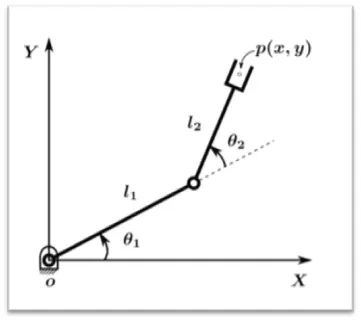
Fig : 2R ROBOTIC ARM
Applications:
Collaborative Robots.Robotic Painting, Robotic Welding, Robotic Assembly, Material Removal, Part Transfer and Machine Tending
code:
%robotic arm challenge
close all
clear all
clc

%input
l1=1;    %length of the first metres.
l2=0.5; %length of the second link in metres.

% angles for the arm from 0° to 180°
theta1 = linspace(0,180,15);%15 values starting from 0 to 180
theta2 = linspace(0,180,15);%15 values starting from 0 to 180

k=1;
for i= 1:length(theta2)
    THETA1 = theta1(i);
     for j = 1:length(theta2)
      THETA2 = theta2(j);


       x0 = 0; % x coordinate  of the start point of link1
       y0 = 0; % y coordinate  of the start point of link1

      x1= l1*cosd( THETA1);% x coordinate  of the end point of link1
      y1= l1*sind( THETA1);% y coordinate  of the end point of link1

     x2 = x1+ l2*cosd(THETA2);% x coordinate  of the end point of link2
     y2 = y1+ l2*sind(THETA2);% y coordinate  of the end point of link2

     %plotting the links
     plot([x0 x1],[y0 y1],[x1 x2],[y1 y2],'linewidth',5)%plotting the points
     axis([-2 2 0 2]) %axis for the plotting thr graph
     pause(0.05) %pause time for each frame
     xlabel('X axis(m)');
     ylabel('Y axis(m)');

     M(k)= getframe(gcf);%get frame and save in array M
     k = k +1 ; %increment for frame
     end
end

%to prepare animation and save it in videofile
movie(M)
videofile = VideoWriter('forward_kinematics.avi','uncompressed AVI');
open(videofile)
writeVideo(videofile,M)
close(videofile)
Explanation of the program:
Firstly we define the input parameters of the robot arm. The length of the two links as l1,l2, and the angles with respect to horizontal theta1 and theta2 l.linspace commands is used to assign 15 values starting from 0 to 180 .we use two for loops to iterate over values of theta 1 and theta 2 .THETA1 and THETA2 are having constant while theta1 and theta2 will have different values. we plot all the points define the axis, pause command is used to freeze frames in between iterations.
The 'getframe(gcf)' command is used inside the second loop(controlling second link position) to get the current frame and store it as an image into the array 'M'. All figures are assigned to a variable M, one at a time using k followed by termination of for loop.k variable is used to increment frame.
Movie command is used to combine all the figures saved in the M file to make an movie and thereafter saving it in .avi format. open() begins to extract the files.
The videowriter command creates an empty video file by the name 'forward kinematics' in .avi format uncompressed type of video has high quality and is therefore used .writeVideo writes data from an array m to the video file. Close command is used to terminate the operation.
Conclusion:
Thus, the program for a 2R robotic arm forward kinematics was created using MATLAB .
References:
Wikipedia
Animation of the plot:
The link for the animation has been mentioned below.