Wiring harness design in CATIA V5 - 3D modeling Week 4 Challenge
Report
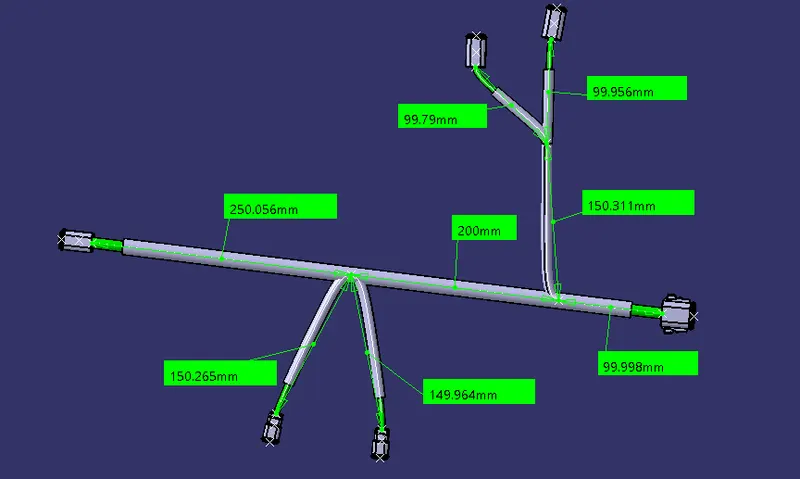
- The aim was to route the harness as per the given diagram and to add protective coverings.
- Firstly, the require connectors .stp file is being downloaded from the te.com website, then they are converted to .CATPart files in CATIAV5 software. They include DT06-2S DT06-4S DT06-6S DT06-08SA
- Now to make any harness assembly, the mechanical part is to be electrically defined using Electrical Part design workbench, hence I defined all 4 parts as connectors, along with that the bundle entry point, Connector connection point, Cavity connection point are defined using the tool available in the same Workbench, and created Axis system wherever required.
- Theses parts are being saved in connectors catalogue using save device tool.
- These connectorsare being copied and moved/ arranged to their respective locations using Mechanical assembly workbench.
- Now we can create Geometrical Bundle in Electrical Harness Assembly
- As per the available reference design, the bundle of 10mm is created between 6S DT06-08SA and DT06-6S
- Between sub-branches 5mm Bundle is created for the bundle entry point created previously for all connectors using Multi-Branchable point creation.
- Finally the Protection COT Tubes are added using our COT_Tubes Catalogue with required diameter, noted that a 30mm gap is given from connectors.
- File is now saved.