Week 8 - Simulation of a backward facing step in OpenFOAM
Incompressible-laminar-viscous flow through the backward facing step geometry:
Incompressible flow:
- It is a fluid dynamics concept where the fluid's density remains constant throughout the flow field, where the fluid's volume does not change, even when subjected to pressure variations or flow disturbances.
- Incompressible flows are commonly observed in liquids and low-speed gases, where density changes are negligible.
Viscous flow:
Viscous flow is a type of fluid flow in which the fluid particles interact with each other through friction. This frictional force, known as viscosity, causes the fluid to resist shearing. As a result, viscous fluids tend to flow more slowly than non-viscous fluids.
Viscosity is a property of fluids that is affected by the temperature and the molecular weight of the fluid. In general, fluids with higher temperatures and lower molecular weights have lower viscosities.
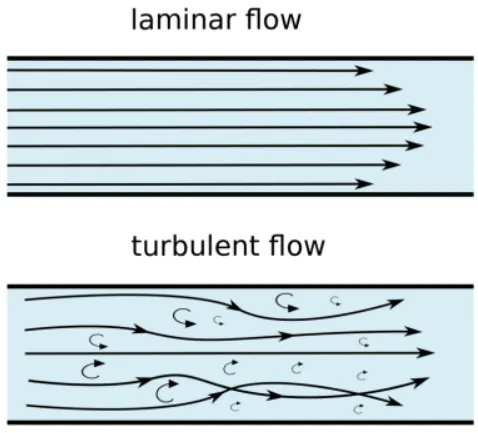
There are two main types of viscous flow: laminar flow and turbulent flow.
Laminar flow:
- Laminar flow is a type of fluid flow in which the fluid particles follow smooth paths in layers, with each layer moving smoothly past the adjacent layers with little or no mixing.
- At low velocities, the fluid tends to flow without lateral mixing, and adjacent layers slide past one another like playing cards.
- In laminar flow, the motion of the particles of the fluid is very orderly with particles close to a solid surface moving in straight lines parallel to that surface.
Turbulent flow
- Turbulent flow is a type of fluid flow where fluid particles are constantly changing direction and speed resulting in large eddies and vortices in the flow.
- These fluctuations lead to enhanced mixing and mass transfer within the fluid, making turbulent flow more effective for heat and mass transfer compared to laminar flow.
- Turbulent flow is commonly observed at high flow velocities and high Reynolds numbers, where the inertial forces dominate over viscous forces.
Reynolds Number:
If Reynolds number is less than 2,000, flow in a pipe is generally laminar, and, if it is greater than 2,000, flow is usually turbulent.
Mathematically, Reynolds number is the ratio of inertial force to the viscous force.
Re = ρuL/μ
where,
- ρ is the density of the fluid (kg/m3)
- u is the flow speed (m/s)
- L is a characteristic linear dimension (m)
- μ is the dynamic viscosity of the fluid (N·s/m2)
- ν is the kinematic viscosity of the fluid (m2/s)
-> The fluid flows in form of a layer.
-> The layer which is near to the wall has zero velocity known as no-slip condition and it develops the frictional effect at the wall.
-> Frictional effects are also present between two layers of fluid where slower layer tries to slow down the faster layer.
Mesh grading
Mesh grading is a technique used in computational fluid dynamics (CFD) to improve the accuracy of the solution by increasing the resolution of the mesh in areas where the flow is more complex.
It is done by increasing the number of cells in these areas, which allows the solver to resolve smaller features and gradients in the flow.
Grading factor = Size of the last cell / Size of the first cell
Process:
- Creating the run folder in OpenFOAM to enable the running of our simulations.
- Copy the cavity folder to the run folder to update the blockMeshDict, controlDict, pressure and velocity files as per required simulations.
- The number of mesh points needed along the x, y, and z-direction and also the simple grading should be done along the boundaries are specified.
- The boundary conditions are assigned by define the inlet and outlet will be patch type, front and back type will be empty faces, top and bottom will be wall type.
- In Velocity and pressure files, initial velocity and pressure are assigned as zerogradient and the outlet velocity type will be zerogradient and pressure will be type fixed value that value will be uniform 0
- At front and back velocity type and pressure be empty, at the no slip boundaries that is top and bottom velocity will be type no slip and pressure type empty. And in the transportProperties we can change the nu value in order to obtain the lower courant number.
- Updating controlDict file, the simulation time and the time step in the way that the courant number lies less than 0.5.
- Block mesh is created and simulation is performed using the respective solver & after the simulation is complete, the paraview is opened in the paraFoam.
BLOCKMESHDICT
Simple Grading
/*--------------------------------*- C++ -*----------------------------------*\
  =========                 |
  \\      /  F ield         | OpenFOAM: The Open Source CFD Toolbox
   \\    /   O peration     | Website:  https://openfoam.org
    \\  /    A nd           | Version:  8
     \\/     M anipulation  |
\*---------------------------------------------------------------------------*/
FoamFile
{
    version     2.0;
    format      ascii;
    class       dictionary;
    object      blockMeshDict;
}
// * * * * * * * * * * * * * * * * * * * * * * * * * * * * * * * * * * * * * //

convertToMeters 0.01;

vertices
(
    (0 0 0)
    (8 0 0)
    (8 0.5 0)
    (0 0.5 0)
    (8 1 0)
    (0 1 0)
    (20 1 0)
    (20 0.5 0)
    (20 0 0)
    (20 -1 0)
    (8 -1 0)

    (0 0 0.6)
    (8 0 0.6)
    (8 0.5 0.6)
    (0 0.5 0.6)
    (8 1 0.6)
    (0 1 0.6)
    (20 1 0.6)
    (20 0.5 0.6)
    (20 0 0.6)
    (20 -1 0.6)
    (8 -1 0.6)


);

blocks
(
    hex (0 1 2 3 11 12 13 14) (80 10 1) simpleGrading (1 1 1)

    hex (3 2 4 5 14 13 15 16) (80 10 1) simpleGrading (1 1 1)

    hex (2 7 6 4 13 18 17 15) (120 10 1) simpleGrading (1 1 1)

    hex (1 8 7 2 12 19 18 13) (120 10 1) simpleGrading (1 1 1)

    hex (10 9 8 1 21 20 19 12) (120 20 1) simpleGrading (1 1 1)

);

edges
(
);

boundary
(
    inlet
    {
        type patch;
        faces
        (
            (0 11 14 3)
            (3 14 16 5)

        );
    }
    outlet
    {
        type patch;
        faces
        (
            (9 8 19 20)
            (8 7 18 19)
            (7 6 17 18)
        );
    }
    frontAndBack
    {
        type empty;
        faces
        (
            (0 3 2 1)
            (11 12 13 14)
            (3 5 4 2)
            (13 15 16 14)
            (2 4 6 7)
            (13 18 17 15)
            (1 2 7 8)
            (12 19 18 13)
            (10 1 8 9)
            (21 20 19 12)


        );
    }

        noslipwall
    {
        type wall;
        faces
        (
            (4 5 16 15)
            (4 15 17 6)
            (0 1 12 11)
            (9 20 21 10)
            (1 10 21 12)

        );
    }

);

mergePatchPairs
(

);

// ************************************************************************* //
Grading Factor as 2
/*--------------------------------*- C++ -*----------------------------------*\
  =========                 |
  \\      /  F ield         | OpenFOAM: The Open Source CFD Toolbox
   \\    /   O peration     | Website:  https://openfoam.org
    \\  /    A nd           | Version:  8
     \\/     M anipulation  |
\*---------------------------------------------------------------------------*/
FoamFile
{
    version     2.0;
    format      ascii;
    class       dictionary;
    object      blockMeshDict;
}
// * * * * * * * * * * * * * * * * * * * * * * * * * * * * * * * * * * * * * //

convertToMeters 0.01;

vertices
(
    (0 0 0)
    (8 0 0)
    (8 0.5 0)
    (0 0.5 0)
    (8 1 0)
    (0 1 0)
    (20 1 0)
    (20 0.5 0)
    (20 0 0)
    (20 -1 0)
    (8 -1 0)

    (0 0 0.6)
    (8 0 0.6)
    (8 0.5 0.6)
    (0 0.5 0.6)
    (8 1 0.6)
    (0 1 0.6)
    (20 1 0.6)
    (20 0.5 0.6)
    (20 0 0.6)
    (20 -1 0.6)
    (8 -1 0.6)


);

blocks
(
    hex (0 1 2 3 11 12 13 14) (80 10 1) simpleGrading (0.2 5 1)

    hex (3 2 4 5 14 13 15 16) (80 10 1) simpleGrading (0.2 0.2 1)

    hex (2 7 6 4 13 18 17 15) (120 10 1) simpleGrading (5 0.2 1)

    hex (1 8 7 2 12 19 18 13) (120 10 1) simpleGrading (5 5 1)

    hex (10 9 8 1 21 20 19 12) (120 20 1) simpleGrading (5 5 1)

);

edges
(
);

boundary
(
    inlet
    {
        type patch;
        faces
        (
            (0 11 14 3)
            (3 14 16 5)

        );
    }
    outlet
    {
        type patch;
        faces
        (
            (9 8 19 20)
            (8 7 18 19)
            (7 6 17 18)
        );
    }
    frontAndBack
    {
        type empty;
        faces
        (
            (0 3 2 1)
            (11 12 13 14)
            (3 5 4 2)
            (13 15 16 14)
            (2 4 6 7)
            (13 18 17 15)
            (1 2 7 8)
            (12 19 18 13)
            (10 1 8 9)
            (21 20 19 12)


        );
    }

        noslipwall
    {
        type wall;
        faces
        (
            (4 5 16 15)
            (4 15 17 6)
            (0 1 12 11)
            (9 20 21 10)
            (1 10 21 12)

        );
    }

);

mergePatchPairs
(

);

// ************************************************************************* //
CONTROLDICT:
/*--------------------------------*- C++ -*----------------------------------*\
  =========                 |
  \\      /  F ield         | OpenFOAM: The Open Source CFD Toolbox
   \\    /   O peration     | Website:  https://openfoam.org
    \\  /    A nd           | Version:  8
     \\/     M anipulation  |
\*---------------------------------------------------------------------------*/
FoamFile
{
    version     2.0;
    format      ascii;
    class       dictionary;
    location    "system";
    object      controlDict;
}
// * * * * * * * * * * * * * * * * * * * * * * * * * * * * * * * * * * * * * //

application     icoFoam;

startFrom       startTime;

startTime       0;

stopAt          endTime;

endTime         3;

deltaT          1e-3;

writeControl    timeStep;

writeInterval   20;

purgeWrite      0;

writeFormat     ascii;

writePrecision  6;

writeCompression off;

timeFormat      general;

timePrecision   6;

runTimeModifiable true;


// ************************************************************************* //
Velocity File:
/*--------------------------------*- C++ -*----------------------------------*\
  =========                 |
  \\      /  F ield         | OpenFOAM: The Open Source CFD Toolbox
   \\    /   O peration     | Website:  https://openfoam.org
    \\  /    A nd           | Version:  8
     \\/     M anipulation  |
\*---------------------------------------------------------------------------*/
FoamFile
{
    version     2.0;
    format      ascii;
    class       volVectorField;
    object      U;
}
// * * * * * * * * * * * * * * * * * * * * * * * * * * * * * * * * * * * * * //

dimensions      [0 1 -1 0 0 0 0];

internalField   uniform (0 0 0);

boundaryField
{
    inlet
    {
        type            fixedValue;
        value           uniform (0.066 0 0);
    }

    outlet
    {
        type            zeroGradient;
    }

    frontAndBack
    {
        type            empty;
    }
    noslipwall
    {
        type            noSlip;
    }
}

// ************************************************************************* //
Pressure File:
/*--------------------------------*- C++ -*----------------------------------*\
  =========                 |
  \\      /  F ield         | OpenFOAM: The Open Source CFD Toolbox
   \\    /   O peration     | Website:  https://openfoam.org
    \\  /    A nd           | Version:  8
     \\/     M anipulation  |
\*---------------------------------------------------------------------------*/
FoamFile
{
    version     2.0;
    format      ascii;
    class       volScalarField;
    object      p;
}
// * * * * * * * * * * * * * * * * * * * * * * * * * * * * * * * * * * * * * //

dimensions      [0 2 -2 0 0 0 0];

internalField   uniform 0;

boundaryField
{
    inlet
    {
        type            zeroGradient;
    }

    outlet
    {
        type            fixedValue;
        value           uniform 0;
    }

    frontAndBack
    {
        type            empty;
    }
    noslipwall
    {
        type            zeroGradient;
    }
}

// ************************************************************************* //
Transport Properties:
/*--------------------------------*- C++ -*----------------------------------*\
  =========                 |
  \\      /  F ield         | OpenFOAM: The Open Source CFD Toolbox
   \\    /   O peration     | Website:  https://openfoam.org
    \\  /    A nd           | Version:  8
     \\/     M anipulation  |
\*---------------------------------------------------------------------------*/
FoamFile
{
    version     2.0;
    format      ascii;
    class       dictionary;
    location    "constant";
    object      transportProperties;
}
// * * * * * * * * * * * * * * * * * * * * * * * * * * * * * * * * * * * * * //

nu              [0 2 -1 0 0 0 0] 1e-6;


// ************************************************************************* //
Result:
Simple Grading factor
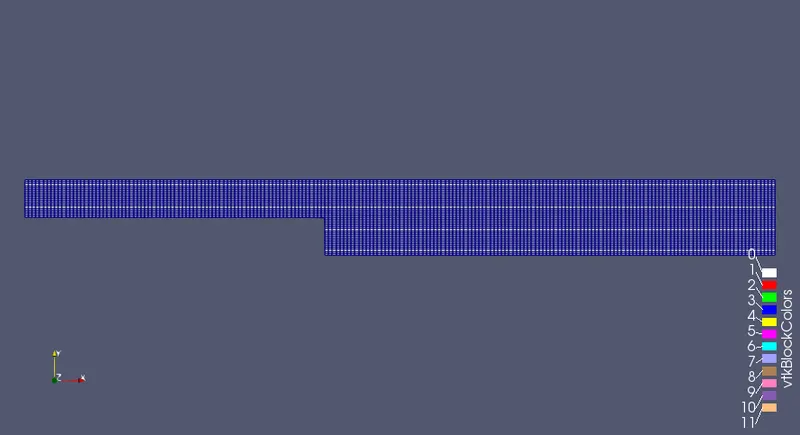
At grading factor 0.2
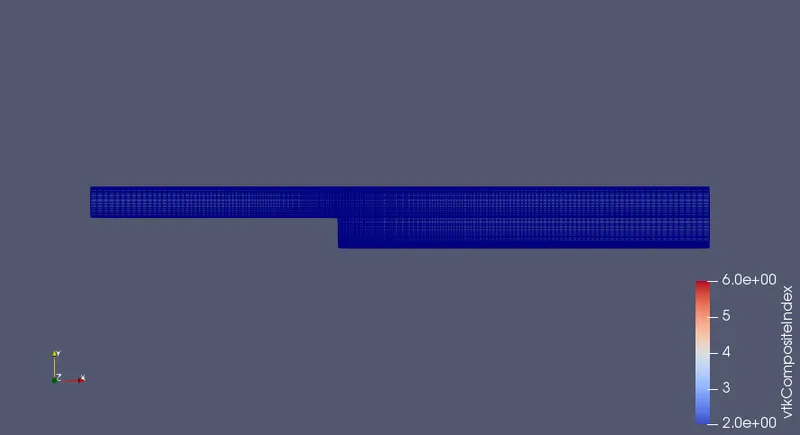
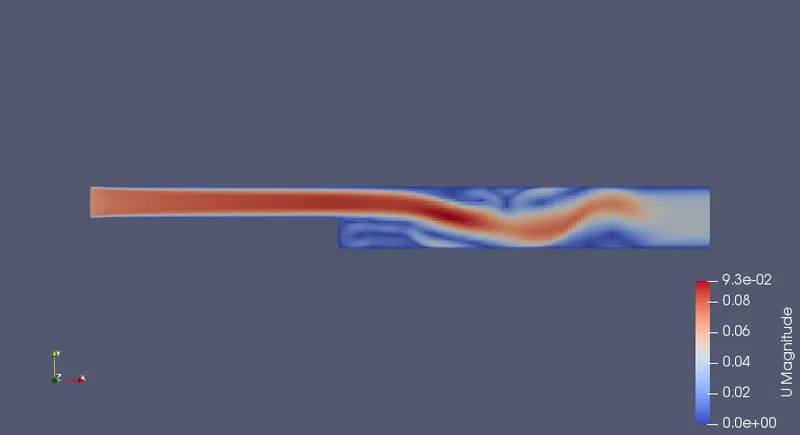
The velocity flow diagram without applying grading factor.
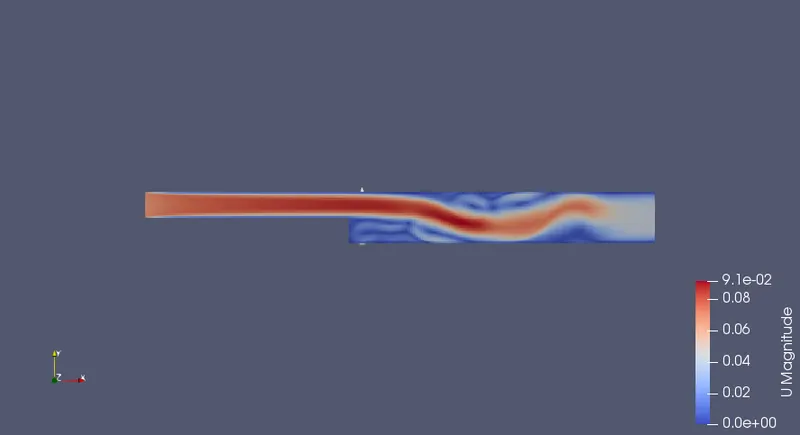
The velocity flow diagram for the grading factor 0.2
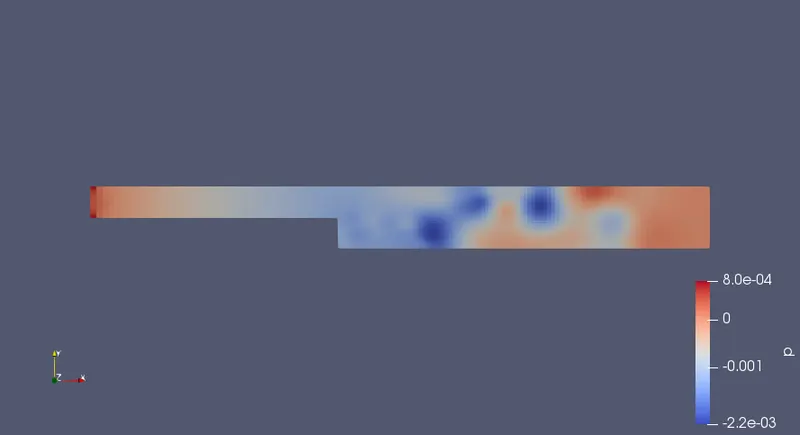
The pressure flow diagram without applying grading factor
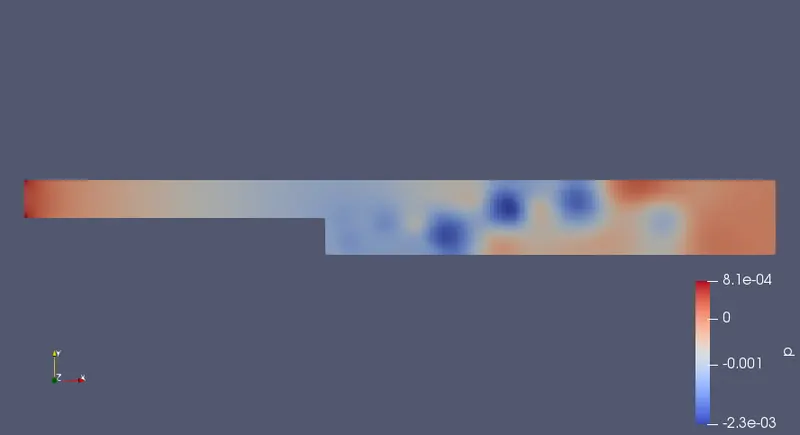
The pressure flow diagram for the given grading factor 0.2
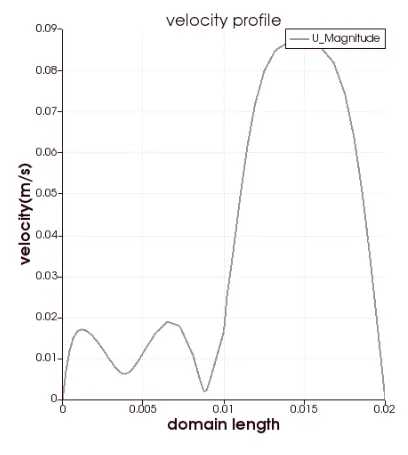
The plot for the velocity at 0.085 without applying grading fcator
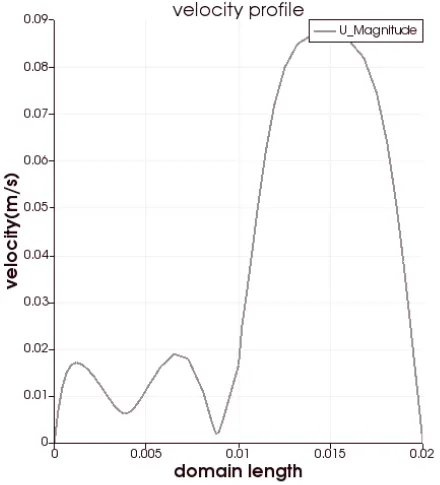
The plot for the velocity at 0.085 without applying grading fcator
CONCLUSION.
As simple grading factor changes from 0.2 to 1, the mesh becomes finer and the solution becomes more accurate.
And, the execution time is lower for lower meshing grading factor.