Week 8 - Simulation of a backward facing step in OpenFOAM
AIM
Simulation of a backward facing step in OpenFOAM
Case 1 - Simulate the flow without using any grading factor (i.e., GF = 1)
Case 2 - Simulate the flow with grading factor of 0.2. The cells should be finer near the walls (includig the step wall).
You can use the following mesh parameters but you can feel free to modify these values.
Mesh specification
- Number of cells along the x direction (longer dimension) = 200
- Number of cells along the longer y direction = 20;
system Folder
blockMeshDict - This file contains the geometry of the domain, the faces, edges, etc. It also contains the mesh properties. The mesh used in this case is a uniformly sized mesh containing 200 elements in the longest X direction and 20 in the longest Y direction.
/*--------------------------------*- C++ -*----------------------------------*
  =========                 |
  \      /  F ield         | OpenFOAM: The Open Source CFD Toolbox
   \    /   O peration     | Website:  https://openfoam.org
    \  /    A nd           | Version:  9
     \/     M anipulation  |
*---------------------------------------------------------------------------*/
FoamFile
{
    format      ascii;
    class       dictionary;
    object      blockMeshDict;
}
// * * * * * * * * * * * * * * * * * * * * * * * * * * * * * * * * * * * * * //

convertToMeters 1;

vertices
(
    // vertices from point 0 to 10
    (0 0 0)
    (0.08 0 0)
    (0.08 0.005 0)
    (0 0.005 0)
    (0.08 0.01 0)
    (0 0.01 0)
    (0.2 0.01 0)
    (0.2 0.005 0)
    (0.2 0 0)
    (0.2 -0.01 0)
    (0.08 -0.01 0)

    // vertices from point 11 to 21
    (0 0 0.1)
    (0.08 0 0.1)
    (0.08 0.005 0.1)
    (0 0.005 0.1)
    (0.08 0.01 0.1)
    (0 0.01 0.1)
    (0.2 0.01 0.1)
    (0.2 0.005 0.1)
    (0.2 0 0.1)
    (0.2 -0.01 0.1)
    (0.08 -0.01 0.1)
);

blocks
(
	// block 1
	hex (0 1 2 3 11 12 13 14) (80 5 1) simpleGrading (1 1 1)
	//block 2
	hex (3 2 4 5 14 13 15 16) (80 5 1) simpleGrading (1 1 1)
	//block 3
	hex (2 7 6 4 13 18 17 15) (120 5 1) simpleGrading (1 1 1)
	//block 4
	hex (1 8 7 2 12 19 18 13) (120 5 1) simpleGrading (1 1 1)
	//block 5
	hex (10 9 8 1 21 20 19 12) (120 10 1) simpleGrading (1 1 1)
);

edges
(
);

boundary
(
    inlet
    {
        type patch;
        faces
        (
            (11 14 3 0)
            (14 16 5 3)
        );
    }
    outlet
    {
        type patch;
        faces
        (
            (6 17 18 7)
            (8 7 18 19)
            (9 8 19 20)
        );
    }

    otherwall  //no slip walls
    {	type wall;
        faces
        (
        	//top
            (15 4 5 16)
            (15 17 6 4)
            //step
            (21 12 1 10)
            //bottom left
            (11 0 1 12)
            //bottom right
            (21 10 9 20)
        );
    }
    frontAndBack
    {
        type empty;
        faces
        (	//back
            (0 3 2 1)
            (3 5 4 2)
            (2 4 6 7)
            (1 2 7 8)
            (10 1 8 9)
            //front
            (13 15 16 14)
            (12 13 14 11)
            (20 19 12 21)
            (19 18 13 12)
            (18 17 15 13)
        );
    }
);
mergePatchPairs
(
);
// ************************************************************************* //
controlDict - This folder contains some essential values which controls the simulation (like timeperiod, timestep, precision, etc.) In this case, the simulation was run for 5 seconds (5 cycles in total) and with a timestep of 0.001s.
/*--------------------------------*- C++ -*----------------------------------*
  =========                 |
  \      /  F ield         | OpenFOAM: The Open Source CFD Toolbox
   \    /   O peration     | Website:  https://openfoam.org
    \  /    A nd           | Version:  9
     \/     M anipulation  |
*---------------------------------------------------------------------------*/
FoamFile
{
    format      ascii;
    class       dictionary;
    location    "system";
    object      controlDict;
}
// * * * * * * * * * * * * * * * * * * * * * * * * * * * * * * * * * * * * * //

application     icoFoam;

startFrom       startTime;

startTime       0;

stopAt          endTime;

endTime         5;

deltaT          0.001;

writeControl    timeStep;

writeInterval   20;

purgeWrite      0;

writeFormat     ascii;

writePrecision  6;

writeCompression off;

timeFormat      general;

timePrecision   6;

runTimeModifiable true;

//adaptive timestep
/*
adjustTimeStep true;

maxCo 1;*/


// ************************************************************************* //
folder fvSolutions and fvSchemes were not changed for this simulation
0 folder
U (Velocity) - This contains the initial and boundary velocity conditions for the domain. The initial conditions are 0.1 m/s across the domain. The boundary condition at the inlet is 0.2 m/s.
/*--------------------------------*- C++ -*----------------------------------*
  =========                 |
  \      /  F ield         | OpenFOAM: The Open Source CFD Toolbox
   \    /   O peration     | Website:  https://openfoam.org
    \  /    A nd           | Version:  9
     \/     M anipulation  |
*---------------------------------------------------------------------------*/
FoamFile
{
    format      ascii;
    class       volVectorField;
    object      U;
}
// * * * * * * * * * * * * * * * * * * * * * * * * * * * * * * * * * * * * * //

dimensions      [0 1 -1 0 0 0 0];

internalField   uniform (0.1 0 0);

boundaryField
{
    inlet
    {
        type            fixedValue;
        value           uniform (0.2 0 0);
    }

    outlet
    {
        type            zeroGradient;
    }

    frontAndBack
    {
        type            empty;
    }
    otherwall
    {
    	type 		noSlip; // zero at walls
    }
}

// ************************************************************************* //
p (pressure) - This contains the initial and boundary pressure conditions for the domain. The initial conditions are 0 Pa across the domain. The boundary condition at the outlet is 0 Pa.
/*--------------------------------*- C++ -*----------------------------------*
  =========                 |
  \      /  F ield         | OpenFOAM: The Open Source CFD Toolbox
   \    /   O peration     | Website:  https://openfoam.org
    \  /    A nd           | Version:  9
     \/     M anipulation  |
*---------------------------------------------------------------------------*/
FoamFile
{
    format      ascii;
    class       volScalarField;
    object      p;
}
// * * * * * * * * * * * * * * * * * * * * * * * * * * * * * * * * * * * * * //

dimensions      [0 2 -2 0 0 0 0];

internalField   uniform 0;

boundaryField
{
    inlet
    {
        type            zeroGradient;
    }

    outlet
    {
        type            fixedValue;
        value		uniform 0;
    }

    frontAndBack
    {
        type            empty;
    }
    otherwall
    {
    	type 		zeroGradient;
    }
}

// ************************************************************************* //
constant Folder
Upon running the blockMesh command, that script also generates a polyMesh folder in this folder, which contains details of the mesh.
transportProperties - This contains other values required to run the simulation but remain constant through the solution (such as Dynamic Viscosity ν">ν�)
Dynamic viscosity was chosen to be 1e-5.
transportProperties
/*--------------------------------*- C++ -*----------------------------------*
  =========                 |
  \      /  F ield         | OpenFOAM: The Open Source CFD Toolbox
   \    /   O peration     | Website:  https://openfoam.org
    \  /    A nd           | Version:  9
     \/     M anipulation  |
*---------------------------------------------------------------------------*/
FoamFile
{
    format      ascii;
    class       dictionary;
    location    "constant";
    object      transportProperties;
}
// * * * * * * * * * * * * * * * * * * * * * * * * * * * * * * * * * * * * * //

nu              [0 2 -1 0 0 0 0] 1e-5;


// ************************************************************************* //
Now, I begin the simulation process.
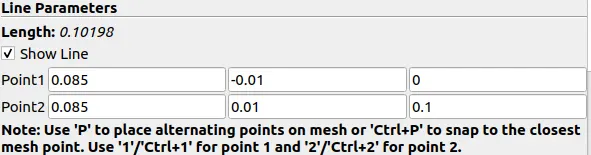
- To calculate velocity at distance 0.085 from inlet modify following parameters:-
- Results discussion-
- Mesh are generated for grading factor 0.2 and grading factor 1.
- Flow is simulated without using grading factor and with using grading factor 0.2
- Graphs are plotted for the velocity profile.
- When dx value is small ,accuracy increases also as the finer mesh , the more accurate will be the results.
- Explain why Grading/Growth factor is essential for meshing.
- Specifies the maximum ratio of adjacent mesh edges for the transition between coarse and fine regions.
A smaller sorting factor creates a more even mesh.
In the program, we can change the factor in the blockMeshDict code. - SimpleGrading defines the expansion ratio or mesh stretching in each local direction(x,y,z).
- Conclusion:-
- As we can observe from the graphs, there is not much difference between the two meshes.
- But if the values are taken, we can see a slight variation among the two graphs.
- By changing the simple grading factor from 0.2 to 1, the mesh becomes finer and the solution changes to precision.
- Overall, changing the size of the simple grading factor,the result remains the same as approx.
- Execution time is lower for a lower mesh sorting factor.