Week 8 - Simulation of a backward facing step in OpenFOAM
AIM: To simulate an incompressible-laminar-viscous flow through the backward facing step geometry.
OBJECTIVES:
1. Simulate incompressible laminar viscous flow through BFS geometry using solvers in OpenFoam.
2. To compare the results of different grading i.e., 1 and 0.2 respectively any explaining the importance in grading/growth factor in meshing.
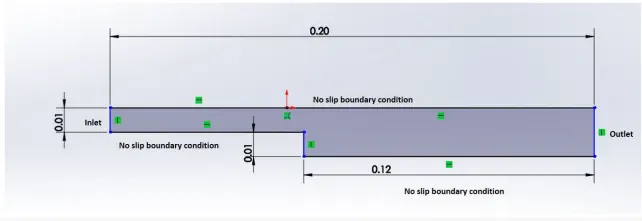
3. Mesh specifications is No. of cells along the x direction = 200 and No. of cells along the longer y direction = 20.
4. For Geometric specifications the geometric dimensions and boundary specifications of the Backward facing step (BFS) is given in below
figure.
THEORY AND EXPLANATION:
The backward-facing step is one of the representative models for the separation flows which can be widely observed in various
applications such as airfoils, cars, boats and even flow around buildings. Because of the sudden increase in area, the flow is
separated from the boundary and it again reattaches further downstream. It is one of the benchmarked geometries and it is
widely used in the study of numerical CFD.
STEPS INVOLVED IN SIMULATION:
1. In order to start the simulation process, First start terminal in Linux Operating system using ctrl+alt+T buttons on key board or right click -> Open Terminal. After starting terminal yo will see following window.
2. Now, we have to simulate our problem in openFOAM and we are going to solve our problem using tutorials present in openFOAM, therefore, just type ‘tut’ to open OpenFOAM tutorial directory. And type ‘ls’ to identify what kind of tutorials present inside this directory.
3. We have to solve incopressible flow simulation for this problem so select incompressible directory by typing ‘cd incompressible/’ and then
again type ‘ls’ to explore folders in incompressible folders.
4. we will select icoFoam folder by typing ‘cd icoFoam/’ and by typing ‘ls’ we explore this folder in terminal.
icoFoam is the solver in openFoam which is use as transient solver for incopressible, laminar flow of Newtonian fluids. (Newtonian fluid is a fluid in which the viscous stress arising from its flow, at every point, are linearly correlated to the local strain rate - the rate of change of its
deformation over time. Newtonian fluids are the simplest mathematical models of fluids that account for viscosity.)
5. Here, we have, again to option, cavity and elbow. They both are part of the icoFoam solver and cavity section use to create required domain and black mesh so select ‘cavity’ folder.
6. In cavity, we are, again, going to see cavity folder, where we have to define our fluid domain and generate block mesh. But we are not going to make any changes here in tutorial section. First of all, OpenFoam does no let anyone make any changes in their official tutorial and secondly, any changes with their official tutorials my corrupt openFoam. An in a bid to correct it, we may need to reinstall open foam all over again. So, we are going to copy this cavity folder using ‘cp -r cavity’ command and paste it in openFoam run folder by typing ‘cp -r cavity
$FOAM_RUN/cavity_test’.
7. And then open run folder by typing ‘cd $FOAM_RUN’. where we can see cavity_test file.
8. Now, we can make any changes to the cavity_test file, which will never affect the openFoam official files. Open cavity_test folder. Here, we can provide specification for our block mesh in system folder.
9. There are 4 script file system folder and by opening blockMeshDict we can create domain and provide required specification for block mesh. So, open this file by typing ‘gedit blockMeshDict’.
10. Now, make following changes in blockMeshDict script file. The blockMeshDict file is a script file that contains information regarding all
aspects of the geometry.
Methodology:
Step 1: Selection of suitable solver
OpenFOAM has a wide variety of solvers for specific use-cases. Based on the requirement, one has to be selected. In this report,
the physics being solved is the flow of incompressible viscous laminar flow. The suitable solver for such a case is icoFOAM.
Step 2: Setting up the case
OpenFOAM, being an open-source software lacks a graphical user interface. Therefore, the case has to be set up using the folder
structure inherent to it. As a beginner, the best approach is to copy a tutorial case that uses the required solver and change the
settings as required.
The cavity tutorial, which uses the icoFOAM solver was copied for this report.
Step 3: Creating a mesh
Once the folder structure is set up, the mesh for the geometry has to be generated. For this purpose, blockMesh, the inherent
feature of OpenFOAM was used. The blockMesh requires the definition of rectangular blocks within the geometry and hence the
geometry was split into 3 blocks as shown below. First, the vertices should be defined and then the blocks should be created from
the vertices such that the local coordinated system of the block is the same.
OpenFOAM is a 3D solver and therefore blocks should also be 3D. Hence the blocks were created based on the configuration
shown above. A 2D case can be simulated by specifying a single cell in the z-direction. In addition to the blocks, the number of
cells and the grading should be defined for each block.
Two variations of the same case were simulated. In the first case, no grading was used in the mesh. In the second one, a grading of
0.2 was used and the results were compared.
Grading is a term used to defined the relative size of the last cell in a block with respect to the first cell.
The above parameters should be defined in the file, blockMeshDict inside the settings folder. The blockMeshDict file used in this
simulation is shown below:
CASE 1: For Grading Factor = 1
BLOCKMESHDICT FILE:
/*---------------------- ----------*- C++ -*----------------------------------*\
  =========                 |
  \\      /  F ield         | OpenFOAM: The Open Source CFD Toolbox
   \\    /   O peration     | Website:  https://openfoam.org
    \\  /    A nd           | Version:  9
     \\/     M anipulation  |
\*---------------------------------------------------------------------------*/
FoamFile
{
    format      ascii;
    class       dictionary;
    object      blockMeshDict;
}
// * * * * * * * * * * * * * * * * * * * * * * * * * * * * * * * * * * * * * //

convertToMeters 0.1;

vertices
(
    (0 0 0) //vertex 0
    (8 0 0) //vertex 1
    (8 0.5 0) //vertex 2
    (0 0.5 0) //vertex 3
    (8 1 0) //vertex 4
    (0 1 0) //vertex 5
    (20 1 0) //vertex 6
    (20 0.5 0) //vertex 7
    (20 0 0) //vertex 8
    (20 -1 0) //vertex 9
    (8 -1 0) //vertex 10
    (0 0 1) //vertex 11
    (8 0 1) //vertex 12
    (8 0.5 1) //vertex 13
    (0 0.5 1) //vertex 14
    (8 1 1) //vertex 15
    (0 1 1) //vertex 16
    (20 1 1) //vertex 17
    (20 0.5 1) //vertex 18
    (20 0 1) //vertex 19
    (20 -1 1) //vertex 20
    (8 -1 1) //vertex 21
);

blocks
(
    hex (0 1 2 3 11 12 13 14) (50 5 1) simpleGrading (1 1 1)
    hex (3 2 4 5 14 13 15 16) (50 5 1) simpleGrading (1 1 1)
    hex (2 7 6 4 13 18 17 15) (150 5 1) simpleGrading (1 1 1)
    hex (1 8 7 2 12 19 18 13) (150 5 1) simpleGrading (1 1 1)
    hex (10 9 8 1 21 20 19 12) (150 20 1) simpleGrading (1 1 1)
);

edges
(
);

boundary
(
    inlet
    {
        type patch;
        faces
        (
            (0 11 14 3)
            (3 14 16 5)

        );
    }
    outlet
    {
        type patch;
        faces
        (
            (9 8 19 20)
            (8 7 18 19)
            (7 6 17 18)

        );
    }
    walls
    {
    type wall;
    faces
    (
            (4 5 16 15)
            (6 4 15 17)
            (0 1 12 11)
            (10 9 20 21)
            (10 21 12 1)

       );
       }

);

mergePatchPairs
(
);

// ************************************************************************* //
CONTOLDICT FILE:
ControlDict file is modified as per the requirement:
/*--------------------------------*- C++ -*----------------------------------*\
  =========                 |
  \\      /  F ield         | OpenFOAM: The Open Source CFD Toolbox
   \\    /   O peration     | Website:  https://openfoam.org
    \\  /    A nd           | Version:  9
     \\/     M anipulation  |
\*---------------------------------------------------------------------------*/
FoamFile
{
    format      ascii;
    class       dictionary;
    location    "system";
    object      controlDict;
}
// * * * * * * * * * * * * * * * * * * * * * * * * * * * * * * * * * * * * * //

application     icoFoam;

startFrom       startTime;

startTime       0;

stopAt          endTime;

endTime         20;

deltaT          1e-2;

writeControl    timeStep;

writeInterval   20;

purgeWrite      0;

writeFormat     ascii;

writePrecision  6;

writeCompression off;

timeFormat      general;

timePrecision   6;

runTimeModifiable true;


// ************************************************************************* //- The system also provides the schemes to discretise the differential equation for Finite volume control methods.
- Change the directory to 0 folder and edit the pressure and velocity files so as to set the initial and boundary conditions for them. The
modified files for the pressure and velocity are:
PRESSURE FILE:
/*--------------------------------*- C++ -*----------------------------------*\
  =========                 |
  \\      /  F ield         | OpenFOAM: The Open Source CFD Toolbox
   \\    /   O peration     | Website:  https://openfoam.org
    \\  /    A nd           | Version:  9
     \\/     M anipulation  |
\*---------------------------------------------------------------------------*/
FoamFile
{
    format      ascii;
    class       volScalarField;
    object      p;
}
// * * * * * * * * * * * * * * * * * * * * * * * * * * * * * * * * * * * * * //

dimensions      [0 2 -2 0 0 0 0];

internalField   uniform 0;

boundaryField
{
    inlet
    {
        type           zeroGradient;
    }
    outlet
    {
     type            fixedValue;
     value           uniform 0;
    }
    walls
    {
        type           zeroGradient;
    }

}
// ************************************************************************* //
VELOCITY FILE:
/*--------------------------------*- C++ -*----------------------------------*\
  =========                 |
  \\      /  F ield         | OpenFOAM: The Open Source CFD Toolbox
   \\    /   O peration     | Website:  https://openfoam.org
    \\  /    A nd           | Version:  9
     \\/     M anipulation  |
\*---------------------------------------------------------------------------*/
FoamFile
{
    format      ascii;
    class       volVectorField;
    object      U;
}
// * * * * * * * * * * * * * * * * * * * * * * * * * * * * * * * * * * * * * //

dimensions      [0 1 -1 0 0 0 0];

internalField   uniform (0 0 0);

boundaryField
{
    inlet
    {
        type            fixedValue;
        value           uniform (0.02 0 0);
    }
    outlet
    {
     type zeroGradient;
    }
    walls
    {
        type            noSlip;
    }

}

// ************************************************************************* //- After required modifications we change the directory to cavity and run ‘blockMesh’ command to create the blocks and mesh for the BFS.
- we can check the mesh using ‘checkMesh’ command.
- Then we run the solver using ‘icoFoam’ command. This will take few minutes to hours as depending upon processors
computational power. - After the solver has run, we can post process the solution in paraview using ‘paraFoam’ command.
RESULTS:
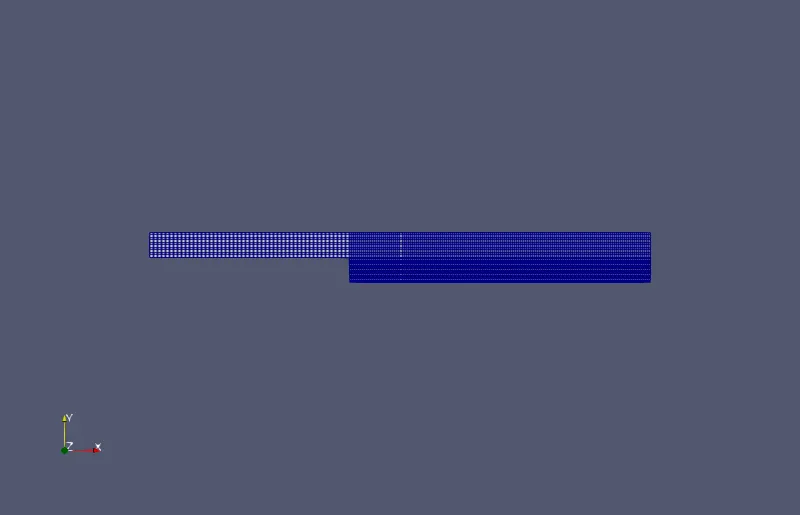
After making above changes, now the mesh is uniformly distributed along the surface:
blockMesh:
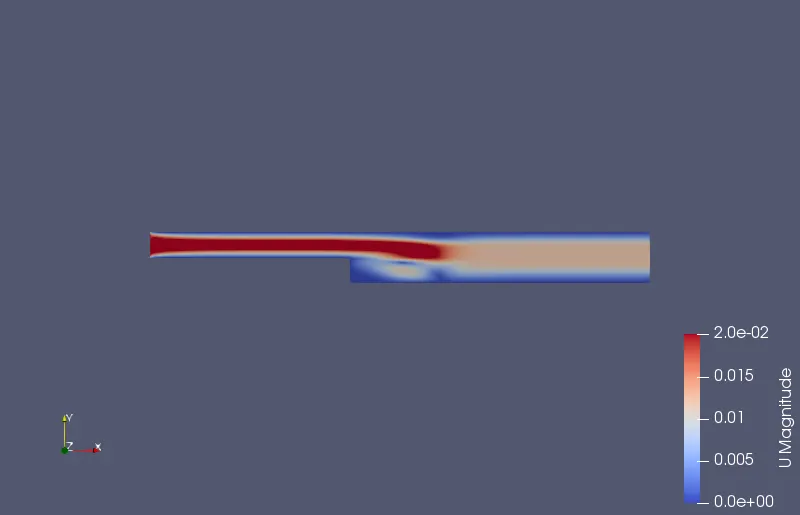
velocity and pressure profile :
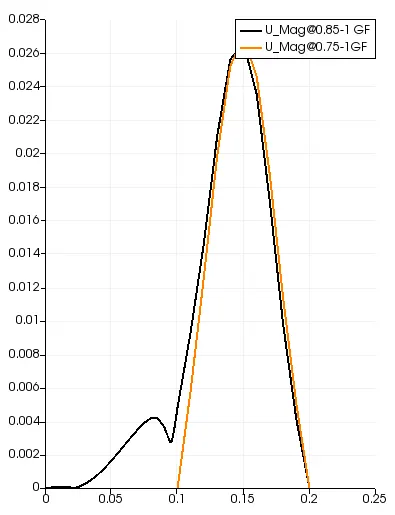
PLOT FOR VELOCITY PROFILE:
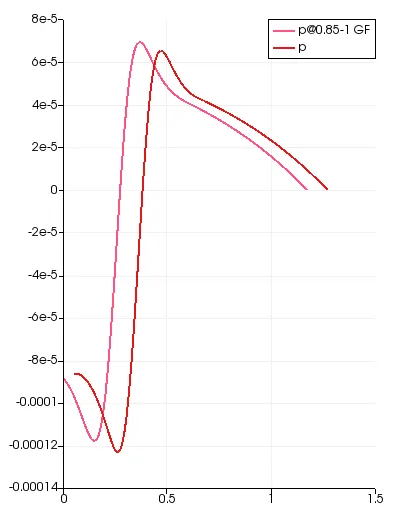
PLOT FOR PRESSURE PROFILE:
[email protected] vs [email protected]
CASE 2:
FOR GRADING FACTOR = 0.2:-
BLOCKMESHDICT FILE:
/*---------------------- ----------*- C++ -*----------------------------------*\
  =========                 |
  \\      /  F ield         | OpenFOAM: The Open Source CFD Toolbox
   \\    /   O peration     | Website:  https://openfoam.org
    \\  /    A nd           | Version:  9
     \\/     M anipulation  |
\*---------------------------------------------------------------------------*/
FoamFile
{
    format      ascii;
    class       dictionary;
    object      blockMeshDict;
}
// * * * * * * * * * * * * * * * * * * * * * * * * * * * * * * * * * * * * * //

convertToMeters 0.1;

vertices
(
    (0 0 0) //vertex 0
    (8 0 0) //vertex 1
    (8 0.5 0) //vertex 2
    (0 0.5 0) //vertex 3
    (8 1 0) //vertex 4
    (0 1 0) //vertex 5
    (20 1 0) //vertex 6
    (20 0.5 0) //vertex 7
    (20 0 0) //vertex 8
    (20 -1 0) //vertex 9
    (8 -1 0) //vertex 10
    (0 0 1) //vertex 11
    (8 0 1) //vertex 12
    (8 0.5 1) //vertex 13
    (0 0.5 1) //vertex 14
    (8 1 1) //vertex 15
    (0 1 1) //vertex 16
    (20 1 1) //vertex 17
    (20 0.5 1) //vertex 18
    (20 0 1) //vertex 19
    (20 -1 1) //vertex 20
    (8 -1 1) //vertex 21
);

blocks
(
    hex (0 1 2 3 11 12 13 14) (50 5 1) simpleGrading (1 5 1)
    hex (3 2 4 5 14 13 15 16) (50 5 1) simpleGrading (1 0.2 1)
    hex (2 7 6 4 13 18 17 15) (150 5 1) simpleGrading (5 0.2 1)
    hex (1 8 7 2 12 19 18 13) (150 5 1) simpleGrading (5 5 1)
    hex (10 9 8 1 21 20 19 12) (150 20 1) simpleGrading (5 10 1)
);

edges
(
);

boundary
(
    inlet
    {
        type patch;
        faces
        (
            (0 11 14 3)
            (3 14 16 5)

        );
    }
    outlet
    {
        type patch;
        faces
        (
            (9 8 19 20)
            (8 7 18 19)
            (7 6 17 18)

        );
    }
    walls
    {
    type wall;
    faces
    (
            (4 5 16 15)
            (6 4 15 17)
            (0 1 12 11)
            (10 9 20 21)
            (10 21 12 1)

       );
       }

);

mergePatchPairs
(
);

// ************************************************************************* //
CONTOLDICT FILE:
/*--------------------------------*- C++ -*----------------------------------*\
  =========                 |
  \\      /  F ield         | OpenFOAM: The Open Source CFD Toolbox
   \\    /   O peration     | Website:  https://openfoam.org
    \\  /    A nd           | Version:  9
     \\/     M anipulation  |
\*---------------------------------------------------------------------------*/
FoamFile
{
    format      ascii;
    class       dictionary;
    location    "system";
    object      controlDict;
}
// * * * * * * * * * * * * * * * * * * * * * * * * * * * * * * * * * * * * * //

application     icoFoam;

startFrom       startTime;

startTime       0;

stopAt          endTime;

endTime         20;

deltaT          1e-2;

writeControl    timeStep;

writeInterval   20;

purgeWrite      0;

writeFormat     ascii;

writePrecision  6;

writeCompression off;

timeFormat      general;

timePrecision   6;

runTimeModifiable true;


// ************************************************************************* //
PRESSURE FILE:
/*--------------------------------*- C++ -*----------------------------------*\
  =========                 |
  \\      /  F ield         | OpenFOAM: The Open Source CFD Toolbox
   \\    /   O peration     | Website:  https://openfoam.org
    \\  /    A nd           | Version:  9
     \\/     M anipulation  |
\*---------------------------------------------------------------------------*/
FoamFile
{
    format      ascii;
    class       volScalarField;
    object      p;
}
// * * * * * * * * * * * * * * * * * * * * * * * * * * * * * * * * * * * * * //

dimensions      [0 2 -2 0 0 0 0];

internalField   uniform 0;

boundaryField
{
    inlet
    {
        type           zeroGradient;
    }
    outlet
    {
     type            fixedValue;
     value           uniform 0;
    }
    walls
    {
        type           zeroGradient;
    }

}
// ************************************************************************* //
VELOCITY FILE:
/*--------------------------------*- C++ -*----------------------------------*\
  =========                 |
  \\      /  F ield         | OpenFOAM: The Open Source CFD Toolbox
   \\    /   O peration     | Website:  https://openfoam.org
    \\  /    A nd           | Version:  9
     \\/     M anipulation  |
\*---------------------------------------------------------------------------*/
FoamFile
{
    format      ascii;
    class       volVectorField;
    object      U;
}
// * * * * * * * * * * * * * * * * * * * * * * * * * * * * * * * * * * * * * //

dimensions      [0 1 -1 0 0 0 0];

internalField   uniform (0 0 0);

boundaryField
{
    inlet
    {
        type            fixedValue;
        value           uniform (0.02 0 0);
    }
    outlet
    {
     type zeroGradient;
    }
    walls
    {
        type            noSlip;
    }

}

// ************************************************************************* //
RESULTS:
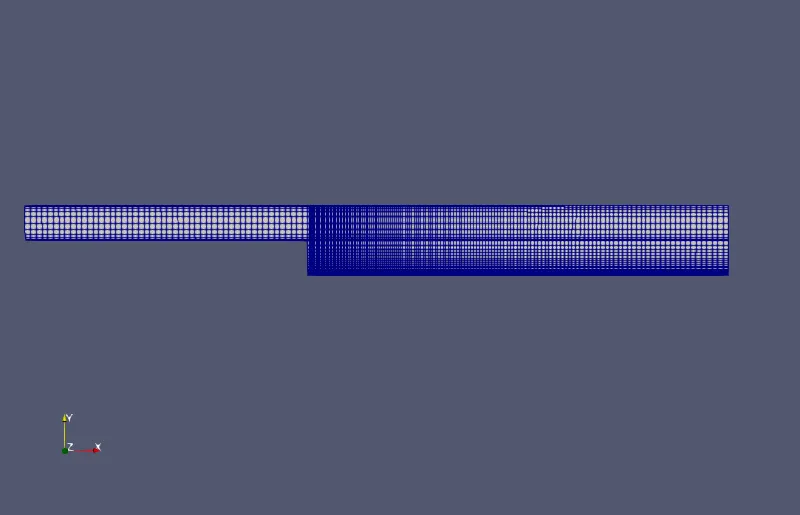
FOR GRADING FACTOR = 0.2:-
blockMesh:
velocity and pressure profile :
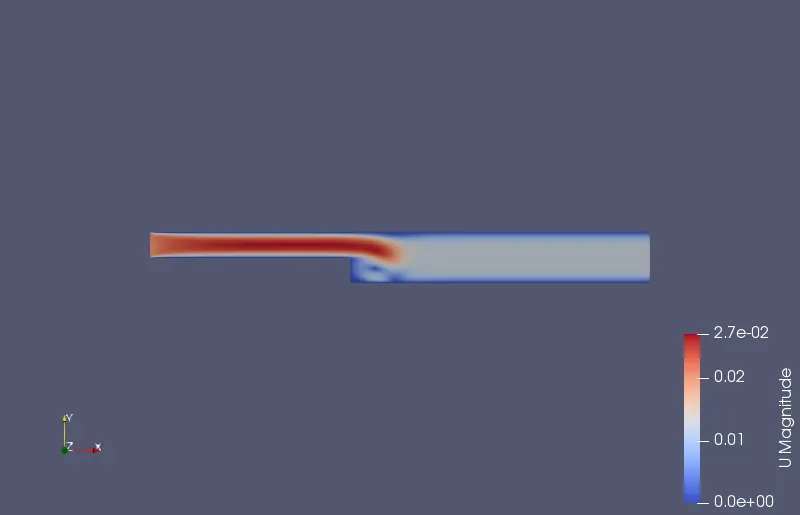
PLOT FOR PRESSURE PROFILE:
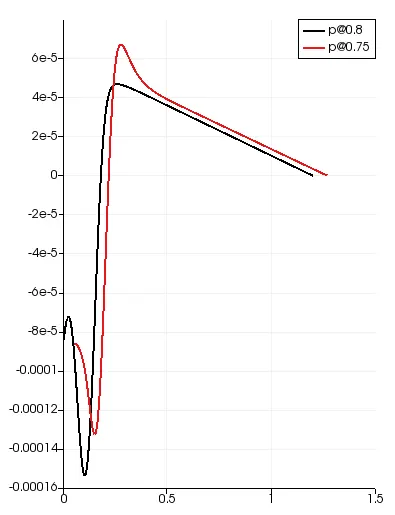
PLOT FOR VELOCITY PROFILE:
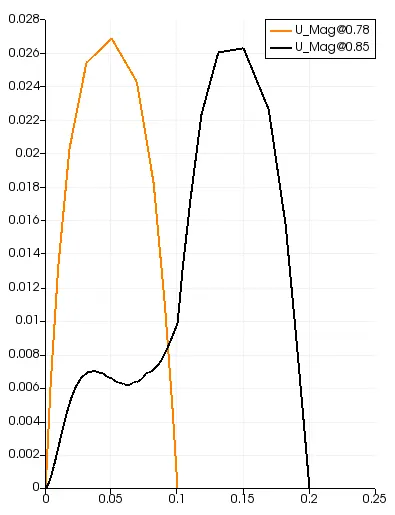
Conclusion:
- With mesh grading, the flow quantities were calculated at more grid points near the wall. Hence the resolution of velocity with the
mesh-grading is more accurate than without grading. - Similarly, having more number of grid points near the walls, the point of reattachment can be captured accurately.
- Velocity and Pressure curves are smoother with the GF=1 compaired to GF=0.2, but the results are accurate with GF=0.2. Finally, I conclude that to get the more accurete results, use finer mesh.