Week 8 - BlockMesh Drill down challenge
Objective:-To produce a blockmesh for the above figure using Openfoam by editing the blockMeshDict file and post-process the results and get velocity plots.
Mesh specification
- Number of cells along the x direction (longer dimension) = 200
- Number of cells along the y direction = 10
- Use a graded mesh. Grading factor near all walls should be 0.2
OpenFoam:-It is a prominient CFD tool used in the industry.It is based on C++ language and it's an opensource software package.
Numerical solutions are obtained using FVM(finite volume methods) unlike MATLAB where FDM(finite differene method) is used.
We can post-process the results in the paraview which comes along with Openfoam.
Advantages:-
Openfoam comes with tutorials which solves various problems using suitable numerical solving techniques.We can solve most of the engineering problems using the tutorials .
We can view the source code which helps in better understanding of the case given .
Disadvantages:-
Need some basic knowledge of C++ for operating in Openfoam
GUI of the openfoam is not user friendly when compare to the other CFD softwares such as Asys fluent.
Solution:-
- Upon starting the system go to the 'Terminal' ,after naviagte to the tutorials folder in openfoam by typing '$FOAM_TUTORIALS'
- In the tutorials go to the incompressible and type 'ls' command which shows the list of the directories in it .IN that select 'Icofoam'.
- In Icofoam there is a case called 'cavity' .
- By opening the cavity folder we can find the 'RUN',"CLEAN','0','system','constant' files where 'Allrun','Allclean', are executables.
- Do not run the code in the tutorials because any edit we done on them might corrupt the tutorial file which conoot be retrived .
- So, copy the 'cavity' folder to '$FOAM_RUN',by using command 'cp -r
- After that, go to FOAM_RUN folder in that open 'cavity' ,go to system we can see file called 'blockMeshDict' .
- Type 'gedit blockMeshDict ' to edit the mesh file from tutorials .
The given block of 2D is divided into 5 blocks and third dimension(thickness) is taken as 0.001 m
The bockMeshDict file is editited as follows
/*--------------------------------*- C++ -*----------------------------------*\
  =========                 |
  \\      /  F ield         | OpenFOAM: The Open Source CFD Toolbox
   \\    /   O peration     | Website:  https://openfoam.org
    \\  /    A nd           | Version:  7
     \\/     M anipulation  |
\*---------------------------------------------------------------------------*/
FoamFile
{
    version     2.0;
    format      ascii;
    class       dictionary;
    object      blockMeshDict;
}
// * * * * * * * * * * * * * * * * * * * * * * * * * * * * * * * * * * * * * //

convertToMeters 0.01;

vertices
(
    (0 0 0)
    (8 0 0)
    (8 0.5 0)
    (0 0.5 0)
    (8 1 0)
    (0 1 0)
    (20 1 0)
    (20 0.5 0)
    (20 0 0)
    (20 -1 0)
    (8 -1 0)
    (0 0 0.1)
    (8 0 0.1)
    (8 0.5 0.1)
    (0 0.5 0.1)
    (8 1 0.1)
    (0 1 0.1)
    (20 1 0.1)
    (20 0.5 0.1)
    (20 0 0.1)
    (20 -1 0.1)
    (8 -1 0.1)
);

blocks
(
    hex (0 1 2 3 11 12 13 14) (200 10 1) simpleGrading (1 1 1)
    hex (3 2 4 5 14 13 15 16) (200 10 1) simpleGrading (1 1 1)
    hex (2 7 6 4 13 18 17 15) (200 10 1) simpleGrading (1 1 1)
    hex (1 8 7 2 12 19 18 13) (200 10 1) simpleGrading (1 1 1)
    hex (10 9 8 1 21 20 19 12) (200 10 1) simpleGrading (1 1 1)
);

edges
(
);

boundary
(
    inlet
    {
        type patch;
        faces
        (
          (0 11 14 3)
          (3 14 16 5)
        );
    }
    outlet
    {
        type patch;
        faces
        (
           (9 8 19 20)
           (8 7 18 19)
           (7 6 17 18)
        );
    }
    front&back
    {
        type empty;
        faces
        (
          (0 3 2 1)
          (2 3 5 4)
          (7 2 4 6)
          (8 1 2 7)
          (9 10 1 8)
          (13 15 16 14)
          (12 13 14 11)
          (18 17 15 13)
          (19 18 13 12)
          (19 12 21 20)
        );
    }
    Noslipwalls
    {
      type wall;
      faces
      (
         (15 4 5 16)
         (17 6 4 15)
         (21 12 1 10)
         (11 0 1 12)
         (21 10 9 20)
      );
    }
);

mergePatchPairs
(
);

// ************************************************************************* //
We can find the initial and boundary conditions in the folder named '0'.we can find the 'pressure(p)' and 'velocity(U)' files in it. We need to make changes in them to suit the case that we specified .
In the 'system' file we can see the
- 'controlDict' which contains the information related to 'time interval' of the solution ,time step, start time and end time.We have to determine the time step deltaT based on the CFL criteria i.e.,CFL<1.
- 'fvSchemes' which contains the information of numerical scheme employed to solve the given case.
- 'fvSolution' consists of information of acceptable tolerance value , type of the solver etc.,
Pressure (Initial & Boundary conditions) :-
/*--------------------------------*- C++ -*----------------------------------*\
  =========                 |
  \\      /  F ield         | OpenFOAM: The Open Source CFD Toolbox
   \\    /   O peration     | Website:  https://openfoam.org
    \\  /    A nd           | Version:  7
     \\/     M anipulation  |
\*---------------------------------------------------------------------------*/
FoamFile
{
    version     2.0;
    format      ascii;
    class       volScalarField;
    object      p;
}
// * * * * * * * * * * * * * * * * * * * * * * * * * * * * * * * * * * * * * //

dimensions      [0 2 -2 0 0 0 0];

internalField   uniform 0;

boundaryField
{
    inlet
    {
        type            zeroGradient;
    }

    outlet
    {
        type            fixedValue;
        value           uniform 0;
    }

    frontAndBack
    {
        type            empty;
    }
    Noslipwalls
    {
      type        zeroGradient;
    }
}
Velocity (Initial & Boundary conditions):-
/*--------------------------------*- C++ -*----------------------------------*\
  =========                 |
  \\      /  F ield         | OpenFOAM: The Open Source CFD Toolbox
   \\    /   O peration     | Website:  https://openfoam.org
    \\  /    A nd           | Version:  7
     \\/     M anipulation  |
\*---------------------------------------------------------------------------*/
FoamFile
{
    version     2.0;
    format      ascii;
    class       volVectorField;
    object      U;
}
// * * * * * * * * * * * * * * * * * * * * * * * * * * * * * * * * * * * * * //

dimensions      [0 1 -1 0 0 0 0];

internalField   uniform (0 0 0);

boundaryField
{
    inlet
    {
        type            fixedValue;
        value           uniform (1 0 0);
    }

    outlet
    {
        type            zeroGradient;
    }
    Noslipwalls
    {
        type            noSlip;
    }

    frontAndBack
    {
        type            empty;
    }
}
ControlDict:-
/*--------------------------------*- C++ -*----------------------------------*\
  =========                 |
  \\      /  F ield         | OpenFOAM: The Open Source CFD Toolbox
   \\    /   O peration     | Website:  https://openfoam.org
    \\  /    A nd           | Version:  7
     \\/     M anipulation  |
\*---------------------------------------------------------------------------*/
FoamFile
{
    version     2.0;
    format      ascii;
    class       dictionary;
    location    "system";
    object      controlDict;
}
// * * * * * * * * * * * * * * * * * * * * * * * * * * * * * * * * * * * * * //

application     icoFoam;

startFrom       startTime;

startTime       0;

stopAt          endTime;

endTime         0.5;

deltaT          0.0001;

writeControl    timeStep;

writeInterval   20;

purgeWrite      0;

writeFormat     ascii;

writePrecision  6;

writeCompression off;

timeFormat      general;

timePrecision   6;

runTimeModifiable true;


// ************************************************************************* //
After defining the cases required we need to execute the case , that is done by the command './Allrun' which is an executable file. Upon executing the problem we can post process the results in paraview.We can navigate to paraview by using command called 'paraFoam'.
By executing the the command paraview is opened .We can observe the geometry we created.
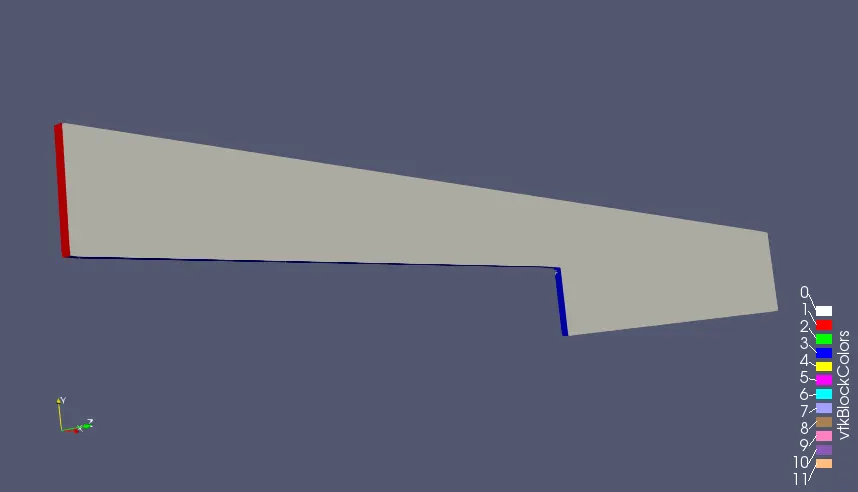
From the problem we need to obtain the velocity profiles at grading factor of 0.2,0.5 and 0.8.
Grading factor:- f=size of end cell/size of start cell.
It is used to control the mesh quality and size .This helps to give fine mesh at areas we want. ex simplegrading(1 1 1) produce mesh of equal sizes, simple grading (0.1 1 1) gives the finer mesh at end cells and simplegrading (10 1 1) gives the finer mesh at starting cells
Results:-
1.Grading factor 1:-
Mesh:-
blocks
(
    hex (0 1 2 3 11 12 13 14) (200 10 1) simpleGrading (1 1 1)
    hex (3 2 4 5 14 13 15 16) (200 10 1) simpleGrading (1 1 1)
    hex (2 7 6 4 13 18 17 15) (200 10 1) simpleGrading (1 1 1)
    hex (1 8 7 2 12 19 18 13) (200 10 1) simpleGrading (1 1 1)
    hex (10 9 8 1 21 20 19 12) (200 10 1) simpleGrading (1 1 1)
);
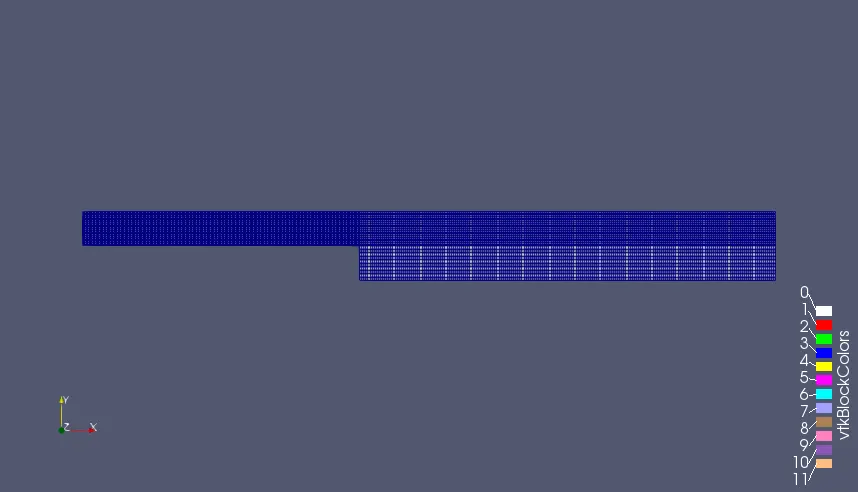
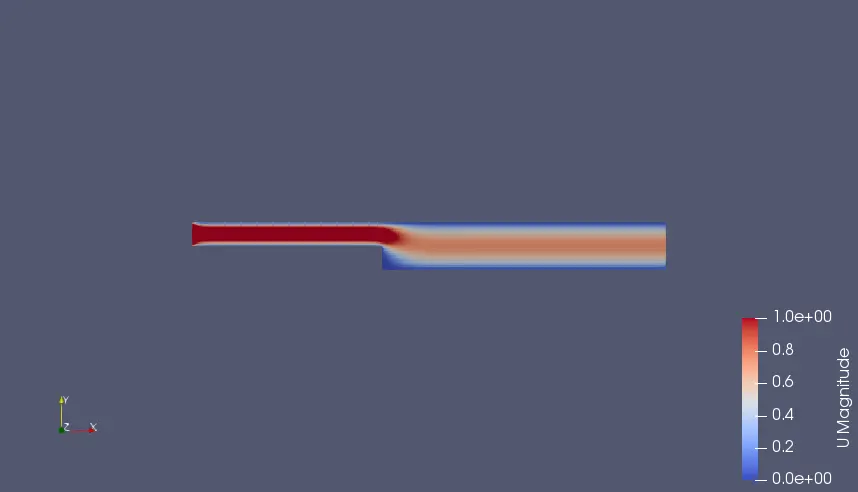
Velocity contour:-
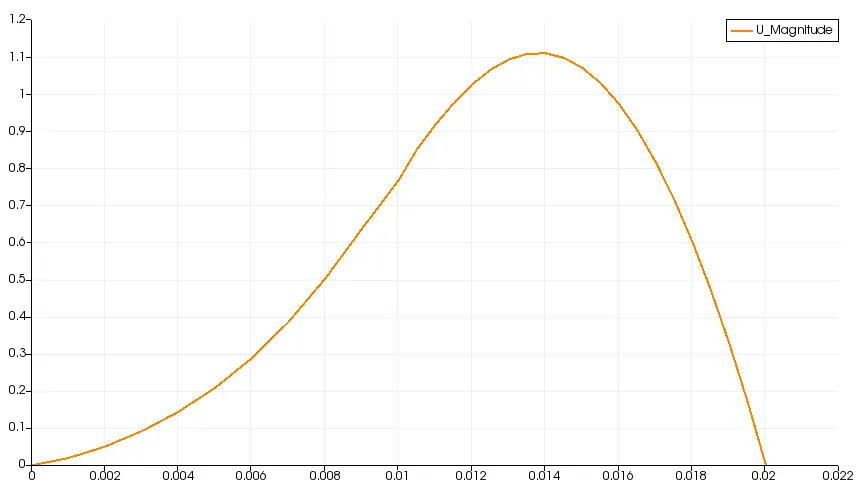
Velocity profile:-
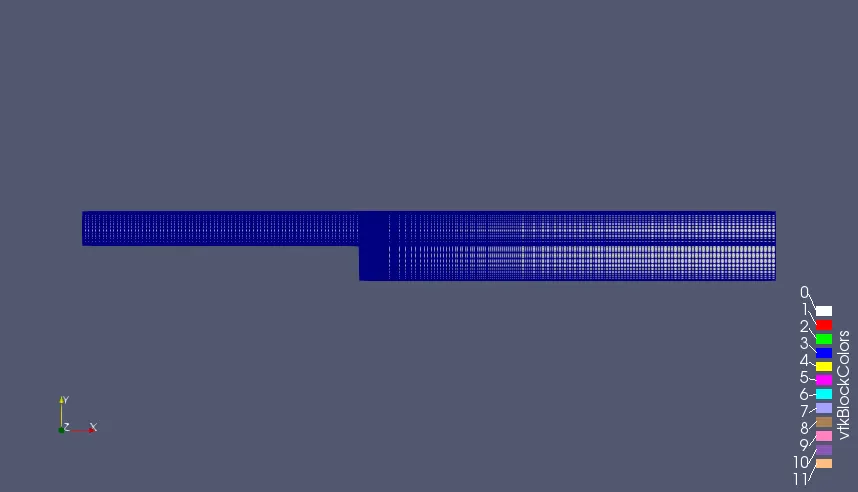
2.Grading factor 0.2:-
Mesh:-
blocks
(
    hex (0 1 2 3 11 12 13 14) (200 10 1) simpleGrading (1 5 1)
    hex (3 2 4 5 14 13 15 16) (200 10 1) simpleGrading (1 0.2 1)
    hex (2 7 6 4 13 18 17 15) (200 10 1) simpleGrading (5 0.2 1)
    hex (1 8 7 2 12 19 18 13) (200 10 1) simpleGrading (5 5 1)
    hex (10 9 8 1 21 20 19 12) (200 10 1) simpleGrading (5 5 1)
);
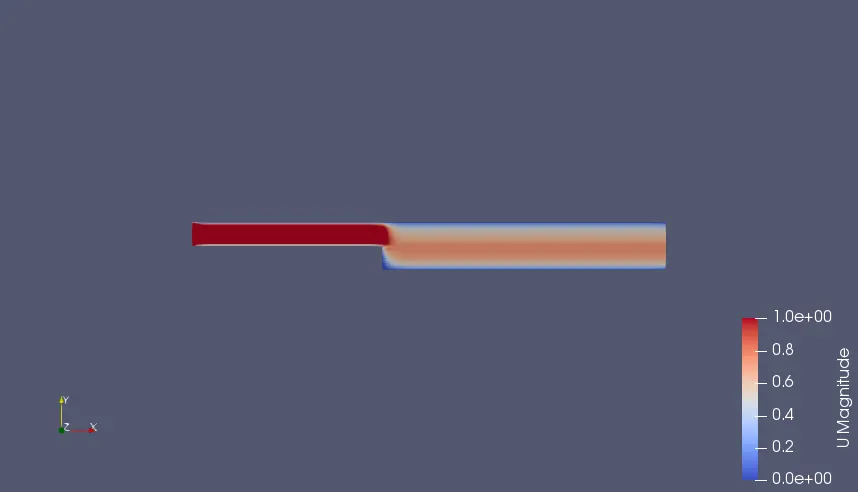
Velocity contour:-
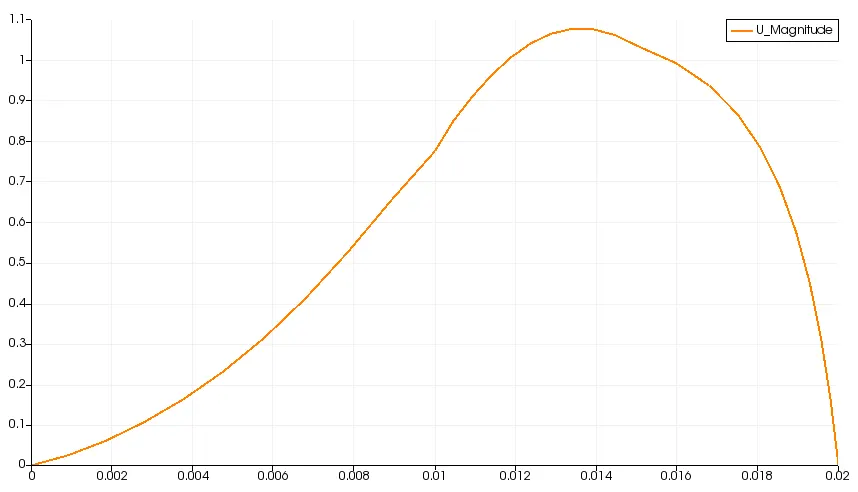
Velocity profile:-
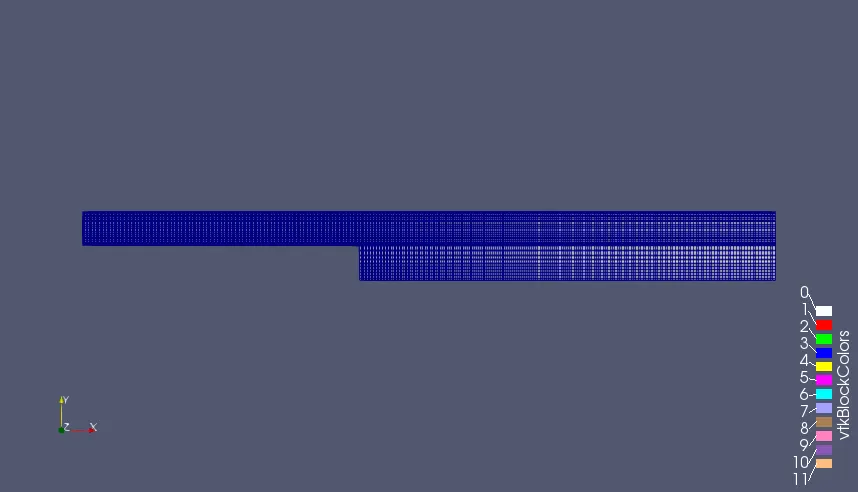
3.Grading factor 0.5:-
Mesh:-
blocks
(
    hex (0 1 2 3 11 12 13 14) (200 10 1) simpleGrading (1 2 1)
    hex (3 2 4 5 14 13 15 16) (200 10 1) simpleGrading (1 0.5 1)
    hex (2 7 6 4 13 18 17 15) (200 10 1) simpleGrading (2 0.5 1)
    hex (1 8 7 2 12 19 18 13) (200 10 1) simpleGrading (2 2 1)
    hex (10 9 8 1 21 20 19 12) (200 10 1) simpleGrading (2 2 1)
);
Velocity contour:-
Velocity profile:-
4.Grading factor 0.8:-
Mesh:-
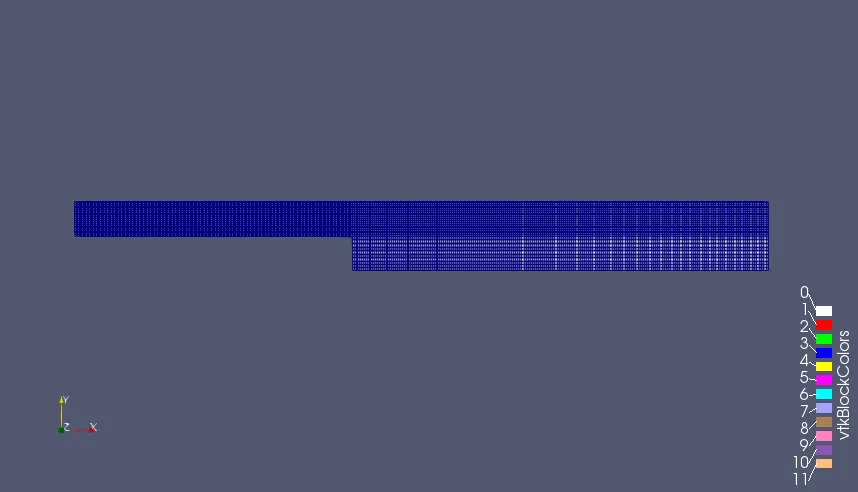
blocks
(
    hex (0 1 2 3 11 12 13 14) (200 10 1) simpleGrading (1 1.25 1)
    hex (3 2 4 5 14 13 15 16) (200 10 1) simpleGrading (1 0.8 1)
    hex (2 7 6 4 13 18 17 15) (200 10 1) simpleGrading (1.25 0.8 1)
    hex (1 8 7 2 12 19 18 13) (200 10 1) simpleGrading (1.25 1.25 1)
    hex (10 9 8 1 21 20 19 12) (200 10 1) simpleGrading (1.25 1.25 1)
);
Velocity contour:-
Velocity profile:-
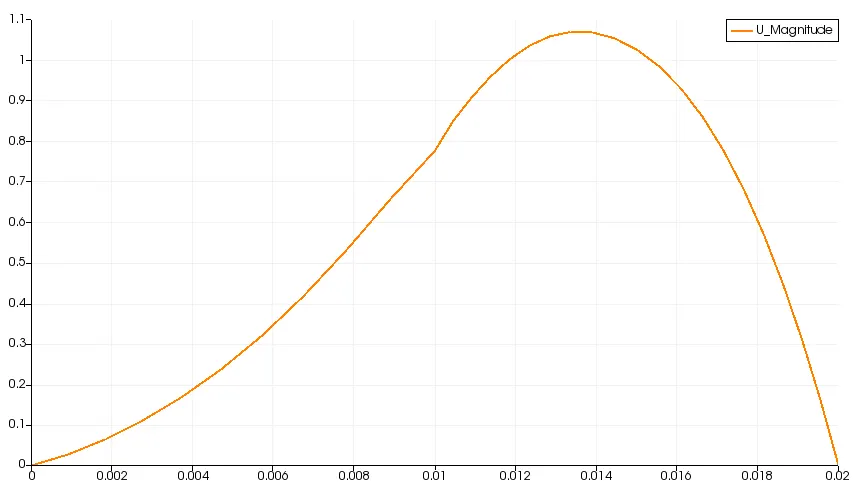
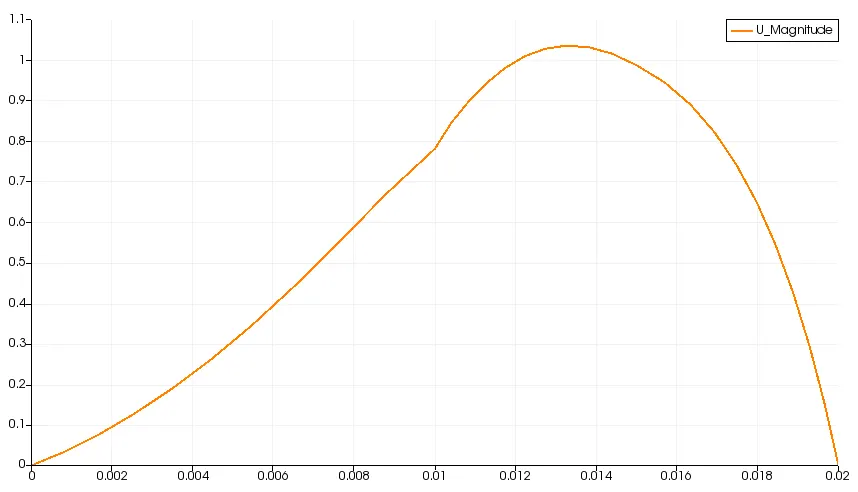
The changes observed in velocity by using the grading factor of 0.2,0.5 and 0.8 is small,as we can observe it from the graph .
The value of the velocity at 0.085m from the inlet along x direction and y-coordinate is 0 is
for Grading factor =0.2, U_magnitude=0.765593
for Grading factor =0.5, U_magnitude=0.767879
for Grading factor =0.8, U_magnitude=0.776667
Among the above cases the grading factor of f=0.2 has the finer mesh at the step.So, the most accurate value of the velocity =0.765593.