Week 8 - BlockMesh Drill down challenge
The main objective of this challenge is to produce the blockmesh by using the OpenFOAM software. The given diagram is in the 2D view. It is divided into 5 blocks, which is shown below.

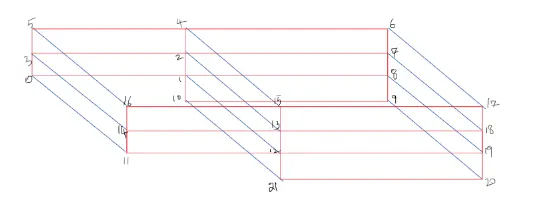
Here in the above 3D view diagram, there are 22 vertices(points), numbered starting from 0.
There are so many shortcuts that are used in OpenFOAM. Some of them are as follows:
ls - list, app - Applications, tut - tutorials, cp - copy, cd - open the folder(directory) , rm - delete, gedit - to open the text files etc.
Steps for simulation:
- First, open a terminal in the Linux Operating System. Just type 'foam' and type 'ls' to see the list of contents in the foam directory or folder.
- Type 'cd tut' then 'ls' to open the tutorials directory. In tutorials type 'cd incompressible' > 'ls' > 'cd icoFoam', then 'ls' > 'cd cavity' then 'ls'.
- Type 'cp -r cavity/ $FOAM_RUN' this command used to copy the cavity directory and pastes directly into the run folder. Because it is not possible to run the directory in the tutorials.
- Type 'cd' to come back to the main directory.
- Then type 'run' to open the run directory and type 'ls', in those contents the cavity directory(folder) will be there. So type 'cd cavity' then 'ls' > 'cd system' then 'ls'.
- In the system list, there are contents like blockMeshDict, controlDict, fvSchemes, and fvSolutions. All these are text files, So there is a possibility to edit these files according to the boundary conditions which are given in the problem.
- Type 'gedit blockMeshDict' to edit the mesh grinding, grid points, and boundary of the given challenge, and finally don't forget to save the text file. Then type 'gedit controlDict' to edit the starting and ending time, time intervals, and the value of delta t. Here the value of the delta t is always less than one(1) otherwise the solution may diverge.
- Then type 'cd ..' to go back to the cavity folder and type 'ls' > type '0' then 'ls'. In the 0 list there are 2 text files. They are p and U. Type 'gedit p' and 'gedit U' mention the initial conditions.
- After editing all these 4 text files come back to the cavity folder then type command 'blockMesh' to create the mesh.
- Type command 'icoFoam' to calculate the simulation.
- After completion of the simulation type command 'paraFoam' to open the paraView. ParaView is an open-source, multi-platform scientific data analysis and visualization tool that enables the analysis and visualization of extremely large datasets.
BlockMesh Code:
/*--------------------------------*- C++ -*----------------------------------*\
  =========                 |
  \\      /  F ield         | OpenFOAM: The Open Source CFD Toolbox
   \\    /   O peration     | Website:  https://openfoam.org
    \\  /    A nd           | Version:  8
     \\/     M anipulation  |
\*---------------------------------------------------------------------------*/
FoamFile
{
    version     2.0;
    format      ascii;
    class       dictionary;
    object      blockMeshDict;
}
// * * * * * * * * * * * * * * * * * * * * * * * * * * * * * * * * * * * * * //

convertToMeters 0.01;

vertices
(
    (0 0 0)//[0]
    (8 0 0)//[1]
    (8 0.5 0)//[2]
    (0 0.5 0)//[3]
    (8 1 0)//[4]
    (0 1 0)//[5]
    (20 1 0)//[6]
    (20 0.5 0)//[7]
    (20 0 0)//[8]
    (20 -1 0)//[9]
    (8 -1 0)//[10]
    (0 0 0.1)//[11]
    (8 0 0.1)//[12]
    (8 0.5 0.1)//[13]
    (0 0.5 0.1)//[14]
    (8 1 0.1)//[15]
    (0 1 0.1)//[16]
    (20 1 0.1)//[17]
    (20 0.5 0.1)//[18]
    (20 0 0.1)//[19]
    (20 -1 0.1)//[20]
    (8 -1 0.1)//[21]
);

blocks
(
    hex (0 1 2 3 11 12 13 14) (200 10 1) simpleGrading (1 1 1)
    hex (3 2 4 5 14 13 15 16) (200 10 1) simpleGrading (1 1 1)
    hex (2 7 6 4 13 18 17 15) (200 10 1) simpleGrading (1 1 1)
    hex (1 8 7 2 12 19 18 13) (200 10 1) simpleGrading (1 1 1)
    hex (10 9 8 1 21 20 19 12) (200 10 1) simpleGrading (1 1 1)
);

edges
(
);

boundary
(
    inlet
    {
        type patch;
        faces
        (
            (0 11 14 3)
            (3 14 16 5)
        );
    }
    outlet
    {
        type patch;
        faces
        (
            (9 8 19 20)
            (8 7 18 19)
            (7 6 17 18)
        );
    }
    front
    {
        type empty;
        faces
        (
            (11 12 13 14)
            (14 13 15 16)
            (13 18 17 15)
            (12 19 18 13)
            (21 20 19 12)
        );
    }
    back
    {
        type empty;
        faces
        (
            (0 3 2 1)
            (3 5 4 2)
            (2 4 6 7)
            (1 2 7 8)
            (10 1 8 9)
        );
    }
    topandbottomwall
    {
        type wall;
        faces
        (
            (5 16 15 4)
            (4 15 17 6)
            (10 21 12 1)
            (0 1 12 11)
            (10 9 20 21)
        );
    }

);

mergePatchPairs
(
);

// ************************************************************************* //
ControlDict Code:
/*--------------------------------*- C++ -*----------------------------------*\
  =========                 |
  \\      /  F ield         | OpenFOAM: The Open Source CFD Toolbox
   \\    /   O peration     | Website:  https://openfoam.org
    \\  /    A nd           | Version:  8
     \\/     M anipulation  |
\*---------------------------------------------------------------------------*/
FoamFile
{
    version     2.0;
    format      ascii;
    class       dictionary;
    location    "system";
    object      controlDict;
}
// * * * * * * * * * * * * * * * * * * * * * * * * * * * * * * * * * * * * * //

application     icoFoam;

startFrom       startTime;

startTime       0;

stopAt          endTime;

endTime         0.5;

deltaT          0.00001;

writeControl    timeStep;

writeInterval   20;

purgeWrite      0;

writeFormat     ascii;

writePrecision  6;

writeCompression off;

timeFormat      general;

timePrecision   6;

runTimeModifiable true;


// ************************************************************************* //
Velocity Code:
/*--------------------------------*- C++ -*----------------------------------*\
  =========                 |
  \\      /  F ield         | OpenFOAM: The Open Source CFD Toolbox
   \\    /   O peration     | Website:  https://openfoam.org
    \\  /    A nd           | Version:  8
     \\/     M anipulation  |
\*---------------------------------------------------------------------------*/
FoamFile
{
    version     2.0;
    format      ascii;
    class       volVectorField;
    object      U;
}
// * * * * * * * * * * * * * * * * * * * * * * * * * * * * * * * * * * * * * //

dimensions      [0 1 -1 0 0 0 0];

internalField   uniform (0 0 0);

boundaryField
{
    inlet
    {
        type            fixedValue;
        value           uniform (1 0 0);
    }
    outlet
    {
        type            zeroGradient;
    }

    front
    {
        type            empty;
    }
    back
    {
        type            empty;
    }
    topandbottomwall
    {
        type            noSlip;
    }
}

// ************************************************************************* //
Pressure Code:
/*--------------------------------*- C++ -*----------------------------------*\
  =========                 |
  \\      /  F ield         | OpenFOAM: The Open Source CFD Toolbox
   \\    /   O peration     | Website:  https://openfoam.org
    \\  /    A nd           | Version:  8
     \\/     M anipulation  |
\*---------------------------------------------------------------------------*/
FoamFile
{
    version     2.0;
    format      ascii;
    class       volScalarField;
    object      p;
}
// * * * * * * * * * * * * * * * * * * * * * * * * * * * * * * * * * * * * * //

dimensions      [0 2 -2 0 0 0 0];

internalField   uniform 0;

boundaryField
{
    inlet
    {
        type            zeroGradient;
    }
    outlet
    {
        type            fixedValue;
        value           uniform 0;
    }
    front
    {
        type            empty;
    }
    back
    {
        type            empty;
    }
    topandbottomwall
    {
        type            zeroGradient;
    }
}

// ************************************************************************* //
For grading scheme 1:
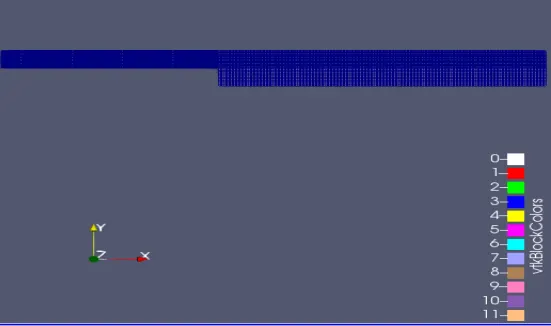
The mesh diagram:
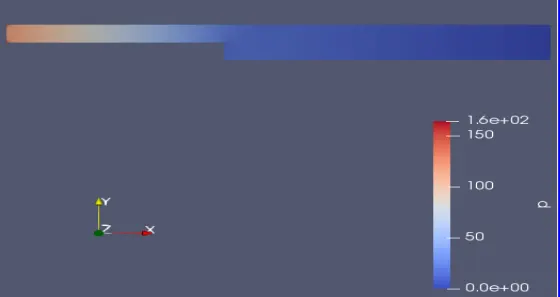
The pressure diagram:
The Velocity diagram:
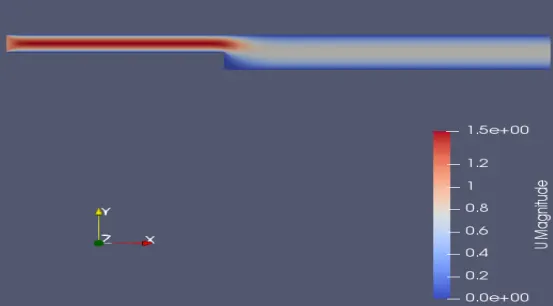
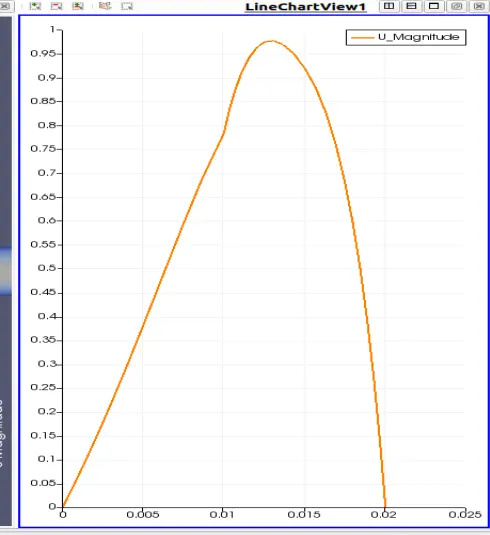
Velocity plot:
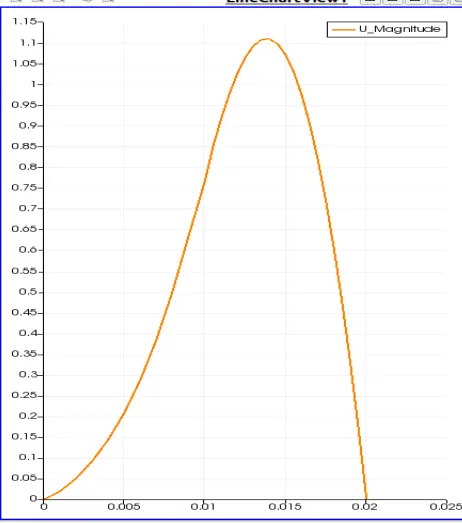
Mesh Grading factor(f):
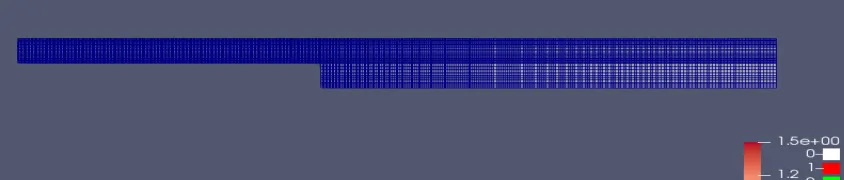
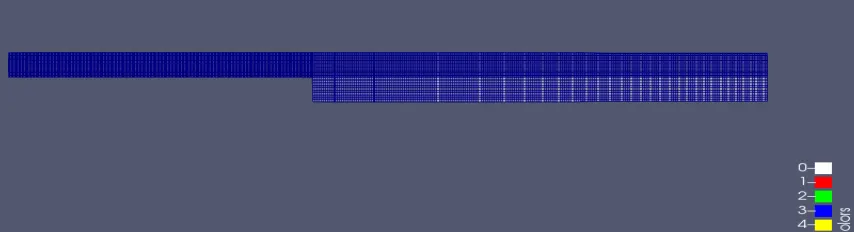
In the blocks, the simple grading values are known as the mesh values. The mesh values are from 1 to 10. The mesh value of 1 produces the uniform mesh. The mesh value of 10 produces the least uniform mesh. The ratio of the size of the end cell to the size of the first cell is known as the mesh grading factor(f).
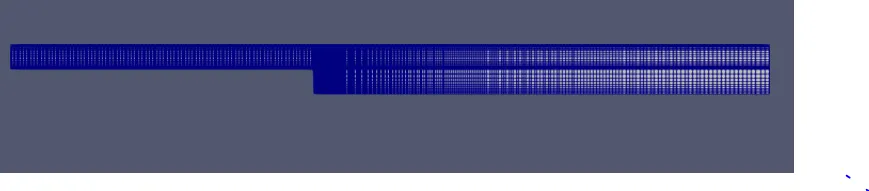
For changing the mesh grading points, we have to edit the simplegrading values in the blocks, which are located in the blockMeshDict text file. The following changes are shown below for each mesh grading factor:
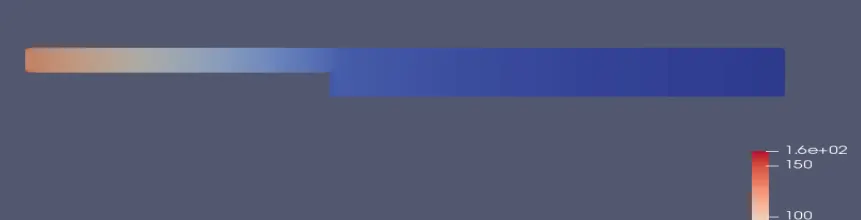
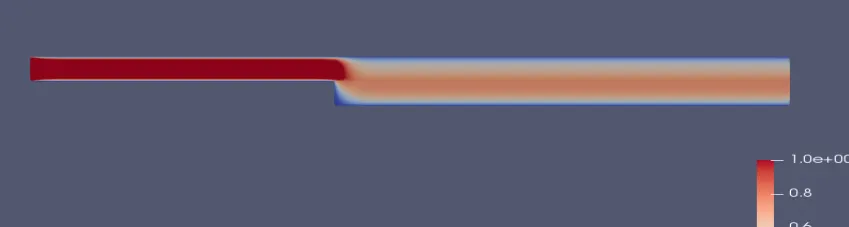
For grading scheme 0.2:
hex(0 1 2 3 11 12 13 14) (200 10 1) simplegrading(1 5 1)
hex(3 2 4 5 14 13 15 16) (200 10 1) simplegrading(1 0.2 1)
hex(2 7 6 4 13 18 17 15) (200 10 1) simplegrading(5 0.2 1)
hex(1 8 7 2 12 19 18 13) (200 10 1) simplegrading(5 5 1)
hex(10 9 8 1 21 20 19 12) (200 10 1) simplegrading(5 5 1)
The mesh diagram:
The pressure diagram:
The Velocity diagram:
The velocity plot:
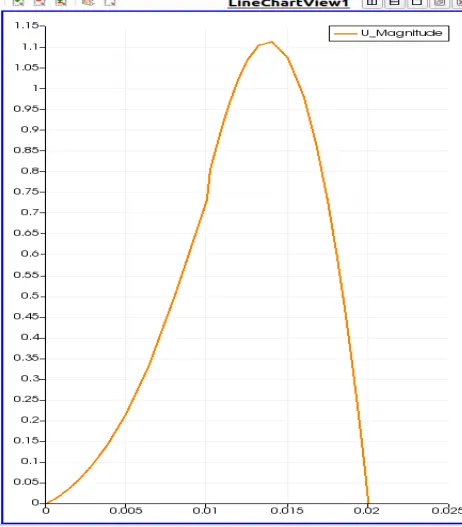
For grading scheme 0.5:
hex(0 1 2 3 11 12 13 14) (200 10 1) simplegrading(1 2 1)
hex(3 2 4 5 14 13 15 16) (200 10 1) simplegrading(1 0.5 1)
hex(2 7 6 4 13 18 17 15) (200 10 1) simplegrading(2 0.5 1)
hex(1 8 7 2 12 19 18 13) (200 10 1) simplegrading(2 2 1)
hex(10 9 8 1 21 20 19 12) (200 10 1) simplegrading(2 2 1)
The mesh diagram:
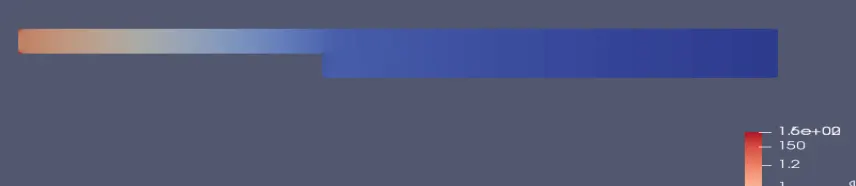
The pressure diagram:
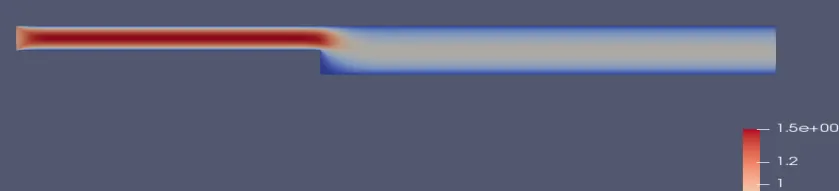
The Velocity diagram:
The velocity plot:
For grading scheme 0.8:
hex(0 1 2 3 11 12 13 14) (200 10 1) simplegrading(1 1.25 1)
hex(3 2 4 5 14 13 15 16) (200 10 1) simplegrading(1 0.8 1)
hex(2 7 6 4 13 18 17 15) (200 10 1) simplegrading(1.25 0.8 1)
hex(1 8 7 2 12 19 18 13) (200 10 1) simplegrading(1.25 1.25 1)
hex(10 9 8 1 21 20 19 12) (200 10 1) simplegrading(1.25 1.25 1)
The mesh diagram:
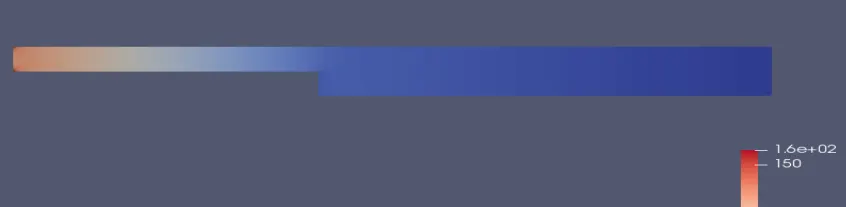
The pressure diagram:
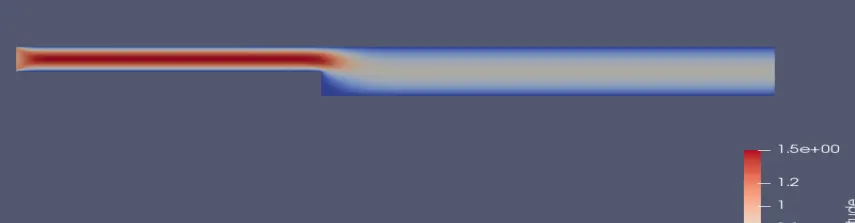
The Velocity diagram:
The velocity plot:
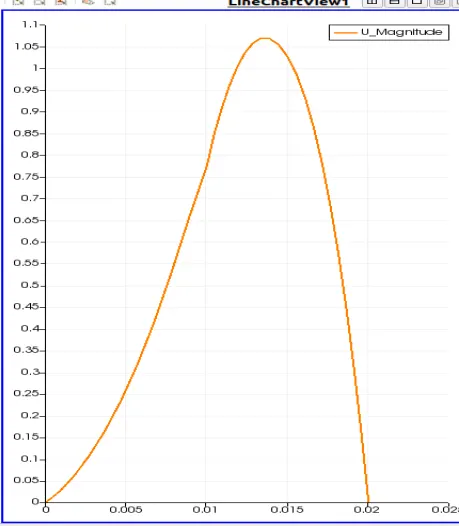
Result:
The velocity graphs that are obtained for different mesh grading factors are almost similar with a small variation. By increasing the grading factor values, the velocity plots are getting better result.