Week 7 State of charge estimation
Matlab project https://in.mathworks.com/matlabcentral/fileexchange/72865-design-and-test-lithium-ion-battery-management-algorithms. Project file attachd.
1.Simulate the 3 test cases from harness dashboard and write a detailed report on the results
BMS_ClosedLoop_Harness_Dashboard:
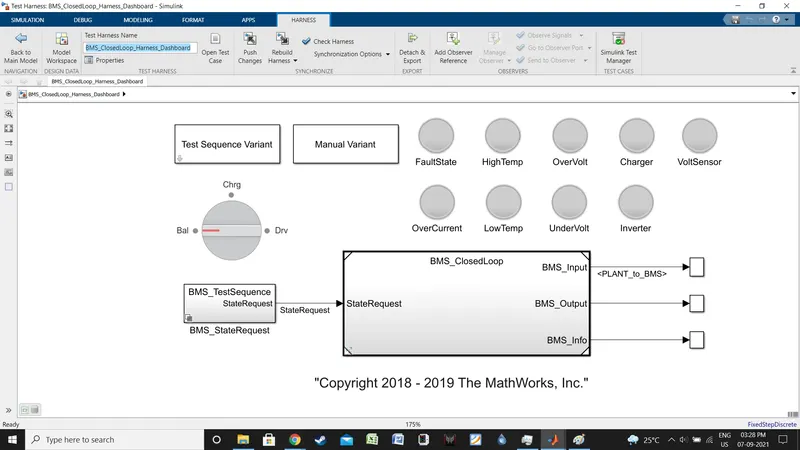
Tests were selected via Test Sequence Variant block.
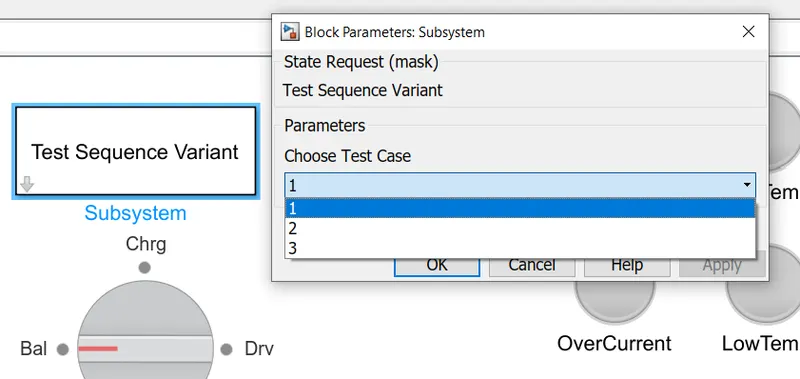
Test 1
Select 1, click on okay.
next click as follows.
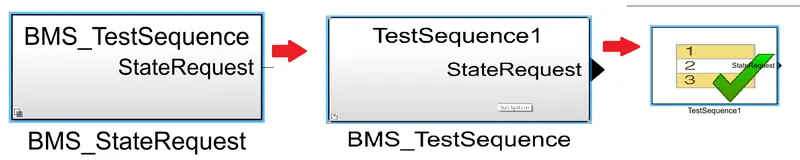
BMS_StateRequest -> BMS_TestSequence -> TestSequence 1
Following window will appear.
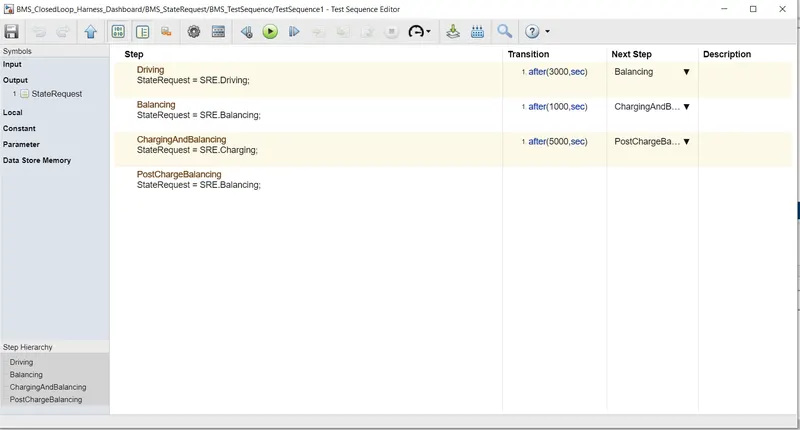
Test 1 is drive for 3000 sec, Balancing for 1000 sec, Charging and balancing for 5000 sec and post charge balancing respectively.
Once we run the simulation we get the followings.
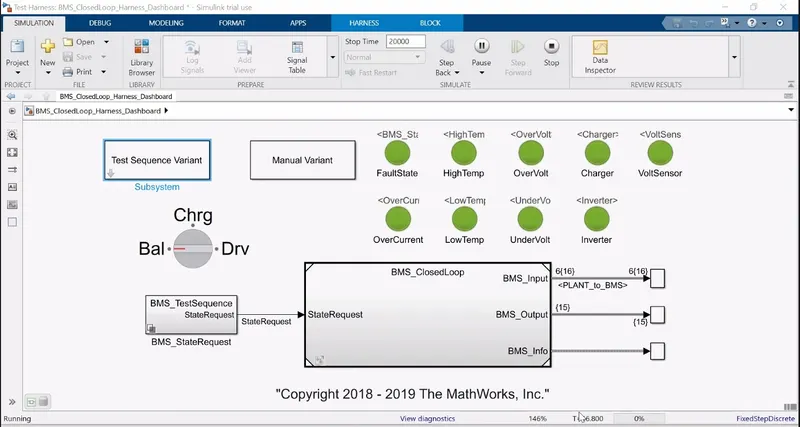
As we can see in the dash board, no warning or fault is generated.
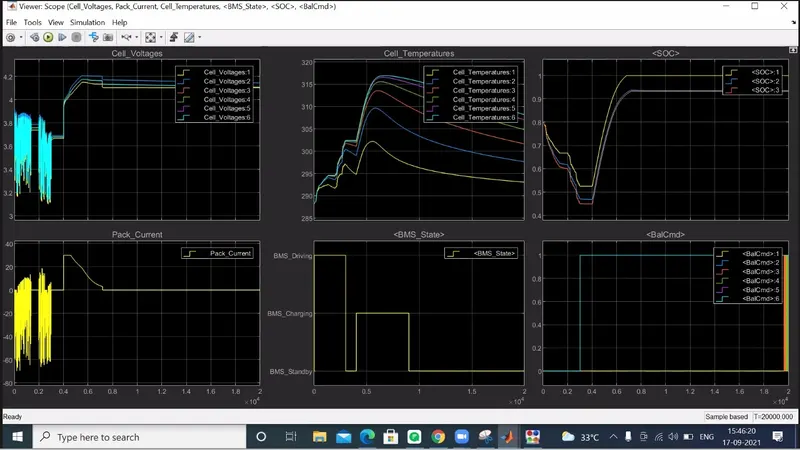
The output shows 6 plots, their details are as follows.
Plot 1: Individual battery voltage
During the drive cycle i.e upto 3000 sec, voltages of all 6 cell stays between 3.16 to 3.95, the voltage rise and fall is as per discharge current of plot 4.
from 1800 to 2000 sec, the vehicle was at rest, and a voltage difference is observed among all 6 cells ranging from 3.72 to 3.8 V, while during the balncing phase from 3000 to 4000 sec, these voltage gap become 3.68 to 3.7.
From 4000 to 9000 sec, the cells were charged and balanced, voltage of the cells raises upto 4.2 V and finnaly dropped to 4.17 to 4.09 V band and stayed there for the rest of the duration.
Plot 2: Individual battery temperature
The cell temperature increases with vehicles driving, decreases during balancing and again increases during charging. During the highest difference period, the cells are within 15 K temperature difference range.
Plot 3: SOC graph
Here the SOC of the battery has been plotted and three mehod of SOC estimation is used. SOC 1, Coloumb Counting metod. SOC 2 Kalman Filter method and SOC 3 Advanced Kalman Filter method. As it can be seen in the graph, there is a major difference of around 8 percent between SOC etimation of Coloumb COunting and Kalmanfilter and Advance Kalman filter method. As Kalman Filter Method take account of more parameters than Coloumb counting, these results should be more accurate.
Plot 4: Current Plot
Showing the pack current during discharge and charge.
Plot 5: BMS state
Showing the BMS states, we can see that here during the balancing part, BMS as on standby mode.
Plot 6: BMS Cmd
Showing which cells are being balacned and we can see in tis graph that cell 6 is being balanced much more than other 5 and also from the other graphs, it is evident that cell 6 is different than other 5 cells, possibly much weaker.
Test 2
Select 2, click on okay.
next select as same as test 1, only choose TestSequence 2.
Following window will appear.
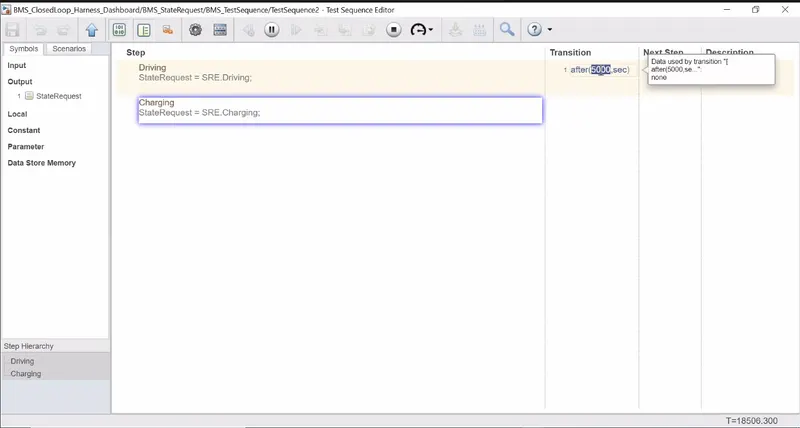
Test 2 is drive for 5000 sec and then continue charging over the duration of simulation (20000 sec total time so 15000 sec for charging).
Once we run the simulation we get the followings.
Initially all parameters were okay and no fault is observed.
however, around 6500 sec after test is started, 1500 sec after the charging is started, the dashboard changed to this.
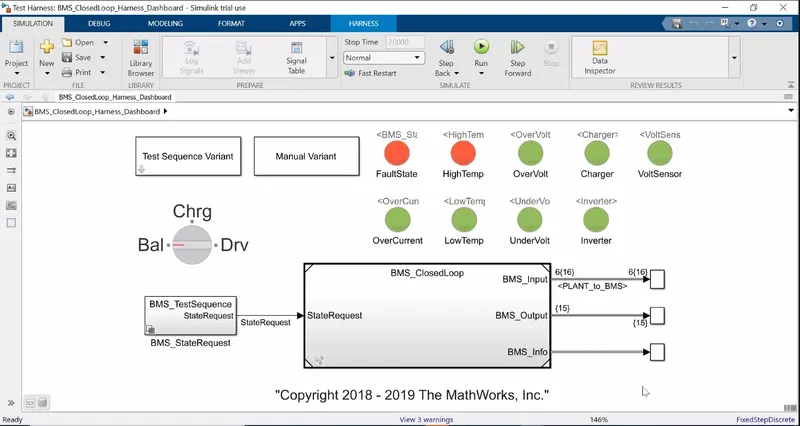
As we can see, now we are getting a warning for high temperature.
if we consult with the output plot, we will see.
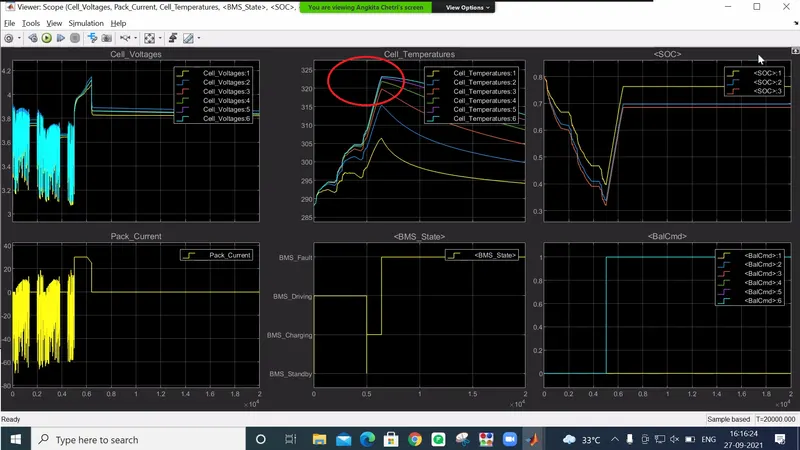
The individual plots describes the simulation as follows.
Plot 1: Individual battery voltage
Plot 2: Individual battery temperature
Plot 3: SOC graph
Here the SOC of the battery has been plotted and three mehod of SOC estimation is used. SOC 1, Coloumb Counting metod. SOC 2 Kalman Filter method and SOC 3 Advanced Kalman Filter method. As it can be seen in the graph, there is a major difference of around 8 percent between SOC etimation of Coloumb COunting and Kalmanfilter and Advance Kalman filter method. As Kalman Filter Method take account of more parameters than Coloumb counting, these results should be more accurate.
Plot 4: Current Plot
Showing the pack current during discharge and charge.
Plot 5: BMS state
Showing the BMS states, we can see that here during the charging part, the BMS start showing fault warning.
Plot 6: BMS Cmd
Showing which cells are being balacned and we can see in tihs graph that cell 6 is being balanced much more than other 5 and also from the other graphs, it is evident that cell 6 is different than other 5 cells, possibly much weaker.
2.What is coulomb counting? Refer to the above model and explain how BMS implements coulomb counting for SOC estimation ?
Hint :(Download the file from the link and go to SOC estimation model-ECU block)
Coulomb Counting Method
The coulomb counting method, also known as ampere hour counting and current integration, is the most common technique for calculating the SOC. This method employs battery current readings mathematically integrated over the usage period to calculate SOC values given by the following equation.
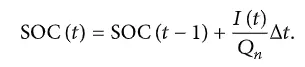
Here SOC(t) is calculated from SOC(t-1) a previously estimated SOC value and I(t), the battery discharge current.
While this method is simple and widely accepted, there are several errors occurs in the calculation due to battery life, temperature etc.
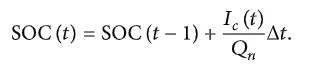
Therefore to improve the Coulomb counting method, a new technique called modified Coulomb counting method is developed. Here, the discharge current has been updated as per experimental constants and this new updated current value is used to determine SOC.

Ic is the updated or corrected discharge current. while K0, K1, K2 are constants developed from experiment data.
Coulomb Counting in the model.
In the BMS system model, go to the BMS ECU Block and double click.
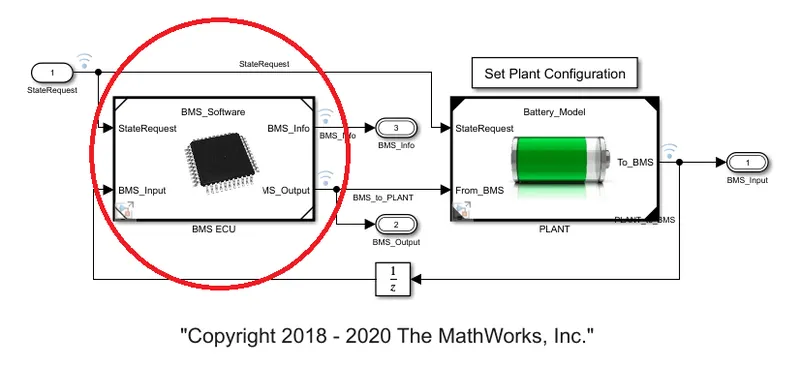
Following window will open.
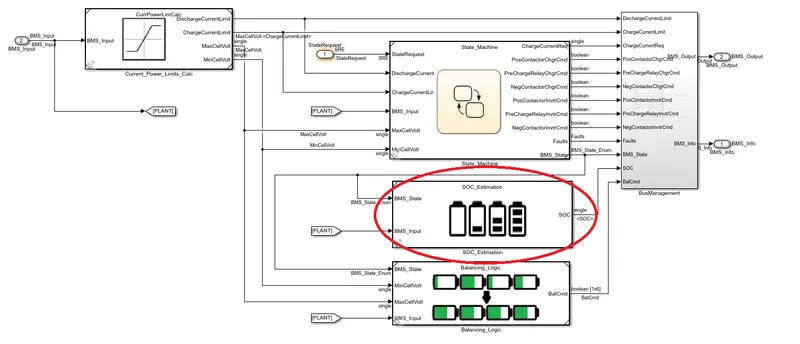
Go to the SOC Estimation block, following window will open
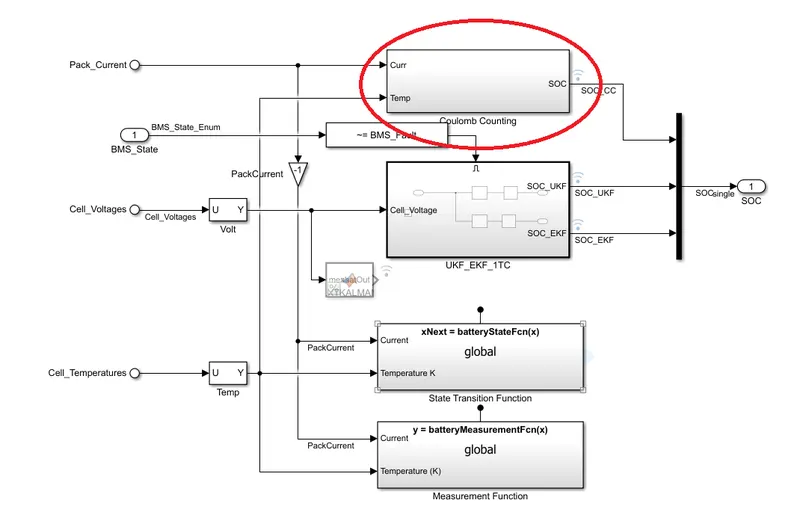
Go to the Coulomb Counting block, following window will open
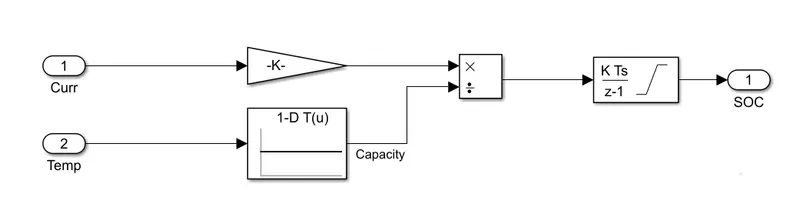
The Coulomb counting is done here. As it has been shown that there are two signal, the Current and Temperature. The current signal is converted into Ah and from a look up table current correction factors is selected based on cell temperature.
The corrected current value (After the division block) is put into a discrete integrator and SOC is estimated.