Week - 4
1.AIM:-
To Implement control logic of a “washing machine” using Stateflow as per given sequence.
OBJECTIVE:
- If the power supply is available, the system gets activated
- If the Water supply is not available, stop the process & indicate through LED
- Soaking time should be 200s followed by Washing time of 100s.
- Then rinsing happens for next 20s & dryer runs for 50s
CONTROL LOGIC:-
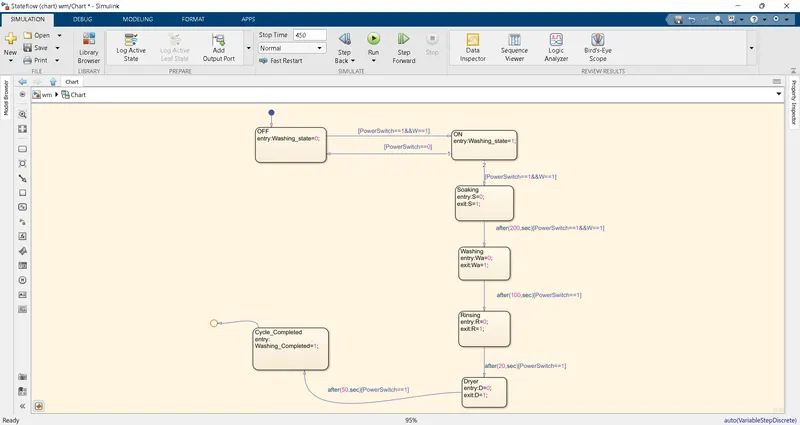
EXPLANATION:
1.In the above control logic first state is created with 2 conditions for power supply.One is with power supply available(Power Switch==1) and second with water supply available (W==1).If the power supply at entry is 1 and water supply is on, then machine will get activated and start the next process of operation.
2. The second state is soaking, in this state the water supply is required so we give water supply. After completion soaking and water supply are off. As per given condition we gave time 200 sec for this process with the help of transition condition
3. The third state is washing, in this state only washing is done with already available water in washing machine this process is took 100 sec time per given transition condition. And water drains from the machine. here.
4. The fourth state is rinsing, in this process repeated washing has happened so we required water supply The water supply is off after 20 sec and rinsing state also done as per given transition condition.
5. The fifth state is dryer, in this process the cloths are dry in 50 sec as per given transition condition after completion of process dryer would off with the help of sate condition.
SYMBOLS PANE:
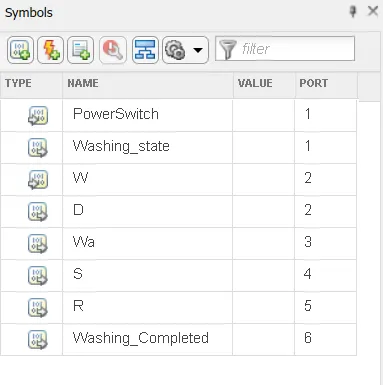
Here,
PowerSwitch & W(water supply) is as input given while all other like Washing_State, D(dryer), Wa(washing), s(soaking), R(rinsing), Washing_Completed are all output given.
COMPLETE SIMULINK MODEL,
Showing that the washing process is completed.
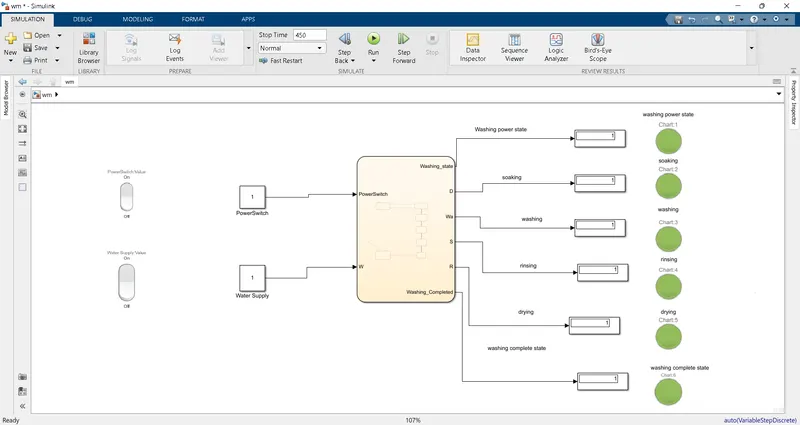
Here, all LED are glowing as green which means power supply is ON all process of washing has been completed and all display output as 1.
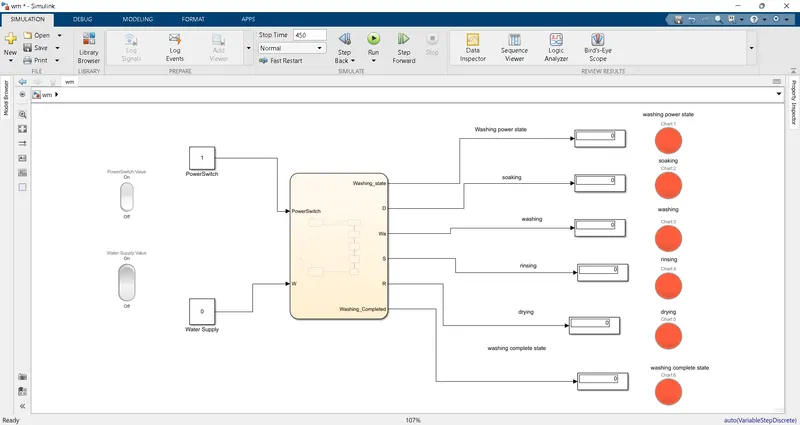
Here, all LED are glowing as red due to water supply is OFF so washing process not completed and all display output as 0.
2.AIM:-
To Make a Simulink chart for the “Gear shift” logic as per below conditions.
OBJECTIVE:
Speed Range(kmph) Gear
0 to 15 1
16 to 25 2
26 to 40 3
41 to 60 4
Above 61 5
Give speed input while the simulation is running & display the gear number.
CONTROL LOGIC:
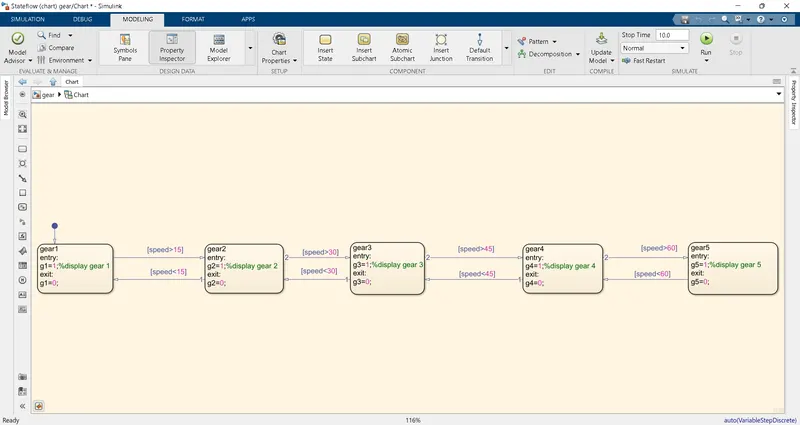
As per given condition created gear shifting stateflow diagram with help transition to give condition with respect to speed.
SYMBOLS PANE:
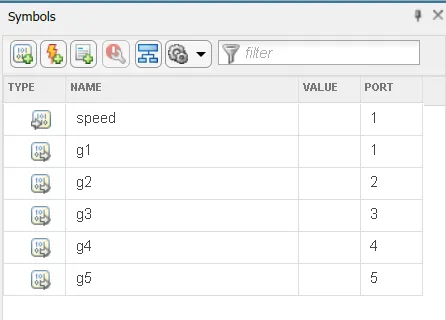
Here,
1.Input data- Speed
2.Output data- Gear
SIMULINK MODEL:
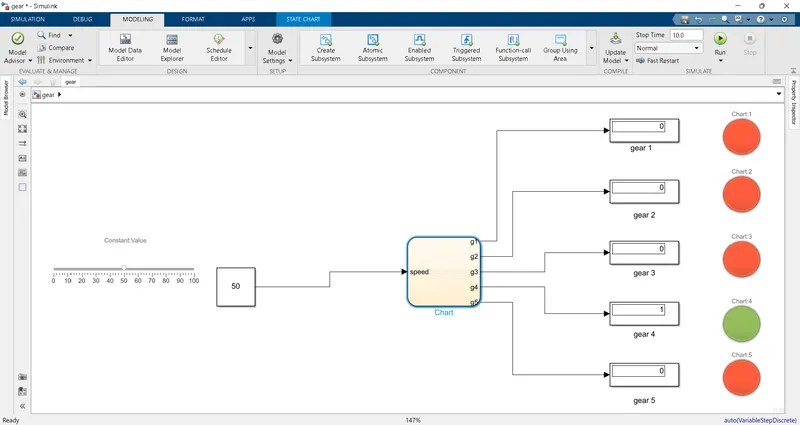
EXPLANATION:
- Here,In the above model we used slider block for variable speed and connect to control logic stateflow block. Display block is connected to control logic to see which gear is running and also used lamp for better graphical presentation to user.
- By given input speed of 50 the gear indicates its in 4th gear by condition provided
BLOCKS USED:
1.LAMP:
The Lamp block displays a color indicating the value of the input signal. You can use the Lamp block with other Dashboard blocks to build an interactive dashboard of controls and indicators for your model. You can specify pairs of input values and colors to provide the Information you want during the simulation.
2.SLIDER:
The Slider block tunes the value of the connected block parameter during the simulation. For example, you can connect the Slider block to a Gain block in your model and adjust its value during the simulation. You can modify the range of the Slider block's scale to fit your data. Use the Slider block with other Dashboard blocks to create an interactive dashboard to control your model.
CONCLUSION:-
All Conditions are simulated through stateflow successfully.