Week 2- 2R Robotic Arm Challenge
AIM:-
To write a program in MATLAB to stimulate the forward kinematics of a 2R Robotic Arm
OBJECTIVE:-
- Write a program to stimulate forward kinematics of a 2R Robotic Arm
- To create a Movie/Animation from the plots obtained from the program
THEORY:-
A Robotic arm is a type of mechanical moveble arm,usually programmable,with similar functions which human arms attained,the arm may be the sum total of mechanism.The links of such manipulator are connected like by human arm joints allowing the rotational motion such as articulated robot or translational displacement (linear).
In this, we consider a 2R Robotic arm.A 2R robotic arm represents a robotic arm with two rotations.
MATLAB CODE:-
%A PROGRAM IN MATLAB TO STIMULATE THE FORWARD KINEMATICS OF 2R ROBOTIC ARM
clear all
close all
clc
%Inputs
l1 = 1;  %length of first arm
l2 = 0.5;%length of second arm
theta1 = linspace(0,90,10);
theta2 = linspace(0,90,10);
ct=1;
for i=1:length(theta1)
    THETA1 = theta1(i);
    for j =1:length(theta2)
        THETA2 = theta2(j);
        x0 = 0;
y0 = 0;

x1 = l1*cosd(THETA1);
y1 = l1*sind(THETA1);

x2 = x1 + l2*cosd(THETA2);
y2 = y1 + l2*sind(THETA2);

%plotting
plot([x0 x1],[y0 y1],[x1 x2],[y1 y2],'linewidth',3)
axis([-0.1 1.5 0 1.5])
pause(0.03)
M(ct) = getframe(gcf);
ct=ct+1;


    end
end

movie(M)
videofile = VideoWriter('forward_kinematics_with_loop.avi','Uncompressed AVI');
open(videofile)
writeVideo(videofile,M)
close(videofile)
CODE EXPLANATION:-
- Starting a program by using comments
- Providing the inputs variables
- Predefining the length/ values of the robotic arms.ie l1 and l2
- Providing the values of theta 1 and theta2 using linspace command for theta = 0 to 90 degrees for 10 values
- by using for loop command for iterating the values of the desired variable.
- providing for loop command for providing movement to the second link arm
- providing the equation for x1 ,y1 ,x2,y2 or defining the coordinates of both links
- next plotting the all coordinates values and providing the axis number
- using the pause command to make plot movement of arms bit slow
- adding cr value by +1 each times executes for loop
- ending the for loop
- using movie commands to stitch all the files to one animated figures and saved in the M file to make animation or movie
- at end of the code saving the movie in .avi format.
ERRORS:-
- While for making the figures into combined animated video i made mistake in code
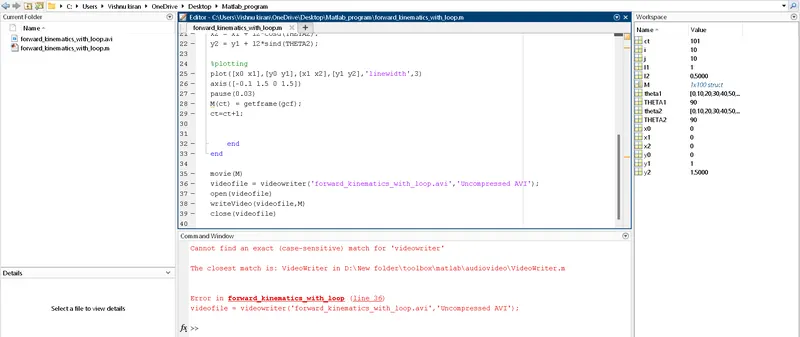
STEPS TO OVERCOME:-
- in the code line 36 instead of VideoWriter i entered videowriter so i could not find my animated video file.
ANIMATED VIDEO LINK:-
youtube link : https://youtu.be/62p6feDBFzA
RESULT:-
Thuss we have stimulated the 2R Robotic arm by using the matlab programming and created Movie/animation from the plots obtained from the program