Week 4-1D Element Creation Challenge
Question:
Objective:To mesh the given component with size5 units.
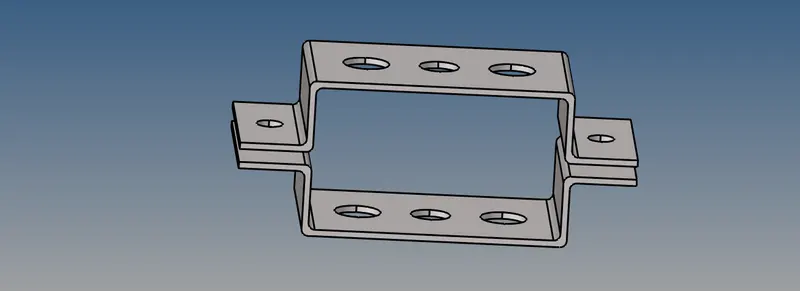
Procedure:
- Import the iges file by going to import geometry.
- start with midsurface by selecting each solid, organize the components as Bracket_1 and Bracket_2.
- create material as steel and properties with thickness of 5units, card image as PSHELL.
- assign the material and properties to the components.
- start with meshing the midsurface with 5units ,keep connectivity , start with the holes by adding a washer split to each holes.
- After meshing go to 2D detailed element representation to obtain the required mesh click on shaded elements and mesh lines to obtain the required mesh.
Result:
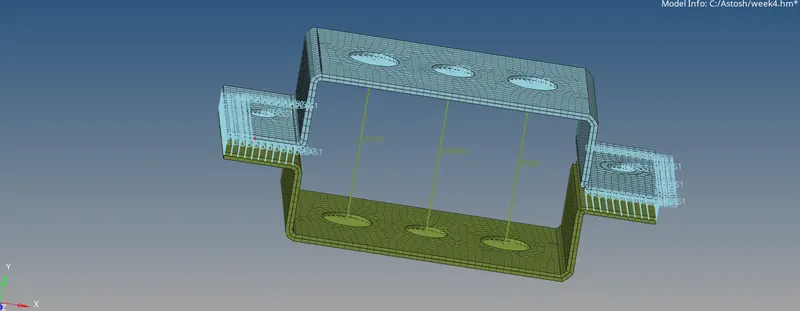
LEARNING: Creating midsurface, organizing,Washer split use etc mentioned in details in procedure.
A:Rod element
Objective:Translational DOF should be Constrained with RBE2 link for the rod elements with provided cross-section of box type.
Procedure:
- Go to rigids, select the nodes by window and create rbe2 elements by ticking dof1,2,3 to get the rbe2 translational only.
- Go to Hyperbeam,select standard section library as Hyperbeam , thinwalled box type and select the cross-section.
- create a property for box rod, and assign it the beam cross section and the card image.
- Now go to rods ,select the 2 nodes ,select the property ,select create ,shows cweld change it to CROD and update to get the 1-d Rod element.
B:Beam element
Objective:All DOF should be constrained with RBE3 link with provided cross-section.
Procedure:
- Go to rbe3, select the nodes by window and create rbe3 elements by ticking dof1,2,3,4,5,6 to get the rbe3 constrained.
- Go to Hyperbeam,select standard section library as Hyperbeam , I section beam type and select the cross-section.
- create a property for I beam , and assign it the beam cross section and the card image.
- Go to bars and select Cbeam,select nodes and create the beam element.
C:Bar element
objective:Constrain only x and y DOFs With RBE3 link and for the provided cross-section for bar element.
Procedure:
- Go to rbe3, select the nodes by window and create rbe3 elements by ticking dof1,2 to get the rbe3 constrained.
- Go to Hyperbeam,select standard section library as optistruct , cross type and select the cross-section.
- create a property for cross bar, and assign it the bar cross section and the card image.
- Go to bar,select nodes give direction and tab or middle mouse to create CBAR.
D&E: Mass
Objective:Apply the mass of magnitude 10 with the RBE2 link at the given location.
Procedure:
- Go to rigids, select the nodes by window and create rbe2 elements by ticking dof to get the rbe2.
- Go to mass and select the location and add the mass of magnitude 10.
F: Spring element
Objective: Join the two components with Spring elements
Procedure:
- select the nodes on both the bracket to create the spring elements.
- also you can go to connectors and spot to select mutiple nodes at a time.
Final result:
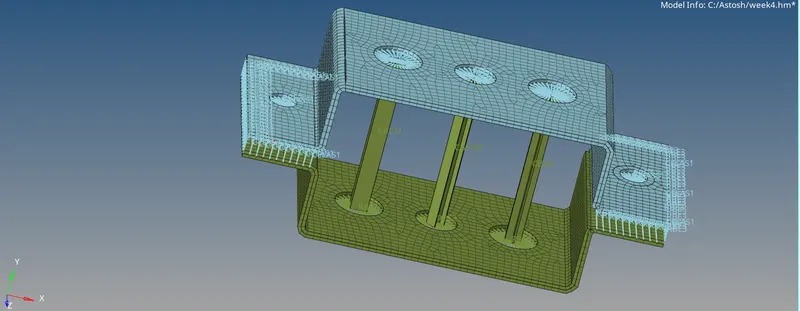
LEARNING: creating 1D elements such as bar,beam,rod,mass,springs and different hyperbeam options and the use of tools, detailed explaination is provided in the procedure.