Week 4.1 - Solving second order ODEs
Solving second order ODEs,
Aim - Solving second order ODEs, To solve an ordinary differential equation (ODE) and use the calculated information to animate the motion of the pendulum.
- A function is a group of statements that together perform a task.
- In MATLAB, functions are defined in separate files. The name of the file and of the function should be the same.
- Functions operate on variables within their own workspace, which is also called the local workspace, separate from the workspace you access at the MATLAB command prompt which is called the base workspace.
- Function handles are simple to function codes that can be created without using the regular function definition using the keywords ‘function’ and ‘end’. They do not require any separate ‘.m’ files or not needed to be declared separately below/above the main code.
- Function handles are directly declared in the main code itself and also accessible from any point in that particular code, i.e they are localized to a particular conditional.
- The declaration of a function handle is very similar to that of a function declaration.
- It can be distinguished by the means of ‘@’ symbol before your value/expression allocation.
- The syntax for creating a function handle is. A function was defined in order to establish a relation between all the given input values, the function code is based on the equation derived in figure 2.
% Ode_function.
function [dtheta_dt] = ode_func(t,theta,b,g,l,m);

theta1= theta(1);
theta2= theta(2);
dtheta1_dt = theta2;
dtheta2_dt = -(b/m)*theta2 - (g/l)*sin(theta1);
dtheta_dt = [dtheta1_dt; dtheta2_dt];

end
function [dtheta_dt] = ode_func(t,theta,b,g,l,m);
theta1= theta(1);
theta2= theta(2);
dtheta1_dt = theta2;
dtheta2_dt = -(b/m)*theta2 - (g/l)*sin(theta1);
dtheta_dt = [dtheta1_dt; dtheta2_dt];
end 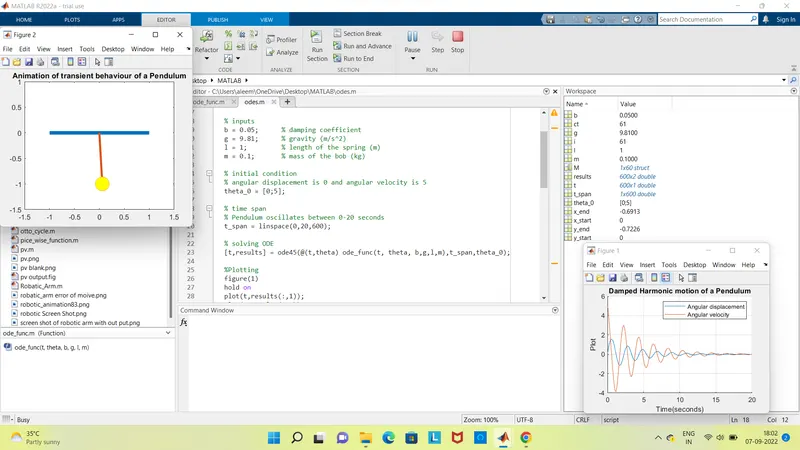
% Step wise explanation of code.
- Before writing the code, it's important to start with clear all, close all and clc commands since
- Clear all - removes data from the workspace, freeing up system memory, Close all- deletes the current figure or the specified ,clc - clears all input and output from the Command Window display, giving you a "clean screen
- Next step is to define the inputs and variables. The damping coefficient, gravity, length of the spring and mass of the bob have all been defined.
- Next step is to define the initial conditions, the angular displacement and angular velocity have been defined. Timespan has also been defined.
- Next step is to solve the ODE, Ode45 was used, it is a function in Matlab that solves ordinary or partial differential equations using a numerical method. The numerical method in question here is the 4th order Runge Kutta method. The function ode45 takes 3 inputs. The 3 inputs are the function to be integrated, the time span and the initial conditions. [t, results] means that the results that have been calculated with respect to time.
- After calculating the results, a graph has to be plotted, the graph contained two plots. One for angular displacement with respect to time and one for angular velocity with respect for time. The legend for the graph and the axis' labels have been defined. Figure 5 shows the graph obtained
%Solving second order ODEs of a penedulum
clear all
close all
clc
% inputs
b = 0.05; % damping coefficient
g = 9.81; % gravity (m/s^2)
l = 1; % length of the spring (m)
m = 0.1; % mass of the bob (kg)
% initial condition
% angular displacement is 0 and angular velocity is 5
theta_0 = [0;5];
% time span
% Pendulum oscillates between 0-20 seconds
t_span = linspace(0,20,600);
% solving ODE
[t,results] = ode45(@(t,theta) ode_func(t, theta, b,g,l,m),t_span,theta_0);
%Plotting
figure(1)
hold on
plot(t,results(:,1));
plot(t,results(:,2));
title('Damped Harmonic motion of a Pendulum');
legend('Angular displacement', 'Angular velocity');
ylabel('Plot');
xlabel('Time(seconds)');
grid on
% Pendulum Animation
ct =1;
for i = 1:length(results(:,1))
x_start = 0;
y_start = 0;
x_end = l*sin(results(i,1));
y_end = -l*cos(results(i,1));
% plotting the animation
figure(2)
plot([-1 1], [0 0], 'linewidth', 5)
hold on
plot([x_start x_end],[y_start y_end],'linewidth',3)
hold on
plot(x_end,y_end,'o','markersize',20,'markerFacecolor','y')
title('Animation of transient behaviour of a Pendulum')
axis([-1.5 1.5 -1.5 1])
pause(0.03)
hold off
M(ct) = getframe(gcf);
ct = ct+1;
end
% Animation of the pendulum
movie(M)
videofile=VideoWriter('Pendulum Animation.avi', 'uncompressed avi');
open(videofile)
writeVideo(videofile,M)
close(videofile)
%Solving second order ODEs of a penedulum
clear all
close all
clc
% inputs
b = 0.05; % damping coefficient
g = 9.81; % gravity (m/s^2)
l = 1; % length of the spring (m)
m = 0.1; % mass of the bob (kg)
% initial condition
% angular displacement is 0 and angular velocity is 5
theta_0 = [0;5];
% time span
% Pendulum oscillates between 0-20 seconds
t_span = linspace(0,20,600);
% solving ODE
[t,results] = ode45(@(t,theta) ode_func(t, theta, b,g,l,m),t_span,theta_0);
%Plotting
figure(1)
hold on
plot(t,results(:,1));
plot(t,results(:,2));
title('Damped Harmonic motion of a Pendulum');
legend('Angular displacement', 'Angular velocity');
ylabel('Plot');
xlabel('Time(seconds)');
grid on
% Pendulum Animation
ct =1;
for i = 1:length(results(:,1))
x_start = 0;
y_start = 0;
x_end = l*sin(results(i,1));
y_end = -l*cos(results(i,1));
% plotting the animation
figure(2)
plot([-1 1], [0 0], 'linewidth', 5)
hold on
plot([x_start x_end],[y_start y_end],'linewidth',3)
hold on
plot(x_end,y_end,'o','markersize',20,'markerFacecolor','y')
title('Animation of transient behaviour of a Pendulum')
axis([-1.5 1.5 -1.5 1])
pause(0.03)
hold off
M(ct) = getframe(gcf);
ct = ct+1;
end
% Animation of the pendulum
movie(M)
videofile=VideoWriter('Pendulum Animation.avi', 'uncompressed avi');
open(videofile)
writeVideo(videofile,M)
close(videofile)
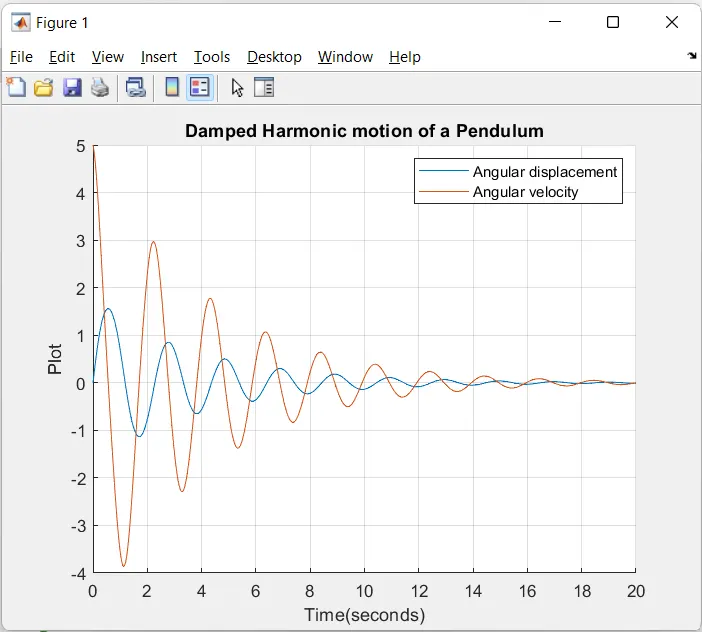
%video
% Error which i have faced while coding
''Undefined function 'ode_func' for input arguments of type ('double')''.
i have saved the program by the ''dtheta_d'' insted of "ode_fun", larer i have gone through the video and come to know the i have save the the code by ''ode_fun, then i got out put. you can see the bleow image.
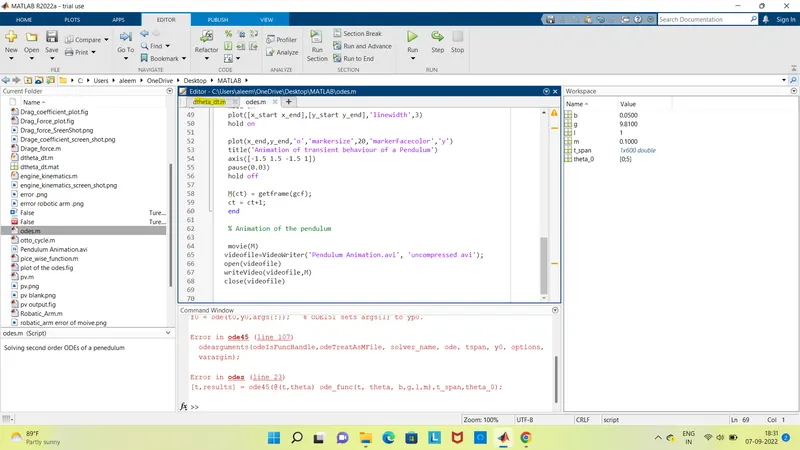
% Error's
I got planty number of errors, i have taken some healp from skill-lync mentoring session they have given some hints and helped to solve the code, then i got to know i have done basic mistakes, like (,) (.) (;) ..... and some where missed the steps of the code.
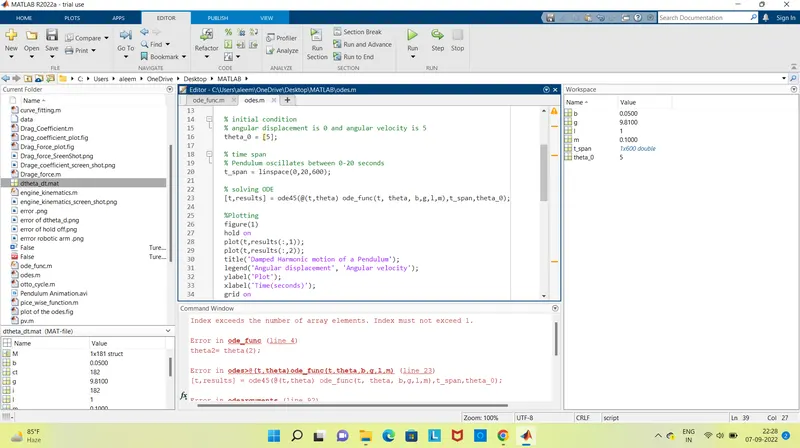
I got planty number of errors, i have taken some healp from skill-lync mentoring session they have given some hints and helped to solve the code, then i got to know i have done basic mistakes, like (,) (.) (;) ..... and some where missed the steps of the code, i have learn how correct the code by ''using search documentation''.