Week 3.2 - 2R Robotic Arm Challenge
Aim:- Write a program in Matlab to simulate the forward kinematics of a 2R Robotic Arm.
INTRODUCTION:-
Robotic arms can be used to automate the process of placing goods or products onto pallets. By automating the process, palletizing becomes more accurate, cost-effective, and predictable. The use of robotic arms also frees human workers from performing tasks that present a risk of bodily injury.
Code Explanation:-
- starting the program by using comments like, clear all, close all and clc.
- Giving the input variables like, Length/values of the robotic arms, l1and l2, theta-1 & theta-2 using linspace command for theta=0 to 90 degrees for 12 values.
- Now Using ‘for’ command for iterating the values of the desired variable and again using ‘for’ command for providing movement to the second robotic arm.
- For the Equection x1,y1,x2,y2 or say Defining the coordinates of both the robotic arms.
- Plotting all the coordinate values and providing the axis no.[-0.1 2 0 2].
- Using the pause command to make the plot look realistic,(0.1).
- Incrementing the compression ratio (cr) value by +1 each time it executes for loop.
- All figures are assigned to a variable M, one at a time usingcr
- Ending the ‘for’ loop twice .
- using movie commandis to combine all the figures saved in the M file to make an animation/movie
- At end saving the movie in .avi format.
% a program for forward kinematic of 2R robotic arm manipulator animation
clear all
close all
clc
% Inputs required for calculation of end position of links
% Length of the links
l1 = 1;
l2 = 0.5;
% Angle of both links with the horizontal axis
theta1 = linspace(0,90,10);
theta2 = linspace(0,90,10);
ct = 1;
for i = 1:length(theta1)
   THETA1 = theta1(i);
   for j = 1 : length(theta2)
    THETA2 = theta2(j);
    x0 = 0;
    y0 = 0;
    x1 = l1*cosd(THETA1);
    y1 = l1*sind(THETA1);
    x2 = x1 + l2*cosd(THETA2);
    y2 = y1 + l2*sind(THETA2);
    plot([x0 x1],[y0 y1],[x1 x2],[y1 y2],'linewidth',1.5)
    axis([-0.1 2 0 2]);
    title('kinematics of 2R Robotic arm')
    xlabel('arm movement in x-axis');
    ylabel('arm movement in y-axis');
    pause(0.1);
    grid on
    file_text = sprintf('robotic_animation%d.png',ct);
    saveas (gca,file_text);
    ct = ct + 1;
   end
end

movie(M)
videofile=VideoWriter('robotic_arm_motion','Uncompressed AVI');
open(videofile)
writevideo(videofile,M)
close(videofile)
% a program for forward kinematic of 2R robotic arm manipulator animation
clear all
close all
clc
% Inputs required for calculation of end position of links
% Length of the links
l1 = 1;
l2 = 0.5;
% Angle of both links with the horizontal axis
theta1 = linspace(0,90,10);
theta2 = linspace(0,90,10);
ct = 1;
for i = 1:length(theta1)
THETA1 = theta1(i);
for j = 1 : length(theta2)
THETA2 = theta2(j);
x0 = 0;
y0 = 0;
x1 = l1*cosd(THETA1);
y1 = l1*sind(THETA1);
x2 = x1 + l2*cosd(THETA2);
y2 = y1 + l2*sind(THETA2);
plot([x0 x1],[y0 y1],[x1 x2],[y1 y2],'linewidth',1.5)
axis([-0.1 2 0 2]);
title('kinematics of 2R Robotic arm')
xlabel('arm movement in x-axis');
ylabel('arm movement in y-axis');
pause(0.1);
grid on
file_text = sprintf('robotic_animation%d.png',ct);
saveas (gca,file_text);
ct = ct + 1;
end
end
movie(M)
videofile=VideoWriter('robotic_arm_motion','Uncompressed AVI');
open(videofile)
writevideo(videofile,M)
close(videofile)
%out put of screen Shot
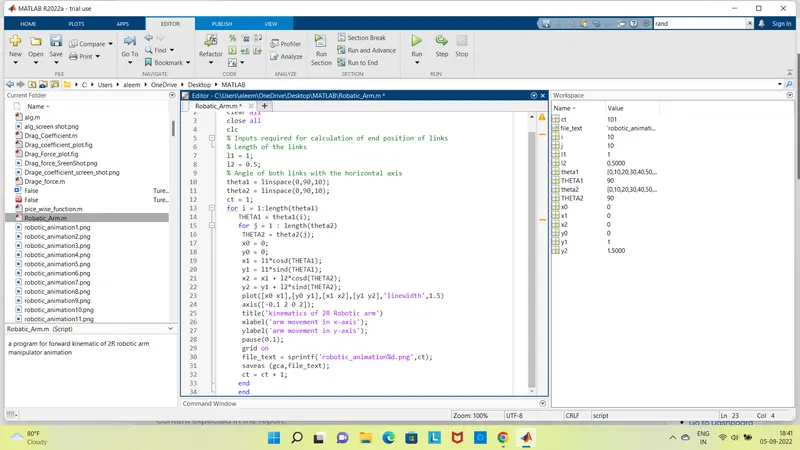
% Error
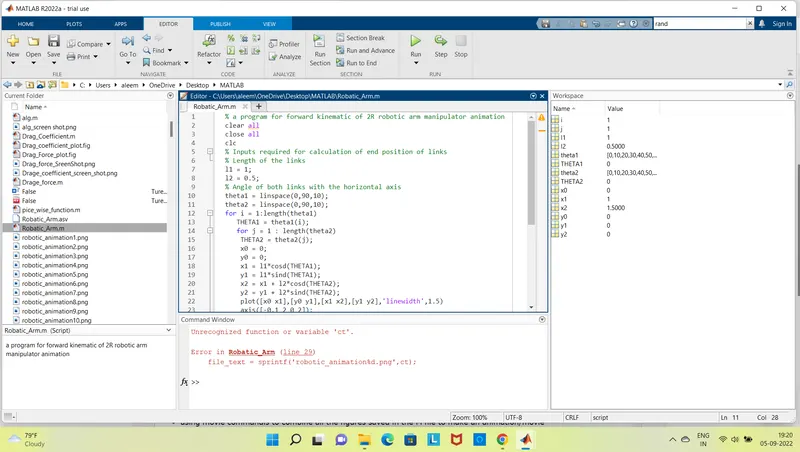
I have found the Error , Later i come to know i have missied the ct=1; line no.12.
% Error of moive save
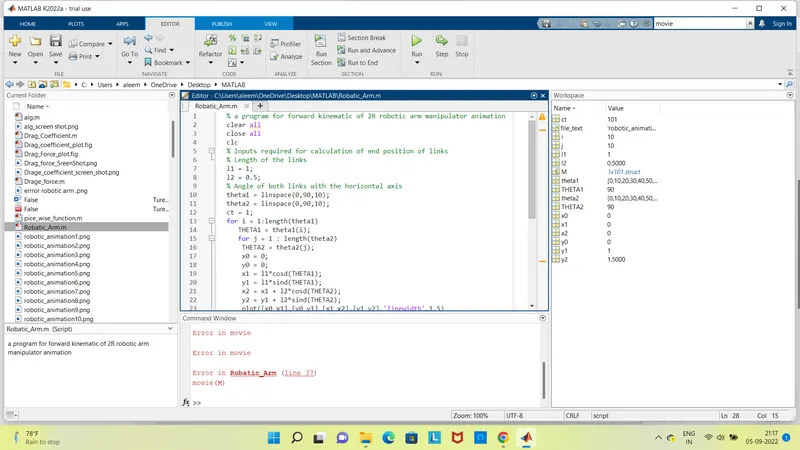
The Above image is the error of out put of the video of the Robotic Arm, I have try to save the video even i have write the code to for te video i couldnt get out put of the video.
pls let me know where i have gone wrong.
Thank you!
Note:- Pls Find the Attacment of the Above Program related Pls look into it.